power steering GMC YUKON DENALI 2015 Owners Manual
[x] Cancel search | Manufacturer: GMC, Model Year: 2015, Model line: YUKON DENALI, Model: GMC YUKON DENALI 2015Pages: 439, PDF Size: 6.22 MB
Page 6 of 439
Black plate (5,1)GMC 2015i Yukon Denali/Yukon XL Denali Owner Manual (GMNA-
Localizing-U.S./Canada/Mexico-8431504) - 2015 - CRC - 7/30/14
Introduction v
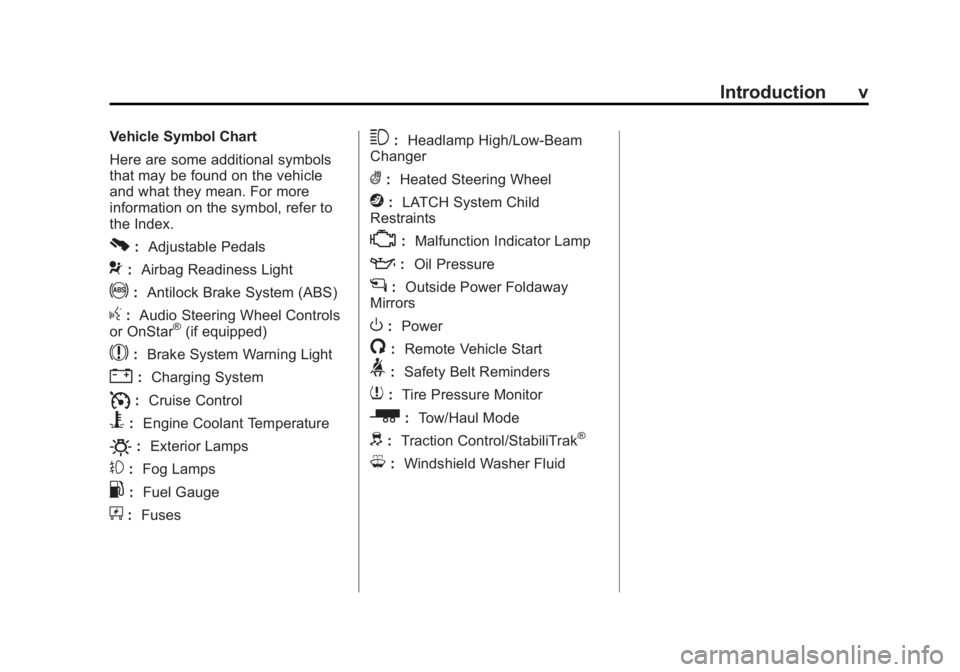
Vehicle Symbol Chart
Here are some additional symbols
that may be found on the vehicle
and what they mean. For more
information on the symbol, refer to
the Index.
0:Adjustable Pedals
9:Airbag Readiness Light
!:Antilock Brake System (ABS)
g:Audio Steering Wheel Controls
or OnStar®(if equipped)
$: Brake System Warning Light
":Charging System
I:Cruise Control
B: Engine Coolant Temperature
O:Exterior Lamps
#:Fog Lamps
.: Fuel Gauge
+:Fuses
3: Headlamp High/Low-Beam
Changer
(: Heated Steering Wheel
j:LATCH System Child
Restraints
*: Malfunction Indicator Lamp
::Oil Pressure
g:Outside Power Foldaway
Mirrors
O: Power
/:Remote Vehicle Start
>:Safety Belt Reminders
7:Tire Pressure Monitor
_: Tow/Haul Mode
d:Traction Control/StabiliTrak®
M:Windshield Washer Fluid
Page 8 of 439
Black plate (1,1)GMC 2015i Yukon Denali/Yukon XL Denali Owner Manual (GMNA-
Localizing-U.S./Canada/Mexico-8431504) - 2015 - CRC - 7/30/14
In Brief 1-1
In Brief
Instrument Panel
Instrument Panel . . . . . . . . . . . . . . 1-2
Initial Drive Information
Initial Drive Information . . . . . . . . 1-4
Remote Keyless Entry (RKE)System . . . . . . . . . . . . . . . . . . . . . . 1-4
Remote Vehicle Start . . . . . . . . . 1-5
Door Locks . . . . . . . . . . . . . . . . . . . 1-5
Liftgate . . . . . . . . . . . . . . . . . . . . . . . . 1-6
Windows . . . . . . . . . . . . . . . . . . . . . . 1-7
Seat Adjustment . . . . . . . . . . . . . . 1-7
Memory Features . . . . . . . . . . . . . 1-8
Second Row Seats . . . . . . . . . . . 1-9
Third Row Seats . . . . . . . . . . . . . . 1-9
Heated and Cooled Front Seats . . . . . . . . . . . . . . . . . . . . . . . . 1-9
Head Restraint Adjustment . . . . 1-9
Safety Belts . . . . . . . . . . . . . . . . . . 1-10
Passenger Sensing System . . . . . . . . . . . . . . . . . . . . . 1-10 Mirror Adjustment . . . . . . . . . . . . 1-10
Steering Wheel
Adjustment . . . . . . . . . . . . . . . . . 1-11
Throttle and Brake Pedal Adjustment . . . . . . . . . . . . . . . . . 1-12
Interior Lighting . . . . . . . . . . . . . . 1-12
Exterior Lighting . . . . . . . . . . . . . 1-13
Windshield Wiper/Washer . . . . 1-14
Climate Controls . . . . . . . . . . . . . 1-15
Transmission . . . . . . . . . . . . . . . . 1-15
Four-Wheel Drive . . . . . . . . . . . . 1-16
Vehicle Features
Infotainment System . . . . . . . . . 1-17
Steering Wheel Controls . . . . . 1-17
Cruise Control . . . . . . . . . . . . . . . 1-17
Driver Information Center (DIC) . . . . . . . . . . . . . . . 1-17
Forward Collision Alert (FCA) System . . . . . . . . . . . . . . . . . . . . . 1-18
Lane Departure Warning (LDW) . . . . . . . . . . . . . 1-18
Lane Change Alert (LCA) . . . . 1-18 Rear Vision
Camera (RVC) . . . . . . . . . . . . . 1-19
Rear Cross Traffic Alert (RCTA) System . . . . . . . . . . . . 1-19
Parking Assist . . . . . . . . . . . . . . . 1-19
Active Emergency Braking
System . . . . . . . . . . . . . . . . . . . . . 1-19
Power Outlets . . . . . . . . . . . . . . . 1-19
Universal Remote System . . . 1-20
Sunroof . . . . . . . . . . . . . . . . . . . . . . 1-20
Performance and Maintenance
Traction Control/Electronic Stability Control . . . . . . . . . . . . 1-21
Tire Pressure Monitor . . . . . . . . 1-22
Engine Oil Life System . . . . . . 1-22
Driving for Better Fuel Economy . . . . . . . . . . . . . . . . . . . 1-23
Roadside Assistance Program . . . . . . . . . . . . . . . . . . . . 1-23
OnStar
®. . . . . . . . . . . . . . . . . . . . . 1-23
Page 10 of 439
Black plate (3,1)GMC 2015i Yukon Denali/Yukon XL Denali Owner Manual (GMNA-
Localizing-U.S./Canada/Mexico-8431504) - 2015 - CRC - 7/30/14
In Brief 1-3
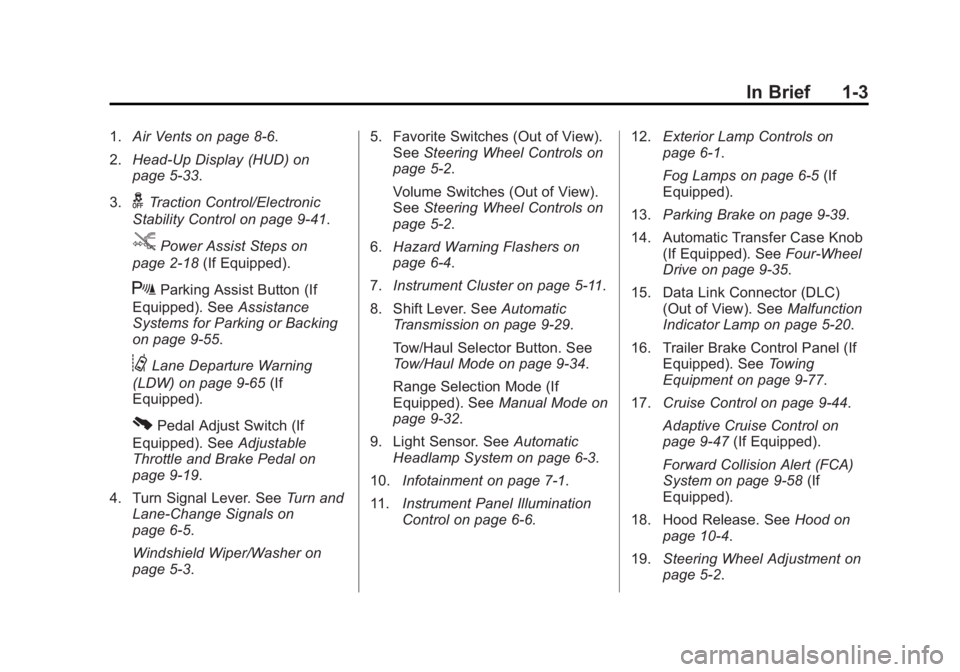
1.Air Vents on page 8-6.
2. Head-Up Display (HUD) on
page 5-33.
3.
gTraction Control/Electronic
Stability Control on page 9-41.
jPower Assist Steps on
page 2-18 (If Equipped).
XParking Assist Button (If
Equipped). See Assistance
Systems for Parking or Backing
on page 9-55.
@Lane Departure Warning
(LDW) on page 9-65 (If
Equipped).
0Pedal Adjust Switch (If
Equipped). See Adjustable
Throttle and Brake Pedal on
page 9-19.
4. Turn Signal Lever. See Turn and
Lane-Change Signals on
page 6-5.
Windshield Wiper/Washer on
page 5-3. 5. Favorite Switches (Out of View).
See Steering Wheel Controls on
page 5-2.
Volume Switches (Out of View).
See Steering Wheel Controls on
page 5-2.
6. Hazard Warning Flashers on
page 6-4.
7. Instrument Cluster on page 5-11.
8. Shift Lever. See Automatic
Transmission on page 9-29.
Tow/Haul Selector Button. See
Tow/Haul Mode on page 9-34.
Range Selection Mode (If
Equipped). See Manual Mode on
page 9-32.
9. Light Sensor. See Automatic
Headlamp System on page 6-3.
10. Infotainment on page 7-1.
11. Instrument Panel Illumination
Control on page 6-6. 12.
Exterior Lamp Controls on
page 6-1.
Fog Lamps on page 6-5 (If
Equipped).
13. Parking Brake on page 9-39.
14. Automatic Transfer Case Knob (If Equipped). See Four-Wheel
Drive on page 9-35.
15. Data Link Connector (DLC) (Out of View). See Malfunction
Indicator Lamp on page 5-20.
16. Trailer Brake Control Panel (If Equipped). See Towing
Equipment on page 9-77.
17. Cruise Control on page 9-44.
Adaptive Cruise Control on
page 9-47 (If Equipped).
Forward Collision Alert (FCA)
System on page 9-58 (If
Equipped).
18. Hood Release. See Hood on
page 10-4.
19. Steering Wheel Adjustment on
page 5-2.
Page 15 of 439
Black plate (8,1)GMC 2015i Yukon Denali/Yukon XL Denali Owner Manual (GMNA-
Localizing-U.S./Canada/Mexico-8431504) - 2015 - CRC - 7/30/14
1-8 In Brief
SeePower Seat Adjustment on
page 3-3.
Lumbar Adjustment
To adjust the lumbar support:
.Press and hold the control
forward to increase or rearward
to decrease upper and lower
lumbar support at the same time.
.Press and hold the control up to
increase upper lumbar support
and decrease lower lumbar
support.
Press and hold the control down
to increase lower lumbar support
and decrease upper lumbar
support.
See Lumbar Adjustment on
page 3-4.Memory Features
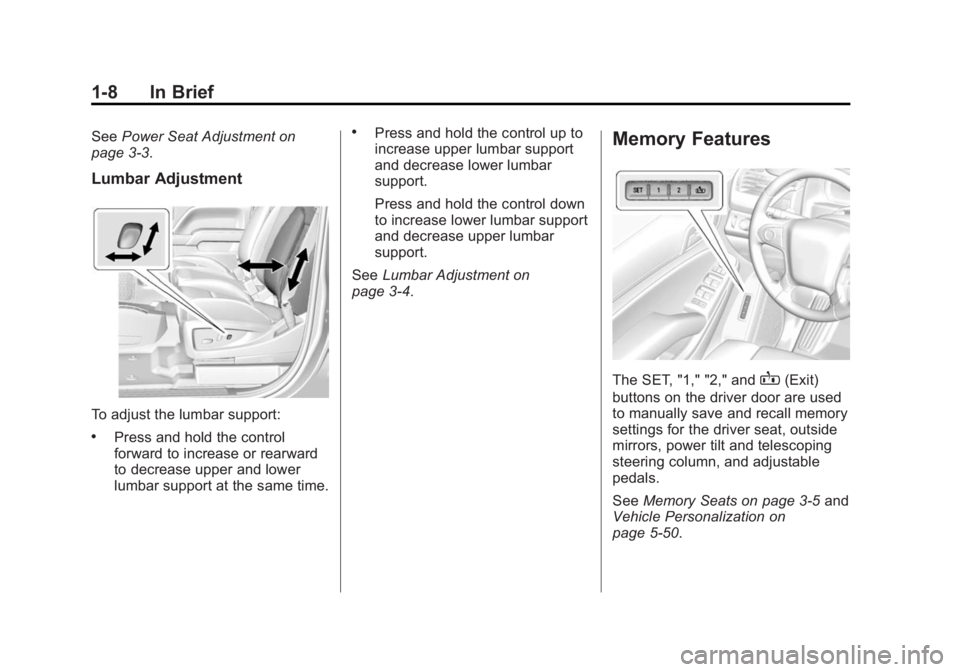
The SET, "1," "2," andB(Exit)
buttons on the driver door are used
to manually save and recall memory
settings for the driver seat, outside
mirrors, power tilt and telescoping
steering column, and adjustable
pedals.
See Memory Seats on page 3-5 and
Vehicle Personalization on
page 5-50.
Page 18 of 439
Black plate (11,1)GMC 2015i Yukon Denali/Yukon XL Denali Owner Manual (GMNA-
Localizing-U.S./Canada/Mexico-8431504) - 2015 - CRC - 7/30/14
In Brief 1-11
2. Press the arrows on the controlpad to move each mirror in the
desired direction.
3. Press either (1) or (2) again to deselect the mirror.
To power fold the mirrors:
1. Press
{to fold the mirrors
inward.
2. Press
{again to return the
mirrors to the driving position.
See Power Mirrors on page 2-22.
Heated Mirrors
Press
1to heat the mirrors.
See “Rear Window Defogger” under
Dual Automatic Climate Control
System on page 8-1.
Interior Mirror
Adjustment
Adjust the mirror to view the area
behind the vehicle.
Automatic Dimming Rearview
Mirror
The mirror automatically reduces
the glare of headlamps from behind.
The dimming feature comes on
when the vehicle is started. See
Automatic Dimming Rearview Mirror
on page 2-24.
Steering Wheel
Adjustment
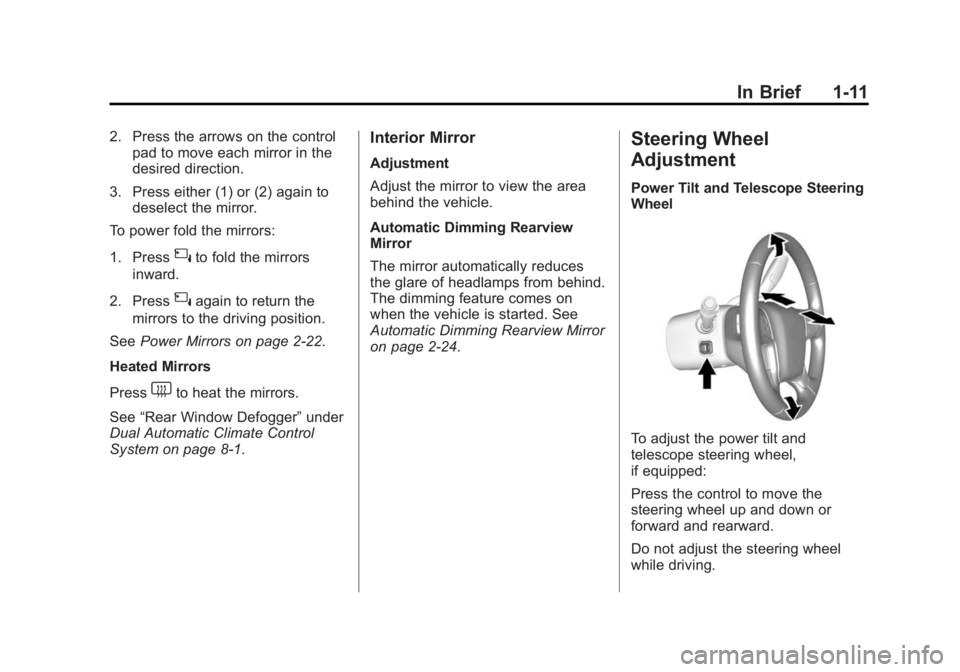
Power Tilt and Telescope Steering
Wheel
To adjust the power tilt and
telescope steering wheel,
if equipped:
Press the control to move the
steering wheel up and down or
forward and rearward.
Do not adjust the steering wheel
while driving.
Page 19 of 439
Black plate (12,1)GMC 2015i Yukon Denali/Yukon XL Denali Owner Manual (GMNA-
Localizing-U.S./Canada/Mexico-8431504) - 2015 - CRC - 7/30/14
1-12 In Brief
Throttle and Brake Pedal
Adjustment
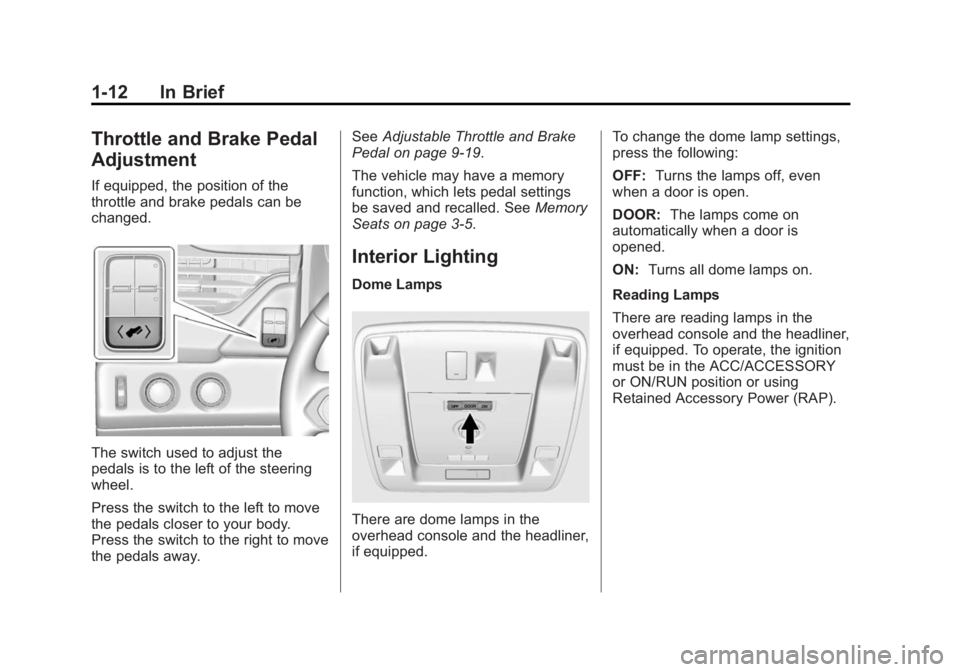
If equipped, the position of the
throttle and brake pedals can be
changed.
The switch used to adjust the
pedals is to the left of the steering
wheel.
Press the switch to the left to move
the pedals closer to your body.
Press the switch to the right to move
the pedals away.See
Adjustable Throttle and Brake
Pedal on page 9-19.
The vehicle may have a memory
function, which lets pedal settings
be saved and recalled. See Memory
Seats on page 3-5.
Interior Lighting
Dome Lamps
There are dome lamps in the
overhead console and the headliner,
if equipped. To change the dome lamp settings,
press the following:
OFF:
Turns the lamps off, even
when a door is open.
DOOR: The lamps come on
automatically when a door is
opened.
ON: Turns all dome lamps on.
Reading Lamps
There are reading lamps in the
overhead console and the headliner,
if equipped. To operate, the ignition
must be in the ACC/ACCESSORY
or ON/RUN position or using
Retained Accessory Power (RAP).
Page 23 of 439
Black plate (16,1)GMC 2015i Yukon Denali/Yukon XL Denali Owner Manual (GMNA-
Localizing-U.S./Canada/Mexico-8431504) - 2015 - CRC - 7/30/14
1-16 In Brief
2. Tap the plus/minus buttons onthe shift lever to select the
desired range of gears for
current driving conditions. See
Manual Mode on page 9-32.
While using Range Selection Mode,
cruise control and the Tow/Haul
Mode can be used.
Grade Braking is not available when
Range Selection Mode is active.
See Tow/Haul Mode on page 9-34.
Four-Wheel Drive
If the vehicle has four-wheel drive,
you can send the engine's driving
power to all four wheels for extra
traction.
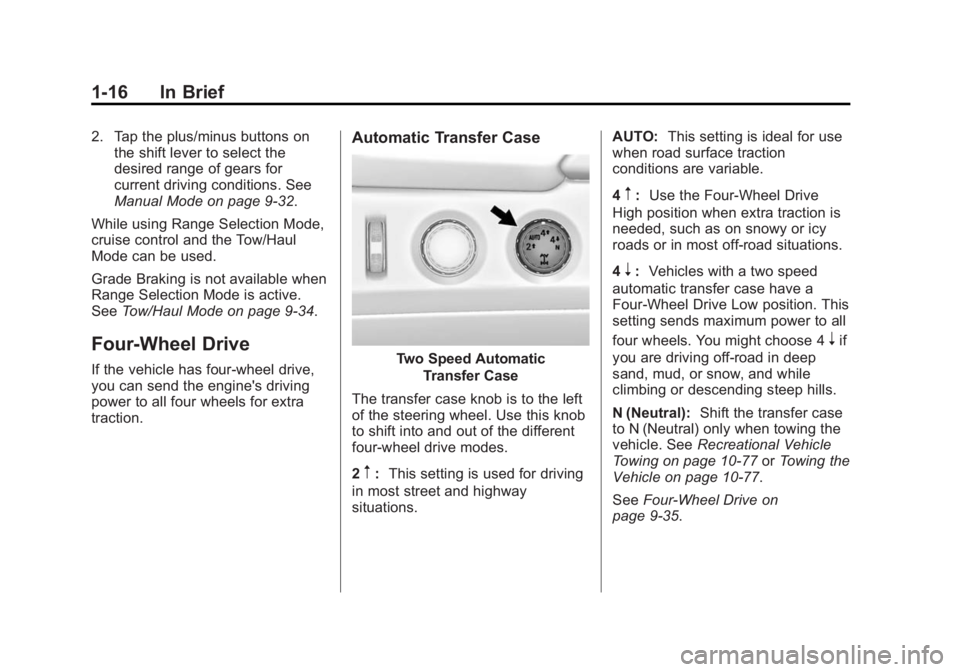
Automatic Transfer Case
Two Speed Automatic
Transfer Case
The transfer case knob is to the left
of the steering wheel. Use this knob
to shift into and out of the different
four-wheel drive modes.
2
m: This setting is used for driving
in most street and highway
situations. AUTO:
This setting is ideal for use
when road surface traction
conditions are variable.
4
m: Use the Four-Wheel Drive
High position when extra traction is
needed, such as on snowy or icy
roads or in most off-road situations.
4
n: Vehicles with a two speed
automatic transfer case have a
Four-Wheel Drive Low position. This
setting sends maximum power to all
four wheels. You might choose 4
nif
you are driving off-road in deep
sand, mud, or snow, and while
climbing or descending steep hills.
N (Neutral): Shift the transfer case
to N (Neutral) only when towing the
vehicle. See Recreational Vehicle
Towing on page 10-77 orTowing the
Vehicle on page 10-77.
See Four-Wheel Drive on
page 9-35.
Page 64 of 439
Black plate (5,1)GMC 2015i Yukon Denali/Yukon XL Denali Owner Manual (GMNA-
Localizing-U.S./Canada/Mexico-8431504) - 2015 - CRC - 7/30/14
Seats and Restraints 3-5
.Tilt the top of the control forward
to raise.
{Warning
Sitting in a reclined position when
the vehicle is in motion can be
dangerous. Even when buckled
up, the safety belts cannot do
their job.
The shoulder belt will not be
against your body. Instead, it will
be in front of you. In a crash, you
could go into it, receiving neck or
other injuries.
The lap belt could go up over
your abdomen. The belt forces
would be there, not at your pelvic
bones. This could cause serious
internal injuries.
For proper protection when the
vehicle is in motion, have the
seatback upright. Then sit well
back in the seat and wear the
safety belt properly.
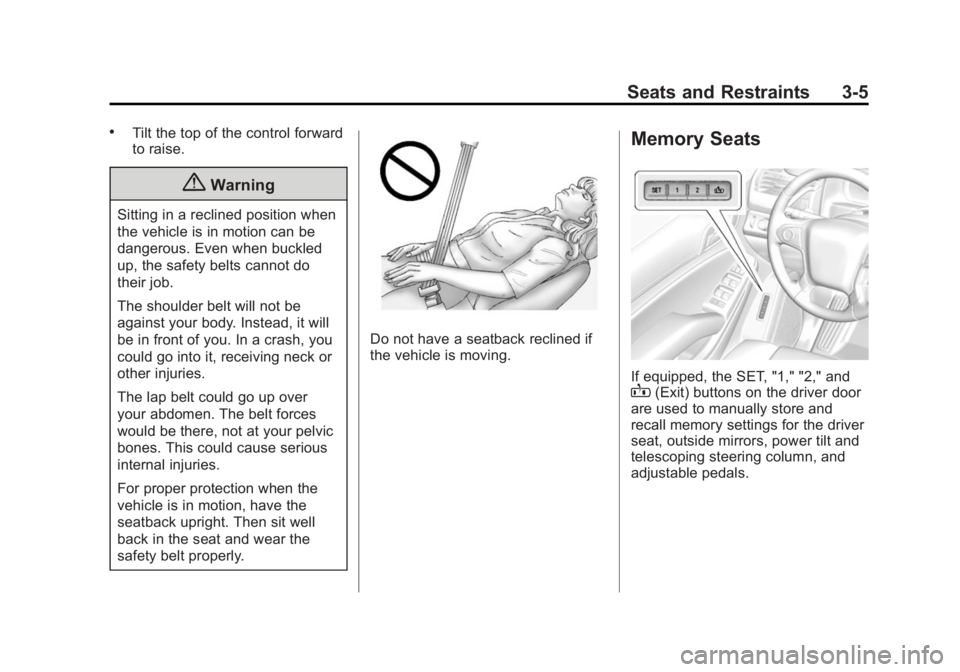
Do not have a seatback reclined if
the vehicle is moving.
Memory Seats
If equipped, the SET, "1," "2," andB(Exit) buttons on the driver door
are used to manually store and
recall memory settings for the driver
seat, outside mirrors, power tilt and
telescoping steering column, and
adjustable pedals.
Page 65 of 439
Black plate (6,1)GMC 2015i Yukon Denali/Yukon XL Denali Owner Manual (GMNA-
Localizing-U.S./Canada/Mexico-8431504) - 2015 - CRC - 7/30/14
3-6 Seats and Restraints
Storing Memory Positions
To store positions to the“1”and “2”
buttons:
1. Adjust the driver seat, outside mirrors, power tilt and
telescoping steering column, and
adjustable pedals (if equipped)
to the desired driving positions.
2. Press and release SET. A beep will sound.
3. Immediately press and hold “1”
until two beeps sound.
4. Repeat Steps 1–3 for a second driver using “2.”
To store positions to the
B(Exit)
button and easy exit features:
1. Adjust the driver seat, outside mirrors, power tilt and
telescoping steering column, and
adjustable pedals (if equipped)
to the desired positions for
getting out of the vehicle.
2. Press and release SET. A beep will sound. 3. Immediately press and hold
B
until two beeps sound.
Manually Recalling Memory
Positions
If the vehicle is off or not in P (Park),
press and hold "1," "2," or
Bto
manually recall the previously
stored memory positions. Releasing
"1,” "2," or
Bbefore the stored
positions are reached stops the
recall.
If the vehicle is on and in P (Park),
press and release “1,” “2,”or
Bto
manually recall the previously
stored memory positions. Placing
the ignition in OFF/LOCK before the
stored positions are reached stops
the recall.
Automatically Recalling Memory
Positions (Auto Memory Recall)
The Auto (Automatic) Memory
Recall feature automatically recalls
the current driver ’s previously stored
“1” or“2” position when entering the
vehicle. If the Auto Memory Recall feature is
enabled in the vehicle
personalization menu, then do one
of the following to recall the
“1”or
“2” position:
.PressKon the RKE transmitter
and open the driver door.
.PressKon the RKE transmitter
when the driver door is
already open.
.Press the lock/unlock button on
the outside driver door handle
and open the driver door. The
RKE transmitter must be present
for the recall to activate.
See Vehicle Personalization on
page 5-50.
To stop recall movement, press one
of the memory, power mirror,
or power seat controls; press the
power tilt and telescoping steering
column control; or press the
adjustable pedal control.
Page 66 of 439
Black plate (7,1)GMC 2015i Yukon Denali/Yukon XL Denali Owner Manual (GMNA-
Localizing-U.S./Canada/Mexico-8431504) - 2015 - CRC - 7/30/14
Seats and Restraints 3-7
RKE transmitters are not labeled
with a number. If your memory seat
position is stored to“1”or“2” but
this position is not automatically
recalling, then change the stored
position or switch RKE transmitters
with the other driver.
Easy Exit Recall
If programmed on in the vehicle
personalization menu, the easy exit
feature automatically moves the
driver seat, power tilt and
telescoping steering column,
adjustable pedals, and outside
mirrors on some vehicles to the
memory positions stored to the
B
(Exit) button. See “Storing Memory
Positions” previously in this section.
See also Vehicle Personalization on
page 5-50.
Easy exit recall automatically
activates when one of the following
occurs:
.The vehicle is turned off and the
driver door is opened within a
short time.
.The vehicle is turned off with the
driver door open.
Obstructions
If something has blocked the driver
seat, power tilt and telescoping
steering column, and/or the
adjustable pedals while recalling a
memory position, the recall may
stop. Remove the obstruction. Then
do one of the following:
.If automatically or manually
recalling the stored memory
position, press and hold the
appropriate manual control for
two seconds. Try recalling again
by pressing the appropriate
memory button.
.If recalling the exit position,
press and hold the appropriate
manual control for the exit
feature not recalling for
two seconds. Then try recalling
the exit position again.
If the memory position is still not
recalling, see your dealer for
service.
Heated and Cooled Front
Seats
{Warning
If you cannot feel temperature
change or pain to the skin, the
seat heater may cause burns. To
reduce the risk of burns, people
with such a condition should use
care when using the seat heater,
especially for long periods of
time. Do not place anything on
the seat that insulates against
heat, such as a blanket, cushion,
cover, or similar item. This may
cause the seat heater to
overheat. An overheated seat
heater may cause a burn or may
damage the seat.