ECO mode GMC YUKON DENALI 2016 Owner's Guide
[x] Cancel search | Manufacturer: GMC, Model Year: 2016, Model line: YUKON DENALI, Model: GMC YUKON DENALI 2016Pages: 396, PDF Size: 5.5 MB
Page 213 of 396
GMC Yukon Denali/Yukon XL Denali Owner Manual (GMNA-Localizing-U.S./
Canada/Mexico-9159308) - 2016 - crc - 6/2/15
212 Driving and Operating
Tow/Haul Mode
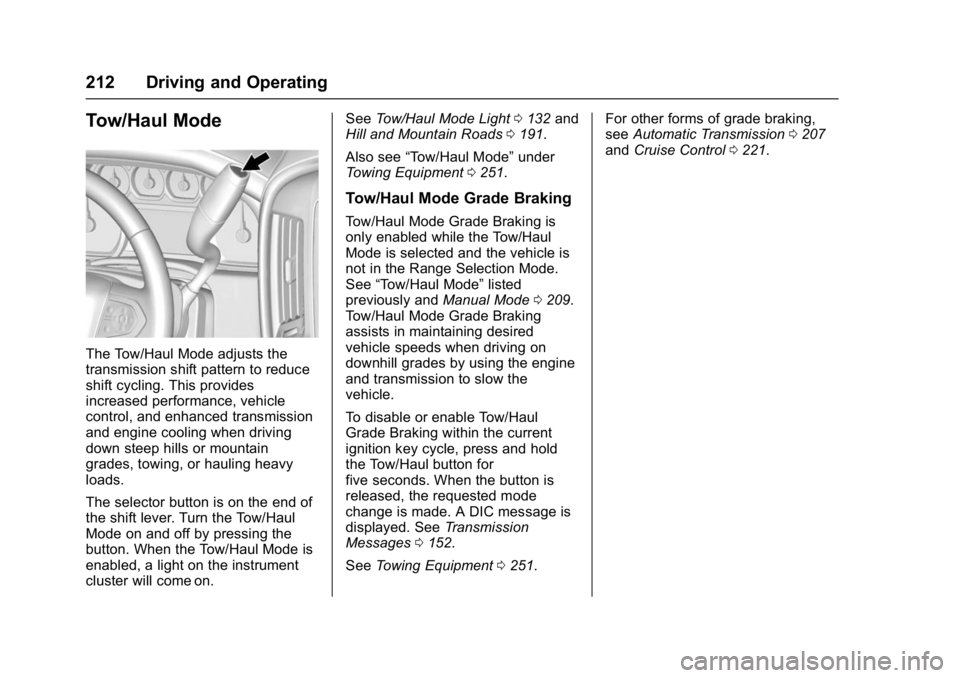
The Tow/Haul Mode adjusts the
transmission shift pattern to reduce
shift cycling. This provides
increased performance, vehicle
control, and enhanced transmission
and engine cooling when driving
down steep hills or mountain
grades, towing, or hauling heavy
loads.
The selector button is on the end of
the shift lever. Turn the Tow/Haul
Mode on and off by pressing the
button. When the Tow/Haul Mode is
enabled, a light on the instrument
cluster will come on.See
Tow/Haul Mode Light 0132 and
Hill and Mountain Roads 0191.
Also see “Tow/Haul Mode” under
Towing Equipment 0251.
Tow/Haul Mode Grade Braking
Tow/Haul Mode Grade Braking is
only enabled while the Tow/Haul
Mode is selected and the vehicle is
not in the Range Selection Mode.
See “Tow/Haul Mode” listed
previously and Manual Mode0209.
Tow/Haul Mode Grade Braking
assists in maintaining desired
vehicle speeds when driving on
downhill grades by using the engine
and transmission to slow the
vehicle.
To disable or enable Tow/Haul
Grade Braking within the current
ignition key cycle, press and hold
the Tow/Haul button for
five seconds. When the button is
released, the requested mode
change is made. A DIC message is
displayed. See Transmission
Messages 0152.
See Towing Equipment 0251. For other forms of grade braking,
see
Automatic Transmission 0207
and Cruise Control 0221.
Page 216 of 396
GMC Yukon Denali/Yukon XL Denali Owner Manual (GMNA-Localizing-U.S./
Canada/Mexico-9159308) - 2016 - crc - 6/2/15
Driving and Operating 215
Caution
Shifting the transmission into gear
before the requested mode
indicator light has stopped
flashing could damage the
transfer case.
If the transmission is in gear and/or
moving more than 5 km/h (3 mph),
the 4
nindicator light will flash for
30 seconds and not complete the
shift. After 30 seconds the transfer
case will shift to 4
m. Turn the knob
to 4
mto display the indicator. With
the vehicle moving less than 5 km/h
(3 mph), and the transmission in
N (Neutral), attempt the shift again.
Shifting Out of 4
n
To shift:
1. The vehicle must be stopped or moving less than 5 km/h
(3 mph) with the transmission
in N (Neutral) and the ignition in
ON/RUN. It is best for the
vehicle to be moving
1.6 to 3.2 km/h (1 to 2 mph). 2. Turn the knob to 4
m, AUTO,
or 2
m. Wait for the 4m, AUTO,
or 2
mindicator light to stop
flashing before shifting the
transmission into gear.
Caution
Shifting the transmission into gear
before the requested mode
indicator light has stopped
flashing could damage the
transfer case.
If the transmission is in gear and/or
moving more than 5 km/h (3 mph),
the 4
m, AUTO, or 2mindicator light
will flash for 30 seconds but will not
complete the shift. With the vehicle
moving less than 5 km/h (3 mph),
and the transmission in N (Neutral),
attempt the shift again.
Shifting Into N (Neutral)
To shift:
1. Park the vehicle on a level surface. 2. Set the parking brake and
press and hold the brake
pedal. See Parking Brake
0 217.
3. Start the vehicle or turn the ignition to ON/RUN.
4. Shift the transmission to N (Neutral).
5. Shift the transfer case to 2
m.
6. Turn the transfer case knob clockwise to N (Neutral) until it
stops and hold it there until the
N (Neutral) light starts blinking.
This will take at least
10 seconds. Then slowly
release the dial to the 4
n
position. The N (Neutral) light
will come on when the transfer
case shift to N (Neutral) is
complete.
7. With the engine running, verify that the transfer case is in
N (Neutral) by shifting the
transmission to R (Reverse),
then shift the transmission to
D (Drive). There should be no
movement of the vehicle while
shifting the transmission.
Page 222 of 396
GMC Yukon Denali/Yukon XL Denali Owner Manual (GMNA-Localizing-U.S./
Canada/Mexico-9159308) - 2016 - crc - 6/2/15
Driving and Operating 221
when traction is low, this feature will
allow the rear wheel with the most
traction to move the vehicle.
Automatic Level Control
The Automatic Level Control (ALC)
rear suspension is available on
light-duty vehicles and comes as a
part of the Magnetic Ride Control
suspension, if equipped. ALC may
also be available as a stand alone
feature.
This type of level control is fully
automatic and will provide a better
leveled riding position as well as
better handling under a variety of
passenger and loading conditions.
An air compressor connected to the
rear shocks will raise or lower the
rear of the vehicle to maintain
proper vehicle height. The system is
activated when the ignition key is
turned to ON/RUN and will
automatically adjust vehicle height
thereafter. The system may exhaust
(lower vehicle height) for up to
10 minutes after the ignition key hasbeen turned off. You may hear the
air compressor operating when the
height is being adjusted.
If a weight-distributing hitch is being
used, it is recommended to allow
the shocks to inflate, thereby
leveling the vehicle prior to adjusting
the hitch.
Cruise Control
{Warning
Cruise control can be dangerous
where you cannot drive safely at
a steady speed. Do not use
cruise control on winding roads or
in heavy traffic.
Cruise control can be dangerous
on slippery roads. On such roads,
fast changes in tire traction can
cause excessive wheel slip, and
you could lose control. Do not use
cruise control on slippery roads.
With cruise control a speed of about
40 km/h (25 mph) or more can be
maintained without keeping your
foot on the accelerator. Cruise
control does not work at speeds
below about 40 km/h (25 mph).
If the brakes are applied, the cruise
control disengages.
For an explanation of how cruise
control interacts with the Range
Selection Mode, Tow/Haul Mode,
Page 224 of 396
GMC Yukon Denali/Yukon XL Denali Owner Manual (GMNA-Localizing-U.S./
Canada/Mexico-9159308) - 2016 - crc - 6/2/15
Driving and Operating 223
Increasing Speed While Using
Cruise Control
If the cruise control system is
already activated:
.Press and hold the +RES button
until the vehicle accelerates to
the desired speed, then
release it.
. To increase vehicle speed in
small increments, briefly press
+RES. For each press, the
vehicle goes about 1.6 km/h
(1 mph) faster.
The speedometer reading can be
displayed in either English or metric
units. See Instrument Cluster 0120.
The increment value used depends
on the units displayed.
Reducing Speed While Using
Cruise Control
If the cruise control system is
already activated:
. Press and hold the SET– button
until the desired lower speed is
reached, then release it. .
To slow down in small
increments, briefly press SET–.
For each press, the vehicle goes
about 1.6 km/h (1 mph) slower.
The speedometer reading can be
displayed in either English or metric
units. See Instrument Cluster 0120.
The increment value used depends
on the units displayed.
Passing Another Vehicle While
Using Cruise Control
Use the accelerator pedal to
increase the vehicle speed. When
you take your foot off the pedal, the
vehicle will slow down to the
previous set cruise speed. While
pressing the accelerator pedal or
shortly following the release to
override cruise control, briefly
pressing the SET– button will result
in cruise control set to the current
vehicle speed.
Using Cruise Control on Hills
How well the cruise control works
on hills depends on the vehicle
speed, the load, and the steepness
of the hills. When going up steep
hills, pressing the accelerator pedal may be necessary to maintain
vehicle speed. When going
downhill, Cruise Grade Braking
helps maintain the driver selected
speed.
Cruise Grade Braking is enabled
when the vehicle is started and
cruise control is active. It is not
enabled in Range Selection Mode.
It assists in maintaining driver
selected speed when driving on
downhill grades by using the engine
and transmission to slow the
vehicle.
To disable and enable Cruise Grade
Braking for the current ignition key
cycle, press and hold the Tow/Haul
button for five seconds. A DIC
message displays. See
Transmission Messages
0152.
For other forms of Grade Braking,
see Automatic Transmission 0207
andTow/Haul Mode 0212.
Ending Cruise Control
There are four ways to end cruise
control:
. Step lightly on the brake pedal.
Page 250 of 396
GMC Yukon Denali/Yukon XL Denali Owner Manual (GMNA-Localizing-U.S./
Canada/Mexico-9159308) - 2016 - crc - 6/2/15
Driving and Operating 249
{Warning
The driver can lose control when
pulling a trailer if the correct
equipment is not used or the
vehicle is not driven properly. For
example, if the trailer is too
heavy, the brakes may not work
well—or even at all. The driver
and passengers could be
seriously injured. The vehicle may
also be damaged; the resulting
repairs would not be covered by
the vehicle warranty. Pull a trailer
only if all the steps in this section
have been followed. Ask your
dealer for advice and information
about towing a trailer with the
vehicle.
Caution
Pulling a trailer improperly can
damage the vehicle and result in
costly repairs not covered by the
vehicle warranty. To pull a trailer
(Continued)
Caution (Continued)
correctly, follow the advice in this
section and see your dealer for
important information about
towing a trailer with the vehicle.
To identify the trailering capacity of
the vehicle, read the information in
“Weight of the Trailer” following.
Trailering is different than just
driving the vehicle by itself.
Trailering means changes in
handling, acceleration, braking,
durability, and fuel economy.
Successful, safe trailering takes
correct equipment, and it has to be
used properly.
The following information has many
time-tested, important trailering tips
and safety rules. Many of these are
important for your safety and that of
your passengers. So please read
this section carefully before pulling a
trailer.
Weight of the Trailer
How heavy can a trailer safely be? It depends on how the rig is used.
Speed, altitude, road grades,
outside temperature, and how much
the vehicle is used to pull a trailer
are all important. It can depend on
any special equipment on the
vehicle, and the amount of tongue
weight the vehicle can carry. See
“Weight of the Trailer Tongue”
later
in this section.
Trailer Weight Rating (TWR) is
calculated assuming the tow vehicle
has only the driver and all required
trailering equipment. Weight of
additional optional equipment,
passengers, and cargo in the tow
vehicle must be subtracted from the
trailer weight rating.
Use the following chart to determine
how much the vehicle can weigh,
based upon the vehicle model and
options.
Page 254 of 396
GMC Yukon Denali/Yukon XL Denali Owner Manual (GMNA-Localizing-U.S./
Canada/Mexico-9159308) - 2016 - crc - 6/2/15
Driving and Operating 253
.White: Ground
. Light Green: Back-up Lamps
. Red/Green: Battery Feed
. Dark Blue: Trailer Brake
If charging a remote (non-vehicle)
battery, press the Tow/Haul mode
button at the end of the shift lever.
This will boost the vehicle system
voltage and properly charge the
battery. If the trailer is too light for
Tow/Haul mode, turn on the
headlamps as a second way to
boost the vehicle system and
charge the battery.
Electric Brake Control Wiring
Provisions
These wiring provisions are
included with the vehicle as part of
the trailer wiring package. These
provisions are for an electric brake
controller.
The harness should be installed by
your dealer or a qualified service
center.
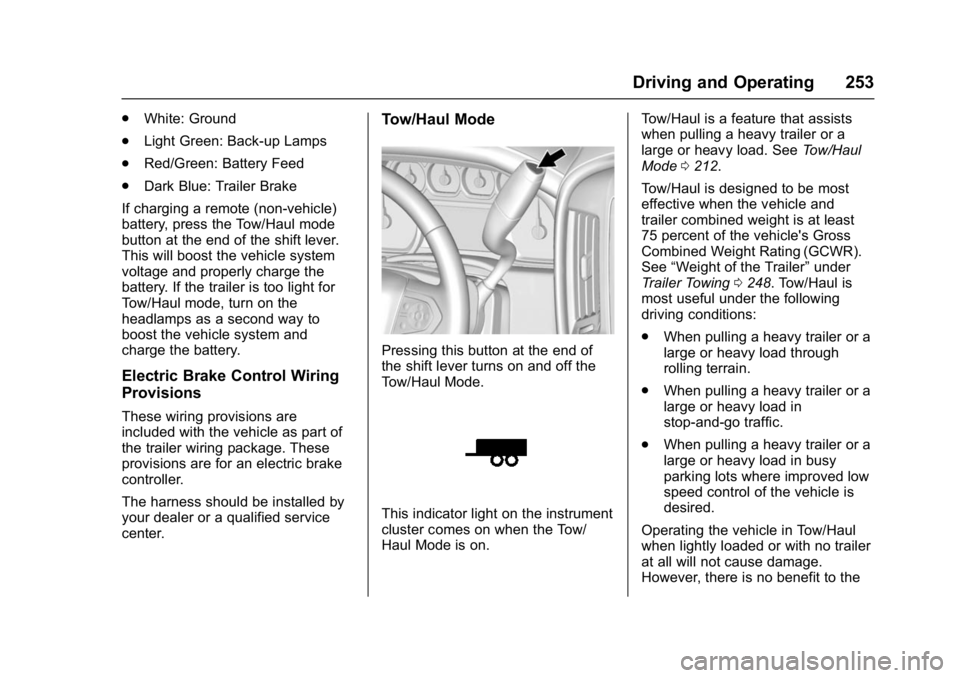
Tow/Haul Mode
Pressing this button at the end of
the shift lever turns on and off the
Tow/Haul Mode.
This indicator light on the instrument
cluster comes on when the Tow/
Haul Mode is on. Tow/Haul is a feature that assists
when pulling a heavy trailer or a
large or heavy load. See
Tow/Haul
Mode 0212.
Tow/Haul is designed to be most
effective when the vehicle and
trailer combined weight is at least
75 percent of the vehicle's Gross
Combined Weight Rating (GCWR).
See “Weight of the Trailer” under
Trailer Towing 0248. Tow/Haul is
most useful under the following
driving conditions:
. When pulling a heavy trailer or a
large or heavy load through
rolling terrain.
. When pulling a heavy trailer or a
large or heavy load in
stop-and-go traffic.
. When pulling a heavy trailer or a
large or heavy load in busy
parking lots where improved low
speed control of the vehicle is
desired.
Operating the vehicle in Tow/Haul
when lightly loaded or with no trailer
at all will not cause damage.
However, there is no benefit to the
Page 309 of 396

GMC Yukon Denali/Yukon XL Denali Owner Manual (GMNA-Localizing-U.S./
Canada/Mexico-9159308) - 2016 - crc - 6/2/15
308 Vehicle Care
.The TPMS sensor matching
process was not done or not
completed successfully after
rotating the tires. The
malfunction light and the DIC
message should go off after
successfully completing the
sensor matching process. See
"TPMS Sensor Matching
Process" later in this section.
. One or more TPMS sensors are
missing or damaged. The
malfunction light and the DIC
message should go off when the
TPMS sensors are installed and
the sensor matching process is
performed successfully. See
your dealer for service.
. Replacement tires or wheels do
not match the original equipment
tires or wheels. Tires and wheels
other than those recommended
could prevent the TPMS from
functioning properly. See Buying
New Tires 0311. .
Operating electronic devices or
being near facilities using radio
wave frequencies similar to the
TPMS could cause the TPMS
sensors to malfunction.
If the TPMS is not functioning
properly, it cannot detect or signal a
low tire condition. See your dealer
for service if the TPMS malfunction
light and DIC message come on
and stay on.
TPMS Sensor Matching
Process
Each TPMS sensor has a unique
identification code. The identification
code needs to be matched to a new
tire/wheel position after rotating the
vehicle’s tires or replacing one or
more of the TPMS sensors. Also,
the TPMS sensor matching process
should be performed after replacing
a spare tire with a road tire
containing the TPMS sensor. The
malfunction light and the DIC
message should go off at the next
ignition cycle. The sensors are
matched to the tire/wheel positions,
using a TPMS relearn tool, in the
following order: driver side front tire, passenger side front tire, passenger
side rear tire, and driver side rear.
See your dealer for service or to
purchase a relearn tool. A TPMS
relearn tool can also be purchased.
See Tire Pressure Monitor Sensor
Activation Tool at
www.gmtoolsandequipment.com or
call 1-800-GM TOOLS
(1-800-468-6657).
There are two minutes to match the
first tire/wheel position, and
five minutes overall to match all four
tire/wheel positions. If it takes
longer, the matching process stops
and must be restarted.
The TPMS sensor matching
process is:
1. Set the parking brake.
2. Place the vehicle power mode in ON/RUN/START. See
Ignition Positions 0199.
3. Make sure the Tire Pressure info page option is turned on.
The info pages on the DIC can
be turned on and off through
the Settings menu. See Driver
Information Center (DIC) 0137.
Page 310 of 396

GMC Yukon Denali/Yukon XL Denali Owner Manual (GMNA-Localizing-U.S./
Canada/Mexico-9159308) - 2016 - crc - 6/2/15
Vehicle Care 309
4. Use the DIC controls on theright side of the steering wheel
to scroll to the Tire Pressure
screen under the DIC
info page.
5. Press and hold the
V(Set/
Reset) button located in the
center of the DIC controls.
The horn sounds twice to
signal the receiver is in relearn
mode and the TIRE
LEARNING ACTIVE message
displays on the DIC screen.
6. Start with the driver side front tire.
7. Place the relearn tool against the tire sidewall, near the valve
stem. Then press the button to
activate the TPMS sensor.
A horn chirp confirms that the
sensor identification code has
been matched to this tire and
wheel position.
8. Proceed to the passenger side front tire, and repeat the
procedure in Step 7. 9. Proceed to the passenger side
rear tire, and repeat the
procedure in Step 7.
10. Proceed to the driver side rear tire, and repeat the procedure
in Step 7. The horn sounds two
times to indicate the sensor
identification code has been
matched to the driver side rear
tire, and the TPMS sensor
matching process is no longer
active. The TIRE LEARNING
ACTIVE message on the DIC
display screen goes off.
11. Turn the ignition switch to LOCK/OFF.
12. Set all four tires to the recommended air pressure
level as indicated on the Tire
and Loading Information label.
Tire Inspection
We recommend that the tires,
including the spare tire, if the
vehicle has one, be inspected
for signs of wear or damage at
least once a month. Replace the tire if:
.The indicators at three or
more places around the tire
can be seen.
.There is cord or fabric
showing through the tire's
rubber.
.The tread or sidewall is
cracked, cut, or snagged
deep enough to show cord or
fabric.
.The tire has a bump, bulge,
or split.
.The tire has a puncture, cut,
or other damage that cannot
be repaired well because of
the size or location of the
damage.
Tire Rotation
Tires should be rotated every
12 000 km (7,500 mi). See
Maintenance Schedule
0344.
Page 370 of 396
GMC Yukon Denali/Yukon XL Denali Owner Manual (GMNA-Localizing-U.S./
Canada/Mexico-9159308) - 2016 - crc - 6/2/15
Customer Information 369
.Vehicle make, model, and
model year.
. Vehicle Identification
Number (VIN).
. Insurance company and policy
number.
. General description of the
damage to the other vehicle.
Choose a reputable repair facility
that uses quality replacement parts.
See “Collision Parts” earlier in this
section.
If the airbag has inflated, see What
Will You See after an Airbag
Inflates? 078.
Managing the Vehicle Damage
Repair Process
In the event that the vehicle requires
damage repairs, GM recommends
that you take an active role in its
repair. If you have a pre-determined
repair facility of choice, take the
vehicle there, or have it towed there.
Specify to the facility that any
required replacement collision parts
be original equipment parts, either
new Genuine GM parts or recycled original GM parts. Remember,
recycled parts will not be covered by
the GM vehicle warranty.
Insurance pays the bill for the repair,
but you must live with the repair.
Depending on your policy limits,
your insurance company may
initially value the repair using
aftermarket parts. Discuss this with
the repair professional, and insist on
Genuine GM parts. Remember,
if the vehicle is leased, you may be
obligated to have the vehicle
repaired with Genuine GM parts,
even if your insurance coverage
does not pay the full cost.
If another party's insurance
company is paying for the repairs,
you are not obligated to accept a
repair valuation based on that
insurance company's collision policy
repair limits, as you have no
contractual limits with that company.
In such cases, you can have control
of the repair and parts choices as
long as the cost stays within
reasonable limits.
Service Publications
Ordering Information
(US and Canada Only)
Service Manuals
Service Manuals have the diagnosis
and repair information on the
engines, transmission, axle,
suspension, brakes, electrical,
steering, body, etc.
Service Bulletins
Service Bulletins give additional
technical service information
needed to knowledgeably service
General Motors cars and trucks.
Each bulletin contains instructions
to assist in the diagnosis and
service of the vehicle.
Owner Information
Owner publications are written
specifically for owners and intended
to provide basic operational
information about the vehicle. The
Owner Manual includes the
Maintenance Schedule for all
models.
Page 391 of 396

GMC Yukon Denali/Yukon XL Denali Owner Manual (GMNA-Localizing-U.S./
Canada/Mexico-9159308) - 2016 - crc - 6/2/15
390 Index
Loss of Control . . . . . . . . . . . . . . . . . 185
Low Fuel Warning Light . . . . . . . . . 135
Low-Profile Tires . . . . . . . . . . . . . . . . 299
Lower Anchors and Tethersfor Children (LATCH
System) . . . . . . . . . . . . . . . . . . . . . . . . 92
Lumbar Adjustment . . . . . . . . . . . . . . 54
Front Seats . . . . . . . . . . . . . . . . . . . . . 54
M
Magnetic Ride Control . . . . . . . . . . 220
MaintenanceRecords . . . . . . . . . . . . . . . . . . . . . . 356
Maintenance and Care Additional . . . . . . . . . . . . . . . . . . . . . 350
Maintenance Schedule . . . . . . . . . 344 Recommended Fluids and
Lubricants . . . . . . . . . . . . . . . . . . . 353
Transfer Case . . . . . . . . . . . . . . . . 213
Malfunction Indicator Lamp . . . . . 129
Manual Mode . . . . . . . . . . . . . . . . . . . 209
Memory Features . . . . . . . . . . . . . . . . 11
Memory Seats . . . . . . . . . . . . . . . . . . . 55
Messages Airbag System . . . . . . . . . . . . . . . . 151
Battery Voltage andCharging . . . . . . . . . . . . . . . . . . . . 143
Brake System . . . . . . . . . . . . . . . . 144
Compass . . . . . . . . . . . . . . . . . . . . . 144 Messages (cont'd)
Door Ajar . . . . . . . . . . . . . . . . . . . . . 145
Engine Cooling System . . . . . . . 146
Engine Oil . . . . . . . . . . . . . . . . . . . . 146
Engine Power . . . . . . . . . . . . . . . . 147
Fuel System . . . . . . . . . . . . . . . . . . 147
Key and Lock . . . . . . . . . . . . . . . . . 147
Lamp . . . . . . . . . . . . . . . . . . . . . . . . . 148
Object Detection System . . . . . 148
Ride Control System . . . . . . . . . . 150
Security . . . . . . . . . . . . . . . . . . . . . . 151
Starting the Vehicle . . . . . . . . . . . 151
Steering System . . . . . . . . . . . . . . 151
Tire . . . . . . . . . . . . . . . . . . . . . . . . . . . 152
Transmission . . . . . . . . . . . . . . . . . 152
Vehicle . . . . . . . . . . . . . . . . . . . . . . . 143
Vehicle Reminder . . . . . . . . . . . . . 154
Washer Fluid . . . . . . . . . . . . . . . . . 155
Mirror Child-View . . . . . . . . . . . . . . . . . . . . . . 47
Mirrors Automatic Dimming . . . . . . . . . . . . . 45
Automatic DimmingRearview . . . . . . . . . . . . . . . . . . . . . . 46
Blind Spot . . . . . . . . . . . . . . . . . . . . . . 45
Convex . . . . . . . . . . . . . . . . . . . . . . . . . 44
Heated . . . . . . . . . . . . . . . . . . . . . . . . . 45
Power . . . . . . . . . . . . . . . . . . . . . . . . . . 44 Mirrors (cont'd)
Tilt in Reverse . . . . . . . . . . . . . . . . . . 46
Mirrors, Interior Rearview . . . . . . . . 46
Monitor System, Tire Pressure . . . . . . . . . . . . . . . . . . . . . . 305
N
NavigationOnStar®. . . . . . . . . . . . . . . . . . . . . . 375
Net, Convenience . . . . . . . . . . . . . . 108
New Vehicle Break-In . . . . . . . . . . . 198
Noise Control System . . . . . . . . . . 280
O
Object Detection System
Messages . . . . . . . . . . . . . . . . . . . . . 148
Odometer . . . . . . . . . . . . . . . . . . . . . . . 122 Trip . . . . . . . . . . . . . . . . . . . . . . . . . . . 122
Off-Road . . . . . . . . . . . . . . . . . . . . . . . 185 Driving . . . . . . . . . . . . . . . . . . . . . . . . 185
Recovery . . . . . . . . . . . . . . . . . . . . . 184
Oil Engine . . . . . . . . . . . . . . . . . . . . . . . . 265
Engine Oil Life System . . . . . . . 267
Engine Oil Pressure Gauge . . . 123
Messages . . . . . . . . . . . . . . . . . . . . 146
Pressure Light . . . . . . . . . . . . . . . . 134
Older Children, Restraints . . . . . . . 86
Online Owner Center . . . . . . . . . . . 363