warning GMC YUKON HYBRID 2010 Owners Manual
[x] Cancel search | Manufacturer: GMC, Model Year: 2010, Model line: YUKON HYBRID, Model: GMC YUKON HYBRID 2010Pages: 120, PDF Size: 1.03 MB
Page 1 of 120
2010 Chevrolet Tahoe and GMC Yukon/Yukon Denali Two-mode Hybrid M
In Brief. . . . . . . . . . . . . . . . . . . . . . . . . . . . . . . . . . . . . . . . . . . . 1-1
Initial Drive Information . . . . . . . . . . . . . . . . . . . . . . . . . . . 1-2
Hybrid Features . . . . . . . . . . . . . . . . . . . . . . . . . . . . . . . . . . 1-3
Performance and Maintenance . . . . . . . . . . . . . . . . . . . 1-6
Seats and Restraint System . . . . . . . . . . . . . . . . . . . . . . 2-1
Front Seats . . . . . . . . . . . . . . . . . . . . . . . . . . . . . . . . . . . . . . . 2-2
Restraint System Check . . . . . . . . . . . . . . . . . . . . . . . . . . 2-3
Features and Controls . . . . . . . . . . . . . . . . . . . . . . . . . . . . 3-1
Storage Areas . . . . . . . . . . . . . . . . . . . . . . . . . . . . . . . . . . . . 3-2
Starting and Operating Your Vehicle . . . . . . . . . . . . . . 3-3
Instrument Panel . . . . . . . . . . . . . . . . . . . . . . . . . . . . . . . . . 4-1
Climate Controls . . . . . . . . . . . . . . . . . . . . . . . . . . . . . . . . . . 4-2
Warning Lights, Gages, and Indicators . . . . . . . . . . . 4-3
Driver Information Center (DIC) . . . . . . . . . . . . . . . . . 4-12
Audio System(s) . . . . . . . . . . . . . . . . . . . . . . . . . . . . . . . . 4-14 Driving Your Vehicle
. . . . . . . . . . . . . . . . . . . . . . . . . . . . . . 5-1
Your Driving, the Road, and the Vehicle . . . . . . . . . . 5-2
Towing . . . . . . . . . . . . . . . . . . . . . . . . . . . . . . . . . . . . . . . . . . . 5-2
Service and Appearance Care . . . . . . . . . . . . . . . . . . . 6-1
Service . . . . . . . . . . . . . . . . . . . . . . . . . . . . . . . . . . . . . . . . . . . 6-2
Checking Things Under the Hood . . . . . . . . . . . . . . . . 6-3
Bulb Replacement . . . . . . . . . . . . . . . . . . . . . . . . . . . . . . 6-24
Electrical System . . . . . . . . . . . . . . . . . . . . . . . . . . . . . . . . 6-25
Tires . . . . . . . . . . . . . . . . . . . . . . . . . . . . . . . . . . . . . . . . . . . . 6-28
Appearance Care . . . . . . . . . . . . . . . . . . . . . . . . . . . . . . . 6-56
Capacities and Specifications . . . . . . . . . . . . . . . . . . . 6-57
Maintenance Schedule . . . . . . . . . . . . . . . . . . . . . . . . . . . 7-1
Maintenance Schedule . . . . . . . . . . . . . . . . . . . . . . . . . . . 7-2
Index . . . . . . . . . . . . . . . . . . . . . . . . . . . . . . . . . . . . i-1
Page 9 of 120
A chime will sound if the driver door is opened while in
Auto Stop as a reminder that the ignition switch is not in
the LOCK/OFF position. Always turn the ignition switch
to LOCK/OFF and remove the key from the ignition
switch when exiting the vehicle.
Auto Start
The vehicle also has an Auto Start feature. The engine
will remain off while in Auto Stop mode until vehicle
conditions require the engine to run. The near-instant
starting of the engine from Auto Stop mode is called
Auto Start.
EV Mode
The vehicle also has an EV mode which uses only
the electric motor to move the vehicle. With light
acceleration, the vehicle will drive in EV mode.
EV mode is unavailable when the vehicle is out of fuel.
See Starting the Vehicle in the Two‐Mode Hybrid
supplement to the owner manual.
Regenerative Braking
Regenerative braking enables the electric drive motor
to operate as a generator when coasting or braking.
Energy from the moving vehicle recharges the hybrid
battery.
The hydraulic disc brakes work with the regenerative
braking to insure effective braking.
The braking system is computer controlled and blends
the regenerative braking with the conventional hydraulic
disc brakes to meet any requirements for deceleration.
Because the controller applies the hydraulic brakes
through its high pressure accumulator, you may
occasionally hear the motor driven pump when it
recharges the system. This is normal. In the event of a
controller problem, the brake pedal may be harder to
push and the stopping distance may be longer.
See Regenerative Braking, Warning Lights, Gages, and
Indicators and Driver Information Center (DIC) in the
owner manual.
1-5
Page 13 of 120
Manual Reclining Seatbacks
(Tahoe and Yukon Two-Mode Hybrid)
To recline the seatback:1. Lift the reclining seatback lever (C).
2. Move the seatback to the desired position, then release the lever to lock the seatback in place.
3. Push and pull on the seatback to make sure it is locked.
To return the seatback to an upright position: 1. Lift the lever fully without applying pressure to the seatback and the seatback will return to the upright
position.
2. Release the lever to lock the seatback in place.
3. Push and pull on the seatback to make sure it is locked.
Restraint System Check
Replacing Restraint System Parts
After a Crash
If an airbag inflates or the vehicle has been in a
crash, the vehicle's sensing system may command
the automatic hybrid battery disconnect to open.
The battery will disconnect. The hybrid battery will be
off and the vehicle will not start. The airbag readiness
light and/or SERVICE HYBRID SYSTEM warning
message may come on in the driver information center.
See “Airbag Readiness Light” in the owner manual and
Driver Information Center (DIC)
on page 4‑12for more
information.
To operate the vehicle, the automatic hybrid battery
disconnect must be reconnected by a qualified service
technician and sensing system parts will need to be
replaced. Have the vehicle serviced right away.
2-3
Page 17 of 120
Starting and Operating Your
Vehicle
Starting the Vehicle
{WARNING:
Exiting the vehicle, without first shifting into
P (Park), may cause the vehicle to move, and you
or others can be seriously injured. Because the
vehicle has the Automatic Engine Start/Stop
feature, the vehicle’s engine might seem to be
shut off when you come to a complete stop.(Continued)
WARNING: (Continued)
However, once the brake pedal is released,
the vehicle can move. The vehicle’s engine can
also restart at any time.
Shift to P (Park) and turn the ignition to
LOCK/OFF, before exiting the vehicle.
Start the engine as you would any other engine.
See “Starting the Engine” in the owner manual for
more information on starting. If pulling a trailer with
trailer brakes, see Towing a Trailer
on page 5‑8for more information.
3-3
Page 20 of 120
Automatic Transmission Operation
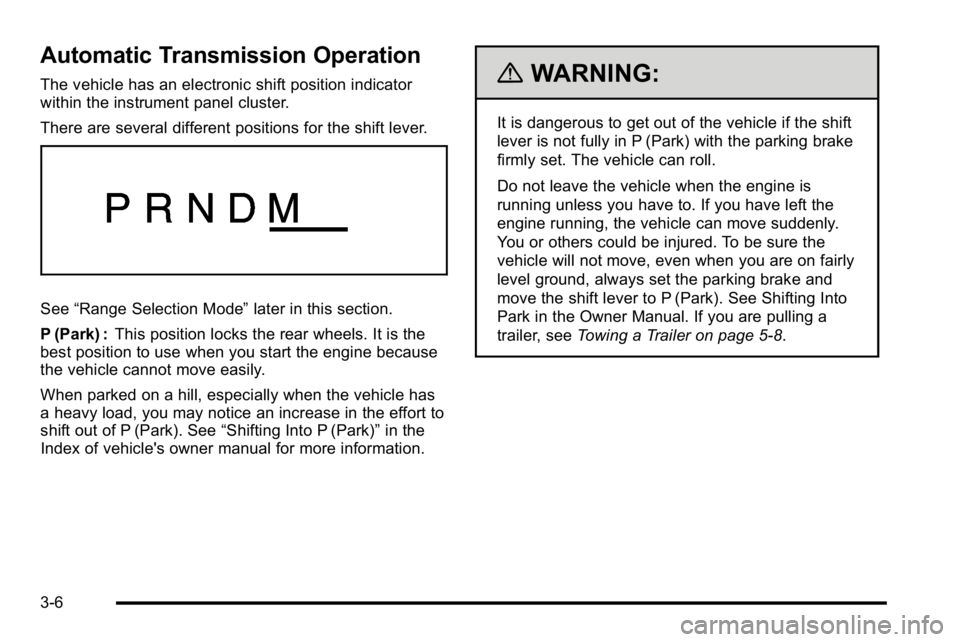
The vehicle has an electronic shift position indicator
within the instrument panel cluster.
There are several different positions for the shift lever.
See“Range Selection Mode” later in this section.
P (Park) : This position locks the rear wheels. It is the
best position to use when you start the engine because
the vehicle cannot move easily.
When parked on a hill, especially when the vehicle has
a heavy load, you may notice an increase in the effort to
shift out of P (Park). See “Shifting Into P (Park)”in the
Index of vehicle's owner manual for more information.
{WARNING:
It is dangerous to get out of the vehicle if the shift
lever is not fully in P (Park) with the parking brake
firmly set. The vehicle can roll.
Do not leave the vehicle when the engine is
running unless you have to. If you have left the
engine running, the vehicle can move suddenly.
You or others could be injured. To be sure the
vehicle will not move, even when you are on fairly
level ground, always set the parking brake and
move the shift lever to P (Park). See Shifting Into
Park in the Owner Manual. If you are pulling a
trailer, see Towing a Trailer on page 5‑8.
3-6
Page 21 of 120
{WARNING:
If you have Four-Wheel Drive, the vehicle will
be free to roll—even if the shift lever is in
P (Park) —if the transfer case is in Neutral.
So, be sure the transfer case is in a drive gear,
Two-Wheel Drive High or Four-Wheel Drive High
or Four-Wheel Drive Low —not in Neutral.
See “Shifting Into Park” in the Owner Manual.
R (Reverse) : Use this gear to back up.
Notice: Shifting to R (Reverse) while the vehicle is
moving forward could damage the transmission.
The repairs would not be covered by the vehicle
warranty. Shift to R (Reverse) only after the vehicle
is stopped.
To rock the vehicle back and forth to get out of snow,
ice, or sand without damaging the transmission, see
“If Your Vehicle is Stuck in Sand, Mud, Ice, or Snow” in
the Index of the vehicle's owner manual. N (Neutral) :
In this position, the engine and
transmission are not connected with the wheels.
To restart the engine when the vehicle is already
moving, use N (Neutral) only.
{WARNING:
Shifting into a drive gear while the engine is
running at high speed is dangerous. Unless your
foot is firmly on the brake pedal, the vehicle could
move very rapidly. You could lose control and hit
people or objects. Do not shift into a drive gear
while the engine is running at high speed.
Notice: Shifting out of P (Park) or N (Neutral) with
the engine running at high speed may damage the
transmission. The repairs would not be covered by
the vehicle warranty. Be sure the engine is not
running at high speed when shifting the vehicle.
3-7
Page 25 of 120
2m(Two-Wheel Drive High):This setting is used for
driving in most street and highway situations. The front
axle is not engaged in two-wheel drive. This setting also
provides the best fuel economy.
AUTO (Automatic Four-Wheel Drive) : This setting is
ideal for use when road surface traction conditions are
variable. When driving your vehicle in AUTO, the front
axle is engaged, but the vehicle's power is primarily
sent to the rear wheels. When the vehicle's software
determines a need for more traction, the system will
transfer more power to the front wheels. Driving in this
mode results in slightly lower fuel economy than
Two-Wheel Drive High.
4
m(Four-Wheel Drive High): Use the four-wheel high
position when you need extra traction, such as on
snowy or icy roads or in most off-road situations.
This setting also engages the front axle to help drive
the vehicle. This is the best setting to use when
plowing snow.
4
n(Four-Wheel Drive Low) : This setting also
engages the front axle and delivers extra torque.
You may never need this setting. It sends maximum
power to all four wheels. You might choose Four-Wheel
Drive Low if you are driving off-road in deep sand, deep
mud, deep snow, and while climbing or descending
steep hills. The vehicle has StabiliTrak
®. Shifting into
Four-Wheel-Drive Low will turn Traction Control and
StabiliTrak
®off. See StabiliTrak®System in the index
of the Owner Manual for more information.
{WARNING:
Shifting the transfer case to N (Neutral) can cause
the vehicle to roll even if the transmission is in
P (Park). You or someone else could be seriously
injured. Be sure to set the parking brake before
placing the transfer case in N (Neutral). See
Parking Brake in the index of the Owner Manual
for more information.
N (Neutral) : Shift the vehicle's transfer case to
N (Neutral) only when towing the vehicle. See
Recreational Vehicle Towing or Towing Your Vehicle in
the index of the Owner Manual.
If the SERVICE 4 WHEEL DRIVE message stays on,
you should take the vehicle to your dealer/retailer for
service. See DIC Warnings and Messages
on
page 4‑12for more information.
3-11
Page 29 of 120
Shifting Into Park
{WARNING:
It can be dangerous to get out of the vehicle if the
shift lever is not fully in P (Park) with the parking
brake firmly set. The vehicle can roll. If you have
left the engine running, the vehicle can move
suddenly. You or others could be injured. To be
sure the vehicle will not move, even when you are
on fairly level ground, use the steps that follow.
With four-wheel drive, if the transfer case is in
N (Neutral), the vehicle will be free to roll, even if
the shift lever is in P (Park). So, be sure the
transfer case is in a drive gear—not in
N (Neutral). If you are pulling a trailer, see Towing
a Trailer on page 5‑8. 1. Hold the brake pedal down, then set the parking
brake.
See Parking Brake in the index of the Owner
Manual for more information.
2. Move the shift lever into the P (Park) position by pulling the shift lever toward you and moving it up
as far as it will go.
3. Be sure the transfer case is in a drive gear —not
in N (Neutral).
4. Turn the ignition key to LOCK/OFF.
5. Remove the key and take it with you. If you can leave the vehicle with the ignition key in your hand,
the vehicle is in P (Park).
3-15
Page 30 of 120
Leaving the Vehicle With the Engine
Running
{WARNING:
It can be dangerous to leave the vehicle with the
engine running. The vehicle could move suddenly
if the shift lever is not fully in P (Park) with the
parking brake firmly set.
If you have four-wheel drive and the transfer case
is in N (Neutral), the vehicle will be free to roll,
even if the shift lever is in P (Park). So be sure
the transfer case is in a drive gear—not in
N (Neutral).
And, if you leave the vehicle with the engine
running, it could overheat and even catch fire.
You or others could be injured. Do not leave the
vehicle with the engine running unless you
have to. If you have to leave the vehicle with the engine running,
be sure your vehicle is in P (Park) and the parking
brake is firmly set before you leave it. After you move
the shift lever into P (Park), hold the regular brake pedal
down. Then, see if you can move the shift lever away
from P (Park) without first pulling it toward you. If you
can, it means that the shift lever was not fully locked
into P (Park).
Torque Lock
If parking on a hill and the transmission not shifted into
P (Park) properly, the weight of the vehicle may put too
much force on the parking pawl in the transmission. You
may find it difficult to pull the shift lever out of P (Park).
This is called torque lock. To prevent torque lock, set
the parking brake and then shift into P (Park) properly
before you leave the driver seat. To find out how, see
Shifting Into Park on page 3‑15.
When you are ready to drive, move the shift lever out
of P (Park) before you release the parking brake.
If torque lock does occur, you may need to have
another vehicle push yours a little uphill to take some of
the pressure from the parking pawl in the transmission,
then you will be able to pull the shift lever out of
P (Park).
3-16
Page 31 of 120
Engine Coolant Heater
The engine coolant heater can provide easier starting
and better fuel economy during engine warm-up in cold
weather conditions at or below−18°C (0°F). Vehicles
with an engine heater should be plugged in at least
four hours before starting. An internal thermostat in
the plug-end of the cord may exist which will prevent
engine coolant heater operation at temperatures
above −18°C (0°F).
To Use the Engine Coolant Heater
1. Turn off the engine.
2. Open the hood and unwrap the electrical cord.
The cord is secured to a wiring harness between
the engine and the Hybrid Auxiliary Underhood
Fuse Block with a clip. Carefully remove the wire
tie which secures the electrical cord. Do not cut the
electrical cord.
3. Plug the cord into a normal, grounded 110-volt AC outlet.
{WARNING:
Plugging the cord into an ungrounded outlet could
cause an electrical shock. Also, the wrong kind of
extension cord could overheat and cause a fire.
You could be seriously injured. Plug the cord into
a properly grounded three-prong 110-volt AC
outlet. If the cord will not reach, use a heavy-duty
three-prong extension cord rated for at least
15 amps.
4. Before starting the engine, be sure to unplug and store the cord as it was before to keep it away from
moving engine parts. If you do not, it could be
damaged.
The length of time the heater should remain plugged in
depends on several factors. Ask a dealer/retailer in the
area where you will be parking the vehicle for the best
advice on this.
3-17