brake GMC YUKON XL 2006 User Guide
[x] Cancel search | Manufacturer: GMC, Model Year: 2006, Model line: YUKON XL, Model: GMC YUKON XL 2006Pages: 540, PDF Size: 3 MB
Page 129 of 540
Leaving Your Vehicle With the Engine
Running
{CAUTION:
It can be dangerous to leave your vehicle
with the engine running. Your vehicle could
move suddenly if the shift lever is not fully in
PARK (P) with the parking brake rmly set.
If you have four-wheel drive and your transfer
case is in NEUTRAL, your vehicle will be free
to roll, even if your shift lever is in PARK (P).
So be sure the transfer case is in a drive
gear — not in NEUTRAL.
And, if you leave the vehicle with the engine
running, it could overheat and even catch re.
You or others could be injured. Do not leave
your vehicle with the engine running unless
you have to.If you have to leave your vehicle with the engine running,
be sure your vehicle is in PARK (P) and the parking
brake is rmly set before you leave it. After you move
the shift lever into PARK (P), hold the regular brake pedal
down. Then, see if you can move the shift lever away
from PARK (P) without rst pulling it toward you. If you
can, it means that the shift lever was not fully locked
into PARK (P).
Torque Lock
If you are parking on a hill and you do not shift your
transmission into PARK (P) properly, the weight of
the vehicle may put too much force on the parking
pawl in the transmission. You may nd it difficult to
pull the shift lever out of PARK (P). This is called
“torque lock.” To prevent torque lock, set the parking
brake and then shift into PARK (P) properly before you
leave the driver’s seat. To nd out how, seeShifting
Into Park (P) on page 2-32.
When you are ready to drive, move the shift lever out
of PARK (P) before you release the parking brake.
If torque lock does occur, you may need to have
another vehicle push yours a little uphill to take some of
the pressure from the parking pawl in the transmission,
so you can pull the shift lever out of PARK (P).
2-33
Page 130 of 540
Shifting Out of Park (P)
Automatic Transmission
Your vehicle has an automatic transmission shift lock
control system which locks the shift lever in PARK (P)
when the ignition is in the LOCK position. You have
to fully apply your regular brakes before you can shift
from PARK (P) when the ignition is in RUN. See
Automatic Transmission Operation on page 2-23.
If you cannot shift out of PARK (P), ease pressure on
the shift lever and push the shift lever all the way up
into PARK (P) as you maintain brake application.
Then, move the shift lever into the gear you want.
If you ever hold the brake pedal down but still can’t
shift out of PARK (P), try this:
1. Turn the key to ACCESSORY. There is no shift
interlock in this key position.
2. Apply and hold the brake until the end of Step 4.
3. Shift the transmission to NEUTRAL (N).
4. Start the vehicle and then shift to the gear
you want.
5. Have the system xed as soon as you can.
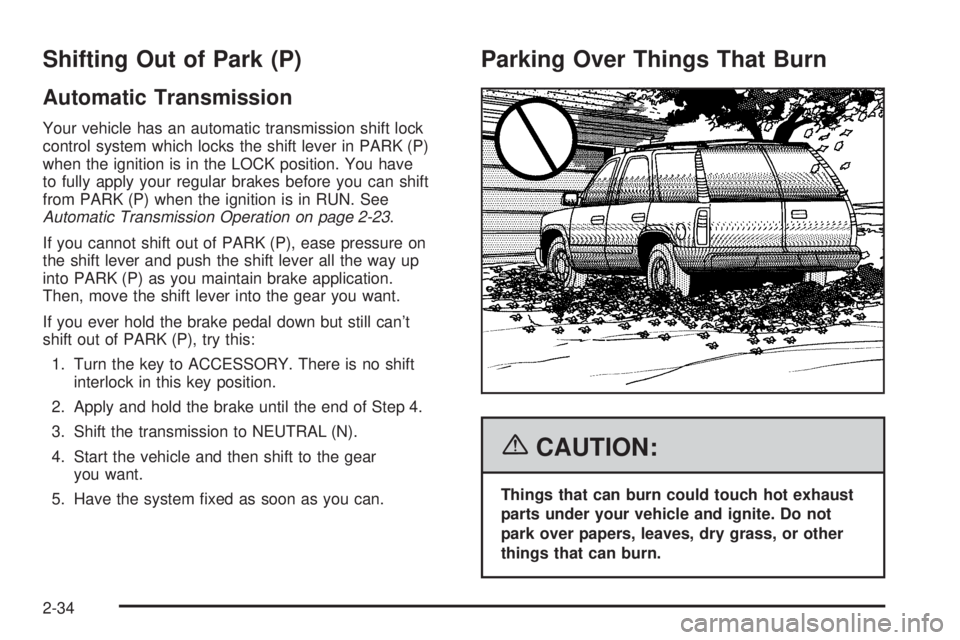
Parking Over Things That Burn
{CAUTION:
Things that can burn could touch hot exhaust
parts under your vehicle and ignite. Do not
park over papers, leaves, dry grass, or other
things that can burn.
2-34
Page 132 of 540
Running the Engine While Parked
It is better not to park with the engine running.
But if you ever have to, here are some things to know.
{CAUTION:
Idling the engine with the climate control
system off could allow dangerous exhaust
into your vehicle. See the earlier caution
underEngine Exhaust on page 2-35.
Also, idling in a closed-in place can let deadly
carbon monoxide (CO) into your vehicle
even if the climate control fan is at the
highest setting. One place this can happen
is a garage. Exhaust — with CO — can come
in easily. NEVER park in a garage with the
engine running.
Another closed-in place can be a blizzard.
SeeWinter Driving on page 4-40.
{CAUTION:
It can be dangerous to get out of your vehicle
if the shift lever is not fully in PARK (P) with
the parking brake rmly set. Your vehicle can
roll. Do not leave your vehicle when the engine
is running unless you have to. If you have
left the engine running, the vehicle can move
suddenly. You or others could be injured.
To be sure your vehicle will not move, even
when you are on fairly level ground, always
set your parking brake and move the shift
lever to PARK (P).
2-36
Page 133 of 540
{CAUTION:
Four-wheel drive vehicles with the transfer
case in NEUTRAL will allow the vehicle to roll,
even if your shift lever is in PARK (P). So, be
sure the transfer case is in a drive gear — not
in NEUTRAL. Always set your parking brake.
Follow the proper steps to be sure your vehicle will
not move. SeeShifting Into Park (P) on page 2-32.
If you are pulling a trailer, seeTowing a Trailer
on page 4-60.
Mirrors
Manual Rearview Mirror
Pull the tab under the mirror toward you to reduce glare
from headlamps behind you after dark. Push the tab
away from you for normal daytime operation.
Automatic Dimming Rearview Mirror
with OnStar
®and Compass
Your vehicle may have an automatic-dimming rearview
mirror with a compass and the OnStar®system.
There are three additional buttons for the OnStar
®
system. See your dealer for more information on
the system and how to subscribe to OnStar®.
SeeOnStar®System on page 2-50for more
information about the services OnStar®provides.
2-37
Page 158 of 540
Vehicle Personalization
In addition to the following features, your vehicle may
also have features that can be programmed through
the Driver Information Center (DIC). SeeDIC Vehicle
Customization on page 3-67for more information.
Memory Seat
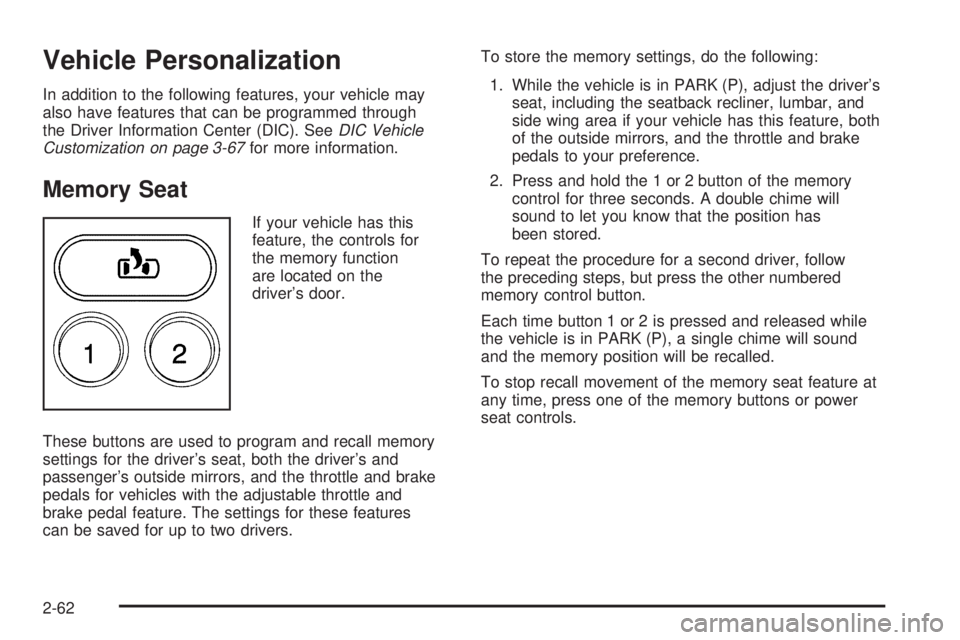
If your vehicle has this
feature, the controls for
the memory function
are located on the
driver’s door.
These buttons are used to program and recall memory
settings for the driver’s seat, both the driver’s and
passenger’s outside mirrors, and the throttle and brake
pedals for vehicles with the adjustable throttle and
brake pedal feature. The settings for these features
can be saved for up to two drivers.To store the memory settings, do the following:
1. While the vehicle is in PARK (P), adjust the driver’s
seat, including the seatback recliner, lumbar, and
side wing area if your vehicle has this feature, both
of the outside mirrors, and the throttle and brake
pedals to your preference.
2. Press and hold the 1 or 2 button of the memory
control for three seconds. A double chime will
sound to let you know that the position has
been stored.
To repeat the procedure for a second driver, follow
the preceding steps, but press the other numbered
memory control button.
Each time button 1 or 2 is pressed and released while
the vehicle is in PARK (P), a single chime will sound
and the memory position will be recalled.
To stop recall movement of the memory seat feature at
any time, press one of the memory buttons or power
seat controls.
2-62
Page 162 of 540
Passenger Airbag Status Indicator...................3-38
Battery Warning Light....................................3-40
Voltmeter Gage............................................3-41
Brake System Warning Light..........................3-42
Anti-Lock Brake System Warning Light.............3-43
Engine Coolant Temperature Gage..................3-43
Transmission Temperature Gage.....................3-44
Tire Pressure Light.......................................3-45
Malfunction Indicator Lamp.............................3-46
Oil Pressure Gage........................................3-48
Security Light...............................................3-49
Cruise Control Light......................................3-49
Highbeam On Light.......................................3-50
Four-Wheel-Drive Light..................................3-50
Tow/Haul Mode Light....................................3-50
Fuel Gage...................................................3-51
Low Fuel Warning Light.................................3-51
Driver Information Center (DIC).......................3-52
DIC Operation and Displays...........................3-53
DIC Warnings and Messages.........................3-56
DIC Vehicle Customization.............................3-67Audio System(s).............................................3-74
Setting the Time for Radios without
Radio Data Systems (RDS)........................3-75
Setting the Time for Radios with Radio
Data Systems (RDS)..................................3-75
AM-FM Radio...............................................3-76
Radio with CD..............................................3-79
Radio with Cassette and CD..........................3-90
Radio with Six-Disc CD................................3-104
Navigation/Radio System..............................3-118
Rear Seat Entertainment System...................3-118
Rear Seat Audio (RSA)................................3-130
Theft-Deterrent Feature................................3-132
Audio Steering Wheel Controls......................3-132
Radio Reception.........................................3-133
Care of the Cassette Tape Player.................3-134
Care of Your CDs and DVDs........................3-135
Care of the CD and DVD Player...................3-135
Fixed Mast Antenna....................................3-136
XM™ Satellite Radio Antenna System............3-136
Chime Level Adjustment...............................3-136
Section 3 Instrument Panel
3-2
Page 165 of 540
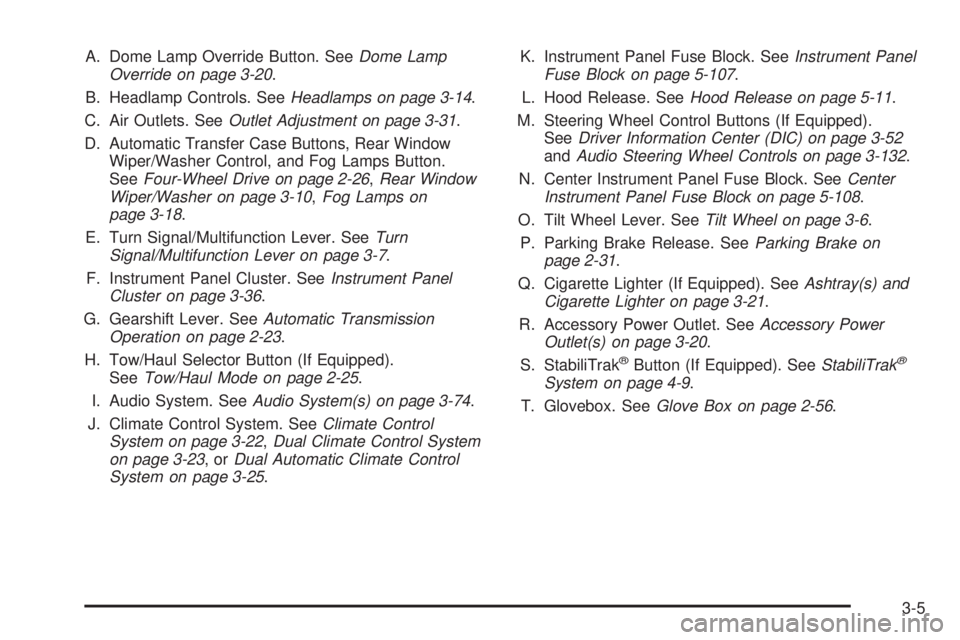
A. Dome Lamp Override Button. SeeDome Lamp
Override on page 3-20.
B. Headlamp Controls. SeeHeadlamps on page 3-14.
C. Air Outlets. SeeOutlet Adjustment on page 3-31.
D. Automatic Transfer Case Buttons, Rear Window
Wiper/Washer Control, and Fog Lamps Button.
SeeFour-Wheel Drive on page 2-26,Rear Window
Wiper/Washer on page 3-10,Fog Lamps on
page 3-18.
E. Turn Signal/Multifunction Lever. SeeTurn
Signal/Multifunction Lever on page 3-7.
F. Instrument Panel Cluster. SeeInstrument Panel
Cluster on page 3-36.
G. Gearshift Lever. SeeAutomatic Transmission
Operation on page 2-23.
H. Tow/Haul Selector Button (If Equipped).
SeeTow/Haul Mode on page 2-25.
I. Audio System. SeeAudio System(s) on page 3-74.
J. Climate Control System. SeeClimate Control
System on page 3-22,Dual Climate Control System
on page 3-23,orDual Automatic Climate Control
System on page 3-25.K. Instrument Panel Fuse Block. SeeInstrument Panel
Fuse Block on page 5-107.
L. Hood Release. SeeHood Release on page 5-11.
M. Steering Wheel Control Buttons (If Equipped).
SeeDriver Information Center (DIC) on page 3-52
andAudio Steering Wheel Controls on page 3-132.
N. Center Instrument Panel Fuse Block. SeeCenter
Instrument Panel Fuse Block on page 5-108.
O. Tilt Wheel Lever. SeeTilt Wheel on page 3-6.
P. Parking Brake Release. SeeParking Brake on
page 2-31.
Q. Cigarette Lighter (If Equipped). SeeAshtray(s) and
Cigarette Lighter on page 3-21.
R. Accessory Power Outlet. SeeAccessory Power
Outlet(s) on page 3-20.
S. StabiliTrak
®Button (If Equipped). SeeStabiliTrak®
System on page 4-9.
T. Glovebox. SeeGlove Box on page 2-56.
3-5
Page 171 of 540
Cruise Control
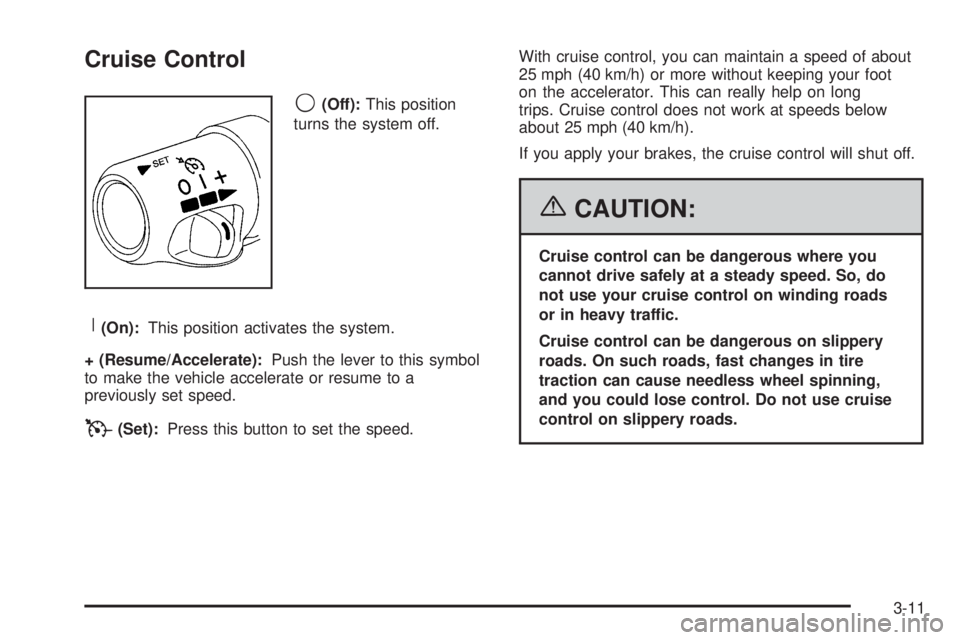
9(Off):This position
turns the system off.
R(On):This position activates the system.
+ (Resume/Accelerate):Push the lever to this symbol
to make the vehicle accelerate or resume to a
previously set speed.
T(Set):Press this button to set the speed.With cruise control, you can maintain a speed of about
25 mph (40 km/h) or more without keeping your foot
on the accelerator. This can really help on long
trips. Cruise control does not work at speeds below
about 25 mph (40 km/h).
If you apply your brakes, the cruise control will shut off.
{CAUTION:
Cruise control can be dangerous where you
cannot drive safely at a steady speed. So, do
not use your cruise control on winding roads
or in heavy traffic.
Cruise control can be dangerous on slippery
roads. On such roads, fast changes in tire
traction can cause needless wheel spinning,
and you could lose control. Do not use cruise
control on slippery roads.
3-11
Page 172 of 540
Setting Cruise Control
{CAUTION:
If you leave your cruise control on when you
are not using cruise, you might hit a button
and go into cruise when you do not want to.
You could be startled and even lose control.
Keep the cruise control switch off until you
want to use cruise control.
1. Move the cruise control switch to on.
2. Get up to the speed you want.
3. Press in the set button at the end of the lever and
release it.
4. Take your foot off the accelerator pedal.The cruise symbol on the
instrument panel will
illuminate when the cruise
control is engaged.
Resuming a Set Speed
Suppose you set your cruise control at a desired
speed and then you apply the brake. This, of course,
disengages the cruise control. But you don’t need
to reset it.
Once you’re going about 25 mph (40 km/h) or more,
you can move the cruise control switch briey from on to
resume/accelerate.
You’ll go right back up to your chosen speed and
stay there.
If you hold the switch at resume/accelerate the vehicle
will keep going faster until you release the switch or
apply the brake. So unless you want to go faster, don’t
hold the switch at resume/accelerate.
3-12
Page 173 of 540
Increasing Speed While Using
Cruise Control
There are two ways to go to a higher speed:
Use the accelerator pedal to get to the higher
speed. Press the set button at the end of the lever,
then release the button and the accelerator pedal.
You’ll now cruise at the higher speed. If the
accelerator pedal is held longer than 60 seconds,
cruise control will turn off.
Move the cruise switch from on to
resume/accelerate. Hold it there until you get
up to the speed you want, and then release
the switch. To increase your speed in very
small amounts, move the switch briey to
resume/accelerate. Each time you do this, your
vehicle will go about 1 mph (1.6 km/h) faster.
Reducing Speed While Using Cruise
Control
Press in the button at the end of the lever until you
reach the lower speed you want, then release it.
To slow down in very small amounts, briey press
the set button. Each time you do this, you’ll go
about 1 mph (1.6 km/h) slower.
Passing Another Vehicle While Using
Cruise Control
Use the accelerator pedal to increase your speed.
When you take your foot off the pedal, your vehicle will
slow down to the cruise control speed you set earlier.
Using Cruise Control on Hills
How well your cruise control will work on hills depends
upon your speed, load and the steepness of the hills.
When going up steep hills, you may want to step on the
accelerator pedal to maintain your speed. When going
downhill, you may have to brake or shift to a lower gear to
keep your speed down. Of course, applying the brake
takes you out of cruise control. Many drivers nd this to
be too much trouble and don’t use cruise control on
steep hills.
3-13