odometer GMC YUKON XL 2007 User Guide
[x] Cancel search | Manufacturer: GMC, Model Year: 2007, Model line: YUKON XL, Model: GMC YUKON XL 2007Pages: 608, PDF Size: 3.01 MB
Page 258 of 608
LEFT REAR DOOR OPEN
If the driver’s side rear door is not fully closed and
the vehicle is in a drive gear, this message will
display and a chime will sound. Stop and turn off
the vehicle, check the door for obstructions,
and close the door again. Check to see if the
message still appears on the DIC.
OIL PRESSURE LOW STOP ENGINE
Notice:If you drive your vehicle while the
engine oil pressure is low, severe engine
damage may occur. If a low oil pressure
warning appears on the Driver Information
Center (DIC), stop the vehicle as soon as
possible. Do not drive the vehicle until the
cause of the low oil pressure is corrected.
SeeEngine Oil on page 438for more
information.
If low oil pressure levels occur, this message will
display. Stop the vehicle as soon as safely
possible and do not operate it until the cause of
the low oil pressure has been corrected. Check
your oil as soon as possible and have your vehicle
serviced by your GM dealer. SeeEngine Oil on
page 438.
PARK ASSIST OFF
If your vehicle has the Ultrasonic Rear Parking
Assist (URPA) system, after the vehicle has been
started, this message will display to remind the
driver that the URPA system has been turned off.
Press the set/reset button or the trip odometer
reset stem to acknowledge this message and clear
it from the DIC display. To turn the URPA
system back on, seeUltrasonic Rear Parking
Assist (URPA) on page 205.
PASSENGER DOOR OPEN
If the passenger’s door is not fully closed and the
vehicle is in a drive gear, this message will
display and a chime will sound. Stop and turn off
the vehicle, check the door for obstructions,
and close the door again. Check to see if the
message still appears on the DIC.
REAR ACCESS OPEN
If the liftgate or liftglass is open while the ignition
is in RUN, this message will display and a
chime will sound. Turn off the vehicle and check
the liftgate and liftglass. Restart the vehicle
and check for the message on the DIC display.
258
Page 265 of 608
Entering the Feature Settings Menu
1. Turn the ignition on and place the vehicle in
PARK (P).
2. Press the customization button to scroll
through the available customizable options.
Feature Settings Menu Items
The following are customization features that allow
you to program settings to the vehicle:
DISPLAY IN ENGLISH
This feature will only display if a language other
than English has been set. This feature allows you
to change the language in which the DIC
messages appear to English.
Press the customization button until the PRESS
V
TO DISPLAY IN ENGLISH screen appears on
the DIC display. Press the set/reset button once
to display all DIC messages in English.
DISPLAY LANGUAGE
This feature allows you to select the language in
which the DIC messages will appear.
Press the customization button until the DISPLAY
LANGUAGE screen appears on the DIC display.
Press the set/reset button once to access the
settings for this feature. Then press the
customization button to scroll through the following
settings:
ENGLISH (default):All messages will appear in
English.
FRANCAIS (French):All messages will appear
in French.
ESPANOL (Spanish):All messages will appear
in Spanish.
NO CHANGE:No change will be made to this
feature. The current setting will remain.
Choose one of the available settings and press
the set/reset button while it is displayed on the DIC
to select it.
You can also change the language by pressing
the trip odometer reset stem. See “Language”
under DIC Operation and Displays (Without DIC
Buttons) earlier in this section for more information.
265
Page 495 of 608
Resetting the TPMS Identication Codes
Each TPMS sensor has a unique identication
code. Any time you rotate your vehicle’s tires or
replace one or more of the TPMS sensors, the
identication codes will need to be matched to the
new tire/wheel position. The sensors are matched
to the tire/wheel positions in the following order:
driver’s side front tire, passengers side front tire,
passengers side rear tire, and driver’s side rear tire
using a TPMS diagnostic tool. See your GM dealer
for service.
The TPMS sensors may also be matched to each
tire/wheel position by increasing or decreasing
the tire’s air pressure. If increasing the tire’s
air pressure, do not exceed the maximum ination
pressure indicated on the tire’s sidewall.
You will have two minutes to match the rst
tire/wheel position, and ve minutes overall to
match all four tire/wheel positions. If it takes longer
than two minutes, to match the rst tire and
wheel, or more than ve minutes to match all
four tire and wheel positions the matching process
stops and you will need to start over.The TPMS sensor matching process is outlined
below:
1. Set the parking brake.
2. Turn the ignition switch to RUN with the
engine off.
3. Using the DIC, press the vehicle information
button until the RELEARN TIRE POSITIONS
message displays. If your vehicle does not
have the DIC buttons, press the trip odometer
reset stem located on the instrument panel
cluster until the RELEARN TIRE POSITIONS
message displays.
4. If your vehicle has the DIC buttons, press the
set/reset button. The horn will sound twice to
indicate the TPMS receiver is ready, and
the TIRE LEARNING ACTIVE message will
display. If your vehicle does not have the DIC
buttons, press and hold the trip odometer
reset stem until the horn chirps twice and the
TIRE LEARNING ACTIVE message is
displayed.
5. Start with the driver’s side front tire.
495
Page 505 of 608
{CAUTION:
Using the wrong replacement wheels,
wheel bolts, or wheel nuts on your vehicle
can be dangerous. It could affect the
braking and handling of your vehicle,
make your tires lose air and make you
lose control. You could have a collision in
which you or others could be injured.
Always use the correct wheel, wheel bolts,
and wheel nuts for replacement.
Notice:The wrong wheel can also cause
problems with bearing life, brake cooling,
speedometer or odometer calibration,
headlamp aim, bumper height, vehicle ground
clearance, and tire or tire chain clearance
to the body and chassis.
SeeChanging a Flat Tire on page 508for more
information.
Used Replacement Wheels
{CAUTION:
Putting a used wheel on your vehicle is
dangerous. You cannot know how it has
been used or how far it has been driven. It
could fail suddenly and cause a crash. If
you have to replace a wheel, use a new
GM original equipment wheel.
505
Page 568 of 608
Maintenance Record
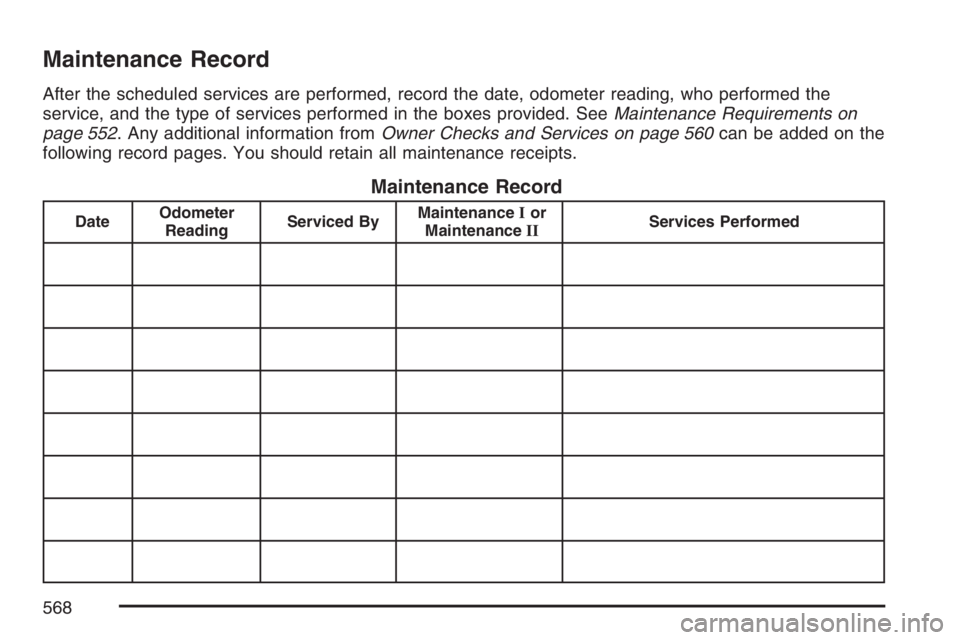
After the scheduled services are performed, record the date, odometer reading, who performed the
service, and the type of services performed in the boxes provided. SeeMaintenance Requirements on
page 552. Any additional information fromOwner Checks and Services on page 560can be added on the
following record pages. You should retain all maintenance receipts.
Maintenance Record
DateOdometer
ReadingServiced ByMaintenanceIor
MaintenanceIIServices Performed
568
Page 569 of 608
Maintenance Record (cont’d)
DateOdometer
ReadingServiced ByMaintenanceIor
MaintenanceIIServices Performed
569
Page 570 of 608
Maintenance Record (cont’d)
DateOdometer
ReadingServiced ByMaintenanceIor
MaintenanceIIServices Performed
570
Page 580 of 608
For prompt and efficient assistance when calling,
please provide the following to the Roadside
Assistance Representative:
Your name, home address, and home
telephone number.
Telephone number of your location.
Location of the vehicle.
Model, year, color, and license plate number
of the vehicle.
Odometer reading, Vehicle Identication
Number (VIN) and delivery date of the vehicle.
Description of the problem.
While we hope you never have the occasion to
use our service, it is added security while traveling
for you and your family. Remember, we are
only a phone call away. U.S. customers call
GMC Roadside Assistance:1-800-462-8782, text
telephone (TTY) users, call1-888-889-2438.
Canadian customers call1-800-268-6800.GMC and General Motors of Canada Limited
reserve the right to limit services or reimbursement
to an owner or driver when, in their sole
discretion, the claims become excessive in
frequency or type of occurrence.
Roadside Assistance is not part of or included in
the coverage provided by the New Vehicle Limited
Warranty. GMC and General Motors of Canada
reserve the right to make any changes or
discontinue the Roadside Assistance program at
any time without notication.
Towing and Road Service Exclusions
Specically excluded from Roadside Assistance
coverage are towing or services for vehicles
operated on a non-public roadway or highway,
nes, impound towing caused by a violation
of local, Municipal, State, Provincial, or Federal
law, and mounting, dismounting or changing
of snow tires, chains, or other traction devices.
580
Page 601 of 608
M
Maintenance Schedule
Additional Required Services..................... 557
At Each Fuel Fill....................................... 560
At Least Once a Month............................ 561
At Least Once a Year............................... 562
Introduction............................................... 552
Maintenance Footnotes............................. 558
Maintenance Record................................. 568
Maintenance Requirements....................... 552
Normal Maintenance Replacement Parts..... 566
Owner Checks and Services..................... 560
Recommended Fluids and Lubricants........ 564
Scheduled Maintenance............................ 555
Using........................................................ 553
Your Vehicle and the Environment............ 552
Malfunction Indicator Light............................ 236
Manual Seats................................................... 9
Memory Seat, Mirrors, and Pedals................. 13
Message
DIC Warnings and Messages.................... 254
Mirrors
Automatic Dimming Rearview with
Compass and Temperature Display........ 160
Automatic Dimming Rearview with
OnStar
®, Compass and Temperature
Display.................................................. 157Mirrors (cont.)
Outside Automatic Dimming Mirror............ 166
Outside Convex Mirror.............................. 166
Outside Curb View Assist Mirrors.............. 166
Outside Heated Mirrors............................. 167
Outside Manual Mirrors............................. 163
Outside Power Foldaway Mirrors............... 165
Outside Power Mirrors.............................. 164
Outside Trailer-Tow Mirrors....................... 163
MyGMLink.com............................................. 574
N
Navigation/Radio System,
see Navigation Manual.............................. 321
New Vehicle Break-In................................... 136
Normal Maintenance Replacement Parts...... 566
O
Odometer..................................................... 226
Odometer, Trip............................................. 226
Off-Road Driving........................................... 356
Off-Road Recovery....................................... 353
601
Page 607 of 608
Traction
StabiliTrak®System.................................. 348
Trailer
Recommendations..................................... 422
Transmission
Fluid, Automatic........................................ 445
Transmission Operation, Automatic............... 142
Trip Odometer.............................................. 226
Turn and Lane-Change Signals.................... 191
Turn Signal/Multifunction Lever..................... 190
U
Ultrasonic Rear Parking Assist (URPA)......... 205
Understanding Radio Reception.................... 335
Uniform Tire Quality Grading........................ 502
Universal Home Remote System.................. 169
Operation.................................................. 170
V
Vehicle
Control...................................................... 344
Damage Warnings........................................ 5
Loading..................................................... 390
Symbols....................................................... 5Vehicle Customization, DIC.......................... 264
Vehicle Data Collection and Event Data
Recorders................................................. 583
Vehicle Identication
Number (VIN)........................................... 538
Service Parts Identication Label.............. 538
Ventilation Adjustment.................................. 220
Visors........................................................... 132
Voltmeter Gage............................................ 231
W
Warning Lights, Gages and Indicators.......... 224
Warnings
DIC Warnings and Messages.................... 254
Hazard Warning Flashers.......................... 188
Other Warning Devices............................. 188
Safety and Symbols...................................... 4
Vehicle Damage........................................... 5
Wheels
Alignment and Tire Balance...................... 504
Different Size............................................ 502
Replacement............................................. 504
Where to Put the Restraint............................ 72
Windows...................................................... 130
Power....................................................... 131
607