start stop button GMC YUKON XL 2007 User Guide
[x] Cancel search | Manufacturer: GMC, Model Year: 2007, Model line: YUKON XL, Model: GMC YUKON XL 2007Pages: 608, PDF Size: 3.01 MB
Page 315 of 608
If the DVD does not begin playing the movie
automatically, press the pushbutton located under
the play/pause symbol tag displayed on the radio.
If the DVD still does not play, refer to the on-screen
instructions, if available.
c(Stop):Press this button to stop playing,
rewinding, or fast forwarding a DVD.
r(Enter):Press this button to select the
choices that are highlighted in any menu.
y(Menu):Press this button to access the DVD
menu. The DVD menu is different on every
DVD. Use the pushbuttons located under the
navigation arrows to navigate the cursor through
the DVD menu. After making a selection press the
enter button. This button only operates when
using a DVD.
Nav (Navigate):Press this button to display
directional arrows for navigating through the
menus.
q(Return):Press this button to exit the current
active menu and return to the previous menu.
This button will operate only when a DVD is
playing and a menu is active.
DVD-A (Audio) Display Buttons
Once a DVD-A is inserted, radio display menu will
show several tag options for DVD playing.
Press the pushbuttons located under any desired
tag option during DVD playback. See the tag
options listed below for more information.
The rear seat operator can navigate the DVD-A
menus and controls through the remote control.
See “Remote Control”, underRear Seat
Entertainment System on page 321for more
information. The Video Screen does not
automatically power on when the DVD-A is
inserted into the DVD slot. It must be manually
turned on by the rear seat occupant through
the remote control power button.
r/j(Play/Pause):Press either the play or
pause icon displayed on the radio system,
to toggle between pausing or restarting playback
of a DVD. If the forward arrow is showing on
display, the system is in pause mode. If the pause
icon is showing on display, the system is in
playback mode.
315
Page 316 of 608
qGroupr:Press this button to cycle through
musical groupings on the DVD-A disc.
Nav (Navigate):Press this button to display
directional arrows for navigating through the
menus.
e(Audio Stream):Press this button to cycle
through audio steam formats located on DVD-A
disc. There is not any type of notication for
the customer to see through the radio display, but
VSM will have a text eld that will show audio
stream changing.
Inserting a Disc
To play a disc, gently insert the disc, with the label
side up, into the loading slot. The DVD player
may not accept some paper labeled media. The
player will start loading the disc into the system
and display “Loading Disc” on the radio display.
At the same time, the radio will display a
softkey menu of option(s). Some discs will
automatically play the movie while others will
default to the softkey menu display which requires
the Play, Enter, or Navigation softkeys to be
pressed (either by softkey or by the rear seat
passenger using the remote control).Loading a disc into the system, depending
on media type and format, ranges from
5 to 20 seconds for a CD, and up to 30 seconds
for a DVD.
Stopping and Resuming Playback
To stop playing a DVD without turning off the
system, press the stop button on the remote
control, or press the pushbutton located under the
stop or the play/pause symbol tags displayed
on the radio. If the radio head is sourced to
something other than DVD-V, press the DVD/CD
AUX button to make DVD-V the active source.
To resume DVD playback, press the play/pause
button on the remote control, or press the
pushbutton located under the play/pause symbol
tag displayed on the radio. The DVD should
resume play from where it last stopped if the disc
has not been ejected and the stop button has
not been pressed twice on the remote control.
If the disc has been ejected or the stop button has
been pressed twice on the remote control, the
disc will resume playing at the beginning of
the disc.
316
Page 329 of 608
c(Stop):Press this button to stop playing,
rewinding, or fast forwarding a DVD. Press this
button twice to return to the beginning of the DVD.
s(Play/Pause):Press this button to start
playing a DVD. Press this button while a DVD is
playing to pause it. Press it again to continue
playing the DVD.
When the DVD is playing, depending on the radio,
you may be able to do slow play by pressing
the pause button then pressing the fast forward
button. The DVD will continue playing in a
slow play mode. You may also, depending on the
radio, perform reverse slow play by pressing
the pause button and then pressing the fast
reverse button. To cancel slow play mode, press
the play/pause button.
t(Previous Track/Chapter):Press this button
to return to the start of the current track or
chapter. Press this button again to go to the
previous track or chapter. This button may
not work when the DVD is playing the copyright
information or the previews.
u(Next Track/Chapter):Press this button to go
to the beginning of the next chapter or track.
This button may not work when the DVD is playing
the copyright information or the previews.
r(Fast Reverse):Press this button to fast
reverse the DVD or CD. To stop fast reversing a
DVD video, press the play button. To stop fast
reversing a DVD audio or CD, release the fast
reverse button. This button may not work when the
DVD is playing the copyright information or the
previews.
[(Fast Forward):Press this button to fast
forward the DVD or CD. To stop fast forwarding a
DVD video, press the play button. To stop fast
forwarding a DVD audio or CD, release the
fast forward button. This button may not work
when the DVD is playing the copyright information
or the previews.
e(Audio):Press this button to change audio
tracks on DVDs that have this feature when
the DVD is playing. The format and content of this
function will vary for each disc.
329
Page 333 of 608
©¨(Seek):When listening to FM, AM, or XM
(if equipped), press the seek up or the seek
down arrow to go to the next or the previous
station or channels and stay there. This function is
inactive, with some radios, if the front seat
passengers are listening to the radio.
Press and hold the seek up or seek down arrow
until the display ashes, to tune to an individual
station. The display will stop ashing after
the buttons have not been pushed for more than
two seconds. This function is inactive, with
some radios, if the front seat passengers are
listening to the radio.
While listening to a CD, press the seek up arrow to
hear the next track on the CD. Press the seek down
arrow to go back to the start of the current track (if
more than ten seconds have played). This function
is inactive, with some radios, if the front seat
passengers are listening to the radio.
When a DVD video menu is being displayed, press
the seek up arrow or seek down arrow to perform a
cursor up or down on the menu. Hold the seek up
arrow or seek down arrow to perform a cursor right
or left on the menu.PROG (Program):Press this button to go to the
next preset radio station or channel set on the
main radio. This function is inactive, with
some radios, if the front seat passengers are
listening to the radio.
When a CD or DVD audio is playing, press this
button to go to the beginning of the CD or
DVD audio. This function is inactive, with some
radios, if the front seat passengers are listening to
the CD or DVD audio.
When a disc audio is playing in the CD or DVD
changer, press this button to select the next disc, if
multiple discs are loaded. This function is
inactive, with some radios, if the front seat
passengers are listening to the disc.
When a DVD video menu is being displayed,
press the PROG button to perform the menu
function, enter.
333
Page 493 of 608
For additional information and details about the
DIC operation and displays seeDIC Operation and
Displays (With DIC Buttons) on page 244orDIC
Operation and Displays (Without DIC Buttons)
on page 251andDIC Warnings and Messages on
page 254.
You may notice, during cooler weather conditions,
that the tire pressure monitor light, located on
the instrument panel cluster, and the CHECK TIRE
PRESSURE message will appear when the
vehicle is rst started and then turn off as you
start to drive the vehicle. This could be an early
indicator that the tire pressures are getting low and
need to be inated to the proper pressure.
Each tire, including the spare (if provided), should
be checked monthly when cold and inated to
the ination pressure recommended by the vehicle
manufacturer on the vehicle placard or tire
ination pressure label. (If your vehicle has tires of
a different size than the size indicated on the
vehicle placard or tire ination pressure label, you
should determine the proper tire ination
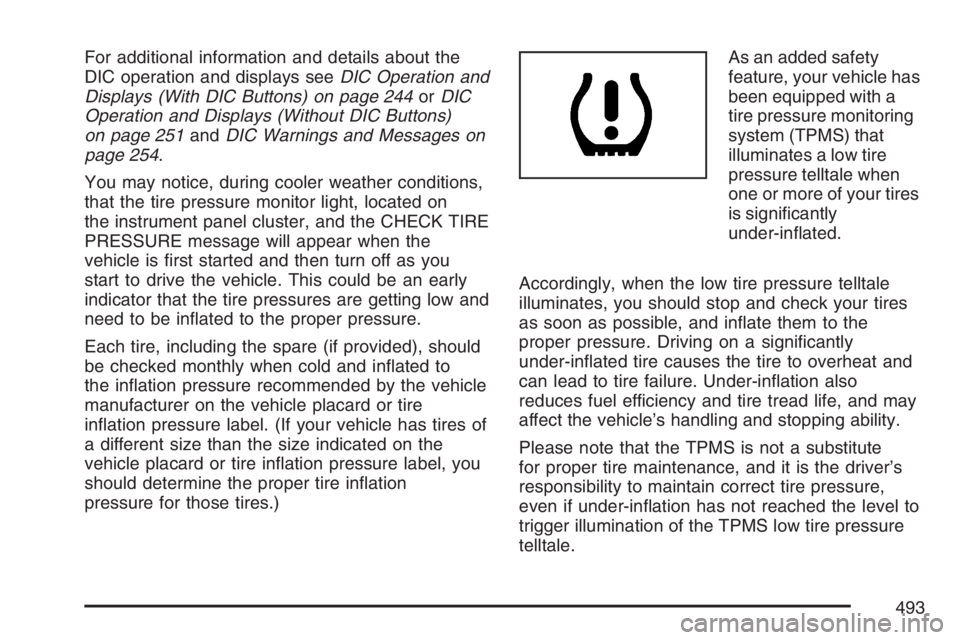
pressure for those tires.)As an added safety
feature, your vehicle has
been equipped with a
tire pressure monitoring
system (TPMS) that
illuminates a low tire
pressure telltale when
one or more of your tires
is signicantly
under-inated.
Accordingly, when the low tire pressure telltale
illuminates, you should stop and check your tires
as soon as possible, and inate them to the
proper pressure. Driving on a signicantly
under-inated tire causes the tire to overheat and
can lead to tire failure. Under-ination also
reduces fuel efficiency and tire tread life, and may
affect the vehicle’s handling and stopping ability.
Please note that the TPMS is not a substitute
for proper tire maintenance, and it is the driver’s
responsibility to maintain correct tire pressure,
even if under-ination has not reached the level to
trigger illumination of the TPMS low tire pressure
telltale.
493
Page 495 of 608
Resetting the TPMS Identication Codes
Each TPMS sensor has a unique identication
code. Any time you rotate your vehicle’s tires or
replace one or more of the TPMS sensors, the
identication codes will need to be matched to the
new tire/wheel position. The sensors are matched
to the tire/wheel positions in the following order:
driver’s side front tire, passengers side front tire,
passengers side rear tire, and driver’s side rear tire
using a TPMS diagnostic tool. See your GM dealer
for service.
The TPMS sensors may also be matched to each
tire/wheel position by increasing or decreasing
the tire’s air pressure. If increasing the tire’s
air pressure, do not exceed the maximum ination
pressure indicated on the tire’s sidewall.
You will have two minutes to match the rst
tire/wheel position, and ve minutes overall to
match all four tire/wheel positions. If it takes longer
than two minutes, to match the rst tire and
wheel, or more than ve minutes to match all
four tire and wheel positions the matching process
stops and you will need to start over.The TPMS sensor matching process is outlined
below:
1. Set the parking brake.
2. Turn the ignition switch to RUN with the
engine off.
3. Using the DIC, press the vehicle information
button until the RELEARN TIRE POSITIONS
message displays. If your vehicle does not
have the DIC buttons, press the trip odometer
reset stem located on the instrument panel
cluster until the RELEARN TIRE POSITIONS
message displays.
4. If your vehicle has the DIC buttons, press the
set/reset button. The horn will sound twice to
indicate the TPMS receiver is ready, and
the TIRE LEARNING ACTIVE message will
display. If your vehicle does not have the DIC
buttons, press and hold the trip odometer
reset stem until the horn chirps twice and the
TIRE LEARNING ACTIVE message is
displayed.
5. Start with the driver’s side front tire.
495