aux GMC YUKON XL 2007 Owner's Manual
[x] Cancel search | Manufacturer: GMC, Model Year: 2007, Model line: YUKON XL, Model: GMC YUKON XL 2007Pages: 608, PDF Size: 3.01 MB
Page 330 of 608
{(Subtitles):Press this button to turn ON/OFF
subtitles and to move through subtitle options
when a DVD is playing. The format and content of
this function will vary for each disc.
AUX (Auxiliary):Press this button to switch the
system between the DVD player and an auxiliary
source.
d(Camera):Press this button to change camera
angles on DVDs that have this feature when a DVD
is playing. The format and content of this function
will vary for each disc.
1 through 0 (Numeric Keypad):The numeric
keypad provides the capability of direct chapter or
track number selection.
\(Clear):Press this button within three seconds
after inputting a numeric selection, to clear all
numeric inputs.
}10 (Double Digit Entries):Press this button to
select chapter or track numbers greater than 9.
Press this button before inputting the number.
Battery Replacement
To change the remote control batteries, do the
following:
1. Remove the battery compartment door
located on the bottom of the remote control.
2. Replace the two AA batteries in the
compartment. Make sure that they are
installed correctly, using the diagram on the
inside of the battery compartment.
3. Close the battery door securely.
If the remote control is to be stored for a long
period of time, remove the batteries and keep them
in a cool, dry place.
330
Page 331 of 608
DVD Display Error Messages
The DVD display error message depends on
which radio you have. The video screen may
display one of the following:
Disc Load/Eject Error:This message is
displayed when there are disc load or eject
problems.
Disc Format Error:This message will be
displayed, if the disc is inserted with the disc label
wrong side up, or if the disc is damaged.
Disc Region Error:This message will be
displayed, if the disc is not from a correct region.
No Disc Inserted:This message will be
displayed, if no disc is present when the EJECT or
DVD/AUX button is pressed on the radio.
DVD Distortion
Video distortion may occur when operating cellular
phones, scanners, CB radios, Global Position
Systems (GPS)*, two-way radios, mobile fax, or
walkie talkies.
It may be necessary to turn off the DVD player
when operating one of these devices in or near the
vehicle.
*Excludes the OnStar
®System.
Cleaning the RSE Overhead Console
When cleaning the RSE overhead console surface,
use only a clean cloth dampened with clean
water.
Cleaning the Video Screen
When cleaning the video screen, use only a clean
cloth dampened with clean water. Use care
when directly touching or cleaning the screen, as
damage may result.
331
Page 332 of 608
Rear Seat Audio (RSA)
This feature allows rear seat passengers to listen
to and control any of the music sources: radio,
CDs, DVDs, or other auxiliary sources. However,
the rear seat passengers can only control the
music sources the front seat passengers are not
listening to (except on some radios where
dual control is allowed). For example, rear seat
passengers can listen to and control a CD through
the headphones, while the driver listens to the
radio through the front speakers. The rear
seat passengers have control of the volume for
each set of headphones.
You can operate the RSA functions even when
the main radio is off.
Audio can be heard through wired headphones
(not included) plugged into the jacks on the RSA.
If your vehicle has this feature, audio can also
be heard on Channel 2 of the wireless
headphones.
The audio system mutes the rear speakers when
the RSA audio is active through the headphones.
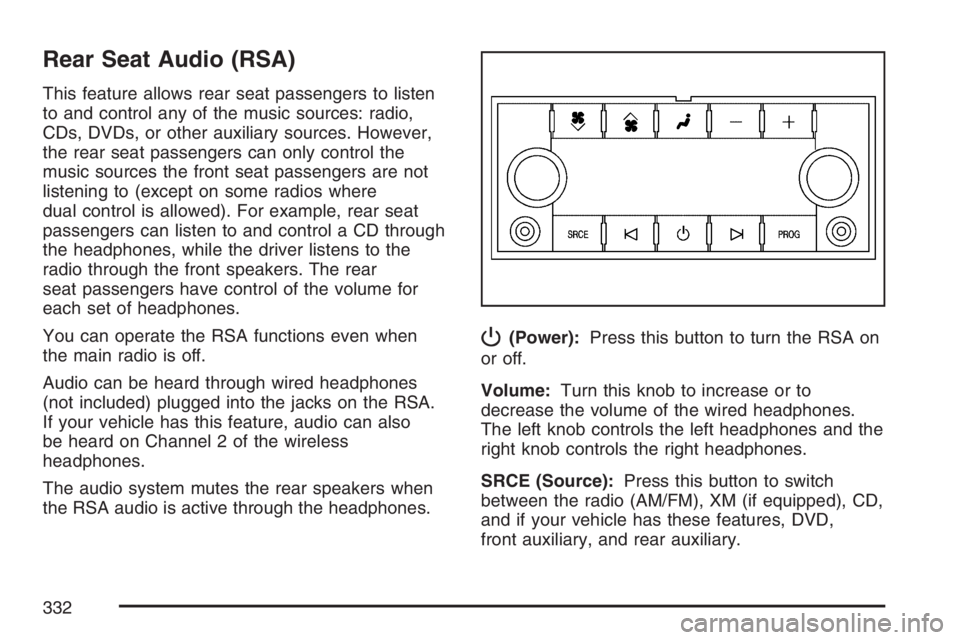
P(Power):Press this button to turn the RSA on
or off.
Volume:Turn this knob to increase or to
decrease the volume of the wired headphones.
The left knob controls the left headphones and the
right knob controls the right headphones.
SRCE (Source):Press this button to switch
between the radio (AM/FM), XM (if equipped), CD,
and if your vehicle has these features, DVD,
front auxiliary, and rear auxiliary.
332
Page 335 of 608
g(Mute/Voice Recognition):Press and release
this button to silence the vehicle speakers only.
The audio of the wireless and wired headphones, if
your vehicle has these features, will not be
muted. Press and release this button again, to
turn the sound on.
If your vehicle has the navigation system, press
and hold this button for longer than one second to
initiate voice recognition. See “Voice Recognition”
in the Navigation System manual for more
information.
If your vehicle has OnStar
®, press and hold this
button for longer than one second to interact
with the OnStar system. If your vehicle is also
equipped with the navigation system, press
and hold this button for longer than one second to
initiate voice recognition and say “OnStar” to
enter OnStar
®mode. See theOnStar®System on
page 167in this manual for more information.
SRCE (Source):Press this button to switch
between the radio (AM, FM), XM (if equipped),
CD, and if your vehicle has these features, DVD,
front auxiliary, and rear auxiliary.+
e−e(Volume):Press the plus or minus
button to increase or to decrease the radio volume.
¨(Seek):Press the seek arrow to go to the next
radio station while in AM, FM, or XM (if equipped).
Press this button to go to the next track or chapter
while sourced to the DVD slot. Press the button to
go to the next disc while sourced to a CD or DVD
changer, if multiple discs are loaded.
Radio Reception
You may experience frequency interference and
static during normal radio reception if items
such as cellphone chargers, vehicle convenience
accessories, and external electronic devices
are plugged into the accessory power outlet.
If there is interference or static, unplug the item
from the accessory power outlet.
335
Page 400 of 608
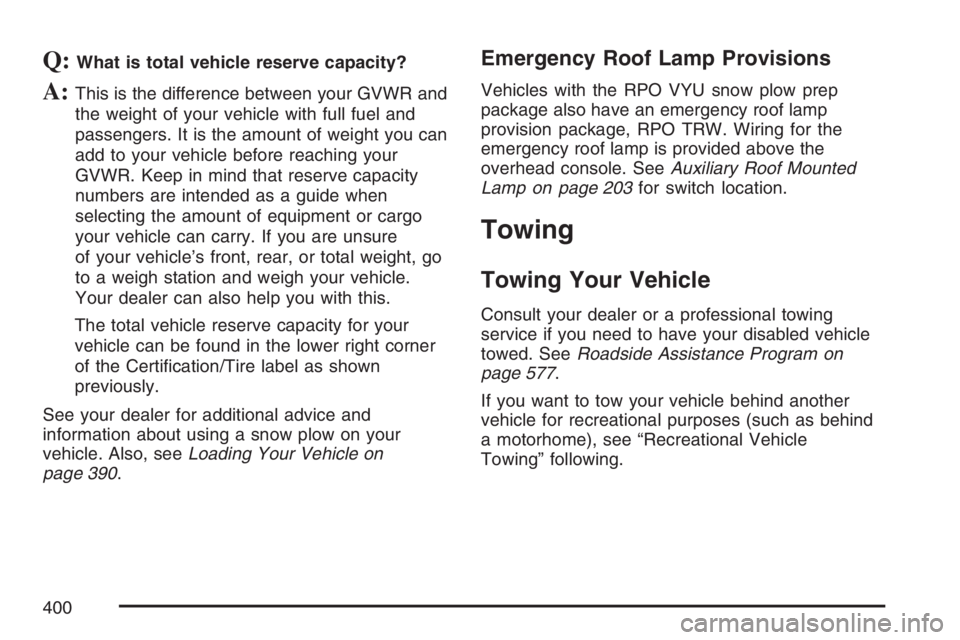
Q:What is total vehicle reserve capacity?
A:This is the difference between your GVWR and
the weight of your vehicle with full fuel and
passengers. It is the amount of weight you can
add to your vehicle before reaching your
GVWR. Keep in mind that reserve capacity
numbers are intended as a guide when
selecting the amount of equipment or cargo
your vehicle can carry. If you are unsure
of your vehicle’s front, rear, or total weight, go
to a weigh station and weigh your vehicle.
Your dealer can also help you with this.
The total vehicle reserve capacity for your
vehicle can be found in the lower right corner
of the Certication/Tire label as shown
previously.
See your dealer for additional advice and
information about using a snow plow on your
vehicle. Also, seeLoading Your Vehicle on
page 390.
Emergency Roof Lamp Provisions
Vehicles with the RPO VYU snow plow prep
package also have an emergency roof lamp
provision package, RPO TRW. Wiring for the
emergency roof lamp is provided above the
overhead console. SeeAuxiliary Roof Mounted
Lamp on page 203for switch location.
Towing
Towing Your Vehicle
Consult your dealer or a professional towing
service if you need to have your disabled vehicle
towed. SeeRoadside Assistance Program on
page 577.
If you want to tow your vehicle behind another
vehicle for recreational purposes (such as behind
a motorhome), see “Recreational Vehicle
Towing” following.
400
Page 541 of 608
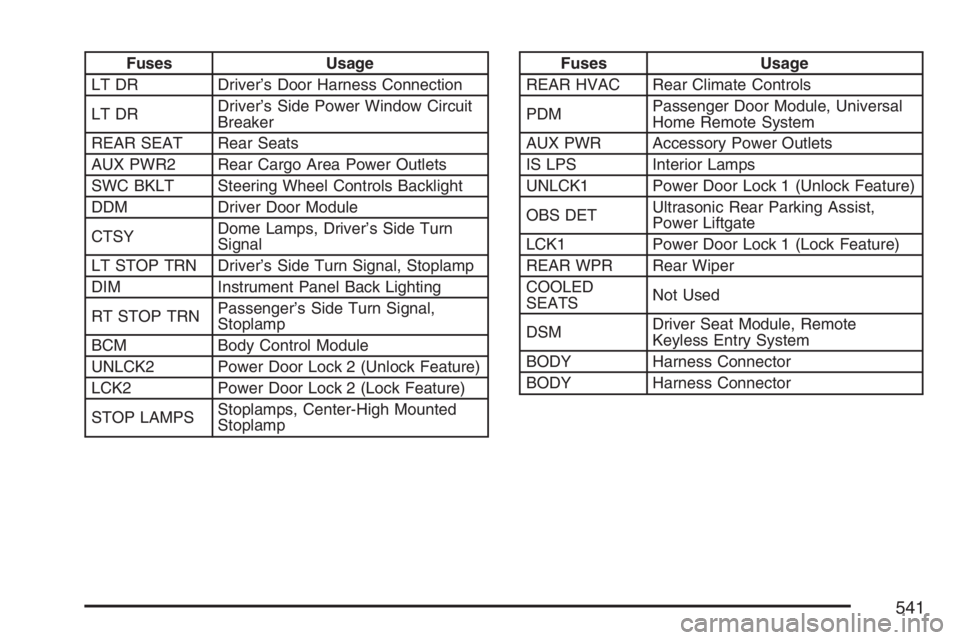
Fuses Usage
LT DR Driver’s Door Harness Connection
LT DRDriver’s Side Power Window Circuit
Breaker
REAR SEAT Rear Seats
AUX PWR2 Rear Cargo Area Power Outlets
SWC BKLT Steering Wheel Controls Backlight
DDM Driver Door Module
CTSYDome Lamps, Driver’s Side Turn
Signal
LT STOP TRN Driver’s Side Turn Signal, Stoplamp
DIM Instrument Panel Back Lighting
RT STOP TRNPassenger’s Side Turn Signal,
Stoplamp
BCM Body Control Module
UNLCK2 Power Door Lock 2 (Unlock Feature)
LCK2 Power Door Lock 2 (Lock Feature)
STOP LAMPSStoplamps, Center-High Mounted
StoplampFuses Usage
REAR HVAC Rear Climate Controls
PDMPassenger Door Module, Universal
Home Remote System
AUX PWR Accessory Power Outlets
IS LPS Interior Lamps
UNLCK1 Power Door Lock 1 (Unlock Feature)
OBS DETUltrasonic Rear Parking Assist,
Power Liftgate
LCK1 Power Door Lock 1 (Lock Feature)
REAR WPR Rear Wiper
COOLED
SEATSNot Used
DSMDriver Seat Module, Remote
Keyless Entry System
BODY Harness Connector
BODY Harness Connector
541
Page 546 of 608
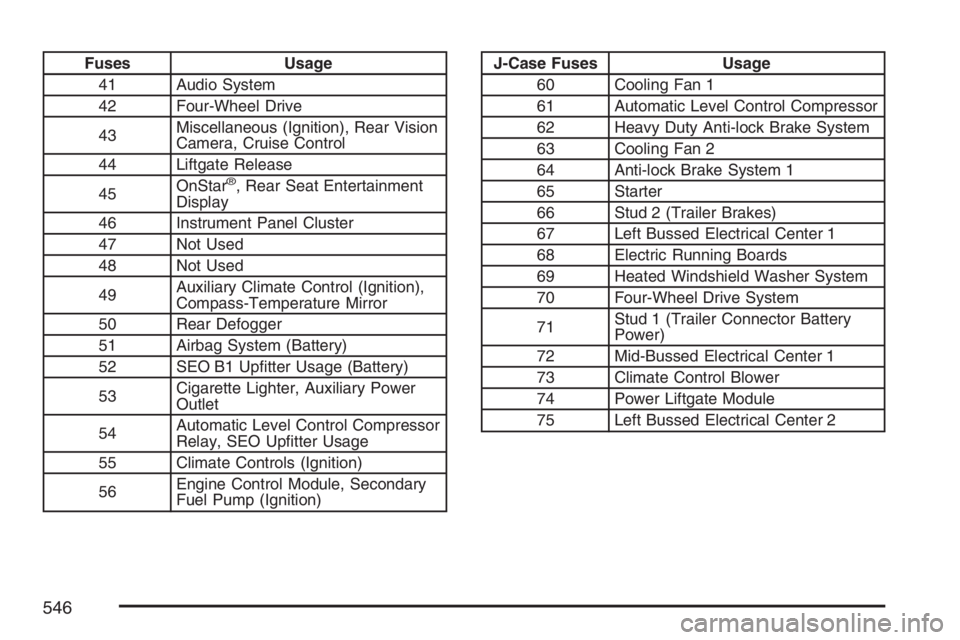
Fuses Usage
41 Audio System
42 Four-Wheel Drive
43Miscellaneous (Ignition), Rear Vision
Camera, Cruise Control
44 Liftgate Release
45OnStar
®, Rear Seat Entertainment
Display
46 Instrument Panel Cluster
47 Not Used
48 Not Used
49Auxiliary Climate Control (Ignition),
Compass-Temperature Mirror
50 Rear Defogger
51 Airbag System (Battery)
52 SEO B1 Uptter Usage (Battery)
53Cigarette Lighter, Auxiliary Power
Outlet
54Automatic Level Control Compressor
Relay, SEO Uptter Usage
55 Climate Controls (Ignition)
56Engine Control Module, Secondary
Fuel Pump (Ignition)
J-Case Fuses Usage
60 Cooling Fan 1
61 Automatic Level Control Compressor
62 Heavy Duty Anti-lock Brake System
63 Cooling Fan 2
64 Anti-lock Brake System 1
65 Starter
66 Stud 2 (Trailer Brakes)
67 Left Bussed Electrical Center 1
68 Electric Running Boards
69 Heated Windshield Washer System
70 Four-Wheel Drive System
71Stud 1 (Trailer Connector Battery
Power)
72 Mid-Bussed Electrical Center 1
73 Climate Control Blower
74 Power Liftgate Module
75 Left Bussed Electrical Center 2
546
Page 594 of 608

Appearance Care (cont.)
Vehicle Care/Appearance Materials........... 537
Washing Your Vehicle............................... 532
Weatherstrips............................................ 531
Windshield, Backglass, and Wiper Blades.... 534
Ashtray(s)..................................................... 209
Audio System(s)........................................... 274
Audio Steering Wheel Controls................. 334
Care of Your CD and DVD Player............. 337
Care of Your CDs and DVDs.................... 336
Navigation/Radio System,
see Navigation Manual.......................... 321
Radio with CD.......................................... 278
Radio with CD and DVD........................... 295
Rear Seat Audio (RSA)............................. 332
Rear Side Window Antenna...................... 337
Setting the Time................................276, 277
Theft-Deterrent Feature............................. 334
Understanding Radio Reception................ 335
XM™ Satellite Radio Antenna System....... 337
Automatic Headlamp System........................ 201
Automatic Transmission
Fluid......................................................... 445
Operation.................................................. 142
Autoride
®..................................................... 405
Auxiliary Roof Mounted Lamp Switch........... 203
B
Battery......................................................... 466
Run-Down Protection................................ 204
Before Leaving on a Long Trip..................... 380
Bench Seat, Split (60/40)............................... 20
Brake
Anti-Lock Brake System (ABS).................. 345
Emergencies............................................. 347
Parking..................................................... 151
System Warning Light............................... 232
Brake Pedal, Throttle.................................... 140
Brakes......................................................... 463
Braking........................................................ 344
Braking in Emergencies................................ 347
Break-In, New Vehicle.................................. 136
Bucket Seats, Rear........................................ 26
Bulb Replacement........................................ 478
Halogen Bulbs.......................................... 478
Headlamp Aiming...................................... 475
License Plate Lamps................................. 480
Replacement Bulbs................................... 481
Taillamps, Turn Signal, Stoplamps and
Back-up Lamps..................................... 478
Buying New Tires......................................... 500
594
Page 599 of 608
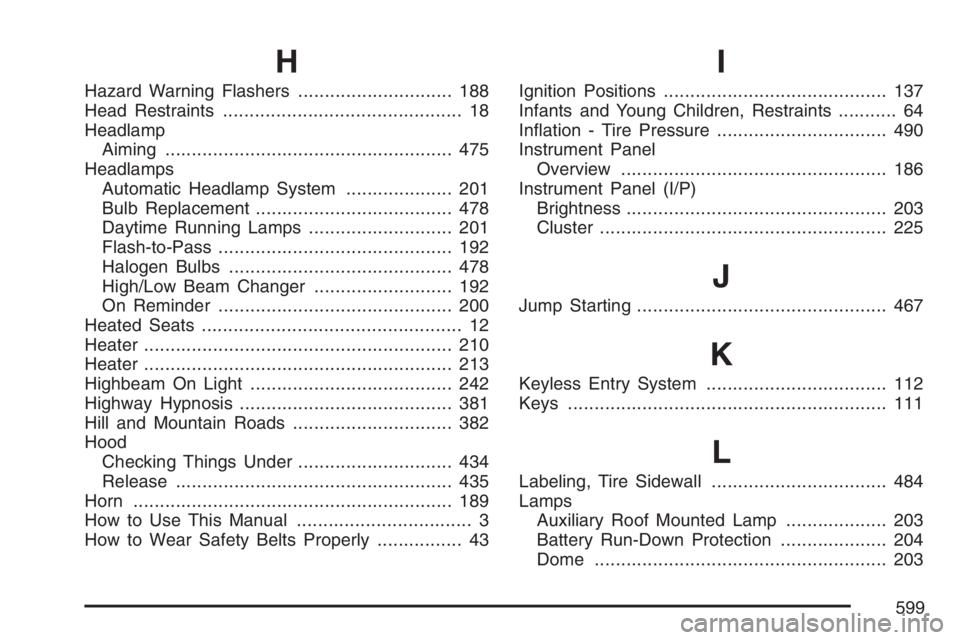
H
Hazard Warning Flashers............................. 188
Head Restraints............................................. 18
Headlamp
Aiming...................................................... 475
Headlamps
Automatic Headlamp System.................... 201
Bulb Replacement..................................... 478
Daytime Running Lamps........................... 201
Flash-to-Pass............................................ 192
Halogen Bulbs.......................................... 478
High/Low Beam Changer.......................... 192
On Reminder............................................ 200
Heated Seats................................................. 12
Heater.......................................................... 210
Heater.......................................................... 213
Highbeam On Light...................................... 242
Highway Hypnosis........................................ 381
Hill and Mountain Roads.............................. 382
Hood
Checking Things Under............................. 434
Release.................................................... 435
Horn............................................................ 189
How to Use This Manual................................. 3
How to Wear Safety Belts Properly................ 43
I
Ignition Positions.......................................... 137
Infants and Young Children, Restraints........... 64
Ination - Tire Pressure................................ 490
Instrument Panel
Overview.................................................. 186
Instrument Panel (I/P)
Brightness................................................. 203
Cluster...................................................... 225
J
Jump Starting............................................... 467
K
Keyless Entry System.................................. 112
Keys............................................................ 111
L
Labeling, Tire Sidewall................................. 484
Lamps
Auxiliary Roof Mounted Lamp................... 203
Battery Run-Down Protection.................... 204
Dome....................................................... 203
599