change time GMC YUKON XL 2007 Owner's Manual
[x] Cancel search | Manufacturer: GMC, Model Year: 2007, Model line: YUKON XL, Model: GMC YUKON XL 2007Pages: 608, PDF Size: 3.01 MB
Page 278 of 608
Changing the Time and Date Default
Settings
You can change the time default setting from
12 hours to 24 hours or change the date default
setting from month/day/year to day/month/year.
To change the time or date default settings, follow
the instructions below:
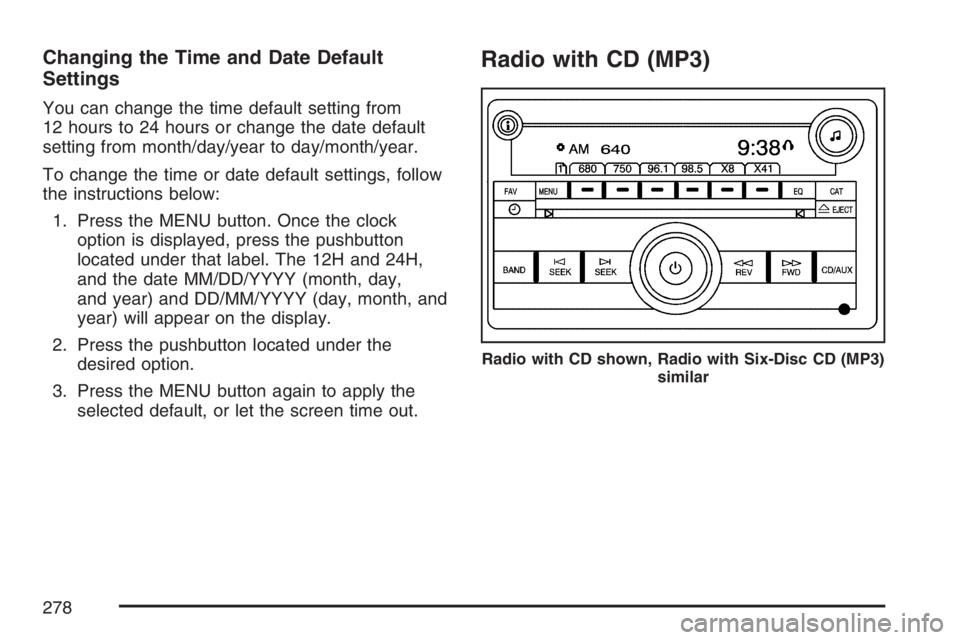
1. Press the MENU button. Once the clock
option is displayed, press the pushbutton
located under that label. The 12H and 24H,
and the date MM/DD/YYYY (month, day,
and year) and DD/MM/YYYY (day, month, and
year) will appear on the display.
2. Press the pushbutton located under the
desired option.
3. Press the MENU button again to apply the
selected default, or let the screen time out.
Radio with CD (MP3)
Radio with CD shown, Radio with Six-Disc CD (MP3)
similar
278
Page 313 of 608
O(Power):Press this knob to turn the radio on.
Turn this knob clockwise to increase the volume
or counterclockwise to decrease the volume.
A single press turns the radio off, a press and hold
for more than two seconds turns off the entire
radio and rear seat entertainment system
and starts the parental control feature which
prevents the rear seat occupant from operating
the Rear Seat Audio (RSA) system or remote
control.
A lock symbol will appear next to the clock display.
The parental control feature will remain on until a
subsequent press and hold of the power button is
performed (more than two seconds), or until the
driver turns the ignition off and exits the vehicle.
f(Tune):Turn this knob to change tracks on a
CD or DVD, to manually tune a radio station,
or to change clock or date settings, while in the
clock or date setting mode. See the information
given earlier in this section specic to the
radio, CD, and the DVD. Also, seeSetting the
Time (Radio with a Single CD Player) on page 276
orSetting the Time (Radio with a Six-Disc CD
Player) on page 277, for setting the clock and date.
©SEEK (Previous Track/Chapter):Press this
button to return to the start of the current track or
chapter. Press this button again to go to the
previous track or chapter. This button may not work
when the DVD is playing the copyright information
or the previews.
SEEK
¨(Next Track/Chapter):Press this
button to go to the next track or chapter. This
button may not work when the DVD is playing the
copyright information or the previews.
sREV (Reverse):Press this button to fast
reverse the CD or DVD, ve times the normal
speed. The radio will display the elapsed
time while in fast reverse. To stop fast reversing,
press this button again. This button may not
work when the DVD is playing the copyright
information or the previews.
313
Page 324 of 608
The symbol R (Right) will appear on the upper
right side, above the ear pad and should be
positioned on the right ear.
Notice:Do not store the headphones in heat
or direct sunlight. This could damage the
headphones and repairs will not be covered by
your warranty. Keep the headphones stored
in a cool, dry place.
The foam ear pads attached to the headphones
may become worn or damaged if they are
not handled or stored properly. If the foam ear
pads do become damaged or worn out, the pads
can be replaced separately from the headphone
set. It is not necessary to replace the complete
headphone set. The headphone replacement foam
ear pads can be ordered in pairs. See your
dealer for more information.Battery Replacement
To change the batteries, do the following:
1. Turn the screw with a coin or screw driver to
loosen, then slide open the battery door
located on the left side of the headphones.
2. Replace the two AAA batteries in the
compartment. Make sure that they are
installed correctly, using the diagram on the
inside of the battery compartment.
3. Replace the battery door and tighten the door
screw.
If the headphones are to be stored for a long
period of time, remove the batteries and keep them
in a cool, dry place.
324
Page 330 of 608
{(Subtitles):Press this button to turn ON/OFF
subtitles and to move through subtitle options
when a DVD is playing. The format and content of
this function will vary for each disc.
AUX (Auxiliary):Press this button to switch the
system between the DVD player and an auxiliary
source.
d(Camera):Press this button to change camera
angles on DVDs that have this feature when a DVD
is playing. The format and content of this function
will vary for each disc.
1 through 0 (Numeric Keypad):The numeric
keypad provides the capability of direct chapter or
track number selection.
\(Clear):Press this button within three seconds
after inputting a numeric selection, to clear all
numeric inputs.
}10 (Double Digit Entries):Press this button to
select chapter or track numbers greater than 9.
Press this button before inputting the number.
Battery Replacement
To change the remote control batteries, do the
following:
1. Remove the battery compartment door
located on the bottom of the remote control.
2. Replace the two AA batteries in the
compartment. Make sure that they are
installed correctly, using the diagram on the
inside of the battery compartment.
3. Close the battery door securely.
If the remote control is to be stored for a long
period of time, remove the batteries and keep them
in a cool, dry place.
330
Page 347 of 608
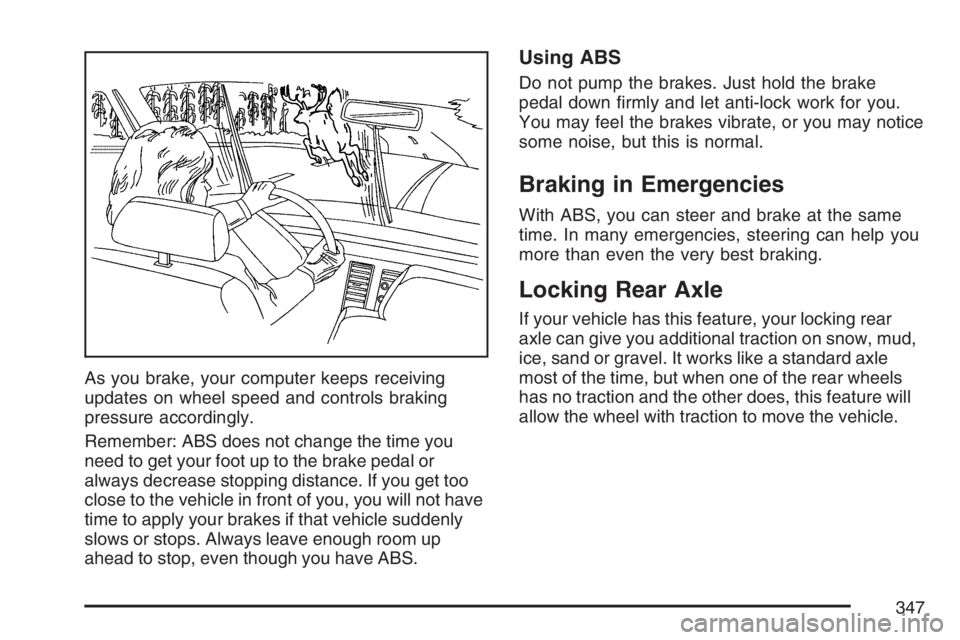
As you brake, your computer keeps receiving
updates on wheel speed and controls braking
pressure accordingly.
Remember: ABS does not change the time you
need to get your foot up to the brake pedal or
always decrease stopping distance. If you get too
close to the vehicle in front of you, you will not have
time to apply your brakes if that vehicle suddenly
slows or stops. Always leave enough room up
ahead to stop, even though you have ABS.
Using ABS
Do not pump the brakes. Just hold the brake
pedal down rmly and let anti-lock work for you.
You may feel the brakes vibrate, or you may notice
some noise, but this is normal.
Braking in Emergencies
With ABS, you can steer and brake at the same
time. In many emergencies, steering can help you
more than even the very best braking.
Locking Rear Axle
If your vehicle has this feature, your locking rear
axle can give you additional traction on snow, mud,
ice, sand or gravel. It works like a standard axle
most of the time, but when one of the rear wheels
has no traction and the other does, this feature will
allow the wheel with traction to move the vehicle.
347
Page 355 of 608
Check your mirrors, glance over your shoulder
and start your left lane change signal before
moving out of the right lane to pass. When you
are far enough ahead of the passed vehicle
to see its front in your inside mirror, activate
your right lane change signal and move
back into the right lane. Remember that if your
passenger side outside mirror is convex, the
vehicle you just passed may seem to be
farther away from you than it really is.
Try not to pass more than one vehicle at a
time on two-lane roads. Reconsider before
passing the next vehicle.
Do not overtake a slowly moving vehicle too
rapidly. Even though the brake lamps are
not ashing, it may be slowing down or starting
to turn.
If you are being passed, make it easy for the
following driver to get ahead of you. Perhaps
you can ease a little to the right.
Loss of Control
Let us review what driving experts say about what
happens when the three control systems — brakes,
steering, and acceleration — do not have enough
friction where the tires meet the road to do what the
driver has asked.
In any emergency, do not give up. Keep trying to
steer and constantly seek an escape route or
area of less danger.
Skidding
In a skid, a driver can lose control of the vehicle.
Defensive drivers avoid most skids by taking
reasonable care suited to existing conditions, and
by not overdriving those conditions. But skids
are always possible.
The three types of skids correspond to your
vehicle’s three control systems. In the braking skid,
your wheels are not rolling. In the steering or
cornering skid, too much speed or steering in a
curve causes tires to slip and lose cornering force.
And in the acceleration skid, too much throttle
causes the driving wheels to spin.
A cornering skid is best handled by easing your
foot off the accelerator pedal.
355
Page 360 of 608
Getting Familiar with Off-Road Driving
It is a good idea to practice in an area that is
safe and close to home before you go into
the wilderness. Off-road driving does require some
new and different skills. Here is what we mean.
Tune your senses to different kinds of signals.
Your eyes, for example, need to constantly sweep
the terrain for unexpected obstacles. Your ears
need to listen for unusual tire or engine sounds.
With your arms, hands, feet and body, you
will need to respond to vibrations and vehicle
bounce.
Controlling your vehicle is the key to successful
off-road driving. One of the best ways to
control your vehicle is to control your speed. Here
are some things to keep in mind. At higher
speeds:
You approach things faster and you have less
time to scan the terrain for obstacles.
You have less time to react.
You have more vehicle bounce when you
drive over obstacles.
You will need more distance for braking,
especially since you are on an unpaved
surface.
{CAUTION:
When you are driving off-road, bouncing
and quick changes in direction can easily
throw you out of position. This could
cause you to lose control and crash. So,
whether you are driving on or off the road,
you and your passengers should wear
safety belts.
360
Page 406 of 608
Trailering is different than just driving your vehicle
by itself. Trailering means changes in acceleration,
braking, handling, durability and fuel economy.
Successful, safe trailering takes correct equipment,
and it has to be used properly.
That’s the reason for this part. In it are many
time-tested, important trailering tips and safety
rules. Many of these are important for your safety
and that of your passengers. So please read
this section carefully before you pull a trailer.
If You Do Decide To Pull A Trailer
If you do, here are some important points:
There are many different laws, including speed
limit restrictions, having to do with trailering.
Make sure your rig will be legal, not only where
you live but also where you’ll be driving. A
good source for this information can be state
or provincial police.
Consider using a sway control. See “Hitches”
later in this section.
Don’t tow a trailer at all during the rst
500 miles (800 km) your new vehicle is driven.
Your engine, axle or other parts could be
damaged.
Then, during the rst 500 miles (800 km) that
you tow a trailer, don’t drive over 50 mph
(80 km/h) and don’t make starts at full throttle.
This helps your engine and other parts of
your vehicle wear in at the heavier loads.
You can tow in DRIVE (D). You may want to
shift the transmission to THIRD (3) or, if
necessary, a lower gear selection if the
transmission shifts too often (e.g., under heavy
loads and/or hilly conditions). See “Tow/Haul
Mode” later in this section.
Three important considerations have to do with
weight:
The weight of the trailer
The weight of the trailer tongue
The weight on your vehicle’s tires
Tow/Haul Mode
Tow/Haul is a feature that assists when pulling a
heavy trailer or a large or heavy load. The
purpose of the Tow/Haul mode is to:
Reduce the frequency and improve the
predictability of transmission shifts when
pulling a heavy trailer or a large or heavy load.
406
Page 441 of 608
Notice:Use only engine oil identied as
meeting GM Standard GM6094M and showing
the American Petroleum Institute Certied
For Gasoline Engines starburst symbol. Failure
to use the recommended oil can result in
engine damage not covered by your warranty.
GM Goodwrench
®oil meets all the requirements
for your vehicle.
If you are in an area of extreme cold, where the
temperature falls below−20°F (−29°C), it is
recommended that you use either an SAE 5W-30
synthetic oil or an SAE 0W-30 oil. Both will
provide easier cold starting and better protection
for your engine at extremely low temperatures.
Engine Oil Additives
Do not add anything to your oil. The recommended
oils with the starburst symbol that meet GM
Standard GM6094M are all you will need for good
performance and engine protection.
Engine Oil Life System
When to Change Engine Oil
Your vehicle has a computer system that lets you
know when to change the engine oil and lter.
This is based on engine revolutions and engine
temperature, and not on mileage. Based on driving
conditions, the mileage at which an oil change
will be indicated can vary considerably. For the oil
life system to work properly, you must reset the
system every time the oil is changed.
When the system has calculated that oil life has
been diminished, it will indicate that an oil change
is necessary. A CHANGE ENGINE OIL SOON
message will come on. SeeDIC Warnings
and Messages on page 254. Change your
oil as soon as possible within the next
600 miles (1 000 km). It is possible that, if you are
driving under the best conditions, the oil life
system may not indicate that an oil change is
necessary for over a year. However, your engine
oil and lter must be changed at least once a
year and at this time the system must be reset.
441
Page 442 of 608
Your dealer has GM-trained service people who
will perform this work using genuine GM parts and
reset the system. It is also important to check
your oil regularly and keep it at the proper level.
If the system is ever reset accidentally, you
must change your oil at 3,000 miles (5 000 km)
since your last oil change. Remember to reset the
oil life system whenever the oil is changed.
How to Reset the Engine Oil Life
System
The Engine Oil Life System calculates when to
change your engine oil and lter based on vehicle
use. Anytime your oil is changed, reset the system
so it can calculate when the next oil change is
required. If a situation occurs where you change
your oil prior to a CHANGE ENGINE OIL SOON
message being turned on, reset the system.
Always reset the engine oil life to 100% after every
oil change. It will not reset itself. To reset the
Engine Oil Life System, do the following:
1. Display the OIL LIFE REMAINING on the DIC.
2. Press and hold the SET/RESET button on the
DIC for more than ve seconds. The oil life
will change to 100%.If the CHANGE ENGINE OIL SOON message
comes back on when you start your vehicle, the
Engine Oil Life System has not reset. Repeat
the procedure.
What to Do with Used Oil
Used engine oil contains certain elements that may
be unhealthy for your skin and could even cause
cancer. Do not let used oil stay on your skin for very
long. Clean your skin and nails with soap and
water, or a good hand cleaner. Wash or properly
dispose of clothing or rags containing used engine
oil. See the manufacturer’s warnings about the use
and disposal of oil products.
Used oil can be a threat to the environment. If you
change your own oil, be sure to drain all the oil from
the lter before disposal. Never dispose of oil by
putting it in the trash, pouring it on the ground, into
sewers, or into streams or bodies of water. Instead,
recycle it by taking it to a place that collects used
oil. If you have a problem properly disposing of
used oil, ask your dealer, a service station, or a
local recycling center for help.
442