radio GMC YUKON XL 2007 Repair Manual
[x] Cancel search | Manufacturer: GMC, Model Year: 2007, Model line: YUKON XL, Model: GMC YUKON XL 2007Pages: 608, PDF Size: 3.01 MB
Page 332 of 608
Rear Seat Audio (RSA)
This feature allows rear seat passengers to listen
to and control any of the music sources: radio,
CDs, DVDs, or other auxiliary sources. However,
the rear seat passengers can only control the
music sources the front seat passengers are not
listening to (except on some radios where
dual control is allowed). For example, rear seat
passengers can listen to and control a CD through
the headphones, while the driver listens to the
radio through the front speakers. The rear
seat passengers have control of the volume for
each set of headphones.
You can operate the RSA functions even when
the main radio is off.
Audio can be heard through wired headphones
(not included) plugged into the jacks on the RSA.
If your vehicle has this feature, audio can also
be heard on Channel 2 of the wireless
headphones.
The audio system mutes the rear speakers when
the RSA audio is active through the headphones.
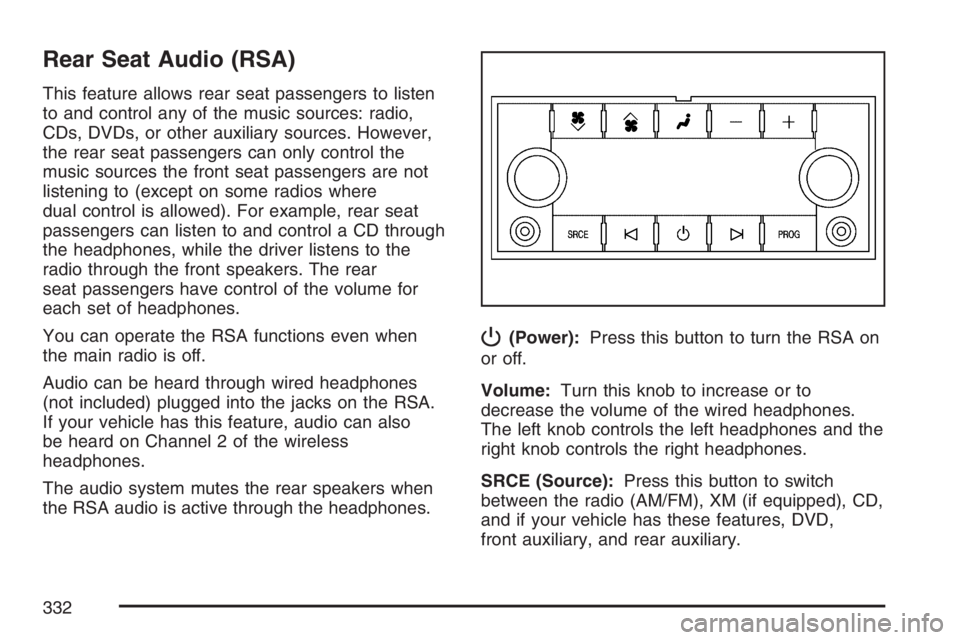
P(Power):Press this button to turn the RSA on
or off.
Volume:Turn this knob to increase or to
decrease the volume of the wired headphones.
The left knob controls the left headphones and the
right knob controls the right headphones.
SRCE (Source):Press this button to switch
between the radio (AM/FM), XM (if equipped), CD,
and if your vehicle has these features, DVD,
front auxiliary, and rear auxiliary.
332
Page 333 of 608
©¨(Seek):When listening to FM, AM, or XM
(if equipped), press the seek up or the seek
down arrow to go to the next or the previous
station or channels and stay there. This function is
inactive, with some radios, if the front seat
passengers are listening to the radio.
Press and hold the seek up or seek down arrow
until the display ashes, to tune to an individual
station. The display will stop ashing after
the buttons have not been pushed for more than
two seconds. This function is inactive, with
some radios, if the front seat passengers are
listening to the radio.
While listening to a CD, press the seek up arrow to
hear the next track on the CD. Press the seek down
arrow to go back to the start of the current track (if
more than ten seconds have played). This function
is inactive, with some radios, if the front seat
passengers are listening to the radio.
When a DVD video menu is being displayed, press
the seek up arrow or seek down arrow to perform a
cursor up or down on the menu. Hold the seek up
arrow or seek down arrow to perform a cursor right
or left on the menu.PROG (Program):Press this button to go to the
next preset radio station or channel set on the
main radio. This function is inactive, with
some radios, if the front seat passengers are
listening to the radio.
When a CD or DVD audio is playing, press this
button to go to the beginning of the CD or
DVD audio. This function is inactive, with some
radios, if the front seat passengers are listening to
the CD or DVD audio.
When a disc audio is playing in the CD or DVD
changer, press this button to select the next disc, if
multiple discs are loaded. This function is
inactive, with some radios, if the front seat
passengers are listening to the disc.
When a DVD video menu is being displayed,
press the PROG button to perform the menu
function, enter.
333
Page 334 of 608
Theft-Deterrent Feature
THEFTLOCK®is designed to discourage theft of
your vehicle’s radio. The feature works
automatically by learning a portion of the Vehicle
Identication Number (VIN). If the radio is
moved to a different vehicle, it will not operate and
LOCKED will appear on the display.
When the radio and vehicle are turned off, the
blinking red light indicates that THEFTLOCK
®is
armed.
With THEFTLOCK
®activated, the radio will not
operate if stolen.
Audio Steering Wheel Controls
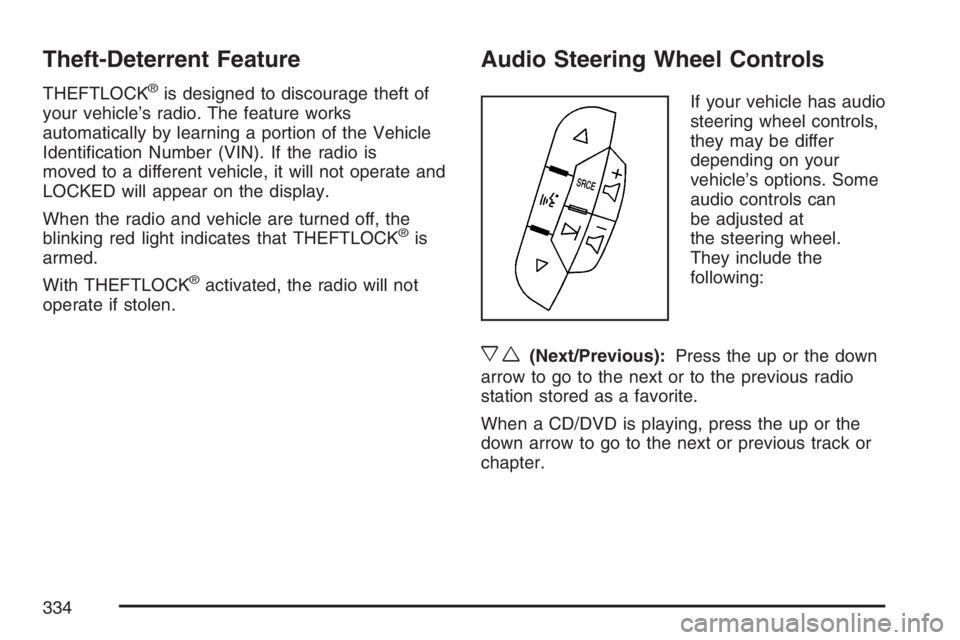
If your vehicle has audio
steering wheel controls,
they may be differ
depending on your
vehicle’s options. Some
audio controls can
be adjusted at
the steering wheel.
They include the
following:
xw(Next/Previous):Press the up or the down
arrow to go to the next or to the previous radio
station stored as a favorite.
When a CD/DVD is playing, press the up or the
down arrow to go to the next or previous track or
chapter.
334
Page 335 of 608
g(Mute/Voice Recognition):Press and release
this button to silence the vehicle speakers only.
The audio of the wireless and wired headphones, if
your vehicle has these features, will not be
muted. Press and release this button again, to
turn the sound on.
If your vehicle has the navigation system, press
and hold this button for longer than one second to
initiate voice recognition. See “Voice Recognition”
in the Navigation System manual for more
information.
If your vehicle has OnStar
®, press and hold this
button for longer than one second to interact
with the OnStar system. If your vehicle is also
equipped with the navigation system, press
and hold this button for longer than one second to
initiate voice recognition and say “OnStar” to
enter OnStar
®mode. See theOnStar®System on
page 167in this manual for more information.
SRCE (Source):Press this button to switch
between the radio (AM, FM), XM (if equipped),
CD, and if your vehicle has these features, DVD,
front auxiliary, and rear auxiliary.+
e−e(Volume):Press the plus or minus
button to increase or to decrease the radio volume.
¨(Seek):Press the seek arrow to go to the next
radio station while in AM, FM, or XM (if equipped).
Press this button to go to the next track or chapter
while sourced to the DVD slot. Press the button to
go to the next disc while sourced to a CD or DVD
changer, if multiple discs are loaded.
Radio Reception
You may experience frequency interference and
static during normal radio reception if items
such as cellphone chargers, vehicle convenience
accessories, and external electronic devices
are plugged into the accessory power outlet.
If there is interference or static, unplug the item
from the accessory power outlet.
335
Page 336 of 608
AM
The range for most AM stations is greater than for
FM, especially at night. The longer range can
cause station frequencies to interfere with each
other. For better radio reception, most AM
radio stations will boost the power levels during
the day, and then reduce these levels during
the night. Static can also occur when things like
storms and power lines interfere with radio
reception. When this happens, try reducing the
treble on your radio.
FM Stereo
FM stereo will give the best sound, but FM signals
will reach only about 10 to 40 miles (16 to 65 km).
Tall buildings or hills can interfere with FM
signals, causing the sound to fade in and out.
XM™ Satellite Radio Service
XM™ Satellite Radio Service gives digital radio
reception from coast-to-coast in the 48 contiguous
United States, and in Canada (if available). Just
as with FM, tall buildings or hills can interfere with
satellite radio signals, causing the sound to
fade in and out.In addition, traveling or standing under heavy
foliage, bridges, garages, or tunnels may cause
loss of the XM™ signal for a period of time.
The radio may display NO SIGNAL to indicate
interference.
Care of Your CDs and DVDs
Handle CDs carefully. Store them in their original
cases or other protective cases and away from
direct sunlight and dust. The CD player scans the
bottom surface of the disc. If the surface of a
CD is damaged, such as cracked, broken,
or scratched, the CD will not play properly or not
at all. If the surface of a CD is soiled, take a
soft, lint free cloth or dampen a clean, soft cloth in
a mild, neutral detergent solution mixed with
water, and clean it. Make sure the wiping process
starts from the center to the edge.
Do not touch the bottom side of a CD while
handling it; this could damage the surface. Pick up
CDs by grasping the outer edges or the edge of
the hole and the outer edge.
336
Page 337 of 608
Care of the CD and DVD Player
The use of CD lens cleaners for CDs is not
advised, due to the risk of contaminating the lens
of the CD optics with lubricants internal to the
CD mechanism.
Rear Side Window Antenna
Your AM-FM antenna is located in the passenger
rear side windows. Be sure that the inside
surfaces of the rear side windows are not
scratched and that the lines on the glass are not
damaged. If the inside surfaces are damaged, they
could interfere with radio reception.
Notice:Using a razor blade or sharp object to
clear the inside of the rear side windows
may affect radio reception or damage the rear
window defogger. Repairs would not be
covered by your warranty. Do not clear the
inside of the rear side windows with sharp
objects.
Notice:Do not apply aftermarket glass tinting
with metallic lm. The metallic lm in some
tinting materials will interfere with or distort the
incoming radio reception. Any damage caused
to your antenna due to metallic tinting materials
will not be covered by your warranty.Because this antenna is built into your rear side
window, there is a reduced risk of damage caused
by car washes and vandals.
If you choose to add an aftermarket cellular
telephone to your vehicle, and the antenna needs
to be attached to the glass, be sure that you
do not damage the grid lines for the AM-FM
antennas or place the cellular telephone antenna
over the grid lines.
XM™ Satellite Radio Antenna
System
The XM™ Satellite Radio antenna is located on
the roof of your vehicle. Keep this antenna clear of
snow and ice build up for clear radio reception.
The performance of the XM™ system may
be affected if the sunroof is open.
Loading items onto the roof of your vehicle can
interfere with the performance of the XM™ system.
Make sure that the XM™ satellite antenna is not
obstructed.
337
Page 468 of 608
Notice:If you leave your radio or other
accessories on during the jump starting
procedure, they could be damaged. The repairs
would not be covered by your warranty. Always
turn off your radio and other accessories when
jump starting your vehicle.
3. Turn off the ignition on both vehicles. Unplug
unnecessary accessories plugged into the
cigarette lighter or the accessory power
outlets. Turn off the radio and all the lamps
that are not needed. This will avoid sparks and
help save both batteries. And it could save
the radio!
4. Open the hood on the other vehicle and
locate the positive (+) and negative (−)
terminal locations on that vehicle.
Your vehicle has a remote positive (+) jump
starting terminal and a remote negative (−)
jump starting terminal. You should always use
these remote terminals instead of the
terminals on the battery.The remote positive (+) terminal, if equipped, is
located under a red plastic cover at the positive
battery post. To uncover the remote positive (+)
terminal, open the red plastic cover.
The remote negative (-) terminal is a stud
located on the right front of the engine, where
the negative battery cable attaches.
SeeEngine Compartment Overview on
page 436for more information on the location
of the remote positive (+) and remote
negative (−) terminals.
{CAUTION:
An electric fan can start up even when the
engine is not running and can injure you.
Keep hands, clothing and tools away from
any underhood electric fan.
468
Page 492 of 608
Remove the valve cap from the tire valve stem.
Press the tire gage rmly onto the valve to
get a pressure measurement. If the cold tire
ination pressure matches the recommended
pressure on the Tire and Loading Information
label, no further adjustment is necessary. If the
ination pressure is low, add air until you reach the
recommended amount.
If you overll the tire, release air by pushing on
the metal stem in the center of the tire valve.
Recheck the tire pressure with the tire gage.
Be sure to put the valve caps back on the valve
stems. They help prevent leaks by keeping out dirt
and moisture.Tire Pressure Monitor System
The Tire Pressure Monitor System (TPMS) uses
radio and sensor technology to check tire pressure
levels. If your vehicle has this feature, sensors
are mounted on each tire and wheel assembly,
except the spare tire. The TPMS sensors monitor
the air pressure in your vehicle’s tires and
transmit tire pressure readings to a receiver
located in the vehicle.
The TPMS is designed to alert the driver, if a low
tire pressure condition exists. If your vehicle has the
Driver Information Center (DIC), the driver may also
check tire pressure levels using the DIC.
When a low tire pressure condition is detected,
the TPMS will illuminate the low tire pressure
warning symbol located on the instrument panel
cluster. If your vehicle has the DIC feature, a
message to check the pressure in a specic tire
will also appear on the DIC display. The low
tire pressure warning symbol on the instrument
panel cluster and the CHECK TIRE PRESSURE
warning message on the DIC display will appear at
each ignition cycle until the tires are inated to
the correct ination pressure.
492
Page 496 of 608
6. Remove the valve cap from the valve cap stem.
Activate the TPMS sensor by increasing or
decreasing the tire’s air pressure for
ve seconds, or until a horn chirp sounds.
The horn chirp, which make take up to
30 seconds to sound, conrms that the sensor
identication code has been matched to this
tire and wheel position. To decrease
air-pressure out of a tire you can use the
pointed end of the valve cap, a pencil-style air
pressure gage, or a key.
7. Proceed to the passenger’s side front tire, and
repeat the procedure in Step 6.
8. Proceed to the passenger’s side rear tire, and
repeat the procedure in Step 6.
9. Proceed to the driver’s side rear tire, and
repeat the procedure in Step 6.
10. After hearing the conrming horn chirp for the
driver’s side rear tire, the horn chirp will sound
two more times to signal the tire learning
mode is no longer active. Turn the ignition
switch to LOCK.11. Set all four tires to the recommended air
pressure level as indicated on the Tire
and Loading Information label.
12. Put the valve caps back on the valve stems
The spare tire does not have a TPMS sensor.
If you replace one of the road tires with the spare,
the SERVICE TIRE MONITOR message will be
displayed on the DIC screen. This message should
go off once you re-install the road tire containing
the TPMS sensor.
Federal Communications Commission
(FCC) and Industry and Science
Canada
The Tire Pressure Monitor System (TPMS)
operates on a radio frequency and complies with
Part 15 of the FCC Rules. Operation is subject
to the following two conditions:
1. This device may not cause harmful
interference.
2. This device must accept any interference
received, including interference that may
cause undesired operation.
496
Page 497 of 608
The Tire Pressure Monitor System (TPMS)
operates on a radio frequency and complies
with RSS-210 of Industry and Science Canada.
Operation is subject to the following
two conditions:
1. This device may not cause interference.
2. This device must accept any interference
received, including interference that may
cause undesired operation of the device.
Changes or modications to this system by other
than an authorized service facility could void
authorization to use this equipment.
Tire Inspection and Rotation
Tires should be rotated every 5,000 to 8,000 miles
(8 000 to 13 000 km).
Any time you notice unusual wear, rotate your
tires as soon as possible and check wheel
alignment. Also check for damaged tires or wheels.
SeeWhen It Is Time for New Tires on page 499
andWheel Replacement on page 504for
more information.Make sure the spare tire is stored securely. Push,
pull, and then try to rotate or turn the tire. If it
moves, use the ratchet/wheel wrench to tighten the
cable. SeeChanging a Flat Tire on page 508.
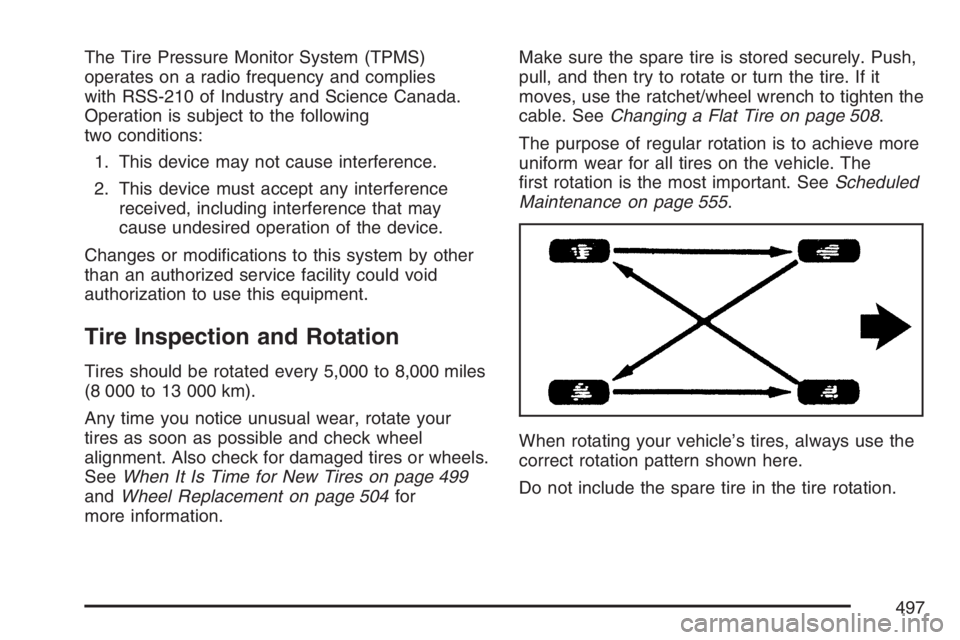
The purpose of regular rotation is to achieve more
uniform wear for all tires on the vehicle. The
rst rotation is the most important. SeeScheduled
Maintenance on page 555.
When rotating your vehicle’s tires, always use the
correct rotation pattern shown here.
Do not include the spare tire in the tire rotation.
497