radio GMC YUKON XL 2010 Repair Manual
[x] Cancel search | Manufacturer: GMC, Model Year: 2010, Model line: YUKON XL, Model: GMC YUKON XL 2010Pages: 614, PDF Size: 4.64 MB
Page 361 of 614
Radio Reception
Frequency interference and static can occur during
normal radio reception if items such as cell phone
chargers, vehicle convenience accessories, and
external electronic devices are plugged into the
accessory power outlet. If there is interference or static,
unplug the item from the accessory power outlet.
AM
The range for most AM stations is greater than for FM,
especially at night. The longer range can cause station
frequencies to interfere with each other. For better radio
reception, most AM radio stations boost the power
levels during the day, and then reduce these levels
during the night. Static can also occur when things like
storms and power lines interfere with radio reception.
When this happens, try reducing the treble on the radio.
FM Stereo
FM signals only reach about 10 to 40 miles
(16 to 65 km). Although the radio has a built-in electronic
circuit that automatically works to reduce interference,
some static can occur, especially around tall buildings
or hills, causing the sound to fade in and out.
XM™Satellite Radio Service
XM Satellite Radio Service gives digital radio reception
from coast-to-coast in the 48 contiguous United States,
and in Canada. Just as with FM, tall buildings or hills
can interfere with satellite radio signals, causing the
sound to fade in and out. In addition, traveling or
standing under heavy foliage, bridges, garages,
or tunnels may cause loss of the XM signal for a
period of time.
Cellular Phone Usage
Cellular phone usage may cause interference with
the vehicle's radio. This interference may occur
when making or receiving phone calls, charging
the phone's battery, or simply having the phone on.
This interference causes an increased level of static
while listening to the radio. If static is received while
listening to the radio, unplug the cellular phone and
turn it off.
4-139
Page 362 of 614
Rear Side Window Antenna
The AM-FM antenna is located in the passenger rear
side windows. Make sure the inside surfaces of the rear
side windows are not scratched and that the lines on
the glass are not damaged. If the inside surfaces are
damaged, they could interfere with radio reception.
If a cellular telephone antenna needs to be attached to
the glass, make sure that the grid lines for the AM-FM
antenna are not damaged. There is enough space
between the grid lines to attach a cellular telephone
antenna without interfering with radio reception.
Notice:Using a razor blade or sharp object to clear
the inside of the rear side windows may affect radio
reception or damage the rear side window antenna.
Repairs would not be covered by the warranty.
Do not clear the inside of the rear side windows
with sharp objects. Notice:
Do not apply aftermarket glass tinting with
metallic film. The metallic film in some tinting
materials will interfere with or distort the incoming
radio reception. Any damage caused to the antenna
due to metallic tinting materials will not be covered
by the warranty.
XM™ Satellite Radio Antenna
System
The XM Satellite Radio antenna is located on the roof of
the vehicle. Keep the antenna clear of obstructions for
clear radio reception.
If the vehicle has a sunroof, the performance of the XM
system may be affected if the sunroof is open.
4-140
Page 479 of 614
Notice:If you leave the radio or other accessories
on during the jump starting procedure, they could
be damaged. The repairs would not be covered by
the warranty. Always turn off the radio and other
accessories when jump starting the vehicle.
3. Turn off the ignition on both vehicles. Unplug unnecessary accessories plugged into the
cigarette lighter or the accessory power outlets.
Turn off the radio and all the lamps that are not
needed. This avoids sparks and helps save both
batteries. And it could save the radio!
4. Open the hood on the other vehicle and locate the positive (+) and negative (−) terminal locations on
that vehicle.
Your vehicle has a remote positive (+) jump starting
terminal and a remote negative (−) jump starting
terminal. You should always use these remote
terminals instead of the terminals on the battery.
If the vehicle has a remote positive (+) terminal, it
is located under a red plastic cover at the positive
battery post. To uncover the remote positive (+)
terminal, open the red plastic cover.
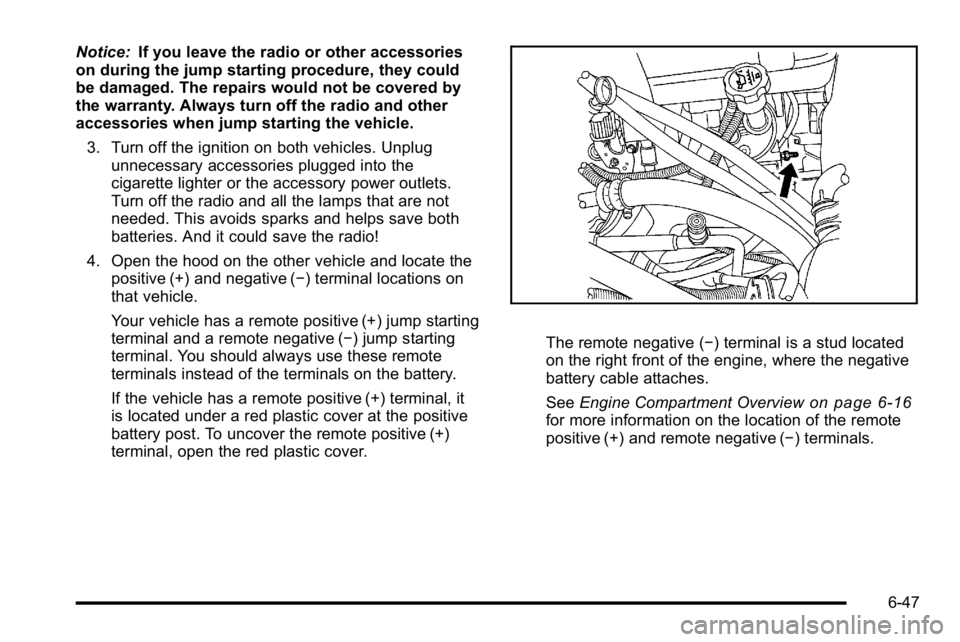
The remote negative (−) terminal is a stud located
on the right front of the engine, where the negative
battery cable attaches.
See Engine Compartment Overview
on page 6‑16for more information on the location of the remote
positive (+) and remote negative (−) terminals.
6-47
Page 505 of 614
How to Check
Use a good quality pocket-type gauge to check
tire pressure. You cannot tell if your tires are
properly inflated simply by looking at them.
Radial tires may look properly inflated even
when they are underinflated. Check the tire's
inflation pressure when the tires are cold.
Cold means your vehicle has been sitting for
at least three hours or driven no more than
1 mile (1.6 km).
Remove the valve cap from the tire valve stem.
Press the tire gauge firmly onto the valve to get
a pressure measurement. If the cold tire inflation
pressure matches the recommended pressure on
the Tire and Loading Information label, no further
adjustment is necessary. If the pressure is low,
add air until you reach the recommended amount.
If you overfill the tire, release air by pushing on
the metal stem in the center of the tire valve.
Recheck the tire pressure with the tire gauge.
Be sure to put the valve caps back on the valve
stems. They help prevent leaks by keeping out dirt
and moisture.
Tire Pressure Monitor System
The Tire Pressure Monitor System (TPMS) uses radio
and sensor technology to check tire pressure levels.
The TPMS sensors monitor the air pressure in your
vehicle's tires and transmit tire pressure readings to a
receiver located in the vehicle.
Each tire, including the spare (if provided), should be
checked monthly when cold and inflated to the inflation
pressure recommended by the vehicle manufacturer
on the vehicle placard or tire inflation pressure label.
(If your vehicle has tires of a different size than the size
indicated on the vehicle placard or tire inflation pressure
label, you should determine the proper tire inflation
pressure for those tires.)
As an added safety feature, your vehicle has been
equipped with a tire pressure monitoring system
(TPMS) that illuminates a low tire pressure telltale when
one or more of your tires is significantly under‐inflated.
6-73
Page 506 of 614
Accordingly, when the low tire pressure telltale
illuminates, you should stop and check your tires
as soon as possible, and inflate them to the proper
pressure. Driving on a significantly under‐inflated tire
causes the tire to overheat and can lead to tire failure.
Under‐inflation also reduces fuel efficiency and tire
tread life, and may affect the vehicle's handling and
stopping ability.
Please note that the TPMS is not a substitute for proper
tire maintenance, and it is the driver's responsibility to
maintain correct tire pressure, even if under‐inflation
has not reached the level to trigger illumination of the
TPMS low tire pressure telltale.
Your vehicle has also been equipped with a TPMS
malfunction indicator to indicate when the system is
not operating properly. The TPMS malfunction indicator
is combined with the low tire pressure telltale. When
the system detects a malfunction, the telltale will
flash for approximately one minute and then remain
continuously illuminated. This sequence will continue
upon subsequent vehicle start‐ups as long as the
malfunction exists.When the malfunction indicator is illuminated, the
system may not be able to detect or signal low tire
pressure as intended. TPMS malfunctions may occur
for a variety of reasons, including the installation of
replacement or alternate tires or wheels on the vehicle
that prevent the TPMS from functioning properly.
Always check the TPMS malfunction telltale after
replacing one or more tires or wheels on your vehicle
to ensure that the replacement or alternate tires and
wheels allow the TPMS to continue to function properly.
See
Tire Pressure Monitor Operation
on page 6‑75for
additional information.
Federal Communications Commission
(FCC) and Industry Canada
See Radio Frequency Statementon page 8‑19for information regarding Part 15 of the Federal
Communications Commission (FCC) Rules and
RSS-210/211 of Industry Canada.
6-74
Page 508 of 614
TPMS Malfunction Light and Message
The TPMS will not function properly if one or more of
the TPMS sensors are missing or inoperable. When the
system detects a malfunction, the low tire warning light
flashes for about one minute and then stays on for the
remainder of the ignition cycle. A DIC warning message
is also displayed. The low tire warning light and DIC
warning message come on at each ignition cycle until
the problem is corrected. Some of the conditions that
can cause the malfunction light and DIC message to
come on are:
.One of the road tires has been replaced with the
spare tire. The spare tire does not have a TPMS
sensor. The TPMS malfunction light and DIC
message should go off once you re‐install the
road tire containing the TPMS sensor.
.The TPMS sensor matching process was started
but not completed or not completed successfully
after rotating the vehicle's tires. The DIC message
and TPMS malfunction light should go off once
the TPMS sensor matching process is performed
successfully. See“TPMS Sensor Matching
Process” later in this section.
.One or more TPMS sensors are missing or
damaged. The DIC message and the TPMS
malfunction light should go off when the TPMS
sensors are installed and the sensor matching
process is performed successfully. See your
dealer for service.
.Replacement tires or wheels do not match your
vehicle's original equipment tires or wheels.
Tires and wheels other than those recommended
for your vehicle could prevent the TPMS from
functioning properly. See Buying New Tires
on
page 6‑80.
.Operating electronic devices or being near facilities
using radio wave frequencies similar to the TPMS
could cause the TPMS sensors to malfunction.
If the TPMS is not functioning it cannot detect or signal
a low tire condition. See your dealer for service if the
TPMS malfunction light and DIC message comes on
and stays on.
6-76
Page 550 of 614
Electrical System
Add-On Electrical Equipment
Notice:Do not add anything electrical to the vehicle
unless you check with your dealer first. Some
electrical equipment can damage the vehicle and
the damage would not be covered by the vehicle's
warranty. Some add-on electrical equipment can
keep other components from working as they
should.
Add-on equipment can drain the vehicle battery, even if
the vehicle is not operating.
The vehicle has an airbag system. Before attempting
to add anything electrical to the vehicle, see Servicing
Your Airbag-Equipped Vehicle
on page 2‑99and
Adding Equipment to Your Airbag-Equipped Vehicleon
page 2‑100.
Windshield Wiper Fuses
The windshield wiper motor is protected by an internal
circuit breaker and a fuse. If the motor overheats due
to heavy snow, etc., the wiper will stop until the motor
cools. If the overload is caused by some electrical
problem and not snow, etc., be sure to get it fixed.
Power Windows and Other Power
Options
Circuit breakers protect the power windows and other
power accessories. If the current load is too heavy, the
circuit breaker opens and then closes after a cool down
period, protecting the circuit until the problem is fixed or
goes away.
Fuses and Circuit Breakers
If the vehicle is a Two-mode Hybrid, see the Two-mode
Hybrid manual for more information.
The wiring circuits in the vehicle are protected from
short circuits by a combination of fuses, circuit breakers
and fusible thermal links. This greatly reduces the
chance of fires caused by electrical problems.
Look at the silver-colored band inside the fuse. If the
band is broken or melted, replace the fuse. Be sure you
replace a bad fuse with a new one of the identical size
and rating.
If you ever have a problem on the road and don't
have a spare fuse, you can borrow one that has
the same amperage. Just pick some feature of your
vehicle that you can get along without –like the
radio or cigarette lighter –and use its fuse, if it is the
correct amperage. Replace it as soon as you can.
6-118
Page 579 of 614
Section 8 Customer Assistance Information
Customer Assistance and Information. . . . . . . . . . .8-2
Customer Satisfaction Procedure . . . . . . . . . . . . . . . 8-2
Online Owner Center . . . . . . . . . . . . . . . . . . . . . . . . . . . . 8-5
Customer Assistance for Text Telephone (TTY) Users . . . . . . . . . . . . . . . . . . . . . . . . . . . . . . . . . . . . . . . . . 8-6
Customer Assistance Offices . . . . . . . . . . . . . . . . . . . 8-6
GM Mobility Reimbursement Program . . . . . . . . . . . 8-7
Roadside Assistance Program . . . . . . . . . . . . . . . . . . 8-7
Scheduling Service Appointments . . . . . . . . . . . . . 8-10
Courtesy Transportation Program . . . . . . . . . . . . . . 8-10
Collision Damage Repair . . . . . . . . . . . . . . . . . . . . . . 8-12 Reporting Safety Defects
. . . . . . . . . . . . . . . . . . . . . . . .8-15
Reporting Safety Defects to the United States Government . . . . . . . . . . . . . . . . . . . . . . . . . . . . . . . . . 8-15
Reporting Safety Defects to the Canadian Government . . . . . . . . . . . . . . . . . . . . . . . . . . . . . . . . . 8-15
Reporting Safety Defects to General Motors . . . 8-16
Service Publications Ordering Information . . . . . 8-16
Vehicle Data Recording and Privacy . . . . . . . . . . . . .8-17
Event Data Recorders . . . . . . . . . . . . . . . . . . . . . . . . . 8-18
OnStar
®. . . . . . . . . . . . . . . . . . . . . . . . . . . . . . . . . . . . . . . 8-18
Navigation System . . . . . . . . . . . . . . . . . . . . . . . . . . . . . 8-19
Radio Frequency Identification (RFID) . . . . . . . . . 8-19
Radio Frequency Statement . . . . . . . . . . . . . . . . . . . 8-19
8-1
Page 595 of 614
Current and Past Model Order Forms
Technical Service Bulletins and Manuals are available
for current and past model GM vehicles. To request an
order form, specify year and model name of the vehicle.
ORDER TOLL FREE: 1-800-551-4123
Monday-Friday 8:00 AM - 6:00 PM
Eastern Time
For Credit Card Orders Only
(VISA-MasterCard-Discover), visit Helm, Inc. on the
World Wide Web at: helminc.com
Or you can write to:Helm, Incorporated
P.O. Box 07130
Detroit, MI 48207
Prices are subject to change without notice and without
incurring obligation. Allow ample time for delivery.
Note to Canadian Customers: All listed prices are
quoted in U.S. funds. Canadian residents are to make
checks payable in U.S. funds.
Vehicle Data Recording and
Privacy
Your GM vehicle has a number of sophisticated
computers that record information about the vehicle’s
performance and how it is driven. For example, your
vehicle uses computer modules to monitor and control
engine and transmission performance, to monitor the
conditions for airbag deployment and deploy airbags in
a crash and, if so equipped, to provide antilock braking
to help the driver control the vehicle. These modules
may store data to help your dealer technician service
your vehicle. Some modules may also store data about
how you operate the vehicle, such as rate of fuel
consumption or average speed. These modules may
also retain the owner ’s personal preferences, such as
radio pre-sets, seat positions, and temperature settings.
8-17
Page 597 of 614
Navigation System
If your vehicle has a navigation system, use of the
system may result in the storage of destinations,
addresses, telephone numbers, and other trip
information. Refer to the navigation system operating
manual for information on stored data and for deletion
instructions.
Radio Frequency
Identification (RFID)
RFID technology is used in some vehicles for functions
such as tire pressure monitoring and ignition system
security, as well as in connection with conveniences
such as key fobs for remote door locking/unlocking and
starting, and in-vehicle transmitters for garage door
openers. RFID technology in GM vehicles does not use
or record personal information or link with any other GM
system containing personal information.
Radio Frequency Statement
This vehicle has systems that operate on a radio
frequency that comply with Part 15 of the Federal
Communications Commission (FCC) Rules and with
RSS-210/211 of Industry Canada.
Operation is subject to the following two conditions:1. The device may not cause interference.
2. The device must accept any interference received, including interference that may cause undesired
operation of the device.
Changes or modifications to any of these systems by
other than an authorized service facility could void
authorization to use this equipment.
8-19