ECU GMC YUKON XL 2011 Workshop Manual
[x] Cancel search | Manufacturer: GMC, Model Year: 2011, Model line: YUKON XL, Model: GMC YUKON XL 2011Pages: 528, PDF Size: 7.64 MB
Page 399 of 528
Black plate (21,1)GMC Yukon/Yukon XL Owner Manual - 2011
Vehicle Care 10-21
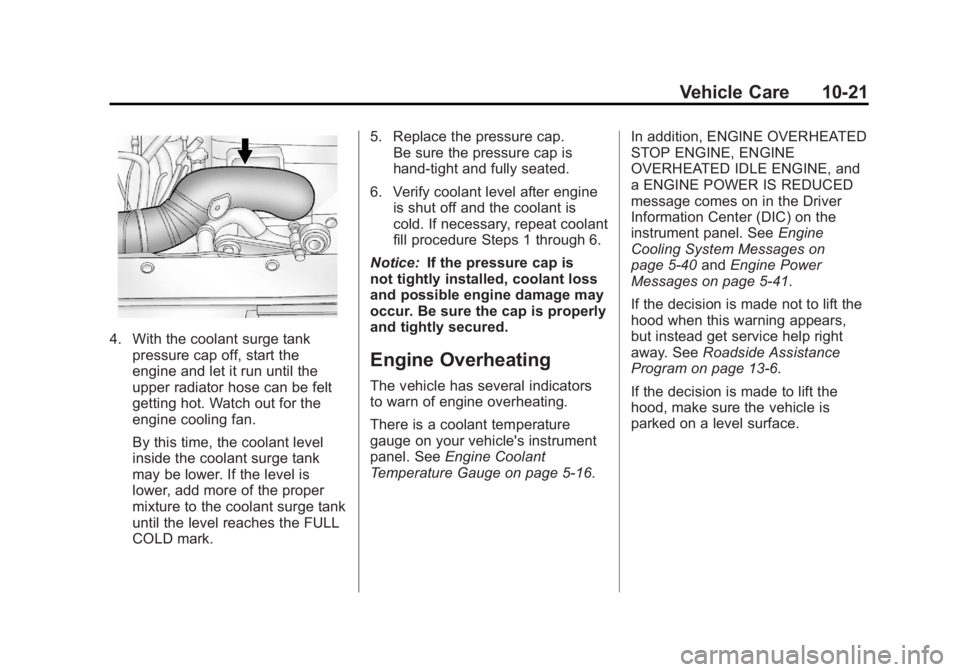
4. With the coolant surge tankpressure cap off, start the
engine and let it run until the
upper radiator hose can be felt
getting hot. Watch out for the
engine cooling fan.
By this time, the coolant level
inside the coolant surge tank
may be lower. If the level is
lower, add more of the proper
mixture to the coolant surge tank
until the level reaches the FULL
COLD mark. 5. Replace the pressure cap.
Be sure the pressure cap is
hand-tight and fully seated.
6. Verify coolant level after engine is shut off and the coolant is
cold. If necessary, repeat coolant
fill procedure Steps 1 through 6.
Notice: If the pressure cap is
not tightly installed, coolant loss
and possible engine damage may
occur. Be sure the cap is properly
and tightly secured.
Engine Overheating
The vehicle has several indicators
to warn of engine overheating.
There is a coolant temperature
gauge on your vehicle's instrument
panel. See Engine Coolant
Temperature Gauge on page 5‑16. In addition, ENGINE OVERHEATED
STOP ENGINE, ENGINE
OVERHEATED IDLE ENGINE, and
a ENGINE POWER IS REDUCED
message comes on in the Driver
Information Center (DIC) on the
instrument panel. See
Engine
Cooling System Messages on
page 5‑40 andEngine Power
Messages on page 5‑41.
If the decision is made not to lift the
hood when this warning appears,
but instead get service help right
away. See Roadside Assistance
Program on page 13‑6.
If the decision is made to lift the
hood, make sure the vehicle is
parked on a level surface.
Page 448 of 528
Black plate (70,1)GMC Yukon/Yukon XL Owner Manual - 2011
10-70 Vehicle Care
Tire Chains
If your vehicle is a Hybrid, see
the Hybrid Supplement for more
information.
{WARNING
If your vehicle has P265/65R18 or
P275/55R20 size tires, do not use
tire chains. They can damage
your vehicle because there is not
enough clearance. Tire chains
used on a vehicle without the
proper amount of clearance can
cause damage to the brakes,
suspension, or other vehicle
parts. The area damaged by the
tire chains could cause you to
lose control of your vehicle and
you or others may be injured in a
crash.(Continued)
WARNING (Continued)
Use another type of traction
device only if its manufacturer
recommends it for use on your
vehicle and tire size combination
and road conditions. Follow
that manufacturer's instructions.
To help avoid damage to your
vehicle, drive slowly, readjust
or remove the device if it is
contacting your vehicle, and do
not spin your vehicle's wheels.
If you do find traction devices that
will fit, install them on the rear
tires. Notice:
If your vehicle has
P265/70R17 size tires, use tire
chains only where legal and
only when you must. Use chains
that are the proper size for your
vehicle's tires. Install them on the
rear tires only.
Do not use chains on the front
tires.
Tighten them as tightly as
possible with the ends securely
fastened. Drive slowly and
follow the chain manufacturer's
instructions. If you can hear the
chains contacting your vehicle,
stop and retighten them. If the
contact continues, slow down
until it stops. Driving too fast or
spinning the wheels with chains
on will damage your vehicle.
Page 460 of 528
Black plate (82,1)GMC Yukon/Yukon XL Owner Manual - 2011
10-82 Vehicle Care
Pull the pin through the center of
the wheel. Tilt the retainer down
through the center wheel
opening.
Make sure the retainer is fully
seated across the underside of
the wheel.
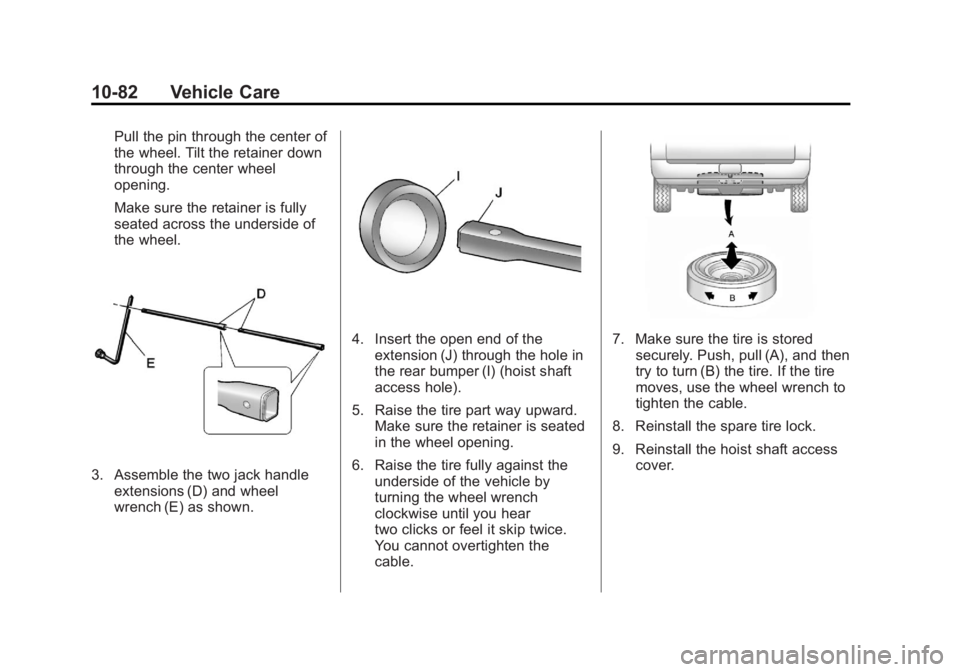
3. Assemble the two jack handleextensions (D) and wheel
wrench (E) as shown.
4. Insert the open end of theextension (J) through the hole in
the rear bumper (I) (hoist shaft
access hole).
5. Raise the tire part way upward. Make sure the retainer is seated
in the wheel opening.
6. Raise the tire fully against the underside of the vehicle by
turning the wheel wrench
clockwise until you hear
two clicks or feel it skip twice.
You cannot overtighten the
cable.7. Make sure the tire is storedsecurely. Push, pull (A), and then
try to turn (B) the tire. If the tire
moves, use the wheel wrench to
tighten the cable.
8. Reinstall the spare tire lock.
9. Reinstall the hoist shaft access cover.
Page 461 of 528
Black plate (83,1)GMC Yukon/Yukon XL Owner Manual - 2011
Vehicle Care 10-83
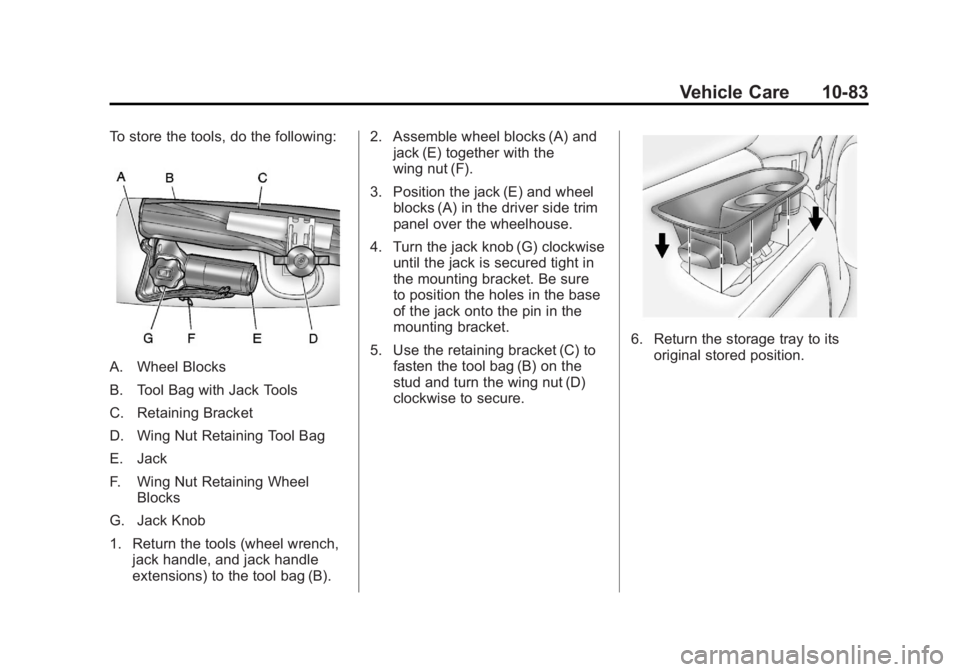
To store the tools, do the following:
A. Wheel Blocks
B. Tool Bag with Jack Tools
C. Retaining Bracket
D. Wing Nut Retaining Tool Bag
E. Jack
F. Wing Nut Retaining WheelBlocks
G. Jack Knob
1. Return the tools (wheel wrench, jack handle, and jack handle
extensions) to the tool bag (B). 2. Assemble wheel blocks (A) and
jack (E) together with the
wing nut (F).
3. Position the jack (E) and wheel blocks (A) in the driver side trim
panel over the wheelhouse.
4. Turn the jack knob (G) clockwise until the jack is secured tight in
the mounting bracket. Be sure
to position the holes in the base
of the jack onto the pin in the
mounting bracket.
5. Use the retaining bracket (C) to fasten the tool bag (B) on the
stud and turn the wing nut (D)
clockwise to secure.
6. Return the storage tray to itsoriginal stored position.
Page 463 of 528
Black plate (85,1)GMC Yukon/Yukon XL Owner Manual - 2011
Vehicle Care 10-85
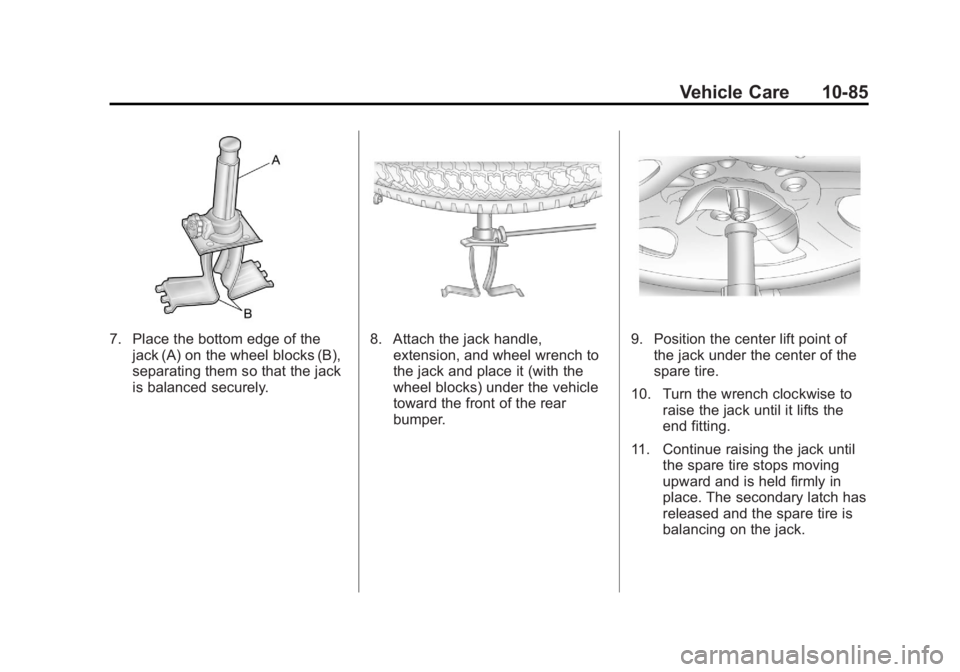
7. Place the bottom edge of thejack (A) on the wheel blocks (B),
separating them so that the jack
is balanced securely.8. Attach the jack handle,extension, and wheel wrench to
the jack and place it (with the
wheel blocks) under the vehicle
toward the front of the rear
bumper.9. Position the center lift point ofthe jack under the center of the
spare tire.
10. Turn the wrench clockwise to raise the jack until it lifts the
end fitting.
11. Continue raising the jack until the spare tire stops moving
upward and is held firmly in
place. The secondary latch has
released and the spare tire is
balancing on the jack.
Page 472 of 528
Black plate (94,1)GMC Yukon/Yukon XL Owner Manual - 2011
10-94 Vehicle Care
Dinghy Towing
Two-Wheel-Drive Vehicles and
Four-Wheel Drive Vehicles
with a Single Speed Automatic
Transfer Case
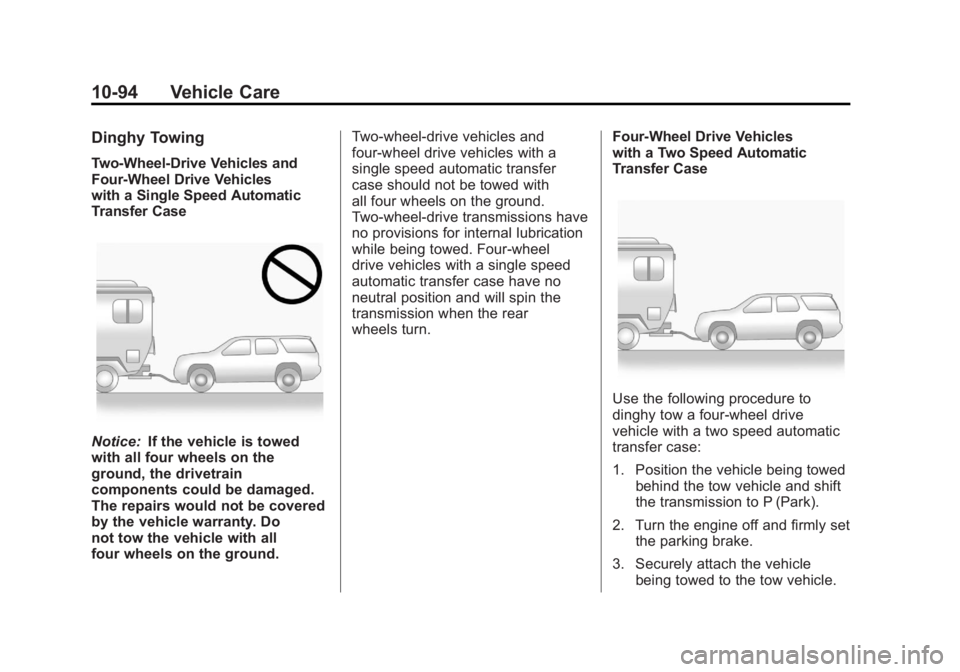
Notice:If the vehicle is towed
with all four wheels on the
ground, the drivetrain
components could be damaged.
The repairs would not be covered
by the vehicle warranty. Do
not tow the vehicle with all
four wheels on the ground. Two-wheel-drive vehicles and
four-wheel drive vehicles with a
single speed automatic transfer
case should not be towed with
all four wheels on the ground.
Two-wheel-drive transmissions have
no provisions for internal lubrication
while being towed. Four-wheel
drive vehicles with a single speed
automatic transfer case have no
neutral position and will spin the
transmission when the rear
wheels turn.
Four-Wheel Drive Vehicles
with a Two Speed Automatic
Transfer Case
Use the following procedure to
dinghy tow a four-wheel drive
vehicle with a two speed automatic
transfer case:
1. Position the vehicle being towed
behind the tow vehicle and shift
the transmission to P (Park).
2. Turn the engine off and firmly set the parking brake.
3. Securely attach the vehicle being towed to the tow vehicle.
Page 475 of 528
Black plate (97,1)GMC Yukon/Yukon XL Owner Manual - 2011
Vehicle Care 10-97
6. Shift the transfer case toN (Neutral). See “Shifting into
N (Neutral)” under“Four-Wheel
Drive”.
7. Secure the vehicle to the dolly following the manufacturer's
instructions.
8. Release the parking brake only after the vehicle being towed is
firmly attached to the towing
vehicle.
9. Turn the ignition to LOCK/OFF.
After towing, see “Shifting Out of
N (Neutral)” under“Four-Wheel
Drive”.Rear Towing (Rear Wheels Off
the Ground)
Two-Wheel-Drive Vehicles and
Four-Wheel Drive Vehicles with a
Single Speed Automatic
Transfer Case
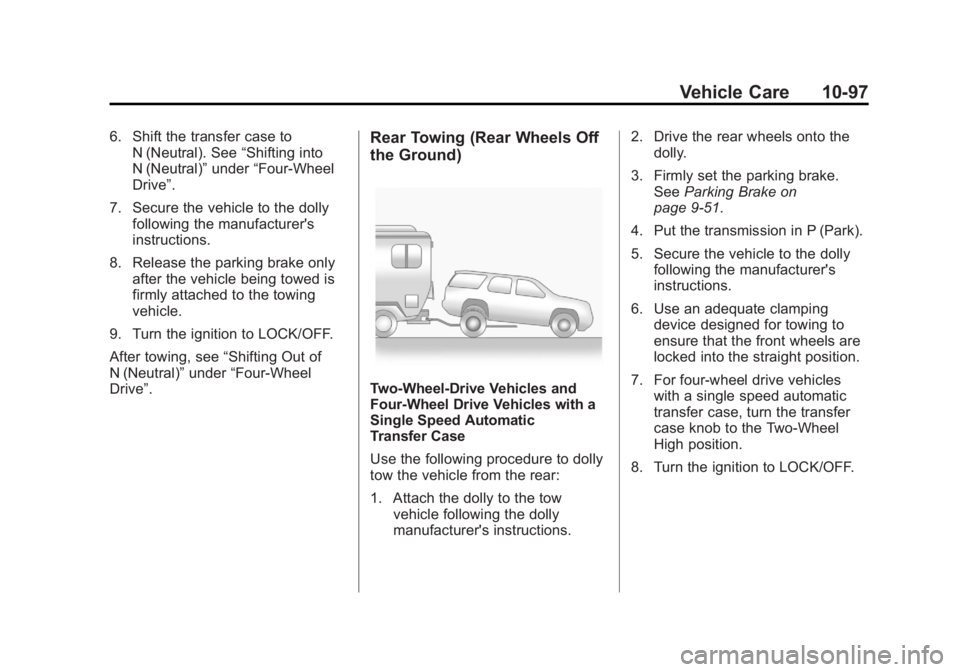
Use the following procedure to dolly
tow the vehicle from the rear:
1. Attach the dolly to the tow vehicle following the dolly
manufacturer's instructions. 2. Drive the rear wheels onto the
dolly.
3. Firmly set the parking brake. See Parking Brake on
page 9‑51.
4. Put the transmission in P (Park).
5. Secure the vehicle to the dolly following the manufacturer's
instructions.
6. Use an adequate clamping device designed for towing to
ensure that the front wheels are
locked into the straight position.
7. For four-wheel drive vehicles with a single speed automatic
transfer case, turn the transfer
case knob to the Two-Wheel
High position.
8. Turn the ignition to LOCK/OFF.
Page 476 of 528
Black plate (98,1)GMC Yukon/Yukon XL Owner Manual - 2011
10-98 Vehicle Care
Four-Wheel Drive Vehicles with a
Two Speed Automatic
Transfer Case
Use the following procedure to dolly
tow a four-wheel drive vehicle from
the rear:
1. Attach the dolly to the towvehicle following the dolly
manufacturer's instructions.
2. Drive the rear wheels onto the dolly.
3. Firmly set the parking brake. See Parking Brake on
page 9‑51.
4. Put the transmission in P (Park).
5. Secure the vehicle to the dolly following the manufacturer's
instructions.
6. Use an adequate clamping device designed for towing to
ensure that the front wheels are
locked into the straight position.{WARNING
Shifting a four-wheel-drive
vehicle's transfer case into
N (Neutral) can cause the vehicle
to roll even if the transmission is
in P (Park). The driver or others
could be injured. Make sure the
parking brake is firmly set before
the transfer case is shifted to
N (Neutral).
7. Shift the transfer case to N (Neutral). See “Shifting into
N (Neutral)” under“Four-Wheel
Drive”.
8. Turn the ignition to LOCK/OFF.
After towing, see “Shifting Out of
N (Neutral)” under“Four-Wheel
Drive”.
Appearance Care
Exterior Care
Weatherstrips
Silicone grease on weatherstrips will
make them last longer, seal better,
and not stick or squeak. Apply
silicone grease with a clean cloth.
During very cold, damp weather
frequent application may be
required. See Recommended Fluids
and Lubricants on page 11‑7.
Washing the Vehicle
The best way to preserve the
vehicle's finish is to keep it clean by
washing it often.
Notice: Certain cleaners contain
chemicals that can damage the
emblems or nameplates on the
vehicle. Check the cleaning
product label. If it states that it
should not be used on plastic
parts, do not use it on the vehicle
Page 506 of 528
Black plate (6,1)GMC Yukon/Yukon XL Owner Manual - 2011
13-6 Customer Information
General Motors of Canada also
has a Mobility Program. Call
1-800-GM-DRIVE (463-7483)
for details. TTY users call
1-800-263-3830.
Roadside Assistance
Program
For U.S.‐purchased vehicles, call
1‐800‐462‐8782; (Text Telephone
(TTY): 1‐888‐889‐2438).
For Canadian‐purchased vehicles,
call1-800-268-6800.
Service is available 24 hours a day,
365 days a year.
Calling for Assistance
When calling Roadside Assistance,
have the following information
ready:
.Your name, home address, and
home telephone number.
.Telephone number of your
location.
.Location of the vehicle.
.Model, year, color, and license
plate number of the vehicle.
.Odometer reading, Vehicle
Identification Number (VIN), and
delivery date of the vehicle.
.Description of the problem.
Coverage
Services are provided up to
5 years/160 000 km (100,000 mi),
whichever comes first.
In the U.S., anyone driving the
vehicle is covered. In Canada, a
person driving the vehicle without
permission from the owner is not
covered.
Roadside Assistance is not a
part of the New Vehicle Limited
Warranty. GMC and General Motors
of Canada Limited reserve the right
to make any changes or discontinue
the Roadside Assistance program at
any time without notification. GMC and General Motors of
Canada Limited reserve the right
to limit services or payment to an
owner or driver if they decide the
claims are made too often, or the
same type of claim is made many
times.
Services Provided
.Emergency Fuel Delivery:
Delivery of enough fuel for the
vehicle to get to the nearest
service station.
.Lock‐Out Service:
Service to
unlock the vehicle if you are
locked out. A remote unlock
may be available if you have
OnStar
®. For security reasons,
the driver must present
identification before this
service is given.
Page 516 of 528
Black plate (16,1)GMC Yukon/Yukon XL Owner Manual - 2011
13-16 Customer Information
OnStar®
If the vehicle is equipped with an
active OnStar system, that system
may also record data in crash or
near crash‐like situations. The
OnStar Terms and Conditions
provides information on data
collection and use and is available
in the OnStar glove box kit, at
www.onstar.com (U.S.) or
www.onstar.ca (Canada), or by
pressing the
Qbutton and
speaking to an advisor.
Navigation System
If the vehicle has a navigation
system, use of the system may
result in the storage of destinations,
addresses, telephone numbers, and
other trip information. Refer to the
navigation system operating manual
for information on stored data and
for deletion instructions.
Radio Frequency
Identification (RFID)
RFID technology is used in some
vehicles for functions such as tire
pressure monitoring and ignition
system security, as well as in
connection with conveniences
such as key fobs for remote door
locking/unlocking and starting, and
in-vehicle transmitters for garage
door openers. RFID technology in
GM vehicles does not use or record
personal information or link with
any other GM system containing
personal information.
Radio Frequency
Statement
This vehicle has systems that
operate on a radio frequency that
comply with Part 15 of the Federal
Communications Commission (FCC)
rules and with Industry Canada
Standards RSS‐210/220/310.
Operation is subject to the following
two conditions:
1. The device may not cause interference.
2. The device must accept any interference received, including
interference that may cause
undesired operation of the
device.
Changes or modifications to any of
these systems by other than an
authorized service facility could void
authorization to use this equipment.