wheel GMC YUKON XL 2013 Owner's Guide
[x] Cancel search | Manufacturer: GMC, Model Year: 2013, Model line: YUKON XL, Model: GMC YUKON XL 2013Pages: 510, PDF Size: 7.71 MB
Page 206 of 510
Black plate (12,1)GMC Yukon/Yukon XL Owner Manual - 2013 - CRC 2nd edition - 8/15/12
7-12 Infotainment System
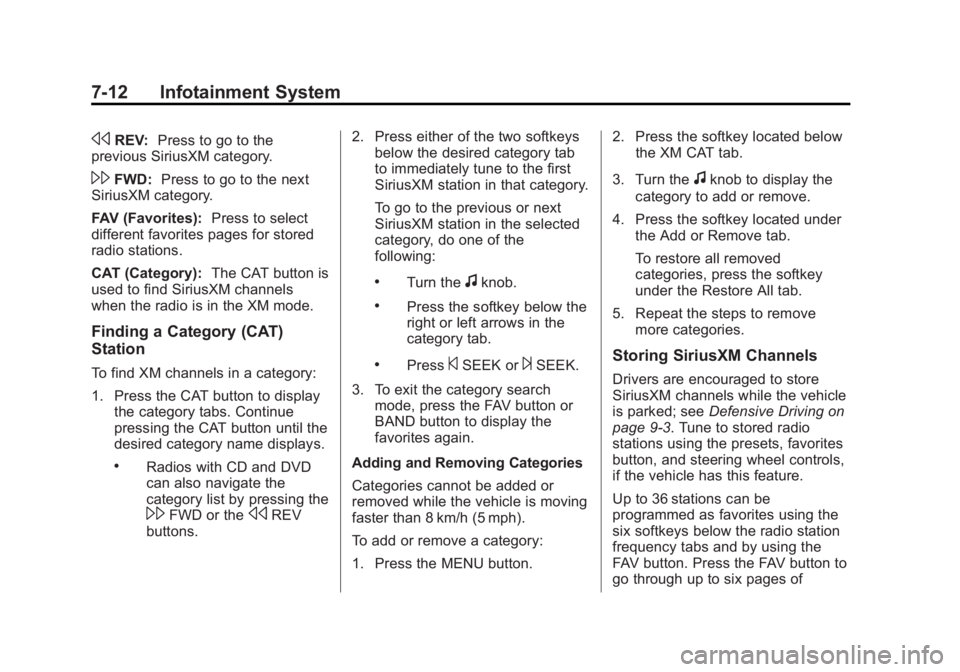
sREV:Press to go to the
previous SiriusXM category.
\FWD: Press to go to the next
SiriusXM category.
FAV (Favorites): Press to select
different favorites pages for stored
radio stations.
CAT (Category): The CAT button is
used to find SiriusXM channels
when the radio is in the XM mode.
Finding a Category (CAT)
Station
To find XM channels in a category:
1. Press the CAT button to display the category tabs. Continue
pressing the CAT button until the
desired category name displays.
.Radios with CD and DVD
can also navigate the
category list by pressing the
\FWD or thesREV
buttons. 2. Press either of the two softkeys
below the desired category tab
to immediately tune to the first
SiriusXM station in that category.
To go to the previous or next
SiriusXM station in the selected
category, do one of the
following:
.Turn thefknob.
.Press the softkey below the
right or left arrows in the
category tab.
.Press©SEEK or¨SEEK.
3. To exit the category search mode, press the FAV button or
BAND button to display the
favorites again.
Adding and Removing Categories
Categories cannot be added or
removed while the vehicle is moving
faster than 8 km/h (5 mph).
To add or remove a category:
1. Press the MENU button. 2. Press the softkey located below
the XM CAT tab.
3. Turn the
fknob to display the
category to add or remove.
4. Press the softkey located under the Add or Remove tab.
To restore all removed
categories, press the softkey
under the Restore All tab.
5. Repeat the steps to remove more categories.
Storing SiriusXM Channels
Drivers are encouraged to store
SiriusXM channels while the vehicle
is parked; see Defensive Driving on
page 9‑3. Tune to stored radio
stations using the presets, favorites
button, and steering wheel controls,
if the vehicle has this feature.
Up to 36 stations can be
programmed as favorites using the
six softkeys below the radio station
frequency tabs and by using the
FAV button. Press the FAV button to
go through up to six pages of
Page 243 of 510
Black plate (49,1)GMC Yukon/Yukon XL Owner Manual - 2013 - CRC 2nd edition - 8/15/12
Infotainment System 7-49
When to Speak:A short tone
sounds after the system responds
indicating when it is waiting for a
voice command. Wait until the tone
and then speak.
How to Speak: Speak clearly in a
calm and natural voice.
Audio System
When using the in-vehicle Bluetooth
system, sound comes through the
vehicle's front audio system
speakers and overrides the audio
system. Use the audio system
volume knob, during a call, to
change the volume level. The
adjusted volume level remains in
memory for later calls. To prevent
missed calls, a minimum volume
level is used if the volume is turned
down too low.
Bluetooth Controls
Use the buttons on the steering
wheel to operate the in-vehicle
Bluetooth system. See Steering
Wheel Controls on page 5‑2.
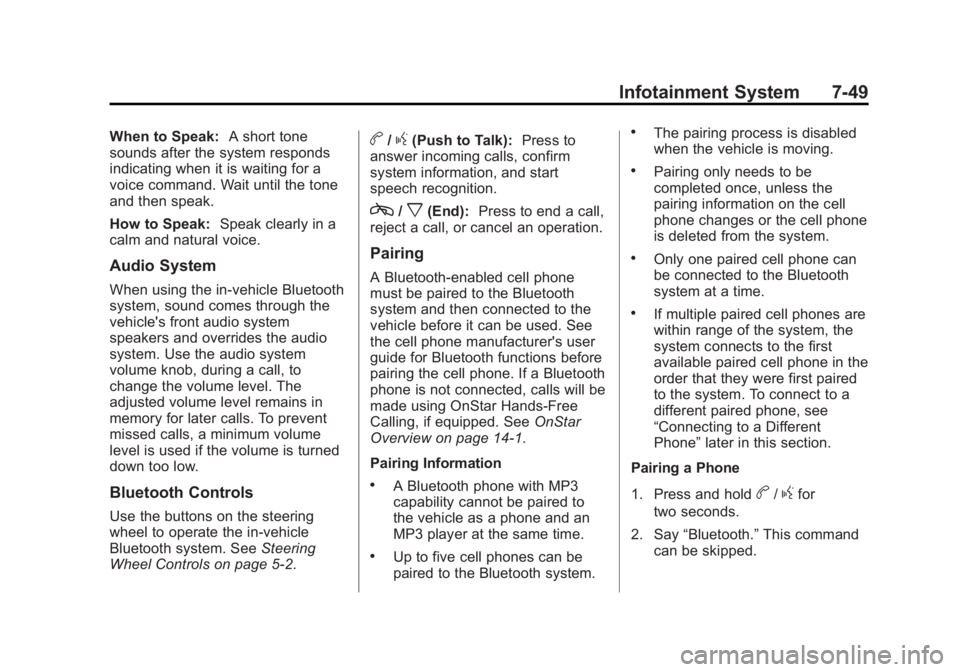
b/g(Push to Talk): Press to
answer incoming calls, confirm
system information, and start
speech recognition.
c/x(End): Press to end a call,
reject a call, or cancel an operation.
Pairing
A Bluetooth-enabled cell phone
must be paired to the Bluetooth
system and then connected to the
vehicle before it can be used. See
the cell phone manufacturer's user
guide for Bluetooth functions before
pairing the cell phone. If a Bluetooth
phone is not connected, calls will be
made using OnStar Hands-Free
Calling, if equipped. See OnStar
Overview on page 14‑1.
Pairing Information
.A Bluetooth phone with MP3
capability cannot be paired to
the vehicle as a phone and an
MP3 player at the same time.
.Up to five cell phones can be
paired to the Bluetooth system.
.The pairing process is disabled
when the vehicle is moving.
.Pairing only needs to be
completed once, unless the
pairing information on the cell
phone changes or the cell phone
is deleted from the system.
.Only one paired cell phone can
be connected to the Bluetooth
system at a time.
.If multiple paired cell phones are
within range of the system, the
system connects to the first
available paired cell phone in the
order that they were first paired
to the system. To connect to a
different paired phone, see
“Connecting to a Different
Phone” later in this section.
Pairing a Phone
1. Press and hold
b/gfor
two seconds.
2. Say “Bluetooth.” This command
can be skipped.
Page 252 of 510
Black plate (2,1)GMC Yukon/Yukon XL Owner Manual - 2013 - CRC 2nd edition - 8/15/12
8-2 Climate Controls
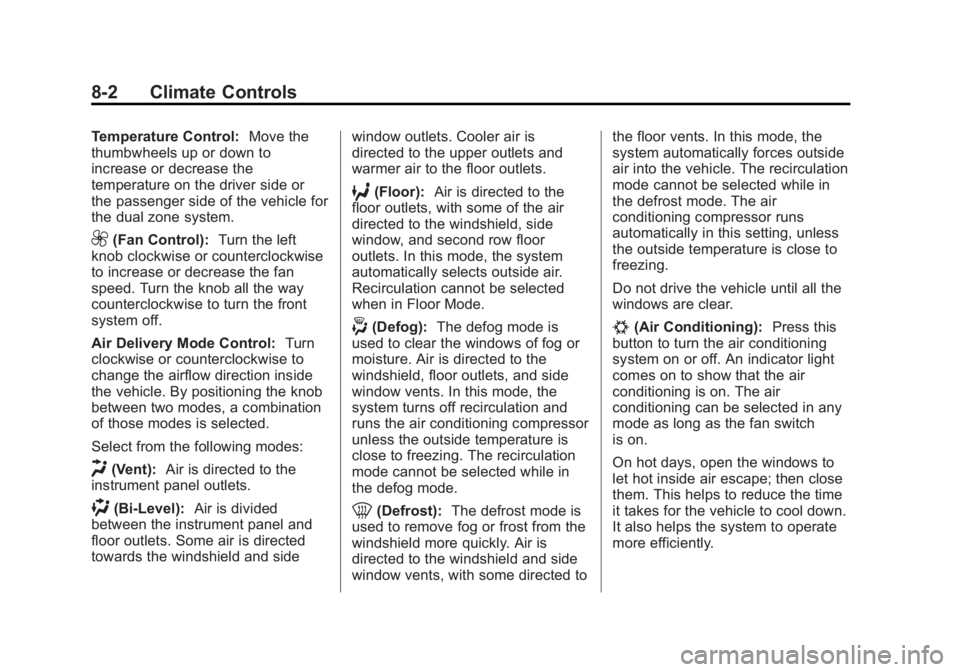
Temperature Control:Move the
thumbwheels up or down to
increase or decrease the
temperature on the driver side or
the passenger side of the vehicle for
the dual zone system.
9(Fan Control): Turn the left
knob clockwise or counterclockwise
to increase or decrease the fan
speed. Turn the knob all the way
counterclockwise to turn the front
system off.
Air Delivery Mode Control: Turn
clockwise or counterclockwise to
change the airflow direction inside
the vehicle. By positioning the knob
between two modes, a combination
of those modes is selected.
Select from the following modes:
H(Vent): Air is directed to the
instrument panel outlets.
)(Bi-Level): Air is divided
between the instrument panel and
floor outlets. Some air is directed
towards the windshield and side window outlets. Cooler air is
directed to the upper outlets and
warmer air to the floor outlets.
6(Floor):
Air is directed to the
floor outlets, with some of the air
directed to the windshield, side
window, and second row floor
outlets. In this mode, the system
automatically selects outside air.
Recirculation cannot be selected
when in Floor Mode.
-(Defog): The defog mode is
used to clear the windows of fog or
moisture. Air is directed to the
windshield, floor outlets, and side
window vents. In this mode, the
system turns off recirculation and
runs the air conditioning compressor
unless the outside temperature is
close to freezing. The recirculation
mode cannot be selected while in
the defog mode.
0(Defrost): The defrost mode is
used to remove fog or frost from the
windshield more quickly. Air is
directed to the windshield and side
window vents, with some directed to the floor vents. In this mode, the
system automatically forces outside
air into the vehicle. The recirculation
mode cannot be selected while in
the defrost mode. The air
conditioning compressor runs
automatically in this setting, unless
the outside temperature is close to
freezing.
Do not drive the vehicle until all the
windows are clear.
#(Air Conditioning):
Press this
button to turn the air conditioning
system on or off. An indicator light
comes on to show that the air
conditioning is on. The air
conditioning can be selected in any
mode as long as the fan switch
is on.
On hot days, open the windows to
let hot inside air escape; then close
them. This helps to reduce the time
it takes for the vehicle to cool down.
It also helps the system to operate
more efficiently.
Page 265 of 510
Black plate (1,1)GMC Yukon/Yukon XL Owner Manual - 2013 - CRC 2nd edition - 8/15/12
Driving and Operating 9-1
Driving and
Operating
Driving Information
Distracted Driving . . . . . . . . . . . . . 9-2
Defensive Driving . . . . . . . . . . . . . 9-3
Drunk Driving . . . . . . . . . . . . . . . . . 9-3
Control of a Vehicle . . . . . . . . . . . 9-4
Braking . . . . . . . . . . . . . . . . . . . . . . . 9-4
Steering . . . . . . . . . . . . . . . . . . . . . . . 9-4
Off-Road Recovery . . . . . . . . . . . . 9-5
Loss of Control . . . . . . . . . . . . . . . . 9-5
Off-Road Driving . . . . . . . . . . . . . . 9-6
Driving on Wet Roads . . . . . . . . 9-11
Highway Hypnosis . . . . . . . . . . . 9-12
Hill and Mountain Roads . . . . . 9-12
Winter Driving . . . . . . . . . . . . . . . 9-13
If the Vehicle Is Stuck . . . . . . . . 9-15
Vehicle Load Limits . . . . . . . . . . 9-16
Starting and Operating
New Vehicle Break-In . . . . . . . . 9-21
Adjustable Throttle and BrakePedal . . . . . . . . . . . . . . . . . . . . . . . 9-21
Ignition Positions . . . . . . . . . . . . 9-22
Starting the Engine . . . . . . . . . . 9-23
Engine Heater . . . . . . . . . . . . . . . 9-25
Retained Accessory Power (RAP) . . . . . . . . . . . . . . . 9-25
Shifting Into Park . . . . . . . . . . . . 9-26
Shifting out of Park . . . . . . . . . . 9-27
Parking over Things That Burn . . . . . . . . . . . . . . . . . . 9-28
Active Fuel Management
®. . . 9-28
Engine Exhaust
Engine Exhaust . . . . . . . . . . . . . . 9-28
Running the Vehicle While Parked . . . . . . . . . . . . . . . . . . . . . 9-29
Automatic Transmission
Automatic Transmission . . . . . 9-29
Manual Mode . . . . . . . . . . . . . . . . 9-32
Tow/Haul Mode . . . . . . . . . . . . . . 9-33
Drive Systems
Four-Wheel Drive (Two SpeedAutomatic
Transfer Case) . . . . . . . . . . . . . 9-34
Four-Wheel Drive (Single Speed Automatic
Transfer Case) . . . . . . . . . . . . . 9-39
Brakes
Antilock Brake
System (ABS) . . . . . . . . . . . . . . 9-41
Parking Brake . . . . . . . . . . . . . . . 9-42
Brake Assist . . . . . . . . . . . . . . . . . 9-42
Hill Start Assist (HSA) . . . . . . . 9-43
Ride Control Systems
StabiliTrak®System . . . . . . . . . 9-43
Locking Rear Axle . . . . . . . . . . . 9-46
Continuous Damping Control (CDC) . . . . . . . . . . . . . . 9-46
Automatic Level Control . . . . . 9-47
Cruise Control
Cruise Control . . . . . . . . . . . . . . . 9-47
Page 266 of 510
Black plate (2,1)GMC Yukon/Yukon XL Owner Manual - 2013 - CRC 2nd edition - 8/15/12
9-2 Driving and Operating
Object Detection Systems
Ultrasonic Parking Assist . . . . 9-50
Side Blind ZoneAlert (SBZA) . . . . . . . . . . . . . . . 9-51
Rear Vision Camera (RVC) . . . . . . . . . . . . . 9-53
Fuel
Fuel . . . . . . . . . . . . . . . . . . . . . . . . . 9-57
Recommended Fuel . . . . . . . . . 9-58
Gasoline Specifications . . . . . . 9-58
California Fuel
Requirements . . . . . . . . . . . . . . 9-58
Fuels in Foreign Countries . . . 9-58
Fuel Additives . . . . . . . . . . . . . . . 9-58
Fuel E85 (85% Ethanol) . . . . . 9-59
Filling the Tank . . . . . . . . . . . . . . 9-60
Filling a Portable Fuel Container . . . . . . . . . . . . . . . . . . . 9-62
Towing
General TowingInformation . . . . . . . . . . . . . . . . . 9-63
Driving Characteristics and Towing Tips . . . . . . . . . . . . . . . . 9-63
Trailer Towing . . . . . . . . . . . . . . . . 9-66
Towing Equipment . . . . . . . . . . . 9-71
Trailer Sway
Control (TSC) . . . . . . . . . . . . . . 9-80
Conversions and Add-Ons
Add-On ElectricalEquipment . . . . . . . . . . . . . . . . . 9-80
Adding a Snow Plow or Similar Equipment . . . . . . . . . . 9-81
Driving Information
Distracted Driving
Distraction comes in many forms
and can take your focus from the
task of driving. Exercise good
judgment and do not let other
activities divert your attention away
from the road. Many local
governments have enacted laws
regarding driver distraction. Become
familiar with the local laws in
your area.
To avoid distracted driving, always
keep your eyes on the road, hands
on the wheel, and mind on the drive.
.Do not use a phone in
demanding driving situations.
Use a hands-free method to
place or receive necessary
phone calls.
.Watch the road. Do not read,
take notes, or look up
information on phones or other
electronic devices.
Page 269 of 510
Black plate (5,1)GMC Yukon/Yukon XL Owner Manual - 2013 - CRC 2nd edition - 8/15/12
Driving and Operating 9-5
.Wait until the vehicle is out of
the curve before accelerating
gently into the straightaway.
Steering in Emergencies
.There are some situations when
steering around a problem may
be more effective than braking.
.Holding both sides of the
steering wheel allows you to turn
180 degrees without removing
a hand.
.Antilock Brake System (ABS)
allows steering while braking.
Off-Road Recovery
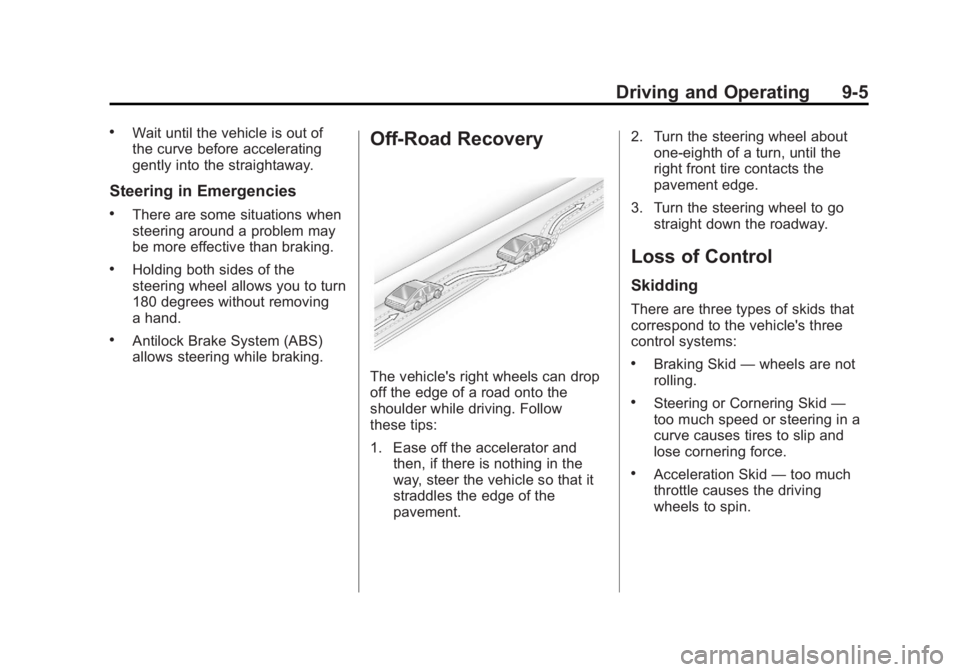
The vehicle's right wheels can drop
off the edge of a road onto the
shoulder while driving. Follow
these tips:
1. Ease off the accelerator andthen, if there is nothing in the
way, steer the vehicle so that it
straddles the edge of the
pavement. 2. Turn the steering wheel about
one-eighth of a turn, until the
right front tire contacts the
pavement edge.
3. Turn the steering wheel to go straight down the roadway.
Loss of Control
Skidding
There are three types of skids that
correspond to the vehicle's three
control systems:
.Braking Skid —wheels are not
rolling.
.Steering or Cornering Skid —
too much speed or steering in a
curve causes tires to slip and
lose cornering force.
.Acceleration Skid —too much
throttle causes the driving
wheels to spin.
Page 270 of 510
Black plate (6,1)GMC Yukon/Yukon XL Owner Manual - 2013 - CRC 2nd edition - 8/15/12
9-6 Driving and Operating
Defensive drivers avoid most skids
by taking reasonable care suited to
existing conditions, and by not
overdriving those conditions. But
skids are always possible.
If the vehicle starts to slide, follow
these suggestions:
.Ease your foot off the
accelerator pedal and steer the
way you want the vehicle to go.
The vehicle may straighten out.
Be ready for a second skid if it
occurs.
.Slow down and adjust your
driving according to weather
conditions. Stopping distance
can be longer and vehicle
control can be affected when
traction is reduced by water,
snow, ice, gravel, or other
material on the road. Learn to
recognize warning clues—such
as enough water, ice, or packed
snow on the road to make a
mirrored surface —and slow
down when you have any doubt.
.Try to avoid sudden steering,
acceleration, or braking,
including reducing vehicle speed
by shifting to a lower gear. Any
sudden changes could cause
the tires to slide.
Remember: Antilock brakes help
avoid only the braking skid.
Off-Road Driving
Four-wheel-drive vehicles can be
used for off-road driving. Vehicles
without four-wheel drive and
vehicles not equipped with All
Terrain (AT) or On-Off Road (OOR)
tires must not be driven off-road
except on a level, solid surface. To
contact the tire manufacturer for
more information about the original
equipment tires, see the Limited
Warranty and Owner Assistance
Information manual.
Controlling the vehicle is the key to
successful off-road driving. One of
the best ways to control the vehicle
is to control the speed.
{WARNING
When driving off-road, bouncing
and quick changes in direction
can easily throw you out of
position. This could cause you to
lose control and crash. You and
your passengers should always
wear safety belts.
Before Driving Off-Road
.Have all necessary maintenance
and service work completed.
.Fuel the vehicle, fill fluid levels,
and check inflation pressure in
all tires, including the spare,
if equipped.
.Read all the information about
four-wheel-drive vehicles in this
manual.
.Make sure all underbody
shields, if equipped, are properly
attached.
.Know the local laws that apply to
off-road driving.
Page 272 of 510
Black plate (8,1)GMC Yukon/Yukon XL Owner Manual - 2013 - CRC 2nd edition - 8/15/12
9-8 Driving and Operating
Driving on Hills
Driving safely on hills requires good
judgment and an understanding of
what the vehicle can and cannot do.
{WARNING
Many hills are simply too steep
for any vehicle. Driving up hills
can cause the vehicle to stall.
Driving down hills can cause loss
of control. Driving across hills can
cause a rollover. You could be
injured or killed. Do not drive on
steep hills.
Before driving on a hill, assess the
steepness, traction, and
obstructions. If the terrain ahead
cannot be seen, get out of the
vehicle and walk the hill before
driving further.
When driving on hills:
.Use a low gear and keep a firm
grip on the steering wheel.
.Maintain a slow speed.
.When possible, drive straight up
or down the hill.
.Slow down when approaching
the top of the hill.
.Use headlamps even during the
day to make the vehicle more
visible.
{WARNING
Driving to the top of a hill at high
speed can cause an accident.
There could be a drop-off,
embankment, cliff, or even
another vehicle. You could be
seriously injured or killed. As you
near the top of a hill, slow down
and stay alert.
.Never go downhill forward or
backward with either the
transmission or transfer case in
N (Neutral). The brakes could
overheat and you could lose
control.
{WARNING
If the vehicle has the two‐speed
automatic transfer case, shifting
the transfer case to N (Neutral)
can cause your vehicle to roll
even if the transmission is in
P (Park). This is because the
N (Neutral) position on the
transfer case overrides the
transmission. You or someone
else could be injured. If leaving
the vehicle, set the parking brake
and shift the transmission to
P (Park). Shift the transfer case to
any position but N (Neutral).
.When driving down a hill, keep
the vehicle headed straight
down. Use a low gear because
the engine will work with the
brakes to slow the vehicle and
help keep the vehicle under
control.
Page 273 of 510
Black plate (9,1)GMC Yukon/Yukon XL Owner Manual - 2013 - CRC 2nd edition - 8/15/12
Driving and Operating 9-9
{WARNING
Heavy braking when going down
a hill can cause your brakes to
overheat and fade. This could
cause loss of control and you or
others could be injured or killed.
Apply the brakes lightly when
descending a hill and use a low
gear to keep vehicle speed under
control.
If the vehicle stalls on a hill:
1. Apply the brakes to stop the vehicle, and then apply the
parking brake.
2. Shift into P (Park) and then restart the engine.
.If driving uphill when the
vehicle stalls, shift to
R (Reverse), release the
parking brake, and back
straight down.
.Never try to turn the vehicle
around. If the hill is steep
enough to stall the vehicle,
it is steep enough to cause
it to roll over.
.If you cannot make it up the
hill, back straight down
the hill.
.Never back down a hill in
N (Neutral) using only the
brake.
.The vehicle can roll
backward quickly and you
could lose control.
.If driving downhill when the
vehicle stalls, shift to a
lower gear, release the
parking brake, and drive
straight down the hill.
3. If the vehicle cannot be restarted after stalling, set the parking
brake, shift an automatic
transmission into P (Park), and
turn the vehicle off.
3.1. Leave the vehicle and seek help. 3.2. Stay clear of the path the
vehicle would take if it
rolled downhill.
.Avoid turns that take the vehicle
across the incline of the hill.
A hill that can be driven straight
up or down might be too steep to
drive across. Driving across an
incline puts more weight on the
downhill wheels which could
cause a downhill slide or a
rollover.
.Surface conditions can be a
problem. Loose gravel, muddy
spots, or even wet grass can
cause the tires to slip sideways,
downhill. If the vehicle slips
sideways, it can hit something
that will trip it –a rock, a rut, etc.
– and roll over.
.Hidden obstacles can make the
steepness of the incline more
severe. If a rock is driven across
with the uphill wheels, or if the
downhill wheels drop into a rut
or depression, the vehicle can tilt
even more.
Page 275 of 510
Black plate (11,1)GMC Yukon/Yukon XL Owner Manual - 2013 - CRC 2nd edition - 8/15/12
Driving and Operating 9-11
Notice:Do not drive through
standing water if it is deep
enough to cover the wheel hubs,
axles or exhaust pipe. Deep water
can damage the axle and other
vehicle parts.
If the standing water is not too deep,
drive slowly through it. At faster
speeds, water splashes on the
ignition system and the vehicle can
stall. Stalling can also occur if you
get the tailpipe under water. While
the tailpipe is under water, you will
not be able to start the engine.
When going through water, the
brakes get wet, and it might take
longer to stop. See Driving on Wet
Roads.
After Off-Road Driving
Remove any brush or debris that
has collected on the underbody,
or chassis, or under the hood.
These accumulations can be a fire
hazard.
After operation in mud or sand,
have the brake linings cleaned and
checked. These substances can cause glazing and uneven braking.
Check the body structure, steering,
suspension, wheels, tires, and
exhaust system for damage and
check the fuel lines and cooling
system for any leakage.
More frequent maintenance service
is required. Refer to the
Maintenance Schedule for more
information.
Driving on Wet Roads
Rain and wet roads can reduce
vehicle traction and affect your
ability to stop and accelerate.
Always drive slower in these types
of driving conditions and avoid
driving through large puddles and
deep‐standing or flowing water.
{WARNING
Wet brakes can cause crashes.
They might not work as well in a
quick stop and could cause
pulling to one side. You could
lose control of the vehicle.
After driving through a large
puddle of water or a car/vehicle
wash, lightly apply the brake
pedal until the brakes work
normally.
Flowing or rushing water creates
strong forces. Driving through
flowing water could cause the
vehicle to be carried away. If this
happens, you and other vehicle
occupants could drown. Do not
ignore police warnings and be
very cautious about trying to drive
through flowing water.