center console GMC YUKON XL 2014 User Guide
[x] Cancel search | Manufacturer: GMC, Model Year: 2014, Model line: YUKON XL, Model: GMC YUKON XL 2014Pages: 490, PDF Size: 7.49 MB
Page 218 of 490
Black plate (32,1)GMC Yukon/Yukon XL Owner Manual (GMNA-Localizing-U.S./Canada-
6081505) - 2014 - crc - 4/23/13
7-32 Infotainment System
the radio CD/AUX button to begin
playing audio from the device over
the vehicle speakers.
For optimal sound quality, increase
the portable audio device's volume
to the loudest level.
It is always best to power the
portable audio device through its
own battery while playing.
O(Power/Volume):Turn clockwise
or counterclockwise to increase or
decrease the volume of the portable
player. Additional volume
adjustments might have to be made
from the portable device if the
volume is not loud or soft enough.
BAND: Press to listen to the radio
when a portable audio device is
playing. The portable audio device
continues playing.
CD/AUX (CD/Auxiliary): Press to
play a CD when a portable audio
device is playing. Press again and
the system begins playing audio
from the connected portable audio player. If a portable audio player is
not connected,
“No Input Device
Found” displays.
DVD/CD AUX (CD/Auxiliary):
Press to cycle through DVD, CD,
or Auxiliary when listening to the
radio. The DVD/CD text tab and a
message showing track or chapter
number displays when a disc is in
either slot. Press again and the
system automatically searches for
an auxiliary input device, such as a
portable audio player. If a portable
audio player is not connected, “No
Aux Input Device” displays. If a disc
is in both the DVD slot and the CD
slot the DVD/CD AUX button cycles
between the two sources and not
indicate “No Aux Input Device”. If a
front auxiliary device is connected,
the DVD/CD AUX button cycles
through all available options, such
as: DVD slot, CD slot, Front
Auxiliary, and Rear Auxiliary (if
available). See “Using the Auxiliary
Input Jack(s)” in this section,
or “Audio/Video (A/V) Jacks” under,Rear Seat Entertainment (RSE)
System on page 7-36
for more
information.
Using the USB Port
Radios with a USB port can control
a USB storage device or an iPod
using the radio buttons and knobs.
USB Support
The USB connector is located on
the instrument panel or in the center
console, and uses the USB 2.0
standard.
USB Supported Devices
.USB Flash Drives
.Portable USB Hard Drives
.Fifth generation or later iPod
.iPod nanos
.iPod touch
.iPod classic
Not all iPods and USB Drives are
compatible with the USB port.
Page 219 of 490
Black plate (33,1)GMC Yukon/Yukon XL Owner Manual (GMNA-Localizing-U.S./Canada-
6081505) - 2014 - crc - 4/23/13
Infotainment System 7-33
Make sure the iPod has the latest
firmware from Apple®for proper
operation. iPod firmware can be
updated using the latest iTunes
®
application. See www.apple.com/
itunes.
For help with identifying your iPod,
go to www.apple.com/support.
Radios that have a USB port can
play .mp3 and .wma files that are
stored on a USB storage device as
well as AAC files that are stored on
an iPod.
USB Supported File and Folder
Structure
The radio supports:
.Up to 700 folders.
.Up to 8 folders in depth.
.Up to 65,535 files.
.Folder and file names up to
64 bytes.
.Files with an .mp3 or .wma file
extension.
.AAC files stored on an iPod.
.FAT16
.FAT32
Connecting a USB Storage
Device or iPod
The USB Port can be used to
control an iPod or a USB storage
device.
To connect a USB storage device,
connect the device to the USB port
located in the center console or on
the instrument panel.
To connect an iPod, connect one
end of the USB cable that came
with the iPod to the iPod’s dock
connector and connect the other
end to the USB port located in the
center console or on the instrument
panel. If the vehicle is on and the
USB connection works, “OK to
disconnect” and a GM logo may
appear on the iPod and iPod
appears on the radio display. The
iPod music appears on the radio’s
display and begins playing. The iPod charges while it is
connected to the vehicle if the
vehicle is in the ACC/ACCESSORY
or ON/RUN position. When the
vehicle is turned off, the iPod
automatically powers off and will not
charge or draw power from the
vehicle's battery.
If you have an older iPod model that
is not supported, it can still be used
by connecting it to the Auxiliary
Input Jack using a standard 3.5 mm
(1/8 in) stereo cable. See
“Using the
Auxiliary Input Jack” earlier for more
information.
Using the Radio to Control a
USB Storage Device or iPod
The radio can control a USB
storage device or an iPod using the
radio buttons and knobs and display
song information on the radio’s
display.
f(Tune): Turn to select files.
Page 253 of 490
Black plate (11,1)GMC Yukon/Yukon XL Owner Manual (GMNA-Localizing-U.S./Canada-
6081505) - 2014 - crc - 4/23/13
Climate Controls 8-11
Rear Climate Control System (Rear Climate with Rear
Seat Audio)
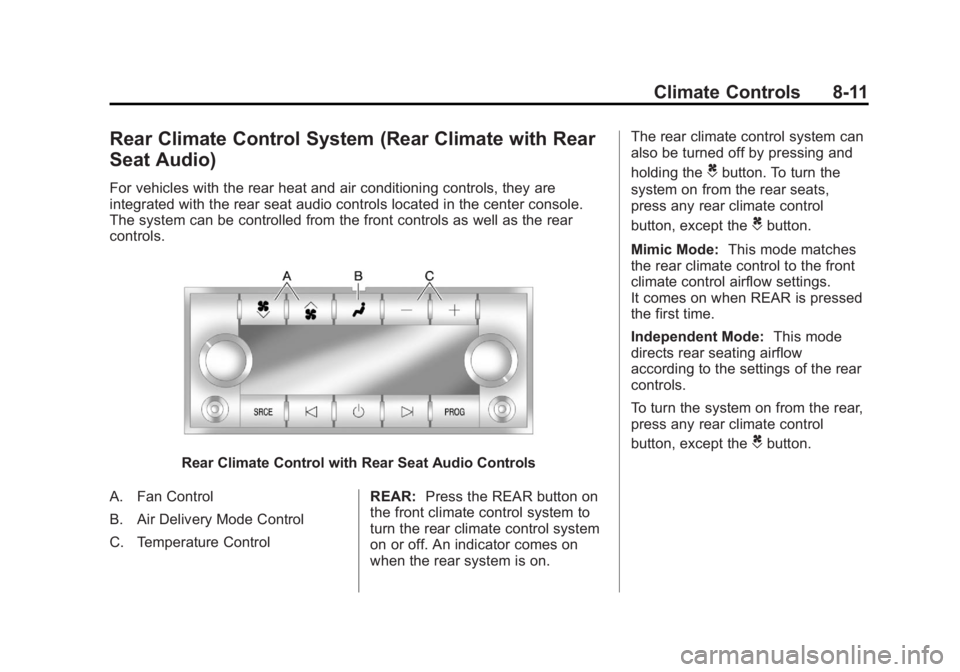
For vehicles with the rear heat and air conditioning controls, they are
integrated with the rear seat audio controls located in the center console.
The system can be controlled from the front controls as well as the rear
controls.
Rear Climate Control with Rear Seat Audio Controls
A. Fan Control
B. Air Delivery Mode Control
C. Temperature Control REAR:
Press the REAR button on
the front climate control system to
turn the rear climate control system
on or off. An indicator comes on
when the rear system is on. The rear climate control system can
also be turned off by pressing and
holding the
Cbutton. To turn the
system on from the rear seats,
press any rear climate control
button, except the
Cbutton.
Mimic Mode: This mode matches
the rear climate control to the front
climate control airflow settings.
It comes on when REAR is pressed
the first time.
Independent Mode: This mode
directs rear seating airflow
according to the settings of the rear
controls.
To turn the system on from the rear,
press any rear climate control
button, except the
Cbutton.
Page 478 of 490
Black plate (2,1)GMC Yukon/Yukon XL Owner Manual (GMNA-Localizing-U.S./Canada-
6081505) - 2014 - crc - 4/23/13
i-2 INDEX
B
Battery . . . . . . . . . . . . . . . . . . . . . . . 10-24Jump Starting . . . . . . . . . . . . . . . 10-76
Load Management . . . . . . . . . . . . . 6-8
Power Protection . . . . . . . . . . . . . . 6-9
Voltage and ChargingMessages . . . . . . . . . . . . . . . . . . . 5-34
Blade Replacement, Wiper . . . 10-28
Bluetooth Overview . . . . . . . . . . . . . . . . . . . . . 7-48
Brake
Pedal and AdjustableThrottle . . . . . . . . . . . . . . . . . . . . . . 9-20
System Warning Light . . . . . . . . 5-21
Brakes . . . . . . . . . . . . . . . . . . . . . . . . 10-21 Antilock . . . . . . . . . . . . . . . . . . . . . . . 9-39
Assist . . . . . . . . . . . . . . . . . . . . . . . . . 9-41
Fluid . . . . . . . . . . . . . . . . . . . . . . . . 10-22
Parking . . . . . . . . . . . . . . . . . . . . . . . 9-40
System Messages . . . . . . . . . . . . 5-35
Braking . . . . . . . . . . . . . . . . . . . . . . . . . 9-3
Break-In, New Vehicle . . . . . . . . . 9-19
Bulb Replacement . . . . . . . . . . . . 10-31 Fog Lamps . . . . . . . . . . . . . . . . . . . . 6-6
Halogen Bulbs . . . . . . . . . . . . . . 10-30
Headlamp Aiming . . . . . . . . . . . 10-29 Bulb Replacement (cont'd)
Headlamps . . . . . . . . . . . . . . . . . 10-30
License Plate Lamps . . . . . . . 10-31
Taillamps, Turn Signal,
Stoplamps, and
Back-up Lamps . . . . . . . . . . . 10-30
Buying New Tires . . . . . . . . . . . . . 10-56
C
Calibration . . . . . . . . . . . . . . . . . . . . . . 5-5
California Fuel Requirements . . . . . . . . . . . 9-56
Perchlorate MaterialsRequirements . . . . . . . . . . . . . . . 10-3
Warning . . . . . . . . . . . . . . . . . . . . . . 10-2
Camera, Rear Vision . . . . . . . . . . 9-51
Canadian Vehicle Owners . . . . . . . . iii
Capacities and
Specifications . . . . . . . . . . . . . . . . 12-2
Carbon Monoxide
Engine Exhaust . . . . . . . . . . . . . . . 9-27
Liftgate . . . . . . . . . . . . . . . . . . . . . . . . 2-9
Winter Driving . . . . . . . . . . . . . . . . 9-12
Cargo Cover . . . . . . . . . . . . . . . . . . . . . . . . . . 4-2 Cautions, Danger, and
Warnings . . . . . . . . . . . . . . . . . . . . . . . . iv
CD Player . . . . . . . . . . . . . . . . . . . . . 7-16
CD/DVD Player . . . . . . . . . . . . . . . . 7-21
Center Console Storage . . . . . . . . 4-2
Center Seat . . . . . . . . . . . . . . . . . . . . 3-3
Chains, Tire . . . . . . . . . . . . . . . . . . 10-60
Charging System Light . . . . . . . . 5-18
Check Engine Light . . . . . . . . . . . . . . . . . . 5-19
IgnitionTransmission Lock . . . . . . . . 10-27
Child Restraints Infants and YoungChildren . . . . . . . . . . . . . . . . . . . . . 3-42
Lower Anchors and
Tethers for Children . . . . . . . . . 3-47
Older Children . . . . . . . . . . . . . . . . 3-40
Securing . . . . . . . . . . 3-54, 3-55, 3-58
Systems . . . . . . . . . . . . . . . . . . . . . . 3-44
Circuit Breakers . . . . . . . . . . . . . . 10-32
Cleaning
Exterior Care . . . . . . . . . . . . . . . 10-86
Interior Care . . . . . . . . . . . . . . . . 10-89
Page 487 of 490
Black plate (11,1)GMC Yukon/Yukon XL Owner Manual (GMNA-Localizing-U.S./Canada-
6081505) - 2014 - crc - 4/23/13
INDEX i-11
Signals, Turn andLane-Change . . . . . . . . . . . . . . . . . 6-5
Snow Plow . . . . . . . . . . . . . . . . . . . . 9-78
Specifications and Capacities . . . . . . . . . . . . . . . . . . . . 12-2
Speedometer . . . . . . . . . . . . . . . . . . 5-12
StabiliTrak OFF Light . . . . . . . . . . . . . . . . . . . . . 5-22
System . . . . . . . . . . . . . . . . . . . . . . . 9-42
Start Assist, Hills . . . . . . . . . . . . . . 9-41
Start Vehicle, Remote . . . . . . . . . . 2-5
Starter Switch Check . . . . . . . . . 10-27
Starting the Engine . . . . . . . . . . . . 9-22
Steering . . . . . . . . . . . . . . . . . . . . . . . . 9-4 Fluid, Power . . . . . . . . . . . . . . . . 10-20
Wheel Adjustment . . . . . . . . . . . . . 5-2
Wheel Controls . . . . . . . . . . . . . . . . 5-2
Steps Power Assist . . . . . . . . . . . . . . . . . 2-12
Stoplamps and Back-up Lamps Bulb Replacement . . . . . . . . . . 10-30
Storage Rear . . . . . . . . . . . . . . . . . . . . . . . . . . . 4-2 Storage Areas
Armrest . . . . . . . . . . . . . . . . . . . . . . . . 4-1
Cargo Cover . . . . . . . . . . . . . . . . . . . 4-2
Center Console . . . . . . . . . . . . . . . . 4-2
Glove Box . . . . . . . . . . . . . . . . . . . . . 4-1
Roof Rack System . . . . . . . . . . . . . 4-3
Stuck Vehicle . . . . . . . . . . . . . . . . . . 9-14
Sun Visors . . . . . . . . . . . . . . . . . . . . . 2-21
Sunroof . . . . . . . . . . . . . . . . . . . . . . . . 2-22
Symbols . . . . . . . . . . . . . . . . . . . . . . . . . . iv
System
Infotainment . . . . . . . . . . . . . . . . . . . 7-1
Roof Rack . . . . . . . . . . . . . . . . . . . . . 4-3
T
Tachometer . . . . . . . . . . . . . . . . . . . . 5-12
TaillampsBulb Replacement . . . . . . . . . . 10-30
Text Telephone (TTY) Users . . . 13-4
Theft-Deterrent Systems . . . . . . . 2-14 Immobilizer . . . . . . . . . . . . . . . . . . . 2-14
Third-Row Seats . . . . . . . . . . . . . . . 3-14
Throttle, Adjustable . . . . . . . . . . . . 9-20
Time . . . . . . . . . . . . . . . . . . . . . . . . . . . . 5-7 Tires
All-Terrain . . . . . . . . . . . . . . . . . . 10-41
Buying New Tires . . . . . . . . . . . 10-56
Chains . . . . . . . . . . . . . . . . . . . . . . 10-60
Changing . . . . . . . . . . . . . . . . . . . 10-63
Designations . . . . . . . . . . . . . . . 10-44
Different Size . . . . . . . . . . . . . . . 10-57
Full-Size Spare . . . . . . . . . . . . . 10-75
If a Tire Goes Flat . . . . . . . . . . 10-61
Inflation Monitor System . . . . 10-50
Inspection . . . . . . . . . . . . . . . . . . 10-53
Messages . . . . . . . . . . . . . . . . . . . . 5-41
Pressure Light . . . . . . . . . . . . . . . . 5-23
Pressure Monitor System . . . 10-49
Rotation . . . . . . . . . . . . . . . . . . . . 10-54
Secondary Latch System . . . 10-72
Sidewall Labeling . . . . . . . . . . . 10-41
Terminology and
Definitions . . . . . . . . . . . . . . . . . 10-45
Uniform Tire Quality Grading . . . . . . . . . . . . . . . . . . . 10-58
Wheel Alignment and Tire Balance . . . . . . . . . . . . . . . . . . . 10-59