climate control GMC YUKON XL 2015 User Guide
[x] Cancel search | Manufacturer: GMC, Model Year: 2015, Model line: YUKON XL, Model: GMC YUKON XL 2015Pages: 459, PDF Size: 6.05 MB
Page 52 of 459
Black plate (19,1)GMC 2015i Yukon/Yukon XL Owner Manual (GMNA-Localizing-U.S./Canada/
Mexico-8431503) - 2015 - crc - 8/11/14
Keys, Doors, and Windows 2-19
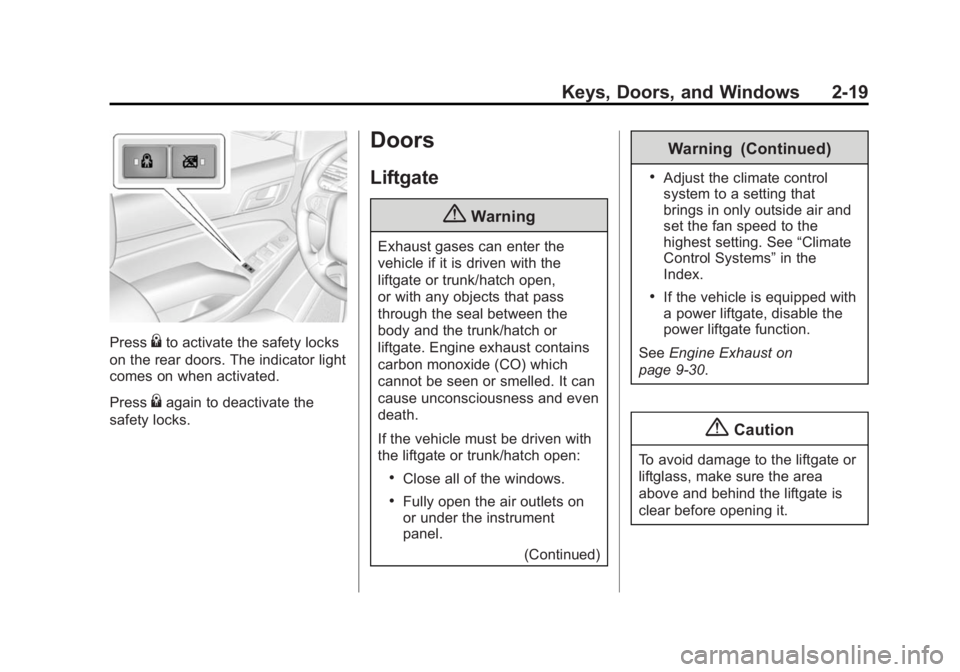
Press{to activate the safety locks
on the rear doors. The indicator light
comes on when activated.
Press
{again to deactivate the
safety locks.
Doors
Liftgate
{Warning
Exhaust gases can enter the
vehicle if it is driven with the
liftgate or trunk/hatch open,
or with any objects that pass
through the seal between the
body and the trunk/hatch or
liftgate. Engine exhaust contains
carbon monoxide (CO) which
cannot be seen or smelled. It can
cause unconsciousness and even
death.
If the vehicle must be driven with
the liftgate or trunk/hatch open:
.Close all of the windows.
.Fully open the air outlets on
or under the instrument
panel.
(Continued)
Warning (Continued)
.Adjust the climate control
system to a setting that
brings in only outside air and
set the fan speed to the
highest setting. See “Climate
Control Systems” in the
Index.
.If the vehicle is equipped with
a power liftgate, disable the
power liftgate function.
See Engine Exhaust on
page 9-30.
{Caution
To avoid damage to the liftgate or
liftglass, make sure the area
above and behind the liftgate is
clear before opening it.
Page 63 of 459

Black plate (30,1)GMC 2015i Yukon/Yukon XL Owner Manual (GMNA-Localizing-U.S./Canada/
Mexico-8431503) - 2015 - crc - 8/11/14
2-30 Keys, Doors, and Windows
Resetting the Power Folding
Mirrors
Reset the power folding mirrors if:
.The mirrors are accidentally
obstructed while folding.
.They are accidentally manually
folded/unfolded.
.The mirrors will not stay in the
unfolded position.
.The mirrors vibrate at normal
driving speeds.
Fold and unfold the mirrors one time
using the mirror controls to reset
them to their normal position.
A popping noise may be heard
during the resetting of the power
folding mirrors. This sound is normal
after a manual folding operation.
Manual Folding
Fold the mirrors inward to prevent
damage when going through an
automatic car wash. To fold, pull the
mirror toward the vehicle. Push the
mirror outward, to return to its
original position.
Heated Mirrors
The heated outside rearview mirrors
turn on when the rear window
defogger is on.
1(Rear Window Defogger):
Press to heat the mirror.
See “Rear Window Defogger” under
Dual Automatic Climate Control
System on page 8-1.
Automatic Dimming
Mirror
If the vehicle has the automatic
dimming mirror, the driver outside
mirror automatically adjusts for the
glare of the headlamps from behind.
Blind Spot Mirrors
If equipped, there is a small convex
mirror built into the upper and outer
corner of the driver outside rearview
mirror. It can show objects that may
be in the vehicle's blind zone.
Driving with the Blind Spot
Mirror
Actual Mirror View
Page 77 of 459

Black plate (8,1)GMC 2015i Yukon/Yukon XL Owner Manual (GMNA-Localizing-U.S./Canada/
Mexico-8431503) - 2015 - crc - 8/11/14
3-8 Seats and Restraints
Warning (Continued)
the seat that insulates against
heat, such as a blanket, cushion,
cover, or similar item. This may
cause the seat heater to
overheat. An overheated seat
heater may cause a burn or may
damage the seat.
Heated and Cooled Seats Shown,Heated Similar
The buttons are on the center stack
below the climate control system. To
operate, the engine must be
running.
Press
Ito heat the driver or
passenger seatback only.
Press
Jto heat the driver or
passenger seat cushion and
seatback.
Press
Ato cool the driver or
passenger seat. The indicator light on the button
comes on when this feature is on.
Press the button once for the
highest setting. With each press of
the button, the seat will change to
the next lower setting, and then to
the off setting. The indicator lights
next to the buttons indicate three for
the highest setting and one for the
lowest. If the heated seats are on
high for an extended time, their level
may automatically be lowered.
The passenger seat may take
longer to heat up.
Remote Start Auto Heated and
Cooled Seats
During a remote start, the heated or
cooled seats can be turned on
automatically. When it is cold
outside, the heated seats turn on,
and when it is hot outside the
cooled seats turn on. The heated or
cooled seats are canceled when the
ignition is turned on. Press the
heated or cooled seat button to use
the heated or cooled seats after the
vehicle is started.
Page 146 of 459
Black plate (7,1)GMC 2015i Yukon/Yukon XL Owner Manual (GMNA-Localizing-U.S./Canada/
Mexico-8431503) - 2015 - crc - 8/11/14
Instruments and Controls 5-7
To set the clock display:
1. Select SETTINGS from theHome Page, then select Time
and Date.
2. Select Clock Display.
3. Turn the MENU knob to Off or On.
4. Press the MENU knob to select.
Press
oBACK to go to the last
menu and save the changes.
Setting the Time and Date with
Touchscreen Controls
To set the time:
1. Press the SETTINGS screen button from the Home Page,
then press Time and Date.
2. Press Set Time and press
«or
ªto increase or decrease
hours, minutes, and AM or PM.
Press 12–24 Hr for 12 or
24 hour clock.
3. Press the
}screen button to go
back to the previous menu. Auto Set requires an OnStar
subscription.
If auto timing is set, the time
displayed on the clock may not
update immediately when driving
into a new time zone.
To set the date:
1. Press the SETTINGS screen
button from the Home Page,
then press Time and Date.
2. Press Set Date and press
«or
ªto increase or decrease
month, day, or year.
3. Press the
}screen button to go
back to the previous menu.
To set the clock display:
1. Press the SETTINGS screen button and press Time and Date.
2. Press Clock Display and press OFF or ON to turn the clock
display off or on.
3. Press the
}screen button to go
back to the previous menu.
Power Outlets
Accessory power outlets can be
used to plug in electrical equipment,
such as a cell phone, MP3
player, etc.
The vehicle may have up to five
accessory power outlets:
Vehicles with a Center Console
.One in front of the cupholders on
the center console.
.One inside the center storage
console.
.One on the rear of the center
storage console.
.One in the third row seat on the
driver side.
.One in the rear cargo area on
the passenger side.
Vehicles with Bench Seats
.One on the center stack below
the climate control system.
.One in the storage area on the
bench seat.
Page 148 of 459
Black plate (9,1)GMC 2015i Yukon/Yukon XL Owner Manual (GMNA-Localizing-U.S./Canada/
Mexico-8431503) - 2015 - crc - 8/11/14
Instruments and Controls 5-9
{Caution
Hanging heavy equipment from
the power outlet can cause
damage not covered by the
vehicle warranty. The power
outlets are designed for
accessory power plugs only, such
as cell phone charge cords.
Power Outlet 110 Volt
Alternating Current
If equipped with this power outlet, it
can be used to plug in electrical
equipment that uses a maximum
limit of 150 watts.
For vehicles with a center console,
the 110 volt power outlet is on the
rear of the center console.
For vehicles with bench seats, the
110 volt power outlet is on the
center stack below the climate
controls.
The 110 volt power outlet is on the
rear of the center console.An indicator light on the outlet turns
on to show it is in use. The light
comes on when the ignition is in
ON/RUN, equipment requiring less
than 150 watts is plugged into the
outlet, and no system fault is
detected.
The indicator light does not come on
when the ignition is in LOCK/OFF or
if the equipment is not fully seated
into the outlet.
If equipment is connected using
more than 150 watts or a system
fault is detected, a protection circuit
shuts off the power supply and the
indicator light turns off. To reset the
circuit, unplug the item and plug it
back in or turn the ignition off and
then back to ON/RUN. The power
restarts when equipment using 150
watts or less is plugged into the
outlet and a system fault is not
detected.
The power outlet is not designed for
the following, and may not work
properly if they are plugged in:
.Equipment with high initial peak
wattage, such as
compressor-driven refrigerators
and electric power tools.
.Other equipment requiring an
extremely stable power supply,
such as
microcomputer-controlled
electric blankets and touch
sensor lamps.
.Medical equipment.
Page 170 of 459
Black plate (31,1)GMC 2015i Yukon/Yukon XL Owner Manual (GMNA-Localizing-U.S./Canada/
Mexico-8431503) - 2015 - crc - 8/11/14
Instruments and Controls 5-31
Vehicle Messages
Messages displayed on the DIC
indicate the status of the vehicle or
some action that may be needed to
correct a condition. Multiple
messages may appear one after
another.
The messages that do not require
immediate action can be
acknowledged and cleared by
pressing
Vor the trip odometer
reset stem on the base cluster.
The messages that require
immediate action cannot be cleared
until that action is performed.
All messages should be taken
seriously and clearing the message
does not correct the problem.
The following are the possible
messages and some information
about them.
Battery Voltage and
Charging Messages
BATTERY LOW START
VEHICLE
When the vehicle’ s battery is
severely discharged, this message
will display and four chimes will
sound. Start the vehicle
immediately. If the vehicle is not
started and the battery continues to
discharge, the climate controls,
heated seats, and audio systems
will shut off and the vehicle may
require a jump start. These systems
will function again after the vehicle
is started.
BATTERY SAVER ACTIVE
This message displays when the
battery voltage drops below
expected levels and features are
disabled. Turn off all unnecessary
accessory features.
SERVICE BATTERY
CHARGING SYSTEM
On some vehicles, this message
displays if there is a problem with
the battery charging system. Under
certain conditions, the charging
system light may also turn on in the
instrument cluster. See Charging
System Light on page 5-19. Driving
with this problem could drain the
battery. Turn off all unnecessary
accessories. Have the electrical
system checked as soon as
possible. See your dealer.
TRANSPORT MODE ON
This message is displayed when the
vehicle is in transport mode. Some
features can be disabled while in
this mode, including Remote
Keyless Entry (RKE), remote start,
and the vehicle alarm system. Take
the vehicle to your dealer for service
to turn transport mode off.
Page 185 of 459
Black plate (46,1)GMC 2015i Yukon/Yukon XL Owner Manual (GMNA-Localizing-U.S./Canada/
Mexico-8431503) - 2015 - crc - 8/11/14
5-46 Instruments and Controls
Number of Favorites Shown
Press to set the number of favorites
to display.
Select the desired number or select
Auto and the infotainment system
will automatically adjust the number
of favorites shown.
Audible Touch Feedback
This allows Audible Touch
Feedback to be turned on or off.
Select Off or On.
Bose AudioPilot
This allows Bose AudioPilot to be
turned on or off.
Select Off or On.
Auto Volume
This feature adjusts the volume
based on vehicle speed and
ambient noise.
Select Off, Low, Medium-Low,
Medium, Medium-High, or High.Maximum Startup Volume
This feature sets the maximum
startup volume. If the vehicle is
started and the volume is greater
than this level, the volume is
adjusted to this level. To set the
maximum startup volume, press +
or
−to increase or decrease.
Audio Cue Volume
This feature sets the volume of
audio files played at system startup
and shutdown.
Select On, then press + or −to
increase or decrease the volume.
Vehicle
Select and the following may
display:
.Climate and Air Quality
.Collision/Detection Systems
.Comfort and Convenience
.Lighting
.Power Door Locks
.Remote Lock, Unlock, Start
Climate and Air Quality
Select the Climate and Air Quality
menu and the following may display:
.Auto Fan Max Speed
.Auto Compartment Zone Temp
.Auto Defog
.Auto Rear Defog
Auto Fan Max Speed
This feature will set the maximum
auto fan speed.
Select Low, Medium, or High.
Auto Compartment Zone Temp
This feature allows for selection of
the compartment zone temperature
setting when the vehicle is
restarted.
Select Single Zone, Dual Zone,
or Last Setting.
Auto Defog
When set to on, the front defog will
automatically come on when the
vehicle is started.
Page 203 of 459
Black plate (8,1)GMC 2015i Yukon/Yukon XL Owner Manual (GMNA-Localizing-U.S./Canada/
Mexico-8431503) - 2015 - crc - 8/11/14
6-8 Lighting
Battery Load
Management
The vehicle has Electric Power
Management (EPM), which
estimates the battery's temperature
and state of charge. It then adjusts
the voltage for best performance
and extended life of the battery.
When the battery's state of charge
is low, the voltage is raised slightly
to quickly bring the charge back up.
When the state of charge is high,
the voltage is lowered slightly to
prevent overcharging. The voltmeter
gauge or the voltage display on the
Driver Information Center (DIC),
if equipped, may show the voltage
moving up or down. This is normal.
If there is a problem, an alert will be
displayed.
The battery can be discharged at
idle if the electrical loads are very
high. This is true for all vehicles.
This is because the generator
(alternator) may not be spinning fastenough at idle to produce all the
power that is needed for very high
electrical loads.
A high electrical load occurs when
several of the following are on, such
as: headlamps, high beams, fog
lamps, rear window defogger,
climate control fan at high speed,
heated seats, engine cooling fans,
trailer loads, and loads plugged into
accessory power outlets.
EPM works to prevent excessive
discharge of the battery. It does this
by balancing the generator's output
and the vehicle's electrical needs.
It can increase engine idle speed to
generate more power, whenever
needed. It can temporarily reduce
the power demands of some
accessories.
Normally, these actions occur in
steps or levels, without being
noticeable. In rare cases at the
highest levels of corrective action,
this action may be noticeable to the
driver. If so, a DIC message might
be displayed and it is recommendedthat the driver reduce the electrical
loads as much as possible. See
Battery Voltage and Charging
Messages on page 5-31.
Battery Power Protection
This feature shuts off the dome and
reading lamps if they are left on for
more than 10 minutes when the
ignition is off. This will keep the
battery from running down.
Page 206 of 459
Black plate (1,1)GMC 2015i Yukon/Yukon XL Owner Manual (GMNA-Localizing-U.S./Canada/
Mexico-8431503) - 2015 - crc - 8/11/14
Climate Controls 8-1
Climate Controls
Climate Control Systems
Dual Automatic Climate ControlSystem . . . . . . . . . . . . . . . . . . . . . . 8-1
Rear Climate Control System . . . . . . . . . . . . . . . . . . . . . . 8-5
Air Vents
Air Vents . . . . . . . . . . . . . . . . . . . . . . 8-6
Maintenance
Passenger Compartment AirFilter . . . . . . . . . . . . . . . . . . . . . . . . . 8-7
Service . . . . . . . . . . . . . . . . . . . . . . . 8-8
Climate Control
Systems
Dual Automatic Climate
Control System
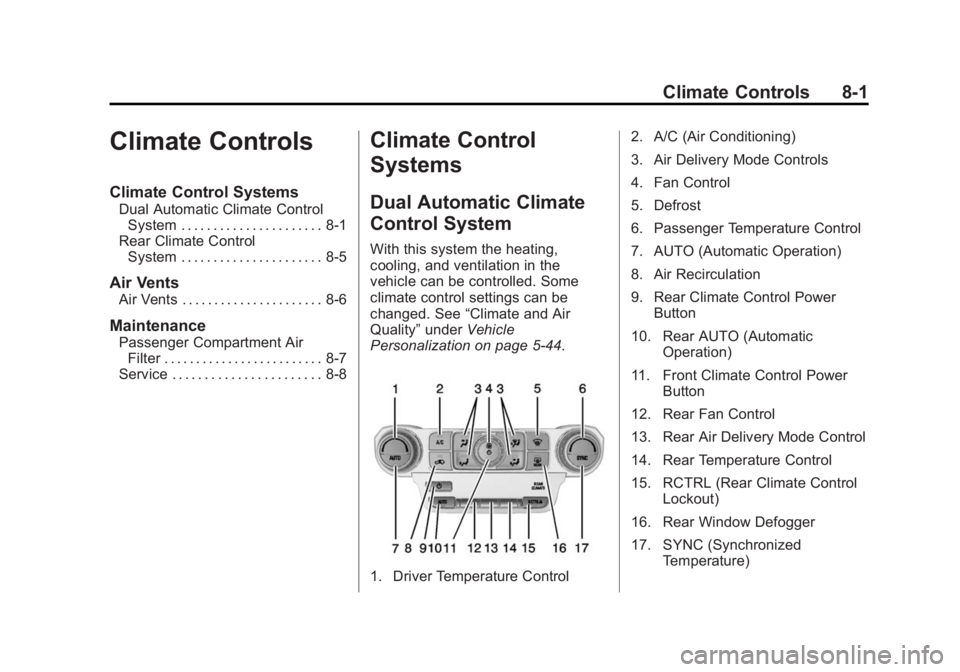
With this system the heating,
cooling, and ventilation in the
vehicle can be controlled. Some
climate control settings can be
changed. See “Climate and Air
Quality” underVehicle
Personalization on page 5-44.
1. Driver Temperature Control 2. A/C (Air Conditioning)
3. Air Delivery Mode Controls
4. Fan Control
5. Defrost
6. Passenger Temperature Control
7. AUTO (Automatic Operation)
8. Air Recirculation
9. Rear Climate Control Power
Button
10. Rear AUTO (Automatic Operation)
11. Front Climate Control Power Button
12. Rear Fan Control
13. Rear Air Delivery Mode Control
14. Rear Temperature Control
15. RCTRL (Rear Climate Control Lockout)
16. Rear Window Defogger
17. SYNC (Synchronized Temperature)
Page 207 of 459

Black plate (2,1)GMC 2015i Yukon/Yukon XL Owner Manual (GMNA-Localizing-U.S./Canada/
Mexico-8431503) - 2015 - crc - 8/11/14
8-2 Climate Controls
Front Climate Controls
Automatic Operation
The system automatically controls
the fan speed, air delivery, air
conditioning, and recirculation in
order to heat or cool the vehicle to
the desired temperature.
When the indicator light is on, the
system is in full automatic operation.
If the air delivery mode or fan
setting is manually adjusted, the
auto indicator turns off and the
selected settings are displayed.
To place the system in
automatic mode:
1. Press AUTO.
2. Set the driver and passengertemperature.
To find your comfort setting, start
with 22°C (72°F) and allow the
system time to stabilize. Then
adjust the temperature as
needed for best comfort. To improve fuel efficiency and to
cool the vehicle faster, recirculation
may be automatically selected in
warm weather.
The recirculation light will not come
on when automatically controlled.
Press
@to manually select
recirculation; press it again to select
outside air.
Do not cover the solar sensor on the
top of the instrument panel near the
windshield. This sensor regulates
air temperature based on sun load.
See “Sensors” later in this section.
Manual Operation
O(On/Off): Press to turn the
climate control system on or off.
Outside air still enters the vehicle,
and is directed to the floor. This
direction can be changed by
pressing the air delivery mode.
9(Fan Control): Turn clockwise
or counterclockwise to increase or
decrease the fan speed. Press AUTO to return to automatic
operation.
Driver and Passenger
Temperature Control:
The
temperature can be adjusted
separately for the driver and
passenger.
Turn the knob clockwise or
counterclockwise to increase or
decrease the driver or passenger
temperature setting.
SYNC (Synchronized
Temperature): Press to link the
passenger and rear climate
temperature settings to the driver
setting. The SYNC indicator light will
turn on. When the passenger or rear
climate settings are adjusted, the
SYNC indicator light turns off.
Air Delivery Mode Control: Press
Y,\,[, or-to change the
direction of the airflow. An indicator
light comes on in the selected mode
button.