steering GMC YUKON XL 2015 Workshop Manual
[x] Cancel search | Manufacturer: GMC, Model Year: 2015, Model line: YUKON XL, Model: GMC YUKON XL 2015Pages: 459, PDF Size: 6.05 MB
Page 259 of 459
Black plate (46,1)GMC 2015i Yukon/Yukon XL Owner Manual (GMNA-Localizing-U.S./Canada/
Mexico-8431503) - 2015 - crc - 8/11/14
9-46 Driving and Operating
press and release thegbutton. The
traction off light
idisplayed in the
instrument cluster will turn off.
If TCS is limiting wheel spin when
the
gbutton is pressed, the system
will not turn off until the wheels stop
spinning.
To turn off both TCS and StabiliTrak,
press and hold the
gbutton until
the traction off light
iand the
StabiliTrak OFF light
gcome on
and stay on in the instrument
cluster, then release. The
appropriate message will display in
the DIC. See Ride Control System
Messages on page 5-38.
To turn TCS and StabiliTrak on
again, press and release the
g
button. The traction off lightiand
the StabiliTrak OFF light
gin the
instrument cluster turn off. StabiliTrak will automatically turn on
if the vehicle exceeds 56 km/h
(35 mph). Traction control will
remain off.
The vehicle has a Trailer Sway
Control (TSC) feature and a Hill
Start Assist (HSA) feature. See
Trailer Sway Control (TSC) on
page 9-88
orHill Start Assist (HSA)
on page 9-43.
Adding accessories can affect the
vehicle performance. See
Accessories and Modifications on
page 10-3.
Magnetic Ride Control
This vehicle may have a semi-active
damping system called Magnetic
Ride Control. With this feature,
improved vehicle ride and handling
is provided under a variety of
passenger and loading conditions.
Magnetic Ride Control is fully
automatic and uses a computer
controller to continuously monitor
vehicle speed, wheel to body
position, lift/dive, and steering position of the vehicle. The
controller then sends signals to
each shock absorber to
independently adjust the damping
level to provide the optimum
vehicle ride.
Magnetic Ride Control also interacts
with the Tow/Haul Mode that, when
activated, will provide additional
control of the shock absorbers. This
additional control results in better
ride and handling characteristics
when the vehicle is loaded or towing
a trailer. See
“Tow/Haul Mode”
under Towing Equipment on
page 9-82.Locking Rear Axle
Vehicles with a locking rear axle can
give more traction on snow, mud,
ice, sand, or gravel. It works like a
standard axle most of the time, but
when traction is low, this feature will
allow the rear wheel with the most
traction to move the vehicle.
Page 265 of 459
Black plate (52,1)GMC 2015i Yukon/Yukon XL Owner Manual (GMNA-Localizing-U.S./Canada/
Mexico-8431503) - 2015 - crc - 8/11/14
9-52 Driving and Operating
*(Cancel):Press to disengage
ACC without erasing the selected
set speed.
3(Follow Distance Gap): Press
to select a following gap time (or
distance) setting for ACC of Far,
Medium, or Near.
Setting Adaptive Cruise Control
If the cruise button is on when not in
use, the cruise on/off control could
get pressed and cruise control could
become active when not desired.
Keep the cruise control off when
cruise is not being used.
Select the set speed desired for
cruise. This is the vehicle speed
when no vehicle is detected in
its path.
ACC will not set or resume at a
speed less than 25 km/h (16 mph).
To set ACC:
1. Press
5.
2. Get up to the desired speed.
3. Press and release SET– .4. Remove foot from the
accelerator.
After ACC is set, it may immediately
apply the brakes if a vehicle ahead
is detected closer than the selected
following gap.
The ACC indicator displays on the
Driver Information Center (DIC) in
the instrument cluster. When ACC is
active, the indicator turns green.
Be mindful of speed limits,
surrounding traffic speeds, and
weather conditions when selecting
the set speed.
Resuming a Set Speed
If the ACC is set at a desired speed
and then the brakes are applied,
ACC is disengaged without erasing
the set speed from memory. To begin using ACC again, press
+RES on the steering wheel. The
vehicle returns to the previous set
speed.
Increasing Speed While ACC is at
a Set Speed
If ACC is already activated, do one
of the following:
.Use the accelerator to get to the
higher speed. Press SET–
.
Release the button and the
accelerator pedal. The vehicle
will now cruise at the higher
speed.
When the accelerator pedal is
pressed, ACC will not brake
because it is overridden.
A warning message will appear
on the Driver Information Center
(DIC). See Cruise Control
Messages on page 5-32.
.Press and hold +RES until the
desired set speed appears on
the display, then release it.
Page 266 of 459
Black plate (53,1)GMC 2015i Yukon/Yukon XL Owner Manual (GMNA-Localizing-U.S./Canada/
Mexico-8431503) - 2015 - crc - 8/11/14
Driving and Operating 9-53
.To increase vehicle speed in
small increments, briefly press
+RES. For each press, the
vehicle goes to the next 1 km/h
(1 mph) faster mark on the
speedometer.
When it is determined that there is
no vehicle ahead or the vehicle
ahead is beyond the selected
following gap, then the vehicle
speed will increase to the set speed.
The speedometer reading can be
displayed in either English or metric
units. See Instrument Cluster on
page 5-11. The increment value
used depends on the units
displayed.
Reducing Speed While ACC is at a
Set Speed
If ACC is already activated, do one
of the following:
.Use the brake to get to the
desired lower speed. Press
SET– and release the
accelerator pedal. The vehicle
will now cruise at the lower
speed.
.Press and hold SET– until the
desired lower speed is reached,
then release it.
.To decrease the vehicle speed in
small increments, briefly press
SET−. For each press, the
vehicle speed goes to the next
1 km/h (1 mph) slower mark on
the speedometer.
The speedometer reading can be
displayed in either English or metric
units. See Instrument Cluster on
page 5-11. The increment value
used depends on the units
displayed.
Selecting the Follow Distance Gap
When a slower moving vehicle is
detected ahead within the selected
following gap, ACC will adjust the
vehicle's speed and attempt to
maintain the follow distance gap
selected.
Press
3on the steering wheel to
adjust the following gap. When
pressed, the current gap setting
displays briefly on the instrument cluster. Subsequent presses cycle
the
3button through three
settings: Far, Medium, or Near. The
gap setting will be maintained until it
is changed.
Since each gap setting corresponds
to a following time (Far, Medium,
or Near), the following distance will
vary based on vehicle speed. The
faster the vehicle speed, the further
back your vehicle will follow a
vehicle detected ahead. Consider
traffic and weather conditions when
selecting the following gap. The
range of selectable gaps may not be
appropriate for all drivers and
driving conditions.
Changing the gap setting
automatically changes the alert
timing sensitivity (Far, Medium,
or Near) for the Forward Collision
Alert (FCA) feature. See Forward
Collision Alert (FCA) System on
page 9-61.
Page 274 of 459
Black plate (61,1)GMC 2015i Yukon/Yukon XL Owner Manual (GMNA-Localizing-U.S./Canada/
Mexico-8431503) - 2015 - crc - 8/11/14
Driving and Operating 9-61
Turning the Features On or Off
TheXbutton to the left of the
steering wheel is used to turn on or
off the Front and Rear Parking
Assist. The indicator light in the
button comes on when the features
are on and turns off when the
features have been disabled.
Front and Rear Parking Assist can
be turned off, on, or on with towbar
through vehicle personalization. See
“Parking Assist” underVehicle
Personalization on page 5-44. If the
parking assist is turned off through
vehicle personalization, the parking
assist button will be disabled. To
turn the parking assist on again,
select On in the vehicle
personalization menu. The On with
Towbar setting allows for the parking assist to work properly with
a small item attached to the trailer
hitch. Turn off parking assist when
towing a trailer.
To turn the rear parking assist
symbols, guidance lines, or Rear
Cross Traffic Alert on or off, see
“Rear Camera”
underVehicle
Personalization on page 5-44
Assistance Systems for
Driving
If equipped, when driving the
vehicle forward, Forward Collision
Alert (FCA), Lane Departure
Warning (LDW), Side Blind Zone
Alert (SBZA), Lane Change Alert
(LCA), and/or the Active Emergency
Braking System can help to avoid a
crash or reduce crash damage.
Forward Collision Alert
(FCA) System
If equipped, the FCA system may
help to avoid or reduce the harm
caused by front-end crashes. When approaching a vehicle ahead too
quickly, FCA provides a red flashing
alert on the windshield and rapidly
beeps or pulses the driver seat.
FCA also lights an amber visual
alert if following another vehicle
much too closely.
FCA detects vehicles within a
distance of approximately 60 m
(197 ft) and operates at speeds
above 40 km/h (25 mph). If the
vehicle has Adaptive Cruise Control
(ACC), it can detect vehicles to
distances of approximately 110 m
(360 ft) and operates at all speeds.
See
Adaptive Cruise Control on
page 9-50.
{Warning
FCA is a warning system and
does not apply the brakes. When
approaching a slower-moving or
stopped vehicle ahead too rapidly,
or when following a vehicle too
closely, FCA may not provide a
(Continued)
Page 275 of 459

Black plate (62,1)GMC 2015i Yukon/Yukon XL Owner Manual (GMNA-Localizing-U.S./Canada/
Mexico-8431503) - 2015 - crc - 8/11/14
9-62 Driving and Operating
Warning (Continued)
warning with enough time to help
avoid a crash. FCA does not warn
of pedestrians, animals, signs,
guardrails, bridges, construction
barrels, or other objects. Be ready
to take action and apply the
brakes. For more information, see
Defensive Driving on page 9-3.
FCA can be disabled with the FCA
steering wheel control, or if your
vehicle is equipped with Adaptive
Cruise Control (ACC), through
vehicle personalization. See the
“Auto Collision Preparation” portion
of “Collision/Detection Systems”
under Vehicle Personalization on
page 5-44.
Detecting the Vehicle Ahead
FCA warnings will not occur unless
the FCA system detects a vehicle
ahead. When the vehicle is
detected, the vehicle-ahead
indicator will display green. Vehicles
may not be detected on curves,
highway exit ramps, or hills; or due
to poor visibility. FCA will not detect
another vehicle ahead until it is
completely in the driving lane.
{Warning
FCA does not provide a warning
to help avoid a crash, unless it
detects a vehicle. FCA may not
detect a vehicle ahead if the FCA
sensor is blocked by dirt, snow,
(Continued)
Warning (Continued)
or ice, or if the windshield is
damaged. It may also not detect a
vehicle on winding or hilly roads,
or in conditions that can limit
visibility such as fog, rain,
or snow, or if the headlamps or
windshield are not cleaned or in
proper condition. Keep the
windshield, headlamps, and FCA
sensors clean and in good repair.
Collision Alert
When your vehicle approaches
another detected vehicle too rapidly,
the red FCA display will flash on the
windshield. Also, eight rapid
high-pitched beeps will sound from
the front, or both sides of the Safety
Page 276 of 459

Black plate (63,1)GMC 2015i Yukon/Yukon XL Owner Manual (GMNA-Localizing-U.S./Canada/
Mexico-8431503) - 2015 - crc - 8/11/14
Driving and Operating 9-63
Alert Seat will pulse five times.
When this Collision Alert occurs, the
brake system may prepare for driver
braking to occur more rapidly which
can cause a brief, mild deceleration.
Continue to apply the brake pedal
as needed. Cruise control may be
disengaged when the Collision Alert
occurs.
Tailgating Alert
The vehicle-ahead indicator will
display amber when you are
following a vehicle ahead much too
closely.
Selecting the Alert Timing
The Collision Alert control is on the
steering wheel. Press
[/3to
set the FCA timing to Far, Medium,
Near, or on some vehicles, Off. The
first button press shows the current setting on the DIC. Additional button
presses will change this setting. The
chosen setting will remain until it is
changed and will affect the timing of
both the Collision Alert and the
Tailgating Alert features. The timing
of both alerts will vary based on
vehicle speed. The faster the
vehicle speed, the farther away the
alert will occur. Consider traffic and
weather conditions when selecting
the alert timing. The range of
selectable alert timing may not be
appropriate for all drivers and
driving conditions.
If your vehicle is equipped with
Adaptive Cruise Control (ACC),
changing the FCA timing setting
automatically changes the ACC
following gap setting (Far, Medium,
or Near).
Unnecessary Alerts
FCA may provide unnecessary
alerts for turning vehicles, vehicles
in other lanes, objects that are not
vehicles, or shadows. These alerts
are normal operation and the
vehicle does not need service.
Cleaning the System
If the FCA system does not seem to
operate properly, cleaning the
outside of the windshield in front of
the camera sensor behind the
rearview mirror, and cleaning the
front of the vehicle where radar
sensors are located, may correct
the issue.
For cleaning instructions, see
“Washing the Vehicle”
under
Exterior Care on page 10-86.
System operation may also be
limited under snow, heavy rain,
or road spray conditions.
Active Emergency
Braking System
If the vehicle has Adaptive Cruise
Control (ACC) it also has the Active
Emergency Braking System, which
includes Intelligent Brake
Assist (IBA) and the Automatic
Page 281 of 459
Black plate (68,1)GMC 2015i Yukon/Yukon XL Owner Manual (GMNA-Localizing-U.S./Canada/
Mexico-8431503) - 2015 - crc - 8/11/14
9-68 Driving and Operating
after cleaning both sides of the
vehicle toward the rear corners of
the vehicle, see your dealer.
If the LCA displays do not light up
when vehicles are in the side blind
zone or rapidly approaching this
zone and the system is clean, the
system may need service. Take the
vehicle to your dealer.
When LCA is disabled for any
reason other than the driver turning
it off, the Side Blind Zone Alert On
option will not be available on the
personalization menu.
Radio Frequency Information
SeeRadio Frequency Statement on
page 13-12.
Lane Departure
Warning (LDW)
If equipped, LDW may help avoid
crashes due to unintentional lane
departures. It may provide an alert if
the vehicle is crossing a lane
without using a turn signal in that
direction. LDW uses a camera sensor to detect the lane markings
at speeds of 56 km/h (35 mph) or
greater.
{Warning
The LDW system does not steer
the vehicle. The LDW system
may not:
.Provide enough time to avoid
a crash.
.Detect lane markings under
poor weather or visibility
conditions. This can occur if
the windshield or headlamps
are blocked by dirt, snow,
or ice; if they are not in
proper condition; or if the sun
shines directly into the
camera.
.Detect road edges.
.Detect lanes on winding or
hilly roads.
(Continued)
Warning (Continued)
If LDW only detects lane
markings on one side of the road,
it will only warn you when
departing the lane on the side
where it has detected a lane
marking. Always keep your
attention on the road and
maintain proper vehicle position
within the lane, or vehicle
damage, injury, or death could
occur. Always keep the
windshield, headlamps, and
camera sensors clean and in
good repair. Do not use LDW in
bad weather conditions.
How the System Works
The LDW camera sensor is on the
windshield ahead of the rearview
mirror.
To turn LDW on and off, press
@to
the left of the steering wheel. The
control indicator will light when LDW
is on.
Page 288 of 459
Black plate (75,1)GMC 2015i Yukon/Yukon XL Owner Manual (GMNA-Localizing-U.S./Canada/
Mexico-8431503) - 2015 - crc - 8/11/14
Driving and Operating 9-75
{Warning
When towing a trailer, exhaust
gases may collect at the rear of
the vehicle and enter if the
liftgate, trunk/hatch, or rear-most
window is open.
When towing a trailer:
.Do not drive with the liftgate,
trunk/hatch, or rear-most
window open.
.Fully open the air outlets on
or under the instrument
panel.
.Also adjust the climate
control system to a setting
that brings in only outside air.
See“Climate Control
Systems” in the Index.
For more information about
Carbon Monoxide, see Engine
Exhaust on page 9-30. Towing a trailer requires a certain
amount of experience. The
combination you are driving is
longer and not as responsive as the
vehicle itself. Get acquainted with
the handling and braking of the rig
before setting out for the open road.
Before starting, check all trailer hitch
parts and attachments, safety
chains, electrical connectors, lamps,
tires, and mirrors. If the trailer has
electric brakes, start the
combination moving and then apply
the trailer brake controller by hand
to be sure the brakes work.
During the trip, check occasionally
to be sure that the load is secure
and the lamps and any trailer
brakes still work.
Following Distance
Stay at least twice as far behind the
vehicle ahead as you would when
driving the vehicle without a trailer.
This can help to avoid heavy
braking and sudden turns.
Passing
More passing distance is needed
when towing a trailer. The
combination will not accelerate as
quickly and is longer so it is
necessary to go much farther
beyond the passed vehicle before
returning to the lane.
Backing Up
Hold the bottom of the steering
wheel with one hand. To move the
trailer to the left, move that hand to
the left. To move the trailer to the
right, move your hand to the right.
Always back up slowly and,
if possible, have someone
guide you.
Making Turns
{Caution
Making very sharp turns while
trailering could cause the trailer to
come in contact with the vehicle.
(Continued)
Page 298 of 459
Black plate (85,1)GMC 2015i Yukon/Yukon XL Owner Manual (GMNA-Localizing-U.S./Canada/
Mexico-8431503) - 2015 - crc - 8/11/14
Driving and Operating 9-85
all of these systems are fully
operational to ensure full
functionality of the ITBC system.
The ITBC system is powered
through the vehicle's electrical
system. Turning the ignition off will
also turn off the ITBC system. The
ITBC system is fully functional only
when the ignition is in ON/RUN.
{Warning
Connecting a trailer that has an
air brake system may result in
reduced or complete loss of trailer
braking. There may be an
increase in stopping distance or
trailer instability which could
result in personal injury or
damage to the vehicle, trailer,
or other property. Use the ITBC
system only with electric or
electric over hydraulic trailer
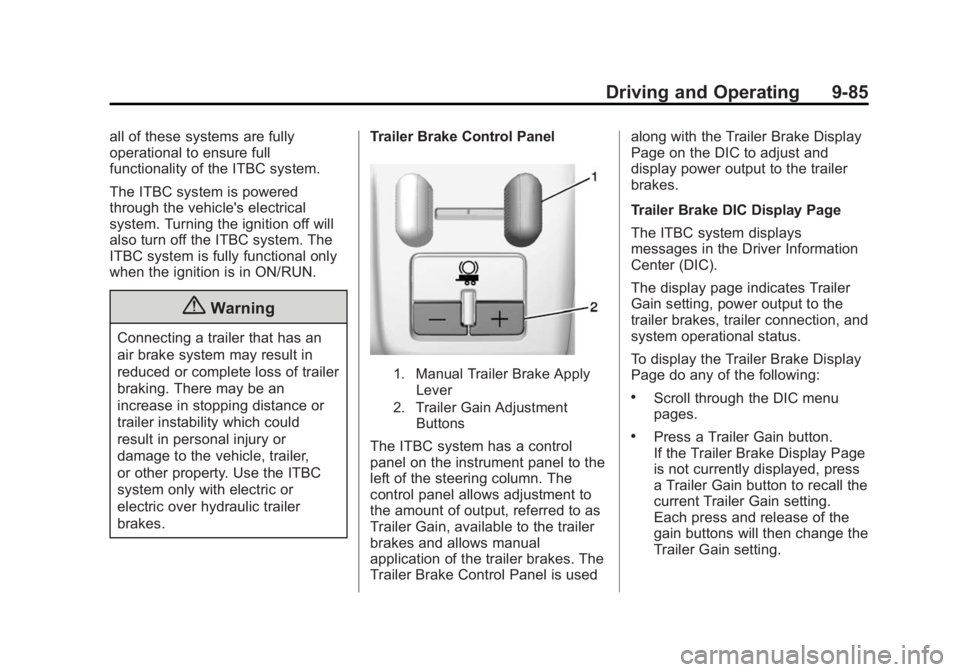
brakes.Trailer Brake Control Panel
1. Manual Trailer Brake Apply
Lever
2. Trailer Gain Adjustment Buttons
The ITBC system has a control
panel on the instrument panel to the
left of the steering column. The
control panel allows adjustment to
the amount of output, referred to as
Trailer Gain, available to the trailer
brakes and allows manual
application of the trailer brakes. The
Trailer Brake Control Panel is used along with the Trailer Brake Display
Page on the DIC to adjust and
display power output to the trailer
brakes.
Trailer Brake DIC Display Page
The ITBC system displays
messages in the Driver Information
Center (DIC).
The display page indicates Trailer
Gain setting, power output to the
trailer brakes, trailer connection, and
system operational status.
To display the Trailer Brake Display
Page do any of the following:
.Scroll through the DIC menu
pages.
.Press a Trailer Gain button.
If the Trailer Brake Display Page
is not currently displayed, press
a Trailer Gain button to recall the
current Trailer Gain setting.
Each press and release of the
gain buttons will then change the
Trailer Gain setting.
Page 307 of 459
Black plate (4,1)GMC 2015i Yukon/Yukon XL Owner Manual (GMNA-Localizing-U.S./Canada/
Mexico-8431503) - 2015 - crc - 8/11/14
10-4 Vehicle Care
This vehicle has an airbag system.
Before attempting to do your own
service work, seeServicing the
Airbag-Equipped Vehicle on
page 3-40.
Keep a record with all parts receipts
and list the mileage and the date of
any service work performed. See
Maintenance Records on
page 11-15.
{Caution
Even small amounts of
contamination can cause damage
to vehicle systems. Do not allow
contaminants to contact the fluids,
reservoir caps, or dipsticks.
Hood
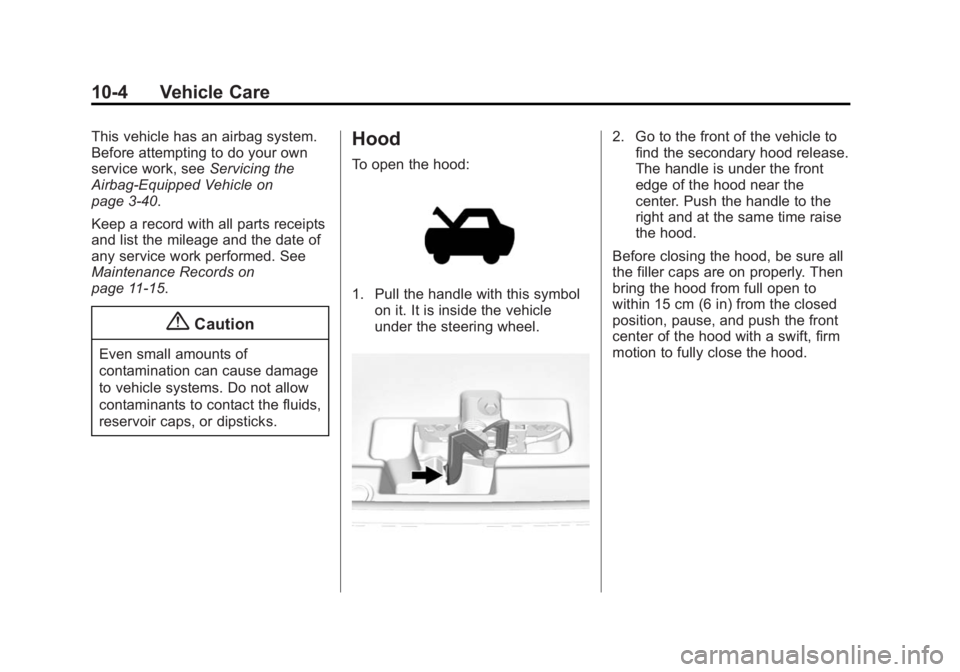
To open the hood:
1. Pull the handle with this symbol on it. It is inside the vehicle
under the steering wheel.
2. Go to the front of the vehicle tofind the secondary hood release.
The handle is under the front
edge of the hood near the
center. Push the handle to the
right and at the same time raise
the hood.
Before closing the hood, be sure all
the filler caps are on properly. Then
bring the hood from full open to
within 15 cm (6 in) from the closed
position, pause, and push the front
center of the hood with a swift, firm
motion to fully close the hood.