oil change GMC YUKON XL 2015 Owners Manual
[x] Cancel search | Manufacturer: GMC, Model Year: 2015, Model line: YUKON XL, Model: GMC YUKON XL 2015Pages: 459, PDF Size: 6.05 MB
Page 5 of 459
Black plate (4,1)GMC 2015i Yukon/Yukon XL Owner Manual (GMNA-Localizing-U.S./Canada/
Mexico-8431503) - 2015 - crc - 8/11/14
iv Introduction
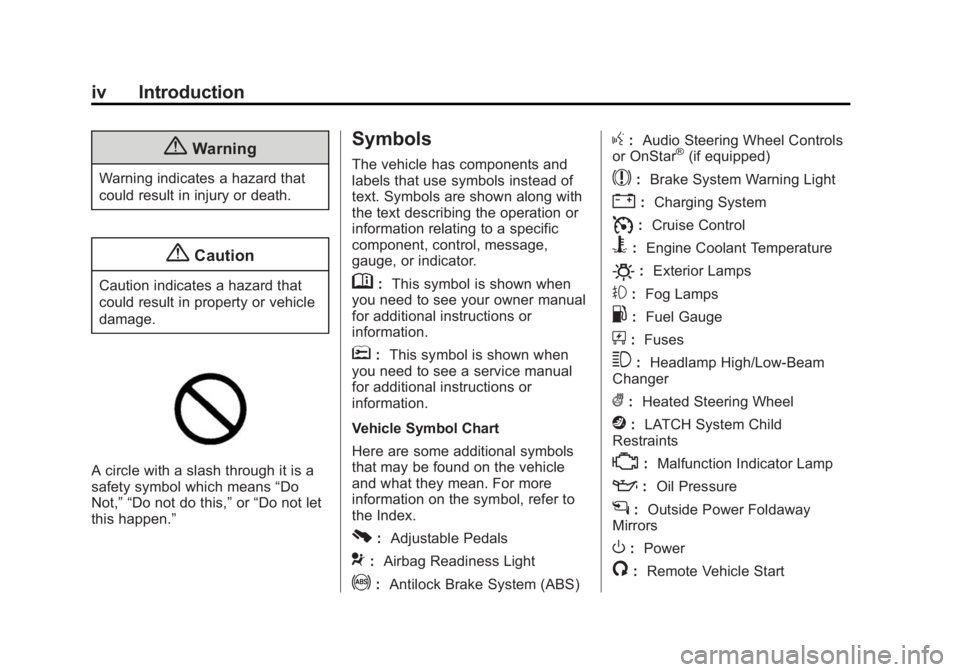
{Warning
Warning indicates a hazard that
could result in injury or death.
{Caution
Caution indicates a hazard that
could result in property or vehicle
damage.
A circle with a slash through it is a
safety symbol which means“Do
Not,” “Do not do this,” or“Do not let
this happen.”
Symbols
The vehicle has components and
labels that use symbols instead of
text. Symbols are shown along with
the text describing the operation or
information relating to a specific
component, control, message,
gauge, or indicator.
M: This symbol is shown when
you need to see your owner manual
for additional instructions or
information.
*: This symbol is shown when
you need to see a service manual
for additional instructions or
information.
Vehicle Symbol Chart
Here are some additional symbols
that may be found on the vehicle
and what they mean. For more
information on the symbol, refer to
the Index.
0: Adjustable Pedals
9:Airbag Readiness Light
!:Antilock Brake System (ABS)
g:Audio Steering Wheel Controls
or OnStar®(if equipped)
$: Brake System Warning Light
":Charging System
I:Cruise Control
B: Engine Coolant Temperature
O:Exterior Lamps
#:Fog Lamps
.: Fuel Gauge
+:Fuses
3: Headlamp High/Low-Beam
Changer
(: Heated Steering Wheel
j:LATCH System Child
Restraints
*: Malfunction Indicator Lamp
::Oil Pressure
g:Outside Power Foldaway
Mirrors
O: Power
/:Remote Vehicle Start
Page 8 of 459
Black plate (1,1)GMC 2015i Yukon/Yukon XL Owner Manual (GMNA-Localizing-U.S./Canada/
Mexico-8431503) - 2015 - crc - 8/11/14
In Brief 1-1
In Brief
Instrument Panel
Instrument Panel . . . . . . . . . . . . . . 1-2
Initial Drive Information
Initial Drive Information . . . . . . . . 1-4
Remote Keyless Entry (RKE)System . . . . . . . . . . . . . . . . . . . . . . 1-4
Remote Vehicle Start . . . . . . . . . 1-5
Door Locks . . . . . . . . . . . . . . . . . . . 1-6
Liftgate . . . . . . . . . . . . . . . . . . . . . . . . 1-6
Windows . . . . . . . . . . . . . . . . . . . . . . 1-7
Seat Adjustment . . . . . . . . . . . . . . 1-7
Memory Features . . . . . . . . . . . . . 1-8
Second Row Seats . . . . . . . . . . . 1-9
Third Row Seats . . . . . . . . . . . . . . 1-9
Heated and Cooled Front Seats . . . . . . . . . . . . . . . . . . . . . . . . 1-9
Head Restraint Adjustment . . . . . . . . . . . . . . . . . 1-10
Safety Belts . . . . . . . . . . . . . . . . . . 1-10 Passenger Sensing
System . . . . . . . . . . . . . . . . . . . . . 1-10
Mirror Adjustment . . . . . . . . . . . . 1-11
Steering Wheel Adjustment . . . . . . . . . . . . . . . . . 1-12
Throttle and Brake Pedal Adjustment . . . . . . . . . . . . . . . . . 1-12
Interior Lighting . . . . . . . . . . . . . . 1-13
Exterior Lighting . . . . . . . . . . . . . 1-14
Windshield Wiper/Washer . . . . 1-15
Climate Controls . . . . . . . . . . . . . 1-16
Transmission . . . . . . . . . . . . . . . . 1-16
Four-Wheel Drive . . . . . . . . . . . . 1-17
Vehicle Features
Infotainment System . . . . . . . . . 1-18
Steering Wheel Controls . . . . . 1-18
Cruise Control . . . . . . . . . . . . . . . 1-18
Driver Information Center (DIC) . . . . . . . . . . . . . . . 1-19
Forward Collision Alert (FCA) System . . . . . . . . . . . . . . . . . . . . . 1-19
Lane Departure Warning (LDW) . . . . . . . . . . . . . 1-19 Lane Change Alert (LCA) . . . . 1-20
Rear Vision
Camera (RVC) . . . . . . . . . . . . . 1-20
Rear Cross Traffic Alert (RCTA) System . . . . . . . . . . . . 1-20
Parking Assist . . . . . . . . . . . . . . . 1-20
Active Emergency Braking System . . . . . . . . . . . . . . . . . . . . . 1-20
Power Outlets . . . . . . . . . . . . . . . 1-21
Universal Remote System . . . 1-21
Sunroof . . . . . . . . . . . . . . . . . . . . . . 1-22
Performance and Maintenance
Traction Control/Electronic Stability Control . . . . . . . . . . . . 1-23
Tire Pressure Monitor . . . . . . . . 1-23
Engine Oil Life System . . . . . . 1-24
E85 or FlexFuel . . . . . . . . . . . . . . 1-24
Driving for Better Fuel Economy . . . . . . . . . . . . . . . . . . . 1-24
Roadside Assistance Program . . . . . . . . . . . . . . . . . . . . 1-25
OnStar
®. . . . . . . . . . . . . . . . . . . . . 1-25
Page 31 of 459
Black plate (24,1)GMC 2015i Yukon/Yukon XL Owner Manual (GMNA-Localizing-U.S./Canada/
Mexico-8431503) - 2015 - crc - 8/11/14
1-24 In Brief
Engine Oil Life System
The engine oil life system calculates
engine oil life based on vehicle use
and, on most vehicles, displays a
DIC message when it is necessary
to change the engine oil and filter.
The oil life system should be reset
to 100% only following an oil
change.
Resetting the Oil Life System
To reset the engine oil life system:
1. Display OIL LIFE REMAININGon the DIC. See Driver
Information Center (DIC) on
page 5-28. If the vehicle does
not have DIC buttons, the
vehicle must be in P (Park) to
access this display.
2. Press and hold the
Vbutton on
the DIC, or the trip odometer
reset stem if the vehicle does
not have DIC buttons, for
several seconds. The oil life will
change to 100%. The oil life system can also be reset
as follows:
1. Turn the ignition to ON/RUN with
the engine off.
2. Fully press the accelerator pedal slowly three times within
five seconds.
3. Display OIL LIFE REMAINING on the DIC. If the display shows
100%, the system is reset.
See Engine Oil Life System on
page 10-9.
E85 or FlexFuel
Vehicles with a yellow fuel cap can
use either unleaded gasoline or
ethanol fuel containing up to 85%
ethanol (E85). See E85 or FlexFuel
on page 9-71. For all other vehicles,
use only the unleaded gasoline
described under Fuel on page 9-69.
Driving for Better Fuel
Economy
Driving habits can affect fuel
mileage. Here are some driving tips
to get the best fuel economy
possible.
.Avoid fast starts and accelerate
smoothly.
.Brake gradually and avoid
abrupt stops.
.Avoid idling the engine for long
periods of time.
.When road and weather
conditions are appropriate, use
cruise control.
.Always follow posted speed
limits or drive more slowly when
conditions require.
.Keep vehicle tires properly
inflated.
.Combine several trips into a
single trip.
Page 168 of 459
Black plate (29,1)GMC 2015i Yukon/Yukon XL Owner Manual (GMNA-Localizing-U.S./Canada/
Mexico-8431503) - 2015 - crc - 8/11/14
Instruments and Controls 5-29
This also shows the approximate
average liters per 100 kilometers
(L/100 km) or miles per
gallon (mpg). This number is
calculated based on the number of
L/100 km (mpg) recorded since the
last time this menu item was reset.
This number reflects only the
approximate average fuel economy
that the vehicle has right now, and
will change as driving conditions
change.
Press and hold
Vwhile this display
is active to reset the trip odometer
and the average fuel economy. Trip
A and Trip B can also be reset by
pressing
pand choosing reset.
Fuel Range: Shows the
approximate distance the vehicle
can be driven without refueling.
LOW will be displayed when the
vehicle is low on fuel. The fuel
range estimate is based on an
average of the vehicle's fuel
economy over recent driving history
and the amount of fuel remaining in
the fuel tank. Oil Life:
Shows an estimate of the
oil's remaining useful life.
If REMAINING OIL LIFE 99% is
displayed, that means 99% of the
current oil life remains.
When the remaining oil life is low,
the CHANGE ENGINE OIL SOON
message will appear on the display.
See Engine Oil Messages on
page 5-34. The oil should be
changed as soon as possible. See
Engine Oil on page 10-6. In addition
to the engine oil life system
monitoring the oil life, additional
maintenance is recommended in the
Maintenance Schedule. See
Maintenance Schedule on
page 11-2.
The Oil Life display must be reset
after each oil change. It will not
reset itself. Do not to reset the Oil
Life display at any time other than
when the oil has just been changed.
It cannot be reset accurately until
the next oil change. To reset the
engine oil life system, press and
hold
Vfor several seconds while the Oil Life display is active. See
Engine Oil Life System on
page 10-9.
Tire Pressure:
Shows the
approximate pressures of all four
tires. Tire pressure is displayed in
either kilopascal (kPa) or in pounds
per square inch (psi). If the pressure
is low, the value for that tire is
shown in amber. See Tire Pressure
Monitor System on page 10-53 and
Tire Pressure Monitor Operation on
page 10-54.
Fuel Economy: The center
displays the approximate
instantaneous fuel economy as a
number and bar graph. Displayed
above the bar graph is a running
average of fuel economy for the
most recently traveled selected
distance. Displayed below the bar
graph is the best average fuel
economy that has been achieved for
the selected distance. The selected
distance is displayed at the top of
the page as “last xxx mi/km.” Next
to the odometer, the Active Fuel
Management displays the number of
Page 173 of 459
Black plate (34,1)GMC 2015i Yukon/Yukon XL Owner Manual (GMNA-Localizing-U.S./Canada/
Mexico-8431503) - 2015 - crc - 8/11/14
5-34 Instruments and Controls
added strain on a hot engine, the air
conditioning compressor
automatically turns off. When the
coolant temperature returns to
normal, the air conditioning
compressor turns back on. You can
continue to drive your vehicle.
If this message continues to appear,
have the system repaired by your
dealer as soon as possible to avoid
damage to the engine.
ENGINE OVERHEATED IDLE
ENGINE
This message displays when the
engine coolant temperature is too
hot. Stop and allow the vehicle to
idle until it cools down. SeeEngine
Coolant Temperature Gauge on
page 5-16.
When towing, use Tow/Haul Mode
to prevent damage to the engine or
transmission. See Tow/Haul Mode
on page 9-36.
ENGINE OVERHEATED STOP
ENGINE
This message displays and a chime
may sound if the engine cooling
system reaches unsafe
temperatures for operation. Stop
and turn off the vehicle as soon as it
is safe to do so to avoid severe
damage. This message clears when
the engine has cooled to a safe
operating temperature.
Engine Oil Messages
CHANGE ENGINE OIL SOON
This message displays when the
engine oil needs to be changed.
When you change the engine oil, be
sure to reset the CHANGE ENGINE
OIL SOON message. See Engine
Oil Life System on page 10-9 for
information on how to reset the
message. See Engine Oil on
page 10-6 andMaintenance
Schedule on page 11-2.
ENGINE OIL LOW ADD OIL
On some vehicles, this message
displays when the engine oil level
may be too low. Check the oil level
before filling to the recommended
level. If the oil is not low and this
message remains on, take the
vehicle to your dealer for service.
See Engine Oil on page 10-6.
ENGINE OIL HOT IDLE
ENGINE
This message displays when the
engine oil becomes hotter than the
normal operating temperature. Stop
and allow the vehicle to idle until it
cools down. See Engine Coolant
Temperature Gauge on page 5-16.
OIL PRESSURE LOW STOP
ENGINE
This message displays if low oil
pressure levels occur. Stop the
vehicle as soon as safely possible
and do not operate it until the cause
of the low oil pressure has been
corrected. Check the oil as soon as
Page 237 of 459
Black plate (24,1)GMC 2015i Yukon/Yukon XL Owner Manual (GMNA-Localizing-U.S./Canada/
Mexico-8431503) - 2015 - crc - 8/11/14
9-24 Driving and Operating
The ignition will switch from ACC/
ACCESSORY to OFF after
five minutes to prevent battery
rundown.
ON/RUN/START (Green Indicator
Light):This mode is for driving and
starting. With the ignition off, and
the brake pedal applied, pressing
the button once will place the
ignition system in ON/RUN/START.
Once engine cranking begins,
release the button. Engine cranking
will continue until the engine starts.
See Starting the Engine on
page 9-24. The ignition will then
remain in ON/RUN.
Service Only Mode
This power mode is available for
service and diagnostics, and to
verify the proper operation of the
malfunction indicator lamp as may
be required for emission inspection
purposes. With the vehicle off, and
the brake pedal not applied,
pressing and holding the button for
more than five seconds will place
the vehicle in Service Only Mode. The instruments and audio systems
will operate as they do in ON/RUN,
but the vehicle will not be able to be
driven. The engine will not start in
Service Only Mode. Press the
button again to turn the vehicle off.
Starting the Engine
Move the shift lever to P (Park) or
N (Neutral). The engine will not start
in any other position. To restart the
engine when the vehicle is already
moving, use N (Neutral) only.
{Caution
Do not try to shift to P (Park) if the
vehicle is moving. If you do, you
could damage the transmission.
Shift to P (Park) only when the
vehicle is stopped.
{Caution
If you add electrical parts or
accessories, you could change
the way the engine operates. Any
resulting damage would not be
covered by the vehicle warranty.
See
Add-On Electrical Equipment
on page 9-89.
Starting Procedure (Key
Access)
1. With your foot off the accelerator pedal, turn the ignition key to
START. When the engine starts,
let go of the key. The idle speed
will go down as the engine gets
warm. Do not race the engine
immediately after starting it.
Operate the engine and
transmission gently to allow the
oil to warm up and lubricate all
moving parts.
When the low fuel warning lamp
is on and the FUEL LEVEL LOW
message is displayed in the
Page 284 of 459
Black plate (71,1)GMC 2015i Yukon/Yukon XL Owner Manual (GMNA-Localizing-U.S./Canada/
Mexico-8431503) - 2015 - crc - 8/11/14
Driving and Operating 9-71
Fuels in Foreign
Countries
If planning to drive in countries
outside the U.S. or Canada, the
proper fuel might be hard to find.
Check regional auto club or fuel
retail brand websites for availability
in the country where driving. Never
use leaded gasoline, fuel containing
methanol, manganese, or any other
fuel not recommended. Costly
repairs caused by use of improper
fuel would not be covered by the
vehicle warranty.
Fuel Additives
To keep fuel systems clean, TOP
TIER Detergent Gasoline is
recommended. SeeFuel on
page 9-69.
If TOP TIER Detergent Gasoline is
not available, one bottle of Fuel
System Treatment PLUS added to
the fuel tank at every engine oil
change can help. Fuel System
Treatment PLUS is the only gasoline additive recommended by
General Motors. It is available at
your dealer.
Do not use additives with E85 or
FlexFuel.
E85 or FlexFuel
Vehicles with fuel caps marked as
“E85”
or FlexFuel can use either
unleaded gasoline or ethanol fuel
containing up to 85% ethanol (E85).
All other vehicles should use only
the unleaded gasoline as described
in Fuel on page 9-69.
The use of E85 or FlexFuel is
encouraged when the vehicle is
designed to use it. E85 or FlexFuel
is made from renewable sources.
Many fuel stations will not have an
85% ethanol fuel (E85) pump
available. Those stations that do
have E85 should have a label
indicating the FlexFuel ethanol
content. Do not use the fuel if the
ethanol content is greater than 85%. The starting characteristics of E85
or FlexFuel make it unsuitable for
use when temperatures fall below
-18°C (0°F). Use gasoline or add
gasoline to the E85 or FlexFuel.
Because E85 or FlexFuel has less
energy per liter (gallon) than
gasoline, the vehicle will need to be
refilled more often. See
Filling the
Tank on page 9-72.
{Caution
Some additives are not
compatible with E85 or FlexFuel
and can harm the vehicle's fuel
system. Do not add anything to
E85 or FlexFuel. Damage caused
by additives would not be covered
by the vehicle warranty.
Page 309 of 459
Black plate (6,1)GMC 2015i Yukon/Yukon XL Owner Manual (GMNA-Localizing-U.S./Canada/
Mexico-8431503) - 2015 - crc - 8/11/14
10-6 Vehicle Care
1. Positive (+) Terminal. SeeJump
Starting on page 10-78.
2. Battery on page 10-23.
3. Coolant Surge Tank and Pressure Cap. See Cooling
System on page 10-14.
4. Engine Air Cleaner/Filter on
page 10-13.
5. Automatic Transmission Dipstick. See “How to Check
Automatic Transmission Fluid”
under Automatic Transmission
Fluid on page 10-10.
6. Remote Negative (–) Location (Out of View). See Jump Starting
on page 10-78.
7. Engine Cooling Fans (Out of View). See Cooling System on
page 10-14.
8. Engine Oil Fill Cap. See “When
to Add Engine Oil” underEngine
Oil on page 10-6.
9. Engine Oil Dipstick. See “Checking Engine Oil” under
Engine Oil on page 10-6. 10. Windshield Washer Fluid
Reservoir. See “Adding Washer
Fluid” under Washer Fluid on
page 10-20.
11. Brake Fluid Reservoir. See Brake Fluid on page 10-21.
12. Engine Compartment Fuse
Block on page 10-34.
Engine Oil
To ensure proper engine
performance and long life, careful
attention must be paid to engine oil.
Following these simple, but
important steps will help protect
your investment:
.Always use engine oil approved
to the proper specification and of
the proper viscosity grade. See
“Selecting the Right Engine Oil”
in this section.
.Check the engine oil level
regularly and maintain the
proper oil level. See “Checking
Engine Oil” and“When to Add
Engine Oil” in this section.
.Change the engine oil at the
appropriate time. See Engine Oil
Life System on page 10-9.
.Always dispose of engine oil
properly. See “What to Do with
Used Oil” in this section.
Checking Engine Oil
If equipped, the ENGINE OIL LOW
ADD OIL message displays when
the engine oil level may be too low.
SeeEngine Oil Messages on
page 5-34. Check the oil level
before filling to the recommended
level. If the oil is not low and this
message remains on, see your
dealer.
It is also a good idea to check the
engine oil level at each fuel fill. In
order to get an accurate reading,
the vehicle must be on level ground.
The engine oil dipstick handle is a
loop. See Engine Compartment
Overview on page 10-5 for the
location of the engine oil dipstick.
Page 311 of 459
Black plate (8,1)GMC 2015i Yukon/Yukon XL Owner Manual (GMNA-Localizing-U.S./Canada/
Mexico-8431503) - 2015 - crc - 8/11/14
10-8 Vehicle Care
Selecting the Right Engine Oil
Selecting the right engine oil
depends on both the proper oil
specification and viscosity grade.
SeeRecommended Fluids and
Lubricants on page 11-12.
Specification
Ask for and use engine oils that
meet the dexos1™ specification.
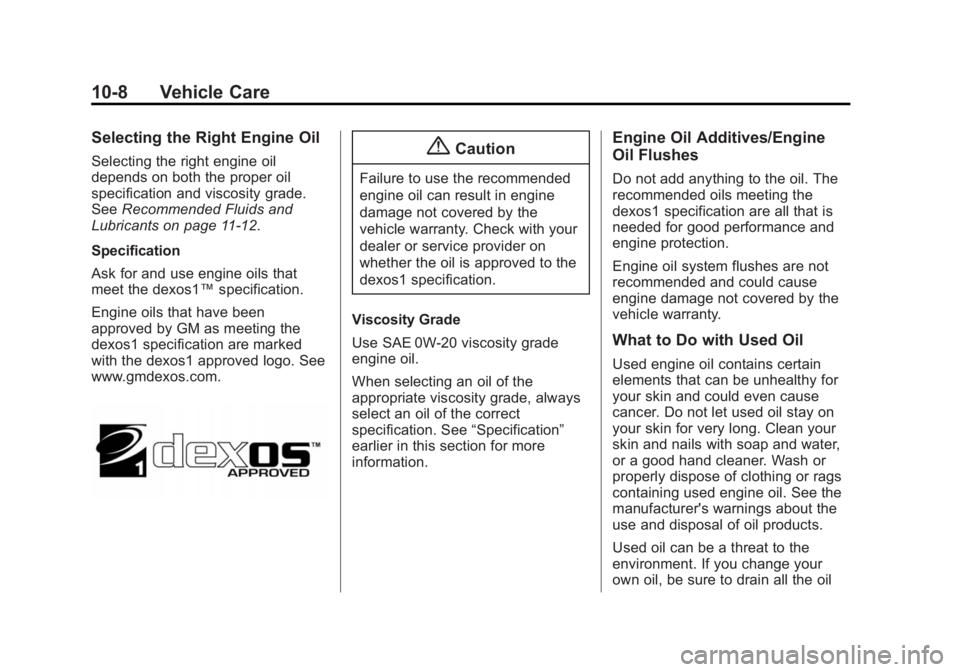
Engine oils that have been
approved by GM as meeting the
dexos1 specification are marked
with the dexos1 approved logo. See
www.gmdexos.com.{Caution
Failure to use the recommended
engine oil can result in engine
damage not covered by the
vehicle warranty. Check with your
dealer or service provider on
whether the oil is approved to the
dexos1 specification.
Viscosity Grade
Use SAE 0W-20 viscosity grade
engine oil.
When selecting an oil of the
appropriate viscosity grade, always
select an oil of the correct
specification. See “Specification”
earlier in this section for more
information.
Engine Oil Additives/Engine
Oil Flushes
Do not add anything to the oil. The
recommended oils meeting the
dexos1 specification are all that is
needed for good performance and
engine protection.
Engine oil system flushes are not
recommended and could cause
engine damage not covered by the
vehicle warranty.
What to Do with Used Oil
Used engine oil contains certain
elements that can be unhealthy for
your skin and could even cause
cancer. Do not let used oil stay on
your skin for very long. Clean your
skin and nails with soap and water,
or a good hand cleaner. Wash or
properly dispose of clothing or rags
containing used engine oil. See the
manufacturer's warnings about the
use and disposal of oil products.
Used oil can be a threat to the
environment. If you change your
own oil, be sure to drain all the oil
Page 312 of 459
Black plate (9,1)GMC 2015i Yukon/Yukon XL Owner Manual (GMNA-Localizing-U.S./Canada/
Mexico-8431503) - 2015 - crc - 8/11/14
Vehicle Care 10-9
from the filter before disposal. Never
dispose of oil by putting it in the
trash or pouring it on the ground,
into sewers, or into streams or
bodies of water. Recycle it by taking
it to a place that collects used oil.
Engine Oil Life System
When to Change Engine Oil
This vehicle has a computer system
that indicates when to change the
engine oil and filter. This is based
on a combination of factors which
include engine revolutions, engine
temperature, and miles driven.
Based on driving conditions, the
mileage at which an oil change is
indicated can vary considerably. For
the oil life system to work properly,
the system must be reset every time
the oil is changed.
On some vehicles, when the system
has calculated that oil life has been
diminished, a CHANGE ENGINE
OIL SOON message comes on to
indicate that an oil change isnecessary. See
Engine Oil
Messages on page 5-34. Change
the oil as soon as possible within
the next 1 000 km (600 mi). It is
possible that, if driving under the
best conditions, the oil life system
might indicate that an oil change is
not necessary for up to a year. The
engine oil and filter must be
changed at least once a year and,
at this time, the system must be
reset. For vehicles without the
CHANGE ENGINE OIL SOON
message, an oil change is needed
when the OIL LIFE REMAINING
percentage is near 0%. Your dealer
has trained service people who will
perform this work and reset the
system. It is also important to check
the oil regularly over the course of
an oil drain interval and keep it at
the proper level.
If the system is ever reset
accidentally, the oil must be
changed at 5 000 km (3,000 mi)
since the last oil change.
Remember to reset the oil life
system whenever the oil is changed.
How to Reset the Engine Oil
Life System
Reset the system whenever the
engine oil is changed so that the
system can calculate the next
engine oil change. Always reset the
engine oil life to 100% after every oil
change. It will not reset itself. To
reset the engine oil life system:
1. Display the OIL LIFE
REMAINING on the DIC. If the
vehicle does not have DIC
buttons, the vehicle must be in
P (Park) to access this display.
See Driver Information Center
(DIC) on page 5-28.
2. Press and hold
V, or the trip
odometer reset stem if the
vehicle does not have DIC
buttons, for several seconds.
The oil life will change to 100%.
The oil life system can also be reset
as follows:
1. Turn the ignition to ON/RUN with the engine off.