lock GMC YUKON XL 2017 Owners Manual
[x] Cancel search | Manufacturer: GMC, Model Year: 2017, Model line: YUKON XL, Model: GMC YUKON XL 2017Pages: 427, PDF Size: 7.04 MB
Page 386 of 427
GMC Yukon/Yukon XL/Denali Owner Manual (GMNA-Localizing-U.S./
Canada/Mexico-9955936) - 2017 - crc - 7/5/16
Service and Maintenance 385
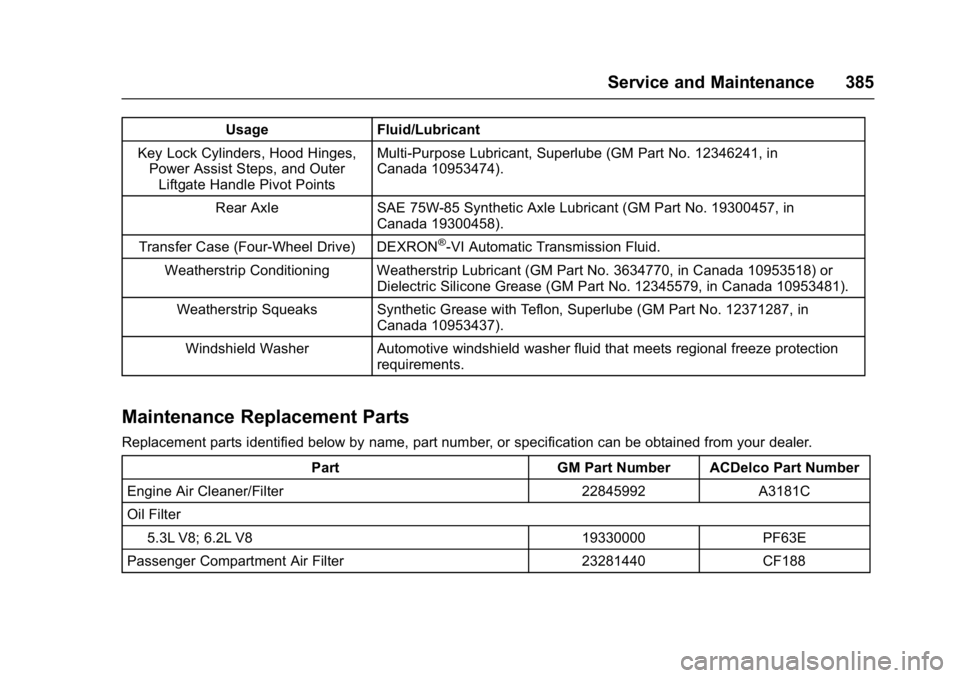
UsageFluid/Lubricant
Key Lock Cylinders, Hood Hinges, Power Assist Steps, and Outer
Liftgate Handle Pivot Points Multi-Purpose Lubricant, Superlube (GM Part No. 12346241, in
Canada 10953474).
Rear Axle SAE 75W-85 Synthetic Axle Lubricant (GM Part No. 19300457, in
Canada 19300458).
Transfer Case (Four-Wheel Drive) DEXRON
®-VI Automatic Transmission Fluid.
Weatherstrip Conditioning Weatherstrip Lubricant (GM Part No. 3634770, in Canada 10953518) or Dielectric Silicone Grease (GM Part No. 12345579, in Canada 10953481).
Weatherstrip Squeaks Synthetic Grease with Teflon, Superlube (GM Part No. 12371287, in Canada 10953437).
Windshield Washer Automotive windshield washer fluid that meets regional freeze protection requirements.
Maintenance Replacement Parts
Replacement parts identified below by name, part number, or specification can be obtained from your dealer.
Part GM Part Number ACDelco Part Number
Engine Air Cleaner/Filter 22845992 A3181C
Oil Filter 5.3L V8; 6.2L V8 19330000 PF63E
Passenger Compartment Air Filter 23281440 CF188
Page 397 of 427
GMC Yukon/Yukon XL/Denali Owner Manual (GMNA-Localizing-U.S./
Canada/Mexico-9955936) - 2017 - crc - 7/5/16
396 Customer Information
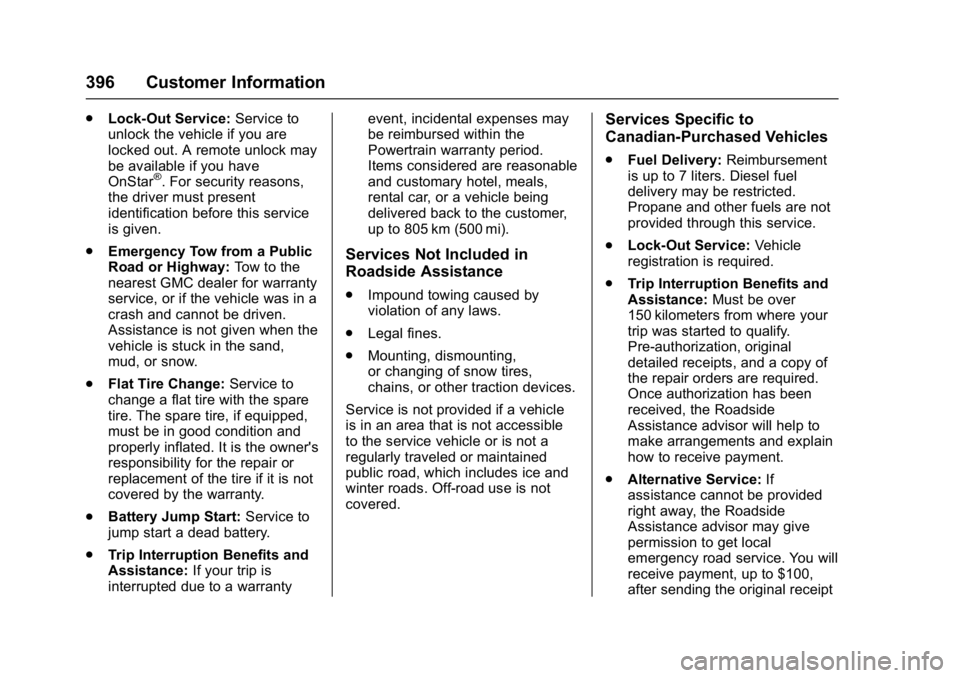
.Lock-Out Service: Service to
unlock the vehicle if you are
locked out. A remote unlock may
be available if you have
OnStar
®. For security reasons,
the driver must present
identification before this service
is given.
. Emergency Tow from a Public
Road or Highway: Tow to the
nearest GMC dealer for warranty
service, or if the vehicle was in a
crash and cannot be driven.
Assistance is not given when the
vehicle is stuck in the sand,
mud, or snow.
. Flat Tire Change: Service to
change a flat tire with the spare
tire. The spare tire, if equipped,
must be in good condition and
properly inflated. It is the owner's
responsibility for the repair or
replacement of the tire if it is not
covered by the warranty.
. Battery Jump Start: Service to
jump start a dead battery.
. Trip Interruption Benefits and
Assistance: If your trip is
interrupted due to a warranty event, incidental expenses may
be reimbursed within the
Powertrain warranty period.
Items considered are reasonable
and customary hotel, meals,
rental car, or a vehicle being
delivered back to the customer,
up to 805 km (500 mi).
Services Not Included in
Roadside Assistance
.
Impound towing caused by
violation of any laws.
. Legal fines.
. Mounting, dismounting,
or changing of snow tires,
chains, or other traction devices.
Service is not provided if a vehicle
is in an area that is not accessible
to the service vehicle or is not a
regularly traveled or maintained
public road, which includes ice and
winter roads. Off-road use is not
covered.
Services Specific to
Canadian-Purchased Vehicles
. Fuel Delivery: Reimbursement
is up to 7 liters. Diesel fuel
delivery may be restricted.
Propane and other fuels are not
provided through this service.
. Lock-Out Service: Vehicle
registration is required.
. Trip Interruption Benefits and
Assistance: Must be over
150 kilometers from where your
trip was started to qualify.
Pre-authorization, original
detailed receipts, and a copy of
the repair orders are required.
Once authorization has been
received, the Roadside
Assistance advisor will help to
make arrangements and explain
how to receive payment.
. Alternative Service: If
assistance cannot be provided
right away, the Roadside
Assistance advisor may give
permission to get local
emergency road service. You will
receive payment, up to $100,
after sending the original receipt
Page 403 of 427
GMC Yukon/Yukon XL/Denali Owner Manual (GMNA-Localizing-U.S./
Canada/Mexico-9955936) - 2017 - crc - 7/5/16
402 Customer Information
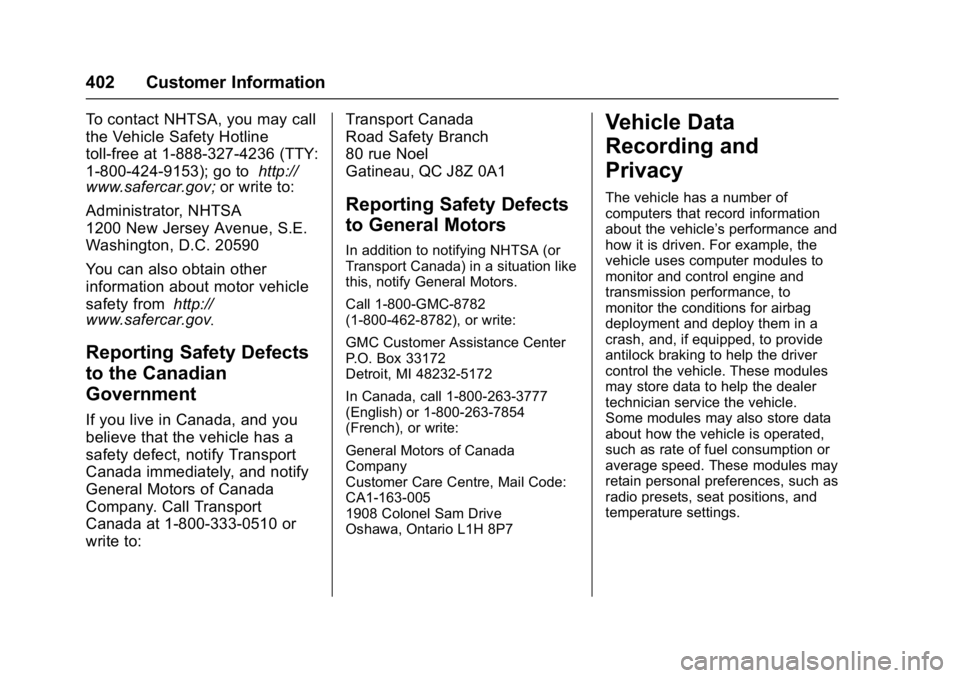
To contact NHTSA, you may call
the Vehicle Safety Hotline
toll-free at 1-888-327-4236 (TTY:
1-800-424-9153); go tohttp://
www.safercar.gov; or write to:
Administrator, NHTSA
1200 New Jersey Avenue, S.E.
Washington, D.C. 20590
You can also obtain other
information about motor vehicle
safety from http://
www.safercar.gov
.
Reporting Safety Defects
to the Canadian
Government
If you live in Canada, and you
believe that the vehicle has a
safety defect, notify Transport
Canada immediately, and notify
General Motors of Canada
Company. Call Transport
Canada at 1-800-333-0510 or
write to: Transport Canada
Road Safety Branch
80 rue Noel
Gatineau
,QC J8Z 0A1
Reporting Safety Defects
to General Motors
In addition to notifying NHTSA (or
Transport Canada) in a situation like
this, notify General Motors.
Call 1-800-GMC-8782
(1-800-462-8782), or write:
GMC Customer Assistance Center
P.O. Box 33172
Detroit, MI 48232-5172
In Canada, call 1-800-263-3777
(English) or 1-800-263-7854
(French), or write:
General Motors of Canada
Company
Customer Care Centre, Mail Code:
CA1-163-005
1908 Colonel Sam Drive
Oshawa, Ontario L1H 8P7
Vehicle Data
Recording and
Privacy
The vehicle has a number of
computers that record information
about the vehicle’s performance and
how it is driven. For example, the
vehicle uses computer modules to
monitor and control engine and
transmission performance, to
monitor the conditions for airbag
deployment and deploy them in a
crash, and, if equipped, to provide
antilock braking to help the driver
control the vehicle. These modules
may store data to help the dealer
technician service the vehicle.
Some modules may also store data
about how the vehicle is operated,
such as rate of fuel consumption or
average speed. These modules may
retain personal preferences, such as
radio presets, seat positions, and
temperature settings.
Page 407 of 427
GMC Yukon/Yukon XL/Denali Owner Manual (GMNA-Localizing-U.S./
Canada/Mexico-9955936) - 2017 - crc - 7/5/16
406 OnStar
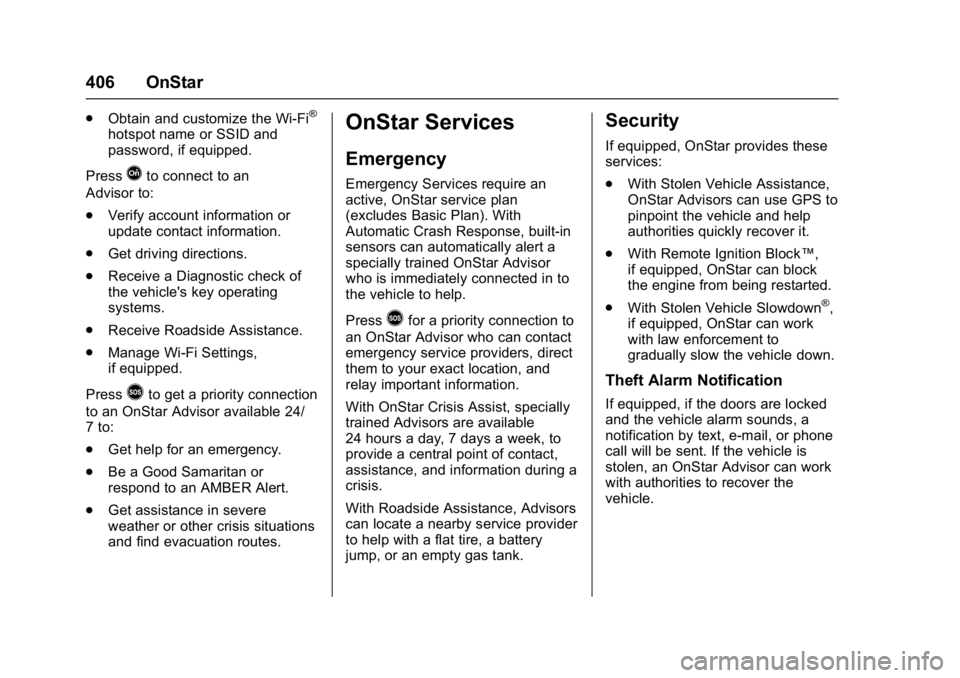
.Obtain and customize the Wi-Fi®
hotspot name or SSID and
password, if equipped.
Press
Qto connect to an
Advisor to:
. Verify account information or
update contact information.
. Get driving directions.
. Receive a Diagnostic check of
the vehicle's key operating
systems.
. Receive Roadside Assistance.
. Manage Wi-Fi Settings,
if equipped.
Press
>to get a priority connection
to an OnStar Advisor available 24/
7 to:
. Get help for an emergency.
. Be a Good Samaritan or
respond to an AMBER Alert.
. Get assistance in severe
weather or other crisis situations
and find evacuation routes.
OnStar Services
Emergency
Emergency Services require an
active, OnStar service plan
(excludes Basic Plan). With
Automatic Crash Response, built-in
sensors can automatically alert a
specially trained OnStar Advisor
who is immediately connected in to
the vehicle to help.
Press
>for a priority connection to
an OnStar Advisor who can contact
emergency service providers, direct
them to your exact location, and
relay important information.
With OnStar Crisis Assist, specially
trained Advisors are available
24 hours a day, 7 days a week, to
provide a central point of contact,
assistance, and information during a
crisis.
With Roadside Assistance, Advisors
can locate a nearby service provider
to help with a flat tire, a battery
jump, or an empty gas tank.
Security
If equipped, OnStar provides these
services:
. With Stolen Vehicle Assistance,
OnStar Advisors can use GPS to
pinpoint the vehicle and help
authorities quickly recover it.
. With Remote Ignition Block™,
if equipped, OnStar can block
the engine from being restarted.
. With Stolen Vehicle Slowdown
®,
if equipped, OnStar can work
with law enforcement to
gradually slow the vehicle down.
Theft Alarm Notification
If equipped, if the doors are locked
and the vehicle alarm sounds, a
notification by text, e-mail, or phone
call will be sent. If the vehicle is
stolen, an OnStar Advisor can work
with authorities to recover the
vehicle.
Page 409 of 427
GMC Yukon/Yukon XL/Denali Owner Manual (GMNA-Localizing-U.S./
Canada/Mexico-9955936) - 2017 - crc - 7/5/16
408 OnStar
from each other and use a
combination of letters, numbers,
and symbols to increase the
security.
. Change the default name of the
SSID (Service Set Identifier).
This is your network’s name that
is visible to other wireless
devices. Choose a unique name
and avoid family names or
vehicle descriptions.
OnStar Wi-Fi
®Hotspot (If
Equipped)
The vehicle may have a built-in
Wi-Fi hotspot that provides access
to the Internet and web content at
4G LTE speed. Up to seven mobile
devices can be connected. A data
plan is required. Use the in-vehicle
controls only when it is safe to
do so.
1. To retrieve Wi-Fi hotspot information, press
=, wait for
the prompt, then say “Wi-Fi
settings.” On some vehicles,
touch Wi-Fi Settings on the
screen. 2. The Wi-Fi settings will display
the Wi-Fi hotspot name (SSID),
password, and on some
vehicles, the connection type
(no Internet connection, 3G,
4G, 4G LTE), and signal quality
(poor, good, excellent).
3. To change the SSID or password, press
Qor call
1-888-4ONSTAR to connect
with an Advisor.
After initial set-up, your vehicle’s
Wi-Fi hotspot will connect
automatically to your mobile
devices. Manage data usage by
turning Wi-Fi on or off on your
mobile device, using the
RemoteLink mobile app, or by
contacting an OnStar Advisor.
OnStar RemoteLink
®Mobile App
(If Equipped)
Download the OnStar RemoteLink
mobile app to select Apple
®iOS,
Android™, BlackBerry®,
or Windows®mobile devices.
OnStar Subscribers can access the
following services from a mobile
device: .
Remotely start/stop the vehicle,
if factory-equipped.
. Lock/unlock doors, if equipped
with automatic locks.
. Activate the horn and lamps.
. Check the vehicle’s fuel level, oil
life, or tire pressure,
if factory-equipped with the Tire
Pressure Monitor System.
. Send directions to the vehicle.
. Locate the vehicle on a map
(U.S. market only).
. Turn the vehicle's Wi-Fi hotspot
on/off, manage settings, and
monitor data consumption,
if equipped.
For OnStar RemoteLink information
and compatibility, see
www.onstar.com (U.S.) or
www.onstar.ca (Canada).
Page 410 of 427
GMC Yukon/Yukon XL/Denali Owner Manual (GMNA-Localizing-U.S./
Canada/Mexico-9955936) - 2017 - crc - 7/5/16
OnStar 409
Remote Services
Contact an OnStar Advisor to
unlock the doors or sound the horn
and flash the lamps.
OnStar AtYourService
OnStar Advisors can provide offers
from restaurants and retailers on
your route, help locate hotels,
or book a room. These services
vary by market.
OnStar Hands-Free Calling
Make and receive calls with the
built-in wireless calling service,
which requires available minutes.
Make a Call1. Press
=. System responds:
“OnStar ready.”
2. Say “Call.”System responds:
“Call. Please say the name or
number to call.”
3. Say the entire number without pausing, including a “1”and the
area code. System responds:
“OK, calling.”
Calling 911 Emergency
1. Press=. System responds:
“OnStar ready.”
2. Say “Call.”System responds:
“Call. Please say the name or
number to call.”
3. Say “911”without pausing.
System responds: “911.”
4. Say “Call.”System responds:
“OK, dialing 911.”
Retrieve My Number
1. Press=. System responds:
“OnStar ready.”
2. Say “My number.” System
responds: “Your OnStar
Hands-Free Calling number is,”
then says the number.
End a Call
Press=. System responds: “Call
ended.”
Verify Minutes and Expiration
Press=and say “Minutes” then
“Verify” to check how many minutes
remain and their expiration date.
Diagnostics
Advanced Diagnostics provides a
status of the vehicle’ s key systems
with a monthly e-mail, or by
pressing
Q. If equipped, Diagnostic
Alerts can be received in real-time
via e-mail or text. The Proactive
Alerts feature (if available) can help
predict and alert of potential
upcoming maintenance issues with
select components on the vehicle,
before they become a problem.
OnStar can also monitor and report
tire pressure, if the vehicle is
equipped with a Tire Pressure
Monitoring System.
Page 412 of 427
GMC Yukon/Yukon XL/Denali Owner Manual (GMNA-Localizing-U.S./
Canada/Mexico-9955936) - 2017 - crc - 7/5/16
OnStar 411
to the vehicle in a crash, or wireless
phone network congestion or
jamming—may prevent service.
See Radio Frequency
Statement 0401.
Services for People with
Disabilities
Advisors provide services to help
Subscribers with physical disabilities
and medical conditions.
Press
Qto help:
. Locate a gas station with an
attendant to pump gas.
. Find a hotel, restaurant, etc.,
that meets accessibility needs.
. Provide directions to the closest
hospital or pharmacy in urgent
situations.
TTY Users
OnStar has the ability to
communicate to deaf,
hard-of-hearing, or speech-impaired
customers while in the vehicle. The
available dealer-installed TTY
system can provide in-vehicle access to all OnStar services,
except Virtual Advisor and OnStar
Turn-by-Turn Navigation.
OnStar Personal Identification
Number (PIN)
A PIN is needed to access some
OnStar services. The PIN will need
to be changed the first time when
speaking with an Advisor. To
change the OnStar PIN, contact an
OnStar Advisor by pressing
Qor
calling 1-888-4ONSTAR.
Warranty
OnStar equipment may be
warranted as part of the vehicle
warranty.
Languages
The vehicle can be programmed to
respond in multiple languages.
Press
Qand ask for an Advisor.
Advisors are available in English,
Spanish, and French. Available
languages may vary by country.
Potential Issues
OnStar cannot perform Remote
Door Unlock or Stolen Vehicle
Assistance after the vehicle has
been off continuously for 10 days
without an ignition cycle. If the
vehicle has not been started for
five days, OnStar can contact
Roadside Assistance or a locksmith
to help gain access to the vehicle.
Global Positioning
System (GPS)
. Obstruction of the GPS can
occur in a large city with tall
buildings; in parking garages;
around airports; in tunnels and
underpasses; or in an area with
very dense trees. If GPS signals
are not available, the OnStar
system should still operate to
call OnStar. However, OnStar
could have difficulty identifying
the exact location.
. In emergency situations, OnStar
can use the last stored GPS
location to send to emergency
responders.
Page 413 of 427
GMC Yukon/Yukon XL/Denali Owner Manual (GMNA-Localizing-U.S./
Canada/Mexico-9955936) - 2017 - crc - 7/5/16
412 OnStar
A temporary loss of GPS can cause
loss of the ability to send a
Turn-by-Turn Navigation route. The
Advisor may give a verbal route or
may ask for a call back after the
vehicle is driven into an open area.
Cellular and GPS Antennas
Cellular reception is required for
OnStar to send remote signals to
the vehicle. Do not place items over
or near the antenna to prevent
blocking cellular and GPS signal
reception.
Unable to Connect to OnStar
Message
If there is limited cellular coverage
or the cellular network has reached
maximum capacity, this message
may come on. Press
Qto try the
call again or try again after driving a
few miles into another cellular area.
Vehicle and Power Issues
OnStar services require a vehicle
electrical system, wireless service,
and GPS satellite technologies to be
available and operating for features to function properly. These systems
may not operate if the battery is
discharged or disconnected.
Add-on Electrical Equipment
The OnStar system is integrated
into the electrical architecture of the
vehicle. Do not add any electrical
equipment. See
Add-On Electrical
Equipment 0282. Added electrical
equipment may interfere with the
operation of the OnStar system and
cause it to not operate.
Vehicle Software Updates
OnStar or GM may remotely deliver
software updates or changes to the
vehicle without further notice or
consent. These updates or changes
may enhance or maintain safety,
security, or the operation of the
vehicle or the vehicle systems.
Software updates or changes may
affect or erase data or settings that
are stored in the vehicle, such as
OnStar Hands-Free Calling name
tags, saved navigation destinations,
or pre-set radio stations. Neither
OnStar nor GM is responsible for
any affected or erased data or settings. These updates or changes
may also collect personal
information. Such collection is
described in the OnStar privacy
statement or separately disclosed at
the time of installation. These
updates or changes may also cause
a system to automatically
communicate with GM servers to
collect information about vehicle
system status, identify whether
updates or changes are available,
or deliver updates or changes. An
active OnStar agreement constitutes
consent to these software updates
or changes and agreement that
either OnStar or GM may remotely
deliver them to the vehicle.
Privacy
The complete OnStar Privacy
Statement may be found at
www.onstar.com (U.S.),
or www.onstar.ca (Canada). We
recommend that you review it. If you
have any questions, call
1-888-4ONSTAR (1-888-466-7827)
or press
Qto speak with an
Advisor. Users of wireless
communications are cautioned that
Page 416 of 427

GMC Yukon/Yukon XL/Denali Owner Manual (GMNA-Localizing-U.S./
Canada/Mexico-9955936) - 2017 - crc - 7/5/16
Index 415
IndexA
Accessories andModifications . . . . . . . . . . . . . . . . . . 285
Accessory Power . . . . . . . . . . . . . . . 223
Active Fuel Management
®. . . . . . 226
Adaptive Cruise Control . . . . . . . . 244
Add-On Electrical Equipment . . . 282
Additional Information OnStar
®. . . . . . . . . . . . . . . . . . . . . . 410
Additional Maintenance
and Care . . . . . . . . . . . . . . . . . . . . . . 381
Adjustable Throttle and Brake Pedal . . . . . . . . . . . . . . . . . . . 216
Adjustments
Lumbar, Front Seats . . . . . . . . . . . . 65
Air Cleaner/Filter, Engine . . . . . . . 297
Air Conditioning . . . . . . . . . . . 191, 195
Air Filter, Passenger Compartment . . . . . . . . . . . . . . . . . 197
Air Vents . . . . . . . . . . . . . . . . . . . . . . . 196
Airbag System Check . . . . . . . . . . . . . . . . . . . . . . . . . . 97
How Does an AirbagRestrain? . . . . . . . . . . . . . . . . . . . . . 90
Passenger Sensing System . . . . 92
What Makes an Airbag Inflate? . . . . . . . . . . . . . . . . . . . . . . . . 90 Airbag System (cont'd)
What Will You See after an
Airbag Inflates? . . . . . . . . . . . . . . . 91
When Should an Airbag
Inflate? . . . . . . . . . . . . . . . . . . . . . . . . 89
Where Are the Airbags? . . . . . . . . 87
Airbags Adding Equipment to theVehicle . . . . . . . . . . . . . . . . . . . . . . . . 97
Passenger Status Indicator . . . 142
Readiness Light . . . . . . . . . . . . . . 142
Servicing Airbag-Equipped Vehicles . . . . . . . . . . . . . . . . . . . . . . . 96
System Check . . . . . . . . . . . . . . . . . . 86
Alarm Vehicle Security . . . . . . . . . . . . . . . . 50
Alert Lane Change . . . . . . . . . . . . . . . . . 259
Side Blind Zone (SBZA) . . . . . . 259
All-Season Tires . . . . . . . . . . . . . . . . 327
All-Terrain Tires . . . . . . . . . . . . . . . . . 328
Antilock Brake System (ABS) . . . 237 Warning Light . . . . . . . . . . . . . . . . . 146
Appearance Care Exterior . . . . . . . . . . . . . . . . . . . . . . . 365
Interior . . . . . . . . . . . . . . . . . . . . . . . . 369
Armrest Storage . . . . . . . . . . . . . . . . 121
Page 417 of 427

GMC Yukon/Yukon XL/Denali Owner Manual (GMNA-Localizing-U.S./
Canada/Mexico-9955936) - 2017 - crc - 7/5/16
416 Index
Assistance Program,Roadside . . . . . . . . . . . . . . . . . . . . . . 395
Assistance Systems for Driving . . . . . . . . . . . . . . . . . . . . . . . . 255
Assistance Systems for Parking and Backing . . . . . . . . . . 252
Automatic
Dimming Mirrors . . . . . . . . . . . . . . . . 55
Door Locks . . . . . . . . . . . . . . . . . . . . . 43
Forward Braking . . . . . . . . . . . . . . 257
Headlamp System . . . . . . . . . . . . 184
Level Control . . . . . . . . . . . . . . . . . 241
Transmission . . . . . . . . . . . . . . . . . 227
Transmission Fluid . . . . . . 293, 296
Automatic Transmission Manual Mode . . . . . . . . . . . . . . . . . 230
Shift Lock Control Function
Check . . . . . . . . . . . . . . . . . . . . . . . 310
Axle, Front . . . . . . . . . . . . . . . . . . . . . . 307
Axle, Rear . . . . . . . . . . . . . . . . . . . . . . 308
B
Battery Load Management . . . . . . . . . . . . 188
Power Protection . . . . . . . . . . . . . 189
Voltage and ChargingMessages . . . . . . . . . . . . . . . . . . . 158 Battery - North America . . . . 306, 357
Blade Replacement, Wiper . . . . . 311
Blind Spot Mirrors . . . . . . . . . . . . . . . 55
Brake
Pedal and AdjustableThrottle . . . . . . . . . . . . . . . . . . . . . . 216
System Warning Light . . . . . . . . 145
Brakes . . . . . . . . . . . . . . . . . . . . . . . . . . 304 Antilock . . . . . . . . . . . . . . . . . . . . . . . 237
Assist . . . . . . . . . . . . . . . . . . . . . . . . . 238
Fluid . . . . . . . . . . . . . . . . . . . . . . . . . . 305
Parking . . . . . . . . . . . . . . . . . . . . . . . 237
System Messages . . . . . . . . . . . . 159
Braking . . . . . . . . . . . . . . . . . . . . . . . . . 201 Automatic Forward . . . . . . . . . . . 257
Break-In, New Vehicle . . . . . . . . . . 216
Bulb Replacement . . . . . . . . . . . . . . 315
Back-up Lamps . . . . . . . . . . . . . . . 313
Fog Lamps . . . . . . . . . . . . . . . . . . . 313
Headlamp Aiming . . . . . . . . . . . . . 312
Headlamps . . . . . . . . . . . . . . . . . . . 313
High Intensity Discharge(HID) Lighting . . . . . . . . . . . . . . . 313
License Plate Lamps . . . . . . . . . 314
Buying New Tires . . . . . . . . . . . . . . . 341
C
Calibration . . . . . . . . . . . . . . . . . . . . . . 128
California
Fuel Requirements . . . . . . . . . . . 264
Perchlorate MaterialsRequirements . . . . . . . . . . . . . . . 284
California Proposition
65 Warning . . . . . . . . . .284, 306, 357
Canadian Vehicle Owners . . . . . . . . 2
Capacities and
Specifications . . . . . . . . . . . . . . . . . 389
Carbon Monoxide Engine Exhaust . . . . . . . . . . . . . . . 226
Liftgate . . . . . . . . . . . . . . . . . . . . . . . . . 44
Winter Driving . . . . . . . . . . . . . . . . 209
Cargo Tie-Downs . . . . . . . . . . . . . . . . . . . . 122
Caution, Danger, and Warning . . . . 2
Center Console Storage . . . . . . . . 121
Chains, Tire . . . . . . . . . . . . . . . . . . . . 345
Charging
Wireless . . . . . . . . . . . . . . . . . . . . . . 132
Charging System Light . . . . . . . . . 143
Check
Ignition Transmission Lock . . . 310
Malfunction IndicatorEngine Light . . . . . . . . . . . . . . . . 144