transmission GMC YUKON XL 2017 Owners Manual
[x] Cancel search | Manufacturer: GMC, Model Year: 2017, Model line: YUKON XL, Model: GMC YUKON XL 2017Pages: 427, PDF Size: 7.04 MB
Page 6 of 427
GMC Yukon/Yukon XL/Denali Owner Manual (GMNA-Localizing-U.S./
Canada/Mexico-9955936) - 2017 - crc - 7/5/16
In Brief 5
In Brief
Instrument Panel
Instrument Panel . . . . . . . . . . . . . . . . 6
Initial Drive Information
Initial Drive Information . . . . . . . . . . 8
Remote Keyless Entry (RKE)System . . . . . . . . . . . . . . . . . . . . . . . . 8
Remote Vehicle Start . . . . . . . . . . . 9
Door Locks . . . . . . . . . . . . . . . . . . . . . 9
Liftgate . . . . . . . . . . . . . . . . . . . . . . . . 10
Windows . . . . . . . . . . . . . . . . . . . . . . . 11
Seat Adjustment . . . . . . . . . . . . . . . 11
Memory Features . . . . . . . . . . . . . . 12
Second Row Seats . . . . . . . . . . . . 13
Third Row Seats . . . . . . . . . . . . . . . 13
Heated and Ventilated Seats . . . 13
Head Restraint Adjustment . . . . 13
Safety Belts . . . . . . . . . . . . . . . . . . . . 14
Passenger Sensing System . . . 14
Mirror Adjustment . . . . . . . . . . . . . . 14
Steering Wheel Adjustment . . . . 15
Throttle and Brake Pedal Adjustment . . . . . . . . . . . . . . . . . . . 16
Interior Lighting . . . . . . . . . . . . . . . . 16
Exterior Lighting . . . . . . . . . . . . . . . 17
Windshield Wiper/Washer . . . . . . 17
Climate Controls . . . . . . . . . . . . . . . 18
Transmission . . . . . . . . . . . . . . . . . . 19 Four-Wheel Drive . . . . . . . . . . . . . . 19
Vehicle Features
Infotainment System . . . . . . . . . . . 20
Steering Wheel Controls . . . . . . . 20
Cruise Control . . . . . . . . . . . . . . . . . 20
Driver Information
Center (DIC) . . . . . . . . . . . . . . . . . 21
Forward Collision Alert (FCA) System . . . . . . . . . . . . . . . . . . . . . . . 21
Forward Automatic Braking (FAB) . . . . . . . . . . . . . . . . 21
Lane Keep Assist (LKA) . . . . . . . 21
Lane Change Alert (LCA) . . . . . . 22
Rear Vision Camera (RVC) . . . . 22
Rear Cross Traffic Alert (RCTA) System . . . . . . . . . . . . . . . . . . . . . . . 22
Parking Assist . . . . . . . . . . . . . . . . . 22
Power Outlets . . . . . . . . . . . . . . . . . 22
Universal Remote System . . . . . 23
Sunroof . . . . . . . . . . . . . . . . . . . . . . . . 23
Performance and Maintenance
Traction Control/Electronic Stability Control . . . . . . . . . . . . . . 24
Tire Pressure Monitor . . . . . . . . . . 25
Fuel (L83 5.3L V8 Engine) . . . . . 25
Fuel (L86 6.2L V8 Engine) . . . . . 25
E85 or FlexFuel . . . . . . . . . . . . . . . . 26
Engine Oil Life System . . . . . . . . 26 Driving for Better Fuel
Economy . . . . . . . . . . . . . . . . . . . . . 26
Roadside Assistance Program . . . . . . . . . . . . . . . . . . . . . . 27
Page 8 of 427

GMC Yukon/Yukon XL/Denali Owner Manual (GMNA-Localizing-U.S./
Canada/Mexico-9955936) - 2017 - crc - 7/5/16
In Brief 7
1.Air Vents 0196.
2. Head-Up Display (HUD) 0155
(If Equipped).
3.
gTraction Control/Electronic
Stability Control 0239.
jPower Assist Steps 049 (If
Equipped).
XParking Assist Button (If
Equipped). See Assistance
Systems for Parking or
Backing 0252.
ALane Departure Warning
(LDW) 0261 (If Equipped).
0Pedal Adjust Switch (If
Equipped). See Adjustable
Throttle and Brake
Pedal 0216.
4. Turn Signal Lever. See Turn
and Lane-Change
Signals 0185.
Windshield Wiper/
Washer 0126. 5. Favorite Switches (Out of
View). See “Steering Wheel
Controls” in the infotainment
manual.
Volume Switches (Out of View).
See “Steering Wheel Controls”
in the infotainment manual.
6. Hazard Warning
Flashers 0185.
7. Instrument Cluster 0134.
8. Shift Lever. See Automatic
Transmission 0227.
Tow/Haul Selector Button. See
Tow/Haul Mode 0232.
Range Selection Mode (If
Equipped). See Manual
Mode 0230.
9. Light Sensor. See Automatic
Headlamp System 0184.
10. Infotainment 0190.
11. Dual Automatic Climate Control
System 0191.
12. Heated and Ventilated Front
Seats 068. 13. Rear Climate Control Buttons.
SeeRear Climate Control
System 0195.
14. Ignition Positions (Keyless
Access) 0219 orIgnition
Positions (Key Access) 0217.
15. Steering Wheel Controls. See the infotainment manual.
16. Horn 0126.
17. Steering Wheel
Adjustment 0125.
18. Hood Release. See Hood 0286.
19. Cruise Control 0242.
Adaptive Cruise Control 0244
(If Equipped).
Forward Collision Alert (FCA)
System 0255 (If Equipped).
20. Trailer Brake Control Panel (If Equipped). See Towing
Equipment 0274.
21. Data Link Connector (DLC) (Out of View). See Malfunction
Indicator Lamp (Check Engine
Light) 0144.
Page 20 of 427
GMC Yukon/Yukon XL/Denali Owner Manual (GMNA-Localizing-U.S./
Canada/Mexico-9955936) - 2017 - crc - 7/5/16
In Brief 19
Transmission
Range Selection Mode
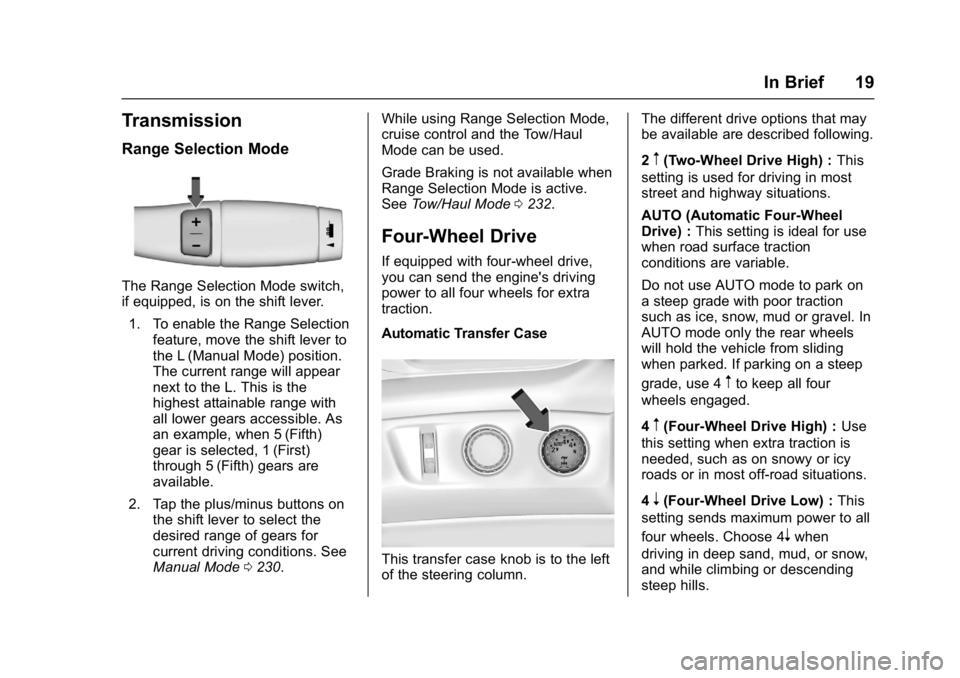
The Range Selection Mode switch,
if equipped, is on the shift lever.1. To enable the Range Selection feature, move the shift lever to
the L (Manual Mode) position.
The current range will appear
next to the L. This is the
highest attainable range with
all lower gears accessible. As
an example, when 5 (Fifth)
gear is selected, 1 (First)
through 5 (Fifth) gears are
available.
2. Tap the plus/minus buttons on the shift lever to select the
desired range of gears for
current driving conditions. See
Manual Mode 0230. While using Range Selection Mode,
cruise control and the Tow/Haul
Mode can be used.
Grade Braking is not available when
Range Selection Mode is active.
See
Tow/Haul Mode 0232.
Four-Wheel Drive
If equipped with four-wheel drive,
you can send the engine's driving
power to all four wheels for extra
traction.
Automatic Transfer Case
This transfer case knob is to the left
of the steering column. The different drive options that may
be available are described following.
2
m(Two-Wheel Drive High) :
This
setting is used for driving in most
street and highway situations.
AUTO (Automatic Four-Wheel
Drive) : This setting is ideal for use
when road surface traction
conditions are variable.
Do not use AUTO mode to park on
a steep grade with poor traction
such as ice, snow, mud or gravel. In
AUTO mode only the rear wheels
will hold the vehicle from sliding
when parked. If parking on a steep
grade, use 4
mto keep all four
wheels engaged.
4
m(Four-Wheel Drive High) : Use
this setting when extra traction is
needed, such as on snowy or icy
roads or in most off-road situations.
4
n(Four-Wheel Drive Low) : This
setting sends maximum power to all
four wheels. Choose 4
nwhen
driving in deep sand, mud, or snow,
and while climbing or descending
steep hills.
Page 44 of 427

GMC Yukon/Yukon XL/Denali Owner Manual (GMNA-Localizing-U.S./
Canada/Mexico-9955936) - 2017 - crc - 7/5/16
Keys, Doors, and Windows 43
Delayed Locking
When locking the doors with the
power lock switch and a door or the
liftgate is open, the doors will lock
five seconds after the last door is
closed. You will hear three chimes
to signal that the delayed locking
feature is in use.
Pressing the power lock switch
twice will override the delayed
locking feature and immediately lock
all the doors.
This feature will not operate if the
key is in the ignition.
This feature can be programmed.
See“Delayed Door Lock” under
Vehicle Personalization 0170.
Automatic Door Locks
The doors will lock automatically
when all doors are closed, the
ignition is on, and the vehicle is
shifted out of P (Park).
To unlock the doors:
.
Press
Kon the power door lock
switch. .
Shift the transmission into
P (Park).
Automatic door locking cannot be
disabled. Automatic door unlocking
can be programmed. See Vehicle
Personalization 0170.
Lockout Protection
Key Access : When locking is
requested with the driver door open
and the key in the ignition, all the
doors will lock and then the driver
door will unlock.
This can be manually overridden by
pressing and holding
Qon the
power door lock switch.
Keyless Access : When locking is
requested with the driver door open
and the vehicle is in ACC/
ACCESSORY or ON/RUN/START,
all the doors will lock and then the
driver door will unlock.
If the vehicle is off and locking is
requested while a door is open,
when all doors are closed the
vehicle will check for RKE
transmitters inside. If an RKE
transmitter is detected and the number of RKE transmitters inside
has not reduced, the driver door will
unlock and the horn will sound three
times.
This can be manually overridden by
pressing and holding
Qon the
power door lock switch.
Unlocked Door Anti-Lockout
Unlocked Door Anti-Lockout, when
on, will unlock the driver door if
locking is requested while the driver
door is open. This feature can be
turned on or off using the vehicle
personalization menus. See Vehicle
Personalization 0170.
Page 74 of 427
GMC Yukon/Yukon XL/Denali Owner Manual (GMNA-Localizing-U.S./
Canada/Mexico-9955936) - 2017 - crc - 7/5/16
Seats and Restraints 73
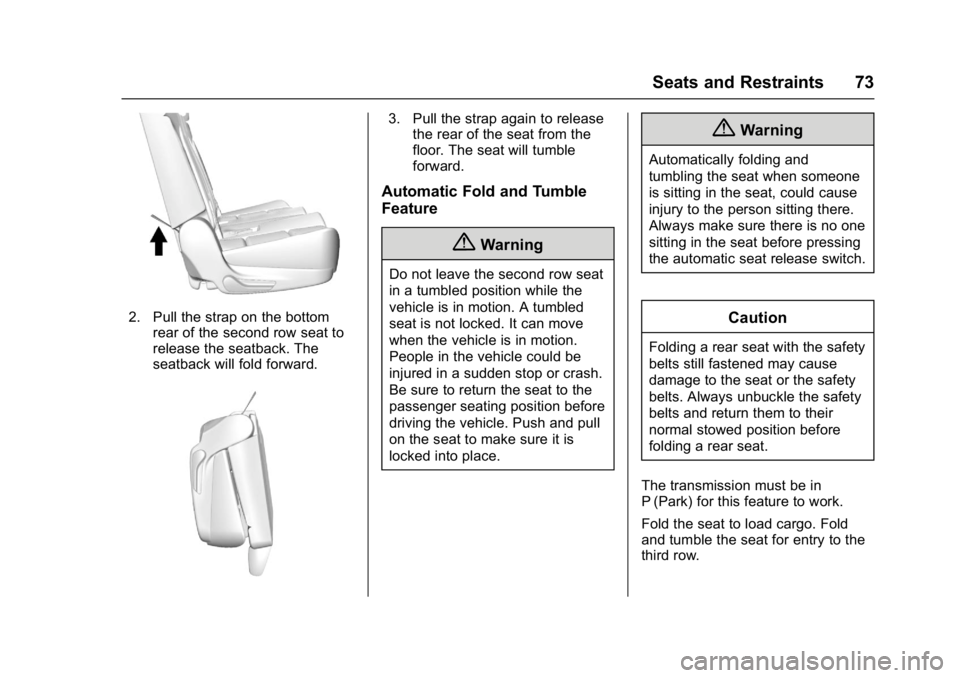
2. Pull the strap on the bottomrear of the second row seat to
release the seatback. The
seatback will fold forward.
3. Pull the strap again to releasethe rear of the seat from the
floor. The seat will tumble
forward.
Automatic Fold and Tumble
Feature
{Warning
Do not leave the second row seat
in a tumbled position while the
vehicle is in motion. A tumbled
seat is not locked. It can move
when the vehicle is in motion.
People in the vehicle could be
injured in a sudden stop or crash.
Be sure to return the seat to the
passenger seating position before
driving the vehicle. Push and pull
on the seat to make sure it is
locked into place.
{Warning
Automatically folding and
tumbling the seat when someone
is sitting in the seat, could cause
injury to the person sitting there.
Always make sure there is no one
sitting in the seat before pressing
the automatic seat release switch.
Caution
Folding a rear seat with the safety
belts still fastened may cause
damage to the seat or the safety
belts. Always unbuckle the safety
belts and return them to their
normal stowed position before
folding a rear seat.
The transmission must be in
P (Park) for this feature to work.
Fold the seat to load cargo. Fold
and tumble the seat for entry to the
third row.
Page 76 of 427
GMC Yukon/Yukon XL/Denali Owner Manual (GMNA-Localizing-U.S./
Canada/Mexico-9955936) - 2017 - crc - 7/5/16
Seats and Restraints 75
To return the seat to the sitting
position from the tumbled position:1. Pull the seat down until both sides of the seat are latched to
the floor. Make sure the seat is
securely latched to the floor
before raising the seatback.
If both sides are not latched to
the floor, the seatback will not
raise.
2. Lift the seatback and push it rearward. Push and pull on the
seatback to make sure it is
locked.
Third Row Seats
Folding the Seatback
Caution
Folding a rear seat with the safety
belts still fastened may cause
damage to the seat or the safety
belts. Always unbuckle the safety
belts and return them to their
normal stowed position before
folding a rear seat. The transmission must be in
P (Park) for this feature to work.
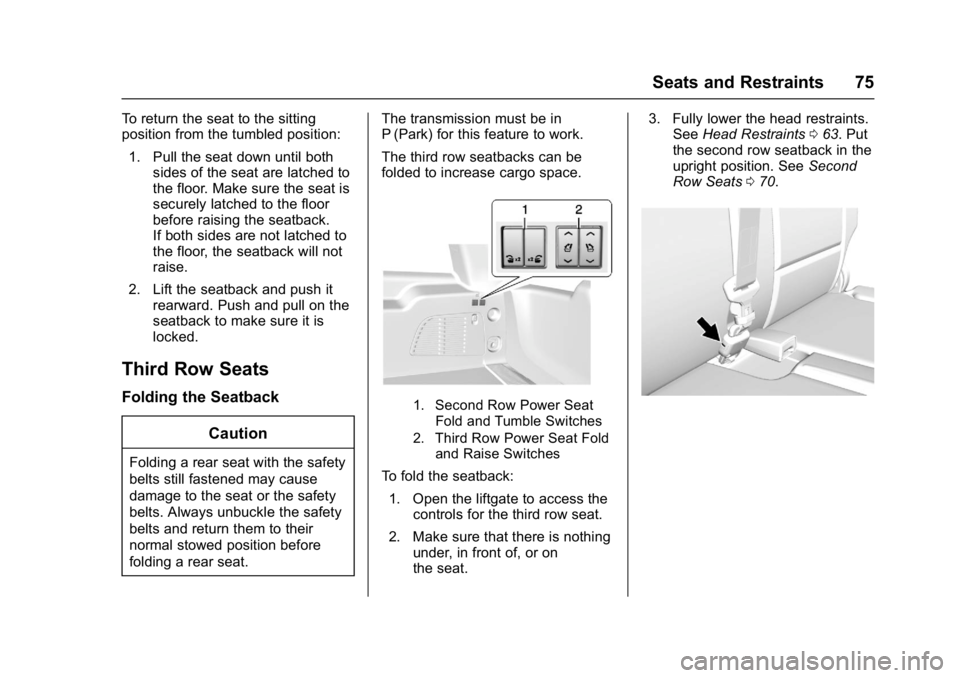
The third row seatbacks can be
folded to increase cargo space.
1. Second Row Power Seat
Fold and Tumble Switches
2. Third Row Power Seat Fold and Raise Switches
To fold the seatback:
1. Open the liftgate to access the controls for the third row seat.
2. Make sure that there is nothing under, in front of, or on
the seat. 3. Fully lower the head restraints.
See Head Restraints 063. Put
the second row seatback in the
upright position. See Second
Row Seats 070.
Page 125 of 427
GMC Yukon/Yukon XL/Denali Owner Manual (GMNA-Localizing-U.S./
Canada/Mexico-9955936) - 2017 - crc - 7/13/16
124 Instruments and Controls
Instruments and
Controls
Controls
Steering Wheel Adjustment . . . 125
Steering Wheel Controls . . . . . . 125
Heated Steering Wheel . . . . . . . 125
Horn . . . . . . . . . . . . . . . . . . . . . . . . . . 126
Windshield Wiper/Washer . . . . 126
Rear Window Wiper/Washer . . . . . . . . . . . . . . . . . . . . . 128
Compass . . . . . . . . . . . . . . . . . . . . . 128
Clock . . . . . . . . . . . . . . . . . . . . . . . . . 129
Power Outlets . . . . . . . . . . . . . . . . 130
Wireless Charging . . . . . . . . . . . . 132
Warning Lights, Gauges, and
Indicators
Warning Lights, Gauges, and Indicators . . . . . . . . . . . . . . . . . . . 133
Instrument Cluster . . . . . . . . . . . . 134
Speedometer . . . . . . . . . . . . . . . . . 137
Odometer . . . . . . . . . . . . . . . . . . . . . 137
Trip Odometer . . . . . . . . . . . . . . . . 137
Tachometer . . . . . . . . . . . . . . . . . . . 137
Fuel Gauge . . . . . . . . . . . . . . . . . . . 137
Engine Oil Pressure
Gauge . . . . . . . . . . . . . . . . . . . . . . 138 Engine Coolant Temperature
Gauge . . . . . . . . . . . . . . . . . . . . . . 139
Transmission Temperature Gauge . . . . . . . . . . . . . . . . . . . . . . 140
Voltmeter Gauge . . . . . . . . . . . . . 140
Safety Belt Reminders . . . . . . . . 141
Airbag Readiness Light . . . . . . . 142
Passenger Airbag Status
Indicator . . . . . . . . . . . . . . . . . . . . 142
Charging System Light . . . . . . . 143
Malfunction Indicator Lamp (Check Engine Light) . . . . . . . . 144
Brake System Warning Light . . . . . . . . . . . . . . . . . . . . . . . . 145
Antilock Brake System (ABS) Warning Light . . . . . . . . . . . . . . . 146
Four-Wheel-Drive Light . . . . . . . 146
Tow/Haul Mode Light . . . . . . . . . 147
Lane Keep Assist (LKA) Light . . . . . . . . . . . . . . . . . . . . . . . . 147
Vehicle Ahead Indicator . . . . . . 147
Traction Off Light . . . . . . . . . . . . . 147
StabiliTrak
®OFF Light . . . . . . . . 148
Traction Control System (TCS)/ StabiliTrak
®Light . . . . . . . . . . . 148
Engine Coolant Temperature Warning Light . . . . . . . . . . . . . . . 148
Tire Pressure Light . . . . . . . . . . . 149
Engine Oil Pressure Light . . . . 149
Low Fuel Warning Light . . . . . . 150
Security Light . . . . . . . . . . . . . . . . . 150 High-Beam On Light . . . . . . . . . . 150
Front Fog Lamp Light . . . . . . . . . 151
Lamps On Reminder . . . . . . . . . 151
Cruise Control Light . . . . . . . . . . 151
Door Ajar Light . . . . . . . . . . . . . . . 151
Information Displays
Driver Information
Center (DIC) . . . . . . . . . . . . . . . . 152
Head-Up Display (HUD) . . . . . . 155
Vehicle Messages
Vehicle Messages . . . . . . . . . . . . 158
Battery Voltage and Charging Messages . . . . . . . . . . . . . . . . . . . 158
Brake System Messages . . . . . 159
Compass Messages . . . . . . . . . . 159
Cruise Control Messages . . . . . 159
Door Ajar Messages . . . . . . . . . . 160
Engine Cooling System Messages . . . . . . . . . . . . . . . . . . . 161
Engine Oil Messages . . . . . . . . . 161
Engine Power Messages . . . . . 162
Fuel System Messages . . . . . . . 162
Key and Lock Messages . . . . . 162
Lamp Messages . . . . . . . . . . . . . . 163
Object Detection System Messages . . . . . . . . . . . . . . . . . . . 163
Ride Control System
Messages . . . . . . . . . . . . . . . . . . . 165
Airbag System Messages . . . . 166
Page 126 of 427
GMC Yukon/Yukon XL/Denali Owner Manual (GMNA-Localizing-U.S./
Canada/Mexico-9955936) - 2017 - crc - 7/13/16
Instruments and Controls 125
Security Messages . . . . . . . . . . . 166
Steering SystemMessages . . . . . . . . . . . . . . . . . . . 166
Starting the Vehicle Messages . . . . . . . . . . . . . . . . . . . 167
Tire Messages . . . . . . . . . . . . . . . . 167
Transmission Messages . . . . . . 167
Vehicle Reminder Messages . . . . . . . . . . . . . . . . . . . 169
Washer Fluid Messages . . . . . . 170
Vehicle Personalization
Vehicle Personalization . . . . . . . 170
Universal Remote System
Universal Remote System . . . . 177
Universal Remote System Programming . . . . . . . . . . . . . . . 177
Universal Remote System Operation . . . . . . . . . . . . . . . . . . . 180
Controls
Steering Wheel
Adjustment
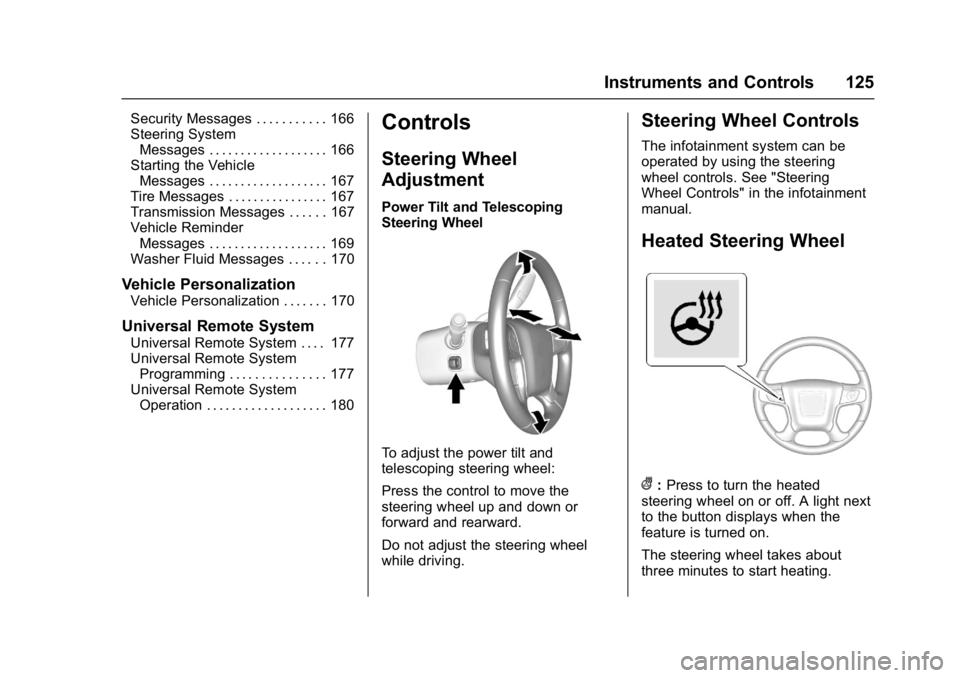
Power Tilt and Telescoping
Steering Wheel
To adjust the power tilt and
telescoping steering wheel:
Press the control to move the
steering wheel up and down or
forward and rearward.
Do not adjust the steering wheel
while driving.
Steering Wheel Controls
The infotainment system can be
operated by using the steering
wheel controls. See "Steering
Wheel Controls" in the infotainment
manual.
Heated Steering Wheel
(: Press to turn the heated
steering wheel on or off. A light next
to the button displays when the
feature is turned on.
The steering wheel takes about
three minutes to start heating.
Page 128 of 427
GMC Yukon/Yukon XL/Denali Owner Manual (GMNA-Localizing-U.S./
Canada/Mexico-9955936) - 2017 - crc - 7/13/16
Instruments and Controls 127
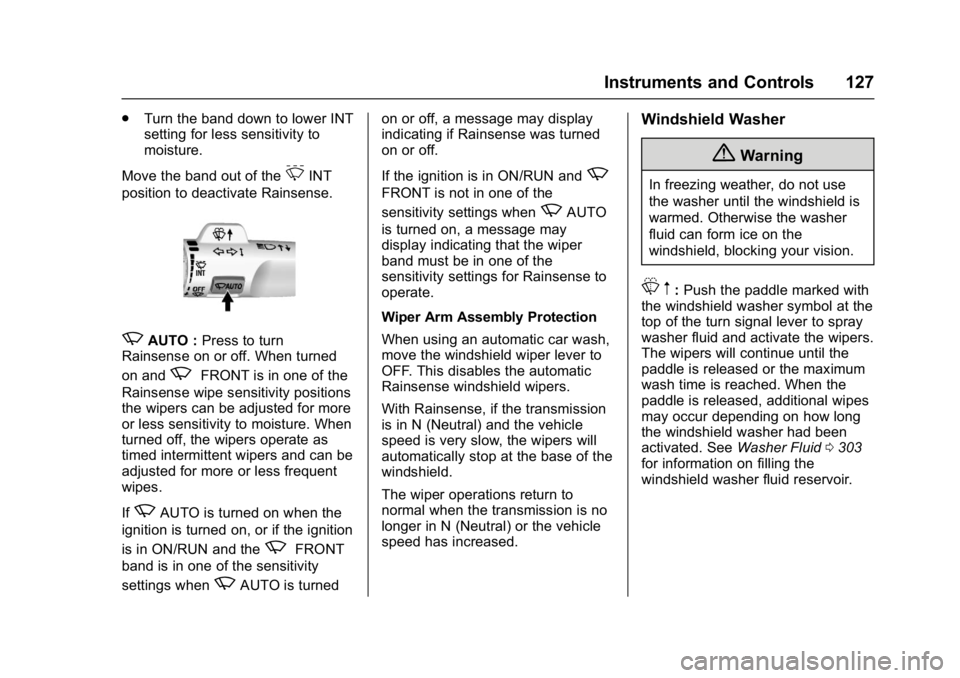
.Turn the band down to lower INT
setting for less sensitivity to
moisture.
Move the band out of the
3INT
position to deactivate Rainsense.
zAUTO : Press to turn
Rainsense on or off. When turned
on and
zFRONT is in one of the
Rainsense wipe sensitivity positions
the wipers can be adjusted for more
or less sensitivity to moisture. When
turned off, the wipers operate as
timed intermittent wipers and can be
adjusted for more or less frequent
wipes.
If
zAUTO is turned on when the
ignition is turned on, or if the ignition
is in ON/RUN and the
zFRONT
band is in one of the sensitivity
settings when
zAUTO is turned on or off, a message may display
indicating if Rainsense was turned
on or off.
If the ignition is in ON/RUN and
z
FRONT is not in one of the
sensitivity settings when
zAUTO
is turned on, a message may
display indicating that the wiper
band must be in one of the
sensitivity settings for Rainsense to
operate.
Wiper Arm Assembly Protection
When using an automatic car wash,
move the windshield wiper lever to
OFF. This disables the automatic
Rainsense windshield wipers.
With Rainsense, if the transmission
is in N (Neutral) and the vehicle
speed is very slow, the wipers will
automatically stop at the base of the
windshield.
The wiper operations return to
normal when the transmission is no
longer in N (Neutral) or the vehicle
speed has increased.
Windshield Washer
{Warning
In freezing weather, do not use
the washer until the windshield is
warmed. Otherwise the washer
fluid can form ice on the
windshield, blocking your vision.
L m:Push the paddle marked with
the windshield washer symbol at the
top of the turn signal lever to spray
washer fluid and activate the wipers.
The wipers will continue until the
paddle is released or the maximum
wash time is reached. When the
paddle is released, additional wipes
may occur depending on how long
the windshield washer had been
activated. See Washer Fluid0303
for information on filling the
windshield washer fluid reservoir.
Page 129 of 427
GMC Yukon/Yukon XL/Denali Owner Manual (GMNA-Localizing-U.S./
Canada/Mexico-9955936) - 2017 - crc - 7/13/16
128 Instruments and Controls
Rear Window Wiper/
Washer
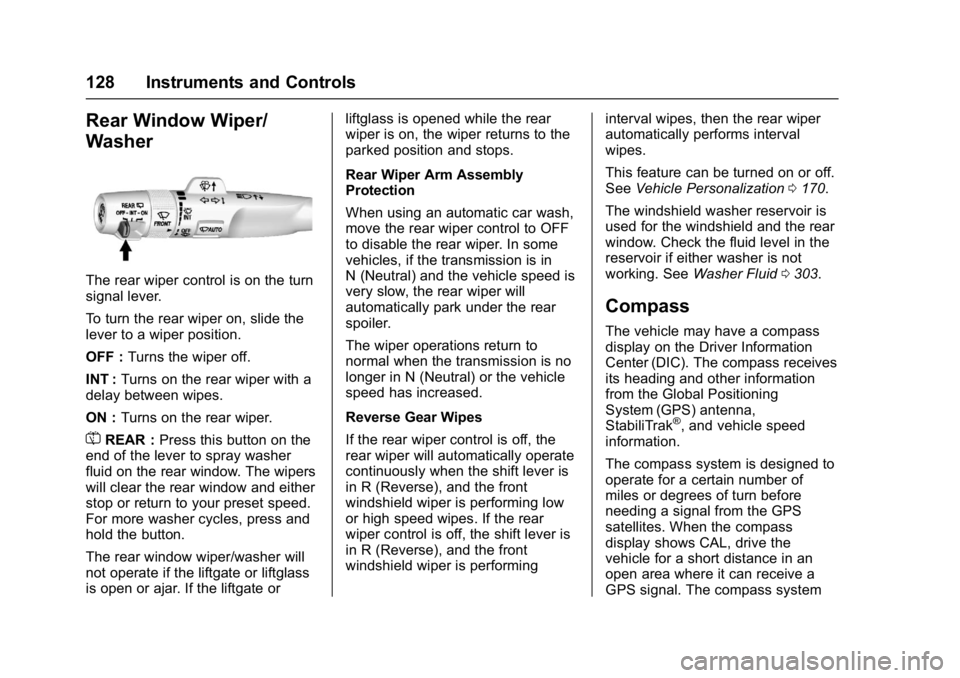
The rear wiper control is on the turn
signal lever.
To turn the rear wiper on, slide the
lever to a wiper position.
OFF :Turns the wiper off.
INT : Turns on the rear wiper with a
delay between wipes.
ON : Turns on the rear wiper.
=REAR : Press this button on the
end of the lever to spray washer
fluid on the rear window. The wipers
will clear the rear window and either
stop or return to your preset speed.
For more washer cycles, press and
hold the button.
The rear window wiper/washer will
not operate if the liftgate or liftglass
is open or ajar. If the liftgate or liftglass is opened while the rear
wiper is on, the wiper returns to the
parked position and stops.
Rear Wiper Arm Assembly
Protection
When using an automatic car wash,
move the rear wiper control to OFF
to disable the rear wiper. In some
vehicles, if the transmission is in
N (Neutral) and the vehicle speed is
very slow, the rear wiper will
automatically park under the rear
spoiler.
The wiper operations return to
normal when the transmission is no
longer in N (Neutral) or the vehicle
speed has increased.
Reverse Gear Wipes
If the rear wiper control is off, the
rear wiper will automatically operate
continuously when the shift lever is
in R (Reverse), and the front
windshield wiper is performing low
or high speed wipes. If the rear
wiper control is off, the shift lever is
in R (Reverse), and the front
windshield wiper is performing
interval wipes, then the rear wiper
automatically performs interval
wipes.
This feature can be turned on or off.
See
Vehicle Personalization 0170.
The windshield washer reservoir is
used for the windshield and the rear
window. Check the fluid level in the
reservoir if either washer is not
working. See Washer Fluid 0303.
Compass
The vehicle may have a compass
display on the Driver Information
Center (DIC). The compass receives
its heading and other information
from the Global Positioning
System (GPS) antenna,
StabiliTrak
®, and vehicle speed
information.
The compass system is designed to
operate for a certain number of
miles or degrees of turn before
needing a signal from the GPS
satellites. When the compass
display shows CAL, drive the
vehicle for a short distance in an
open area where it can receive a
GPS signal. The compass system