remote start GMC YUKON XL 2018 Owner's Manual
[x] Cancel search | Manufacturer: GMC, Model Year: 2018, Model line: YUKON XL, Model: GMC YUKON XL 2018Pages: 425, PDF Size: 7.37 MB
Page 215 of 425
GMC Yukon/Yukon XL/Denali Owner Manual (GMNA-Localizing-U.S./
Canada/Mexico-11349262) - 2018 - crc - 6/21/17
214 Driving and Operating
Parking over Things
That Burn
{ WarningThings that can burn could touch
hot exhaust parts under the
vehicle and ignite. Do not park
over papers, leaves, dry grass,
or other things that can burn.
Active Fuel Management Vehicles with V8 engines may have
Active Fuel Management. This
system allows the engine to operate
on either all or half of its cylinders,
depending on the driving conditions.
When less power is required, such
as cruising at a constant vehicle
speed, the system will operate in
the half cylinder mode, allowing the
vehicle to achieve better fuel
economy. When greater power
demands are required, such as
accelerating from a stop, passing,
or merging onto a freeway, the
system will maintain full-cylinder
operation. If the vehicle has an Active Fuel
Management indicator, see Driver
Information Center (DIC) 0 151 for
more information on using this
display.
Extended Parking It is better not to park with the
vehicle running. If the vehicle is left
while running, follow the proper
steps to be sure the vehicle will not
move and there is adequate
ventilation.
See Shifting Into Park 0 212 and
Engine Exhaust 0 215 .
For vehicles with pushbutton start,
if the vehicle is left parked while
running and the Remote Keyless
Entry (RKE) transmitter is outside
the vehicle, the vehicle will turn off
after one hour.
If the vehicle is left parked while
running and the RKE transmitter is
inside, the vehicle will turn off after
two hours.
Vehicles without pushbutton start
will run indefinitely, or until the
ignition is turned off. Automatic Transmission
The timer will reset if the vehicle is
shifted out of P (Park) while it is
running.
Manual Transmission
The timer will reset if the vehicle
speed is greater than 4 km/h
(2.5 mph).
Page 241 of 425
GMC Yukon/Yukon XL/Denali Owner Manual (GMNA-Localizing-U.S./
Canada/Mexico-11349262) - 2018 - crc - 6/21/17
240 Driving and Operating braking may feel or sound different
than if the brakes were applied
manually. This is normal.
Stationary or Very Slow-Moving
Objects
{ WarningACC may not detect and react to
stopped or slow-moving vehicles
ahead of you. For example, the
system may not brake for a
vehicle it has never detected
moving. This can occur in
stop-and-go traffic or when a
vehicle suddenly appears due to
a vehicle ahead changing lanes.
Your vehicle may not stop and
could cause a crash. Use caution
when using ACC. Your complete
attention is always required while
driving and you should be ready
to take action and apply the
brakes. ACC Automatically Disengages
ACC may automatically disengage
and you will need to manually apply
the brakes to slow the vehicle if:
.
Your vehicle speed goes below
the minimum speed of 16 km/h
(10 mph).
.
The sensors are blocked.
.
The Traction Control System
(TCS) or electronic stability
control system has activated or
been disabled.
.
There is a fault in the system.
.
The radar falsely reports a
blockage when driving in a
desert or remote area with no
other vehicles or roadside
objects. A DIC message may
display to indicate that ACC is
temporarily unavailable.
A message will appear on the DIC
indicating that cruise is disengaging.
The ACC indicator will turn white
when ACC is no longer active. ACC Override
If using the accelerator pedal while
ACC is active, a warning message
in the DIC and in the HUD,
if equipped, will indicate that
automatic braking will not occur.
See Vehicle Messages 0 157 . ACC
will resume operation when the
accelerator pedal is not being
pressed.
{ WarningThe ACC will not automatically
apply the brakes if your foot is
resting on the accelerator pedal.
You could crash into a vehicle
ahead of you.
Curves in the Road
{ Warning
On curves, ACC may not detect a
vehicle ahead in your lane. You
could be startled if the vehicle
accelerates up to the set speed,
(Continued)
Page 282 of 425

GMC Yukon/Yukon XL/Denali Owner Manual (GMNA-Localizing-U.S./
Canada/Mexico-11349262) - 2018 - crc - 6/20/17
Vehicle Care 2811. Positive (+) Terminal. See
Jump Starting - North America
0 351 .
2. Battery - North America 0 298 .
3. Coolant Surge Tank and
Pressure Cap. See Cooling
System 0 291 .
4. Engine Air Cleaner/Filter 0 290 .
5. Automatic Transmission
Dipstick. See “ How to Check
Automatic Transmission Fluid ”
under Automatic Transmission
Fluid (6 Speed Transmission)
0 286 or Automatic
Transmission Fluid (8 and 10
Speed Transmission) 0 289 .
6. Remote Negative ( – ) Location
(Out of View). See Jump
Starting - North America 0 351 .
7. Engine Cooling Fans (Out of
View). See Cooling System
0 291 .
8. Engine Oil Fill Cap. See “ When
to Add Engine Oil ” under
Engine Oil 0 283 . 9. Engine Oil Dipstick. See
“ Checking Engine Oil ” under
Engine Oil 0 283 .
10. Windshield Washer Fluid
Reservoir. See “ Adding Washer
Fluid ” under Washer Fluid
0 296 .
11. Brake Fluid Reservoir. See
Brake Fluid 0 297 .
12. Engine Compartment Fuse
Block 0 310 .
Page 284 of 425
GMC Yukon/Yukon XL/Denali Owner Manual (GMNA-Localizing-U.S./
Canada/Mexico-11349262) - 2018 - crc - 6/20/17
Vehicle Care 2831. Positive (+) Terminal. See
Jump Starting - North America
0 351 .
2. Battery - North America 0 298 .
3. Coolant Surge Tank and
Pressure Cap. See Cooling
System 0 291 .
4. Engine Air Cleaner/Filter 0 290 .
5. Remote Negative ( – ) Location
(Out of View). See Jump
Starting - North America 0 351 .
6. Engine Cooling Fans (Out of
View). See Cooling System
0 291 .
7. Engine Oil Fill Cap. See “ When
to Add Engine Oil ” under
Engine Oil 0 283 .
8. Engine Oil Dipstick. See
“ Checking Engine Oil ” under
Engine Oil 0 283 .
9. Windshield Washer Fluid
Reservoir. See “ Adding Washer
Fluid ” under Washer Fluid
0 296 .
10. Brake Fluid Reservoir. See
Brake Fluid 0 297 . 11. Engine Compartment Fuse
Block 0 310 .
Engine Oil To ensure proper engine
performance and long life, careful
attention must be paid to engine oil.
Following these simple, but
important steps will help protect
your investment:
.
Use engine oil approved to the
proper specification and of the
proper viscosity grade. See
“ Selecting the Right Engine Oil ”
in this section.
.
Check the engine oil level
regularly and maintain the
proper oil level. See “ Checking
Engine Oil ” and “ When to Add
Engine Oil ” in this section.
.
Change the engine oil at the
appropriate time. See Engine Oil
Life System 0 285 .
.
Always dispose of engine oil
properly. See “ What to Do with
Used Oil ” in this section. Checking Engine Oil If equipped, the ENGINE OIL LOW
ADD OIL message displays when
the engine oil level may be too low.
Check the oil level before filling to
the recommended level. If the oil is
not low and this message remains
on, see your dealer.
Check the engine oil level regularly,
every 650 km (400 mi), especially
prior to a long trip. The engine oil
dipstick handle is a loop. See
Engine Compartment Overview
0 280 for the location.
{ WarningThe engine oil dipstick handle
may be hot; it could burn you.
Use a towel or glove to touch the
dipstick handle.
Follow these guidelines:
.
To get an accurate reading, park
the vehicle on level ground.
Check the engine oil level after
the engine has been off for at
least two hours. Checking the
Page 354 of 425
GMC Yukon/Yukon XL/Denali Owner Manual (GMNA-Localizing-U.S./
Canada/Mexico-11349262) - 2018 - crc - 6/20/17
Vehicle Care 353Caution (Continued)warranty. Whenever possible, turn
off or unplug all accessories on
either vehicle when jump starting.
3. Turn the ignition off on both
vehicles. Unplug unnecessary
accessories plugged into the
accessory power outlets. Turn
off the radio and all the lamps
that are not needed. This will
avoid sparks and help save
both batteries. And it could
save the radio!
4. Open the hood on the other
vehicle and locate the
positive (+) and negative ( − )
terminal locations on that
vehicle.
The positive (+) terminal is
under a red plastic cover at the
positive battery post. To
uncover the positive (+)
terminal, open the red plastic
cover. For more information on the
location of the remote
positive (+) and remote
negative ( − ) terminals, see
Engine Compartment Overview
0 280 .
{ WarningAn electric fan can start up even
when the engine is not running
and can injure you. Keep hands,
clothing, and tools away from any
underhood electric fan.
{ Warning
Using a match near a battery can
cause battery gas to explode.
People have been hurt doing this,
and some have been blinded.
Use a flashlight if you need more
light.
Battery fluid contains acid that
can burn you. Do not get it on
you. If you accidentally get it in
(Continued) Warning (Continued) your eyes or on your skin, flush
the place with water and get
medical help immediately.
{ WarningFans or other moving engine
parts can injure you badly. Keep
your hands away from moving
parts once the engine is running.
5. Check that the jumper cables
do not have loose or missing
insulation. If they do, you could
get a shock. The vehicles
could be damaged too.
Before you connect the cables,
here are some basic things you
should know. Positive (+) will
go to positive (+) or to a remote
positive (+) terminal if the
vehicle has one. Negative ( − )
will go to a heavy, unpainted
Page 355 of 425
GMC Yukon/Yukon XL/Denali Owner Manual (GMNA-Localizing-U.S./
Canada/Mexico-11349262) - 2018 - crc - 6/20/17
354 Vehicle Care metal engine part or to a
remote negative ( − ) terminal if
the vehicle has one.
Do not connect positive (+) to
negative ( − ) or you will get a
short that would damage the
battery and maybe other parts
too. And do not connect the
negative ( − ) cable to the
negative ( − ) terminal on the
dead battery because this can
cause sparks.
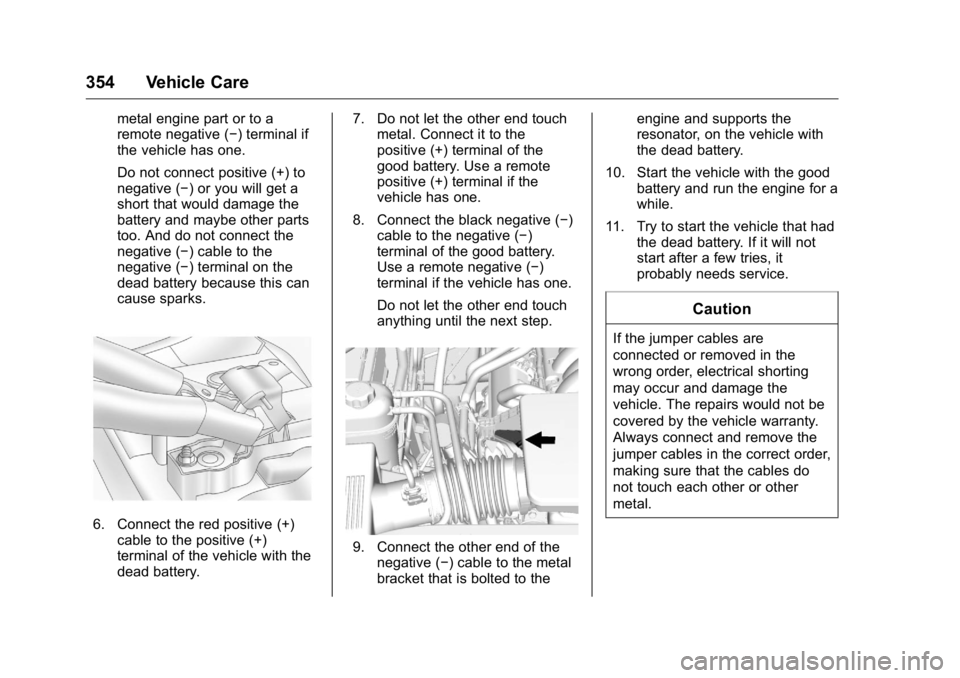
6. Connect the red positive (+)
cable to the positive (+)
terminal of the vehicle with the
dead battery. 7. Do not let the other end touch
metal. Connect it to the
positive (+) terminal of the
good battery. Use a remote
positive (+) terminal if the
vehicle has one.
8. Connect the black negative ( − )
cable to the negative ( − )
terminal of the good battery.
Use a remote negative ( − )
terminal if the vehicle has one.
Do not let the other end touch
anything until the next step.
9. Connect the other end of the
negative ( − ) cable to the metal
bracket that is bolted to the engine and supports the
resonator, on the vehicle with
the dead battery.
10. Start the vehicle with the good
battery and run the engine for a
while.
11. Try to start the vehicle that had
the dead battery. If it will not
start after a few tries, it
probably needs service.
CautionIf the jumper cables are
connected or removed in the
wrong order, electrical shorting
may occur and damage the
vehicle. The repairs would not be
covered by the vehicle warranty.
Always connect and remove the
jumper cables in the correct order,
making sure that the cables do
not touch each other or other
metal.
Page 392 of 425
GMC Yukon/Yukon XL/Denali Owner Manual (GMNA-Localizing-U.S./
Canada/Mexico-11349262) - 2018 - crc - 6/20/17
Customer Information 391.
Lock-Out Service: Service to
unlock the vehicle if you are
locked out. A remote unlock may
be available if you have OnStar.
For security reasons, the driver
must present identification
before this service is given.
.
Emergency Tow from a Public
Road or Highway: Tow to the
nearest GMC dealer for warranty
service, or if the vehicle was in a
crash and cannot be driven.
Assistance is not given when the
vehicle is stuck in the sand,
mud, or snow.
.
Flat Tire Change: Service to
change a flat tire with the spare
tire. The spare tire, if equipped,
must be in good condition and
properly inflated. It is the owner's
responsibility for the repair or
replacement of the tire if it is not
covered by the warranty.
.
Battery Jump Start: Service to
jump start a dead battery.
.
Trip Interruption Benefits and
Assistance: If your trip is
interrupted due to a warranty
event, incidental expenses may be reimbursed within the
Powertrain warranty period.
Items considered are reasonable
and customary hotel, meals,
rental car, or a vehicle being
delivered back to the customer,
up to 805 km (500 mi).
Services Not Included in
Roadside Assistance .
Impound towing caused by
violation of any laws
.
Legal fines
.
Mounting, dismounting,
or changing of snow tires,
chains, or other traction devices
Service is not provided if a vehicle
is in an area that is not accessible
to the service vehicle or is not a
regularly traveled or maintained
public road, which includes ice and
winter roads. Off-road use is not
covered. Services Specific to
Canadian-Purchased Vehicles .
Fuel Delivery: Reimbursement
is up to 7 L. Diesel fuel delivery
may be restricted. Propane and
other fuels are not provided
through this service.
.
Lock-Out Service: Vehicle
registration is required.
.
Trip Interruption Benefits and
Assistance: Must be over
150 km from where your trip was
started to qualify.
Pre-authorization, original
detailed receipts, and a copy of
the repair orders are required.
Once authorization has been
received, the Roadside
Assistance advisor will help to
make arrangements and explain
how to receive payment.
.
Alternative Service: If
assistance cannot be provided
right away, the Roadside
Assistance advisor may give
permission to get local
emergency road service. You will
receive payment, up to $100,
after sending the original receipt
Page 403 of 425
GMC Yukon/Yukon XL/Denali Owner Manual (GMNA-Localizing-U.S./
Canada/Mexico-11349262) - 2018 - crc - 6/21/17
402 OnStar
Security If equipped, OnStar provides these
services:
.
With Stolen Vehicle Assistance,
OnStar Advisors can use GPS to
pinpoint the vehicle and help
authorities quickly recover it.
.
With Remote Ignition Block,
if equipped, OnStar can block
the engine from being restarted.
.
With Stolen Vehicle Slowdown,
if equipped, OnStar can work
with law enforcement to
gradually slow the vehicle down.
Theft Alarm Notification If equipped, if the doors are locked
and the vehicle alarm sounds, a
notification by text, e-mail, or phone
call will be sent. If the vehicle is
stolen, an OnStar Advisor can work
with authorities to recover the
vehicle. Navigation OnStar navigation requires a
specific OnStar service plan.
Press
Q to receive Turn-by-Turn
directions or have them sent to the
vehicle ’ s navigation screen,
if equipped.
Turn-by-Turn Navigation 1. Press
Q to connect to an
Advisor.
2. Request directions to be
downloaded to the vehicle.
3. Follow the voice-guided
commands.
Using Voice Commands
During a Planned Route Functionality of the Voice Command
button may vary by vehicle and
region. For some vehicles, press
=to open the OnStar app on the
infotainment display. For other
vehicles press
= as follows. Cancel Route
1. Press
= . System responds:
“ OnStar ready, ” then a tone.
2. Say “ Cancel route. ” System
responds: “ Do you want to
cancel directions? ”
3. Say “ Yes. ” System responds:
“ OK, request completed, thank
you, goodbye. ”
Route Preview
1. Press
= . System responds:
“ OnStar ready, ” then a tone.
2. Say “ Route preview. ” System
responds with the next three
maneuvers.
Repeat
1. Press
= . System responds:
“ OnStar ready, ” then a tone.
2. Say “ Repeat. ” System
responds with the last direction
given, then responds with
“ OnStar ready, ” then a tone.
Page 405 of 425
GMC Yukon/Yukon XL/Denali Owner Manual (GMNA-Localizing-U.S./
Canada/Mexico-11349262) - 2018 - crc - 6/21/17
404 OnStar devices. Manage data usage by
turning Wi-Fi on or off on your
mobile device, using the myGMC
mobile app, or by contacting an
OnStar Advisor. On some vehicles,
Wi-Fi can also be managed from the
Wi-Fi Hotspot menu.
MyGMC Mobile App (If Available)
Download the myGMC mobile app
to compatible Apple and Android
smartphones. GMC users can
access the following services from a
smartphone:
.
Remotely start/stop the vehicle,
if factory-equipped.
.
Lock/unlock doors, if equipped
with automatic locks.
.
Activate the horn and lamps.
.
Check the vehicle ’ s fuel level, oil
life, or tire pressure,
if factory-equipped with the Tire
Pressure Monitor System.
.
Send destinations to the vehicle.
.
Locate the vehicle on a map
(U.S. market only). .
Turn the vehicle's Wi-Fi hotspot
on/off, manage settings, and
monitor data consumption,
if equipped.
.
Locate a dealer and schedule
service.
.
Request roadside assistance.
.
Set a parking reminder with pin
drop, take a photo, make a note,
and set a timer.
.
Connect with GMC on social
media.
For myGMC mobile app information
and compatibility, see my.gmc.com.
An active OnStar service,
compatible device, factory-installed
remote start, and power locks are
required. Data rates apply. See
onstar.com for details and system
limitations.
Remote Services
Contact an OnStar Advisor to
unlock the doors or sound the horn
and flash the lamps. OnStar AtYourService OnStar Advisors can provide offers
from restaurants and retailers on
your route, help locate hotels,
or book a room. These services
vary by market.
OnStar Hands-Free Calling Make and receive calls with the
built-in wireless calling service,
which requires available minutes.
Functionality of the Voice Command
button may vary by vehicle and
region. For some vehicles, press
=to open the OnStar app on the
infotainment display, then select
Hands-Free calling. For other
vehicles press
= as follows.
Make a Call
1. Press
= . System responds:
“ OnStar ready. ”
2. Say “ Call. ” System responds:
“ Call. Please say the name or
number to call. ”
Page 406 of 425
GMC Yukon/Yukon XL/Denali Owner Manual (GMNA-Localizing-U.S./
Canada/Mexico-11349262) - 2018 - crc - 6/21/17
OnStar 4053. Say the entire number without
pausing, including a “ 1 ” and the
area code. System responds:
“ OK, calling. ”
Calling 911 Emergency 1. Press
= . System responds:
“ OnStar ready. ”
2. Say “ Call. ” System responds:
“ Call. Please say the name or
number to call. ”
3. Say “ 911 ” without pausing.
System responds: “ 911. ”
4. Say “ Call. ” System responds:
“ OK, dialing 911. ”
Retrieve My Number 1. Press
= . System responds:
“ OnStar ready. ”
2. Say “ My number. ” System
responds: “ Your OnStar
Hands-Free Calling number is, ”
then says the number.
End a Call
Press
= . System responds: “ Call
ended. ” Verify Minutes and Expiration Press
= and say “ Minutes ” then
“ Verify ” to check how many minutes
remain and their expiration date.
Diagnostics By monitoring and reporting on the
vehicle ’ s key systems, OnStar
Advanced Diagnostics provides a
way to keep up on maintenance.
Capabilities vary by model. See
www.onstar.com for details and
system limitations. Message and
data rates may apply. Advanced
Diagnostics requires an active
OnStar paid service plan, e-mail
address on file, and enrollment in
Advanced Diagnostics.
Includes:
.
Diagnostic Alerts: Set
preferences to receive real-time
e-mails, texts, or monthly reports
of the vehicle ’ s health. Or
press
Q to have an Advisor
initiate a remote diagnostic
report. .
Proactive Alerts: Receive a
real-time e-mail or text message
regarding potential issues with
key vehicle components, such
as the battery, fuel system,
or starter system. Alerts for
potential issues appear on the
infotainment display. Proactive
Alerts are designed to help
predict specific types of issues
based on information collected
from the vehicle. Other factors
may affect vehicle performance.
Not all issues will deliver alerts.
In some cases, a dealer service
check may be required to
confirm the accuracy of the
alerts.
.
Dealer Maintenance Notification:
Have the vehicle notify your
preferred dealer when it is time
for maintenance. Your dealer will
then contact you to set up an
appointment.
To begin, press
Q to speak to an
Advisor, or see www.onstar.com.