CD player GMC YUKON XL DENALI 2005 Owners Manual
[x] Cancel search | Manufacturer: GMC, Model Year: 2005, Model line: YUKON XL DENALI, Model: GMC YUKON XL DENALI 2005Pages: 62, PDF Size: 1.17 MB
Page 48 of 62
Navigation Audio System
Notice:Before adding any sound equipment to
your vehicle, like a tape player, CB radio, mobile
telephone, or two-way radio, make sure that it can
be added by checking with your dealer. Also,
check federal rules covering mobile radio and
telephone units. If sound equipment can be added,
it is very important to do it properly. Added
sound equipment may interfere with the operation
of your vehicle’s engine, radio, or other systems,
and even damage them. Your vehicle’s systems may
interfere with the operation of sound equipment
that has been added improperly.
Your vehicle has a feature called Retained Accessory
Power (RAP). With RAP, the audio system can be
played even after the ignition is turned off. See
“Retained Accessory Power (RAP)” in Section 2 of
your vehicle’s owner manual for more information.
The audio system is operated using navigation system
menus. The audio menus are explained in this section.
Playing the Radio
O
(Power/Volume):Press this knob to turn the audio
and navigation systems on and off. Turn the knob to
increase or decrease the volume.
Finding a Station
BAND:Press this hard key to access the BAND screen
and to switch between AM, FM1, FM2, XM1, and
XM2, if equipped.
Tuning Knob:Use the tuning knob on the lower
left corner of the navigation system to choose a
radio station.
wSEEKx:Press the SEEK up or the down arrow to
go to the next or previous station and stay there.
To scan stations, press and hold the SEEK up or down
arrow for two seconds until you hear a beep. The radio
will go to a station, play for a few seconds, then go
on to the next station. Press either SEEK arrow again
to stop scanning.
To scan preset stations, press and hold the SEEK up or
down arrow for more than four seconds. You will hear
two beeps and PSCAN will be displayed, along with
the highlighted preset. The radio will go to one of
the preset stations, play for a few seconds, then go on
to the next preset station. Press either SEEK arrow
again to stop scanning presets.
The radio will only seek and scan stations with a strong
signal that are in the selected band.
3-2
Page 52 of 62
After adjustments are made, press the BAND hard key
to go back to the preset station menu. Now that you
have preset the station and the EQ setting, you can
assign the EQ to the preset station. To do this, touch the
desired preset station screen button until you hear a
beep. The EQ setting will now be assigned to that preset
unless you decide to change it.
If you were at the CD screen before setting an EQ and
you press the CD hard key, you will be returned to
the CD screen, and the EQ will be set to that screen
until you change it.Digital Signal Processing (DSP)
If your vehicle is equipped with DSP, you have a choice
of four different listening experiences. DSP can be used
while listening to the audio system or the CD player.
You can choose from the following DSP settings:
Normal:Touch this screen button to adjust the audio to
deliver all occupants the best possible sound qualities.
Driver:Touch this screen button to adjust the audio
to deliver the driver’s seat occupant the best possible
sound qualities.
Rear:Touch this screen button to adjust the audio to
deliver the rear seat occupants the best possible
sound qualities.
Spacious:Touch this screen button to make the
listening space seem larger.
See “Rear Seat Audio (RSA)”, “Theft-Deterrent Feature”,
“Audio Steering Wheel Controls”, “Radio Reception”,
and antenna information in Section 3 of your vehicle’s
owner manual for more information.
3-6
Page 57 of 62
Playing a CD
Remove the navigation map DVD from the slot and
return it to its case. Insert a CD partway into the slot,
label side up. The player will pull it in.
There will be a 12 to 15 second delay while the CD is
read, before it begins to play. When the player begins to
read a CD, the Disc Check in Process message will
appear briey to remind you of the delay. When the
map DVD is reinserted and read, the DVD Check
in Process message will appear briey to remind you
of the delay.
While playing a CD in the CD player, the navigation
system is not available. A message will display
if the NAV key is pressed. If your vehicle is equipped
with Rear Seat Entertainment (RSE), you can play
an audio CD while using the navigation system.
SeeRear Seat Entertainment System on page 3-14
for more information.
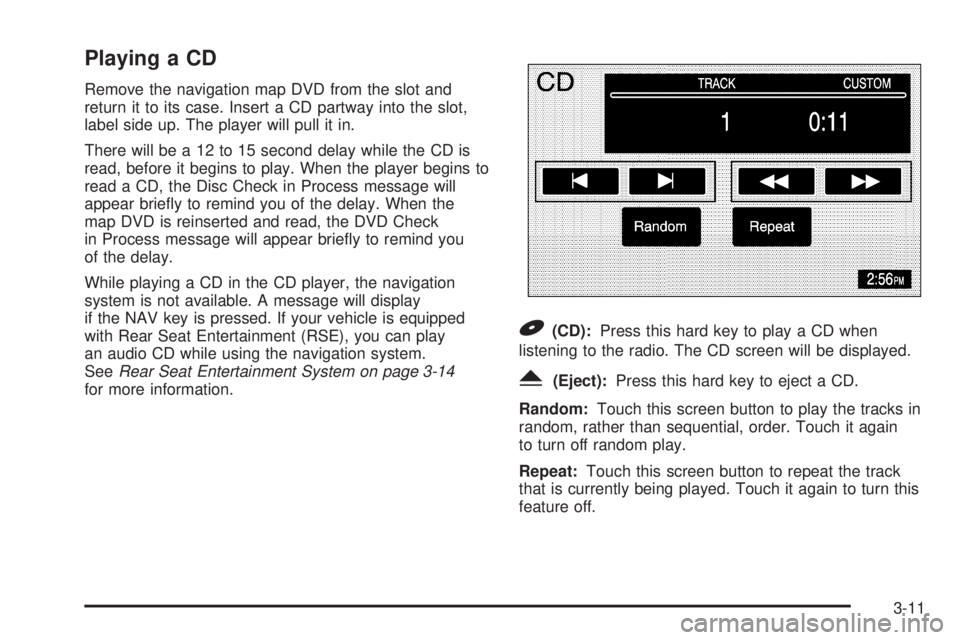
B(CD):Press this hard key to play a CD when
listening to the radio. The CD screen will be displayed.
Y(Eject):Press this hard key to eject a CD.
Random:Touch this screen button to play the tracks in
random, rather than sequential, order. Touch it again
to turn off random play.
Repeat:Touch this screen button to repeat the track
that is currently being played. Touch it again to turn this
feature off.
3-11
Page 58 of 62
[(Forward):Touch this screen button to advance
quickly within a track. As the CD advances, elapsed time
will be displayed to help you nd the correct passage.
Release this screen button to play the passage.
r(Reverse):Touch this screen button to reverse
quickly within a track. As the CD reverses, elapsed time
will be displayed to help you nd the correct passage.
Release this screen button to play the passage.
u(Track Forward):Touch this screen button to
advance to the next track on the CD.
t(Track Reverse):Touch this screen button to return
to the previous track on the CD.
wSEEKx:Within two seconds, press and release
the SEEK up arrow to advance to the next track, or
the down arrow to return to the previous track.
Track Scan:Press and hold one of the SEEK arrows
for two seconds or more to enter CD TRACK SCAN
mode. A chime will sound to alert you that TRACK
SCAN is active, and the rst 10 seconds of each track
on the disc will be played before advancing to the
next track. Press one of the SEEK arrows again to stop
the scan at the track currently being played.
BAND:Press the BAND hard key to switch to the radio
when a CD is playing.
CD Messages
CD ERROR:If this message appears on the screen,
the CD is not being read by the system. The CD could
be dirty, scratched, wet, or upside down. You may
also be driving on a very rough road. When the road
becomes smoother, the CD should play.
NO MUSIC DISC:If this message appears on the
screen, the map DVD is still inserted in the system.
Press eject and return the map DVD to its case, then
insert a CD. The CD should play.
NO DISC:If this message appears on the screen, the
CD slot is empty. Insert a CD. The CD should play.
If a CD is not playing correctly for any other reason, try a
known good CD. If any error occurs repeatedly or if
an error cannot be corrected, contact your dealer. If your
radio displays an error message, write it down and
provide it to your dealer when reporting the problem.
See “Rear Seat Audio (RSA)”, “Care of Your CDs
and DVDs”, and “Care of Your CD and DVD Player”
in Section 3 of your vehicle’s owner manual for
more information.
3-12
Page 59 of 62
Playing a CD with the CD Changer
Your vehicle may be equipped with a CD changer.
See “Radio with Six-Disc CD” in Section 3 of your
vehicle’s owner manual for more information on how to
operate the CD changer.
Random:Touch the Random screen button for less than
two seconds to play the tracks on the current disc in
random, rather than sequential, order. Touch it again to
turn off random play. When Random is touched for more
than two seconds, the player selects D. Random mode.
The system will then select a track from all of the discs
in the magazine and will play them in random order.
To cancel it, touch the Random screen button again.
Repeat:Touch the Repeat screen button to repeat the
track that is currently being played. Touch it again to
turn this feature off.
[(Forward):Touch and hold the forward arrow
screen button to advance quickly within a track. As the
CD advances, elapsed time will be displayed to help
you nd the correct passage.
r(Reverse):Touch and hold the reverse arrow
screen button to reverse quickly within a track. As the
CD reverses, elapsed time will be displayed to help you
nd the correct passage.
Disc
r:Touch this screen button to advance to the
next disc in the changer.
qDisc:Touch this screen button to return to the
previous disc in the changer.
To switch between tracks on a disc, use the SEEK
arrows. Press the up arrow to advance to the next track
on the disc. Press the down arrow to return to the
previous track on the disc.
Track Scan:To use this function, press and hold the
SEEK key for at least two seconds, but less than
four seconds, at which time a single chime will sound to
alert you that the CD changer has entered TRACK
SCAN mode for the current CD. While TRACK SCAN
is active, the rst 10 seconds of each track on the
current disc will be played before advancing to the next.
Press the SEEK key again to stop the scan at the
track currently being played.
Disc Scan:To use this function, press and hold the
SEEK key for at least four seconds, at which time
a double chime will sound to alert you that the CD
changer has entered DISC SCAN mode for the entire
CD magazine. While DISC SCAN is active, the rst
10 seconds of the rst track on each disc will be played
before advancing to the rst track on the next disc.
Press the SEEK key again to stop the scan at the track
and disc currently being played.
BAND:Press this hard key to switch to the radio when
a CD is playing.
3-13
Page 60 of 62
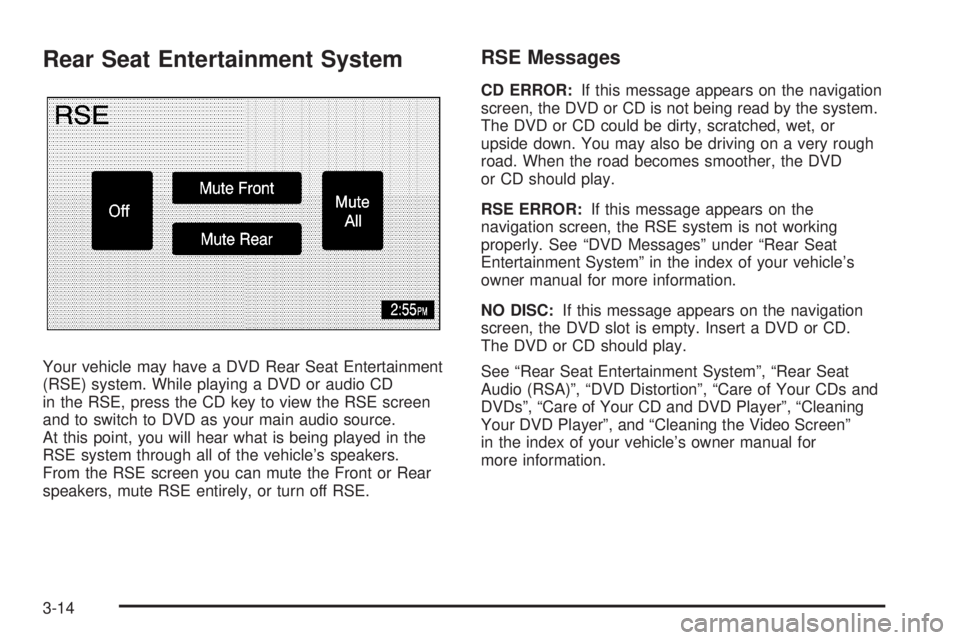
Rear Seat Entertainment System
Your vehicle may have a DVD Rear Seat Entertainment
(RSE) system. While playing a DVD or audio CD
in the RSE, press the CD key to view the RSE screen
and to switch to DVD as your main audio source.
At this point, you will hear what is being played in the
RSE system through all of the vehicle’s speakers.
From the RSE screen you can mute the Front or Rear
speakers, mute RSE entirely, or turn off RSE.
RSE Messages
CD ERROR:If this message appears on the navigation
screen, the DVD or CD is not being read by the system.
The DVD or CD could be dirty, scratched, wet, or
upside down. You may also be driving on a very rough
road. When the road becomes smoother, the DVD
or CD should play.
RSE ERROR:If this message appears on the
navigation screen, the RSE system is not working
properly. See “DVD Messages” under “Rear Seat
Entertainment System” in the index of your vehicle’s
owner manual for more information.
NO DISC:If this message appears on the navigation
screen, the DVD slot is empty. Insert a DVD or CD.
The DVD or CD should play.
See “Rear Seat Entertainment System”, “Rear Seat
Audio (RSA)”, “DVD Distortion”, “Care of Your CDs and
DVDs”, “Care of Your CD and DVD Player”, “Cleaning
Your DVD Player”, and “Cleaning the Video Screen”
in the index of your vehicle’s owner manual for
more information.
3-14