radio controls GMC YUKON XL DENALI 2007 User Guide
[x] Cancel search | Manufacturer: GMC, Model Year: 2007, Model line: YUKON XL DENALI, Model: GMC YUKON XL DENALI 2007Pages: 608, PDF Size: 2.92 MB
Page 314 of 608
Z(Eject):Press this button to eject a CD or
DVD. If a CD or DVD is ejected, but not removed,
the player will automatically pull it back in after
15 seconds.
If loading and reading of a CD cannot be
completed, such as unknown format, etc., and the
disc fails to eject, press and hold the CD eject
button for more than ve seconds to force the disc
to eject.
DVD-V (Video) Display Buttons
Once a DVD-V is inserted, the radio display menu
will show several tag options for DVD playing.
Press the pushbuttons located under any desired
tag option during DVD playback. See the tag
options listed below for more information.
The rear seat passenger can navigate the DVD-V
menus and controls through the remote control.
See “Remote Control”, underRear Seat
Entertainment System on page 321for more
information. The Video Screen automatically
turns on when the DVD-V is inserted into the
DVD slot.
r/j(Play/Pause):Press either the play or
pause icon displayed on the radio system,
to toggle between pausing or restarting playback
of a DVD. If the forward arrow is showing on
display, the system is in pause mode. If the pause
icon is showing on display, the system is in
playback mode. If the DVD screen is off, press the
play button to turn the screen on.
Some DVDs will begin playing after the previews
have nished, although there may be a delay
of up to 30 seconds. If the DVD does not begin
playing the movie automatically, press the
pushbutton located under the play/pause symbol
tag displayed on the radio. If the DVD still does not
play, refer to the on-screen instructions, if
available.
c(Stop):Press this button to stop playing,
rewinding, or fast forwarding a DVD.
r(Enter):Press this button to select the
choices that are highlighted in any menu.
314
Page 315 of 608
y(Menu):Press this button to access the DVD
menu. The DVD menu is different on every
DVD. Use the pushbuttons located under the
navigation arrows to navigate the cursor through
the DVD menu. After making a selection press the
enter button. This button only operates when
using a DVD.
Nav (Navigate):Press this button to display
directional arrows for navigating through the
menus.
q(Return):Press this button to exit the current
active menu and return to the previous menu.
This button will operate only when a DVD is
playing and a menu is active.
DVD-A (Audio) Display Buttons
Once a DVD-A is inserted, radio display menu
will show several tag options for DVD playing.
Press the pushbuttons located under any desired
tag option during DVD playback. See the tag
options listed below for more information.The rear seat operator can navigate the DVD-A
menus and controls through the remote control.
See “Remote Control”, underRear Seat
Entertainment System on page 321for more
information. The Video Screen does not
automatically power on when the DVD-A is
inserted into the DVD slot. It must be manually
turned on by the rear seat occupant through
the remote control power button.
r/j(Play/Pause):Press either the play or
pause icon displayed on the radio system,
to toggle between pausing or restarting playback
of a DVD. If the forward arrow is showing on
display, the system is in pause mode. If the pause
icon is showing on display, the system is in
playback mode.
qGroupr:Press this button to cycle through
musical groupings on the DVD-A disc.
Nav (Navigate):Press this button to display
directional arrows for navigating through the
menus.
315
Page 333 of 608
Rear Seat Audio (RSA)
This feature allows rear seat passengers to listen
to and control any of the music sources: radio,
CDs, DVDs, or other auxiliary sources. However,
the rear seat passengers can only control the
music sources the front seat passengers are not
listening to (except on some radios where
dual control is allowed). For example, rear seat
passengers can listen to and control a CD through
the headphones, while the driver listens to the
radio through the speakers. The rear seat
passengers have control of the volume for each
set of wired headphones.
You may operate the RSA functions even when
the main radio is off.
Audio can be heard through wired headphones
(not included) plugged into the jacks on the RSA.
If your vehicle has this feature, audio can also
be heard on Channel 2 of the wireless
headphones.
The front audio system will display the headphone
icon when the RSA is on and the headphone
icon will disappear from the display when it is off.
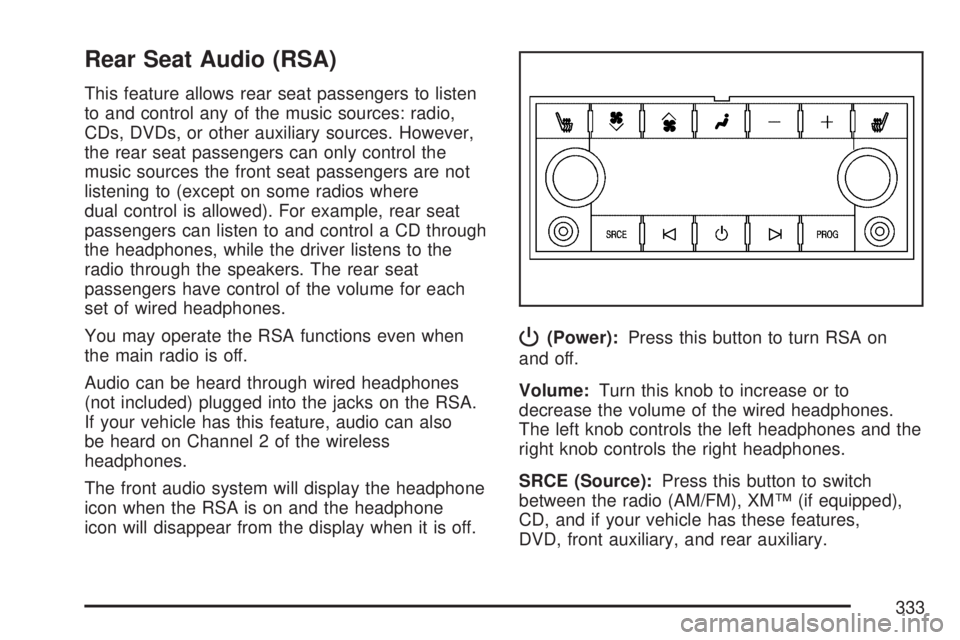
P(Power):Press this button to turn RSA on
and off.
Volume:Turn this knob to increase or to
decrease the volume of the wired headphones.
The left knob controls the left headphones and the
right knob controls the right headphones.
SRCE (Source):Press this button to switch
between the radio (AM/FM), XM™ (if equipped),
CD, and if your vehicle has these features,
DVD, front auxiliary, and rear auxiliary.
333
Page 335 of 608
Theft-Deterrent Feature
THEFTLOCK®is designed to discourage theft
of your vehicle’s radio. The feature works
automatically by learning a portion of the Vehicle
Identication Number (VIN). If the radio is
moved to a different vehicle, it will not operate
and LOCKED will appear on the display.
When the radio and vehicle are turned off, the
blinking red light indicates that THEFTLOCK
®is
armed.
With THEFTLOCK
®activated, the radio will not
operate if stolen.
Audio Steering Wheel Controls
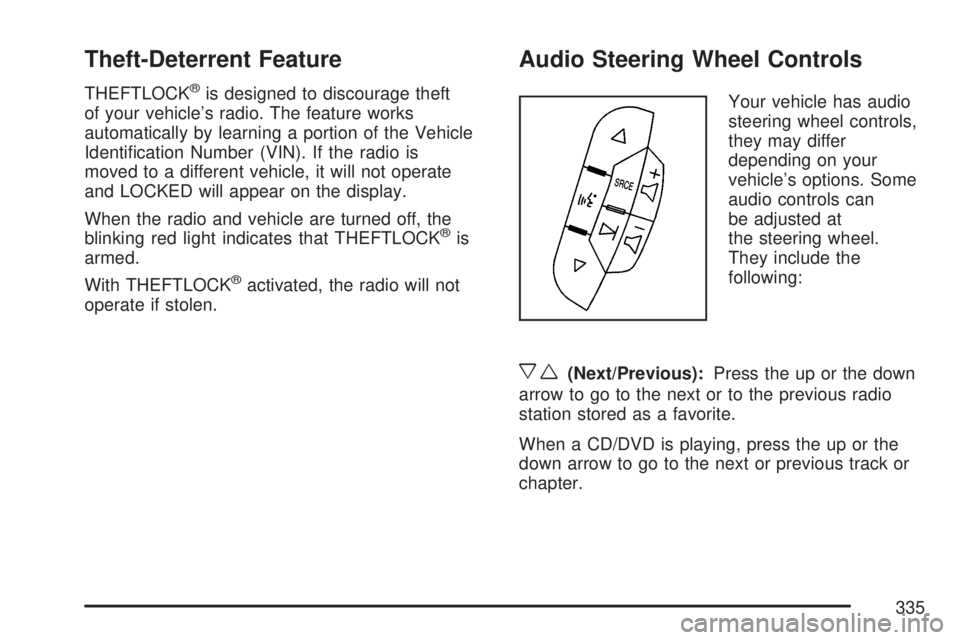
Your vehicle has audio
steering wheel controls,
they may differ
depending on your
vehicle’s options. Some
audio controls can
be adjusted at
the steering wheel.
They include the
following:
xw(Next/Previous):Press the up or the down
arrow to go to the next or to the previous radio
station stored as a favorite.
When a CD/DVD is playing, press the up or the
down arrow to go to the next or previous track or
chapter.
335
Page 594 of 608
Appearance Care (cont.)
Leather.................................................... 529
Sheet Metal Damage............................... 533
Speaker Covers....................................... 530
Tires........................................................ 533
Underbody Maintenance........................... 534
Vehicle Care/Appearance Materials.......... 535
Washing Your Vehicle.............................. 530
Weatherstrips........................................... 530
Windshield, Backglass, and Wiper
Blades.................................................. 532
Wood Panels........................................... 530
Ashtray(s).................................................... 214
Audio System(s).......................................... 272
Audio Steering Wheel Controls................. 335
Care of Your CD and DVD Player............ 338
Care of Your CDs and DVDs................... 338
Navigation/Radio System, see Navigation
Manual................................................. 321
Radio with CD and DVD.......................... 294
Radio with Six-Disc CD............................ 276
Rear Seat Audio (RSA)............................ 333
Rear Side Window Antenna..................... 338
Setting the Time..............................274, 275
Theft-Deterrent Feature............................ 335Audio System(s) (cont.)
Understanding Radio Reception............... 336
XM™ Satellite Radio Antenna System...... 339
Automatic Headlamp System....................... 205
Automatic Transmission
Fluid........................................................ 440
Operation................................................. 145
Autoride
®..................................................... 399
B
Battery........................................................ 463
Run-Down Protection............................... 208
Before Leaving on a Long Trip.................... 382
Bench Seat, Split (60/40).............................. 18
Brake
Anti-Lock Brake System (ABS)................. 347
Emergencies............................................ 349
Parking.................................................... 152
System Warning Light.............................. 233
Brake Pedal, Throttle................................... 143
Brakes........................................................ 459
Braking....................................................... 346
Braking in Emergencies............................... 349
Break-In, New Vehicle................................. 139
594
Page 603 of 608
Power
Accessory Outlet(s).................................. 213
Door Locks.............................................. 123
Electrical System..................................... 537
Liftgate..................................................... 128
Lumbar Controls........................................ 10
Reclining Seatbacks................................... 14
Retained Accessory (RAP)....................... 141
Running Boards....................................... 132
Seat............................................................ 9
Steering Fluid.......................................... 457
Windows.................................................. 133
Pretensioners, Safety Belt............................. 60
Programmable Automatic Door Locks.......... 124
Q
Questions and Answers About Safety Belts ... 42
R
Radios........................................................ 272
Care of Your CD and DVD Player............ 338
Care of Your CDs and DVDs................... 338
Navigation/Radio System, see Navigation
Manual................................................. 321Radios (cont.)
Radio with CD and DVD.......................... 294
Radio with Six-Disc CD............................ 276
Rear Seat Audio...................................... 333
Setting the Time..............................274, 275
Theft-Deterrent......................................... 335
Understanding Reception......................... 336
Rainsense™ II Wipers................................. 197
Rear Air Conditioning and Heating System
and Electronic Climate Controls............... 223
Rear Axle.................................................... 470
Rear Door Security Locks........................... 124
Rear Heated Seats....................................... 17
Rear Safety Belt Comfort Guides.................. 56
Rear Seat Audio (RSA)............................... 333
Rear Seat Entertainment System................. 321
Rear Seat Passengers, Safety Belts.............. 53
Rear Side Window Antenna......................... 338
Rear Storage Area...................................... 180
Rear Windshield Washer/Wiper.................... 199
Rearview Mirror, Automatic Dimming with
OnStar®, Compass and Temperature
Display..................................................... 158
Reclining Seatbacks, Power.......................... 14
Recommended Fluids and Lubricants.......... 561
Recovery Hooks.......................................... 391
603