key GREAT WALL FLORID 2008 User Guide
[x] Cancel search | Manufacturer: GREAT WALL, Model Year: 2008, Model line: FLORID, Model: GREAT WALL FLORID 2008Pages: 281, PDF Size: 43.97 MB
Page 188 of 281
Downloaded from www.Manualslib.com manuals search engine 181Electrical Accessories
Central Door Lock
1. Lock
After closing the door (when unlocked), press the LOCK button once on the remote controller, the car lamp
flashs once, and all five doors will be locked.
2. Unlock
When locked, press the UNLOCK button once on the remote controller, the car lamp will flash twice, and all
four front doors will be unlocked.
3. Vehicle pager function
Press the LOCK button once on the remote controller while all the doors are closed and locked. The car lamp
will then flash ten times. Press the UNLOCK button to exit the vehicle pager function. If the doors are not well
closed and locked, then press the LOCK button once on the remote controller, in which case the lamps will not
flash.
4. Auto-defense function
While locked, press the UNLOCK button on the remote controller. If the doors are not open, it will automatically
lock after 30s.
5. Auto-close window function (jam protection window regulator)
(a) Pull the key out and make sure all the doors are closed, then press the LOCK button on remote controller,
the side windows will close after 1 second of negative output.
(b) After pulling out the key, the sunroof will close after 60 seconds of negative output (reserve)\
.
6. Remote controller function suspension
When the key is inserted into the ignition lock, the remote controller will not work, but the head unit will work
as normal.
7. Manual lock and unlock
Locking or unlocking can be manually controlled.
8. Deleting or registering remote learning functions of the remote controll\
er
Step one: Under normal circumstances, open the front left door (do not close). Insert the key into the ignition
lock, within five seconds, switch it ON and LOCK five times and stop it at the ON position the fifth time. The
buzzer will sound once and the light will flash once. It is now in the l\
earning state.
Step two: Press any key on the remote controller within 10 seconds, the buzzer will sound twice, and the light
will flash twice. This is the first learning state. Press any key on another remote controller, it will sound twice,
and the light will flash twice. Second learning successful (A total of four remote controllers can learn).
Step three: After successful learning, pull the key out (ON-LOCK) to exit the learning state. If no key is pressed
within 10 seconds, the system will exit from the learning state automati\
cally.
9. Dome lamp delay function
(a) Open the door and then close it, the lamp will light for 10 seconds. If the key is inserted into the ignition
lock head or door lock within these 10 seconds, the lamp will gradually \
extinguish.
(b) When the key is pulled out of the ignition lock head, the dome lamp will turn on. If the key is inserted into
it again or the door is locked, the dome lamp will turn off gradually after one minute.
10. Alert function
(a) If the key is inserted (low) and is not at the ON gear (high), when the front left door is opened (low), the
buzzer will emit an intermittent chirp.
(b) If the key is not inserted (low) and the lamplet is on (high), when the front left door is open (low), the
buzzer will emit a long chirp.
11. Trunk door independent open function
(a) After pressing the trunk lock striker of the remote controller and turning the trunk door switch on, the trunk
door actuator will open (14th pin will output positive voltage), and then the trunk door can be opened. If
the trunk door does not open after pressing the trunk lock striker for 60 seconds and then switching the
trunk door on, then the trunk door actuator is unable to open (14th pin\
is not outputting positive voltage).
(b) When the trunk lock striker of the remote controller is not pressed or the trunk door is not opened after
pressing the button for 60 seconds, the trunk door actuator cannot be opened after switching the trunk door
on (14th pin is not outputting positive voltage).
Page 189 of 281
Downloaded from www.Manualslib.com manuals search engine GWFLORID Maintenance Manual182
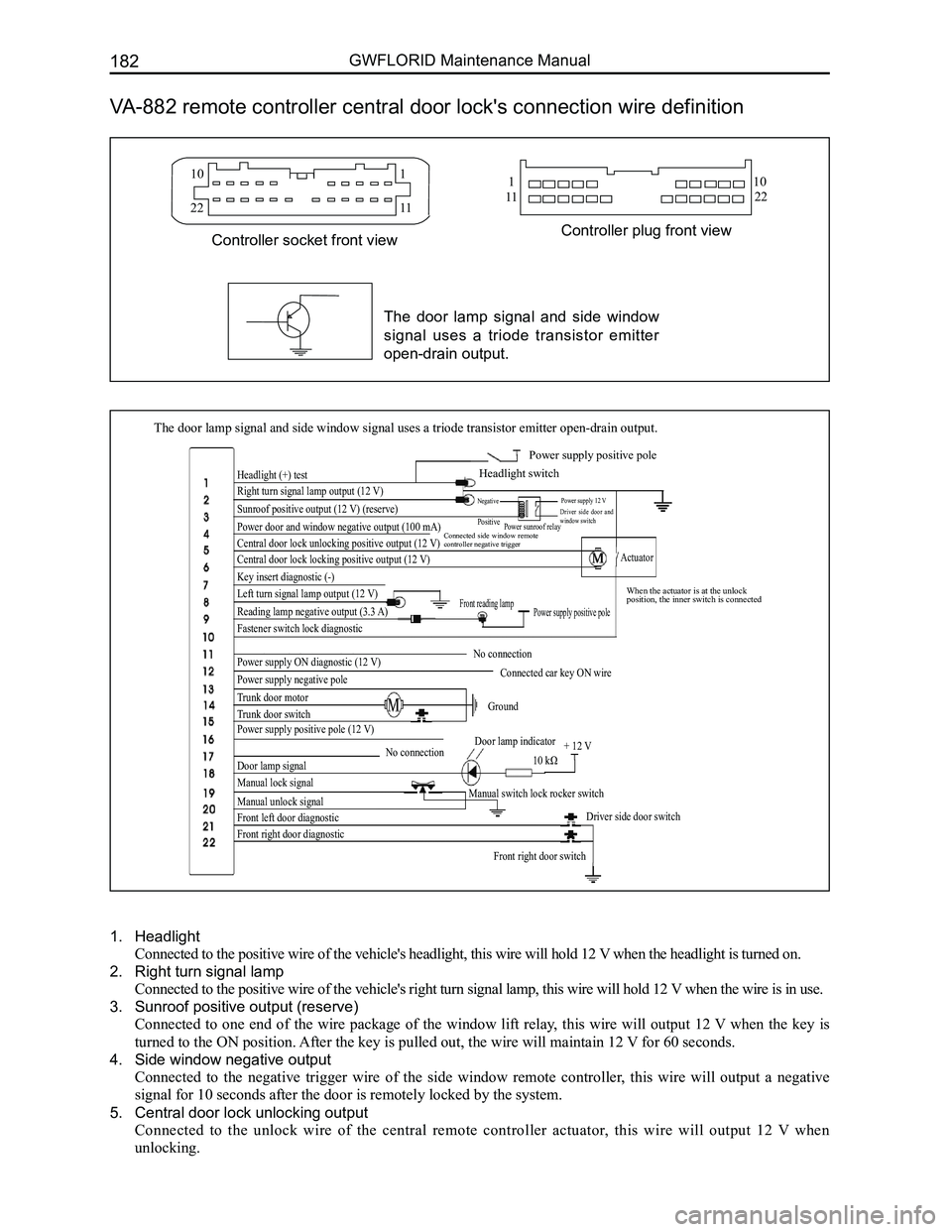
VA-882 remote controller central door lock's connection wire definition
The door lamp signal and side window signal uses a triode transistor emi\
tter open-drain output.
Headlight (+) test
Right turn signal lamp output (12 V)
Sunroof positive output (12 V) (reserve)
Power door and window negative output (100 mA)
Central door lock unlocking positive output (12 V)
Central door lock locking positive output (12 V)
Key insert diagnostic (-)
Left turn signal lamp output (12 V)
Reading lamp negative output (3.3 A)
Fastener switch lock diagnostic
Power supply ON diagnostic (12 V)
Power supply negative pole
Trunk door motor
Trunk door switch
Power supply positive pole (12 V)
Door lamp signal
Manual lock signal
Manual unlock signal
Front left door diagnostic
Front right door diagnostic
Front right door switch
Driver side door switch
Manual switch lock rocker switch
No connectionDoor lamp indicator
10 kΩ + 12 V
Ground
Connected car key ON wire
No connection
Power supply positive poleFront reading lamp
Actuator
When the actuator is at the unlock position, the inner switch is connected
Connected side window remote controller negative trigger
Power sunroof relay
Power supply 12 VDriver side door and window switch
Negative
Positive
Power supply positive pole
Headlight switch
10
22
110
1122
1
11
Controller plug front viewController socket front view
The door lamp signal and side window
signal uses a triode transistor emitter
open-drain output.
1. Headlight
Connected to the positive wire of the vehicle's headlight, this wire will hold 12 V when the headlight is turned on.
2. Right turn signal lamp
Connected to the positive wire of the vehicle's right turn signal lamp, this wire will hold 12 V when the wire is in use.
3. Sunroof positive output (reserve)
Connected to one end of the wire package of the window lift relay, this wire will output 12 V when the key is
turned to the ON position. After the key is pulled out, the wire will maintain 12 V for 60 seconds.
4. Side window negative output
Connected to the negative trigger wire of the side window remote controller, this wire will output a negative
signal for 10 seconds after the door is remotely locked by the system.
5. Central door lock unlocking output
Connected to the unlock wire of the central remote controller actuator, this wire will output 12 V when
unlocking.
Page 190 of 281
Downloaded from www.Manualslib.com manuals search engine 183Electrical Accessories
6. Central door lock locking output
Connected to the locking wire of the central door lock actuator, this wire will output 12 V when locking.
7. Key insert diagnostic
Connected to the detecting wire of the lock head, the electric potential of this wire will lower when a key being
inserted into the lock is detected.
8. Left turn signal lamp
Connected to the positive wire of the left turn signal lamp, this wire o\
utputs 12 V during its use.
9. Reading lamp output
Connected to the negative trigger wire of the front reading lamp, this wire uses a low electric potential output to
control the reading lamp's lighting.
10. Fastener switch lock diagnostic
Connected to the inner switch wire of the driver side door fastener, the inside switches will be connected and the
wire's electric potential will lower when the fastener is unlocked.
11. No connection
12. Power supply ON diagnostic
Connected to the ON wire of the key switch, this wire holds 12 V when the key is turned to the ON position.
13. Power supply negative pole
Wire is grounded (too long a wire can create interference sources).
14. Trunk door motor
This wire is connected to the trunk door motor and will output 12 V when the UNLOCK button of the remote
controller or the manually unlock switch is pressed.
15. Trunk door switch
This wire is connected to the trunk door switch and will connect with the power supply's negative pole when in
use.
16. Power supply positive pole
This wire is connected to the battery positive (red fire wire).
17. No connection
18. Door lamp signal
This wire is connected to the door lamp indicator of the combination meter and holds 100 mA negative output
when in use (the indicator light is on when any door is detected open)\
.
19. Manual lock signal
This wire is connected to the locking control wire of the front left door's manual switch and will pass through
the power supply's negative pole (ground) when in use.
20. Manual unlock signal
This wire is connected to the unlocking control wire of the front left door's manual switch and will pass through
the power supply's negative pole (ground) when in use.
21. Front left door switch
This wire is connected to the front left door's switch control wire and will pass through the power supply's
negative pole (ground) when in use.
22. Front right door switch
This wire is connected to the front right door's switch control wire and will pass through the power supply's
negative pole (ground) when in use.
Page 193 of 281
Downloaded from www.Manualslib.com manuals search engine GWFLORID Maintenance Manual186
Immobilizer System
Immobilizer system composition
This vehicle's engine immobilizer system consists of a theft deterrent ECU assembly, a theft deterrent coil as-
sembly, and two theft deterrent converter assemblies. The theft deterrent coil assembly is put on the head of
ignition lock cylinder, with the other end connected to the theft deterrent ECU assembly. The two theft deterrent
converter assemblies are separately installed inside the plastic handles\
of the two keys.
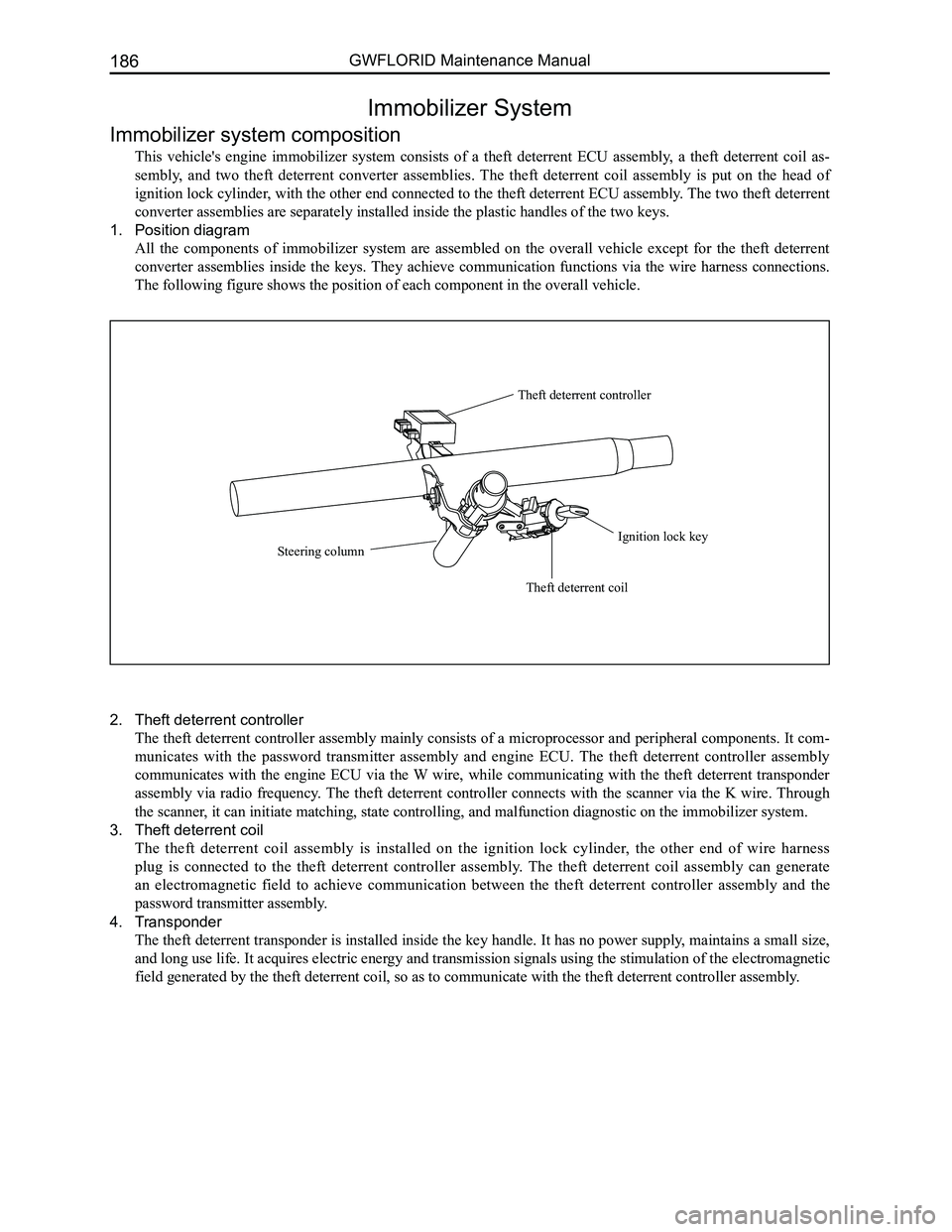
1. Position diagram
All the components of immobilizer system are assembled on the overall vehicle except for the theft deterrent
converter assemblies inside the keys. They achieve communication functions via the wire harness connections.
The following figure shows the position of each component in the overall\
vehicle.
Theft deterrent controller
Ignition lock key
Theft deterrent coil
Steering column
2. Theft deterrent controller
The theft deterrent controller assembly mainly consists of a microprocessor and peripheral components. It com-
municates with the password transmitter assembly and engine ECU. The theft deterrent controller assembly
communicates with the engine ECU via the W wire, while communicating with the theft deterrent transponder
assembly via radio frequency. The theft deterrent controller connects with the scanner via the K wire. Through
the scanner, it can initiate matching, state controlling, and malfunction diagnosti\
c on the immobilizer system.
3. Theft deterrent coil
The theft deterrent coil assembly is installed on the ignition lock cylinder, the other end of wire harness
plug is connected to the theft deterrent controller assembly. The theft deterrent coil assembly can generate
an electromagnetic field to achieve communication between the theft deterrent controller assembly and the
password transmitter assembly.
4. Transponder
The theft deterrent transponder is installed inside the key handle. It has no power supply, maintains a small size,
and long use life. It acquires electric energy and transmission signals using the stimulation of the electromagnetic
field generated by the theft deterrent coil, so as to communicate with t\
he theft deterrent controller assembly.
Page 195 of 281
Downloaded from www.Manualslib.com manuals search engine GWFLORID Maintenance Manual188
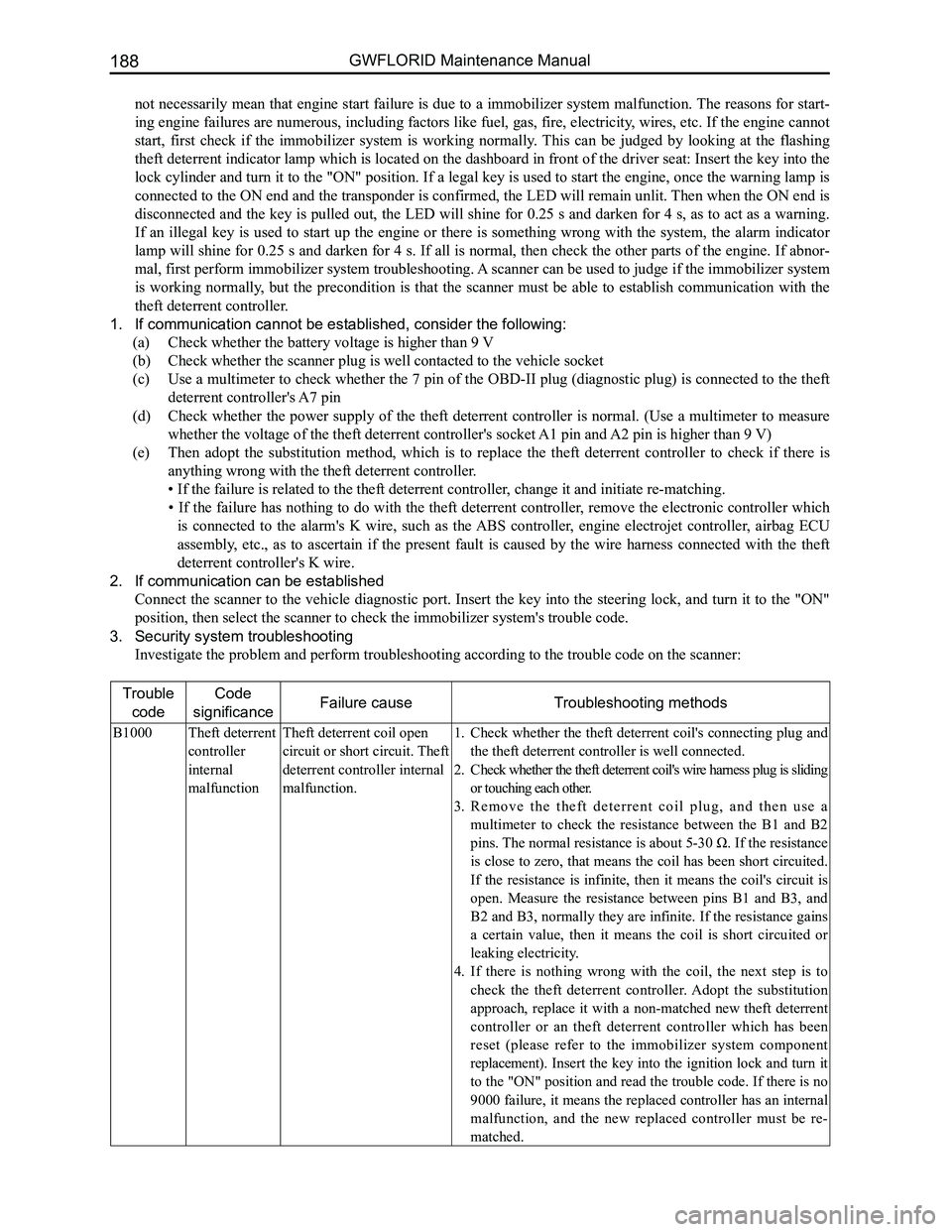
not necessarily mean that engine start failure is due to a immobilizer system malfunction. The reasons for start-
ing engine failures are numerous, including factors like fuel, gas, fire, electricity, wires, etc. If the engine cannot
start, first check if the immobilizer system is working normally. This can be judged by looking at the flashing
theft deterrent indicator lamp which is located on the dashboard in front of the driver seat: Insert the key into the
lock cylinder and turn it to the "ON" position. If a legal key is used to start the engine, once the warning lamp is
connected to the ON end and the transponder is confirmed, the LED will remain unlit. Then when the ON end is
disconnected and the key is pulled out, the LED will shine for 0.25 s and darken for 4 s, as to act as a warning.
If an illegal key is used to start up the engine or there is something wrong with the system, the alarm indicator
lamp will shine for 0.25 s and darken for 4 s. If all is normal, then check the other parts of the engine. If abnor-
mal, first perform immobilizer system troubleshooting. A scanner can be used to judge if the immobilizer system
is working normally, but the precondition is that the scanner must be able to establish communication with the
theft deterrent controller.
1. If communication cannot be established, consider the following:
(a) Check whether the battery voltage is higher than 9 V
(b) Check whether the scanner plug is well contacted to the vehicle socket
(c) Use a multimeter to check whether the 7 pin of the OBD-II plug (diagnostic plug) is connected to the theft
deterrent controller's A7 pin
(d) Check whether the power supply of the theft deterrent controller is normal. (Use a multimeter to measure
whether the voltage of the theft deterrent controller's socket A1 pin and A2 pin is higher than 9 V)
(e) Then adopt the substitution method, which is to replace the theft deterrent controller to check if there is
anything wrong with the theft deterrent controller.
• If the failure is related to the theft deterrent controller, change it and initiate re-matching.
• If the failure has nothing to do with the theft deterrent controller, remove the electronic controller which
is connected to the alarm's K wire, such as the ABS controller, engine electrojet controller, airbag ECU
assembly, etc., as to ascertain if the present fault is caused by the wire harness connected with the theft
deterrent controller's K wire.
2. If communication can be established
Connect the scanner to the vehicle diagnostic port. Insert the key into the steering lock, and turn it to the "ON"
position, then select the scanner to check the immobilizer system's trou\
ble code.
3. Security system troubleshooting
Investigate the problem and perform troubleshooting according to the tro\
uble code on the scanner:
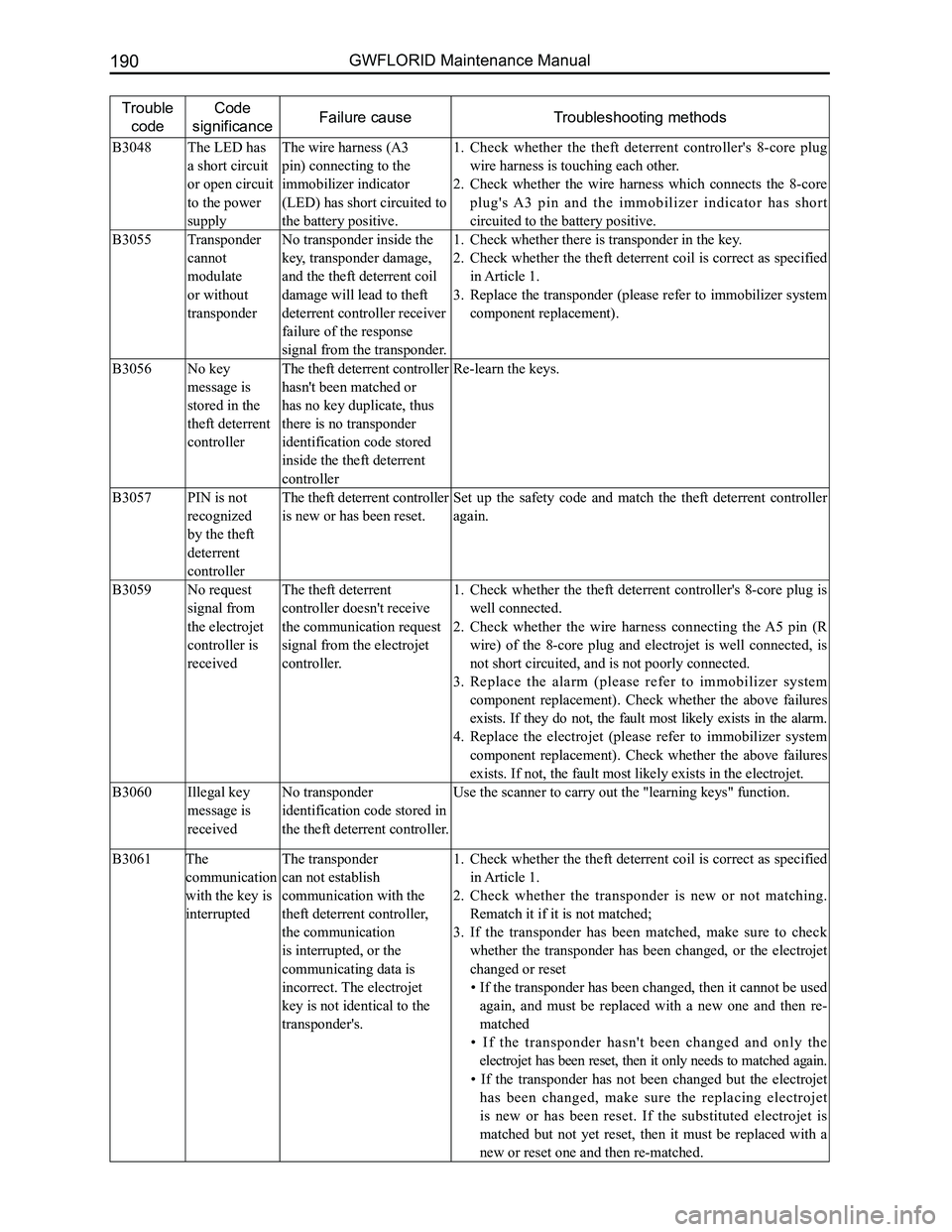
Trouble
code
Code
significanceFailure causeTroubleshooting methods
B1000Theft deterrent
controller
internal
malfunction
Theft deterrent coil open
circuit or short circuit. Theft
deterrent controller internal
malfunction.
Check whether the theft deterrent coil's connecting plug and 1.
the theft deterrent controller is well connected.
Check whether the theft deterrent coil's wire harness plug is sliding 2.
or touching each other.
R e m o v e t h e t h e f t d e t e r r e n t c o i l p l u g , a n d t h e n u s e a 3.
multimeter to check the resistance between the B1 and B2
pins. The normal resistance is about 5-30 Ω. If the resistance
is close to zero, that means the coil has been short circuited.
If the resistance is infinite, then it means the coil's circuit is
open. Measure the resistance between pins B1 and B3, and
B2 and B3, normally they are infinite. If the resistance gains
a certain value, then it means the coil is short circuited or
leaking electricity.
If there is nothing wrong with the coil, the next step is to 4.
check the theft deterrent controller. Adopt the substitution
approach, replace it with a non-matched new theft deterrent
controller or an theft deterrent controller which has been
reset (please refer to the immobilizer system component
replacement). Insert the key into the ignition lock and turn it
to the "ON" position and read the trouble code. If there is no
9000 failure, it means the replaced controller has an internal
malfunction, and the new replaced controller must be re-
matched.
Page 197 of 281
Downloaded from www.Manualslib.com manuals search engine GWFLORID Maintenance Manual190
Trouble
code
Code
significanceFailure causeTroubleshooting methods
B3048The LED has
a short circuit
or open circuit
to the power
supply
The wire harness (A3
pin) connecting to the
immobilizer indicator
(LED) has short circuited to
the battery positive.
Check whether the theft deterrent controller's 8-core plug 1.
wire harness is touching each other.
Check whether the wire harness which connects the 8-core 2.
plug's A3 pin and the immobilizer indicator has short
circuited to the battery positive.
B3055Transponder
cannot
modulate
or without
transponder
No transponder inside the
key, transponder damage,
and the theft deterrent coil
damage will lead to theft
deterrent controller receiver
failure of the response
signal from the transponder.
Check whether there is transponder in the key.1.
Check whether the theft deterrent coil is correct as specified 2.
in Article 1.
Replace the transponder (please refer to immobilizer system 3.
component replacement).
B3056No key
message is
stored in the
theft deterrent
controller
The theft deterrent controller
hasn't been matched or
has no key duplicate, thus
there is no transponder
identification code stored
inside the theft deterrent
controller
Re-learn the keys.
B3057PIN is not
recognized
by the theft
deterrent
controller
The theft deterrent controller
is new or has been reset.
Set up the safety code and match the theft deterrent controller
again.
B3059No request
signal from
the electrojet
controller is
received
The theft deterrent
controller doesn't receive
the communication request
signal from the electrojet
controller.
Check whether the theft deterrent controller's 8-core plug is 1.
well connected.
Check whether the wire harness connecting the A5 pin (R 2.
wire) of the 8-core plug and electrojet is well connected, is
not short circuited, and is not poorly connected.
Replace the alarm (please refer to immobilizer system 3.
component replacement). Check whether the above failures
exists. If they do not, the fault most likely exists in the alarm.
Replace the electrojet (please refer to immobilizer system 4.
component replacement). Check whether the above failures
exists. If not, the fault most likely exists in the electrojet.
B3060Illegal key
message is
received
No transponder
identification code stored in
the theft deterrent controller.
Use the scanner to carry out the "learning keys" function.
B3061The
communication
with the key is
interrupted
The transponder
can not establish
communication with the
theft deterrent controller,
the communication
is interrupted, or the
communicating data is
incorrect. The electrojet
key is not identical to the
transponder's.
Check whether the theft deterrent coil is correct as specified 1.
in Article 1.
Check whether the transponder is new or not matching. 2.
Rematch it if it is not matched;
If the transponder has been matched, make sure to check 3.
whether the transponder has been changed, or the electrojet
changed or reset
• If the transponder has been changed, then it cannot be used
again, and must be replaced with a new one and then re-
matched
• If the transponder hasn't been changed and only the
electrojet has been reset, then it only needs to matched again.
• If the transponder has not been changed but the electrojet
has been changed, make sure the replacing electrojet
is new or has been reset. If the substituted electrojet is
matched but not yet reset, then it must be replaced with a
new or reset one and then re-matched.
Page 198 of 281
Downloaded from www.Manualslib.com manuals search engine 191Electrical Accessories
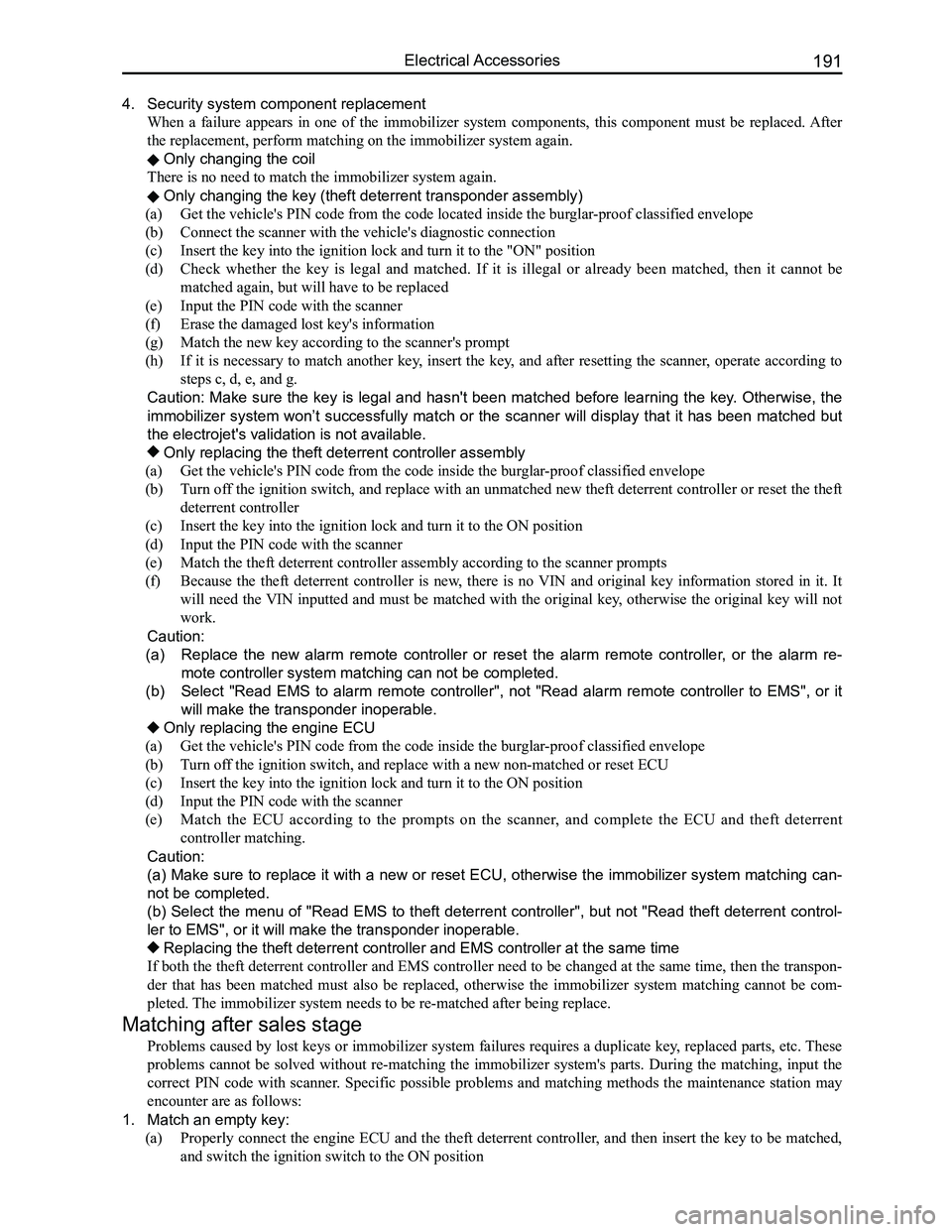
4. Security system component replacement
When a failure appears in one of the immobilizer system components, this component must be replaced. After
the replacement, perform matching on the immobilizer system again.
Only changing the coil
There is no need to match the immobilizer system again.
Only changing the key (theft deterrent transponder assembly)
(a) Get the vehicle's PIN code from the code located inside the burglar-proof classified envelope
(b) Connect the scanner with the vehicle's diagnostic connection
(c) Insert the key into the ignition lock and turn it to the "ON" position
(d) Check whether the key is legal and matched. If it is illegal or already been matched, then it cannot be
matched again, but will have to be replaced
(e) Input the PIN code with the scanner
(f) Erase the damaged lost key's information
(g) Match the new key according to the scanner's prompt
(h) If it is necessary to match another key, insert the key, and after resetting the scanner, operate according to
steps c, d, e, and g.
Caution: Make sure the key is legal and hasn't been matched before learning the key. Otherwise, the
immobilizer system won’t successfully match or the scanner will display that it has been matched but
the electrojet's validation is not available.
Only replacing the theft deterrent controller assembly
(a) Get the vehicle's PIN code from the code inside the burglar-proof classified envelope
(b) Turn off the ignition switch, and replace with an unmatched new theft deterrent controller or reset the theft
deterrent controller
(c) Insert the key into the ignition lock and turn it to the ON position
(d) Input the PIN code with the scanner
(e) Match the theft deterrent controller assembly according to the scanner prompts
(f) Because the theft deterrent controller is new, there is no VIN and original key information stored in it. It
will need the VIN inputted and must be matched with the original key, otherwise the original key will not
work.
Caution:
(a) Replace the new alarm remote controller or reset the alarm remote controller, or the alarm re-
mote controller system matching can not be completed.
(b) Select "Read EMS to alarm remote controller", not "Read alarm remote controller to EMS", or it
will make the transponder inoperable.
Only replacing the engine ECU
(a) Get the vehicle's PIN code from the code inside the burglar-proof classified envelope
(b) Turn off the ignition switch, and replace with a new non-matched or reset ECU
(c) Insert the key into the ignition lock and turn it to the ON position
(d) Input the PIN code with the scanner
(e) Match the ECU according to the prompts on the scanner, and complete the ECU and theft deterrent
controller matching.
Caution:
(a) Make sure to replace it with a new or reset ECU, otherwise the immobilizer system matching can-
not be completed.
(b) Select the menu of "Read EMS to theft deterrent controller", but not "Read theft deterrent control-
ler to EMS", or it will make the transponder inoperable.
Replacing the theft deterrent controller and EMS controller at the same\
time
If both the theft deterrent controller and EMS controller need to be changed at the same time, then the transpon-
der that has been matched must also be replaced, otherwise the immobilizer system matching cannot be com-
pleted. The immobilizer system needs to be re-matched after being replace.
Matching after sales stage
Problems caused by lost keys or immobilizer system failures requires a duplicate key, replaced parts, etc. These
problems cannot be solved without re-matching the immobilizer system's parts. During the matching, input the
correct PIN code with scanner. Specific possible problems and matching methods the maintenance station may
encounter are as follows:
1. Match an empty key:
(a) Properly connect the engine ECU and the theft deterrent controller, and then insert the key to be matched,
and switch the ignition switch to the ON position
Page 199 of 281
Downloaded from www.Manualslib.com manuals search engine GWFLORID Maintenance Manual192
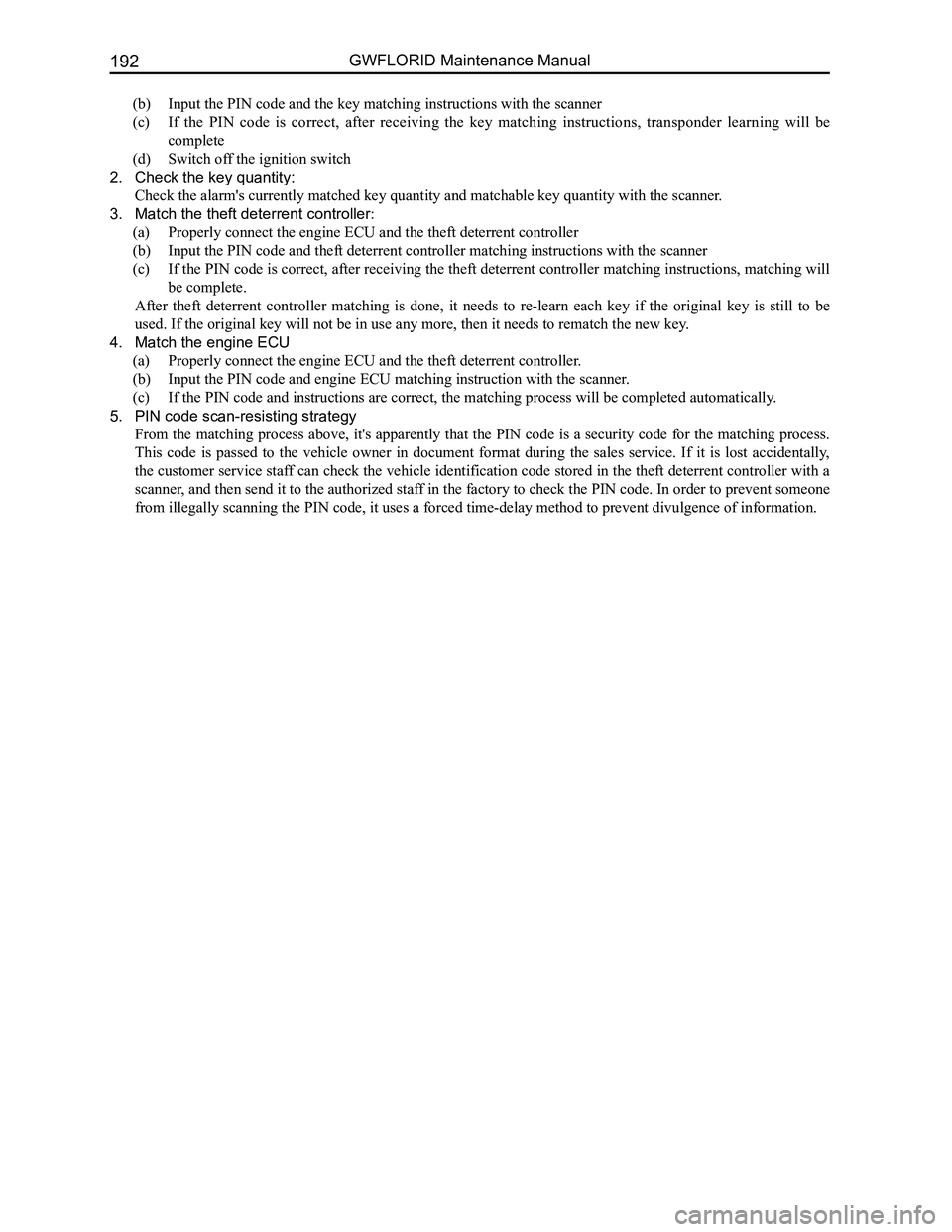
(b) Input the PIN code and the key matching instructions with the scanner
(c) If the PIN code is correct, after receiving the key matching instructions, transponder learning will be
complete
(d) Switch off the ignition switch
2. Check the key quantity:
Check the alarm's currently matched key quantity and matchable key quantity with the scanner .
3. Match the theft deterrent controller:
(a) Properly connect the engine ECU and the theft deterrent controller
(b) Input the PIN code and theft deterrent controller matching instructions with the scanner
(c) If the PIN code is correct, after receiving the theft deterrent controller matching instructions, matching will
be complete.
After theft deterrent controller matching is done, it needs to re-learn each key if the original key is still to be
used. If the original key will not be in use any more, then it needs to \
rematch the new key.
4. Match the engine ECU
(a) Properly connect the engine ECU and the theft deterrent controller.
(b) Input the PIN code and engine ECU matching instruction with the scanner.
(c) If the PIN code and instructions are correct, the matching process will be completed automatically.
5. PIN code scan-resisting strategy
From the matching process above, it's apparently that the PIN code is a security code for the matching process.
This code is passed to the vehicle owner in document format during the sales service. If it is lost accidentally,
the customer service staff can check the vehicle identification code stored in the theft deterrent controller with a
scanner, and then send it to the authorized staff in the factory to check the PIN code. In order to prevent someone
from illegally scanning the PIN code, it uses a forced time-delay method to prevent divulgence of information.
Page 202 of 281
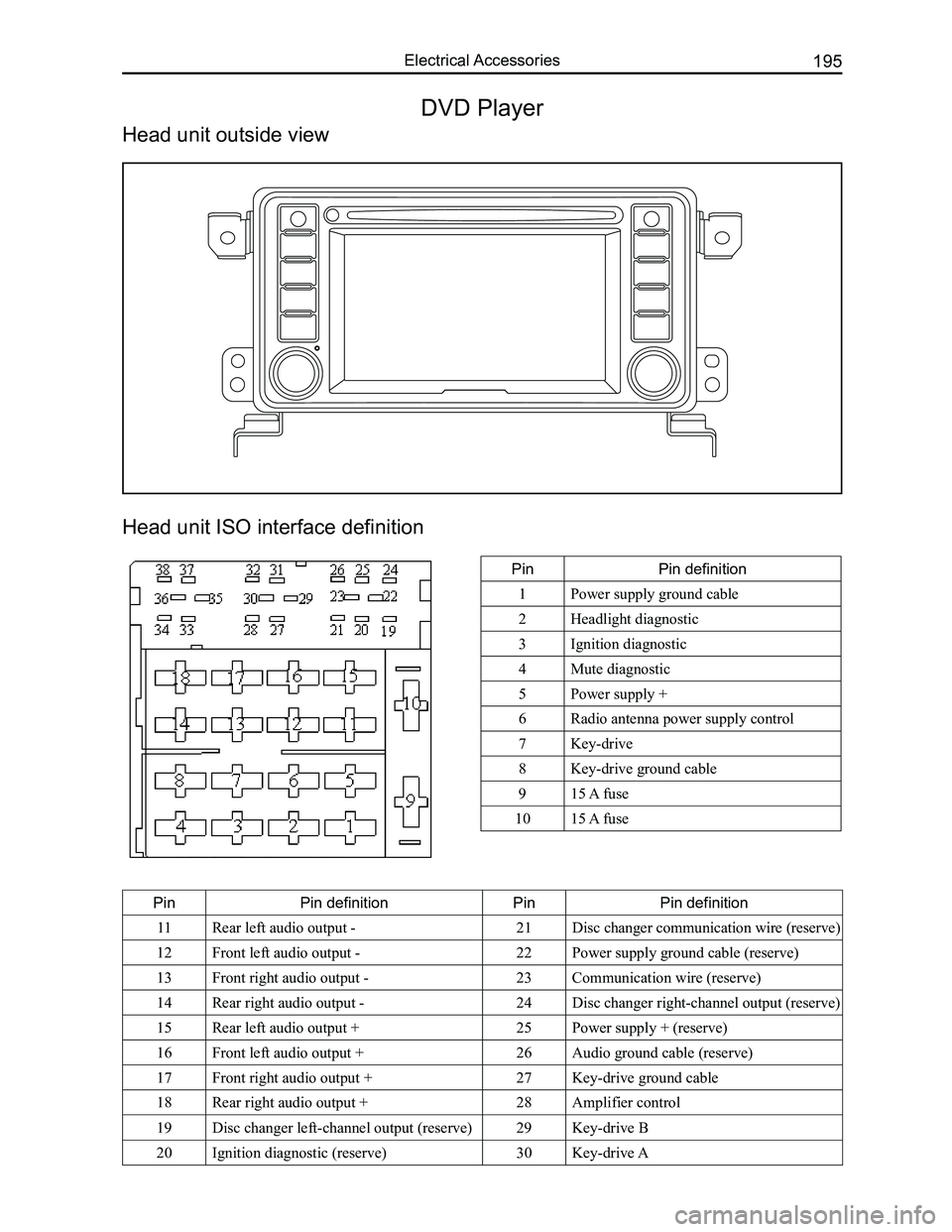
Downloaded from www.Manualslib.com manuals search engine 195Electrical Accessories
Head unit ISO interface definition
PinPin definition
1Power supply ground cable
2Headlight diagnostic
3Ignition diagnostic
4Mute diagnostic
5Power supply +
6Radio antenna power supply control
7Key-drive
8Key-drive ground cable
915 A fuse
1015 A fuse
PinPin definitionPinPin definition
11Rear left audio output -21Disc changer communication wire (reserve)
12Front left audio output -22Power supply ground cable (reserve)
13Front right audio output -23Communication wire (reserve)
14Rear right audio output -24Disc changer right-channel output (reserve)
15Rear left audio output +25Power supply + (reserve)
16Front left audio output +26Audio ground cable (reserve)
17Front right audio output +27Key-drive ground cable
18Rear right audio output +28Amplifier control
19Disc changer left-channel output (reserve)29Key-drive B
20Ignition diagnostic (reserve)30Key-drive A
DVD Player
Head unit outside view
Page 236 of 281

(a) Install the horn's w")
Downloaded from www.Manualslib.com manuals search engine 229Airbags
3. Driver side airbag module installation sequence (after steering wheel i\
nstallation is completed)
(a) Install the horn's wire harness.
(b) Install the airbag module executing equipment's (gas generator) wire harness.
(c) Place the airbag module onto the steering wheel's proper installation position (avoid heavy knocking while
placing).
(d) Tighten the airbag module mounting bolt.
(e) Connect the battery's negative (-) terminal.
(f) Inspection after installation.
Auxiliary airbag removal and installation
1. Auxiliary airbag removal
(a) Remove the glove box.
(b) Pull out the dashboard wire harness and the auxiliary airbag wire harness connectors.
(c) Remove the airbag mounting bolt.
(d) Remove the upper dashboard.
(e) Remove the auxiliary airbag's two mounting nuts.
(f) Press the buckle and remove the auxiliary airbag.
2. Installation sequence for the auxiliary airbag is reverse to the removal\
sequence.
Caution: Please do not place anything on the auxiliary airbag, as to avoid accidents while deploying
the airbag.
Operation essentials
1. Driver side airbag and steering wheel removal
Caution: The following operations should only be performed after the battery's negative (-) terminal
has been disconnected, and after the ignition switch key has been pulled\
out for 60 s.
(a) Remove the mounting screws from the two holes under the steering wheel bottom cap, and lightly pick up
the driver side airbag module.
(b) Pull out the deployed airbag module's wire harness and the horn line, and remove the airbag module\
.
Attention: Diagnose the airbag module's circuit with an electrical measuring instruments but do not
dismantle it. Face the bottom of the removed passenger side airbag upwards and store it in a clean
and dry place.
(c) Remove the steering wheel mounting bolt on the steering column.
Caution: Due to the over-tight occlusion of the spline and column, the steering wheel and steering
column may be hard to separate, in which case make sure not to use force to remove the steering
wheel. The correct method is to tighten the screw into the column just a bit, and then pull up the
steering wheel (because the steering wheel bottom is connected to the clock spring, if force is used to
remove it, it may damage it).
2. Clock spring removal
(a) After steering wheel removal is completed, remove the combination switch hood.
(b) Pull out the dashboard wire harness connectors under the clock spring.
(c) Take off the clock spring.
Caution: Store the removed clock spring in a clean and dry place.
3. Installation notes
(a) Inspection before installation, inspection of driver side airbag module.
(b) Inspect the new airbag or clock spring before installing them.
4. Driver side airbag module inspection
Inspect each of the following items. If any faults are found, replace with a new corresponding airbag module
part. Discard the old components after they have been deployed in the pr\
oper order.
(a) Whether the cover sunken or depressed, cracked, or deformed.
(b) Whether the wire harness has broken connectors and deformed terminals.
(c) Whether the gas generator's housing is sunken or depressed, cracked, or deformed.
(d) Airbag module installation status.
Caution: The specified measuring instrument cannot measure the airbag module (tube rupture) circuit
resistance. Test the resistance with a testing instrument. There is an electric current in the tube rup-
ture which may lead to accidental deployment due to static electricity a\
nd cause serious accidents.
5. Clock spring inspection
Inspect each of the following items. If any fault is found, replace with\
a new clock spring.