service HONDA ACCORD 2012 8.G User Guide
[x] Cancel search | Manufacturer: HONDA, Model Year: 2012, Model line: ACCORD, Model: HONDA ACCORD 2012 8.GPages: 449, PDF Size: 9.32 MB
Page 158 of 449
Theremaybeothergeographic
situations that could af f ect XM Radio
reception.After you’ve registered with XM
Radio, keep your audio system in the
XM Radio mode while you wait f or
activation. This should take about 30
minutes.
If your XM Radio service has expired
or you purchased your vehicle f rom
a previous owner, you can listen to a
sampling of the broadcasts
available
on XM Radio. With the ignition
switch in the ACCESSORY (I) or the
ON (II) position, press the button. A variety of music
types and styles will play.
If you decide to purchase XM radio
service, contact XM Radio at ,orat
1-800-852-9696. In Canada, contact
XM CANADA
at , or
at 1-877-209-0079. You will need to
give them your radio I.D. number
and your credit card number. To get
your radio I.D. number, press the button, then turn the
selector knob until ‘‘CH 000’’ appears
in the display. Your I.D. will appear
in the display. While waiting f or activation, make
sure your vehicle remains in an open
area with good reception. Once your
audio system is activated,
‘‘CATEGORY’’ or ‘‘CHANNEL’’ will
appear in the display, and you’ll be
able to listen to XM Radio broadcasts.
XM Radio will continue to send an
activation signal to your vehicle f or
at least 12 hours from the activation
request. If the service has not been
activated after 36 hours, contactXM
Radio. In Canada, contact XM
CANADA
.
As required by the FCC:
Changes or modif ications not expressly
approved by the party responsible f or
compliance could void the user’s authority to operate the equipment.
www.siriusxm.comwww.xmradio.ca
This Category II radiocommunication
device complies with Industry CanadaStandard RSS-310.Operation is subject to the f ollowing two
conditions: (1) this device may not causeinterf erence, and (2) this device mustaccept any interf erence, including
interf erence that may cause undesiredoperation of the device.
Receiving XM Radio Service
Playing t he XMRadio (Models with premium audio system)
Features
153
Main MenuTable of Contents
Page 196 of 449
CONT INUED
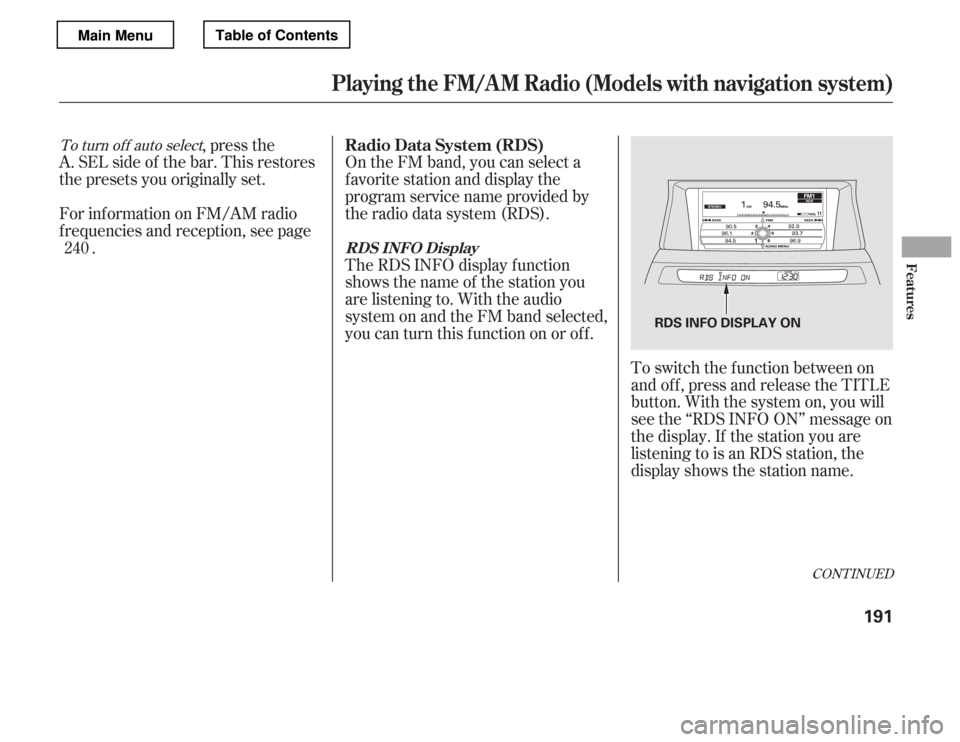
On the FM band, you can select a
favorite station and display the
program service name provided by
the radio data system (RDS).
,pressthe
A. SEL side of the bar. This restores
the presets you originally set.
For inf ormation on FM/AM radio
f requencies and reception, see page .
To switch the function between on
and off, press and release the TITLE
button. With the system on, you will
see the ‘‘RDS INFO ON’’ message on
the display. If the station you are
listening to is an RDS station, the
display shows the station name.
The RDS INFO display f unction
shows the name of the station you
are listening to. With the audio
system on and the FM band selected,
you can turn this f unction on or of f .
240
To turn of f auto select
Playing the FM/A M Radio (Models with navigation system)
Radio Data System (RDS)
RDS INFO DisplayFeatures
191
RDS INFO DISPLAY ON
Main MenuTable of Contents
Page 210 of 449
After you’ve registered with XM
Radio, keep your audio system in the
XM Radio mode while you wait f or
activation. This should take about 30
minutes.
If your XM Radio service has expired
or you purchased your vehicle f rom
a previous owner, you can listen to a
sampling of the broadcasts
available
on XM Radio. With the ignition
switch in the ACCESSORY (I) or the
ON (II) position, press the button. A variety of music
types and styles will play.
If you decide to purchase XM radio
service, contact XM Radio at ,orat
1-800-852-9696. In Canada, contact
XM CANADA
at , or
at 1-877-209-0079. You will need to
give them your radio I.D. number
and your credit card number. To get
your radio I.D. number, press the side of the TUNE bar until ‘‘0’’
appears in the display. Your I.D. will
appear in the display. While waiting f or activation, make
sure your vehicle remains in an open
area with good reception. Once your
audio system is activated, CAT
(category) or CH (channel) will
appear in the center display, and
you’ll be able to listen to XM Radio
broadcasts. XM Radio will continue
to send an activation signal to your
vehicle for at least 12 hours from the
activation request. If the service has
not been activated after 36 hours,
contact XM
Radio. In Canada,
contact XM CANADA
.
Theremaybeothergeographic
situations that could af f ect XM Radio
reception.
www.siriusxm.com
www.xmradio.ca
As required by the FCC:
Changes or modif ications not expressly
approved by the party responsible f or
compliance could void the user’sauthority to operate the equipment.
This Category II radiocommunicationdevice complies with Industry Canada
Standard RSS-310.Operation is subject to the f ollowing two
conditions: (1) this device may not cause
interf erence, and (2) this device must accept any interf erence, including
interf erence that may cause undesired
operation of the device.
Playing t he XMRadio (Models with navigation system)
Receiving XM Radio Service
Features
205
Main MenuTable of Contents
Page 292 of 449
Bef ore you begin driving your
vehicle, you should know what
gasoline to use and how to check the
levels of important f luids. You also
need to know how to properly store
luggage or packages. The
inf ormation in this section will help
you. If you plan to add any
accessories to your vehicle, please
read the information in this section
first..............................
Break-in Period . 288
.................
Fuel Recommendation . 288
.........
Service Station Procedures . 290
....................................
Ref ueling . 290
........
Check Fuel Cap Message . 291
Opening and Closing
................................
the Hood . 293
...................................
Oil Check . 295
.............
Engine Coolant Check . 296
...............................
Fuel Economy . 297
...
Accessories and Modif ications . 300
.............................
Carrying Cargo . 302
Bef ore Driving
Bef ore Driving
287
Main Menu
Page 294 of 449
Because the level of detergency and
additives in gasoline vary in the
market, Honda endorses the use of
‘‘TOP TIER Detergent Gasoline’’
where available to help maintain the
perf ormance and reliability of your
vehicle. TOP TIER Detergent
Gasoline meets a new gasoline
standard jointly established by
leading automotive manuf acturers to
meet the needs of today’s advanced
engines. Qualif ying gasoline retailers
will, in most cases, identif y their
gasoline as having met ‘‘TOP TIER
Detergent Gasoline’’ standards at the
retail location. This f uel is
guaranteed to contain the proper
level of detergent additives and be
f ree of metallic additives. The proper
level of detergent additives, and
absence of harmf ul metallic additives
in gasoline, help avoid build-up of
deposits in your engine and emission
control system.For f urther important f uel-related
inf ormation f or your vehicle, or
inf ormation on gasoline that does not
contain MMT, visit Owner Link at
. In Canada, visit
f or additional
inf ormation on gasoline. For more
inf ormation on top tier gasoline, visit
owners.honda.com
www.honda.ca
www.toptiergas.com.
Fuel Recommendation
Bef ore Driving
289
We recommend quality gasoline
containing detergent additives that help
prevent f uel system and engine deposits.
In addition, in order to maintain good
perf ormance, f uel economy, and
emissions control, we strongly
recommend the use of gasoline that
does NOT contain harmf ul manganese-
based f uel additives such as MMT , if
such gasoline is available.
Use of gasoline with these additives
may adversely af f ect perf ormance, and
cause the malf unction indicator lamp
on your instrument panel to come on. If
this happens, contact your dealer f or
service. Some gasoline today is blended
with oxygenates such as ethanol. Your
vehicle is designed to operate on
oxygenated gasoline containing up to
10% ethanol by volume. Do not use
gasoline containing methanol. If you
notice any undesirable operating
symptoms, try another service station
or switch to another brand of gasoline.
Main MenuTable of Contents
Page 295 of 449
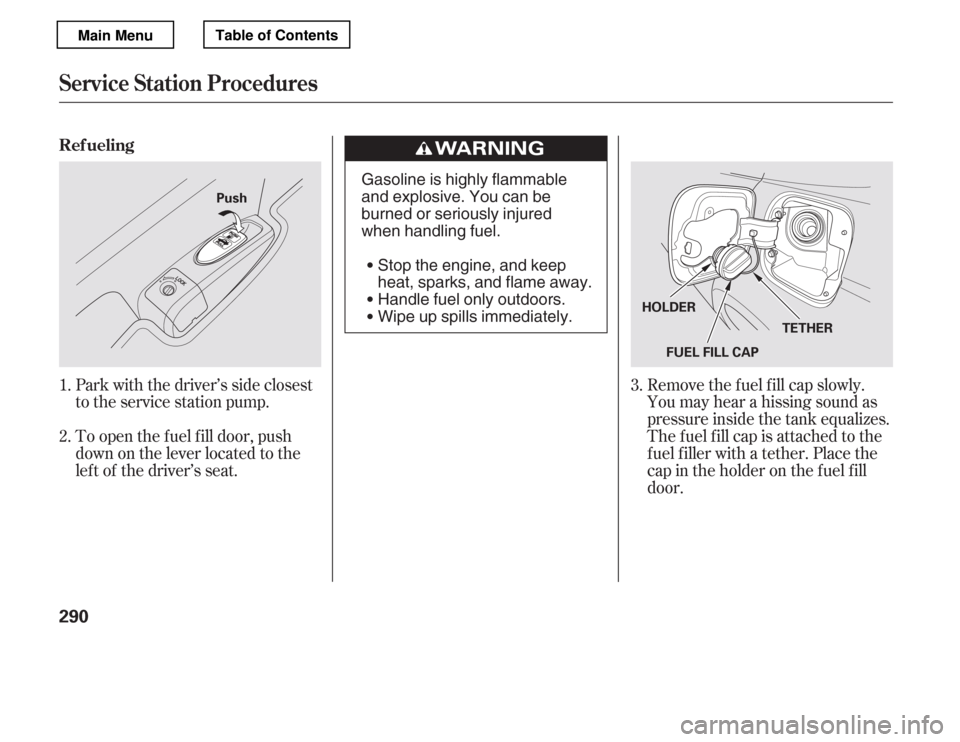
Park with the driver’s side closest
to the service station pump.
To open the f uel f ill door, push
down on the lever located to the
lef t of the driver’s seat.Remove the f uel f ill cap slowly.
You may hear a hissing sound as
pressure inside the tank equalizes.
The fuel fill cap is attached to the
f uel f iller with a tether. Place the
cap in the holder on the f uel f ill
door.
1. 2.
3.
Ref ueling
Service Station Procedures
290
Push
FUEL FILL CAPTETHER
HOLDER
Gasoline is highly flammable
and explosive. You can be
burned or seriously injured
when handling fuel.
Stop the engine, and keep
heat, sparks, and flame away.
Handle fuel only outdoors.
Wipe up spills immediately.
Main MenuTable of Contents
Page 296 of 449
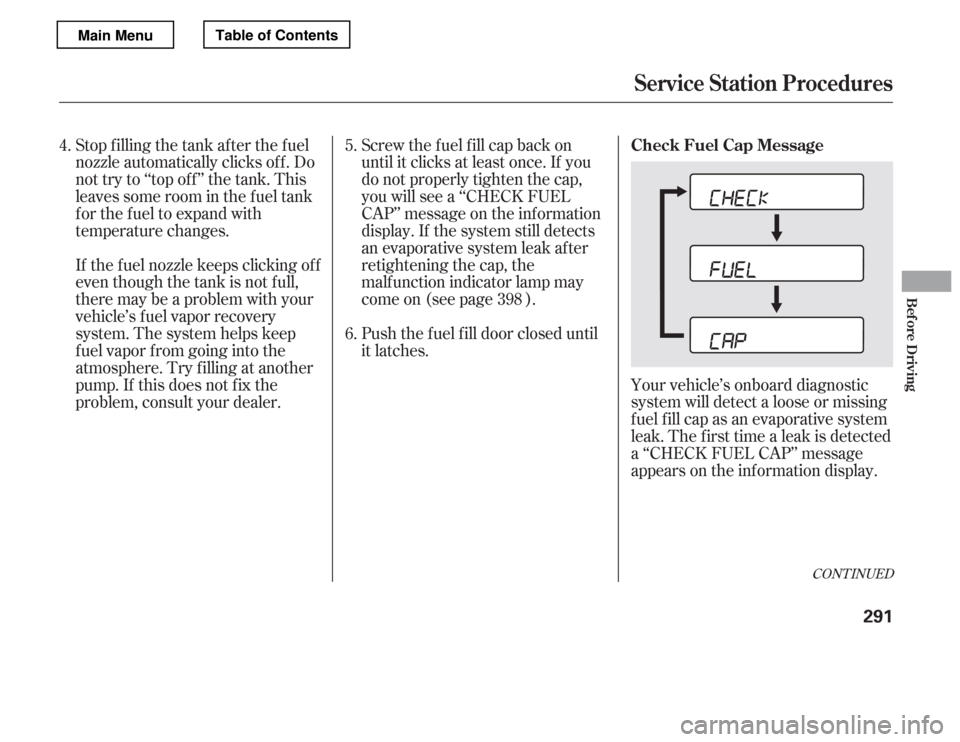
Your vehicle’s onboard diagnostic
system will detect a loose or missing
f uel f ill cap as an evaporative system
leak. The f irst time a leak is detected
a ‘‘CHECK FUEL CAP’’ message
appears on the inf ormation display.
Screw the f uel f ill cap back on
until it clicks at least once. If you
do not properly tighten the cap,
you will see a ‘‘CHECK FUEL
CAP’’ message on the inf ormation
display. If the system still detects
an evaporative system leak after
retightening the cap, the
malf unction indicator lamp may
come on (see page ).
Push the f uel f ill door closed until
it latches.
Stop f illing the tank af ter the f uel
nozzle automatically clicks of f . Do
not try to ‘‘top off’’ the tank. This
leaves some room in the f uel tank
for the fuel to expand with
temperature changes.
If thefuelnozzlekeepsclickingoff
even though the tank is not f ull,
there may be a problem with your
vehicle’s fuel vapor recovery
system. The system helps keep
f uel vapor f rom going into the
atmosphere. Try f illing at another
pump. If this does not f ix the
problem, consult your dealer.
4.
5.
6. 398
CONT INUED
Check Fuel Cap Message
Service Station Procedures
Bef ore Driving
291
Main MenuTable of Contents
Page 297 of 449
Turn the engine of f , and conf irm the
f uel f ill cap is installed. If it is, loosen
it, then retighten it until it clicks at
least once. The message should go
off after several days of normal
driving once you tighten or replace
the f uel f ill cap. To scroll to another
display, press the select/reset knob.
The ‘‘CHECK FUEL CAP’’ message
will appear each time you restart the
engine until the system turns the
message of f .If the system still detects a leak in
your vehicle’s evaporative emissions
system, the malf unction indicator
lamp (MIL) comes on. If the f uel f ill
cap was not already tightened, turn
the engine of f , and check or
retighten the f uel f ill cap until it
clicks at least once. The MIL should
go of f af ter several days of normal
driving once the cap is tightened or
replaced. If the MIL does not go of f ,
have your vehicle inspected by a
dealer. For more inf ormation, see
page .
398
Service Station Procedures
292
Main MenuTable of Contents
Page 298 of 449
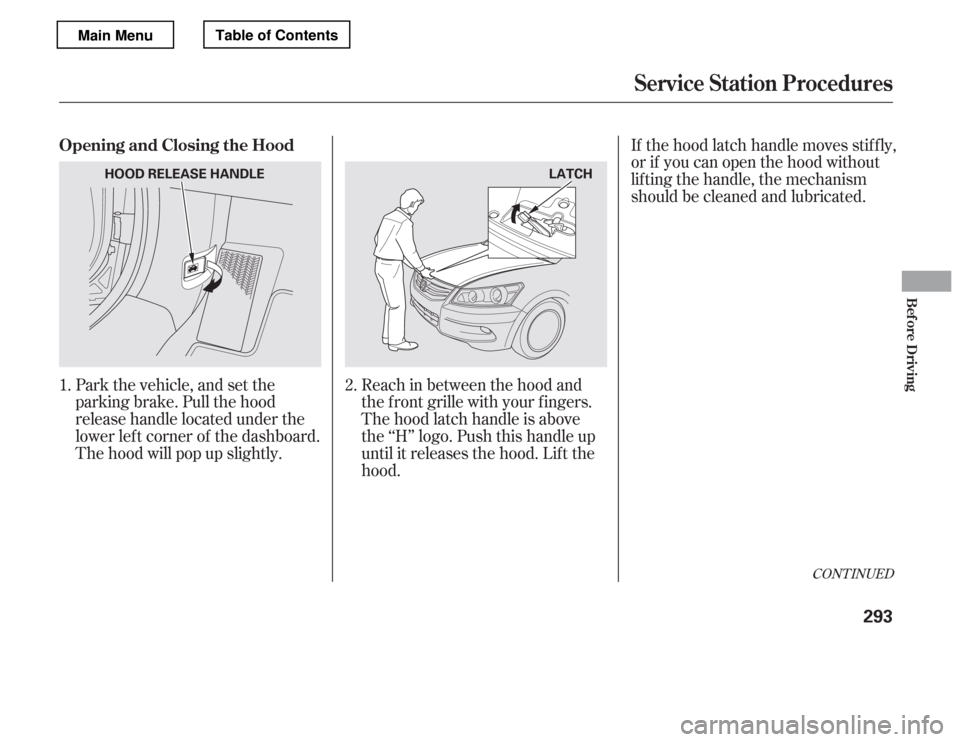
Park the vehicle, and set the
parking brake. Pull the hood
release handle located under the
lower lef t corner of the dashboard.
The hood will pop up slightly.Reach in between the hood and
the f ront grille with your f ingers.
The hood latch handle is above
the ‘‘H’’ logo. Push this handle up
until it releases the hood. Lif t thehood.If the hood latch handle moves stif f ly,
or if you can open the hood without
lifting the handle, the mechanism
should be cleaned and lubricated.
1. 2.
CONT INUED
Opening and Closing the Hood
Service Station Procedures
Bef ore Driving
293
LATCH
HOOD RELEASE HANDLE
Main MenuTable of Contents
Page 299 of 449
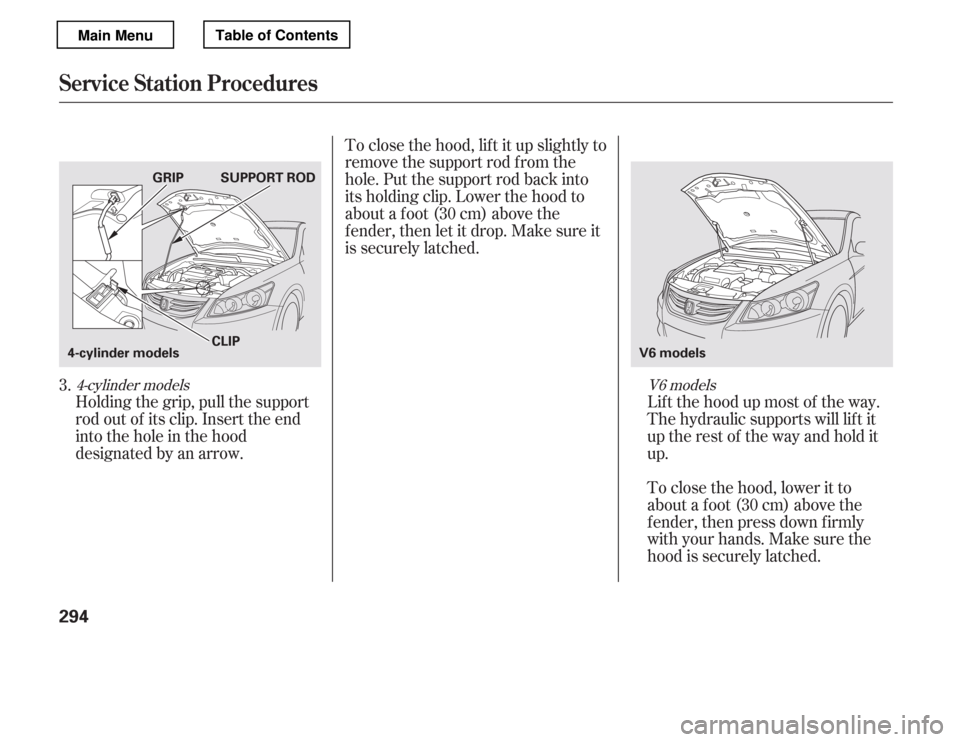
Holding the grip, pull the support
rod out of its clip. Insert the end
into the hole in the hood
designated by an arrow.Lif t the hood up most of the way.
The hydraulic supports will lif t it
uptherestof thewayandholdit up.
To close the hood, lif t it up slightly to
remove the support rod f rom the
hole. Put the support rod back into
its holding clip. Lower the hood to
about a f oot (30 cm) above the
f ender, then let it drop. Make sure it
is securely latched.
To close the hood, lower it to
about a f oot (30 cm) above the
f ender, then press down f irmly
with your hands. Make sure the
hood is securely latched.
3.
V6 models
4-cylinder models
Service Station Procedures
294
V6 models
SUPPORT ROD
CLIP
4-cylinder models GRIP
Main MenuTable of Contents