roof HONDA ACCORD 2014 9.G User Guide
[x] Cancel search | Manufacturer: HONDA, Model Year: 2014, Model line: ACCORD, Model: HONDA ACCORD 2014 9.GPages: 595
Page 246 of 595
245
uuAudio System Basic Operation uVoice Control Operation
Continued
Features
Voice Control OperationYour vehicle has a voice control system that allows hands-free operation of most of
the navigation system functions.
The voice control system uses the (Talk) and (hang-up/back) buttons on the
steering wheel and a microphone near the map lights on the ceiling.
To achieve optimum voice recognition when using the navigation voice control
system:
• Make sure the correct screen is displayed for the voice command that you are
using.
• Close the windows and moonroof.
• Adjust the dashboard and side vents so air does not blow onto the microphone
on the ceiling.
• Speak clearly in a clear, natural speaking voice without pausing between words.
• Reduce any background noise if possible. The system may misinterpret your
command if more than one person is speaking at the same time.
• Refer to the Voice Help feature.
2 Refer to the Navigation System Manual
■
Voice Recognition
1Voice Control Operation
When you press the button, a helpful prompt asks
what you would like to do. Press and release the
button again to bypass this prompt and give a
command.1Voice Recognition
The voice control system can only be used from the
driver’s seat because the microphone unit removes
noises from the front passenger’s side.
Page 296 of 595
295
Features
General Information on the Audio SystemXM® Radio Service
*
1. You need your radio ID ready before registering for subscription. To see the ID in
the display: Turn the selector knob or the interface dial until 0 appears.
2. Have your radio ID and credit card number ready, and either call or visit the XM ®
website to subscribe.
Switch to the XM ® mode by using the SOURCE button, or through the audio with
touch screen, and stay in this mode for about 30 minutes until the service is
activated. Make sure your vehicle is in an open area with good reception.
Loading:
XM ® is loading the audio or program information.
Ch off air:
The channel is not currently broadcasting.
Ch unauthorized:
XM ® radio is receiving information update from the network.
No signal:
The signal is too weak in the current location.
Ch unavailable:
No such channel exists, the channel is not part of your subscription, or the artist or
title information is unavailable.
Check antenna:
There is a problem with the XM® antenna. Contact a dealer.■
Subscribing to XM ® Radio
■
Receiving XM ® Radio
■
XM ® Radio Display Messages
1 Subscribing to XM ® Radio
Contact Information for XM ® Radio:
US: XM ® Radio at www.siriusxm.com or (800) 852-
9696
Canada: XM ® Canada at www.xmradio.ca , or (877)
209-00791 Receiving XM ® Radio
The XM ® satellites are in orbit over the equator;
therefore, objects south of the vehicle may cause
satellite reception interruptions. Satellite signals are
more likely to be blocked by tall buildings and
mountains the farther north you travel from the
equator.
You may experience reception problems under the
following circumstances:•In a location with an obstruction to the south of
your vehicle.•In tunnels•On the lower level of a multi-tiered road•Large items carried on the roof rack
* Not available on all models
Page 415 of 595
414Features
Compass
*
When you set the power mode to ON, the compass self-calibrates, and the compass
display appears.Compass CalibrationIf the compass indicates the wrong direction, or the CAL indicator blinks, you need
to manually calibrate the system.
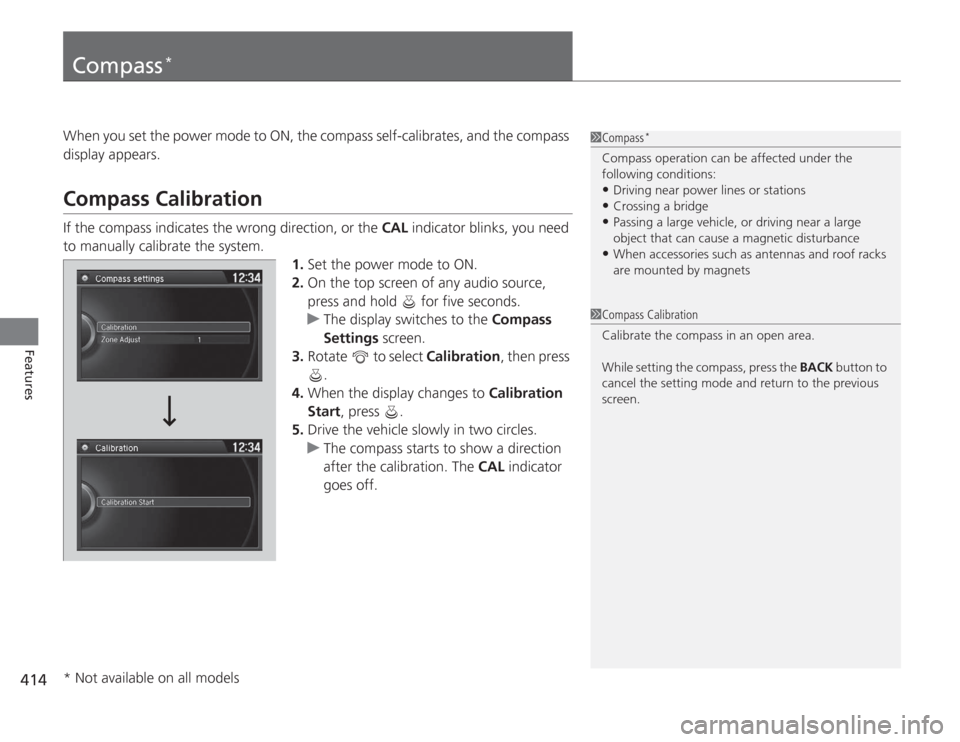
1.Set the power mode to ON.
2. On the top screen of any audio source,
press and hold for five seconds.
u The display switches to the Compass
Settings screen.
3. Rotate to select Calibration, then press
.
4. When the display changes to Calibration
Start, press .
5. Drive the vehicle slowly in two circles.
u The compass starts to show a direction
after the calibration. The CAL indicator
goes off.
1 Compass
*
Compass operation can be affected under the
following conditions:•Driving near power lines or stations•Crossing a bridge•Passing a large vehicle, or driving near a large
object that can cause a magnetic disturbance•When accessories such as antennas and roof racks
are mounted by magnets
1Compass Calibration
Calibrate the compass in an open area.
While setting the compass, press the BACK button to
cancel the setting mode and return to the previous
screen.
* Not available on all models
Page 419 of 595
418Driving
Before DrivingDriving PreparationCheck the following items before you start driving.
•Make sure there are no obstructions on the windows, door mirrors, exterior
lights, or other parts of the vehicle.
u Remove any frost, snow, or ice.
u Remove any snow on the roof, as this can slip down and obstruct your field of
vision while driving. If frozen solid, remove ice once it has softened.
u When removing ice from around the wheels, be sure not to damage the wheel
or wheel components.
• Make sure the hood is securely closed.
u If the hood opens while driving, your front view will be blocked.
• Make sure the tires are in good condition.
u Check air pressure, check for damage and excessive wear.
2 Checking and Maintaining Tires P. 525
•Make sure there are no people or objects behind or around the vehicle.
u There are blind spots from the inside.■
Exterior Checks
1Exterior Checks
NOTICEWhen doors are frozen shut, use warm water around
the door edges to melt any ice. Do not try to force
them open, as this can damage the rubber trim
around the doors. When done, wipe dry to avoid
further freezing.
Do not pour warm water into the key cylinder.
You will be unable to insert key if the water freezes in
the hole.
Heat from the engine and exhaust can ignite
flammable materials left under the hood, causing a
fire. If you've parked your vehicle for an extended
period, inspect and remove any debris that may have
collected, such as dried grass and leaves that have
fallen or have been carried in for use as a nest by a
small animal.
Also check under the hood for leftover flammable
materials after you or someone else has performed
maintenance on your vehicle.
Page 566 of 595
565
uuFuses uFuse Locations
Handling the Unexpected
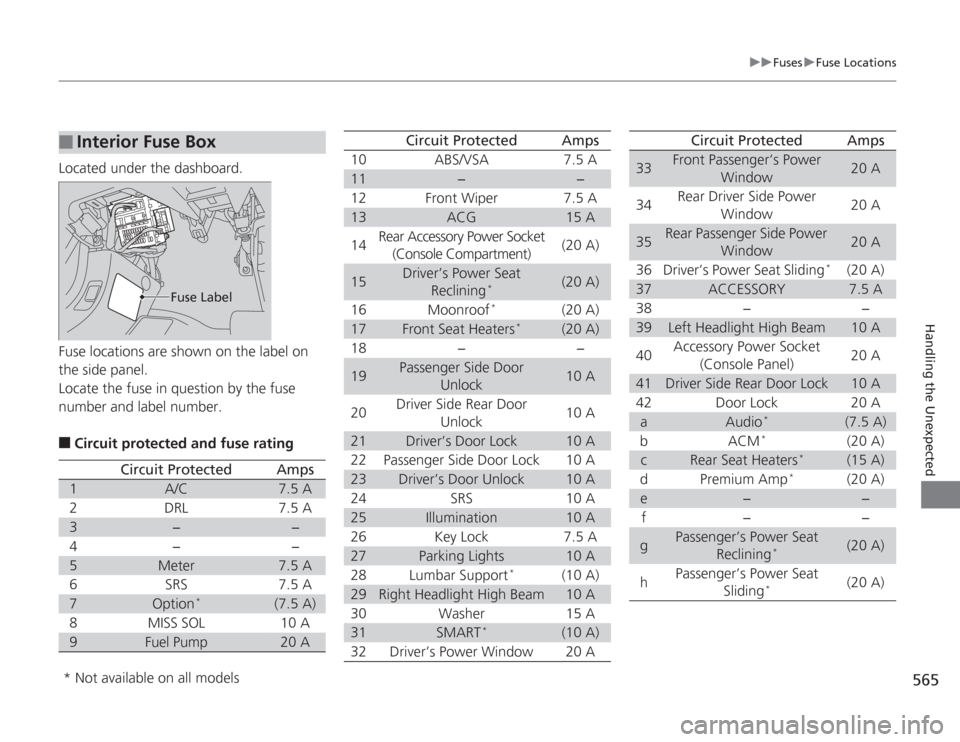
Located under the dashboard.
Fuse locations are shown on the label on
the side panel.
Locate the fuse in question by the fuse
number and label number.■
Circuit protected and fuse rating
■
Interior Fuse Box
Fuse Label
Circuit Protected
Amps
1
A/C
7.5 A
2
DRL
7.5 A
3
−
−
4
−
−
5
Meter
7.5 A
6
SRS
7.5 A
7
Option
*
(7.5 A)
8
MISS SOL
10 A
9
Fuel Pump
20 A
10
ABS/VSA
7.5 A
11
−
−
12
Front Wiper
7.5 A
13
ACG
15 A
14
Rear Accessory Power Socket
(Console Compartment)
(20 A)
15
Driver’s Power Seat Reclining
*
(20 A)
16
Moonroof
*
(20 A)
17
Front Seat Heaters
*
(20 A)
18
−
−
19
Passenger Side Door Unlock
10 A
20
Driver Side Rear Door
Unlock
10 A
21
Driver’s Door Lock
10 A
22
Passenger Side Door Lock
10 A
23
Driver’s Door Unlock
10 A
24
SRS
10 A
25
Illumination
10 A
26
Key Lock
7.5 A
27
Parking Lights
10 A
28
Lumbar Support
*
(10 A)
29
Right Headlight High Beam
10 A
30
Washer
15 A
31
SMART
*
(10 A)
32
Driver’s Power Window
20 A
Circuit Protected
Amps
33
Front Passenger’s Power Window
20 A
34
Rear Driver Side Power Window
20 A
35
Rear Passenger Side Power Window
20 A
36
Driver’s Power Seat Sliding
*
(20 A)
37
ACCESSORY
7.5 A
38
−
−
39
Left Headlight High Beam
10 A
40
Accessory Power Socket
(Console Panel)
20 A
41
Driver Side Rear Door Lock
10 A
42
Door Lock
20 A
a
Audio
*
(7.5 A)
b
ACM
*
(20 A)
c
Rear Seat Heaters
*
(15 A)
d
Premium Amp
*
(20 A)
e
−
−
f
−
−
g
Passenger’s Power Seat Reclining
*
(20 A)
h
Passenger’s Power Seat Sliding
*
(20 A)
Circuit Protected
Amps
* Not available on all models
Page 588 of 595
587
Index
Shifting ........................................... 435, 437
Auxiliary Input Jack ................................. 176
Average Fuel Economy ........................ 91, 95
Average Speed ........................................... 96
BBattery...................................................... 534
Charging System Indicator ................ 69, 560
Jump Starting ......................................... 554
Maintenance (Checking the Battery) ....... 534
Maintenance (Replacing) ......................... 535
Belts (Seat) .................................................. 32
Beverage Holders ..................................... 160
Bluetooth® Audio..................... 201, 234, 287
Bluetooth® HandsFreeLink® ............ 339, 376
Booster Seats (For Children) ...................... 63
Brake System ............................................ 474
Anti-lock Brake System (ABS) .................. 476
Brake Assist System................................. 477
Fluid ....................................................... 511
Foot Brake .............................................. 475
Indicator ........................................... 68, 562
Parking Brake.......................................... 474
Brake System Indicator (Amber) ............... 68
Brake System Indicator (Red) .................... 68
Brightness Control (Instrument Panel) ... 141
Bulb Replacement .................................... 513
Brake/Taillights and Rear Turn Signal Lights/ Rear Side Marker Lights......................... 520
Fog Lights ............................................... 515 Front Turn Signal/Side Marker Lights ........ 518
Headlights ............................................... 513
High-Mount Brake Light .......................... 522
Parking Lights .......................................... 519
Parking/Daytime Running Lights .............. 519
Rear License Plate Lights .......................... 522
Side Turn Signal/Emergency Indicator
Lights .................................................... 518
Taillights and Back-Up Lights ................... 521
Bulb Specifications ........................... 570, 572
CCarbon Monoxide Gas ................................ 64
Cargo Hooks ............................................. 162
Carrying Cargo .................................. 419, 421
CD Player ................................... 190, 221, 260
Center Pocket ........................................... 159
Certification Label .................................... 574
Changing Bulbs ......................................... 513
Charging System Indicator ................. 69, 560
Child Safety ................................................. 52
Childproof Door Locks ............................. 118
Emergency Trunk Opener ........................ 123
Child Seat .................................................... 52
Booster Seats ............................................. 63
Child Seat for Infants ................................. 54
Child Seat for Small Children ..................... 55
Installing a Child Seat with a Lap/Shoulder Seat Belt.......................................................... 59
Larger Children .......................................... 62 Rear-facing Child Seat ............................... 54
Selecting a Child Seat ................................ 56
Using a Tether ........................................... 61
Childproof Door Locks ............................. 118
Cleaning the Exterior ............................... 540
Cleaning the Interior ................................ 538
Climate Control System ............................ 169
Changing the Mode ................................ 169
Defrosting the Windshield and Windows ............................................... 170
Dust and Pollen Filter............................... 537
Recirculation and Fresh Air Mode ............ 169
Sensors ................................................... 172
Synchronized Mode................................. 171
Using Automatic Climate Control ............ 169
Clock .......................................................... 106
Clutch Fluid ............................................... 511
Coat Hook ................................................. 162
Compact Spare Tire .................. 545, 571, 573
Compass .................................................... 414
Console Compartment ............................. 158
Controls ..................................................... 105
Coolant (Engine) ...................................... 507
Adding to the Radiator ............................ 508
Adding to the Reserve Tank..................... 507
Overheating ............................................ 558
Creeping (Automatic Transmission/CVT) ............... 434
Cruise Control ........................................... 447
Indicator.................................................... 80
Cup Holders .............................................. 160
Page 591 of 595
590Index
Ignition Switch.......................................... 131
Illumination Control
Knob ....................................................... 141
Immobilizer System .................................. 124
Indicator .................................................... 77
Indicators ..................................................... 68
ABS (Anti-lock Brake System) ..................... 72
Adaptive Cruise Control (ACC) .................. 80
Brake System (Amber)................................ 68
Brake System (Red) .................................... 68
Charging System ............................... 69, 560
CRUISE CONTROL .............................. 80, 448
CRUISE MAIN .................................... 80, 447
Door and Trunk Open ................................ 74
ECON Mode ...................................... 80, 446
Electric Power Steering (EPS) System ............................................. 74, 562
Fog Light ................................................... 77
Forward Collision Warning (FCW) .............. 78
High Beam................................................. 76
Immobilizer System .................................... 77
Lane Departure Warning (LDW) ................. 79
Light Control ............................................. 81
Lights On ................................................... 76
Low Fuel .................................................... 72
Low Oil Pressure ................................ 69, 560
Low Tire Pressure/TPMS ............. 75, 470, 472
Maintenance Minder ......................... 80, 489
Malfunction Indicator Lamp ............... 69, 561
Parking Brake and Brake System ........ 68, 562
Seat Belt Reminder .............................. 33, 71 Security System Alarm ............................... 77
Smart Entry System ................................... 81
Starter System ........................................... 81
Supplemental Restraint System ............ 49, 72
System Message ........................................ 76
Transmission ............................................. 71
Turn Signal and Hazard Warning ............... 76
VSA
® (Vehicle Stability Assist)
System ............................................ 73, 466
VSA ® OFF .......................................... 73, 467
Washer Level ............................................. 80
Information .............................................. 569
Information Display ................................... 90
Instant Fuel Economy ........................... 91, 96
Instrument Panel ........................................ 67
Brightness Control................................... 141
Interface Dial ............................................ 236
Interior Lights ........................................... 156
Interior Rearview Mirror .......................... 146
JJack (Wheel Nut Wrench) ........................ 548
Jump Starting ........................................... 554KKey Number Tag ....................................... 109
Keyless Lockout Prevention ..................... 115
Keys ........................................................... 108
Lockout Prevention.................................. 115 Master Keys ............................................ 108
Number Tag............................................ 109
Rear Door Won’t Open ........................... 118
Remote Transmitter ................................ 111
Types and Functions................................ 108
Valet Key ........................................ 109, 122
Won’t Turn ............................................... 22
Kickdown
(Automatic Transmission/CVT) .............. 434
LLane Departure Warning (LDW) ............. 462
LaneWatch
TM
............................................ 468
Language (HFL) ................................ 341, 377
LATCH (Child Seats) ................................... 57
Lights ................................................ 136, 513
Automatic............................................... 137
Bulb Replacement ................................... 513
Daytime Running Lights .......................... 139
Fog Lights ............................................... 138
High Beam Indicator ................................. 76
Interior.................................................... 156
Light Switches......................................... 136
Lights On Indicator.................................... 76
Turn Signals ............................................ 136
Load Limits ............................................... 421
Locking/Unlocking ................................... 108
Auto Door Locking/Unlocking ................. 119
Childproof Door Locks ............................ 118
From Inside ............................................. 116
Page 592 of 595
591
Index
From Outside .......................................... 111
Keys........................................................ 108
Using a Key............................................. 115
Lockout Prevention System ..................... 115
Low Battery Charge ................................. 560
Low Fuel Indicator ..................................... 72
Low Oil Pressure Indicator ................. 69, 560
Low Smart Entry Remote Signal
Strength .................................................. 110
Lower Anchors ........................................... 57
Lubricant Specifications Chart ........ 570, 572
Luggage (Maximum Load Limit) ............. 421
MMaintenance............................................ 485
Battery .................................................... 534
Brake/Clutch Fluid ................................... 511
Cleaning ................................................. 538
Climate Control System .......................... 537
Coolant .................................................. 507
Heating and Cooling System ................... 537
Maintenance Minder
TM............................ 489
Oil .......................................................... 502
Precautions ............................................. 486
Radiator .................................................. 508
Remote Transmitter ................................ 535
Replacing Light Bulbs .............................. 513
Safety ..................................................... 487
Service Items ................................... 491, 495
Tires........................................................ 525 Transmission Fluid ................................... 509
Under the Hood ...................................... 497
Malfunction Indicator Lamp .............. 69, 561
Manual Transmission ................................ 443
Map Lights ................................................ 157
Maximum Load Limit ............................... 421
Meters, Gauges ........................................... 89
Mirrors ....................................................... 146
Adjusting ................................................. 146
Door........................................................ 147
Exterior .................................................... 147
Interior Rearview ..................................... 146
Modifications (and Accessories) .............. 484
Moonroof .................................................. 130
MP3 ................... 190, 198, 221, 231, 260, 284
Multi-Information Display ......................... 93
Multi-View Rear Camera .......................... 479
NNumbers (Identification).......................... 574OOdometer.............................................. 91, 95
Oil (Engine) ............................................... 501
Adding .................................................... 504
Checking ................................................. 502
Displaying Oil Life ............................ 489, 493
Low Oil Pressure Indicator .................. 69, 560
Recommended Engine Oil ........................ 501 Viscosity .................................................. 501
Opening/Closing
Hood....................................................... 499
Moonroof ............................................... 130
Power Windows ...................................... 127
Trunk ...................................................... 120
Outside Temperature Display .............. 92, 96
Overheating .............................................. 558
PPaddle Shifters (7-Speed Manual Shift
Mode) ...................................................... 439
Pandora ®................................... 197, 229, 282
Panic Mode ............................................... 126
Parking ...................................................... 478
Parking Brake ........................................... 474
Parking Brake and Brake System
Indicator ............................................ 68, 562
Passenger Airbag Off Indicator ................. 50
Passing Indicators ..................................... 136
Power Windows ....................................... 127
Precautions While Driving ....................... 433
Rain ........................................................ 433
Pregnant Women ....................................... 37
Puncture (Tire) .......................................... 545RRadiator.................................................... 508
Radio (AM/FM) ......................... 187, 214, 253