Battery system HONDA ACCORD 2014 9.G Owner's Manual
[x] Cancel search | Manufacturer: HONDA, Model Year: 2014, Model line: ACCORD, Model: HONDA ACCORD 2014 9.GPages: 595
Page 428 of 595
427
Continued
Driving
When DrivingStarting the Engine
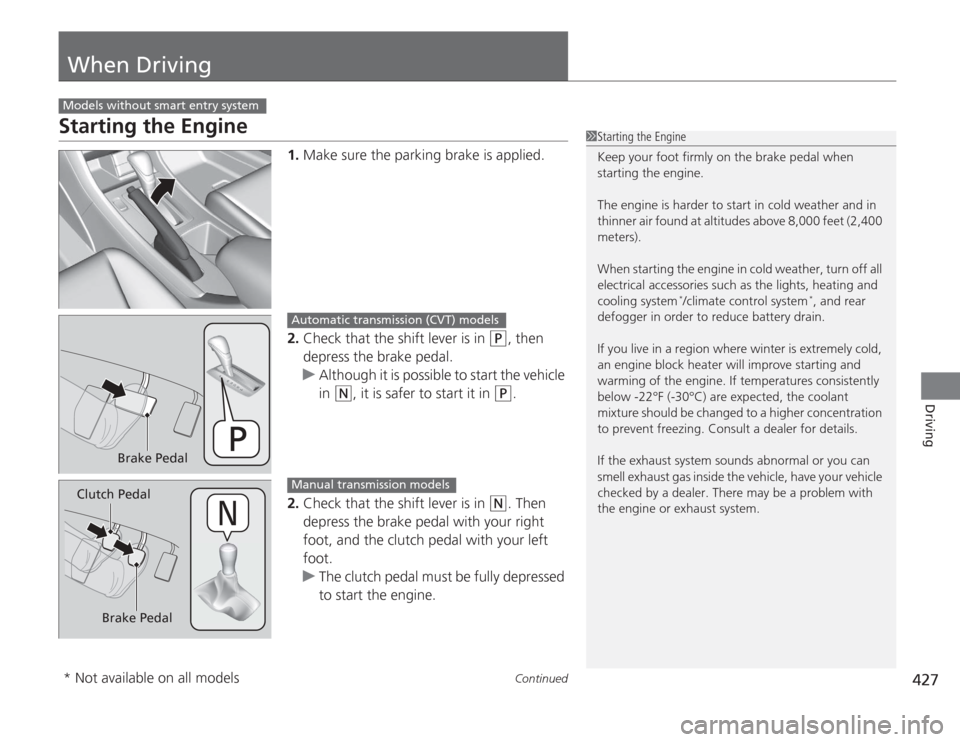
1.Make sure the parking brake is applied.
2. Check that the shift lever is in
(P
, then
depress the brake pedal.
u Although it is possible to start the vehicle
in
(N
, it is safer to start it in
(P
.
2. Check that the shift lever is in
(N
. Then
depress the brake pedal with your right
foot, and the clutch pedal with your left
foot.
u The clutch pedal must be fully depressed
to start the engine.
Models without smart entry system
1Starting the Engine
Keep your foot firmly on the brake pedal when
starting the engine.
The engine is harder to start in cold weather and in
thinner air found at altitudes above 8,000 feet (2,400
meters).
When starting the engine in cold weather, turn off all
electrical accessories such as the lights, heating and
cooling system
*/climate control system
*, and rear
defogger in order to reduce battery drain.
If you live in a region where winter is extremely cold,
an engine block heater will improve starting and
warming of the engine. If temperatures consistently
below -22°F (-30°C) are expected, the coolant
mixture should be changed to a higher concentration
to prevent freezing. Consult a dealer for details.
If the exhaust system sounds abnormal or you can
smell exhaust gas inside the vehicle, have your vehicle
checked by a dealer. There may be a problem with
the engine or exhaust system.
Brake Pedal
Automatic transmission (CVT) models
Brake Pedal
Clutch Pedal
Manual transmission models
* Not available on all models
Page 430 of 595
429
uuWhen Driving uStarting the Engine
Continued
Driving
Starting the Engine
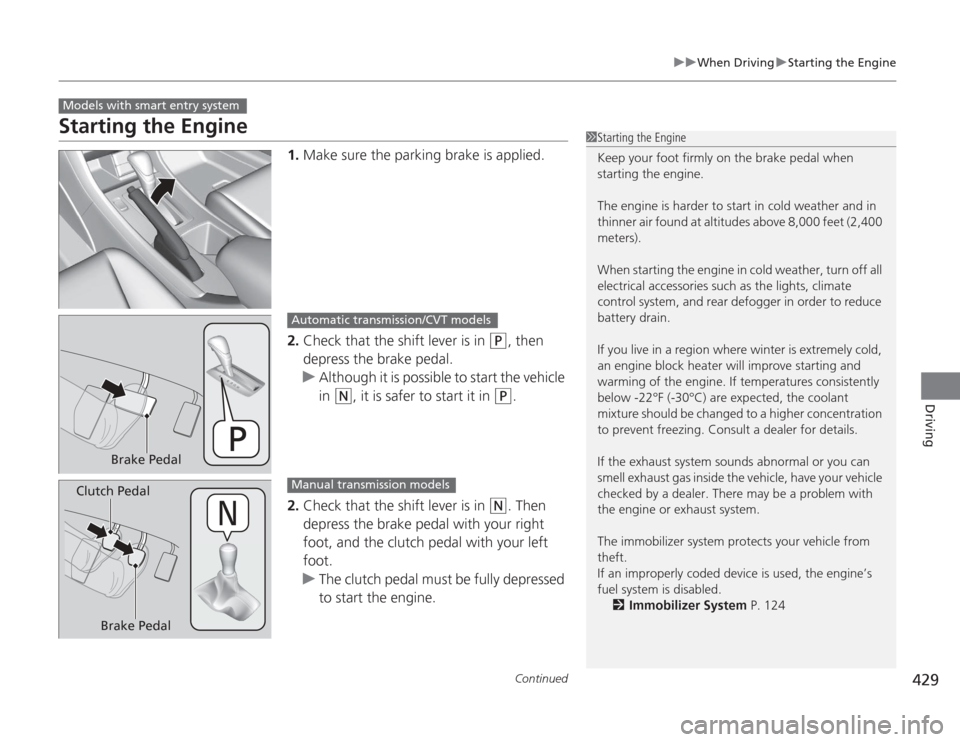
1. Make sure the parking brake is applied.
2. Check that the shift lever is in
(P
, then
depress the brake pedal.
u Although it is possible to start the vehicle
in
(N
, it is safer to start it in
(P
.
2. Check that the shift lever is in
(N
. Then
depress the brake pedal with your right
foot, and the clutch pedal with your left
foot.
u The clutch pedal must be fully depressed
to start the engine.
Models with smart entry system
1Starting the Engine
Keep your foot firmly on the brake pedal when
starting the engine.
The engine is harder to start in cold weather and in
thinner air found at altitudes above 8,000 feet (2,400
meters).
When starting the engine in cold weather, turn off all
electrical accessories such as the lights, climate
control system, and rear defogger in order to reduce
battery drain.
If you live in a region where winter is extremely cold,
an engine block heater will improve starting and
warming of the engine. If temperatures consistently
below -22°F (-30°C) are expected, the coolant
mixture should be changed to a higher concentration
to prevent freezing. Consult a dealer for details.
If the exhaust system sounds abnormal or you can
smell exhaust gas inside the vehicle, have your vehicle
checked by a dealer. There may be a problem with
the engine or exhaust system.
The immobilizer system protects your vehicle from
theft.
If an improperly coded device is used, the engine’s
fuel system is disabled.
2 Immobilizer System P. 124
Brake Pedal
Automatic transmission/CVT models
Brake Pedal
Clutch Pedal
Manual transmission models
Page 486 of 595
485
Maintenance
This chapter discusses basic maintenance.
Before Performing MaintenanceInspection and Maintenance ............ 486
Safety When Performing Maintenance..... 487Parts and Fluids Used in Maintenance Service ........................................... 488
Maintenance Minder
TM
..................... 489
Maintenance Under the Hood
Maintenance Items Under the Hood ..... 497Opening the Hood ........................... 499
Recommended Engine Oil ................ 501
Oil Check ......................................... 502
Adding Engine Oil ............................ 504Changing the Engine Oil and Oil Filter ..... 505
Engine Coolant ................................ 507
Transmission Fluid ............................ 509
Brake/Clutch Fluid ............................ 511
Refilling Window Washer Fluid......... 512
Replacing Light Bulbs ....................... 513
Checking and Maintaining Wiper
Blades .......................................... 523Checking and Maintaining Tires
Checking Tires ................................. 525
Tire and Loading Information Label ...... 526Tire Labeling .................................... 526DOT Tire Quality Grading (U.S. Vehicles)....... 528Wear Indicators................................ 530 Tire Service Life ................................ 530
Tire and Wheel Replacement ........... 531
Tire Rotation .................................... 532
Winter Tires ..................................... 533
Battery ............................................... 534
Remote Transmitter Care
Replacing the Button Battery ........... 535
Heating and Cooling System
*/Climate
Control System
* Maintenance ....... 537
Cleaning
Interior Care .................................... 538
Exterior Care.................................... 540
* Not available on all models
Page 488 of 595
487
uuBefore Performing Maintenance uSafety When Performing Maintenance
Maintenance
Safety When Performing MaintenanceSome of the most important safety precautions are given here.
However, we cannot warn you of every conc eivable hazard that can arise in
performing maintenance. Only you can decide whether or not you should perform
a given task.
• To reduce the possibility of fire or explosion, keep cigarettes, sparks, and flames
away from the battery and all fuel related parts.
• Never leave rags, towels, or other flammable objects under the hood.
u Heat from the engine and exhaust can ignite them causing a fire.
• To clean parts, use a commercially available degreaser or parts cleaner, not
gasoline.
• Wear eye protection and protective clothing when working with the battery or
compressed air.
• Engine exhaust contains carbon monoxide, which is poisonous and can kill you.
u Only operate the engine if there is sufficient ventilation.
• The vehicle must be in a stationary condition.
u Make sure your vehicle is parked on level ground, the parking brake is set, and
the engine is off.
• Be aware that hot parts can burn you.
u Make sure to let the engine and exhaust system cool thoroughly before
touching vehicle parts.
• Be aware that moving parts can injure you.
u Do not start the engine unless instructed, and keep your hands and limbs away
from moving parts.■
Maintenance Safety
■
Vehicle Safety
1Safety When Performing Maintenance
3
WARNING
Improperly maintaining this vehicle or
failing to correct a problem before driving
can cause a crash in which you can be
seriously hurt or killed.
Always follow the inspection and
maintenance recommendations according
to the schedules in this owner's manual.
3
WARNING
Failure to properly fol low maintenance
instructions and precautions can cause you
to be seriously hurt or killed.
Always follow the procedures and
precautions in this owner's manual.
Page 535 of 595
534Maintenance
BatteryChecking the Battery
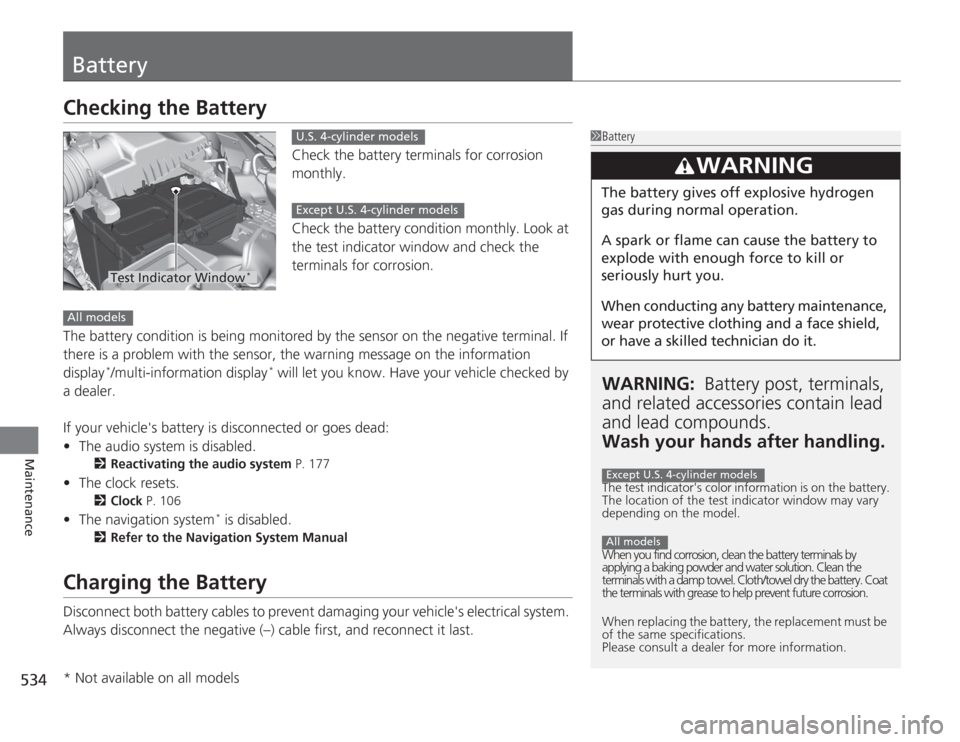
Check the battery terminals for corrosion
monthly.
Check the battery condition monthly. Look at
the test indicator window and check the
terminals for corrosion.
The battery condition is being monitored by the sensor on the negative terminal. If
there is a problem with the sensor, the warning message on the information
display
*/multi-information display
* will let you know. Have your vehicle checked by
a dealer.
If your vehicle's battery is disconnected or goes dead:
• The audio system is disabled.
2 Reactivating the audio system P. 177
•The clock resets.
2 Clock P. 106
•The navigation system
* is disabled.
2 Refer to the Navigation System Manual
Charging the BatteryDisconnect both battery cables to prevent damaging your vehicle's electrical system.
Always disconnect the negative (–) cable first, and reconnect it last.
1BatteryWARNING: Battery post, terminals,
and related accessori es contain lead
and lead compounds.
Wash your hands after handling.The test indicator's color information is on the battery.
The location of the test indicator window may vary
depending on the model.
When you find corrosion, clean the battery terminals by
applying a baking powder and water solution. Clean the
terminals with a damp towel. Cloth/towel dry the battery. Coat
the terminals with grease to help prevent future corrosion.
When replacing the battery, the replacement must be
of the same specifications.
Please consult a dealer for more information.
3
WARNING
The battery gives off explosive hydrogen
gas during normal operation.
A spark or flame can cause the battery to
explode with enough force to kill or
seriously hurt you.
When conducting any battery maintenance,
wear protective clothing and a face shield,
or have a skilled technician do it.Except U.S. 4-cylinder modelsAll models
Test Indicator Window
*
U.S. 4-cylinder modelsExcept U.S. 4-cylinder models
All models* Not available on all models
Page 544 of 595
543
Handling the Unexpected
This chapter explains how to handle unexpected troubles.
Tools
Types of Tools .................................. 544
If a Tire Goes Flat Changing a Flat Tire ......................... 545
Engine Does Not Start Checking the Engine ........................ 551
If the Smart Entry Remote Battery is Weak .......................................... 552Emergency Engine Stop ................... 553
Jump Starting .................................... 554
Shift Lever Does Not Move .............. 557Overheating
How to Handle Overheating............. 558
Indicator, Coming On/Blinking
If the Low Oil Pressure Indicator Comes On ............................................. 560If the Charging System Indicator Comes
On ................................................. 560
If the Malfunction Indicator Lamp Comes On or Blinks ................................... 561If the Brake System Indicator (Red) Comes On .................................. 562
If the Electric Power Steering (EPS) System
Indicator Comes On............................ 562If the Low Tire Pressure/TPMS Indicator Comes On or Blinks ....................... 563
Fuses Fuse Locations ................................. 564
Inspecting and Changing Fuses ........ 566
Emergency Towing ........................... 567
Page 552 of 595
551
Handling the Unexpected
Engine Does Not StartChecking the EngineIf the engine does not start, check the starter.
Starter condition
Checklist
Starter doesn’t turn or turns
over slowly.
The battery may be dead. Check
each of the items on the right and
respond accordingly.
Check for a message on the multi-information display.●
If the To Start, Hold Remote Near Start Button message appears
2 If the Smart Entry Remote Battery is Weak P. 552
uMake sure the smart entry remote is in its operating range.
2 ENGINE START/STOP Button Operating Range P. 132
Check brightness of the interior lights.
Turn on the interior lights and check the brightness.●
If the interior lights are dim or do not come on at all
2Battery P. 534
●
If the interior lights come on normally
2 Fuses P. 564
The starter turns over normally
but the engine doesn’t start.
There may be a problem with the
fuse. Check each of the items on
the right and respond accordingly. Review the engine start procedure.
Follow its instructions, and try to start the engine again.
2
Starting the Engine P. 427
Check the immobilizer system indicator.
When the immobilizer system indicator is blinking, the engine cannot be started.
2Immobilizer System P. 124
Check the fuel level.
There should be enough fuel in the tank.
2 Fuel Gauge P. 89
Check the fuse.
Check all fuses, or have the vehicle checked by a dealer.
2Inspecting and Changing Fuses P. 566
If the problem continues:
2Emergency Towing P. 567
1Checking the Engine
If you must start the vehicle immediately, use an
assisting vehicle to jump start it.
2 Jump Starting P. 554
Models with multi-information display
Page 553 of 595
552
uuEngine Does Not Start uIf the Smart Entry Remote Battery is Weak
Handling the Unexpected
If the Smart Entry Remote Battery is WeakIf the beeper sounds, the indicator on the ENGINE START/STOP button flashes,
and the engine won’t start.
The To Start, Hold Remote Near Start Button message appears on the multi-
information display.
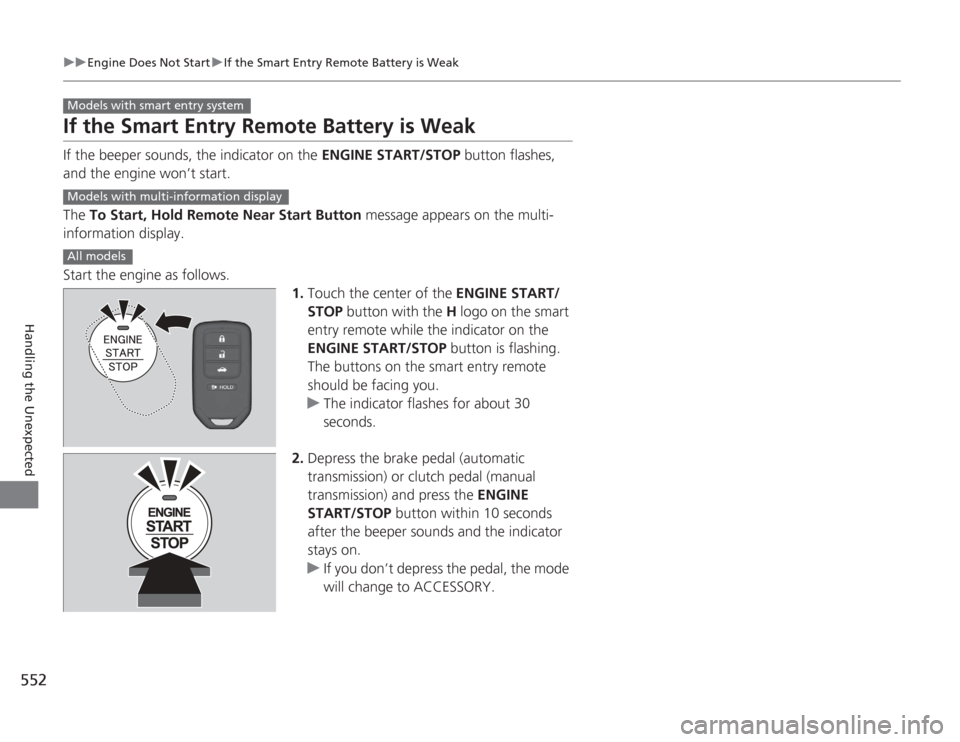
Start the engine as follows. 1.Touch the center of the ENGINE START/
STOP button with the H logo on the smart
entry remote while the indicator on the
ENGINE START/STOP button is flashing.
The buttons on the smart entry remote
should be facing you.
u The indicator flashes for about 30
seconds.
2. Depress the brake pedal (automatic
transmission) or clutch pedal (manual
transmission) and press the ENGINE
START/STOP button within 10 seconds
after the beeper sounds and the indicator
stays on.
u If you don’t depress the pedal, the mode
will change to ACCESSORY.Models with smart entry systemModels with multi-information displayAll models
Page 561 of 595
560Handling the Unexpected
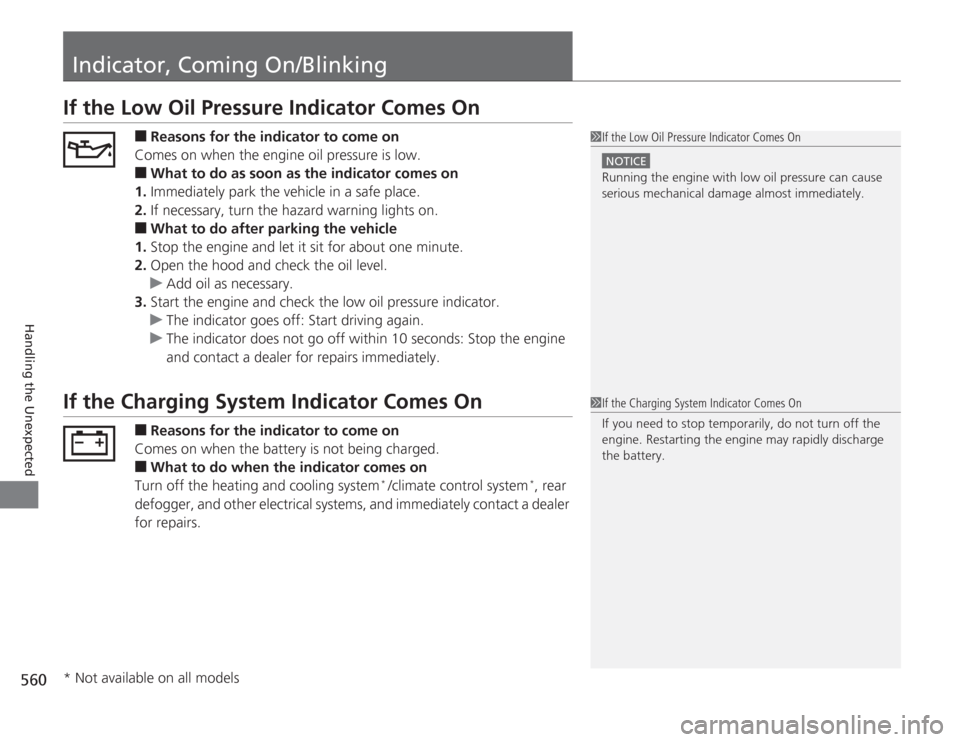
Indicator, Coming On/BlinkingIf the Low Oil Pressure Indicator Comes On
■
Reasons for the indicator to come on
Comes on when the engine oil pressure is low.
■
What to do as soon as the indicator comes on
1. Immediately park the vehicle in a safe place.
2. If necessary, turn the hazard warning lights on.
■
What to do after parking the vehicle
1. Stop the engine and let it sit for about one minute.
2. Open the hood and check the oil level.
u Add oil as necessary.
3. Start the engine and check the low oil pressure indicator.
u The indicator goes off: Start driving again.
u The indicator does not go off within 10 seconds: Stop the engine
and contact a dealer for repairs immediately.
If the Charging System Indicator Comes On
■
Reasons for the indicator to come on
Comes on when the battery is not being charged.
■
What to do when the indicator comes on
Turn off the heating and cooling system
* /climate control system
*, rear
defogger, and other electrical systems, and immediately contact a dealer
for repairs.
1 If the Low Oil Pressure Indicator Comes On
NOTICERunning the engine with low oil pressure can cause
serious mechanical damage almost immediately.1If the Charging System Indicator Comes On
If you need to stop temporarily, do not turn off the
engine. Restarting the engine may rapidly discharge
the battery.
* Not available on all models
Page 565 of 595
564Handling the Unexpected
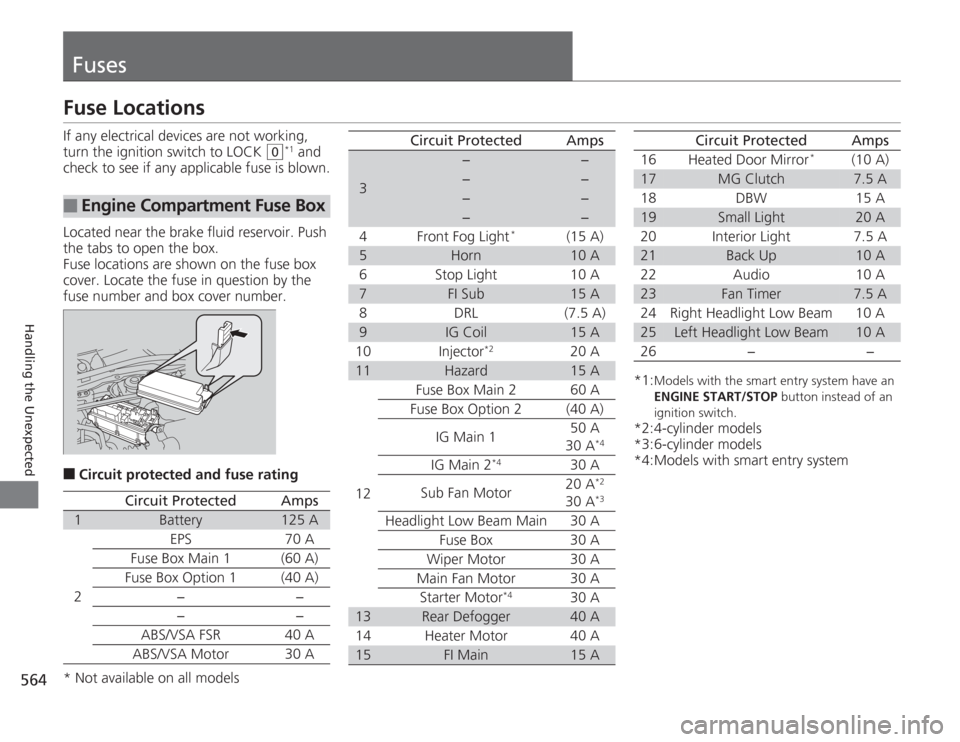
FusesFuse LocationsIf any electrical devices are not working,
turn the ignition switch to LOCK
(0
*1 and
check to see if any applicable fuse is blown.
Located near the brake fluid reservoir. Push
the tabs to open the box.
Fuse locations are shown on the fuse box
cover. Locate the fuse in question by the
fuse number and box cover number.
■
Circuit protected and fuse rating
■
Engine Compartment Fuse Box
Circuit Protected
Amps
1
Battery
125 A
2
EPS
70 A
Fuse Box Main 1 (60 A)
Fuse Box Option 1
(40 A)
−−
−
−
ABS/VSA FSR 40 A
ABS/VSA Motor 30 A
3
−
−
−
−
−
−
−
−
4 Front Fog Light
*
(15 A)
5
Horn
10 A
6 Stop Light 10 A
7
FI Sub
15 A
8 DRL (7.5 A)
9
IG Coil
15 A
10 Injector
*2
20 A
11
Hazard
15 A
12 Fuse Box Main 2 60 A
Fuse Box Option 2 (40 A)
IG Main 1 50 A
30 A
*4
IG Main 2
*4
30 A
Sub Fan Motor 20 A
*2
30 A
*3
Headlight Low Beam Main 30 A
Fuse Box 30 A
Wiper Motor 30 A
Main Fan Motor 30 A Starter Motor
*4
30 A
13
Rear Defogger
40 A
14 Heater Motor 40 A
15
FI Main
15 A
Circuit Protected
Amps
*1:
Models with the smart ent ry system have an
ENGINE START/STOP button instead of an
ignition switch.
*2:4-cylinder models
*3:6-cylinder models
*4:Models with smart entry system 16 Heated Door Mirror
*
(10 A)
17
MG Clutch
7.5 A
18 DBW 15 A
19
Small Light
20 A
20 Interior Light 7.5 A
21
Back Up
10 A
22 Audio 10 A
23
Fan Timer
7.5 A
24 Right Headlight Low Beam 10 A
25
Left Headlight Low Beam
10 A
26 − −
Circuit Protected
Amps
* Not available on all models