warning HONDA ACCORD 2014 9.G Owner's Manual
[x] Cancel search | Manufacturer: HONDA, Model Year: 2014, Model line: ACCORD, Model: HONDA ACCORD 2014 9.GPages: 595
Page 84 of 595
83
uuIndicators uInformation Display Warning and Information Messages
*
Instrument Panel
Message
Condition
Explanation
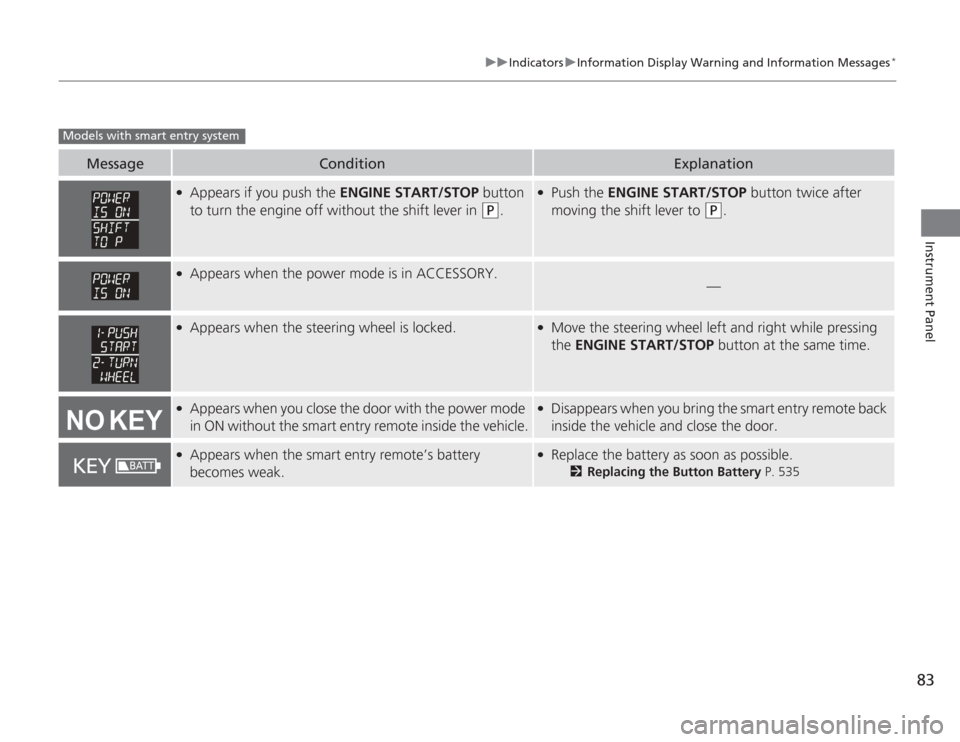
●
Appears if you push the ENGINE START/STOP button
to turn the engine off without the shift lever in
(P
.
●
Push the ENGINE START/STOP button twice after
moving the shift lever to
(P
.
●
Appears when the power mode is in ACCESSORY.
—
●
Appears when the steering wheel is locked.
●
Move the steering wheel left and right while pressing
the ENGINE START/STOP button at the same time.
●
Appears when you close the door with the power mode
in ON without the smart entry remote inside the vehicle.
●
Disappears when you bring the smart entry remote back
inside the vehicle and close the door.
●
Appears when the smart entry remote’s battery
becomes weak.
●
Replace the battery as soon as possible.
2Replacing the Button Battery P. 535
Models with smart entry system
Page 85 of 595
84
uuIndicators uMulti-Information Display Warn ing and Information Messages
*
Instrument Panel
Multi-Information Display Warning and Information Messages
*
The following messages appear only on the multi-information display. Pres s the (information) button to see the message again
with the system message indicator on.
Message
Condition
Explanation
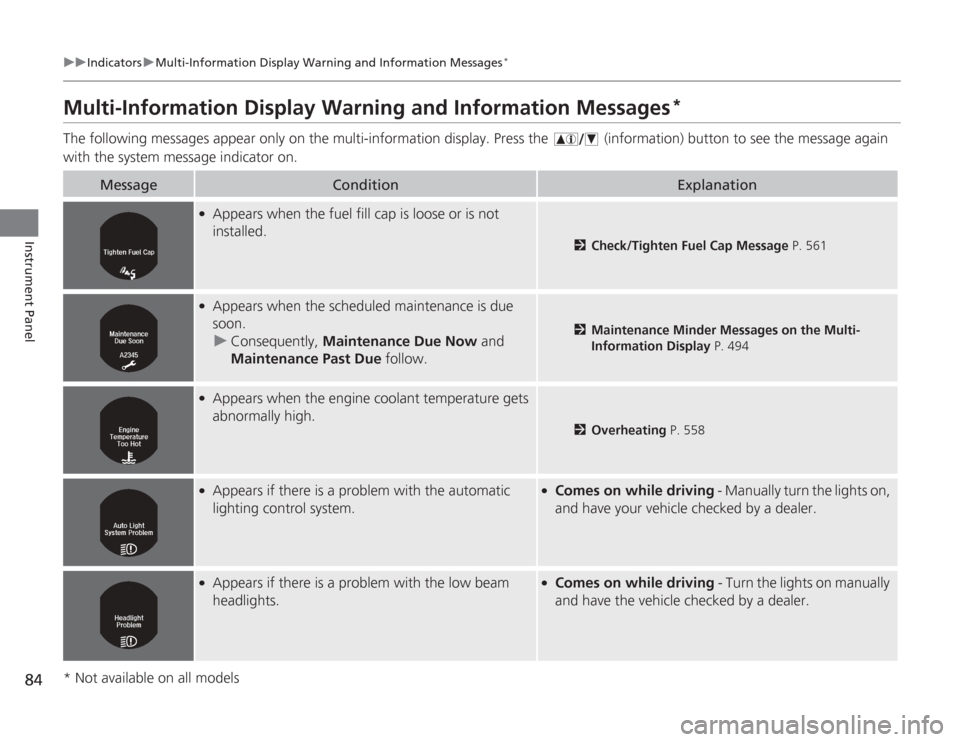
●
Appears when the fuel fill cap is loose or is not
installed.
2 Check/Tighten Fuel Cap Message P. 561
●
Appears when the scheduled maintenance is due
soon.
u Consequently, Maintenance Due Now and
Maintenance Past Due follow.
2Maintenance Minder Messages on the Multi-
Information Display P. 494
●
Appears when the engine coolant temperature gets
abnormally high.
2Overheating P. 558
●
Appears if there is a problem with the automatic
lighting control system.
●
Comes on while driving - Manually turn the lights on,
and have your vehicle checked by a dealer.
●
Appears if there is a problem with the low beam
headlights.
●
Comes on while driving - Turn the lights on manually
and have the vehicle checked by a dealer.
* Not available on all models
Page 88 of 595
87
uuIndicators uMulti-Information Display Wa rning and Information Messages
*
Continued
Instrument Panel
Message
Condition
Explanation
●
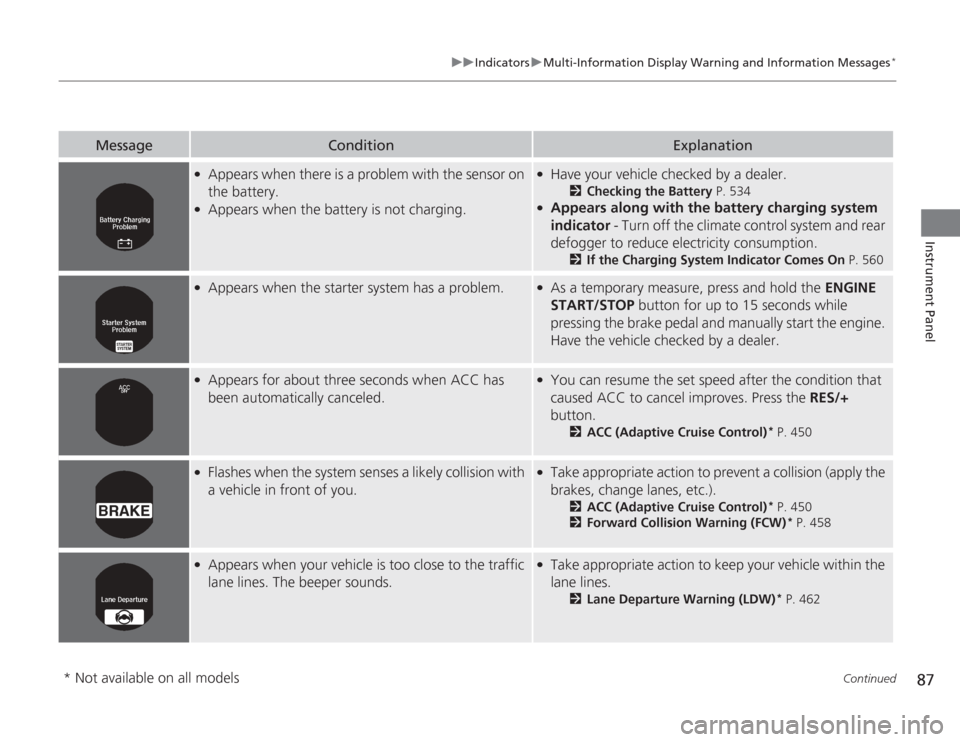
Appears when there is a problem with the sensor on
the battery.
●
Appears when the battery is not charging.
●
Have your vehicle checked by a dealer.
2Checking the Battery P. 534
●
Appears along with the battery charging system
indicator - Turn off the climate control system and rear
defogger to reduce electricity consumption.
2 If the Charging System Indicator Comes On P. 560
●
Appears when the starter system has a problem.
●
As a temporary measure, press and hold the ENGINE
START/STOP button for up to 15 seconds while
pressing the brake pedal and manually start the engine.
Have the vehicle checked by a dealer.
●
Appears for about three seconds when ACC has
been automatically canceled.
●
You can resume the set speed after the condition that
caused ACC to cancel improves. Press the RES/+
button.
2 ACC (Adaptive Cruise Control)
* P. 450
●
Flashes when the system senses a likely collision with
a vehicle in front of you.
●
Take appropriate action to prevent a collision (apply the
brakes, change lanes, etc.).
2ACC (Adaptive Cruise Control)
* P. 450
2 Forward Collision Warning (FCW)
* P. 458
●
Appears when your vehicle is too close to the traffic
lane lines. The beeper sounds.
●
Take appropriate action to keep your vehicle within the
lane lines.
2Lane Departure Warning (LDW)
* P. 462
* Not available on all models
Page 94 of 595
93
uuGauges and Displays uMulti-Information Display
*
Continued
Instrument Panel
Multi-Information Display
*
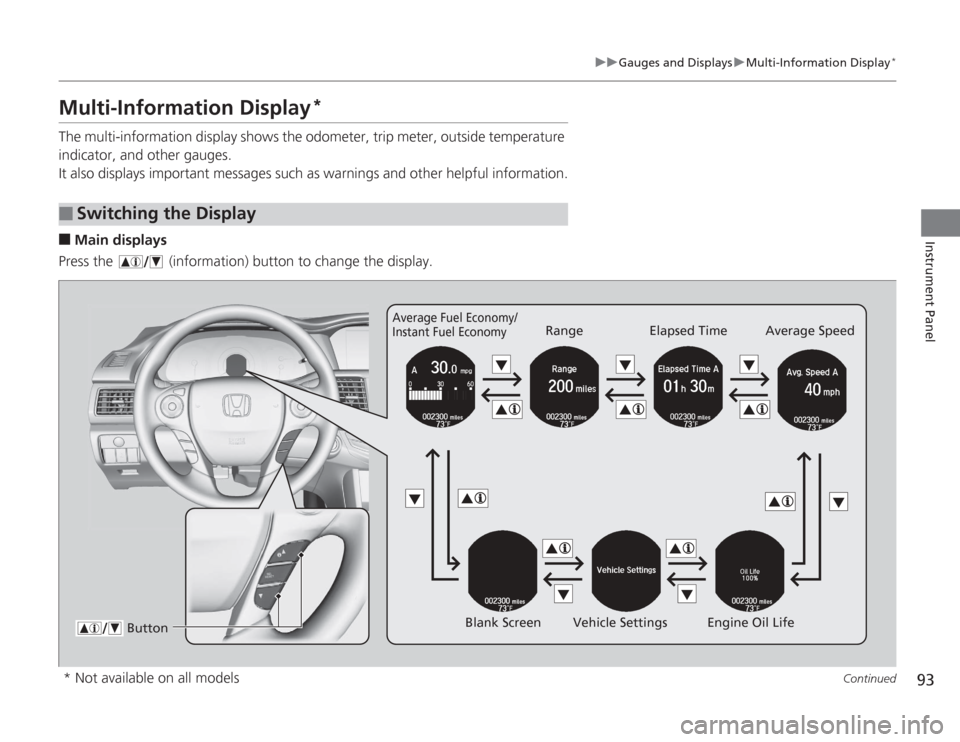
The multi-information display shows the odometer, trip meter, outside temperature
indicator, and other gauges.
It also displays important messages such as warnings and other helpful information.■
Main displays
Press the (information) button to change the display.
■
Switching the Display
Average Fuel Economy/
Instant Fuel Economy
Range Elapsed Time Average Speed
Blank Screen Vehicle Settings Engine Oil Life
Button
* Not available on all models
Page 99 of 595
98
uuGauges and Displays uMulti-Information Display
*
Instrument Panel
■
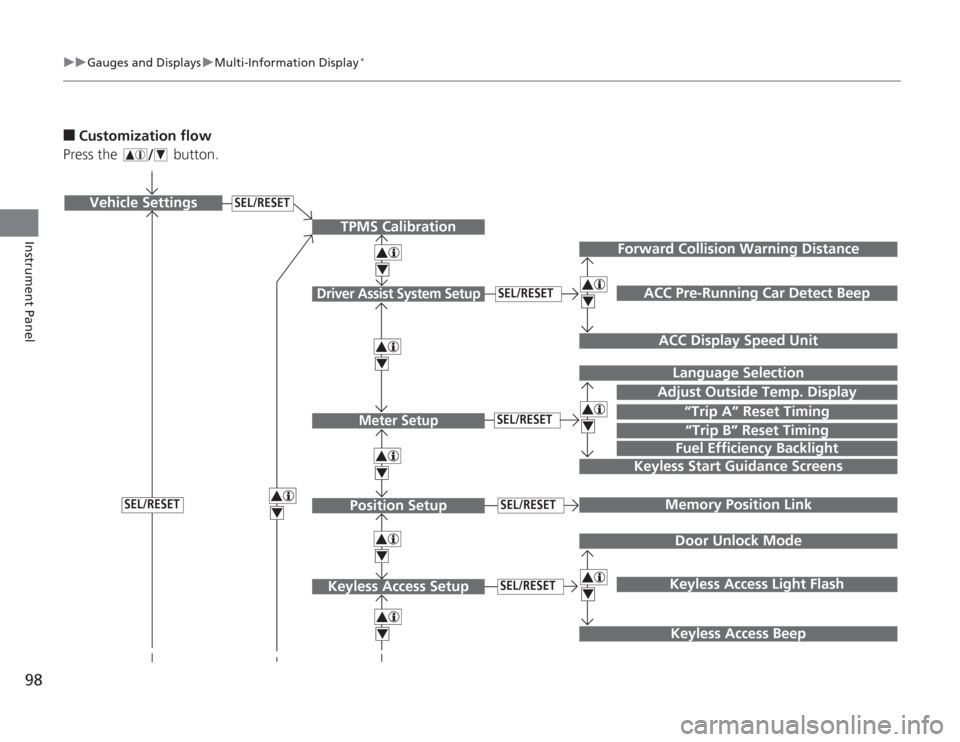
Customization flow
Press the button.
SEL/RESET
Vehicle Settings
“Trip A” Reset TimingLanguage Selection
Adjust Outside Temp. DisplayMemory Position LinkDoor Unlock ModeKeyless Access Light Flash
4444
TPMS Calibration
Driver Assist System Setup
Meter SetupPosition Setup
Keyless Access Setup
SEL/RESETSEL/RESETSEL/RESETSEL/RESET
“Trip B” Reset TimingFuel Efficiency Backlight
4
ACC Pre-Running Car Detect Beep
ACC Display Speed Unit
4
Keyless Start Guidance Screens
SEL/RESET
Keyless Access Beep
Forward Collision Warning Distance
444
Page 101 of 595
100
uuGauges and Displays uMulti-Information Display
*
Instrument Panel
■
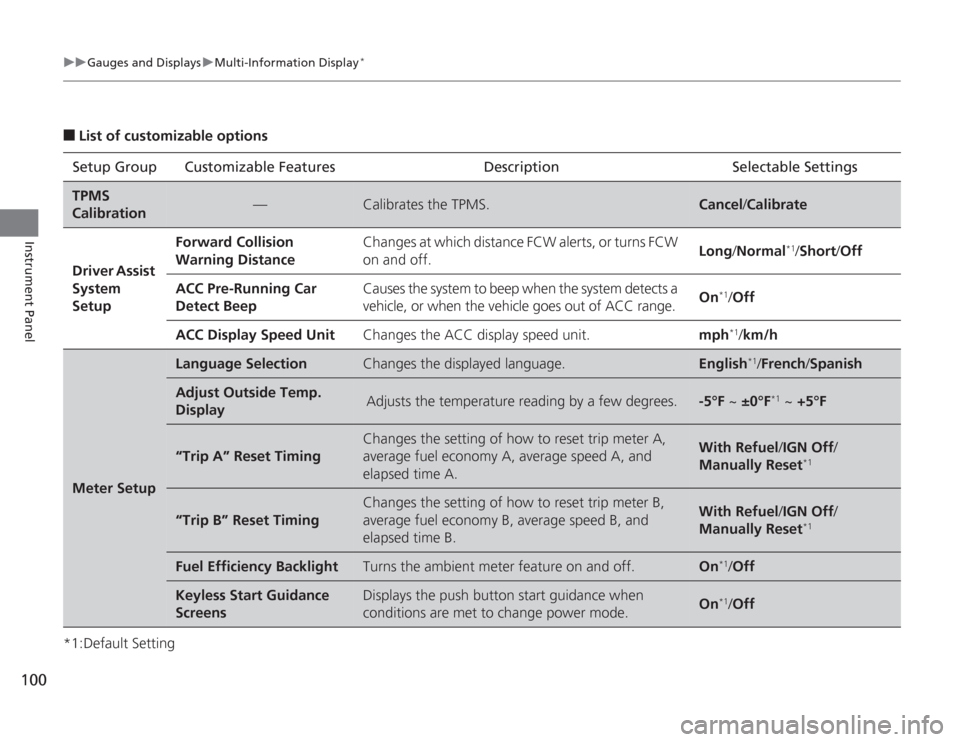
List of customizable options
*1:Default Setting Setup Group Customizable Features Description Selectable SettingsTPMS
Calibration
—
Calibrates the TPMS.
Cancel
/Calibrate
Driver Assist
System
Setup
Forward Collision
Warning Distance
Changes at which distance FCW alerts, or turns FCW
on and off.
Long /Normal
*1/Short /Off
ACC Pre-Running Car
Detect Beep
Causes the system to beep when the system detects a
vehicle, or when the vehicle goes out of ACC range.
On
*1/Off
ACC Display Speed Unit
Changes the ACC display speed unit.
mph
*1/km/h
Meter Setup
Language Selection
Changes the displayed language.
English
*1/French /Spanish
Adjust Outside Temp.
Display
Adjusts the temperature reading by a few degrees.
-5°F ~ ±0°F
*1 ~ +5°F
“Trip A” Reset Timing
Changes the setting of how to reset trip meter A,
average fuel economy A, average speed A, and
elapsed time A.
With Refuel /IGN Off /
Manually Reset
*1
“Trip B” Reset Timing
Changes the setting of how to reset trip meter B,
average fuel economy B, average speed B, and
elapsed time B.
With Refuel /IGN Off /
Manually Reset
*1
Fuel Efficiency Backlight
Turns the ambient meter feature on and off.
On
*1/ Off
Keyless Start Guidance
Screens
Displays the push button start guidance when
conditions are met to change power mode.
On
*1/Off
Page 128 of 595
127
Continued
Controls
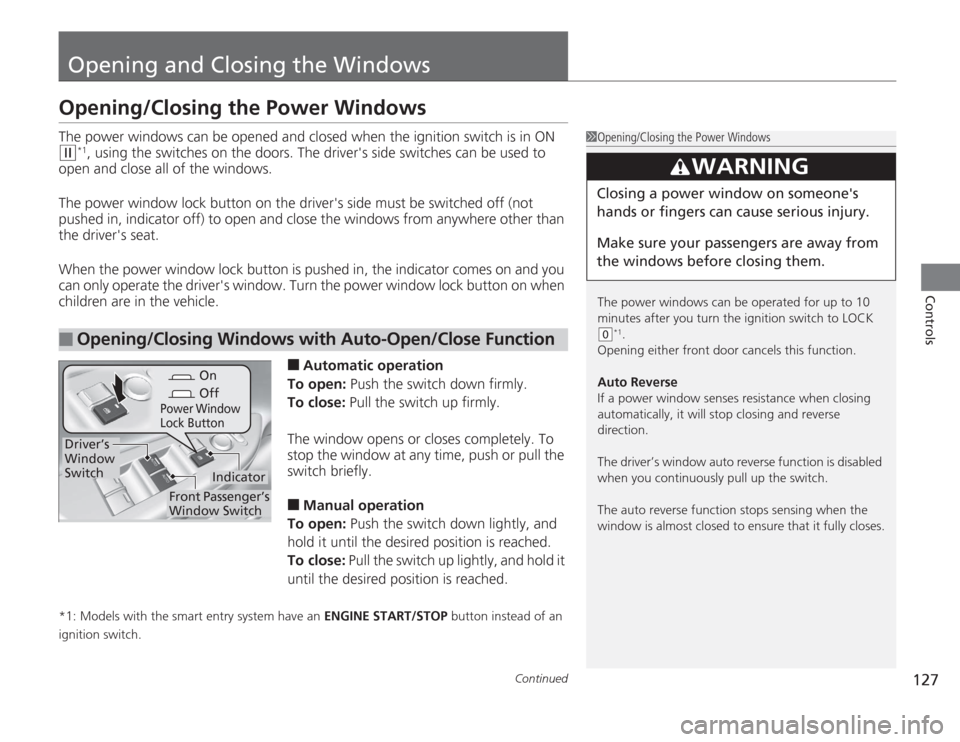
Opening and Closing the WindowsOpening/Closing the Power WindowsThe power windows can be opened and closed when the ignition switch is in ON (w
*1, using the switches on the doors. The driver's side switches can be used to
open and close all of the windows.
The power window lock button on the driver's side must be switched off (not
pushed in, indicator off) to open and close the windows from anywhere other than
the driver's seat.
When the power window lock button is pushed in, the indicator comes on and you
can only operate the driver's window. Turn the power window lock button on when
children are in the vehicle.
■
Automatic operation
To open: Push the switch down firmly.
To close: Pull the switch up firmly.
The window opens or closes completely. To
stop the window at any time, push or pull the
switch briefly.
■
Manual operation
To open: Push the switch down lightly, and
hold it until the desired position is reached.
To close: Pull the switch up lightly, and hold it
until the desired position is reached.
*1: Models with the smart entry system have an ENGINE START/STOP button instead of an
ignition switch.■
Opening/Closing Windows with Auto-Open/Close Function
1 Opening/Closing the Power Windows
The power windows can be operated for up to 10
minutes after you turn the ignition switch to LOCK
(0
*1.
Opening either front door cancels this function.
Auto Reverse
If a power window senses resistance when closing
automatically, it will stop closing and reverse
direction.
The driver’s window auto reverse function is disabled
when you continuously pull up the switch.
The auto reverse function stops sensing when the
window is almost closed to ensure that it fully closes.
3
WARNING
Closing a power window on someone's
hands or fingers can cause serious injury.
Make sure your passengers are away from
the windows before closing them.
On
Off
Power Window
Lock Button
Indicator
Driver’s
Window
Switch
Front Passenger’s
Window Switch
Page 131 of 595
130Controls
Opening and Closing the Moonroof
*
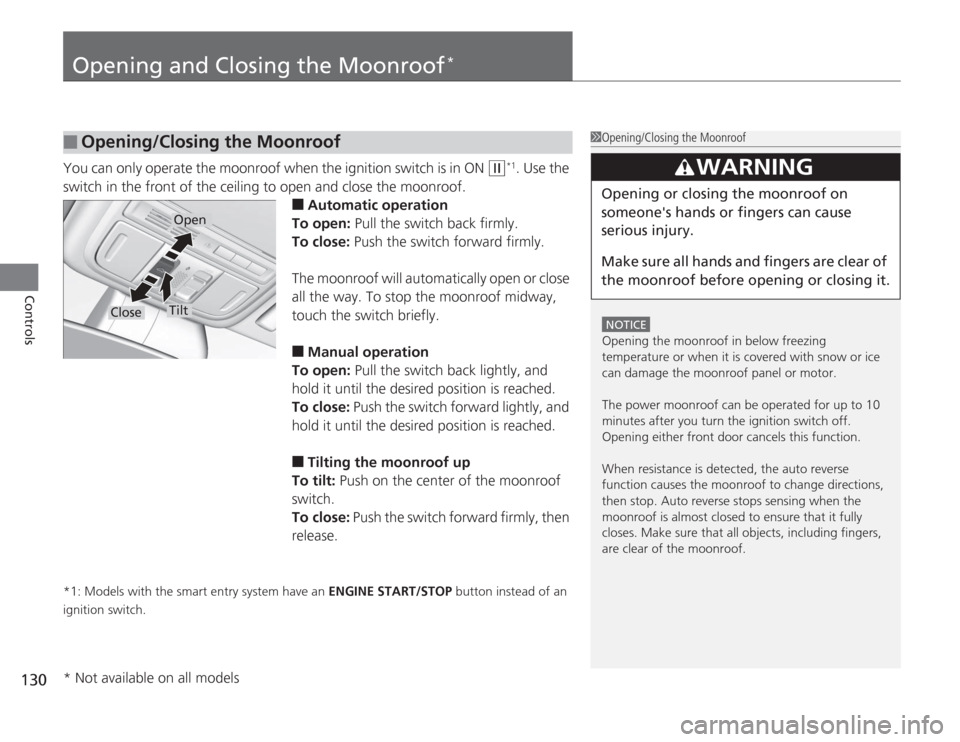
You can only operate the moonroof when the ignition switch is in ON
(w
*1. Use the
switch in the front of the ceiling to open and close the moonroof.
■
Automatic operation
To open: Pull the switch back firmly.
To close: Push the switch forward firmly.
The moonroof will automatically open or close
all the way. To stop the moonroof midway,
touch the switch briefly.
■
Manual operation
To open: Pull the switch back lightly, and
hold it until the desired position is reached.
To close: Push the switch forward lightly, and
hold it until the desired position is reached.
■
Tilting the moonroof up
To tilt: Push on the center of the moonroof
switch.
To close: Push the switch forward firmly, then
release.
*1: Models with the smart entry system have an ENGINE START/STOP button instead of an
ignition switch.■
Opening/Closing the Moonroof
1 Opening/Closing the Moonroof
NOTICEOpening the moonroof in below freezing
temperature or when it is covered with snow or ice
can damage the moonroof panel or motor.
The power moonroof can be operated for up to 10
minutes after you turn the ignition switch off.
Opening either front door cancels this function.
When resistance is detected, the auto reverse
function causes the moonroof to change directions,
then stop. Auto reverse stops sensing when the
moonroof is almost closed to ensure that it fully
closes. Make sure that all objects, including fingers,
are clear of the moonroof.
3
WARNING
Opening or closing the moonroof on
someone's hands or fingers can cause
serious injury.
Make sure all hands and fingers are clear of
the moonroof before opening or closing it.
Open
Close
Tilt
* Not available on all models
Page 132 of 595
131
Controls
Operating the Switches Around the Steering WheelIgnition Switch
*
1Ignition Switch
*
You cannot take the key out unless the shift lever is
in
(P
.
If you open the driver's door when the key is in LOCK
( 0
or ACCESSORY
(q
, a warning buzzer will sound
to remind you to take the key out.
If the key won't turn from LOCK
( 0
to ACCESSORY
(q
, turn the key while moving the steering wheel left
and right. The steering wheel will unlock, allowing
the key to turn.
3
WARNING
Removing the key from the ignition switch
while driving locks the steering. This can
cause you to lose control of the vehicle.
Remove the key from the ignition switch
only when parked.Manual transmission modelsAutomatic transmission (CVT) modelsAll models
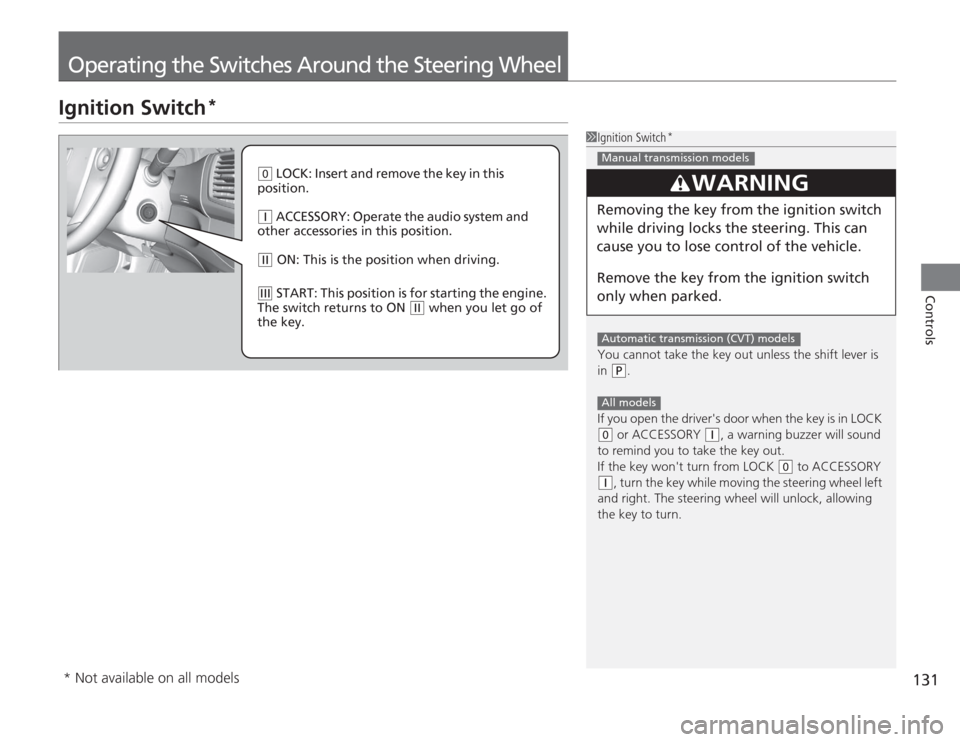
( 0
LOCK: Insert and remove the key in this
position.
( q
ACCESSORY: Operate the audio system and
other accessories in this position.
( w
ON: This is the position when driving.
(e
START: This position is for starting the engine.
The switch returns to ON
( w
when you let go of
the key.
* Not available on all models
Page 135 of 595
uuOperating the Switches Around the Steering Wheel uENGINE START/STOP Button
*
134Controls
If you open the driver’s door when the power mode is set to ACCESSORY, a warning
buzzer sounds.
Warning buzzers may sound from inside or/
and outside the vehicle to remind you that the
smart entry remote is out of the vehicle. If the
buzzer continues even after the remote is put
back inside, place it to be within its
operational range.
■
When the power mode is in ON
If the smart entry remote is taken out of the
vehicle, and the driver’s door is closed,
warning buzzers sound from both inside and
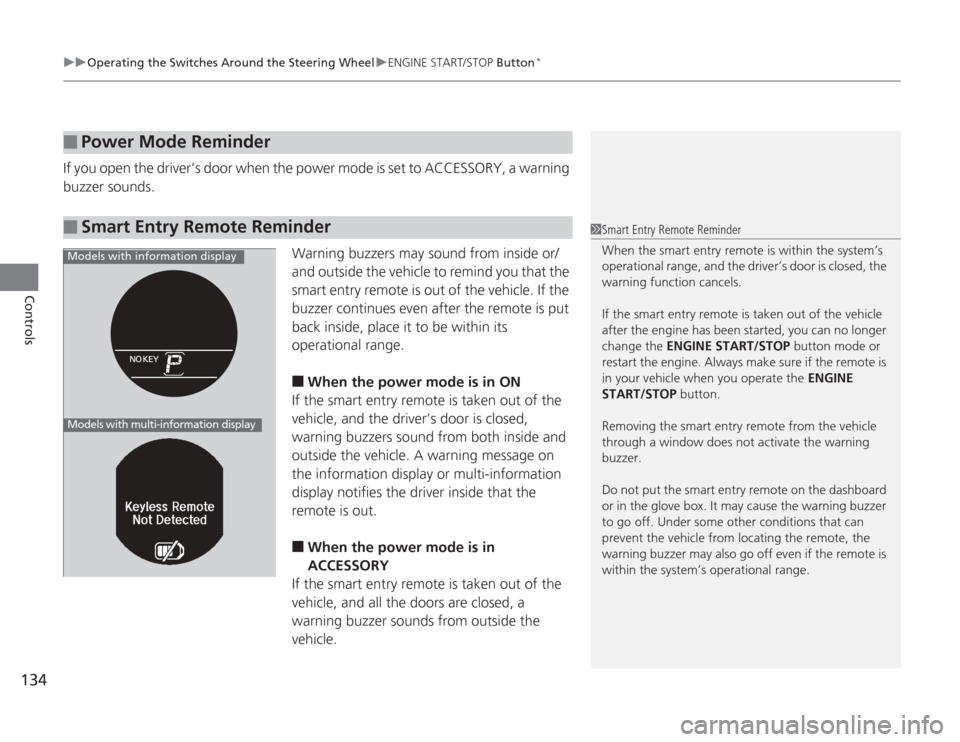
outside the vehicle. A warning message on
the information display or multi-information
display notifies the driver inside that the
remote is out.
■
When the power mode is in
ACCESSORY
If the smart entry remote is taken out of the
vehicle, and all the doors are closed, a
warning buzzer sounds from outside the
vehicle.
■
Power Mode Reminder
■
Smart Entry Remote Reminder
1 Smart Entry Remote Reminder
When the smart entry remote is within the system’s
operational range, and the driver’s door is closed, the
warning function cancels.
If the smart entry remote is taken out of the vehicle
after the engine has been started, you can no longer
change the ENGINE START/STOP button mode or
restart the engine. Al ways make sure if the remote is
in your vehicle when you operate the ENGINE
START/STOP button.
Removing the smart entry re mote from the vehicle
through a window does not activate the warning
buzzer.
Do not put the smart entry remote on the dashboard
or in the glove box. It may cause the warning buzzer
to go off. Under some other conditions that can
prevent the vehicle from locating the remote, the
warning buzzer may also go off even if the remote is
within the system’s operational range.
Models with information displayModels with multi-information display