Audio system HONDA ACCORD 2014 9.G Owner's Guide
[x] Cancel search | Manufacturer: HONDA, Model Year: 2014, Model line: ACCORD, Model: HONDA ACCORD 2014 9.GPages: 595
Page 194 of 595
193
uuAudio System Basic Operation uPlaying an iPod ®
Continued
Features
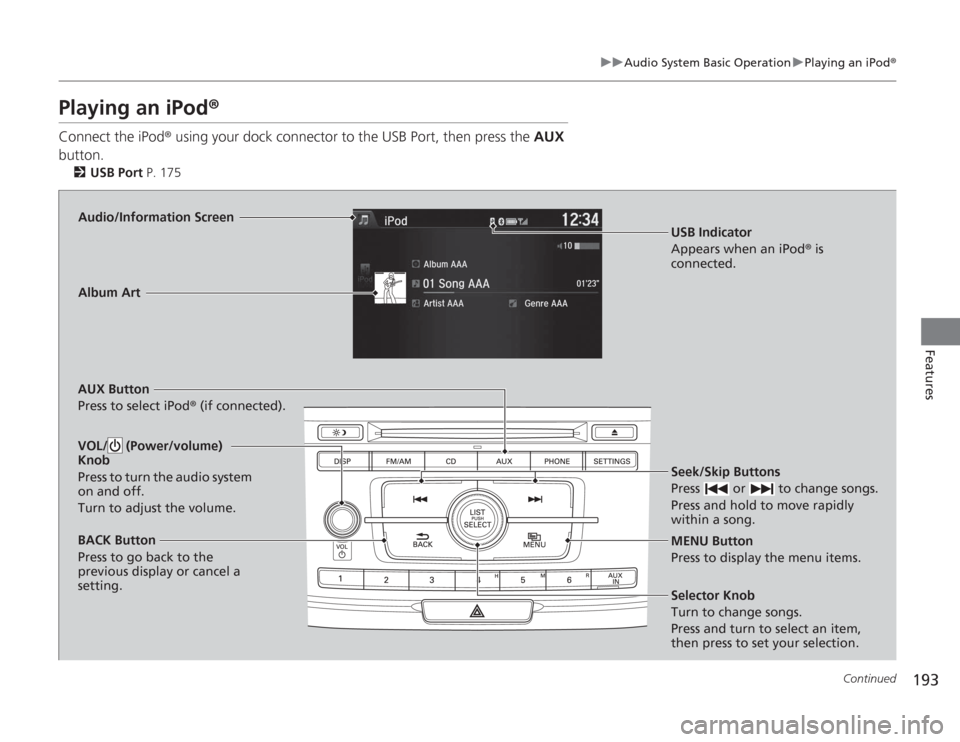
Playing an iPod ®Connect the iPod ® using your dock connector to the USB Port, then press the AUX
button.
2 USB Port P. 175Audio/Information Screen
AUX Button
Press to select iPod® (if connected).
Seek/Skip Buttons
Press or to change songs.
Press and hold to move rapidly
within a song.
MENU Button
Press to display the menu items.
Selector Knob
Turn to change songs.
Press and turn to select an item,
then press to set your selection.
VOL/ (Power/volume)
Knob
Press to turn the audio system
on and off.
Turn to adjust the volume.BACK Button
Press to go back to the
previous display or cancel a
setting.Album Art
USB Indicator
Appears when an iPod® is
connected.
Page 195 of 595
uuAudio System Basic Operation uPlaying an iPod ®
194Features
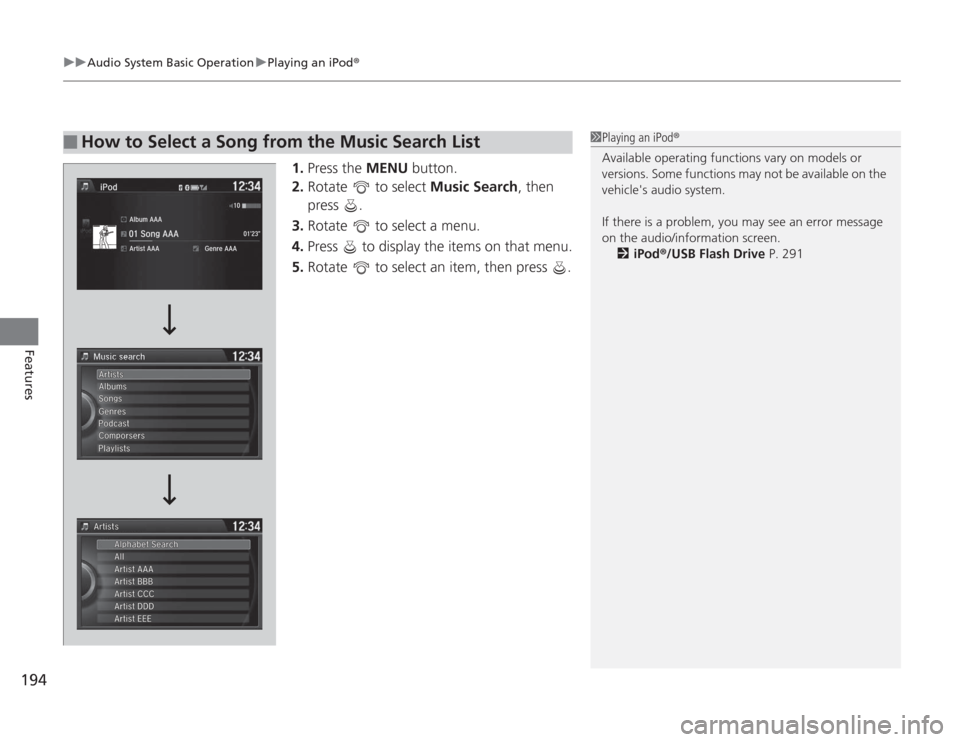
1.Press the MENU button.
2. Rotate to select Music Search, then
press .
3. Rotate to select a menu.
4. Press to display the items on that menu.
5. Rotate to select an item, then press .
■
How to Select a Song from the Music Search List
1Playing an iPod®
Available operating functions vary on models or
versions. Some functions may not be available on the
vehicle's audio system.
If there is a problem, you may see an error message
on the audio/information screen.
2 iPod ®/USB Flash Drive P. 291
Page 196 of 595
Continued
195
uuAudio System Basic Operation u
Features
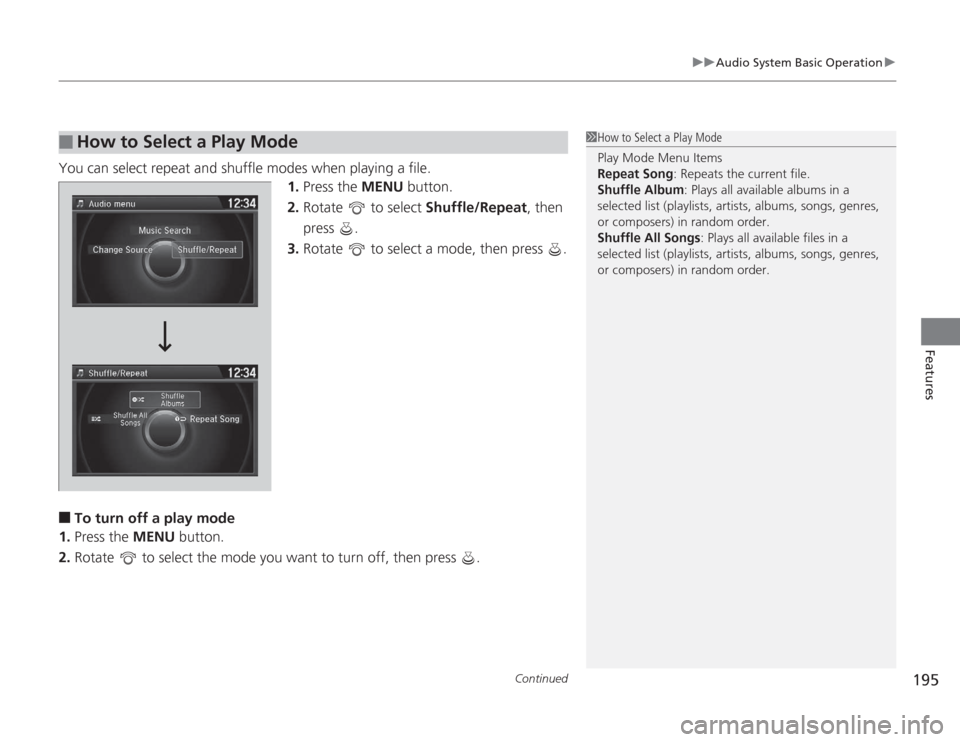
You can select repeat and shuffle modes when playing a file.
1.Press the MENU button.
2. Rotate to select Shuffle/Repeat, then
press .
3. Rotate to select a mode, then press .■
To turn off a play mode
1. Press the MENU button.
2. Rotate to select the mode you want to turn off, then press .
■
How to Select a Play Mode
1How to Select a Play Mode
Play Mode Menu Items
Repeat Song : Repeats the current file.
Shuffle Album: Plays all available albums in a
selected list (playlists, artists, albums, songs, genres,
or composers) in random order.
Shuffle All Songs : Plays all available files in a
selected list (playlists, artists, albums, songs, genres,
or composers) in random order.
Page 197 of 595
196
uuAudio System Basic Operation uPlaying Internet Radio
Features
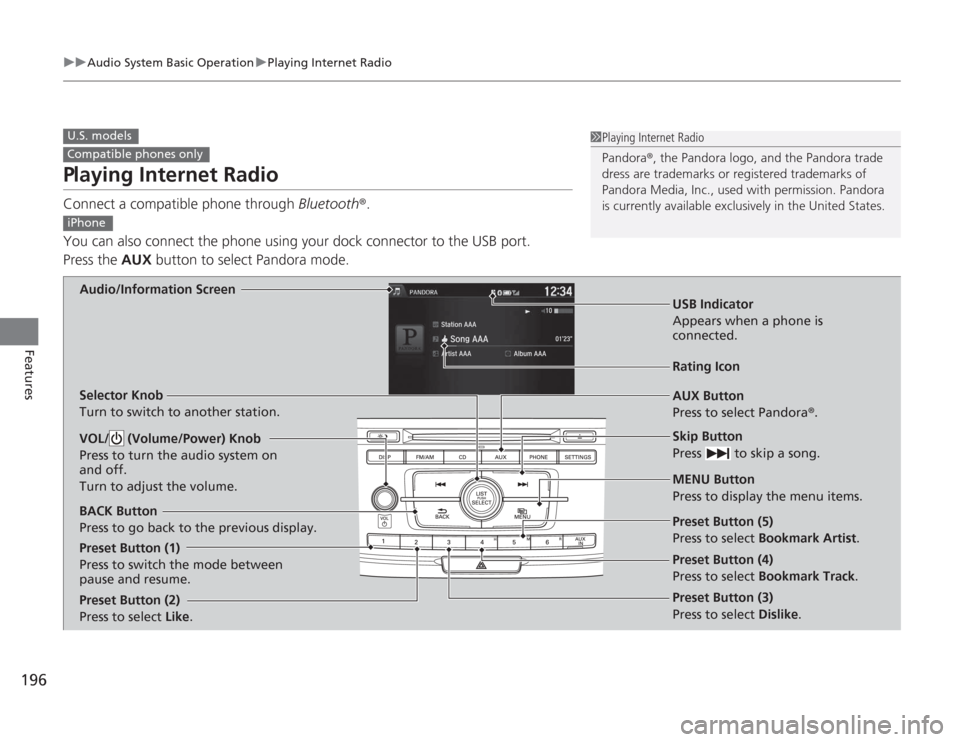
Playing Internet RadioConnect a compatible phone through Bluetooth®.
You can also connect the phone using your dock connector to the USB port.
Press the AUX button to select Pandora mode.U.S. modelsCompatible phones only
1Playing Internet Radio
Pandora ®, the Pandora logo, and the Pandora trade
dress are trademarks or regi stered trademarks of
Pandora Media, Inc., used with permission. Pandora
is currently available exclusively in the United States.
iPhone
Audio/Information Screen
AUX Button
Press to select Pandora®.
Skip Button
Press to skip a song.
MENU Button
Press to display the menu items.
Selector Knob
Turn to switch to another station.
VOL/ (Volume/Power) Knob
Press to turn the audio system on
and off.
Turn to adjust the volume.BACK Button
Press to go back to the previous display.
USB Indicator
Appears when a phone is
connected.Rating Icon
Preset Button (1)
Press to switch the mode between
pause and resume.
Preset Button (2)
Press to select Like.
Preset Button (3)
Press to select Dislike. Preset Button (4)
Press to select Bookmark Track
.
Preset Button (5)
Press to select Bookmark Artist
.
Page 198 of 595
197
uuAudio System Basic Operation uPlaying Internet Radio
Features
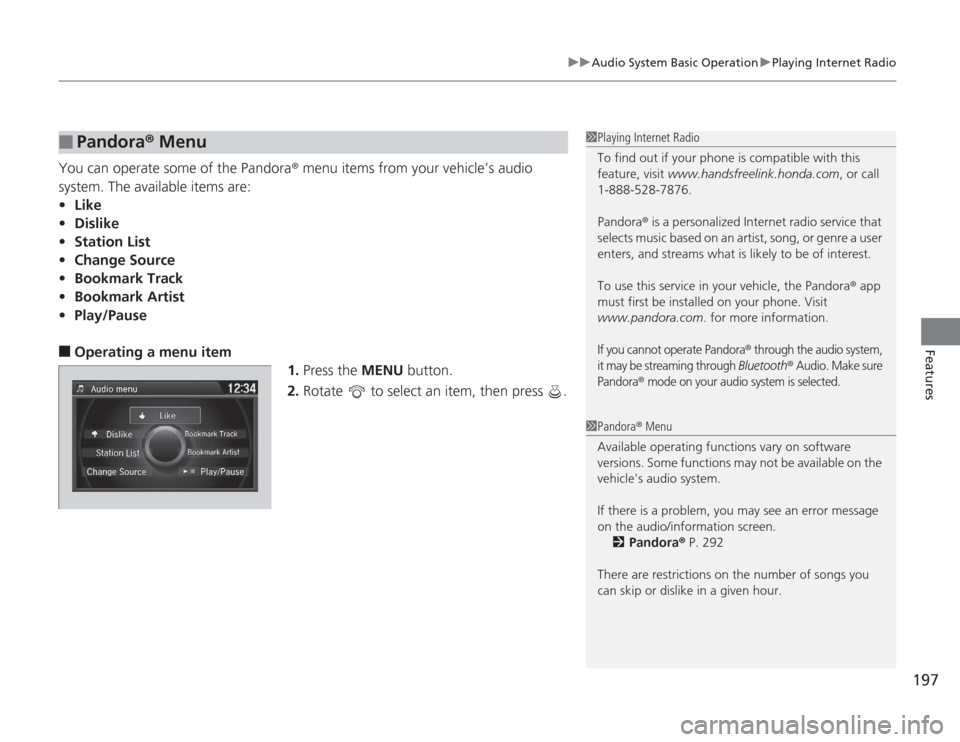
You can operate some of the Pandora ® menu items from your vehicle’s audio
system. The available items are:
• Like
• Dislike
• Station List
• Change Source
• Bookmark Track
• Bookmark Artist
• Play/Pause■
Operating a menu item
1.Press the MENU button.
2. Rotate to select an item, then press .
■
Pandora ® Menu
1 Playing Internet Radio
To find out if your phone is compatible with this
feature, visit www.handsfreelink.honda.com , or call
1-888-528-7876.
Pandora ® is a personalized Internet radio service that
selects music based on an artist, song, or genre a user
enters, and streams what is likely to be of interest.
To use this service in your vehicle, the Pandora ® app
must first be installed on your phone. Visit
www.pandora.com . for more information.If you cannot operate Pandora
® through the audio system,
it may be streaming through
Bluetooth
® Audio. Make sure
Pandora
® mode on your audio system is selected.
1 Pandora ® Menu
Available operating functions vary on software
versions. Some functions may not be available on the
vehicle's audio system.
If there is a problem, you may see an error message
on the audio/information screen. 2 Pandora ® P. 292
There are restrictions on the number of songs you
can skip or dislike in a given hour.
Page 199 of 595
198
uuAudio System Basic Operation uPlaying a USB Flash Drive
Features
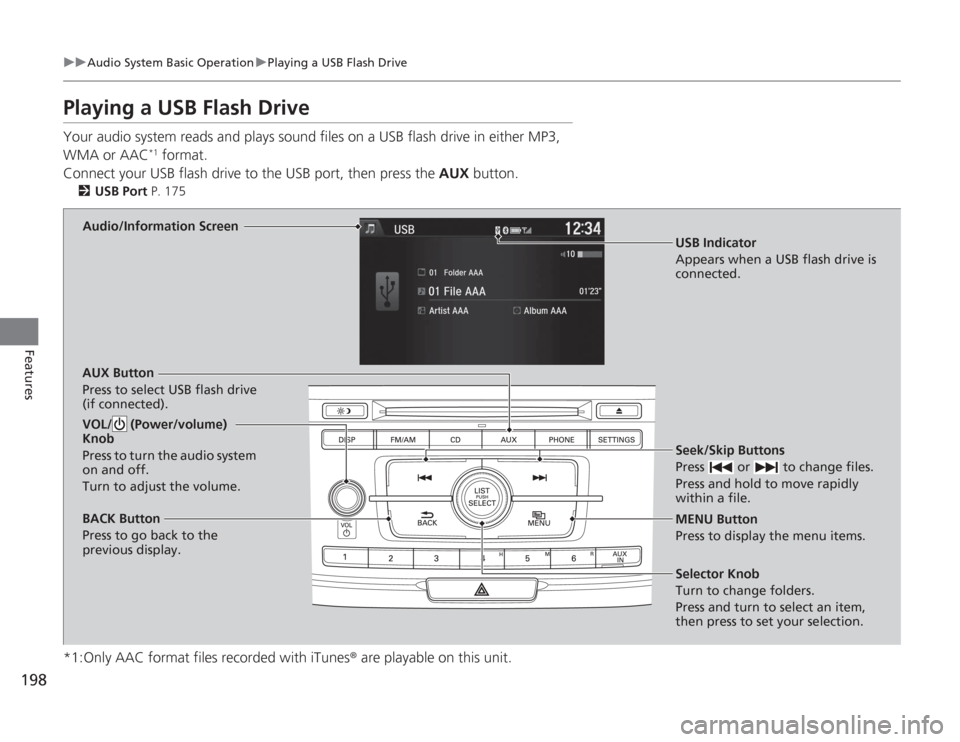
Playing a USB Flash DriveYour audio system reads and plays sound files on a USB flash drive in either MP3,
WMA or AAC
*1 format.
Connect your USB flash driv e to the USB port, then press the AUX button.
2USB Port P. 175
*1:Only AAC format files recorded with iTunes ® are playable on this unit.
Audio/Information Screen
AUX Button
Press to select USB flash drive
(if connected). Seek/Skip Buttons
Press or to change files.
Press and hold to move rapidly
within a file.
MENU Button
Press to display the menu items.
Selector Knob
Turn to change folders.
Press and turn to select an item,
then press to set your selection.
VOL/ (Power/volume)
Knob
Press to turn the audio system
on and off.
Turn to adjust the volume.BACK Button
Press to go back to the
previous display.
USB Indicator
Appears when a USB flash drive is
connected.
Page 200 of 595
Continued
199
uuAudio System Basic Operation uPlaying a USB Flash Drive
Features
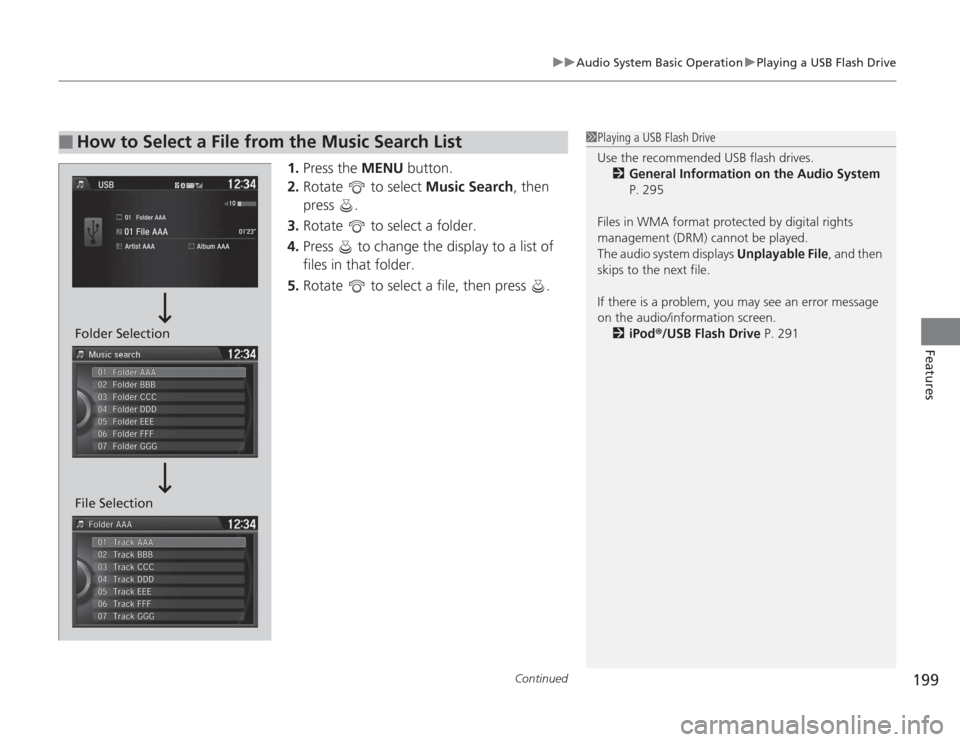
1. Press the MENU button.
2. Rotate to select Music Search, then
press .
3. Rotate to select a folder.
4. Press to change the display to a list of
files in that folder.
5. Rotate to select a file, then press .
■
How to Select a File from the Music Search List
1Playing a USB Flash Drive
Use the recommended USB flash drives.
2 General Information on the Audio System
P. 295
Files in WMA format protected by digital rights
management (DRM) cannot be played.
The audio system displays Unplayable File, and then
skips to the next file.
If there is a problem, you may see an error message
on the audio/information screen.
2 iPod ®/USB Flash Drive P. 291
File Selection Folder Selection
Page 201 of 595
uuAudio System Basic Operation uPlaying a USB Flash Drive
200Features
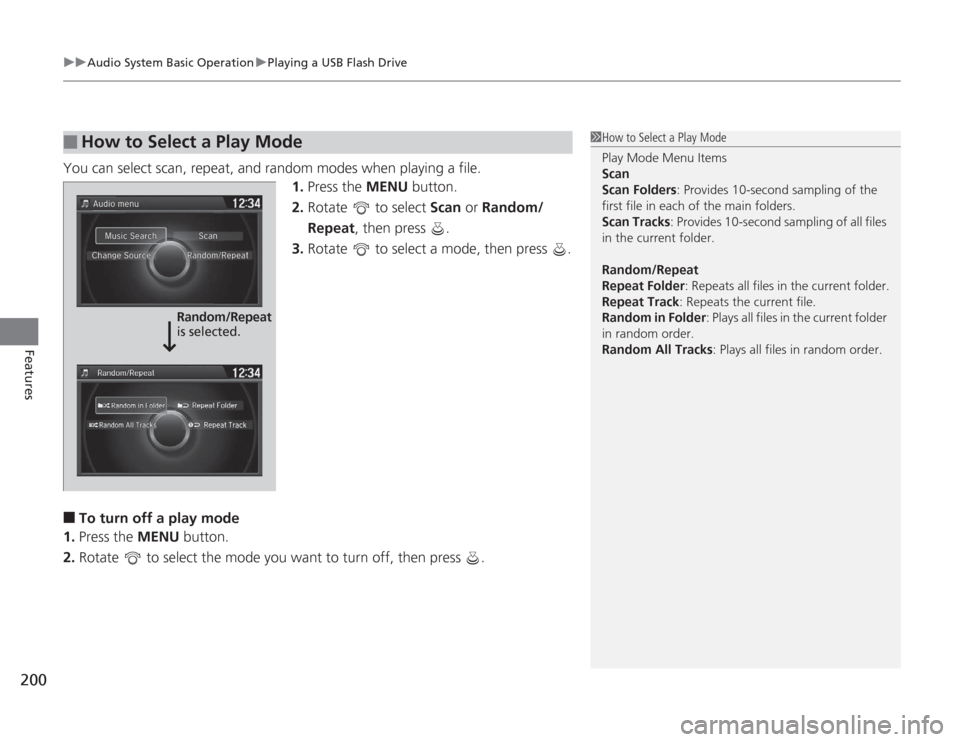
You can select scan, repeat, and random modes when playing a file.
1.Press the MENU button.
2. Rotate to select Scan or Random/
Repeat, then press .
3. Rotate to select a mode, then press .■
To turn off a play mode
1. Press the MENU button.
2. Rotate to select the mode you want to turn off, then press .
■
How to Select a Play Mode
1How to Select a Play Mode
Play Mode Menu Items
Scan
Scan Folders : Provides 10-second sampling of the
first file in each of the main folders.
Scan Tracks: Provides 10-second sampling of all files
in the current folder.
Random/Repeat
Repeat Folder : Repeats all files in the current folder.
Repeat Track: Repeats the current file.
Random in Folder : Plays all files in the current folder
in random order.
Random All Tracks : Plays all files in random order.
Random/Repeat
is selected.
Page 202 of 595
201
uuAudio System Basic Operation uPlaying Bluetooth ® Audio
Continued
Features
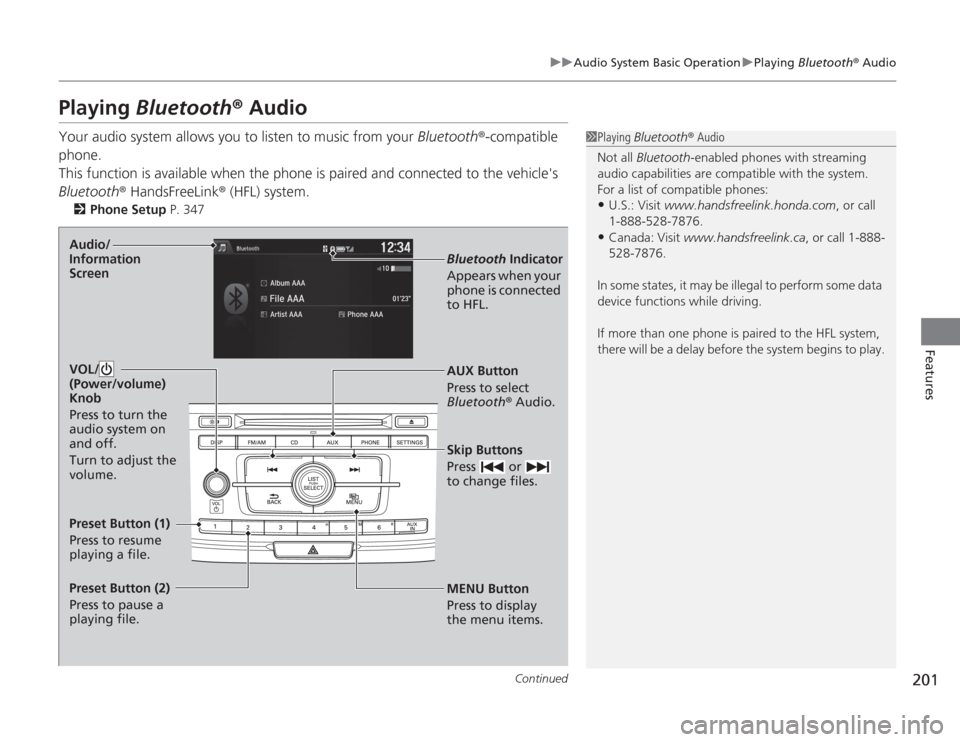
Playing Bluetooth ® AudioYour audio system allows you to listen to music from your Bluetooth®-compatible
phone.
This function is available when the phone is paired and connected to the vehicle's
Bluetooth ® HandsFreeLink ® (HFL) system.
2Phone Setup P. 347
1Playing Bluetooth ® Audio
Not all Bluetooth -enabled phones with streaming
audio capabilities are compatible with the system.
For a list of compatible phones:•U.S.: Visit www.handsfreelink.honda.com , or call
1-888-528-7876.•Canada: Visit www.handsfreelink.ca , or call 1-888-
528-7876.
In some states, it may be illegal to perform some data
device functions while driving.
If more than one phone is paired to the HFL system,
there will be a delay before the system begins to play.
MENU Button
Press to display
the menu items. AUX Button
Press to select
Bluetooth® Audio.
Skip Buttons
Press or
to change files.Bluetooth Indicator
Appears when your
phone is connected
to HFL.
VOL/
(Power/volume)
Knob
Press to turn the
audio system on
and off.
Turn to adjust the
volume.
Audio/
Information
ScreenPreset Button (1)
Press to resume
playing a file.
Preset Button (2)
Press to pause a
playing file.
Page 203 of 595
uuAudio System Basic Operation uPlaying Bluetooth ® Audio
202Features
1. Make sure that your phone is paired and
connected to HFL.
2. Press the AUX button.
If the phone is not recognized, another HFL-
compatible phone, which is not compatible
for Bluetooth ® Audio, may already be
connected.
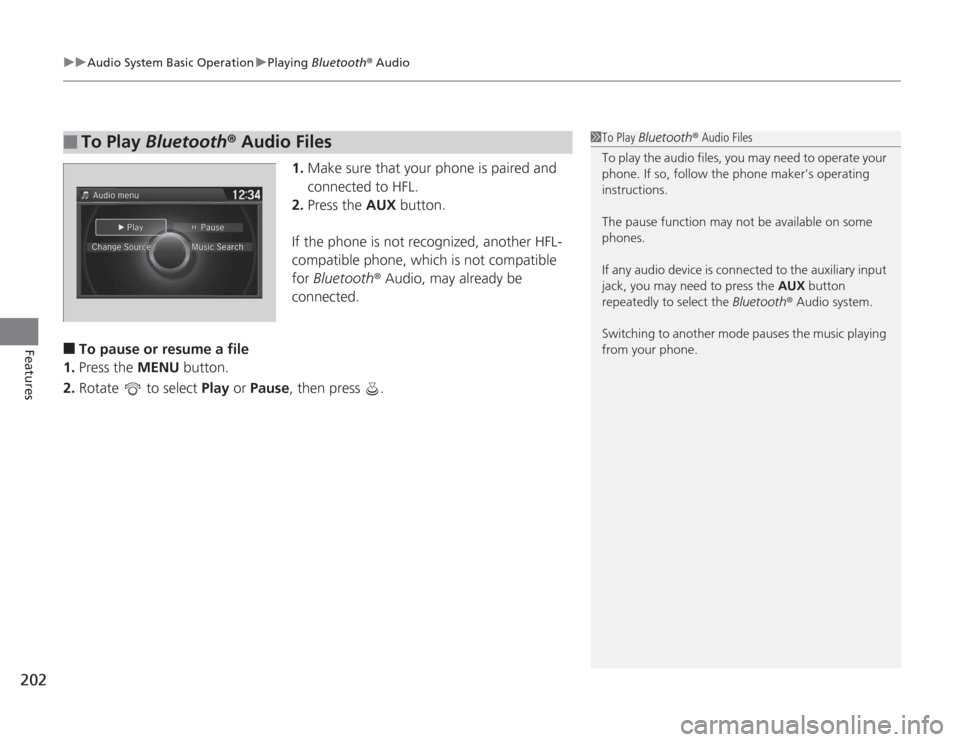
■
To pause or resume a file
1. Press the MENU button.
2. Rotate to select Play or Pause , then press .
■
To Play Bluetooth® Audio Files
1To Play Bluetooth ® Audio Files
To play the audio files, you may need to operate your
phone. If so, follow the phone maker's operating
instructions.
The pause function may not be available on some
phones.
If any audio device is connected to the auxiliary input
jack, you may need to press the AUX button
repeatedly to select the Bluetooth® Audio system.
Switching to another mode pauses the music playing
from your phone.