buttons HONDA ACCORD 2014 9.G Owners Manual
[x] Cancel search | Manufacturer: HONDA, Model Year: 2014, Model line: ACCORD, Model: HONDA ACCORD 2014 9.GPages: 595
Page 4 of 595
3Quick Reference Guide
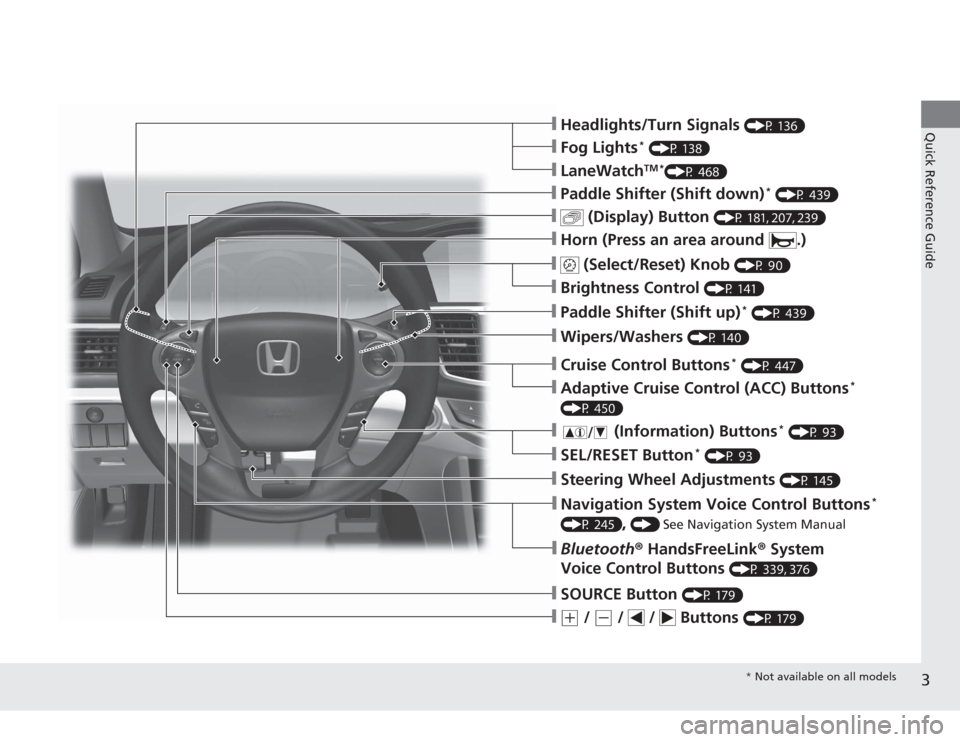
❙(+
/
(-
/ / Buttons
(P 179)
❙SOURCE Button
(P 179)
❙Bluetooth® HandsFreeLink ® System
Voice Control Buttons
(P 339, 376)
❙Navigation System Voice Control Buttons
*
(P 245)
, () See Navigation System Manual
❙Steering Wheel Adjustments
(P 145)
❙SEL/RESET Button
* (P 93)
❙
(Information) Buttons
* (P 93)
❙Adaptive Cruise Control (ACC) Buttons
*
(P 450)❙Cruise Control Buttons
* (P 447)
❙Wipers/Washers
(P 140)
❙Paddle Shifter (Shift up)
* (P 439)
❙Brightness Control
(P 141)
❙
(Select/Reset) Knob
(P 90)
❙Horn (Press an area around .)❙
(Display) Button
(P 181, 207, 239)
❙Paddle Shifter (Shift down)
* (P 439)
❙LaneWatch
TM *
(P 468)
❙Fog Lights
* (P 138)
❙Headlights/Turn Signals
(P 136)* Not available on all models
Page 13 of 595
12Quick Reference Guide
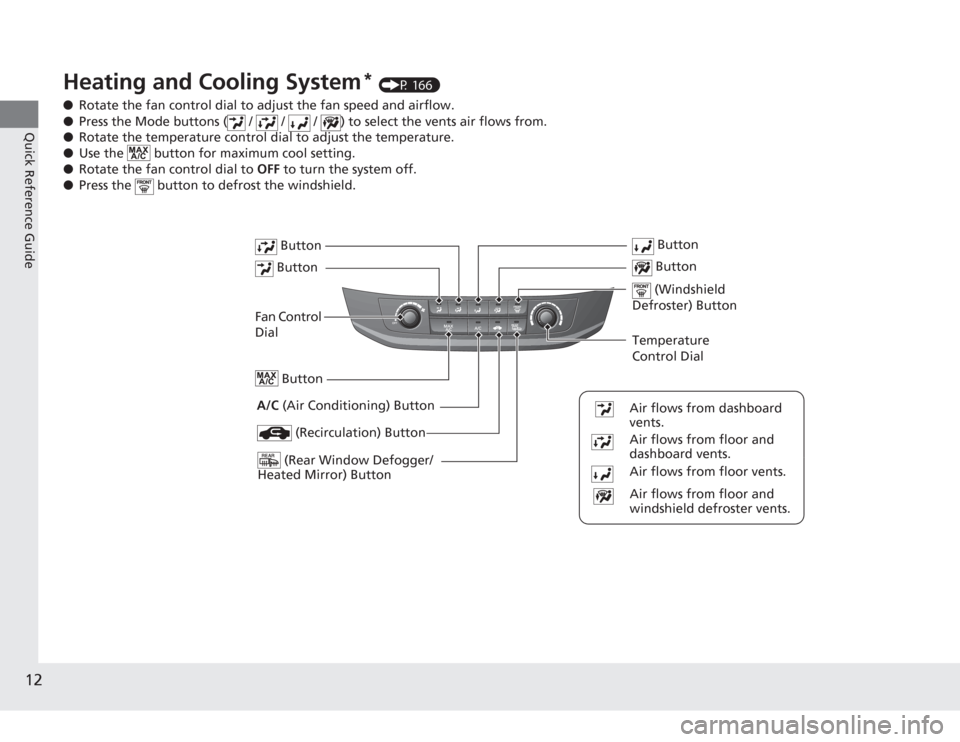
Heating and Cooling System
* (P 166)
● Rotate the fan control dial to adjust the fan speed and airflow.
● Press the Mode buttons ( / / / ) to select the vents air flows from.
● Rotate the temperature control dial to adjust the temperature.
● Use the button for maximum cool setting.
● Rotate the fan control dial to OFF to turn the system off.
● Press the button to defrost the windshield.
Fan Control
Dial
(Rear Window Defogger/
Heated Mirror) Button
(Windshield
Defroster) Button
A/C (Air Conditioning) Button
Air flows from floor and
windshield defroster vents.
Air flows from floor vents. Air flows from floor and
dashboard vents. Air flows from dashboard
vents.
Button Button Button
(Recirculation) Button
Temperature
Control Dial Button
Button
Page 14 of 595
13Quick Reference Guide
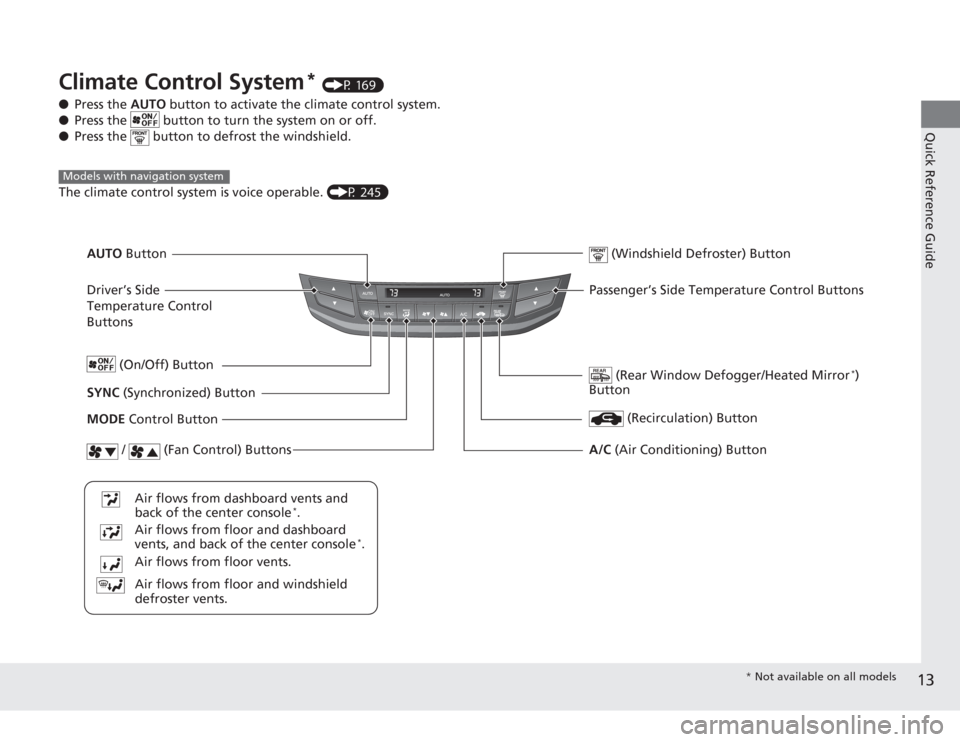
Climate Control System
* (P 169)
● Press the AUTO button to activate the climate control system.
● Press the button to turn the system on or off.
● Press the button to defrost the windshield.
The climate control system is voice operable. (P 245)
Models with navigation system
Driver’s Side
Temperature Control
Buttons
(Rear Window Defogger/Heated Mirror
*)
Button
(Windshield Defroster) Button
SYNC (Synchronized) Button
Air flows from floor and windshield
defroster vents.
Air flows from floor vents. Air flows from floor and dashboard
vents, and back of the center console
*.
Air flows from dashboard vents and
back of the center console
*.
AUTO
Button
(On/Off) Button
(Recirculation) Button
MODE Control Button
/ (Fan Control) Buttons
A/C (Air Conditioning) ButtonPassenger’s Side Temperature Control Buttons
* Not available on all models
Page 15 of 595
14Quick Reference Guide
Features
(P 173)
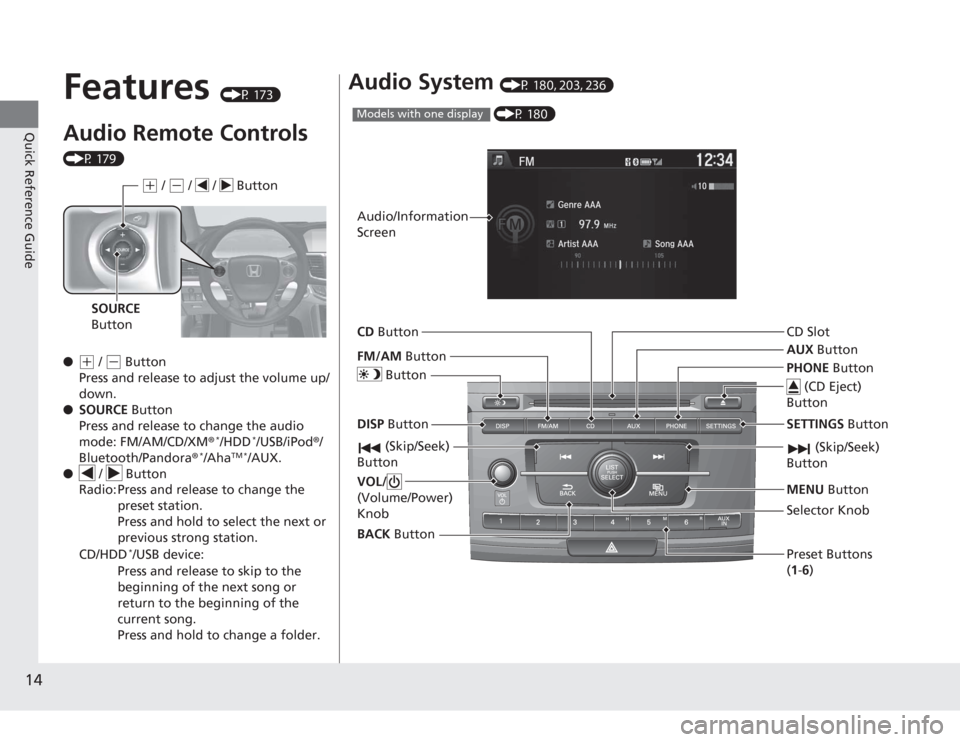
Audio Remote Controls (P 179)
●
(+
/ ( -
Button
Press and release to adjust the volume up/
down.
● SOURCE Button
Press and release to change the audio
mode: FM/AM/CD/XM ®
*/HDD
*/USB/iPod®/
Bluetooth/Pandora®
*/Aha
TM *
/AUX.
● / Button
Radio: Press and release to change the
preset station.
Press and hold to select the next or
previous strong station.
CD/HDD
*/USB device:
Press and release to skip to the
beginning of the next song or
return to the beginning of the
current song.
Press and hold to change a folder.( +
/ (-
/ / Button
SOURCE
Button
Audio System
(P 180, 203, 236) (P 180)
Models with one displayAudio/Information
Screen
BACK Button
FM/AM
Button
(Skip/Seek)
Button
Selector Knob
Button
VOL/
(Volume/Power)
KnobCD
Button
AUX Button
CD Slot
(CD Eject)
Button
Preset Buttons
( 1- 6)
SETTINGS Button
(Skip/Seek)
ButtonPHONE ButtonMENU Button
DISP Button
Page 16 of 595
15Quick Reference Guide
*1: Icons that appear on the screen vary by the source selected.
CD Slot (CD Eject) ButtonBACK Button
Selector Knob
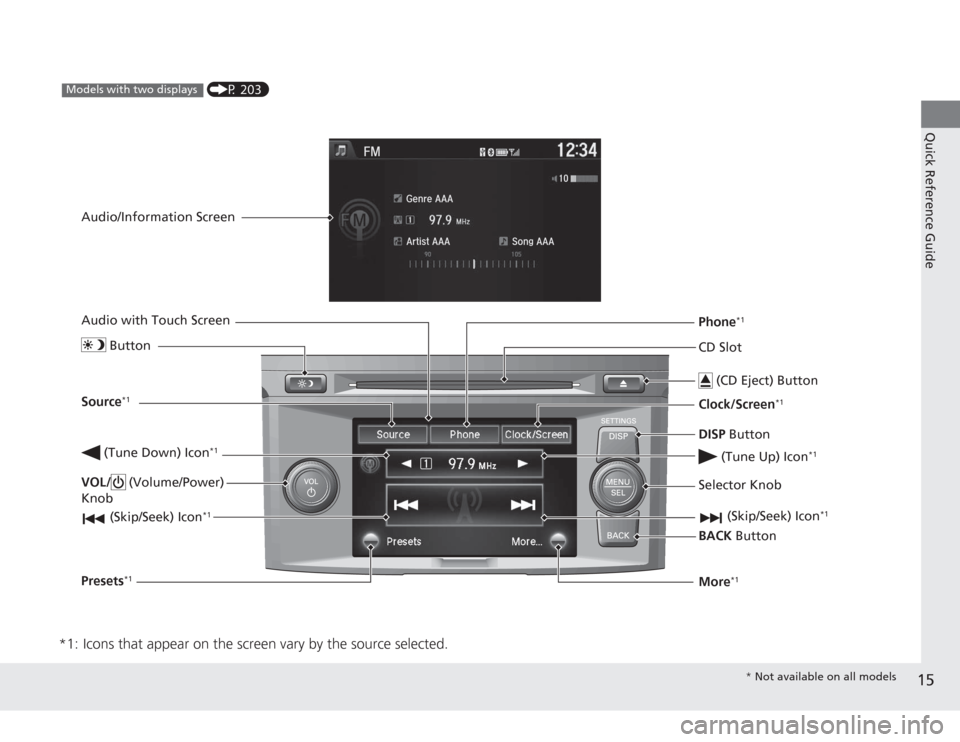
(Tune Down) Icon
*1
(Skip/Seek) Icon
*1
(P 203)
Models with two displays
Audio/Information Screen
Audio with Touch Screen
ButtonSource
*1
VOL/ (Volume/Power)
Knob
(Skip/Seek) Icon
*1
Presets
*1
Phone
*1
Clock/Screen
*1
DISP Button
(Tune Up) Icon
*1
More
*1
* Not available on all models
Page 68 of 595
67
Instrument Panel
This chapter describes the buttons, indicators, and gauges that are used while driving.
Indicators............................................ 68
Information Display Warning and Information Messages
*.................... 82
Multi-Information Display Warning and Information Messages*.................... 84
Gauges and Displays Gauges .............................................. 89
Information Display
*.......................... 90
Multi-Information Display
*................. 93
* Not available on all models
Page 167 of 595
166Controls
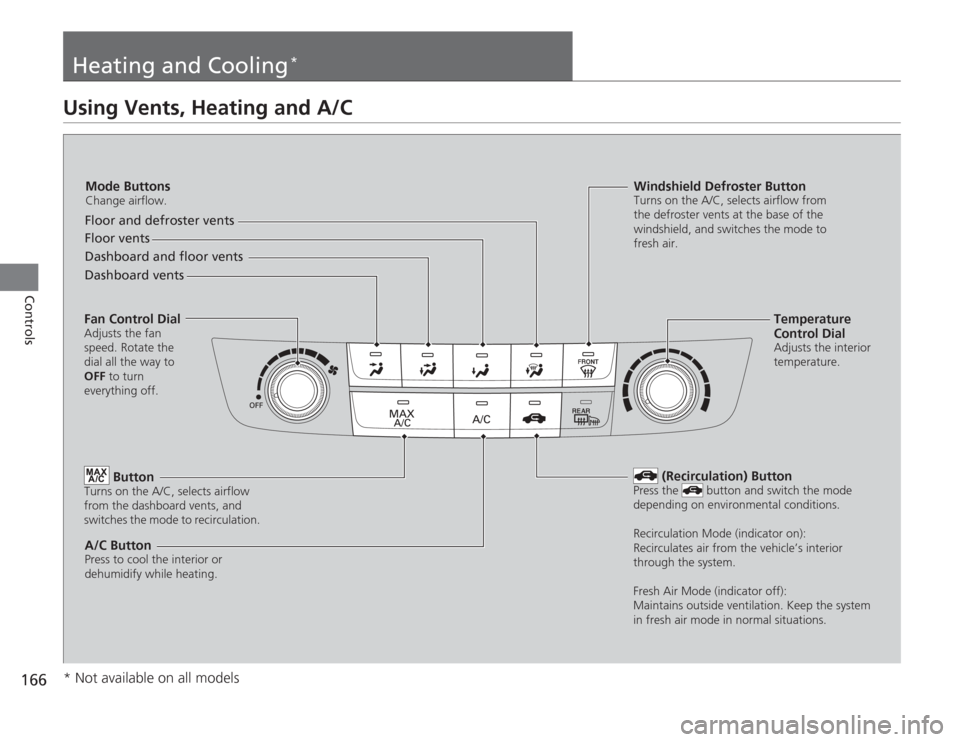
Heating and Cooling
*
Using Vents, Heating and A/C
Mode ButtonsChange airflow.Floor and defroster vents
Floor vents
Dashboard and floor vents
Dashboard vents
Fan Control DialAdjusts the fan
speed. Rotate the
dial all the way to
OFF to turn
everything off.
Button
Turns on the A/C, selects airflow
from the dashboard vents, and
switches the mode to recirculation.A/C ButtonPress to cool the interior or
dehumidify while heating.
Windshield Defroster ButtonTurns on the A/C, selects airflow from
the defroster vents at the base of the
windshield, and switches the mode to
fresh air.
Temperature
Control DialAdjusts the interior
temperature.
(Recirculation) Button
Press the button and switch the mode
depending on environmental conditions.
Recirculation Mode (indicator on):
Recirculates air from the vehicle’s interior
through the system.
Fresh Air Mode (indicator off):
Maintains outside ventilation. Keep the system
in fresh air mode in normal situations.
* Not available on all models
Page 170 of 595
169
Continued
Controls
Climate Control System
*
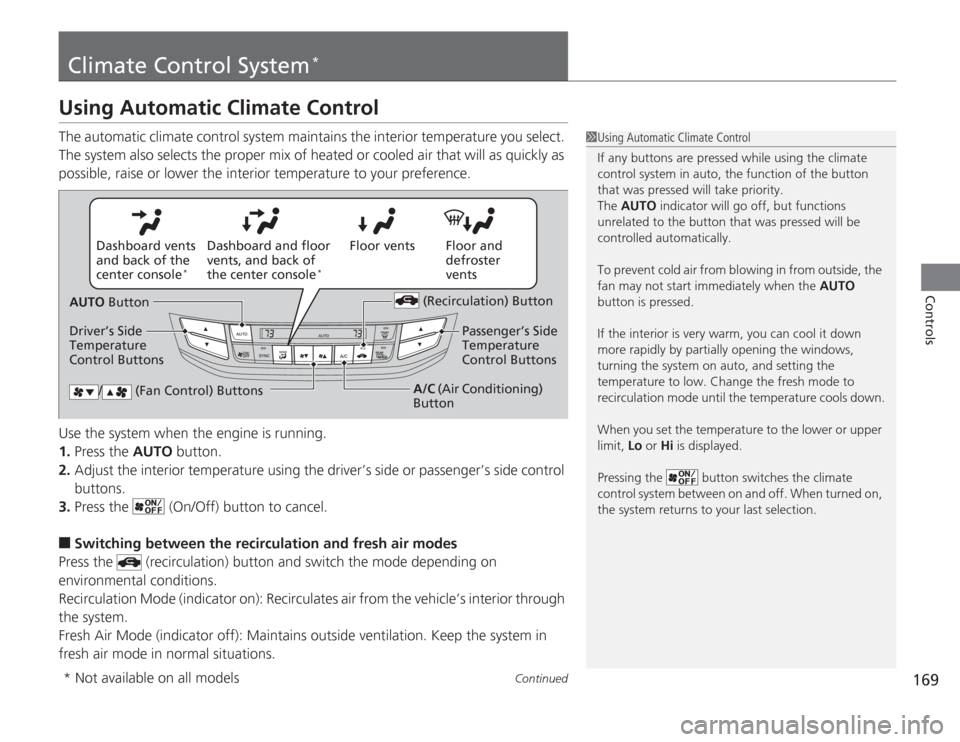
Using Automatic Climate ControlThe automatic climate control system maintains the interior temperature you select.
The system also selects the proper mix of heated or cooled air that will as quickly as
possible, raise or lower the interior temperature to your preference.
Use the system when the engine is running.
1.Press the AUTO button.
2. Adjust the interior temperature using the driver’s side or passenger’s side control
buttons.
3. Press the (On/Off) button to cancel.■
Switching between the recirculation and fresh air modes
Press the (recirculation) button and switch the mode depending on
environmental conditions.
Recirculation Mode (indicator on): Recirculates air from the vehicle’s interior through
the system.
Fresh Air Mode (indicator off): Maintains outside ventilation. Keep the system in
fresh air mode in normal situations.
1 Using Automatic Climate Control
If any buttons are pressed while using the climate
control system in auto, the function of the button
that was pressed will take priority.
The AUTO indicator will go off, but functions
unrelated to the button that was pressed will be
controlled automatically.
To prevent cold air from blowing in from outside, the
fan may not start immediately when the AUTO
button is pressed.
If the interior is very warm, you can cool it down
more rapidly by partially opening the windows,
turning the system on auto, and setting the
temperature to low. Change the fresh mode to
recirculation mode until the temperature cools down.
When you set the temperature to the lower or upper
limit, Lo or Hi is displayed.
Pressing the button switches the climate
control system between on and off. When turned on,
the system returns to your last selection.
Floor and
defroster
vents
Floor vents
Dashboard and floor
vents, and back of
the center console
*
Dashboard vents
and back of the
center console
*
AUTO Button
Driver’s Side
Temperature
Control Buttons (Recirculation) Button
/ (Fan Control) Buttons
A/C
(Air Conditioning)
Button Passenger’s Side
Temperature
Control Buttons
* Not available on all models
Page 172 of 595
171
uuClimate Control System
*uSynchronized Mode
Controls
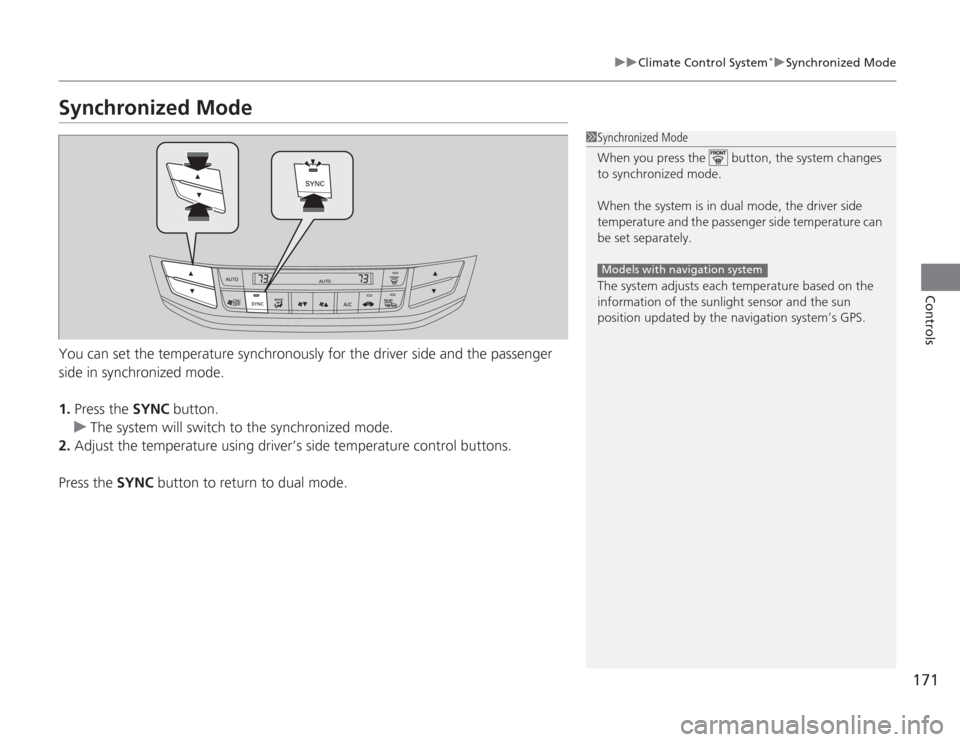
Synchronized ModeYou can set the temperature synchronously for the driver side and the passenger
side in synchronized mode.
1. Press the SYNC button.
u The system will switch to the synchronized mode.
2. Adjust the temperature using driver’s side temperature control buttons.
Press the SYNC button to return to dual mode.
1Synchronized Mode
When you press the button, the system changes
to synchronized mode.
When the system is in dual mode, the driver side
temperature and the passenge r side temperature can
be set separately.
The system adjusts each temperature based on the
information of the sunlight sensor and the sun
position updated by the navigation system’s GPS.
Models with navigation system
Page 175 of 595
174Features
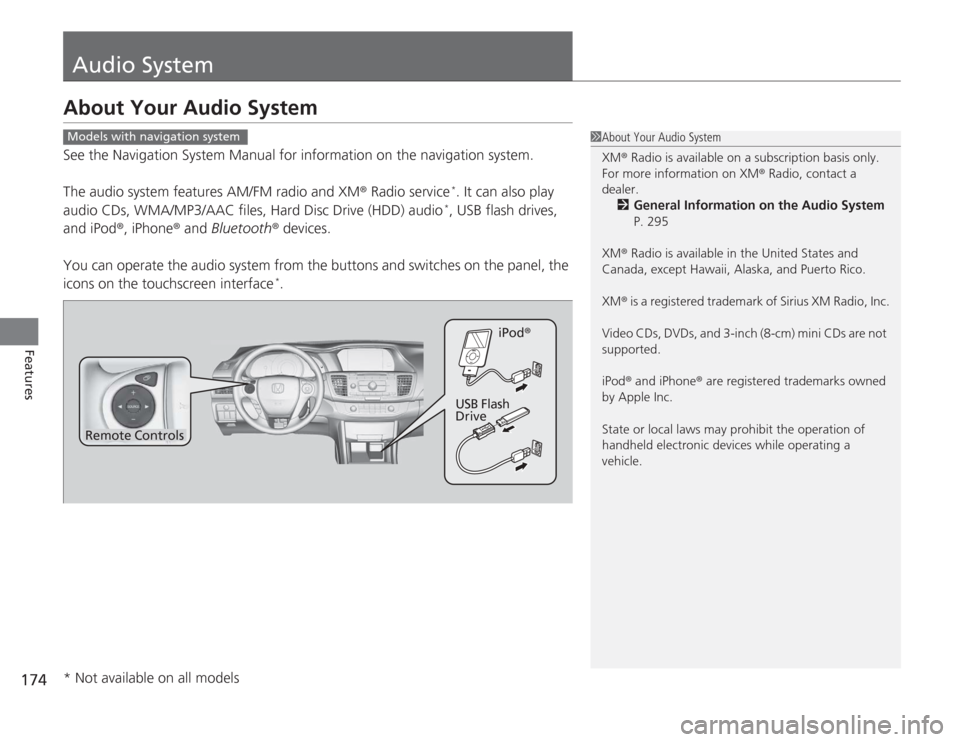
Audio SystemAbout Your Audio SystemSee the Navigation System Manual for information on the navigation system.
The audio system features AM/FM radio and XM® Radio service
*. It can also play
audio CDs, WMA/MP3/AAC files, Hard Disc Drive (HDD) audio*, USB flash drives,
and iPod®, iPhone ® and Bluetooth ® devices.
You can operate the audio system from the buttons and switches on the panel, the
icons on the touchscreen interface
*.
1 About Your Audio System
XM ® Radio is available on a subscription basis only.
For more information on XM® Radio, contact a
dealer.
2 General Information on the Audio System
P. 295
XM ® Radio is available in the United States and
Canada, except Hawaii, Alaska, and Puerto Rico.
XM ® is a registered trademark of Sirius XM Radio, Inc.
Video CDs, DVDs, and 3-inch (8-cm) mini CDs are not
supported.
iPod ® and iPhone ® are registered trademarks owned
by Apple Inc.
State or local laws may prohibit the operation of
handheld electronic devices while operating a
vehicle.
Models with navigation system
Remote Controls iPod
®
USB Flash
Drive
* Not available on all models