rear view mirror HONDA ACCORD 2014 9.G Owners Manual
[x] Cancel search | Manufacturer: HONDA, Model Year: 2014, Model line: ACCORD, Model: HONDA ACCORD 2014 9.GPages: 595
Page 5 of 595
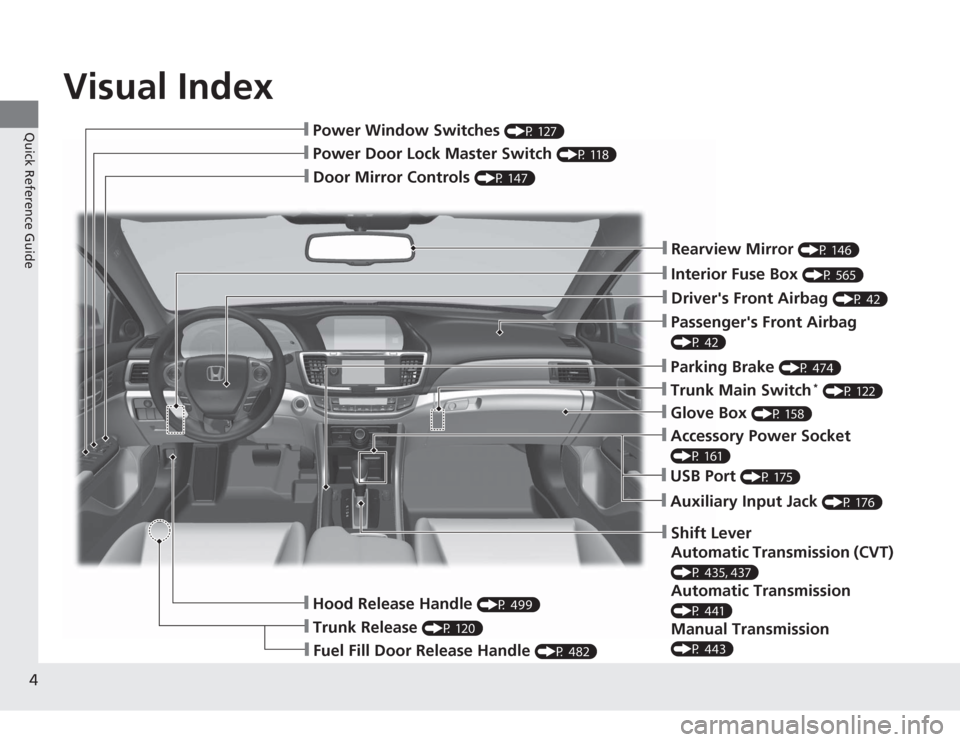
Visual Index
4Quick Reference Guide
❙Door Mirror Controls
(P 147)
❙Passenger's Front Airbag (P 42)❙Parking Brake
(P 474)
❙Glove Box
(P 158)
❙Rearview Mirror
(P 146)
❙Hood Release Handle
(P 499)
❙Power Door Lock Master Switch
(P 118)
❙Power Window Switches
(P 127)
❙Interior Fuse Box
(P 565)
❙Driver's Front Airbag
(P 42)
❙Trunk Main Switch
* (P 122)
❙Fuel Fill Door Release Handle
(P 482)
❙Trunk Release
(P 120)
❙Shift Lever
Automatic Transmission (CVT) (P 435, 437)Automatic Transmission (P 441)Manual Transmission (P 443)❙USB Port
(P 175)
❙Auxiliary Input Jack
(P 176)
❙Accessory Power Socket (P 161)
Page 7 of 595
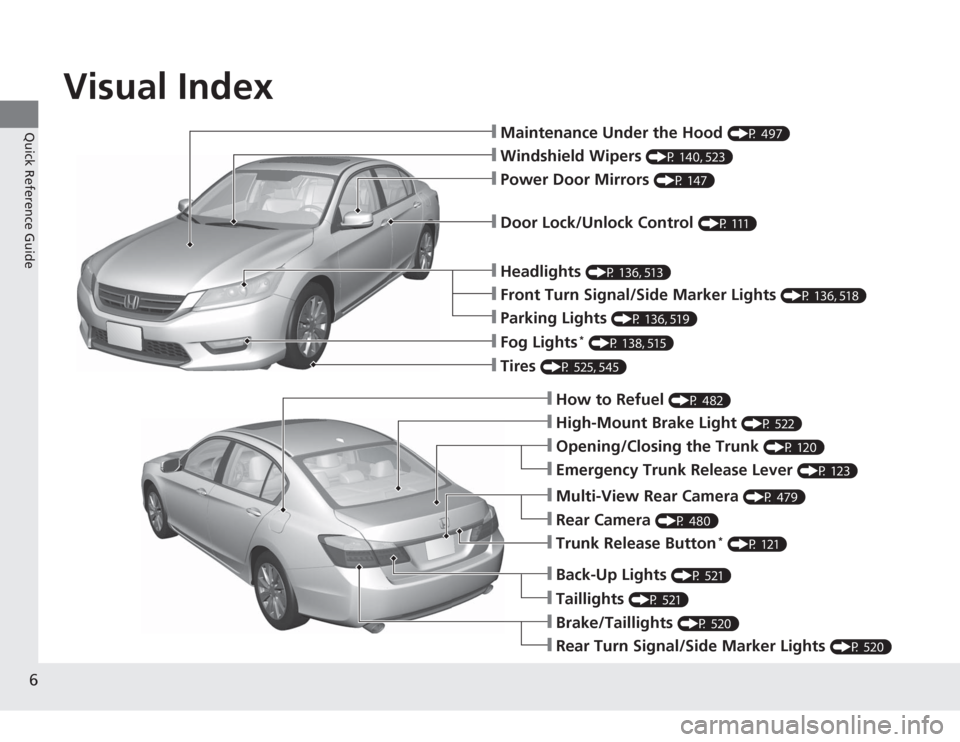
Visual Index
6Quick Reference Guide
❙Maintenance Under the Hood
(P 497)
❙Windshield Wipers
(P 140, 523)
❙Tires
(P 525, 545)
❙Door Lock/Unlock Control
(P 111)
❙Power Door Mirrors
(P 147)
❙Headlights
(P 136, 513)
❙How to Refuel
(P 482)
❙High-Mount Brake Light
(P 522)
❙Emergency Trunk Release Lever
(P 123)
❙Opening/Closing the Trunk
(P 120)
❙Parking Lights
(P 136, 519)
❙Front Turn Signal/Side Marker Lights
(P 136, 518)
❙Fog Lights
* (P 138, 515)
❙Multi-View Rear Camera
(P 479)
❙Trunk Release Button
* (P 121)
❙Back-Up Lights
(P 521)
❙Taillights
(P 521)
❙Brake/Taillights
(P 520)
❙Rear Turn Signal/Side Marker Lights
(P 520)
❙Rear Camera
(P 480)
Page 106 of 595
105
Controls
This chapter explains how to operate the various controls necessary for driving.
Clock.................................................. 106
Locking and Unlocking the Doors
Key Types and Functions .................. 108
Low Smart Entry Remote Signal Strength
*.................................... 110
Locking/Unlocking the Doors from the
Inside ............................................. 116
Childproof Door Locks ..................... 118
Auto Door Locking/Unlocking .......... 119
Opening and Closing the Trunk....... 120
Security System
Immobilizer System .......................... 124
Security System Alarm ...................... 124
Opening and Closing the Windows ..... 127
Opening and Closing the Moonroof
*.. 130
Operating the Switches Around the Steering Wheel
Ignition Switch
*............................... 131
ENGINE START/STOP Button
*........... 132
Ignition Switch and Power Mode
Comparison ................................... 135
Turn Signals ..................................... 136
Light Switches.................................. 136
Fog Lights
*...................................... 138
Daytime Running Lights ................... 139
Wipers and Washers ........................ 140
Brightness Control ........................... 141
Rear Defogger/Heated Door Mirror
*
Button ........................................... 142 Driving Position Memory System
*.... 143
Adjusting the Steering Wheel .......... 145
Adjusting the Mirrors Interior Rearview Mirror ................... 146
Power Door Mirrors ......................... 147
Adjusting the Seats .......................... 148
Interior Lights/Interior Convenience Items ................................................ 156
Heating and Cooling
*
Using Vents, Heating and A/C.......... 166
Climate Control System
*
Using Automatic Climate Control .... 169
Synchronized Mode ......................... 171
Automatic Climate Control Sensors ... 172
* Not available on all models
Page 147 of 595
146Controls
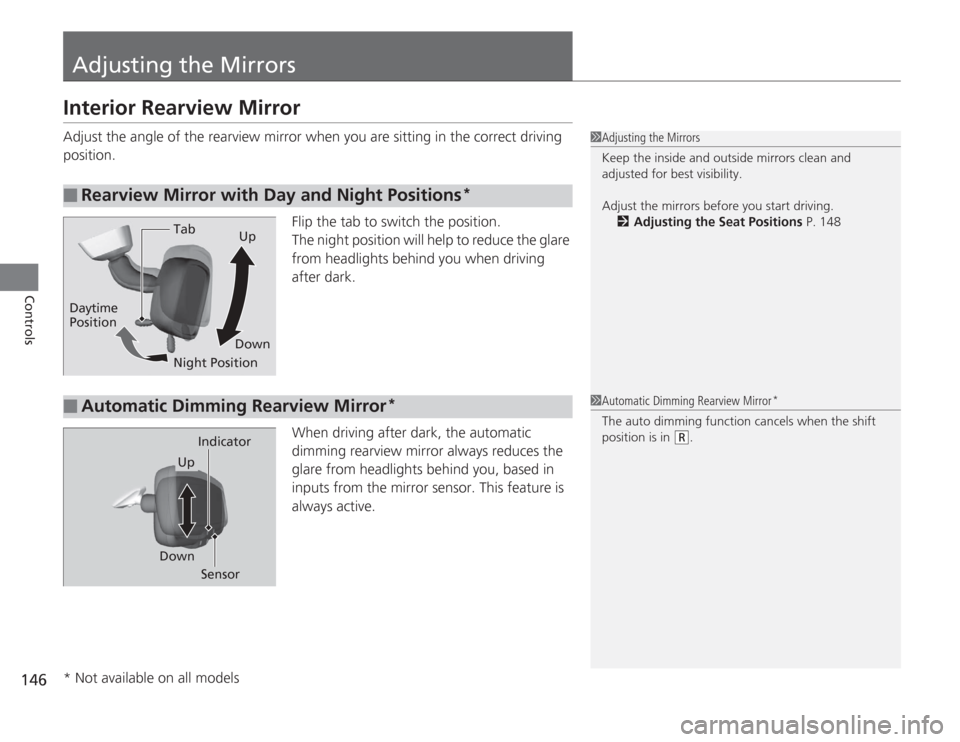
Adjusting the MirrorsInterior Rearview MirrorAdjust the angle of the rearview mirror when you are sitting in the correct driving
position.Flip the tab to switch the position.
The night position will help to reduce the glare
from headlights behind you when driving
after dark.
When driving after dark, the automatic
dimming rearview mirror always reduces the
glare from headlights behind you, based in
inputs from the mirror sensor. This feature is
always active.■
Rearview Mirror with Day and Night Positions
*
1Adjusting the Mirrors
Keep the inside and outside mirrors clean and
adjusted for best visibility.
Adjust the mirrors before you start driving.
2 Adjusting the Seat Positions P. 148
Tab
Daytime
Position
Night PositionUp
Down■
Automatic Dimming Rearview Mirror
*
1 Automatic Dimming Rearview Mirror
*
The auto dimming function cancels when the shift
position is in
(R
.
Sensor
Down Indicator
Up
* Not available on all models
Page 461 of 595
uuWhen Driving uForward Collision Warning (FCW)
*
460Driving
■
Automatic shutoff
FCW may automatically shut itself off and the FCW indicator comes and stays on when:
• The temperature inside the system is high.
• The windshield is blocked by dirt, mud, leaves, wet snow, etc.
• You drive off-road or on a mountain road, or curved and winding road for an
extended period.
• You drive in bad weather (rain, fog, snow, etc.).
• The radar sensor cover is blocked by dirt, mud, leaves, wet snow, etc.
• An abnormal tire condition is detected (wrong tire size, flat tire, etc.).
Once the conditions that caused FCW to shut off improve or are addressed (e.g.,
cleaning), the system comes back on.
1 Automatic shutoff
To help reduce the likelihood that high interior
temperatures will cause the camera system to shut
off, when parking, find a shady area or face the front
of the vehicle away from the sun. If you use a
reflective sun shade, do not allow it to cover the
camera housing. Covering the camera can
concentrate heat on the camera.
If the CAMERA HOT message appears:•Use the climate control system to cool down the
interior and, if necessary, the defroster mode when
windows are fogged.•Start driving the vehicle to lower the windshield
temperature, which cools down the area around
the FCW system.Models with information display
Beep
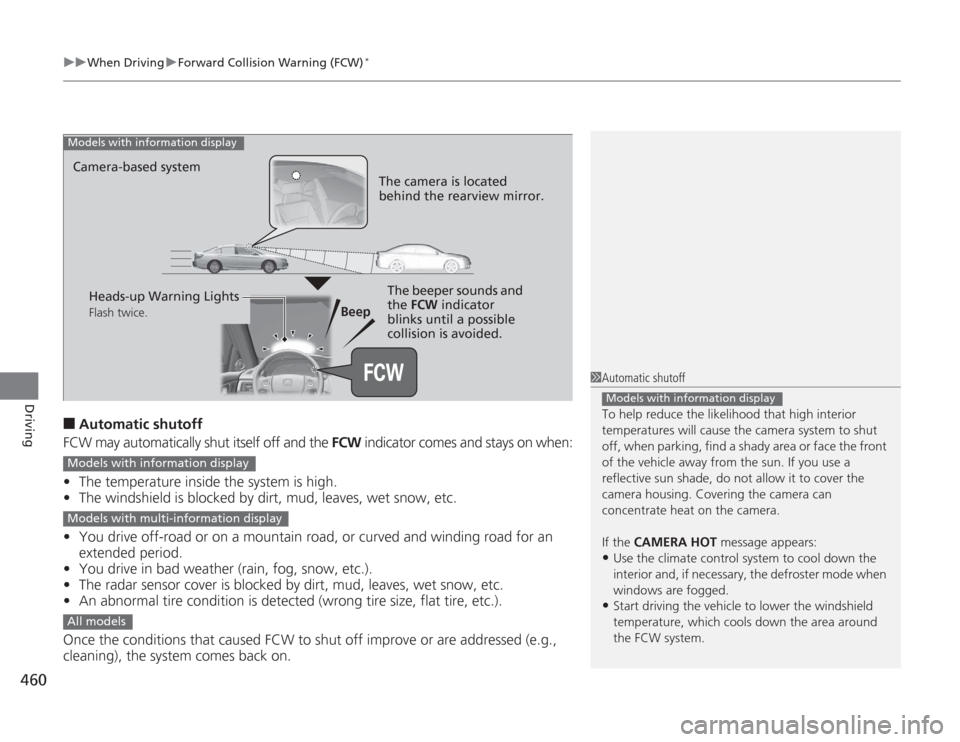
Camera-based system
Models with information display
The camera is located
behind the rearview mirror.The beeper sounds and
the FCW
indicator
blinks until a possible
collision is avoided.
Heads-up Warning LightsFlash twice.
Models with information displayModels with multi-information displayAll models
Page 465 of 595
uuWhen Driving uLane Departure Warning (LDW)
*
464Driving
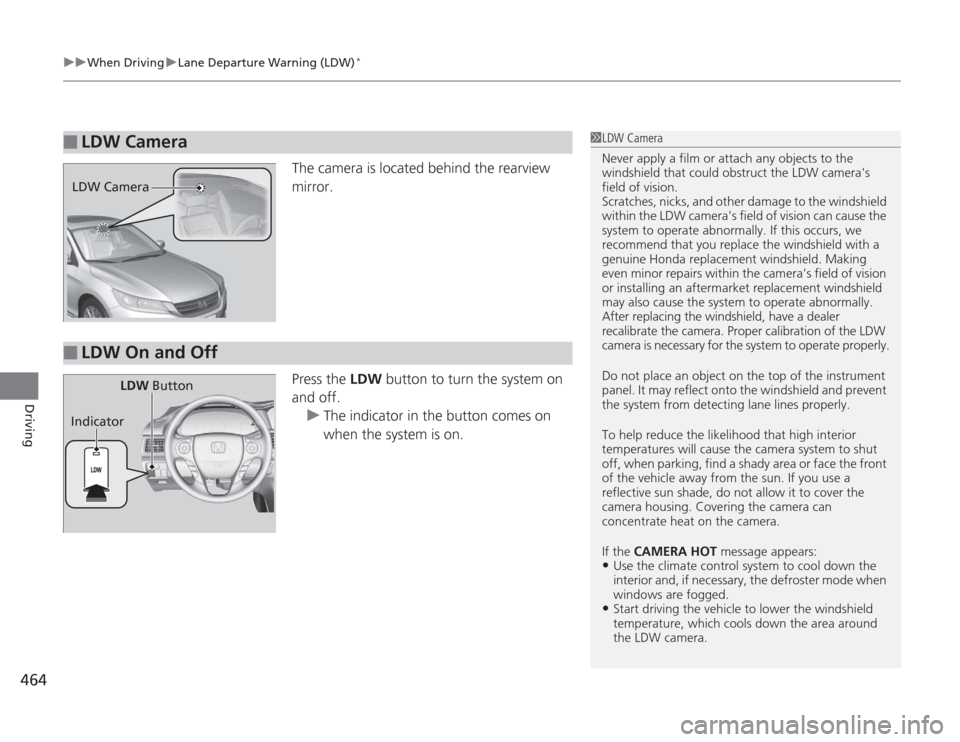
The camera is located behind the rearview
mirror.
Press the LDW button to turn the system on
and off. u The indicator in the button comes on
when the system is on.
■
LDW Camera
1LDW Camera
Never apply a film or attach any objects to the
windshield that could obstruct the LDW camera's
field of vision.
Scratches, nicks, and other damage to the windshield
within the LDW camera's field of vision can cause the
system to operate abnormally. If this occurs, we
recommend that you replace the windshield with a
genuine Honda replacement windshield. Making
even minor repairs within the camera's field of vision
or installing an aftermarket replacement windshield
may also cause the system to operate abnormally.
After replacing the windshield, have a dealer
recalibrate the camera. Proper calibration of the LDW
camera is necessary for the system to operate properly.
Do not place an object on the top of the instrument
panel. It may reflect onto the windshield and prevent
the system from detecting lane lines properly.
To help reduce the likelihood that high interior
temperatures will cause the camera system to shut
off, when parking, find a shady area or face the front
of the vehicle away from the sun. If you use a
reflective sun shade, do not allow it to cover the
camera housing. Covering the camera can
concentrate heat on the camera.
If the CAMERA HOT message appears:•Use the climate control system to cool down the
interior and, if necessary, the defroster mode when
windows are fogged.•Start driving the vehicle to lower the windshield
temperature, which cools down the area around
the LDW camera.
LDW Camera■
LDW On and Off
LDW Button
Indicator
Page 469 of 595
468
uuWhen Driving uLaneWatch
TM*
Driving
LaneWatch
TM
*
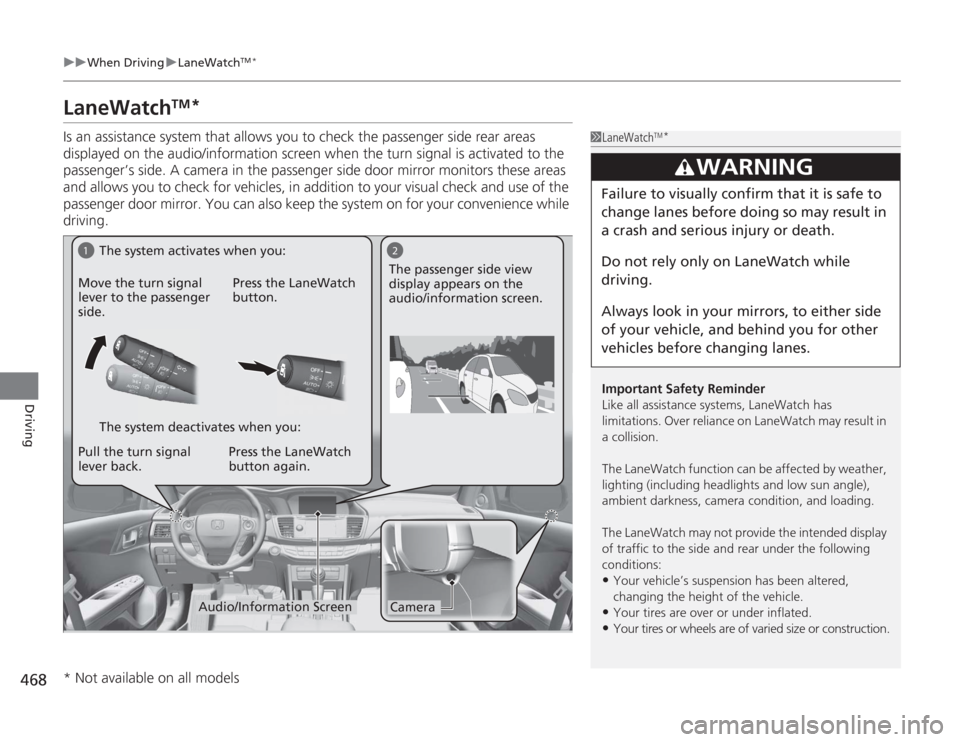
Is an assistance system that allows you to check the passenger side rear areas
displayed on the audio/information screen when the turn signal is activated to the
passenger’s side. A camera in the passenger side door mirror monitors these areas
and allows you to check for vehicles, in addition to your visual check and use of the
passenger door mirror. You can also keep the system on for your convenience while
driving.
1LaneWatch
TM*
Important Safety Reminder
Like all assistance systems, LaneWatch has
limitations. Over reliance on LaneWatch may result in
a collision.
The LaneWatch function can be af fected by weather,
lighting (including headlights and low sun angle),
ambient darkness, camera condition, and loading.
The LaneWatch may not provide the intended display
of traffic to the side and rear under the following
conditions:•Your vehicle’s suspension has been altered,
changing the height of the vehicle. •Your tires are over or under inflated.•Your tires or wheels are of varied size or construction.
3
WARNING
Failure to visually confirm that it is safe to
change lanes before doing so may result in
a crash and serious injury or death.
Do not rely only on LaneWatch while
driving.
Always look in your mirrors, to either side
of your vehicle, and behind you for other
vehicles before changing lanes.
1
2Camera
Audio/Information Screen
Move the turn signal
lever to the passenger
side.
Press the LaneWatch
button.
Pull the turn signal
lever back. Press the LaneWatch
button again. The passenger side view
display appears on the
audio/information screen.
The system activates when you:
The system deactivates when you:
* Not available on all models
Page 470 of 595
469
uuWhen Driving uLaneWatch
TM*
Driving
■
Customizing the LaneWatch settings
You can customize the following items using the audio/information screen.
• Show with Turn Signal : Selects whether LaneWatch monitor comes on when
you operate the turn signal light lever.
• Reference Lines : Selects whether the reference lines appear on the LaneWatch
monitor.
• Next Maneuver Pop up
*: Selects whether a turn direction screen of the
navigation system interrupts the LaneWatch display.
• Display : Adjusts display settings.
2Customized Features P. 299
■
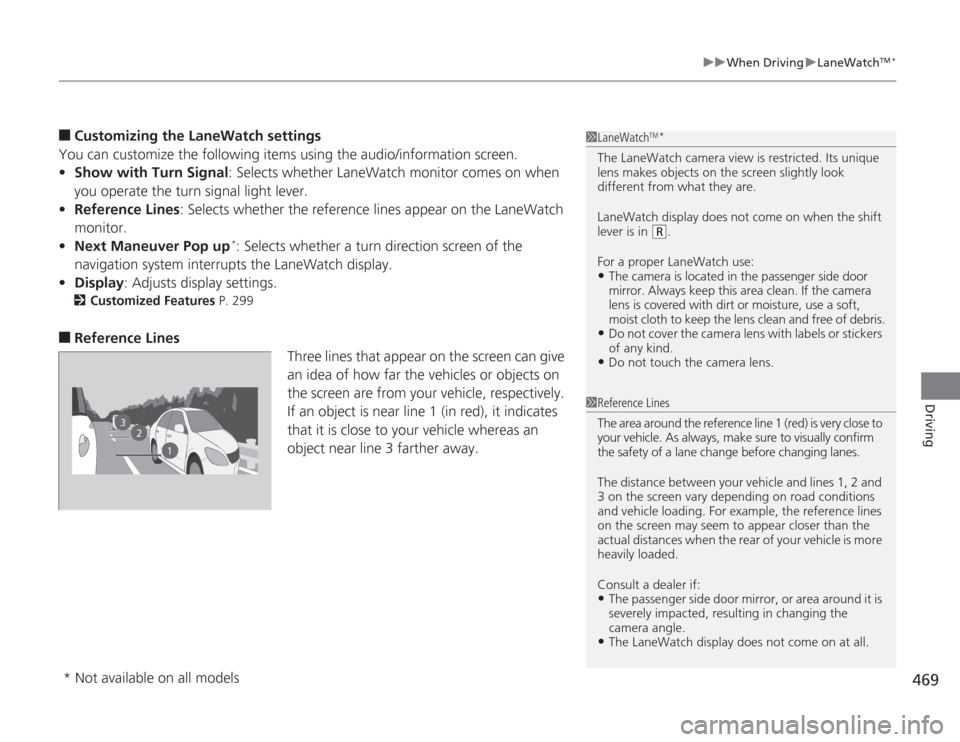
Reference Lines
Three lines that appear on the screen can give
an idea of how far the vehicles or objects on
the screen are from your vehicle, respectively.
If an object is near line 1 (in red), it indicates
that it is close to your vehicle whereas an
object near line 3 farther away.
1 LaneWatch
TM*
The LaneWatch camera view is restricted. Its unique
lens makes objects on the screen slightly look
different from what they are.
LaneWatch display does not come on when the shift
lever is in
(R
.
For a proper LaneWatch use:
•The camera is located in the passenger side door
mirror. Always keep this area clean. If the camera
lens is covered with dirt or moisture, use a soft,
moist cloth to keep the lens clean and free of debris.•Do not cover the camera lens with labels or stickers
of any kind.•Do not touch the camera lens.
2
3
1
1 Reference Lines
The area around the reference line 1 (red) is very close to
your vehicle. As always, make sure to visually confirm
the safety of a lane change before changing lanes.
The distance between your vehicle and lines 1, 2 and
3 on the screen vary depending on road conditions
and vehicle loading. For example, the reference lines
on the screen may seem to appear closer than the
actual distances when the rear of your vehicle is more
heavily loaded.
Consult a dealer if:•The passenger side door mirror, or area around it is
severely impacted, resulting in changing the
camera angle.•The LaneWatch display does not come on at all.
* Not available on all models
Page 589 of 595
588Index
Customer Service Information................. 582
Customized Features .......................... 97, 299DDaytime Running Lights ........................... 139
Dead Battery ............................................. 554
Defrosting the Windshield and Windows .......................................... 168, 170
Devices that Emit Radio Waves ................ 575
Dimming Headlights ............................................... 136
Rearview Mirror ....................................... 146
Dipstick (Engine Oil) ................................. 502
Directional Signals (Turn Signal) .............. 136
Display Button .......................... 181, 207, 239
Door Mirrors ............................................. 147
Doors ......................................................... 108
Auto Door Locking .................................. 119
Auto Door Unlocking ............................... 119
Door and Trunk Open Indicator ........... 31, 74
Keys ........................................................ 108
Locking/Unlocking the Doors from the Inside ............................................... 116
Locking/Unlocking the Doors from the Outside ............................................ 111
Lockout Prevention System ...................... 115
DOT Tire Quality Grading ........................ 528
Driving ....................................................... 417
ACC (Adaptive Cruise Control) ................ 450
Automatic Transmission/CVT ................... 434 Braking ................................................... 474
Cruise Control ......................................... 447
Shifting Gear ................................... 441, 443
Shifting Position .............................. 435, 437
Starting the Engine.......................... 427, 429
Driving Position Memory System ............ 143
Dust and Pollen Filter ............................... 537
EEco Assist System.......................................... 7
ECON Button ............................................ 446
Elapsed Time ............................................... 95
Electric Power Steering (EPS) System Indicator............................................ 74, 562
Electronic Stability Control (ESC) ............. 466
Emergency ................................................ 567
Emergency Engine Stop ........................... 553
Emergency Trunk Opener ........................ 123
Emissions Testing (Readiness Codes) ....... 577
Engine ....................................................... 574
Coolant ................................................... 507
Jump Starting .......................................... 554
Oil ........................................................... 501
Starting ........................................... 427, 429
Switch Buzzer.......................................... 131
Engine Coolant ......................................... 507
Adding to the Radiator ............................ 508
Adding to the Reserve Tank..................... 507
Overheating ............................................ 558
Temperature Gauge .................................. 89 Engine Oil
................................................. 501
Adding ................................................... 504
Checking ................................................ 502
Displaying Oil Life ........................... 489, 493
Low Oil Pressure Indicator ................. 69, 560
Recommended Engine Oil ....................... 501
ENGINE START/STOP Button .................... 132
EPS (Electric Power Steering)
System ............................................... 74, 562
Exhaust Gas Hazard (Carbon Monoxide) .................................. 64
Expanded View Driver’s Mirror ............... 147
Exterior Care (Cleaning) .......................... 540
Exterior Mirrors ........................................ 147
FFeatures.................................................... 173
Filters Dust and Pollen....................................... 537
Oil .......................................................... 505
Flat Tire ..................................................... 545
Floor Mats ................................................ 539
Fluids
Automatic Transmission .......................... 510
Brake/Clutch ........................................... 511
Continuously Variable Transmission (CVT) .................................................... 509
Engine Coolant ....................................... 507
Manual Transmission .............................. 509
Windshield Washer ................................. 512
Page 591 of 595
590Index
Ignition Switch.......................................... 131
Illumination Control
Knob ....................................................... 141
Immobilizer System .................................. 124
Indicator .................................................... 77
Indicators ..................................................... 68
ABS (Anti-lock Brake System) ..................... 72
Adaptive Cruise Control (ACC) .................. 80
Brake System (Amber)................................ 68
Brake System (Red) .................................... 68
Charging System ............................... 69, 560
CRUISE CONTROL .............................. 80, 448
CRUISE MAIN .................................... 80, 447
Door and Trunk Open ................................ 74
ECON Mode ...................................... 80, 446
Electric Power Steering (EPS) System ............................................. 74, 562
Fog Light ................................................... 77
Forward Collision Warning (FCW) .............. 78
High Beam................................................. 76
Immobilizer System .................................... 77
Lane Departure Warning (LDW) ................. 79
Light Control ............................................. 81
Lights On ................................................... 76
Low Fuel .................................................... 72
Low Oil Pressure ................................ 69, 560
Low Tire Pressure/TPMS ............. 75, 470, 472
Maintenance Minder ......................... 80, 489
Malfunction Indicator Lamp ............... 69, 561
Parking Brake and Brake System ........ 68, 562
Seat Belt Reminder .............................. 33, 71 Security System Alarm ............................... 77
Smart Entry System ................................... 81
Starter System ........................................... 81
Supplemental Restraint System ............ 49, 72
System Message ........................................ 76
Transmission ............................................. 71
Turn Signal and Hazard Warning ............... 76
VSA
® (Vehicle Stability Assist)
System ............................................ 73, 466
VSA ® OFF .......................................... 73, 467
Washer Level ............................................. 80
Information .............................................. 569
Information Display ................................... 90
Instant Fuel Economy ........................... 91, 96
Instrument Panel ........................................ 67
Brightness Control................................... 141
Interface Dial ............................................ 236
Interior Lights ........................................... 156
Interior Rearview Mirror .......................... 146
JJack (Wheel Nut Wrench) ........................ 548
Jump Starting ........................................... 554KKey Number Tag ....................................... 109
Keyless Lockout Prevention ..................... 115
Keys ........................................................... 108
Lockout Prevention.................................. 115 Master Keys ............................................ 108
Number Tag............................................ 109
Rear Door Won’t Open ........................... 118
Remote Transmitter ................................ 111
Types and Functions................................ 108
Valet Key ........................................ 109, 122
Won’t Turn ............................................... 22
Kickdown
(Automatic Transmission/CVT) .............. 434
LLane Departure Warning (LDW) ............. 462
LaneWatch
TM
............................................ 468
Language (HFL) ................................ 341, 377
LATCH (Child Seats) ................................... 57
Lights ................................................ 136, 513
Automatic............................................... 137
Bulb Replacement ................................... 513
Daytime Running Lights .......................... 139
Fog Lights ............................................... 138
High Beam Indicator ................................. 76
Interior.................................................... 156
Light Switches......................................... 136
Lights On Indicator.................................... 76
Turn Signals ............................................ 136
Load Limits ............................................... 421
Locking/Unlocking ................................... 108
Auto Door Locking/Unlocking ................. 119
Childproof Door Locks ............................ 118
From Inside ............................................. 116