lock HONDA ACCORD 2015 9.G Owner's Manual
[x] Cancel search | Manufacturer: HONDA, Model Year: 2015, Model line: ACCORD, Model: HONDA ACCORD 2015 9.GPages: 593
Page 61 of 593
uuChild Safety uSafety of Infants and Small Children
60Safe Driving
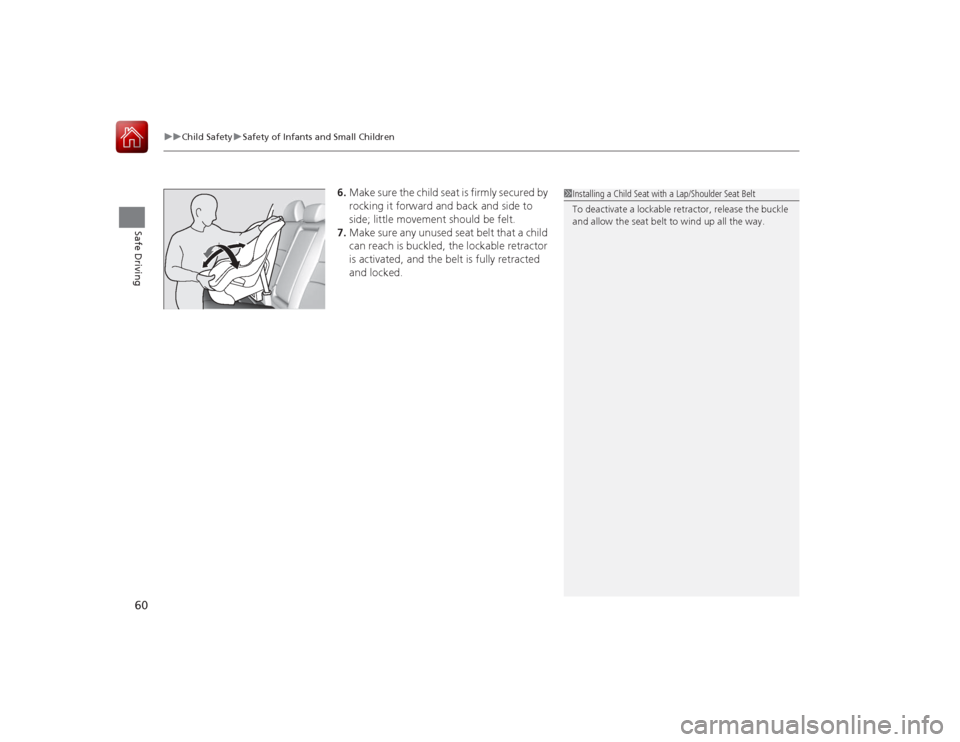
6. Make sure the child seat is firmly secured by
rocking it forward and back and side to
side; little movement should be felt.
7. Make sure any unused seat belt that a child
can reach is buckled, the lockable retractor
is activated, and the belt is fully retracted
and locked.
1Installing a Child Seat with a Lap/Shoulder Seat Belt
To deactivate a lockable retractor, release the buckle
and allow the seat belt to wind up all the way.
Page 73 of 593
72
uuIndicators u
Instrument Panel
*1:Models with the smart entry system have an ENGINE START/STOP button instead of an ignition switch.Indicator
Name
On/Blinking
Explanation
Message
*
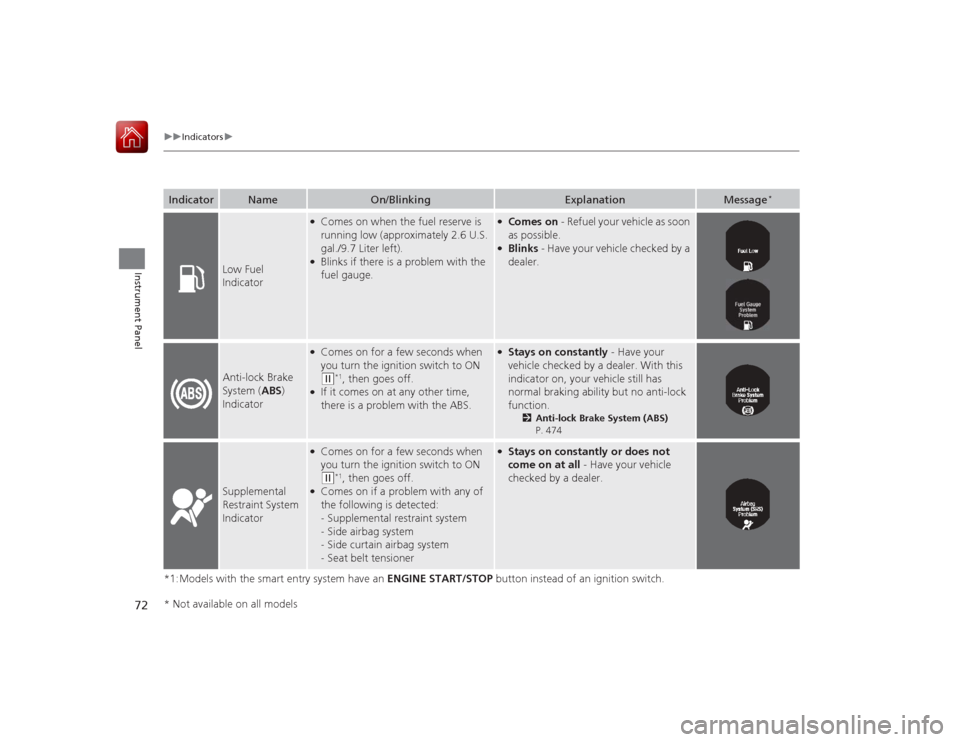
Low Fuel
Indicator
●Comes on when the fuel reserve is
running low (approximately 2.6 U.S.
gal./9.7 Liter left).●Blinks if there is a problem with the
fuel gauge.
●Comes on - Refuel your vehicle as soon
as possible.●Blinks - Have your vehicle checked by a
dealer.
Anti-lock Brake
System ( ABS)
Indicator
●Comes on for a few seconds when
you turn the ignition switch to ON (w
*1, then goes off.
●If it comes on at any other time,
there is a problem with the ABS.
●Stays on constantly - Have your
vehicle checked by a dealer. With this
indicator on, your vehicle still has
normal braking ability but no anti-lock
function.
2 Anti-lock Brake System (ABS)
P. 474
Supplemental
Restraint System
Indicator
●Comes on for a few seconds when
you turn the ignition switch to ON (w
*1, then goes off.
●Comes on if a problem with any of
the following is detected:
-Supplemental restraint system
- Side airbag system
- Side curtain airbag system
- Seat belt tensioner
●Stays on constantly or does not
come on at all - Have your vehicle
checked by a dealer.
* Not available on all models
Page 78 of 593
77
uuIndicators u
Continued
Instrument Panel
*1:Models with the smart entry system have an ENGINE START/STOP button instead of an ignition switch.Indicator
Name
On/Blinking
Explanation
Message
*
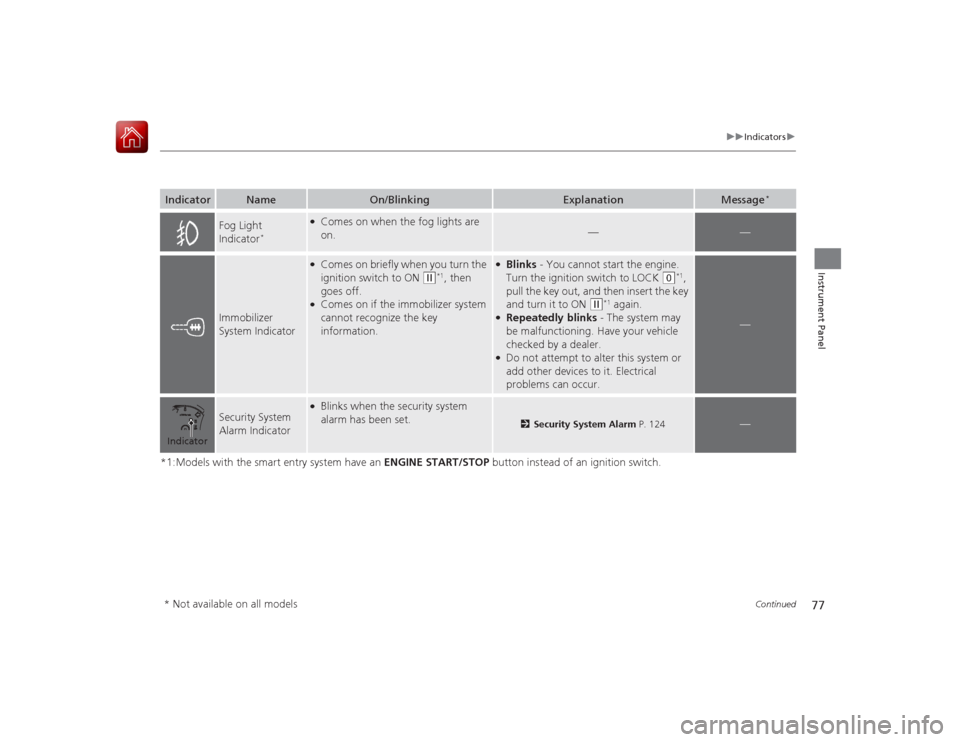
Fog Light
Indicator
*
●Comes on when the fog lights are
on.
—
—
Immobilizer
System Indicator
●Comes on briefly when you turn the
ignition switch to ON
(w
*1, then
goes off.
●Comes on if the immobilizer system
cannot recognize the key
information.
●Blinks - You cannot start the engine.
Turn the ignition switch to LOCK
(0
*1,
pull the key out, and then insert the key
and turn it to ON
(w
*1 again.
●Repeatedly blinks - The system may
be malfunctioning. Have your vehicle
checked by a dealer.●Do not attempt to alter this system or
add other devices to it. Electrical
problems can occur.
—
Security System
Alarm Indicator
●Blinks when the security system
alarm has been set.
2 Security System Alarm P. 124
—
Indicator* Not available on all models
Page 79 of 593
78
uuIndicators u
Instrument Panel
*1:Models with the smart entry system have an ENGINE START/STOP button instead of an ignition switch.
*2:On the left: Models with information display On the right: Models with multi-information displayIndicator
Name
On/Blinking
Explanation
Message
*2
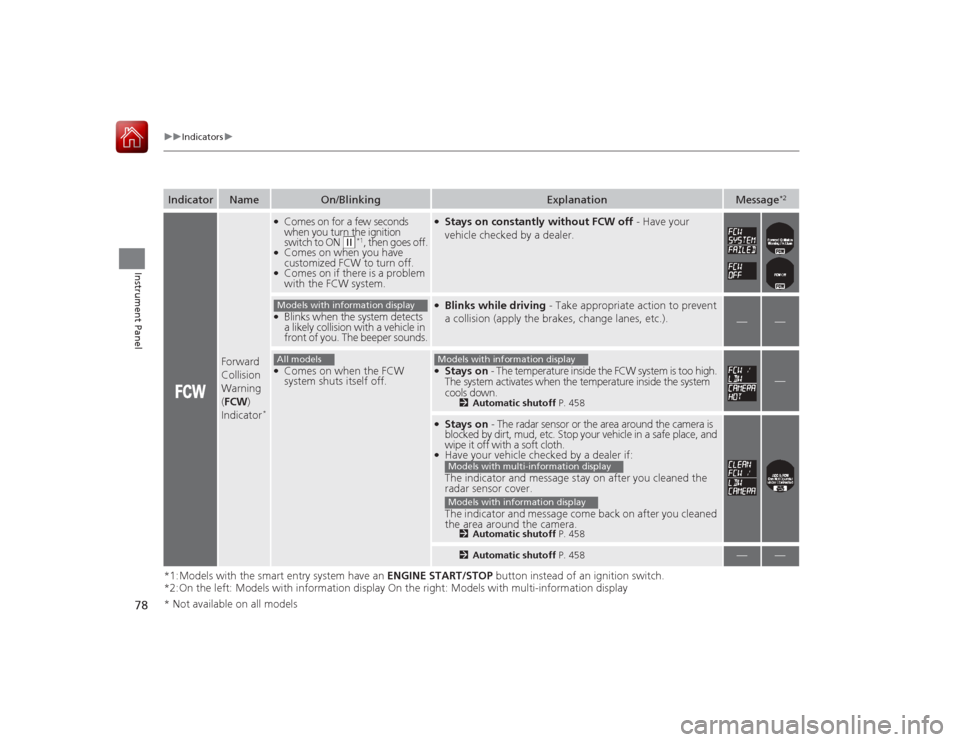
Forward
Collision
Warning
( FCW )
Indicator
*●Comes on for a few seconds
when you turn the ignition
switch to ON
(w
*1, then goes off.
●Comes on when you have
customized FCW to turn off.●Comes on if there is a problem
with the FCW system.
●Stays on constantly without FCW off - Have your
vehicle checked by a dealer.
●Blinks when the system detects
a likely collision with a vehicle in
front of you. The beeper sounds.
●Blinks while driving - Take appropriate action to prevent
a collision (apply the brakes, change lanes, etc.).
—
—
●Comes on when the FCW
system shuts itself off.
●Stays on - The temperature inside the FCW system is too high.
The system activates when the temperature inside the system
cools down.
2 Automatic shutoff P. 458
—
●Stays on - The radar sensor or the area around the camera is
blocked by dirt, mud, etc. Stop your vehicle in a safe place, and
wipe it off with a soft cloth.●Have your vehicle checked by a dealer if:
The indicator and message stay on after you cleaned the
radar sensor cover.
The indicator and message come back on after you cleaned
the area around the camera.
2 Automatic shutoff P. 4582Automatic shutoff P. 458
—
—
Models with information displayAll models
Models with information displayModels with multi-information displayModels with information display
* Not available on all models
Page 80 of 593
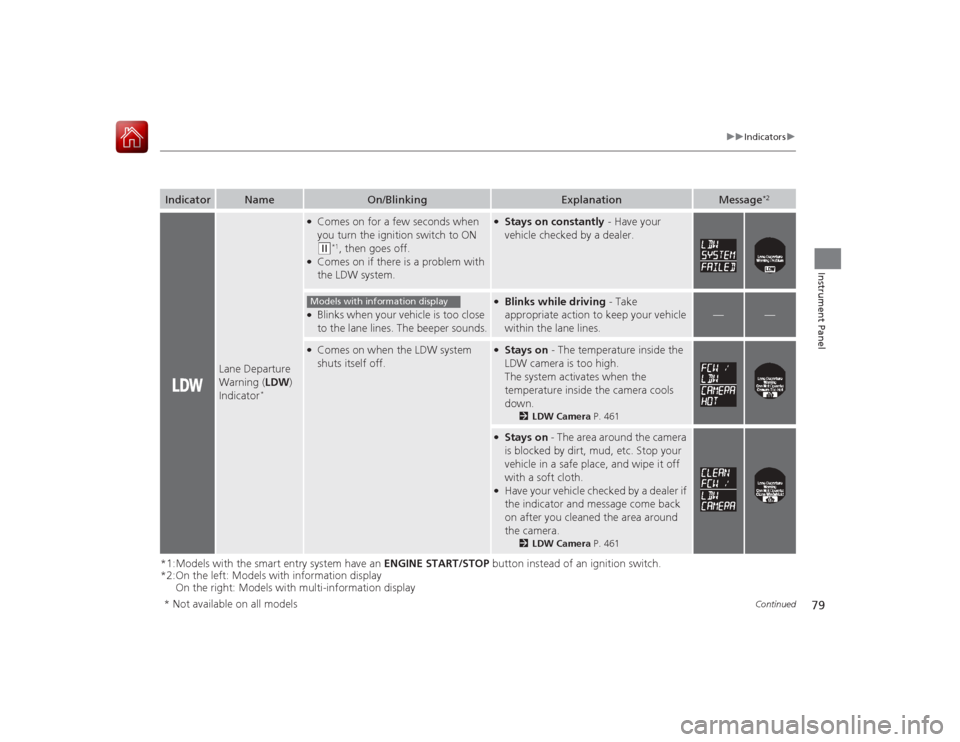
79
uuIndicators u
Continued
Instrument Panel
*1:Models with the smart entry system have an ENGINE START/STOP button instead of an ignition switch.
*2:On the left: Models with information display
On the right: Models with multi-information displayIndicator
Name
On/Blinking
Explanation
Message
*2
Lane Departure
Warning ( LDW)
Indicator
*
●Comes on for a few seconds when
you turn the ignition switch to ON (w
*1, then goes off.
●Comes on if there is a problem with
the LDW system.
●Stays on constantly - Have your
vehicle checked by a dealer.
●Blinks when your vehicle is too close
to the lane lines. The beeper sounds.
●Blinks while driving - Take
appropriate action to keep your vehicle
within the lane lines.
—
—
●Comes on when the LDW system
shuts itself off.
●Stays on - The temperature inside the
LDW camera is too high.
The system activates when the
temperature inside the camera cools
down.
2 LDW Camera P. 461
●Stays on - The area around the camera
is blocked by dirt, mud, etc. Stop your
vehicle in a safe place, and wipe it off
with a soft cloth.●Have your vehicle checked by a dealer if
the indicator and message come back
on after you cleaned the area around
the camera.
2 LDW Camera P. 461
Models with information display
* Not available on all models
Page 84 of 593
83
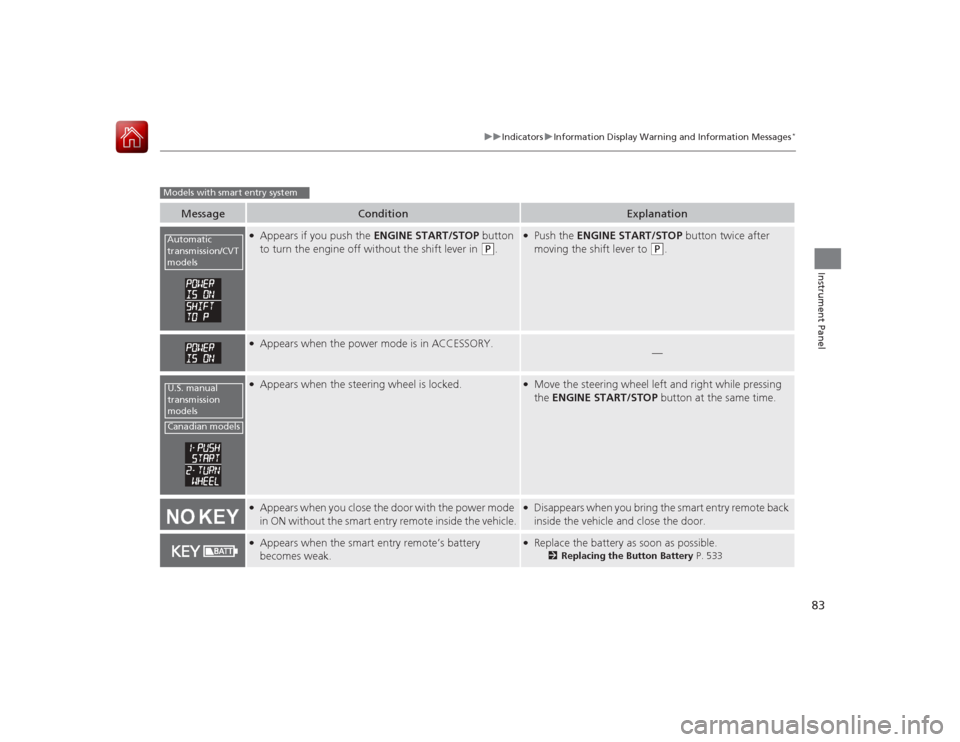
uuIndicators uInformation Display Warning and Information Messages
*
Instrument Panel
Message
Condition
Explanation
●Appears if you push the ENGINE START/STOP button
to turn the engine off without the shift lever in
(P
.
●Push the ENGINE START/STOP button twice after
moving the shift lever to
(P
.
●Appears when the power mode is in ACCESSORY.
—
●Appears when the steering wheel is locked.
●Move the steering wheel left and right while pressing
the ENGINE START/STOP button at the same time.
●Appears when you close the door with the power mode
in ON without the smart entry remote inside the vehicle.
●Disappears when you bring the smart entry remote back
inside the vehicle and close the door.
●Appears when the smart entry remote’s battery
becomes weak.
●Replace the battery as soon as possible.
2Replacing the Button Battery P. 533
Models with smart entry systemAutomatic
transmission/CVT
modelsU.S. manual
transmission
modelsCanadian models
Page 86 of 593
85
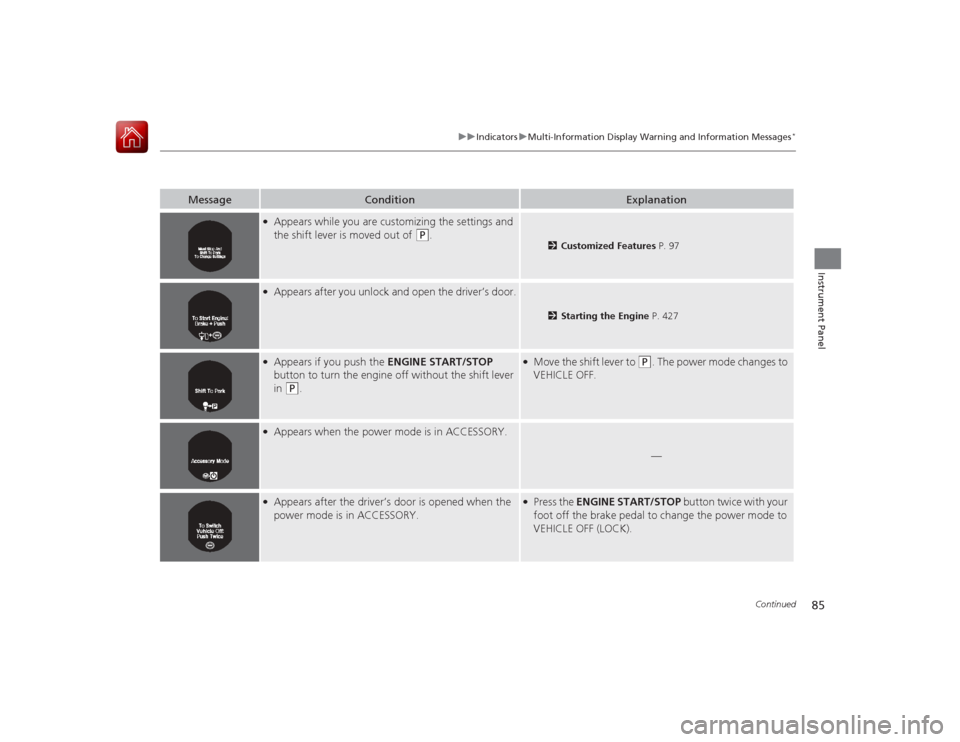
uuIndicators uMulti-Information Display Wa rning and Information Messages
*
Continued
Instrument Panel
Message
Condition
Explanation
●Appears while you are customizing the settings and
the shift lever is moved out of
(P
.
2Customized Features P. 97
●Appears after you unlock and open the driver’s door.
2Starting the Engine P. 427
●Appears if you push the ENGINE START/STOP
button to turn the engine off without the shift lever
in
(P
.
●Move the shift lever to
(P
. The power mode changes to
VEHICLE OFF.
●Appears when the power mode is in ACCESSORY.
—
●Appears after the driver’s door is opened when the
power mode is in ACCESSORY.
●Press the ENGINE START/STOP button twice with your
foot off the brake pedal to change the power mode to
VEHICLE OFF (LOCK).
Page 98 of 593
Continued
97
uuGauges and Displays uMulti-Information Display
*
Instrument Panel
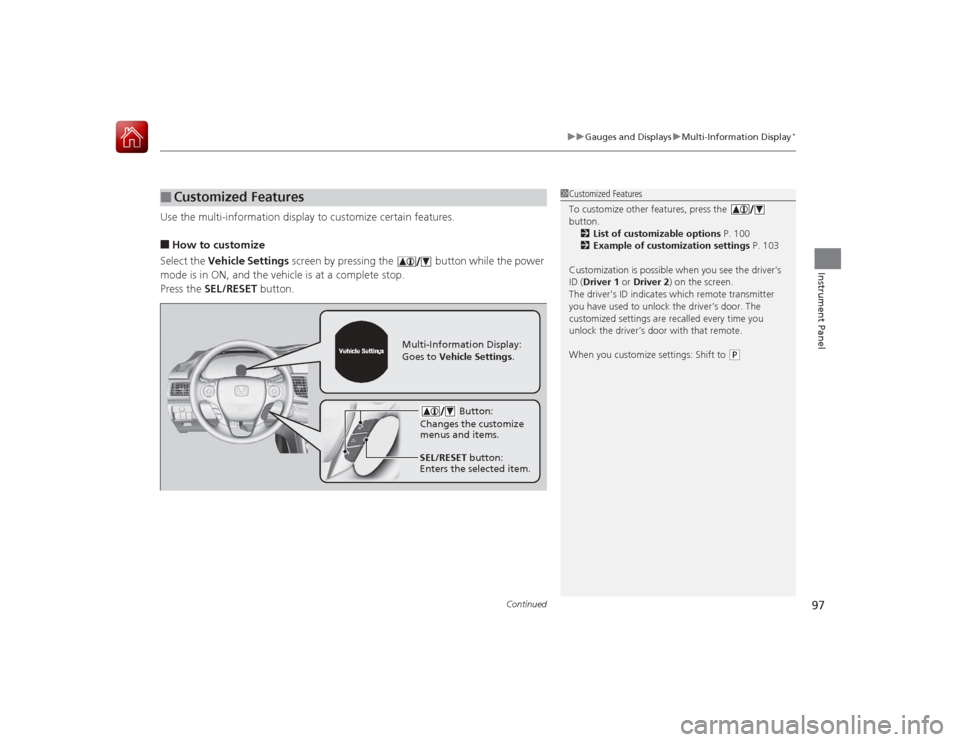
Use the multi-information display to customize certain features.■How to customize
Select the Vehicle Settings screen by pressing the button while the power
mode is in ON, and the vehicle is at a complete stop.
Press the SEL/RESET button.■
Customized Features
1Customized Features
To customize other features, press the
button.
2 List of customizable options P. 100
2 Example of customization settings P. 103
Customization is possible when you see the driver’s
ID ( Driver 1 or Driver 2) on the screen.
The driver’s ID indicates which remote transmitter
you have used to unlock the driver’s door. The
customized settings are recalled every time you
unlock the driver’s door with that remote.
When you customize settings: Shift to
( P
Button:
Changes the customize
menus and items.
Multi-Information Display:
Goes to Vehicle Settings .
SEL/RESET button:
Enters the selected item.
Page 99 of 593
98
uuGauges and Displays uMulti-Information Display
*
Instrument Panel
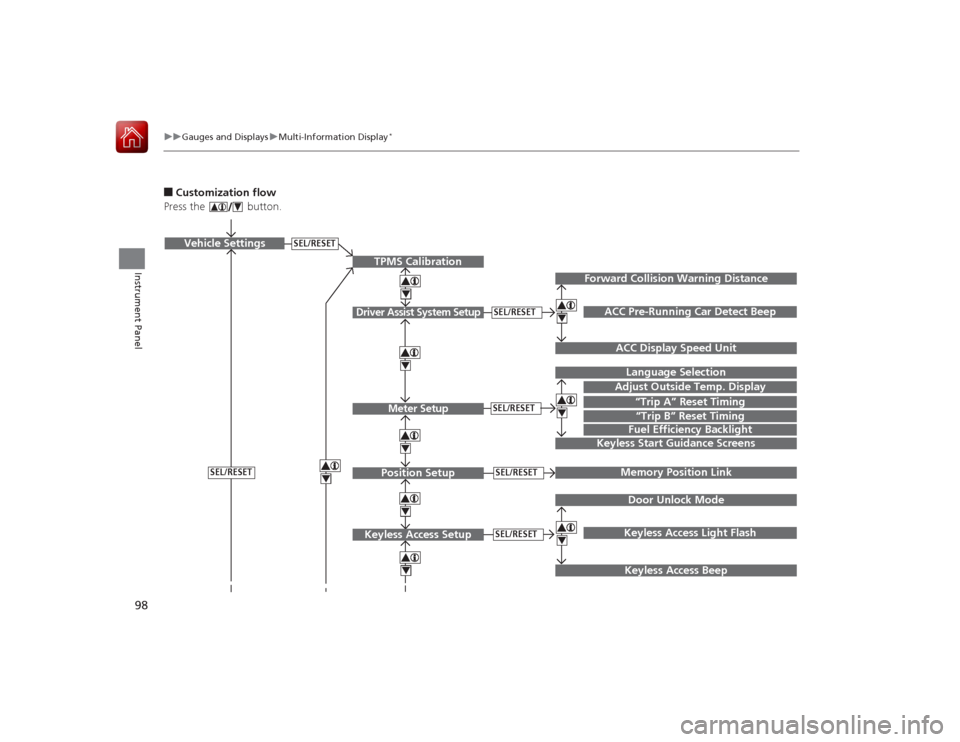
■Customization flow
Press the button.
SEL/RESET
Vehicle Settings
“Trip A” Reset TimingLanguage SelectionAdjust Outside Temp. DisplayMemory Position LinkDoor Unlock ModeKeyless Access Light Flash
4444
TPMS Calibration
Driver Assist System Setup
Meter SetupPosition Setup
Keyless Access Setup
SEL/RESETSEL/RESETSEL/RESETSEL/RESET
Page 100 of 593
99
uuGauges and Displays uMulti-Information Display
*
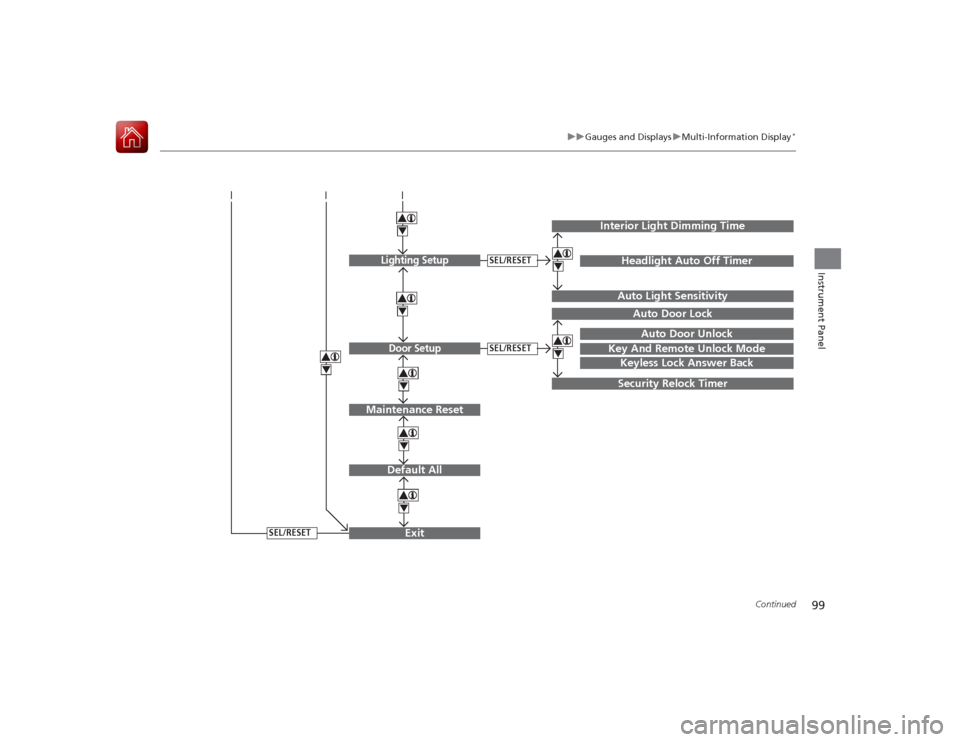
Continued
Instrument Panel
Exit444Door Setup
Maintenance Reset
Default All
SEL/RESET
4
SEL/RESET
4
Lighting Setup
SEL/RESET
4
Key And Remote Unlock Mode
Auto Door LockAuto Door Unlock
Keyless Lock Answer BackSecurity Relock Timer
Interior Light Dimming Time
Headlight Auto Off TimerAuto Light Sensitivity
44