wheel nut HONDA ACCORD 2015 9.G Owners Manual
[x] Cancel search | Manufacturer: HONDA, Model Year: 2015, Model line: ACCORD, Model: HONDA ACCORD 2015 9.GPages: 593
Page 134 of 593
Continued
133
uuOperating the Switches Around the Steering Wheel uENGINE START/STOP Button
*
Controls
If you leave the vehicle for 30 to 60 minutes with the shift lever in
(P
*1 and the
power mode in ACCESSORY, the vehicle automatically goes into the mode similar to
VEHICLE OFF (LOCK) to avoid the battery drain.
When in this mode:
The steering wheel does not lock.
You cannot lock or unlock doors with the remote transmitter or the smart entry
system.
Press the ENGINE START/STOP button to switch the mode to VEHICLE OFF (LOCK).
If you open the driver’s door when the power mode is set to ACCESSORY, a warning
buzzer sounds.
*1: Automatic transmission/CVT models■
Automatic Power Off
■
Power Mode Reminder
1 Changing the Power Mode
If the power mode does not change from VEHICLE
OFF to ACCESSORY, press the ENGINE START/STOP
button while moving the steering wheel left and
right. The steering wheel will unlock, allowing the
mode to change.Except U.S. automatic transmission/CVT models
Except U.S. automatic transmission/CVT modelsAll models
Page 139 of 593
uuOperating the Switches Around the Steering Wheel uFog Lights
*
138Controls
The headlights automatically come on when the wipers are used several times within
a certain number of intervals with the headlight switch in AUTO.
The headlights automatically go off a few minutes later if the wipers are stopped.
The headlights, all other exterior lights, and the instrument panel lights turn off 15
seconds after you remove the key or set the power mode to VEHICLE OFF (LOCK),
take the remote with you, and close the driver's door.
u You can change the headlight auto off timer setting.
2 Customized Features P. 97, 298
If you turn the ignition switch to LOCK
(0
*1 with the headlight switch on, but do
not open the door, the lights turn off after 10 minutes (three minutes, if the switch
is in the AUTO position).
The lights turn on again when you unlock or open th e driver's door. If you unlock
the door, but do not open it within 15 seconds, the lights go off. If you open the
driver's door, you will hear a lights on reminder chime.
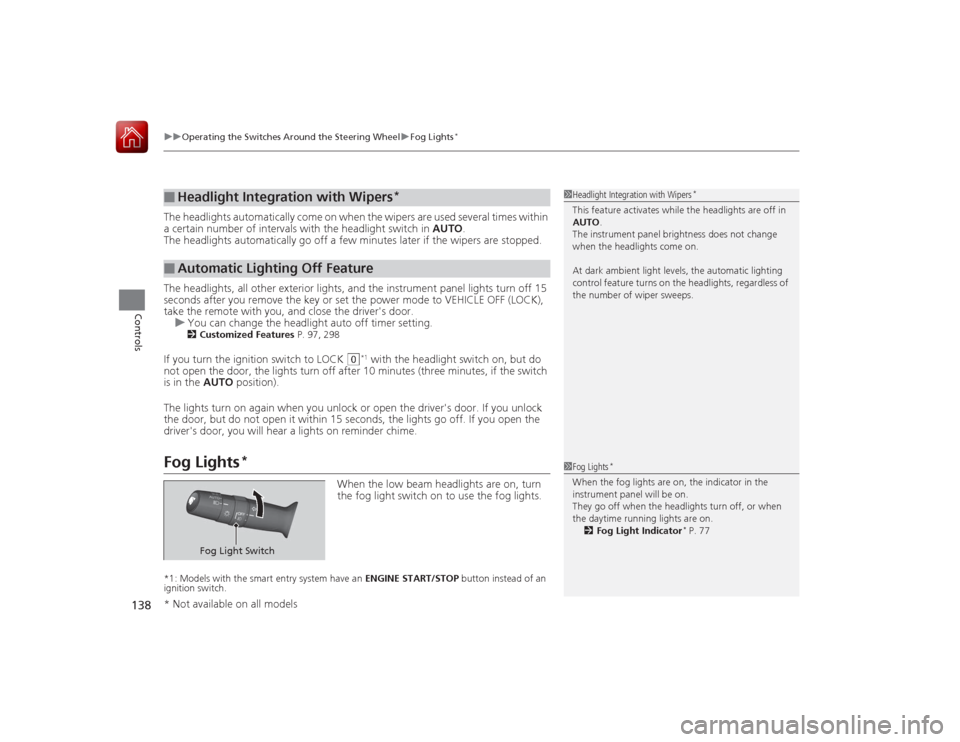
Fog Lights
*
When the lo w beam headlights are on, turn
the fog light switch on to use the fog lights.
*1: Models with the smart entry system have an ENGINE START/STOP button instead of an
ignition switch.■
Headlight Integration with Wipers
*
■
Automatic Lighting Off Feature
1 Headlight Integration with Wipers
*
This feature activates while the headlights are off in
AUTO .
The instrument panel brightness does not change
when the headlights come on.
At dark ambient light levels, the automatic lighting
control feature turns on the headlights, regardless of
the number of wiper sweeps.1 Fog Lights
*
When the fog lights are on, the indicator in the
instrument panel will be on.
They go off when the headlights turn off, or when
the daytime running lights are on.
2 Fog Light Indicator
* P. 77
Fog Light Switch
* Not available on all models
Page 141 of 593
140
uuOperating the Switches Around the Steering Wheel uWipers and Washers
Controls
Wipers and Washers
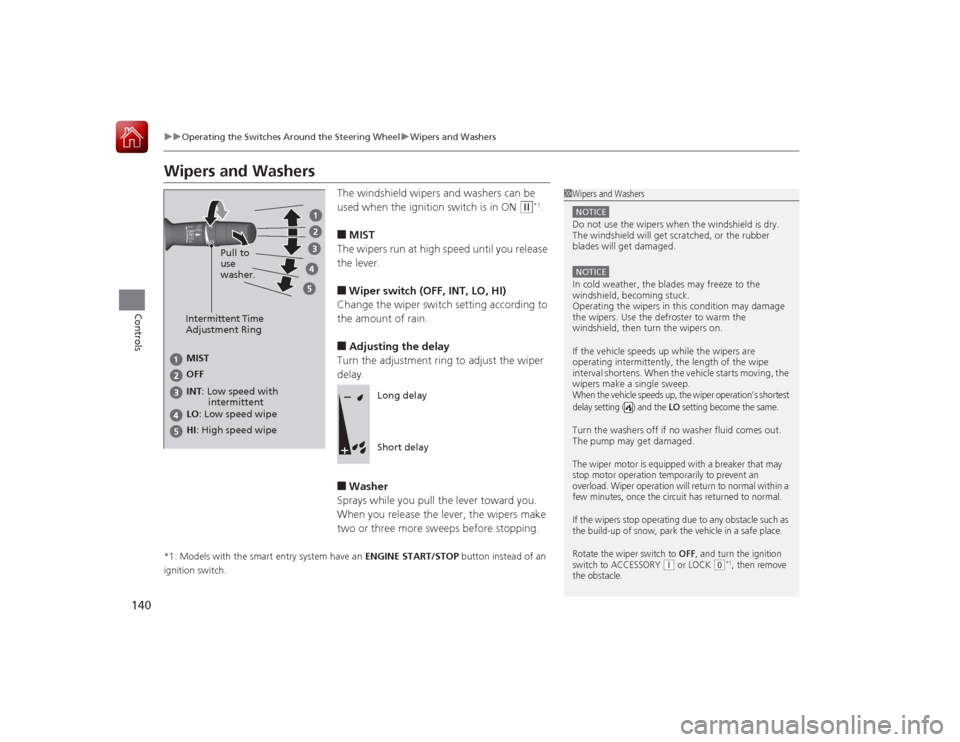
The windshield wipers and washers can be
used when the ignition switch is in ON
(w
*1.
■MIST
The wipers run at high speed until you release
the lever.■Wiper switch (OFF, INT, LO, HI)
Change the wiper switch setting according to
the amount of rain.■Adjusting the delay
Turn the adjustment ring to adjust the wiper
delay.■Washer
Sprays while you pull the lever toward you.
When you release the lever, the wipers make
two or three more sweeps before stopping.
*1: Models with the smart entry system have an ENGINE START/STOP button instead of an
ignition switch.
1 Wipers and WashersNOTICEDo not use the wipers when the windshield is dry.
The windshield will get scratched, or the rubber
blades will get damaged.NOTICEIn cold weather, the blades may freeze to the
windshield, becoming stuck.
Operating the wipers in this condition may damage
the wipers. Use the defroster to warm the
windshield, then turn the wipers on.
If the vehicle speeds up while the wipers are
operating intermitte ntly, the length of the wipe
interval shortens. When the vehicle starts moving, the
wipers make a single sweep.When the vehicle speeds up, the wiper operation’s shortest
delay setting ( ) and the
LO setting become the same.
Turn the washers off if no washer fluid comes out.
The pump may get damaged.The wiper motor is equipped with a breaker that may
stop motor operation temporarily to prevent an
overload. Wiper operation will return to normal within a
few minutes, once the circuit has returned to normal.
If the wipers stop operating due to any obstacle such as
the build-up of snow, park the vehicle in a safe place.
Rotate the wiper switch to
OFF
, and turn the ignition
switch to ACCESSORY
( q or LOCK
(0*1, then remove
the obstacle.
Intermittent Time
Adjustment Ring
MIST
INT: Low speed with
intermittent OFF
LO : Low speed wipe
HI: High speed wipe Pull to
use
washer.
Long delay
Short delay
Page 143 of 593
142
uuOperating the Switches Around the Steering Wheel uRear Defogger/Heated Door Mirror
* Button
Controls
Rear Defogger/Heated Door Mirror
* Button
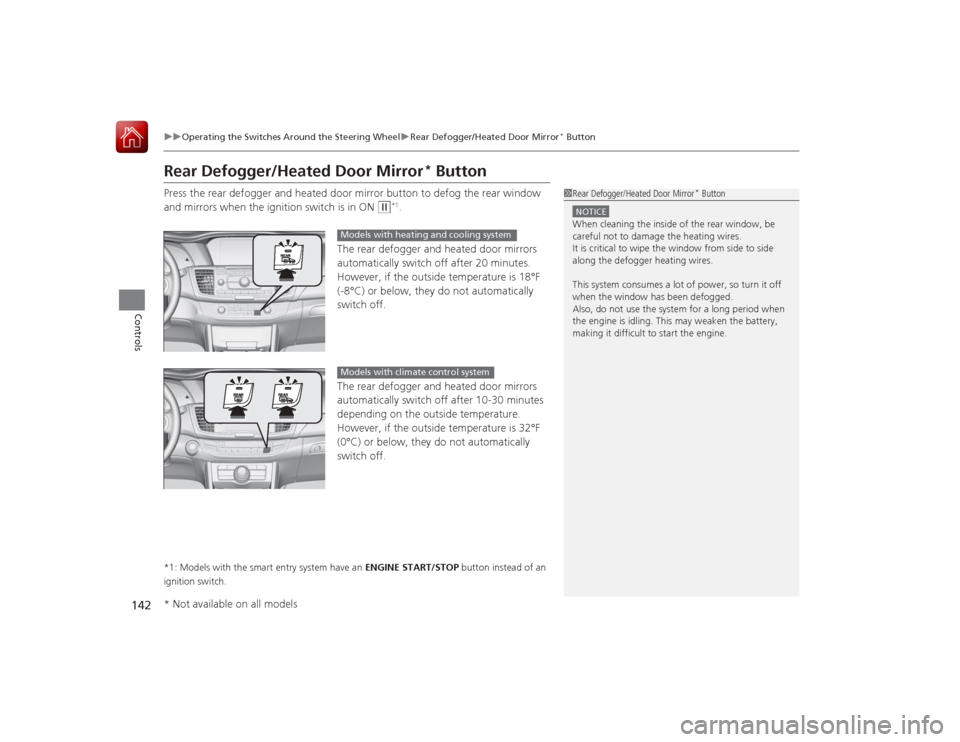
Press the rear defogger and heated door mirror button to defog the rear window
and mirrors when the ignition switch is in ON
(w
*1.
The rear defogger and heated door mirrors
automatically switch off after 20 minutes.
However, if the outside temperature is 18°F
(-8°C) or below, they do not automatically
switch off.
The rear defogger and heated door mirrors
automatically switch off after 10-30 minutes
depending on the outside temperature.
However, if the outside temperature is 32°F
(0°C) or below, they do not automatically
switch off.
*1: Models with the smart entry system have an ENGINE START/STOP button instead of an
ignition switch.
1 Rear Defogger/Heated Door Mirror
* Button
NOTICEWhen cleaning the inside of the rear window, be
careful not to damage the heating wires.
It is critical to wipe the window from side to side
along the defogger heating wires.
This system consumes a lot of power, so turn it off
when the window has been defogged.
Also, do not use the system for a long period when
the engine is idling. This may weaken the battery,
making it difficult to start the engine.
Models with heating and cooling systemModels with climate control system
* Not available on all models
Page 472 of 593
471
uuWhen Driving uTire Pressure Monitoring System (TPMS) - Required Federal Explanation
Driving
Please note that the TPMS is not a substitute for proper tire
maintenance, and it is the driver's responsibility to maintain
correct tire pressure, even if un der-inflation has not reached the
level to trigger il lumination of the TPMS low tire pressure telltale.
Your vehicle has also been equipped with a TPMS malfunction
indicator to indicate when the system is no t operating properly.
The TPMS malfunctio n indicator is combined with the low tire
pressure telltale. When the system detects a malfunction, the
telltale will flash for approximately one minute and then remain
continuously illuminated. This sequen ce will continue upon
subsequent vehicle st art-ups as long as the malfunction exists.
When the malfunction indicator is illuminated, the system may
not be able to detect or signal low tire pressure as intended.
TPMS malfunctions may occur for a variety of reasons, including
the installation of replacement or alte rnate tires or wheels on the
vehicle that prevent the TPMS from functioning properly.
Always check the TPMS malfunction telltale after replacing one or
more tires or wheels on your vehicle to ensure that the
replacement or alternate tires and wheels allow the TPMS to
continue to function properly.
Page 543 of 593
542Handling the Unexpected
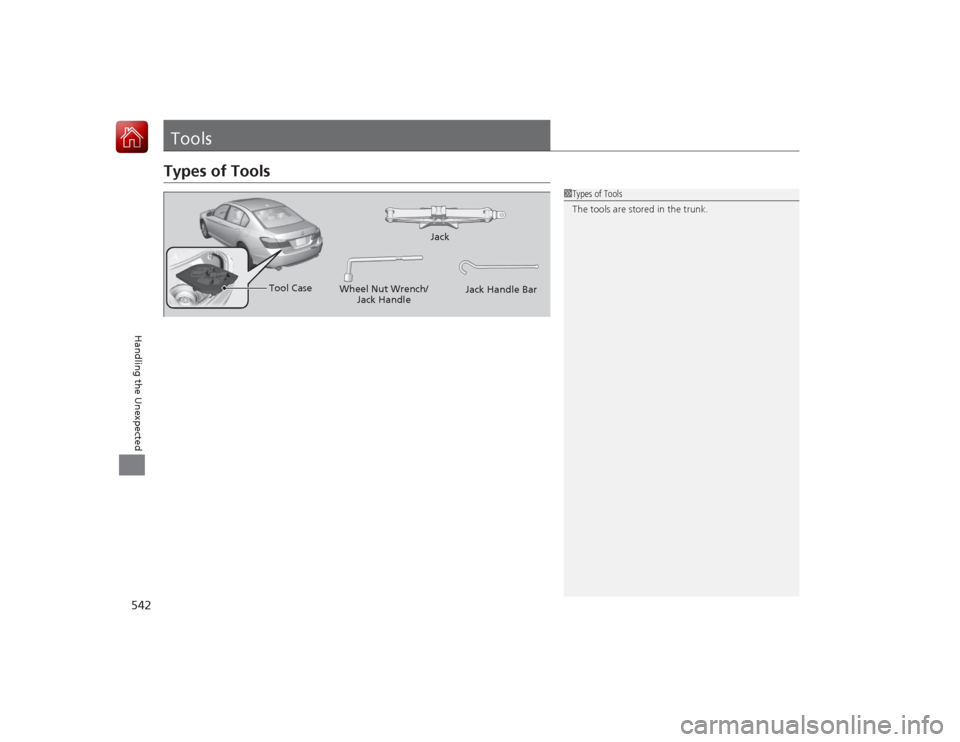
ToolsTypes of Tools
1Types of Tools
The tools are stored in the trunk.
Wheel Nut Wrench/
Jack Handle Jack
Jack Handle Bar
Tool Case
Page 545 of 593
544
uuIf a Tire Goes Flat uChanging a Flat Tire
Handling the Unexpected
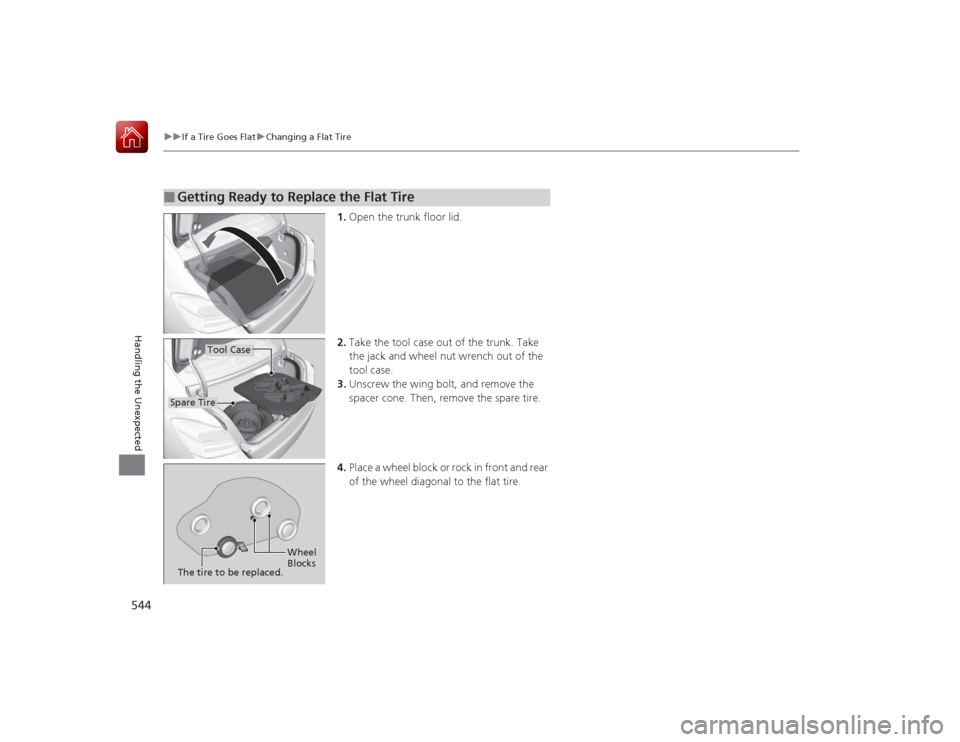
1. Open the trunk floor lid.
2. Take the tool case out of the trunk. Take
the jack and wheel nut wrench out of the
tool case.
3. Unscrew the wing bolt, and remove the
spacer cone. Then, remove the spare tire.
4. Place a wheel block or rock in front and rear
of the wheel diagonal to the flat tire.
■
Getting Ready to Replace the Flat Tire
Tool Case
Spare Tire
Wheel
Blocks
The tire to be replaced.
Page 546 of 593
545
uuIf a Tire Goes Flat uChanging a Flat Tire
Continued
Handling the Unexpected
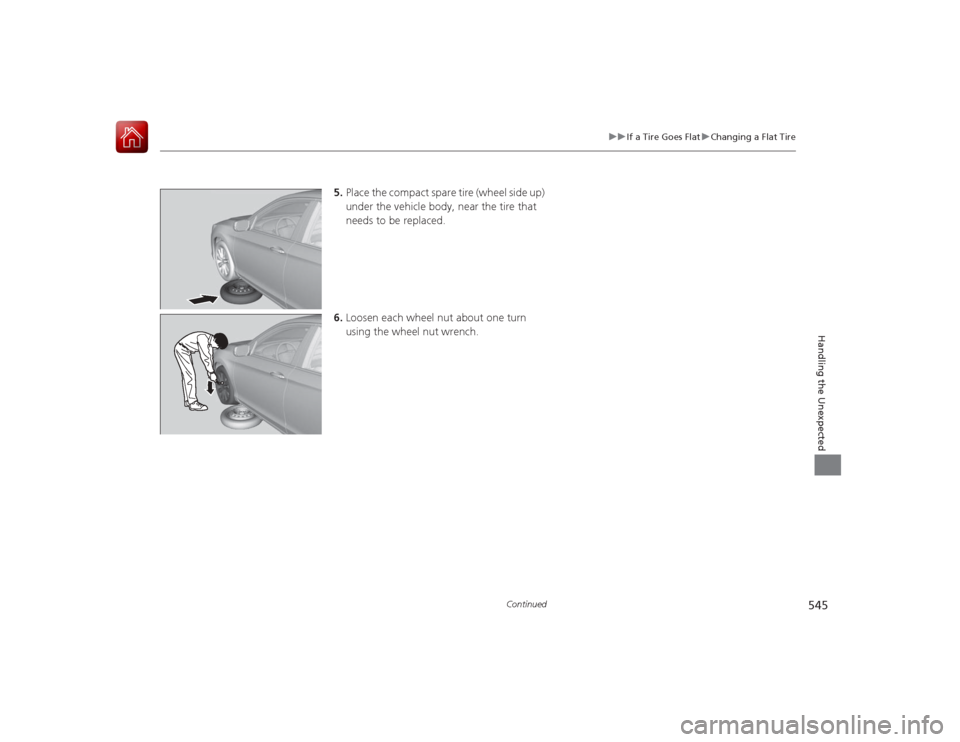
5. Place the compact spare tire (wheel side up)
under the vehicle body, near the tire that
needs to be replaced.
6. Loosen each wheel nut about one turn
using the wheel nut wrench.
Page 547 of 593
uuIf a Tire Goes Flat uChanging a Flat Tire
546Handling the Unexpected
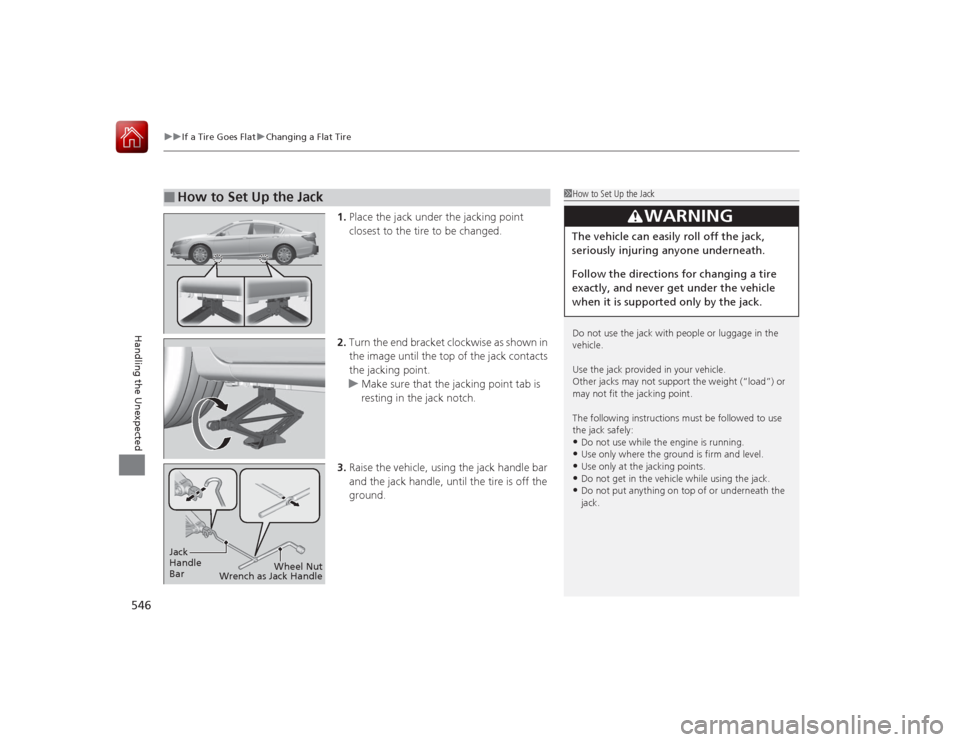
1. Place the jack under the jacking point
closest to the tire to be changed.
2. Turn the end bracket clockwise as shown in
the image until the top of the jack contacts
the jacking point.
u Make sure that the jacking point tab is
resting in the jack notch.
3. Raise the vehicle, using the jack handle bar
and the jack handle, until the tire is off the
ground.
■
How to Set Up the Jack
1How to Set Up the Jack
Do not use the jack with people or luggage in the
vehicle.
Use the jack provided in your vehicle.
Other jacks may not support the weight (“load”) or
may not fit the jacking point.
The following instructions must be followed to use
the jack safely:•Do not use while the engine is running.•Use only where the ground is firm and level.•Use only at the jacking points.•Do not get in the vehicle while using the jack.•Do not put anything on top of or underneath the
jack.
3
WARNING
The vehicle can easily roll off the jack,
seriously injuring anyone underneath.
Follow the directions for changing a tire
exactly, and never get under the vehicle
when it is supported only by the jack.
Jack
Handle
Bar Wheel Nut
Wrench as Jack Handle
Page 548 of 593
Continued
547
uuIf a Tire Goes Flat uChanging a Flat Tire
Handling the Unexpected
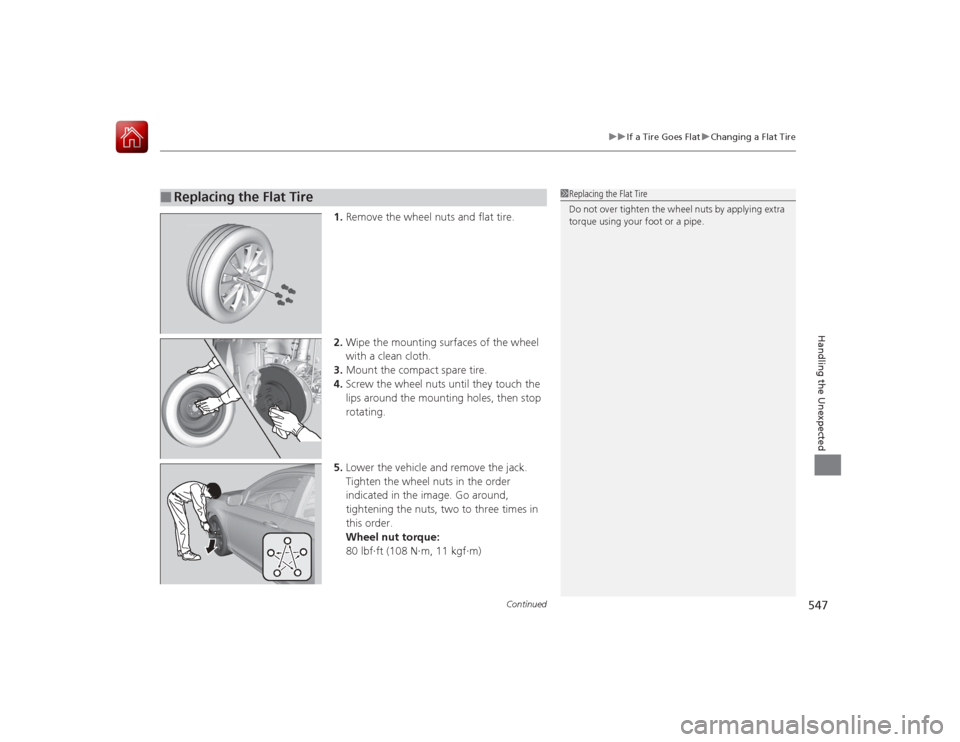
1. Remove the wheel nuts and flat tire.
2. Wipe the mounting surfaces of the wheel
with a clean cloth.
3. Mount the compact spare tire.
4. Screw the wheel nuts until they touch the
lips around the mounting holes, then stop
rotating.
5. Lower the vehicle and remove the jack.
Tighten the wheel nuts in the order
indicated in the image. Go around,
tightening the nuts, two to three times in
this order.
Wheel nut torque:
80 lbf∙ft (108 N∙m, 11 kgf∙m)
■
Replacing the Flat Tire
1Replacing the Flat Tire
Do not over tighten the wheel nuts by applying extra
torque using your foot or a pipe.