USB HONDA ACCORD 2016 9.G User Guide
[x] Cancel search | Manufacturer: HONDA, Model Year: 2016, Model line: ACCORD, Model: HONDA ACCORD 2016 9.GPages: 609, PDF Size: 26.52 MB
Page 206 of 609
Continued205
uuAudio System Basic Operation uPlaying an iPod
Features
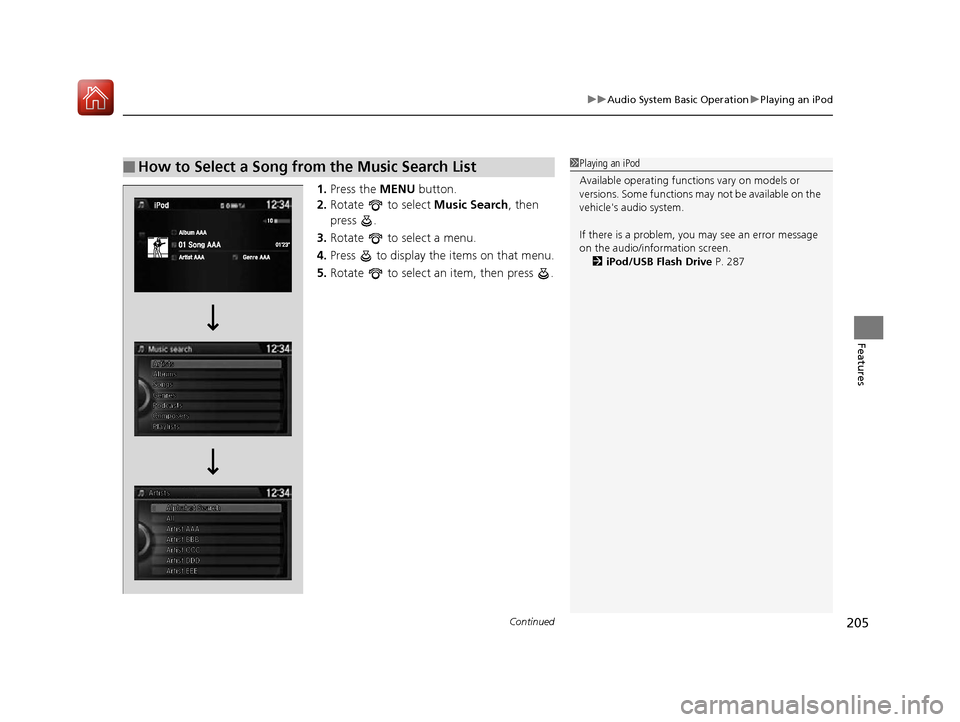
1. Press the MENU button.
2. Rotate to select Music Search, then
press .
3. Rotate to select a menu.
4. Press to display the items on that menu.
5. Rotate to select an item, then press .
■How to Select a Song from the Music Search List1Playing an iPod
Available operating functi ons vary on models or
versions. Some functions ma y not be available on the
vehicle's audio system.
If there is a problem, you may see an error message
on the audio/information screen. 2 iPod/USB Flash Drive P. 287
16 US ACCORD 4D (KA KC KL)-31T2A6300.book 205 ページ 2015年7月28日 火曜日 午後3時3分
Page 208 of 609
Continued207
uuAudio System Basic Operation uPlaying Internet Radio
Features
Playing Internet Radio
Connect a compatible phone through Bluetooth®.
You can also connect the phone using your dock connector to the USB port.
Press the AUX button to select Pandora mode.
U.S. models
Compatible phones only
1Playing Internet Radio
Pandora®, the Pandora logo, and the Pandora trade
dress are trademarks or registered trademarks of
Pandora Media, Inc., used with permission. Pandora
®,
the Pandora logo, and the Pandora trade dress are
trademarks or registered trademarks of Pandora Media,
Inc. Used with permission. Pandora
® is only available in
certain countries. Please visit
http://www.pandora.com/legal for more information.
To find out if your phone is compatible with this
feature, visit www.handsfreelink.honda.com , or call
1-888-528-7876.
To use this service in your vehicle, the Pandora ® app
must first be installed on your phone. Visit
www.pandora.com . for more information.
Pandora ® is free personalized radio that offers
effortless and endless music and comedy. Just start
with the name of one of your favorite artists, songs,
genres, composers, or comedians and it will do the
rest.
If you cannot operate Pandora ® through the audio
system, it may be streaming through Bluetooth®
Audio. Make sure Pandora ® mode on your audio
system is selected.
Changing Stations
To change stations, activate the Pandora ® menu,
select Station List , and then select a new station.
iPhone
16 US ACCORD 4D (KA KC KL)-31T2A6300.book 207 ページ 2015年7月28日 火曜日 午後3時3分
Page 209 of 609
208
uuAudio System Basic Operation uPlaying Internet Radio
Features
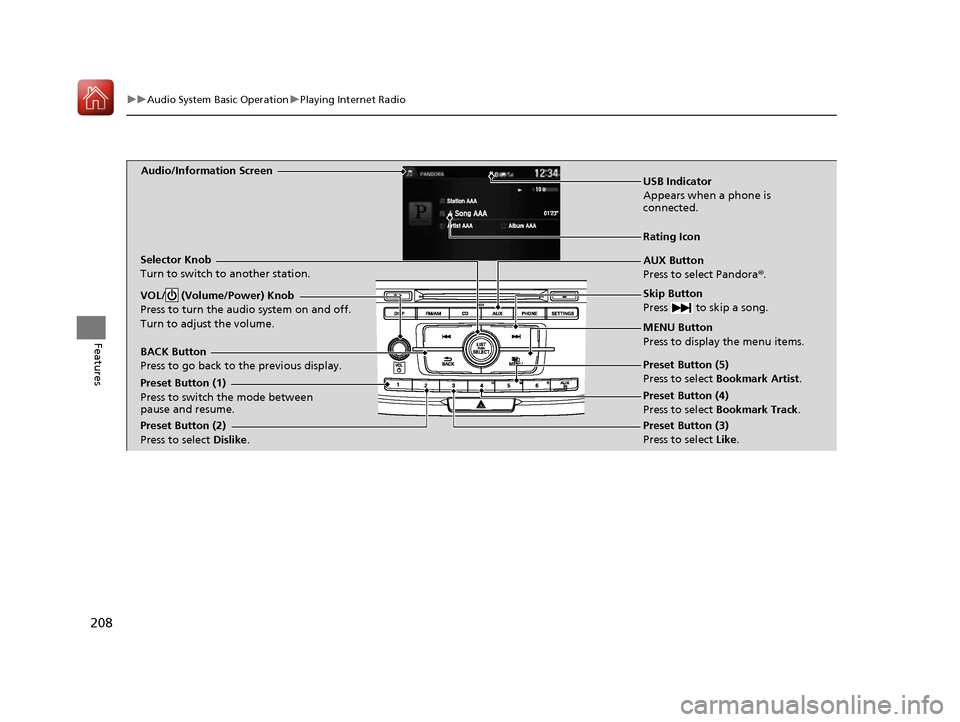
Audio/Information Screen
AUX Button
Press to select Pandora®.
Skip Button
Press to skip a song.
MENU Button
Press to display the menu items.
Selector Knob
Turn to switch to another station.
VOL/ (Volume/Power) Knob
Press to turn the audio system on and off.
Turn to adjust the volume.
BACK Button
Press to go back to
the previous display.
USB Indicator
Appears when a phone is
connected.
Rating Icon
Preset Button (1)
Press to switch the mode between
pause and resume.
Preset Button (2)
Press to select Dislike. Preset Button (3)
Press to select Like. Preset Button (4)
Press to select Bookmark Track
.
Preset Button (5)
Press to select Bookmark Artist
.
16 US ACCORD 4D (KA KC KL)-31T2A6300.book 208 ページ 2015年7月28日 火曜日 午後3時3分
Page 211 of 609
210
uuAudio System Basic Operation uPlaying a USB Flash Drive
Features
Playing a USB Flash Drive
Your audio system reads and plays sound files on a USB flash drive in either MP3,
WMA or AAC*1 format.
Connect your USB flash drive to the USB port, then press the AUX button.
2USB Port(s*) P. 187
*1:Only AAC format files recorded with iTunes are playable on this unit.
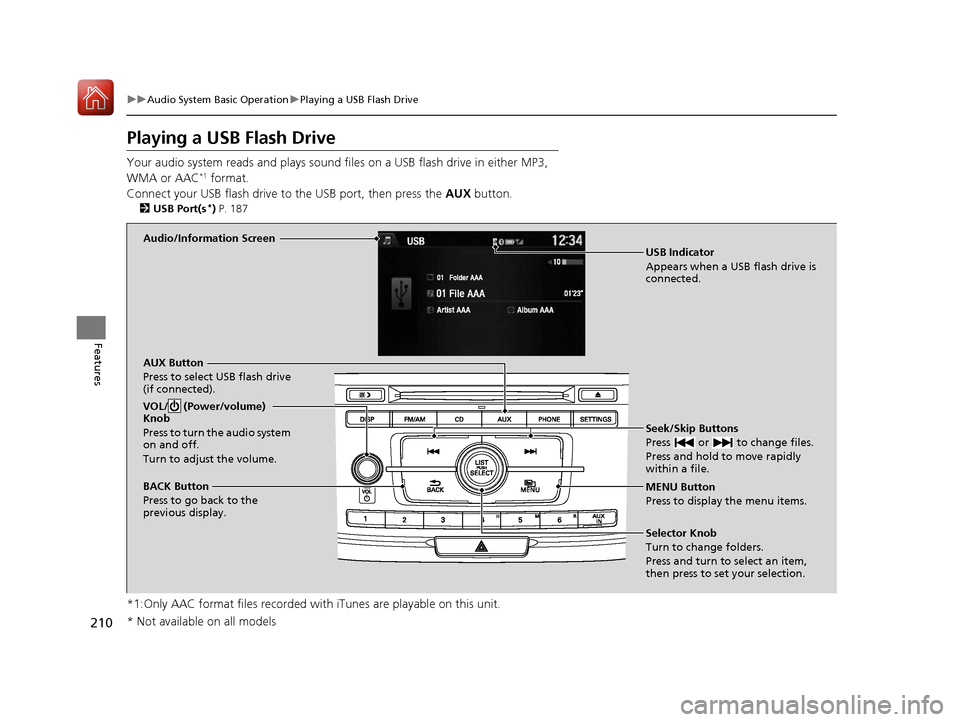
Audio/Information Screen
AUX Button
Press to select USB flash drive
(if connected). Seek/Skip Buttons
Press or to change files.
Press and hold to move rapidly
within a file.
MENU Button
Press to display the menu items.
Selector Knob
Turn to change folders.
Press and turn to select an item,
then press to set your selection.
VOL/ (Power/volume)
Knob
Press to turn the audio system
on and off.
Turn to adjust the volume.
BACK Button
Press to go back to the
previous display.
USB Indicator
Appears when a USB flash drive is
connected.
* Not available on all models
16 US ACCORD 4D (KA KC KL)-31T2A6300.book 210 ページ 2015年7月28日 火曜日 午後3時3分
Page 212 of 609
Continued211
uuAudio System Basic Operation uPlaying a USB Flash Drive
Features
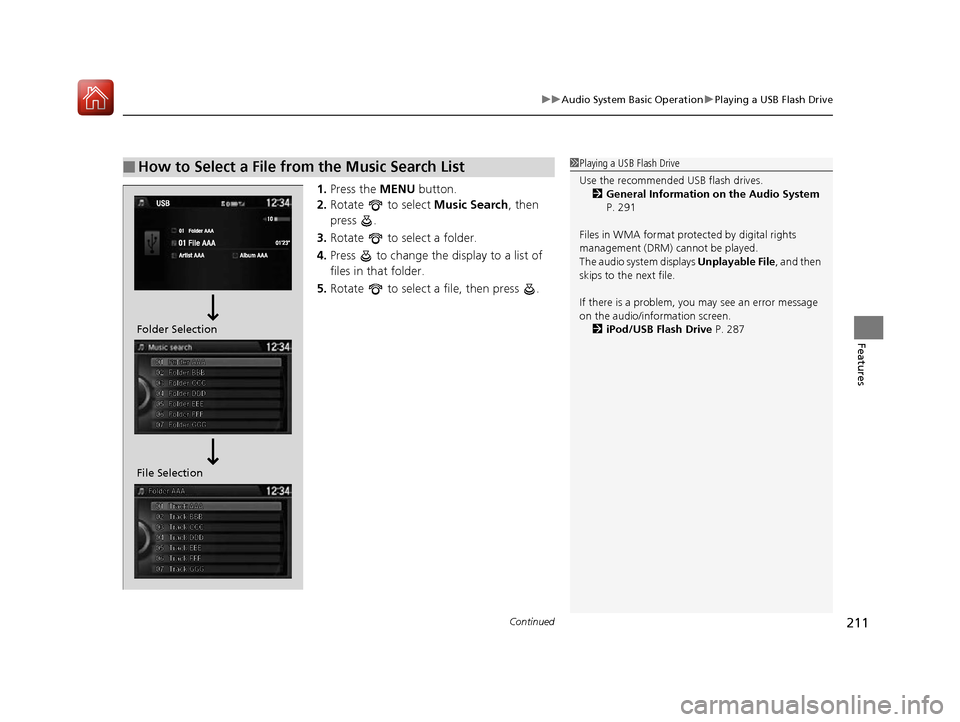
1. Press the MENU button.
2. Rotate to select Music Search, then
press .
3. Rotate to select a folder.
4. Press to change the display to a list of
files in that folder.
5. Rotate to select a file, then press .
■How to Select a File from the Music Search List1Playing a USB Flash Drive
Use the recommended USB flash drives.
2 General Information on the Audio System
P. 291
Files in WMA format prot ected by digital rights
management (DRM) cannot be played.
The audio system displays Unplayable File, and then
skips to the next file.
If there is a problem, you may see an error message
on the audio/information screen.
2 iPod/USB Flash Drive P. 287
File Selection Folder Selection
16 US ACCORD 4D (KA KC KL)-31T2A6300.book 211 ページ 2015年7月28日 火曜日 午後3時3分
Page 213 of 609
uuAudio System Basic Operation uPlaying a USB Flash Drive
212
Features
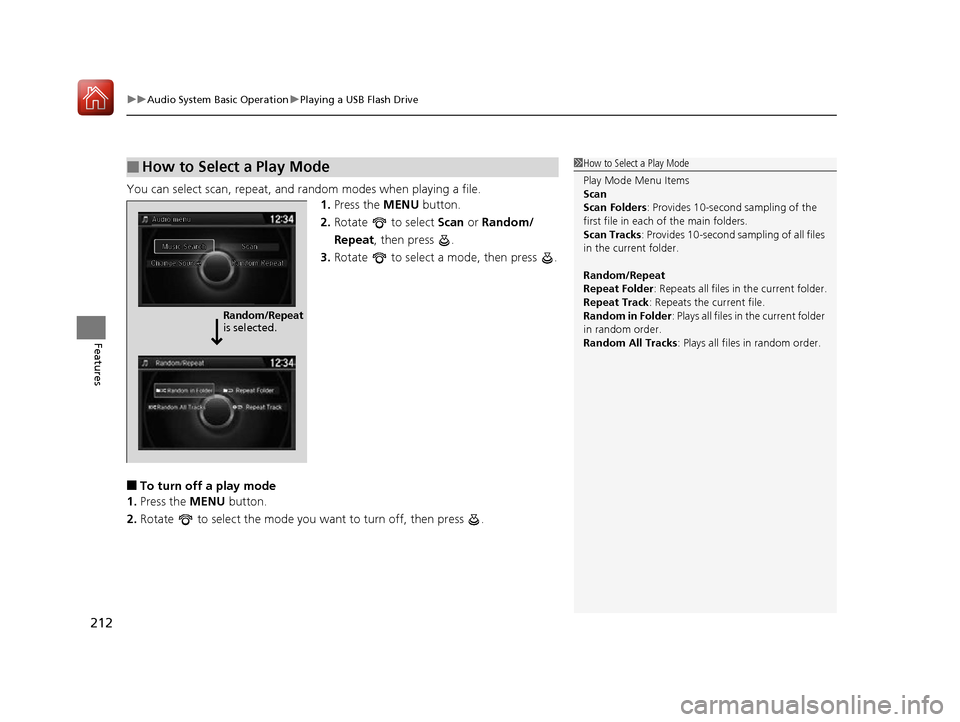
You can select scan, repeat, and random modes when playing a file.
1.Press the MENU button.
2. Rotate to select Scan or Random/
Repeat, then press .
3. Rotate to select a mode, then press .
■To turn off a play mode
1. Press the MENU button.
2. Rotate to select the mode you want to turn off, then press .
■How to Select a Play Mode1How to Select a Play Mode
Play Mode Menu Items
Scan
Scan Folders : Provides 10-second sampling of the
first file in each of the main folders.
Scan Tracks : Provides 10-second sa mpling of all files
in the current folder.
Random/Repeat
Repeat Folder : Repeats all files in the current folder.
Repeat Track: Repeats the current file.
Random in Folder : Plays all files in the current folder
in random order.
Random All Tracks : Plays all files in random order.
Random/Repeat
is selected.
16 US ACCORD 4D (KA KC KL)-31T2A6300.book 212 ページ 2015年7月28日 火曜日 午後3時3分
Page 220 of 609
219
uuAudio System Basic Operation uAudio/Information Touch Screen
Continued
Features
■Info
Displays Trip Computer . To see all available information, Trip Computer, Voice
Info , or System/Device Information , select on the Info Menu screen.
Trip Computer :
• Current Drive tab: Displays the current trip information.
• History of Trip A tab: Displays information for the three previous drives. The
information is stored every time you reset Trip A.
To delete the history manually, select Delete History on the History of Trip A
tab. The confirmation message appears on the screen, then select Yes.
Voice Info : Displays the all commands list.
System/Device Information :
• System Info : Displays the software version of the audio system.
• USB Info : Displays the memory usage of the USB device.
■Audio
Displays the current audio information.
■Settings
Enters the customizing menu screen.
2 Customized Features P. 316
■Navigation*
Displays the navigation screen.
2Refer to the Navigation System Manual
* Not available on all models
16 US ACCORD 4D (KA KC KL)-31T2A6300.book 219 ページ 2015年7月28日 火曜日 午後3時3分
Page 223 of 609
uuAudio System Basic Operation uAudio/Information Touch Screen
222
Features
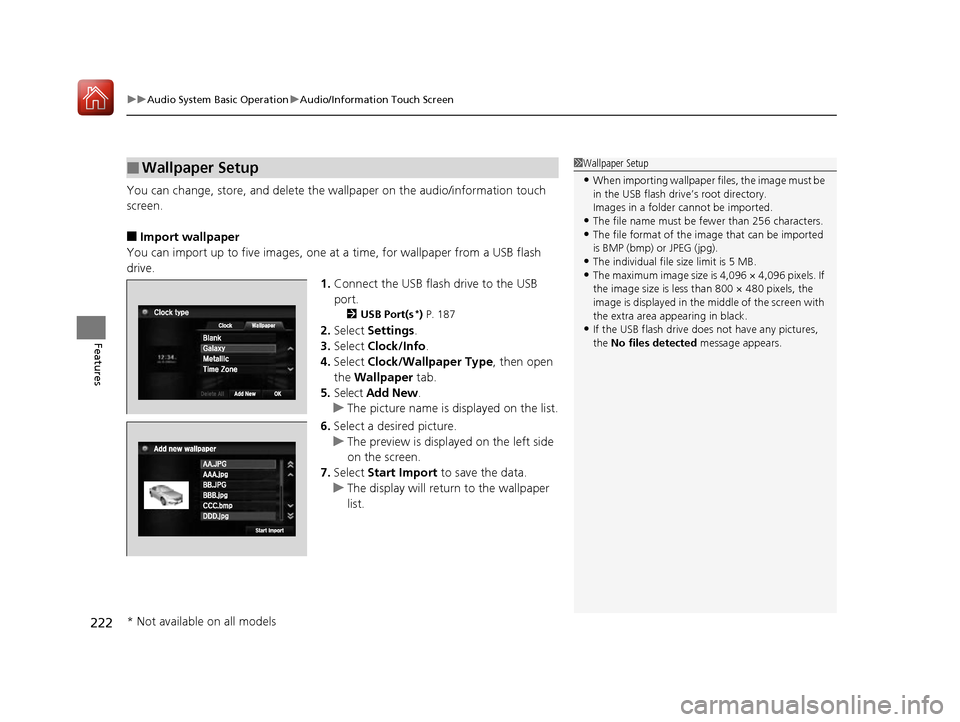
You can change, store, and delete the wallpaper on the audio/information touch
screen.
■Import wallpaper
You can import up to five images, one at a time, for wallpaper from a USB flash
drive. 1.Connect the USB flash drive to the USB
port.
2 USB Port(s*) P. 187
2. Select Settings .
3. Select Clock/Info .
4. Select Clock/Wallpaper Type , then open
the Wallpaper tab.
5. Select Add New .
u The picture name is displayed on the list.
6. Select a desired picture.
u The preview is displayed on the left side
on the screen.
7. Select Start Import to save the data.
u The display will return to the wallpaper
list.
■Wallpaper Setup1Wallpaper Setup
•When importing wallpaper files, the image must be
in the USB flash driv e’s root directory.
Images in a folder cannot be imported.
•The file name must be fewer than 256 characters.•The file format of the im age that can be imported
is BMP (bmp) or JPEG (jpg).
•The individual file size limit is 5 MB.•The maximum image size is 4,096 × 4,096 pixels. If
the image size is less than 800 × 480 pixels, the
image is displayed in the middle of the screen with
the extra area appearing in black.
•If the USB flash drive doe s not have any pictures,
the No files detected message appears.
* Not available on all models
16 US ACCORD 4D (KA KC KL)-31T2A6300.book 222 ページ 2015年7月28日 火曜日 午後3時3分
Page 226 of 609
Continued225
uuAudio System Basic Operation uAudio/Information Touch Screen
Features
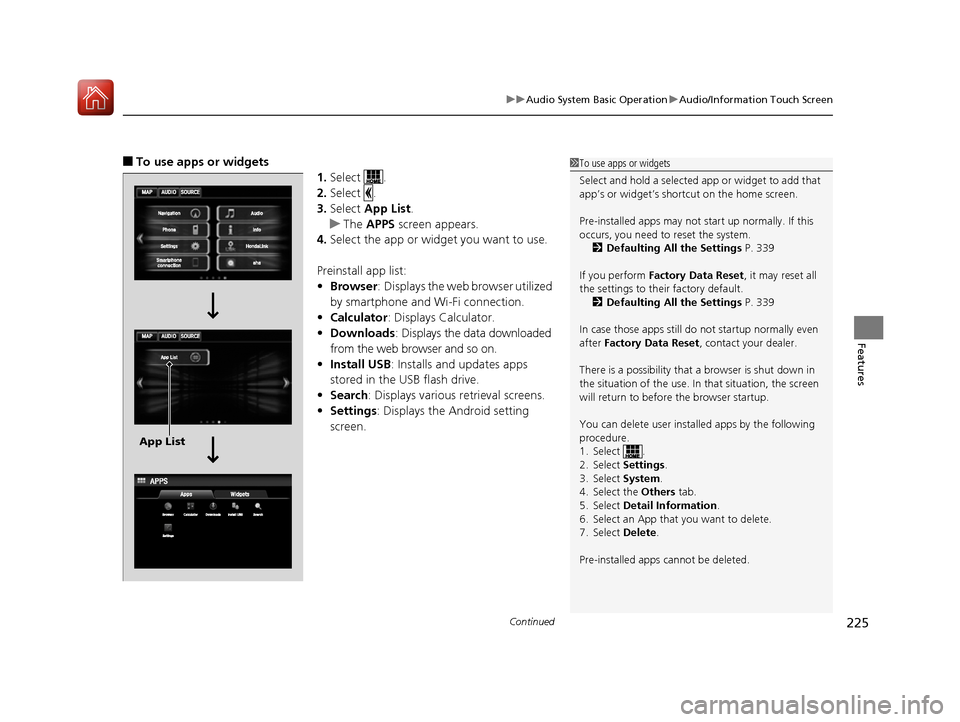
■To use apps or widgets
1.Select .
2. Select .
3. Select App List .
u The APPS screen appears.
4. Select the app or widget you want to use.
Preinstall app list:
• Browser : Displays the web browser utilized
by smartphone and Wi-Fi connection.
• Calculator : Displays Calculator.
• Downloads : Displays the data downloaded
from the web browser and so on.
• Install USB : Installs and updates apps
stored in the USB flash drive.
• Search : Displays various retrieval screens.
• Settings : Displays the Android setting
screen.1 To use apps or widgets
Select and hold a selected app or widget to add that
app’s or widget’s shortcut on the home screen.
Pre-installed apps may not start up normally. If this
occurs, you need to reset the system.
2 Defaulting All the Settings P. 339
If you perform Factory Data Reset , it may reset all
the settings to their factory default. 2 Defaulting All the Settings P. 339
In case those apps still do not startup normally even
after Factory Data Reset , contact your dealer.
There is a possibility that a browser is shut down in
the situation of the use. In that situation, the screen
will return to before the browser startup.
You can delete user installed apps by the following
procedure.
1. Select .
2. Select Settings .
3. Select System .
4. Select the Others tab.
5. Select Detail Information .
6. Select an App that you want to delete.
7. Select Delete .
Pre-installed apps cannot be deleted.
App List
16 US ACCORD 4D (KA KC KL)-31T2A6300.book 225 ページ 2015年7月28日 火曜日 午後3時3分
Page 237 of 609
236
uuAudio System Basic Operation uVoice Control Operation
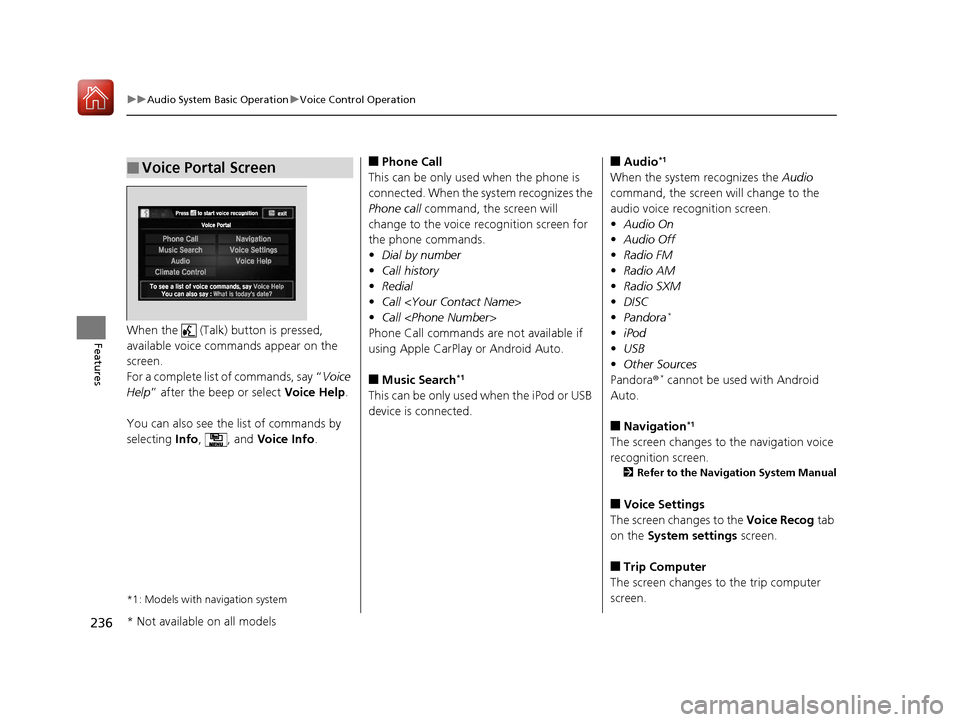
FeaturesWhen the (Talk) button is pressed,
available voice commands appear on the
screen.
For a complete list of commands, say “ Voice
Help ” after the beep or select Voice Help.
You can also see the list of commands by
selecting Info, , and Voice Info.
*1: Models with navigation system
■Voice Portal Screen■Phone Call
This can be only used when the phone is
connected. When the sy stem recognizes the
Phone call command, the screen will
change to the voice recognition screen for
the phone commands.
• Dial by number
• Call history
• Redial
• Call
• Call
Phone Call commands are not available if
using Apple CarPlay or Android Auto.
■Music Search*1
This can be only used when the iPod or USB
device is connected.
■Audio*1
When the system recognizes the Audio
command, the screen will change to the
audio voice recognition screen.
• Audio On
• Audio Off
• Radio FM
• Radio AM
• Radio SXM
• DISC
• Pandora
*
•iPod
• USB
• Other Sources
Pandora ®
* cannot be used with Android
Auto.
■Navigation*1
The screen changes to the navigation voice
recognition screen.
2 Refer to the Navigation System Manual
■Voice Settings
The screen changes to the Voice Recog tab
on the System settings screen.
■Trip Computer
The screen changes to the trip computer
screen.
* Not available on all models
16 US ACCORD 4D (KA KC KL)-31T2A6300.book 236 ページ 2015年7月28日 火曜日 午後3時3分