interior lights HONDA ACCORD 2016 9.G User Guide
[x] Cancel search | Manufacturer: HONDA, Model Year: 2016, Model line: ACCORD, Model: HONDA ACCORD 2016 9.GPages: 609, PDF Size: 26.52 MB
Page 174 of 609
Continued173
uuInterior Lights/Interior Convenience Items uInterior Convenience Items
Controls
The accessory power so ckets can be used when the i gnition switch is in ACCESSORY
(q or ON (w*1.
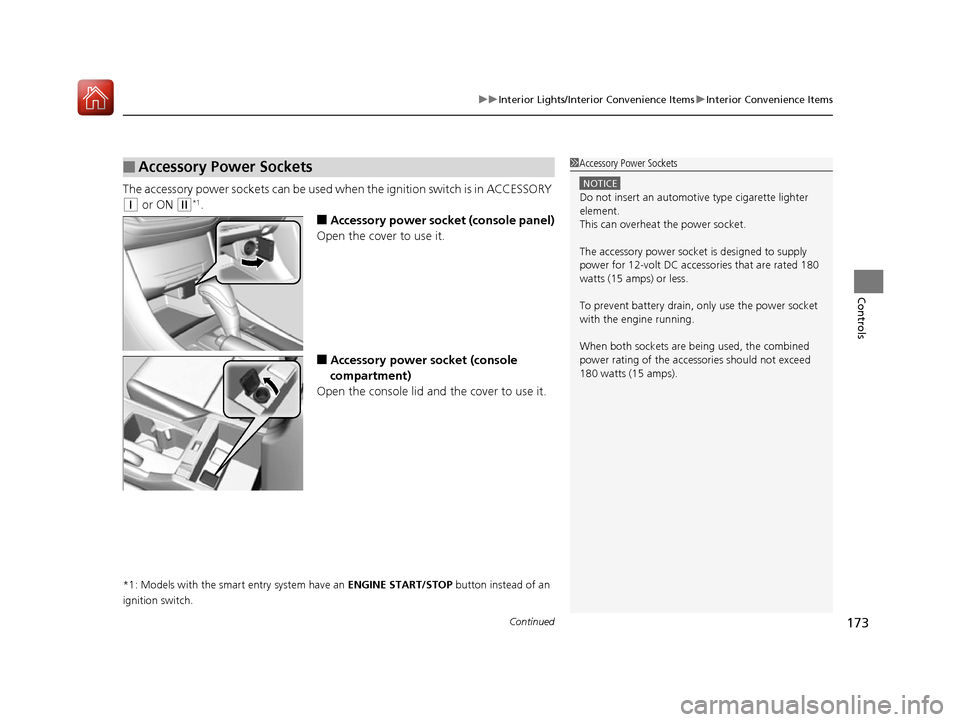
■Accessory power socket (console panel)
Open the cover to use it.
■Accessory power socket (console
compartment)
Open the console lid and the cover to use it.
*1: Models with the smart entry system have an ENGINE START/STOP button instead of an
ignition switch.
■Accessory Power Sockets1 Accessory Power Sockets
NOTICE
Do not insert an automotive type cigarette lighter
element.
This can overheat the power socket.
The accessory power socket is designed to supply
power for 12-volt DC accessories that are rated 180
watts (15 amps) or less.
To prevent battery drain, only use the power socket
with the engine running.
When both sockets are being used, the combined
power rating of the accessories should not exceed
180 watts (15 amps).
16 US ACCORD 4D (KA KC KL)-31T2A6300.book 173 ページ 2015年7月28日 火曜日 午後3時3分
Page 175 of 609
uuInterior Lights/Interior Convenience Items uInterior Convenience Items
174
Controls
To use the wireless charger, the ig nition switch must be in ACCESSORY (q or ON
(w*1.
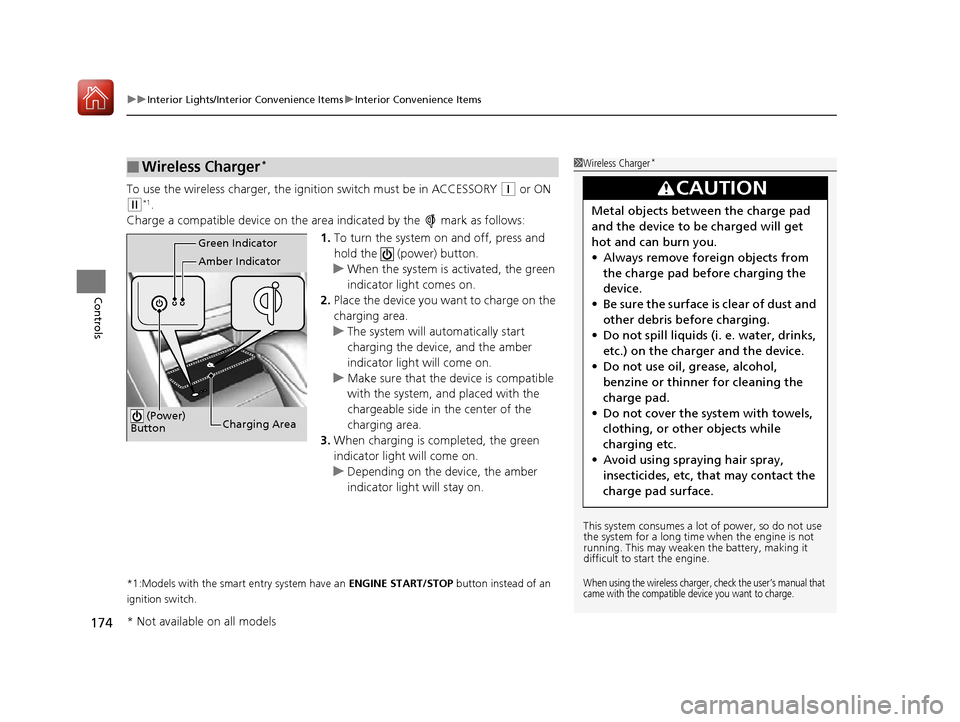
Charge a compatible device on the ar ea indicated by the mark as follows:
1. To turn the system on and off, press and
hold the (power) button.
u When the system is activated, the green
indicator light comes on.
2. Place the device you want to charge on the
charging area.
u The system will automatically start
charging the device, and the amber
indicator light will come on.
u Make sure that the device is compatible
with the system, a nd placed with the
chargeable side in the center of the
charging area.
3. When charging is completed, the green
indicator light will come on.
u Depending on the device, the amber
indicator light will stay on.
*1:Models with the smart entry system have an ENGINE START/STOP button instead of an
ignition switch.
■Wireless Charger*1 Wireless Charger*
This system consumes a lot of power, so do not use
the system for a long time when the engine is not
running. This may weaken the battery, making it
difficult to start the engine.
When using the wireless charger, check the user’s manual that
came with the compatible device you want to charge.
3CAUTION
Metal objects between the charge pad
and the device to be charged will get
hot and can burn you.
• Always remove foreign objects from
the charge pad before charging the
device.
• Be sure the surface is clear of dust and
other debris before charging.
• Do not spill liquids (i. e. water, drinks,
etc.) on the charger and the device.
• Do not use oil, grease, alcohol,
benzine or thinner for cleaning the
charge pad.
• Do not cover the system with towels,
clothing, or other objects while
charging etc.
• Avoid using spraying hair spray,
insecticides, etc, that may contact the
charge pad surface.
Green Indicator
Amber Indicator
Charging Area
(Power)
Button
* Not available on all models
16 US ACCORD 4D (KA KC KL)-31T2A6300.book 174 ページ 2015年7月28日 火曜日 午後3時3分
Page 176 of 609
Continued175
uuInterior Lights/Interior Convenience Items uInterior Convenience Items
Controls
■When charging does not start
Perform one of the solutions in the following table.
IndicatorCauseSolution
Green &
AmberBlinking
simulta- neously
There is an obstacle(s) between
the charging area and the
device.Remove the
obstacle(s).
The device is not within the
charging area. Move the device to the
center of the charging
area where is
located.
AmberBlinkingThe wireless charger is faulty.Contact a dealer for
repairs.
1
Wireless Charger*
NOTICE
Do not place any magneti c recording media or
precision machines within the charging area while
charging.
The data on your cards such as credit cards can be
lost because of the magneti c effect. Also precision
machines such as watches can go wrong.
Page 177 of 609
uuInterior Lights/Interior Convenience Items uInterior Convenience Items
176
Controls
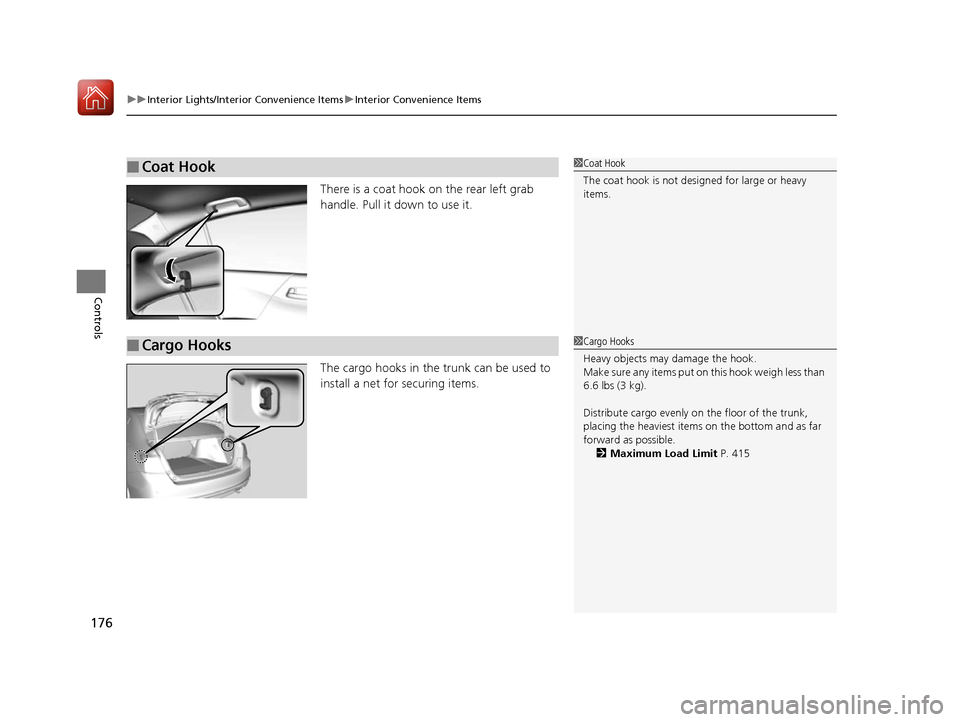
There is a coat hook on the rear left grab
handle. Pull it down to use it.
The cargo hooks in the trunk can be used to
install a net for securing items.
■Coat Hook1Coat Hook
The coat hook is not desi gned for large or heavy
items.
■Cargo Hooks1 Cargo Hooks
Heavy objects may damage the hook.
Make sure any items put on this hook weigh less than
6.6 lbs (3 kg).
Distribute cargo evenly on the floor of the trunk,
placing the heaviest item s on the bottom and as far
forward as possible.
2 Maximum Load Limit P. 415
16 US ACCORD 4D (KA KC KL)-31T2A6300.book 176 ページ 2015年7月28日 火曜日 午後3時3分
Page 178 of 609
Continued177
uuInterior Lights/Interior Convenience Items uInterior Convenience Items
Controls
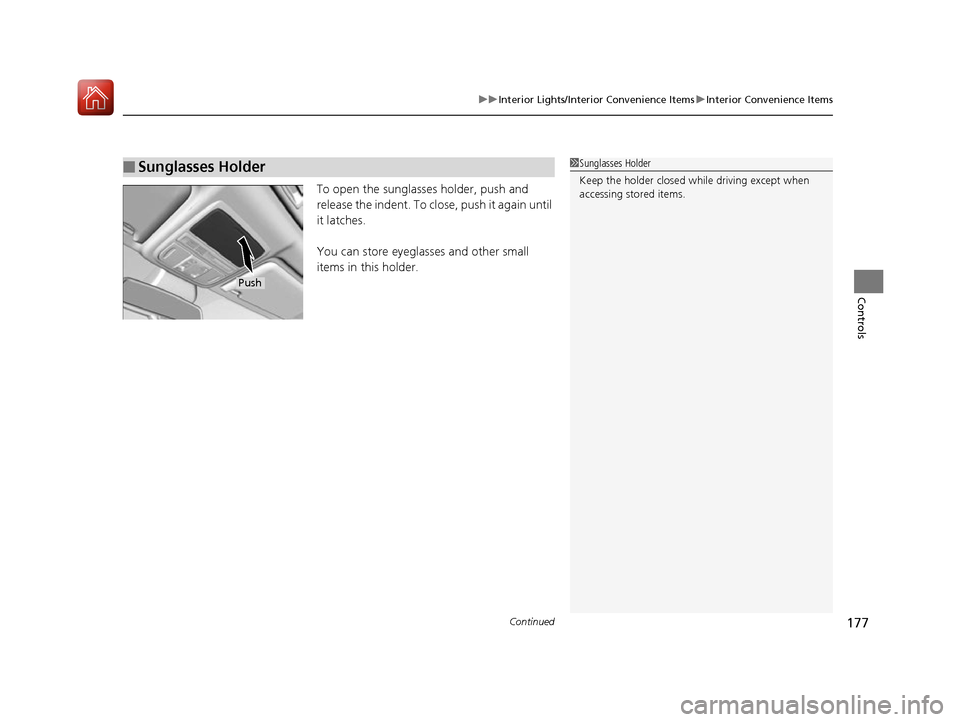
To open the sunglasses holder, push and
release the indent. To close, push it again until
it latches.
You can store eyeglasses and other small
items in this holder.
■Sunglasses Holder1Sunglasses Holder
Keep the holder closed wh ile driving except when
accessing stored items.
Push
16 US ACCORD 4D (KA KC KL)-31T2A6300.book 177 ページ 2015年7月28日 火曜日 午後3時3分
Page 179 of 609
uuInterior Lights/Interior Convenience Items uInterior Convenience Items
178
Controls
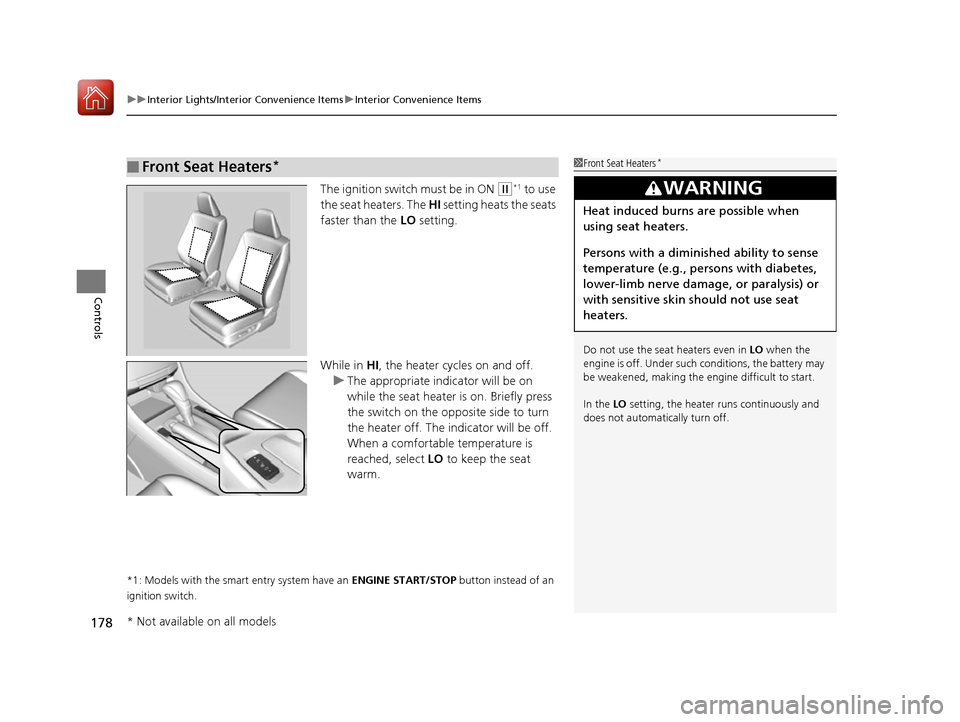
The ignition switch must be in ON (w*1 to use
the seat heaters. The HI setting heats the seats
faster than the LO setting.
While in HI, the heater cycles on and off.
u The appropriate indicator will be on
while the seat heater is on. Briefly press
the switch on the opposite side to turn
the heater off. The in dicator will be off.
When a comfortable temperature is
reached, select LO to keep the seat
warm.
*1: Models with the smart entry system have an ENGINE START/STOP button instead of an
ignition switch.
■Front Seat Heaters*1 Front Seat Heaters*
Do not use the seat heaters even in LO when the
engine is off. Under such conditions, the battery may
be weakened, making the engine difficult to start.
In the LO setting, the heater runs continuously and
does not automatically turn off.
3WARNING
Heat induced burns are possible when
using seat heaters.
Persons with a diminished ability to sense
temperature (e.g., persons with diabetes,
lower-limb nerve damage, or paralysis) or
with sensitive skin should not use seat
heaters.
* Not available on all models
16 US ACCORD 4D (KA KC KL)-31T2A6300.book 178 ページ 2015年7月28日 火曜日 午後3時3分
Page 180 of 609
179
uuInterior Lights/Interior Convenience Items uInterior Convenience Items
Controls
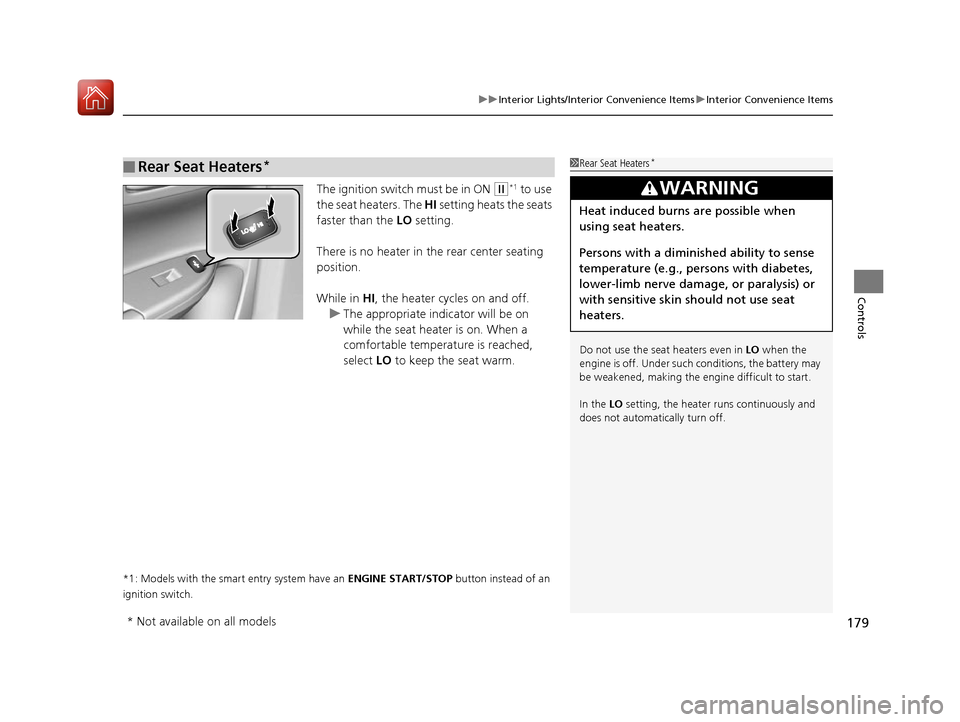
The ignition switch must be in ON (w*1 to use
the seat heaters. The HI setting heats the seats
faster than the LO setting.
There is no heater in the rear center seating
position.
While in HI , the heater cycles on and off.
u The appropriate indicator will be on
while the seat heater is on. When a
comfortable temperature is reached,
select LO to keep the seat warm.
*1: Models with the smart entry system have an ENGINE START/STOP button instead of an
ignition switch.
■Rear Seat Heaters*1 Rear Seat Heaters*
Do not use the seat heaters even in LO when the
engine is off. Under such conditions, the battery may
be weakened, making the engine difficult to start.
In the LO setting, the heater runs continuously and
does not automatically turn off.
3WARNING
Heat induced burns are possible when
using seat heaters.
Persons with a diminished ability to sense
temperature (e.g., persons with diabetes,
lower-limb nerve damage, or paralysis) or
with sensitive skin should not use seat
heaters.
* Not available on all models
16 US ACCORD 4D (KA KC KL)-31T2A6300.book 179 ページ 2015年7月28日 火曜日 午後3時3分
Page 309 of 609
308
uuCustomized Features u
Features
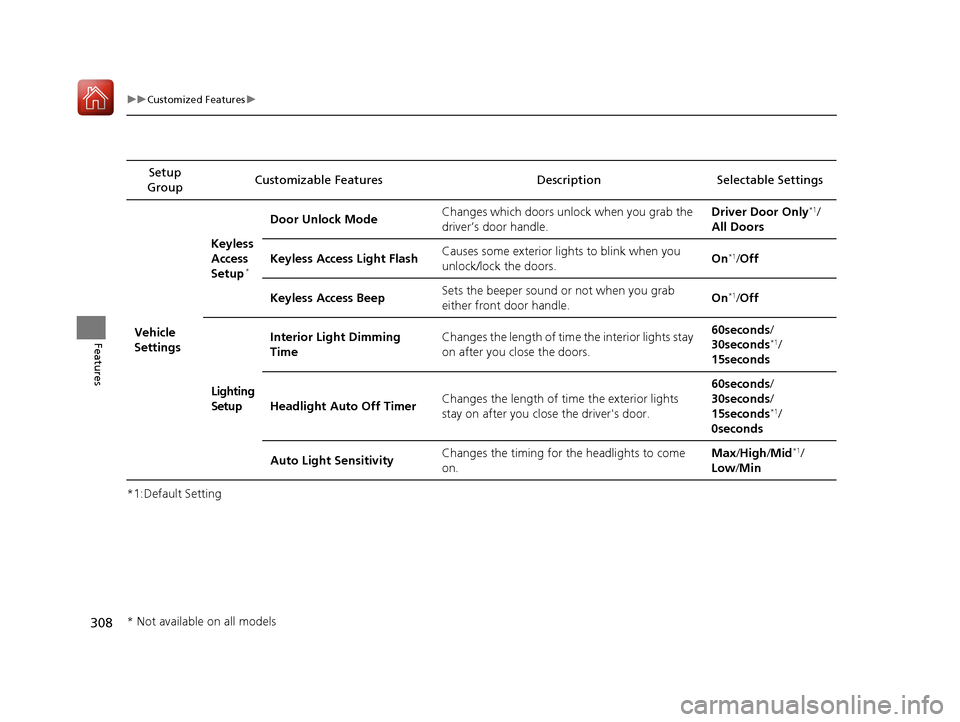
*1:Default SettingSetup
Group Customizable Features Descri
ption Selectable Settings
Vehicle
Settings Keyless
Access
Setup
*
Door Unlock Mode
Changes which doors unlock when you grab the
driver’s door handle. Driver Door Only*1/
All Doors
Keyless Access Light Flash Causes some exterior lig
hts to blink when you
unlock/lock the doors. On
*1/
Off
Keyless Access Beep Sets the beeper sound or not when you grab
either front door handle. On
*1/
Off
Lighting
Setup Interior Light Dimming
Time
Changes the length of time the interior lights stay
on after you close the doors. 60seconds/
30seconds
*1/
15seconds
Headlight Auto Off Timer Changes the length of time the exterior lights
stay on after you close the driver's door. 60seconds/
30seconds/
15seconds
*1/
0seconds
Auto Light Sensitivity Changes the timing for the headlights to come
on. Max
/High /Mid
*1/
Low /Min
* Not available on all models
16 US ACCORD 4D (KA KC KL)-31T2A6300.book 308 ページ 2015年7月28日 火曜日 午後3時3分
Page 332 of 609

331
uuCustomized Features u
Continued
Features
*1:Default SettingSetup
Group Customizable Featur
es Description Sel ectable Settings
Vehicle
Driving
Position
Setup
*Memory Position LinkTurns the driving position memory system on and off.On*1/Off
Keyless
Access
Setup
*
Door Unlock Mode Changes which doors unlock when you grab the
driver’s door handle. Driver Door Only*1/
All Doors
Keyless Access Light
Flash Causes some exterior lights to flash when you unlock/
lock the doors.
On
*1/
Off
Keyless Access Beep Causes the beeper to soun
d when you unlock/lock the
doors. On
*1/
Off
Remote Start System On/
Off
*Turns the remote engine start feature on and off. On*1/Off
Lighting
Setup
Interior Light Dimming
Time Changes the length of time the interior lights stay on
after you close the doors. 60 sec/
30 sec*1/
15 sec
Headlight Auto Off Timer Changes the length of time the exterior lights stay on
after you close the driver’s door. 60 sec/
30 sec/
15 sec
*1/ 0 sec
Auto Light Sensitivity Changes the timing for the headlights to come on. Max
/High /Mid
*1/
Low /Min
* Not available on all models
16 US ACCORD 4D (KA KC KL)-31T2A6300.book 331 ページ 2015年7月28日 火曜日 午後3時3分
Page 566 of 609
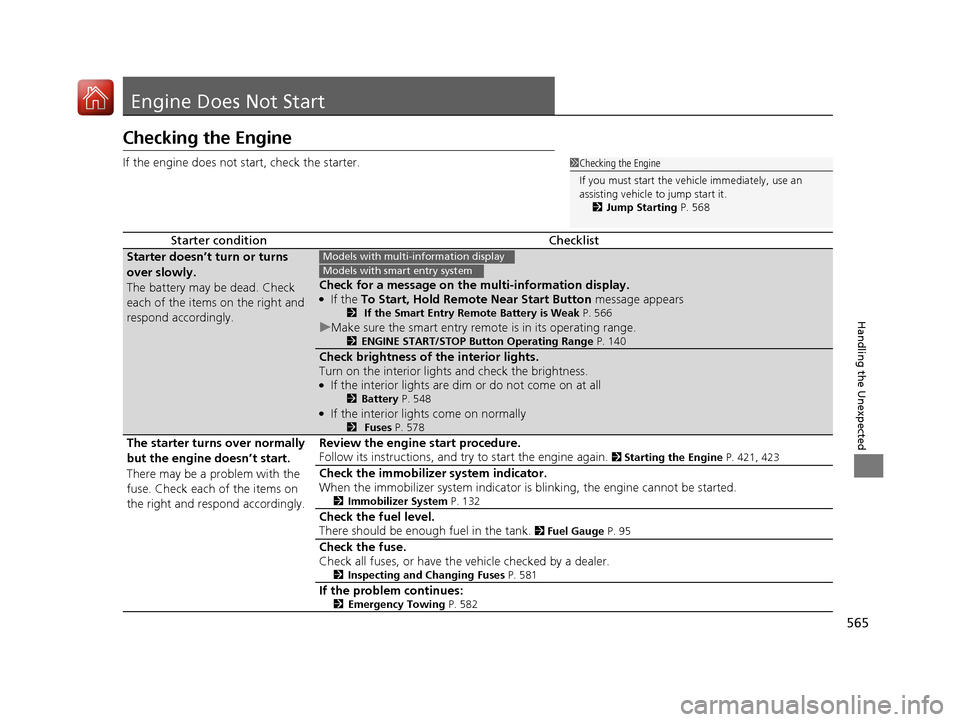
565
Handling the Unexpected
Engine Does Not Start
Checking the Engine
If the engine does not start, check the starter.
Starter conditionChecklist
Starter doesn’t turn or turns
over slowly.
The battery may be dead. Check
each of the items on the right and
respond accordingly.
Check for a message on the multi-information display.●If the To Start, Hold Remote Near Start Button message appears2 If the Smart Entry Remote Battery is Weak P. 566
uMake sure the smart entry remote is in its operating range.2 ENGINE START/STOP Button Operating Range P. 140
Check brightness of the interior lights.
Turn on the interior lights and check the brightness.
●If the interior lights are dim or do not come on at all2Battery P. 548●If the interior lights come on normally2 Fuses P. 578
The starter turns over normally
but the engine doesn’t start.
There may be a problem with the
fuse. Check each of the items on
the right and respond accordingly. Review the engine start procedure.
Follow its instructions, and try
to start the engine again.
2 Starting the Engine P. 421, 423
Check the immobilizer system indicator.
When the immobilizer system indicator is blinking, the engine cannot be started.
2Immobilizer System P. 132
Check the fuel level.
There should be enough fuel in the tank.
2 Fuel Gauge P. 95
Check the fuse.
Check all fuses, or have the vehicle checked by a dealer.
2 Inspecting and Changing Fuses P. 581
If the problem continues:2Emergency Towing P. 582
1Checking the Engine
If you must start the vehi cle immediately, use an
assisting vehicle to jump start it.
2 Jump Starting P. 568
Models with multi- information display
Models with smart entry system
16 US ACCORD 4D (KA KC KL)-31T2A6300.book 565 ページ 2015年7月28日 火曜日 午後3時3分