reset HONDA ACCORD 2016 9.G Quick Guide
[x] Cancel search | Manufacturer: HONDA, Model Year: 2016, Model line: ACCORD, Model: HONDA ACCORD 2016 9.GPages: 83, PDF Size: 7.35 MB
Page 64 of 83
120 || 121
HANDLING THE UNEXPECTED
HANDLING THE UNEXPECTED
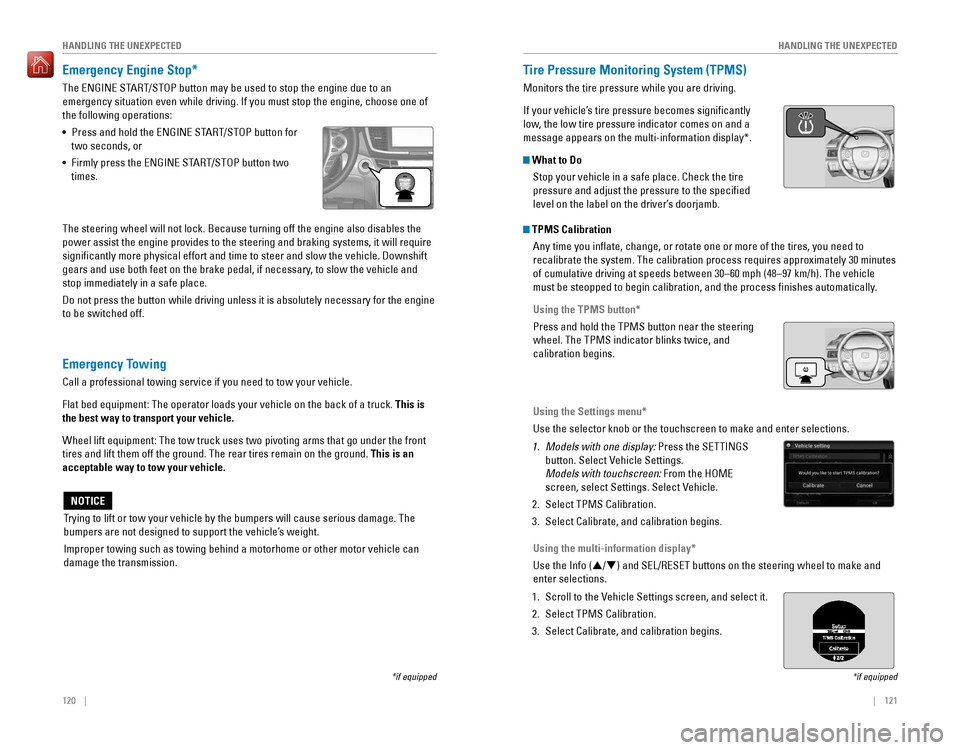
Emergency Engine Stop*
The ENGINE START/STOP button may be used to stop the engine due to an
emergency situation even while driving. If you must stop the engine, choose one of
the following operations:
•
Press and hold the ENGINE START/STOP button for
two seconds, or
•
Firmly press the ENGINE START/STOP button two
times.
The steering wheel will not lock. Because turning off the engine also disables the
power assist the engine provides to the steering and braking systems, it will require
significantly more physical effort and time to steer and slow the vehi\
cle. Downshift
gears and use both feet on the brake pedal, if necessary, to slow the vehicle and
stop immediately in a safe place.
Do not press the button while driving unless it is absolutely necessary for the engine
to be switched off.
*if equipped
Trying to lift or tow your vehicle by the bumpers will cause serious damage. The
bumpers are not designed to support the vehicle’s weight.
Improper towing such as towing behind a motorhome or other motor vehicle can
damage the transmission.
NOTICE
Emergency Towing
Call a professional towing service if you need to tow your vehicle.
Flat bed equipment: The operator loads your vehicle on the back of a truck. This is
the best way to transport your vehicle.
Wheel lift equipment: The tow truck uses two pivoting arms that go under the front
tires and lift them off the ground. The rear tires remain on the ground.\
This is an
acceptable way to tow your vehicle.
Tire Pressure Monitoring System (TPMS)
Monitors the tire pressure while you are driving.
If your vehicle’s tire pressure becomes significantly
low, the low tire pressure indicator comes on and a
message appears on the multi-information display*.
What to Do
Stop your vehicle in a safe place. Check the tire
pressure and adjust the pressure to the specified
level on the label on the driver’s doorjamb.
*if equipped
TPMS CalibrationAny time you inflate, change, or rotate one or more of the tires, you \
need to
recalibrate the system. The calibration process requires approximately 30 minutes
of cumulative driving at speeds between 30–60 mph (48–97 km/h). The vehicle
must be steopped to begin calibration, and the process finishes automatically.
Using the TPMS button*
Press and hold the TPMS button near the steering
wheel. The TPMS indicator blinks twice, and
calibration begins.
Using the Settings menu*
Use the selector knob or the touchscreen to make and enter selections.
1. Models with one display: Press the SETTINGS
button. Select Vehicle Settings.
Models with touchscreen: From the HoMe
screen, select Settings. Select vehicle.
2. Select TPMS Calibration.
3. Select Calibrate, and calibration begins.
Using the multi-information display*
Use the Info (p/q) and SEL/RESET buttons on the steering wheel to make and
enter selections.
1. Scroll to the vehicle Settings screen, and select it.
2. Select TPMS Calibration.
3. Select Calibrate, and calibration begins.
Page 69 of 83
130 || 131
MAINTENANCEMAINTENANCE
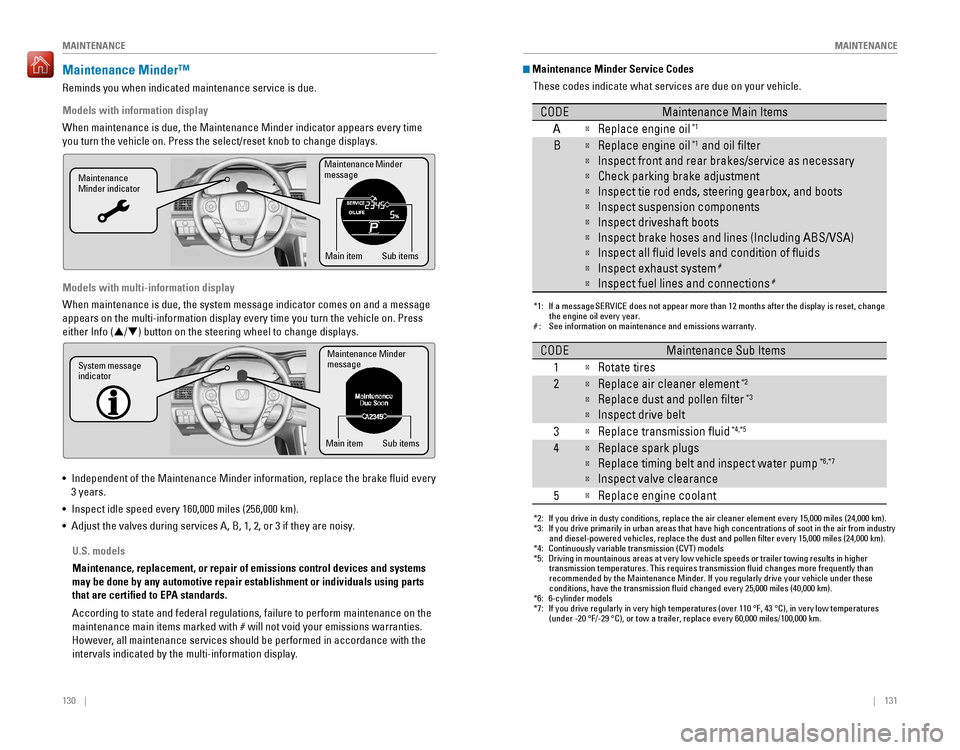
Maintenance Minder™
reminds you when indicated maintenance service is due.
Models with information display
When maintenance is due, the Maintenance Minder indicator appears every time
you turn the vehicle on. Press the select/reset knob to change displays.
Models with multi-information display
When maintenance is due, the system message indicator comes on and a message
appears on the multi-information display every time you turn the vehicle\
on. Press
either Info (p/q) button on the steering wheel to change displays.
• Independent of the Maintenance Minder information, replace the brake fluid every
3 years.
•
Inspect idle speed every 160,000 miles (256,000 km).
• Adjust the valves during services A, B, 1, 2, or 3 if they are noisy.
Maintenance Minder
message
Maintenance
Minder indicator
Sub items
Main item
Maintenance Minder
messag e
System message
indicator
Sub items
Main item
U.S. models
Maintenance, replacement, or repair of emissions control devices and sys\
tems
may be done by any automotive repair establishment or individuals using \
parts
that are certified to EPA standards.
According to state and federal regulations, failure to perform maintenan\
ce on the
maintenance main items marked with # will not void your emissions warranties.
However, all maintenance services should be performed in accordance with the
intervals indicated by the multi-information display.
Maintenance Minder Service Codes
These codes indicate what services are due on your vehicle.
*1: If a message SERVICE does not appear more than 12 months after the display is reset, change the engine oil every year.
#: See information on maintenance and emissions warranty.
CODEMaintenance Main Items
A
Replace engine oi l*1
BReplace engine oil*1 and oil lter
Inspect front and rear brakes/service as necessary
Check parking brake adjustment
Inspect tie rod ends, steering gearbox, and boots
Inspect suspension components
Inspect driveshaft boots
Inspect brake hoses and lines (Including ABS/VSA)
Inspect all uid levels and condition of uid s
Inspect exhaust system#
Inspect fuel lines and connections#
*2: If you drive in dusty conditions, replace the air cleaner element every \
15,000 miles (24,000 km).
*3: If you drive primarily in urban areas that have high concentrations of s\
oot in the air from industryand diesel-powered vehicles, replace the dust and pollen lter every \
15,000 miles (24,000 km).
*4: Continuously variable transmission (CVT) models
*5: Driving in mountainous areas at very low vehicle speeds or trailer towing results in higher
transmission temperatures. This requires transmission uid changes mo\
re frequently than
recommended by the Maintenance Minder. If you regularly drive your vehic\
le under these
conditions, have the transmission uid changed every 25,000 miles (4\
0,000 km).
*6: 6-cylinder models
*7: If you drive regularly in very high temperatures (over 110 °F, 43 °C), in very low temperatures
(under -20 °F/-29 °C), or tow a trailer, replace every 60,000 mi\
les/100,000 km.
CODEMaintenance Sub Items
1
Rotate tires
2Replace air cleaner element*2
Replace dust and pollen lter*3
Inspect drive belt
3
Replace transmission ui d*4,*5
4Replace spark plugs
Replace timing belt and inspect water pum p*6,*7
Inspect valve clearance
5
Replace engine coolant
Page 72 of 83
136 || 137
MAINTENANCEMAINTENANCE
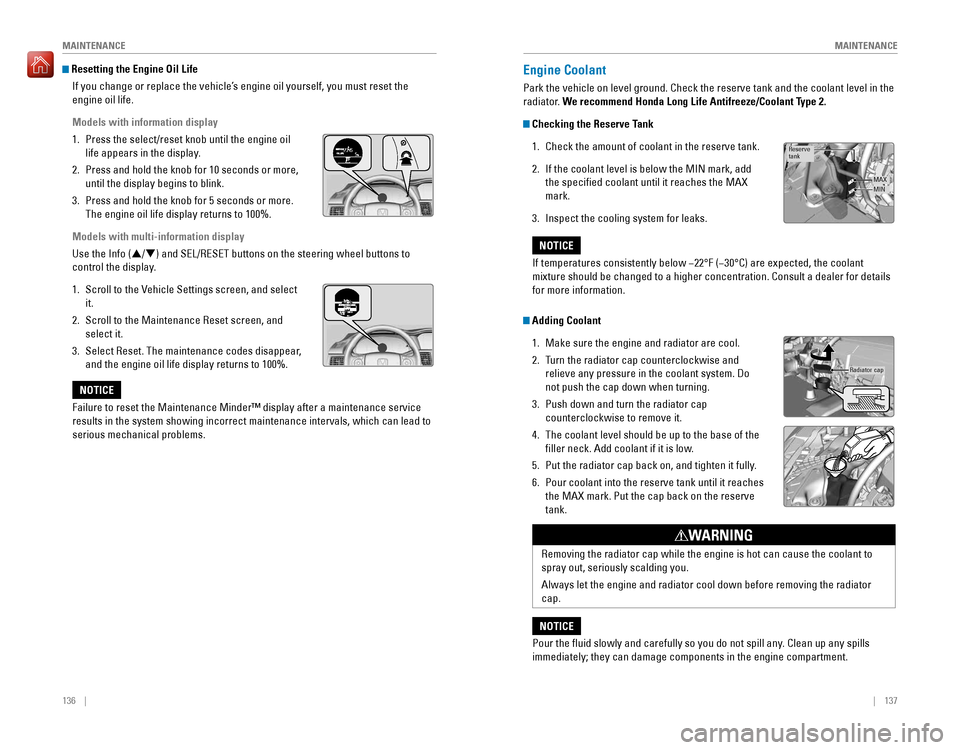
Resetting the Engine Oil Life
If you change or replace the vehicle’s engine oil yourself, you must reset the
engine oil life.
Models with information display
1. Press the select/reset knob until the engine oil
life appears in the display.
2. Press and hold the knob for 10 seconds or more,
until the display begins to blink.
3. Press and hold the knob for 5 seconds or more.
The engine oil life display returns to 100%.
Models with multi-information display
Use the Info (p/q) and SEL/RESET buttons on the steering wheel buttons to
control the display.
1. Scroll to the vehicle Settings screen, and select
it.
2. Scroll to the Maintenance reset screen, and
select it.
3. Select reset. The maintenance codes disappear,
and the engine oil life display returns to 100%.
Failure to reset the Maintenance Minder™ display after a maintenance \
service
results in the system showing incorrect maintenance intervals, which can\
lead to
serious mechanical problems.
NOTICE
Engine Coolant
Park the vehicle on level ground. Check the reserve tank and the coolant\
level in the
radiator. We recommend Honda Long Life Antifreeze/Coolant Type 2.
Checking the Reserve Tank
1. Check the amount of coolant in the reserve tank.
2. If the coolant level is below the MIN mark, add
the specified coolant until it reaches the MAX
mark.
3. Inspect the cooling system for leaks.
Adding Coolant
1. Make sure the engine and radiator are cool.
2. Turn the radiator cap counterclockwise and
relieve any pressure in the coolant system. Do
not push the cap down when turning.
3. Push down and turn the radiator cap
counterclockwise to remove it.
4. The coolant level should be up to the base of the
filler neck. Add coolant if it is low.
5. Put the radiator cap back on, and tighten it fully.
6. Pour coolant into the reserve tank until it reaches
the MAX mark. Put the cap back on the reserve
tank.
Reserve
tank
MAXMIN
If temperatures consistently below −22°F (−30°C) are expected, the coolant
mixture should be changed to a higher concentration. Consult a dealer for details
for more information.
NOTICE
Radiator cap
removing the radiator cap while the engine is hot can cause the coolant t\
o
spray out, seriously scalding you.
Always let the engine and radiator cool down before removing the radiator
cap.
WARNING
Pour the fluid slowly and carefully so you do not spill any. Clean up any spills
immediately; they can damage components in the engine compartment.
NOTICE
Page 81 of 83
154 || 155
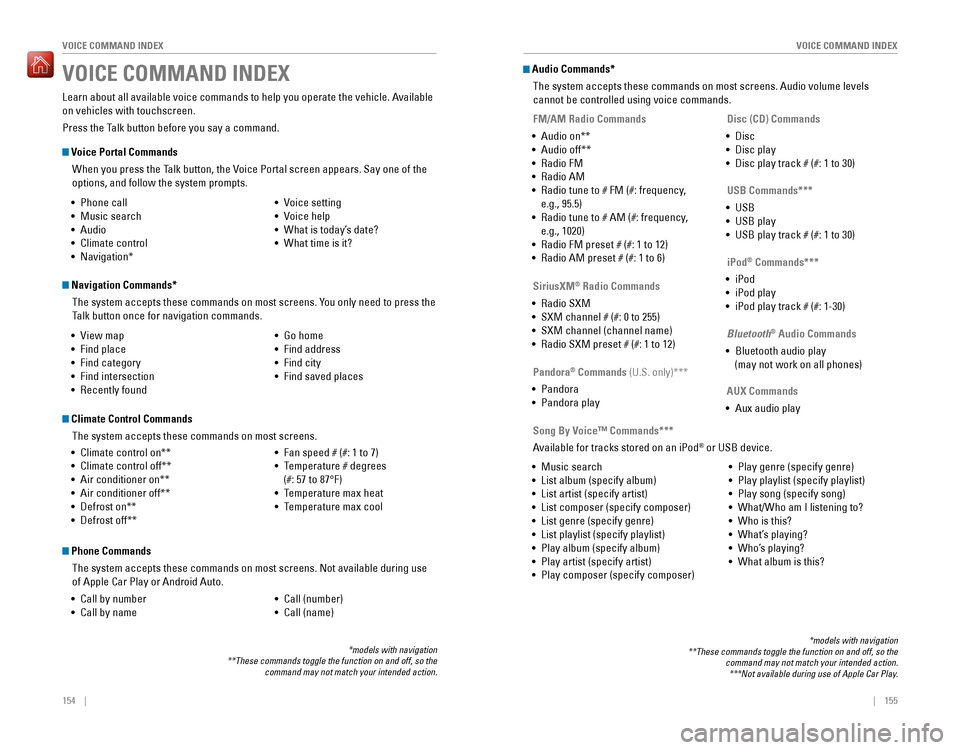
VOICE COMMAND INDEX
VOICE COMMAND INDEX
Voice Portal Commands
When you press the Talk button, the Voice Portal screen appears. Say one of the
options, and follow the system prompts.
Navigation Commands*
The system accepts these commands on most screens. You only need to press the
Talk button once for navigation commands.
Learn about all available voice commands to help you operate the vehicle. Available
on vehicles with touchscreen.
Press the Talk button before you say a command.
VOICE COMMAND INDEX
• Phone call
• Music search
• Audio
• Climate control
• Navigation* • voice setting
• voice help
• What is today’s date?
• What time is it?
• view map
•
Find place
• Find category
• Find intersection
•
recently found
• Go home
• Find address
• Find city
• Find saved places
*models with navigation**These commands toggle the function on and off, so the command may not match your intended action.
Climate Control Commands
The system accepts these commands on most screens.
•
Climate control on**
• Climate control off**
• Air conditioner on**
• Air conditioner off**
• Defrost on**
• Defrost off**
• Fan speed # (#: 1 to 7)
• Temperature # degrees
(#: 57 to 87°F)
• Temperature max heat
• Temperature max cool
Phone Commands
The system accepts these commands on most screens. Not available during use
of Apple Car Play or Android Auto.
•
Call by number
• Call by name
• Call (number)
• Call (name)
Audio Commands*
The system accepts these commands on most screens. Audio volume levels
cannot be controlled using voice commands.
FM/AM Radio Commands
•
Audio on**
• Audio off**
• radio FM
• radio AM
• Radio tune to # FM (#: frequency,
e.g., 95.5)
•
Radio tune to # AM (#: frequency,
e.g., 1020)
•
radio FM preset # (#: 1 to 12)
• radio AM preset # (#: 1 to 6)
SiriusXM® Radio Commands
•
radio SXM
• SXM channel # (#: 0 to 255)
• SXM channel (channel name)
•
radio SXM preset # (#: 1 to 12)
Disc (CD) Commands
• Disc
• Disc play
• Disc play track # (#: 1 to 30)
USB Commands***
• USB
• USB play
• USB play track # (#: 1 to 30)
Pandora
® Commands (U.S. only)***
• Pandora
• Pandora play iPod
® Commands***
• iPod
• iPod play
• iPod play track # (#: 1-30)
Bluetooth
® Audio Commands
• Bluetooth audio play
(may not work on all phones)
AUX Commands
• Aux audio play
• Music search
•
List album (specify album)
• List artist (specify artist)
• List composer (specify composer)
• List genre (specify genre)
• List playlist (specify playlist)
•
Play album (specify album)
• Play artist (specify artist)
• Play composer (specify composer) •
Play genre (specify genre)
• Play playlist (specify playlist)
• Play song (specify song)
•
What/Who am I listening to?
• Who is this?
• What’s playing?
• Who’s playing?
• What album is this?
Song By Voice™ Commands***
Available for tracks stored on an iPod® or USB device.
*models with navigation**These commands toggle the function on and off, so the command may not match your intended action.***Not available during use of Apple Car Play.
Page 83 of 83
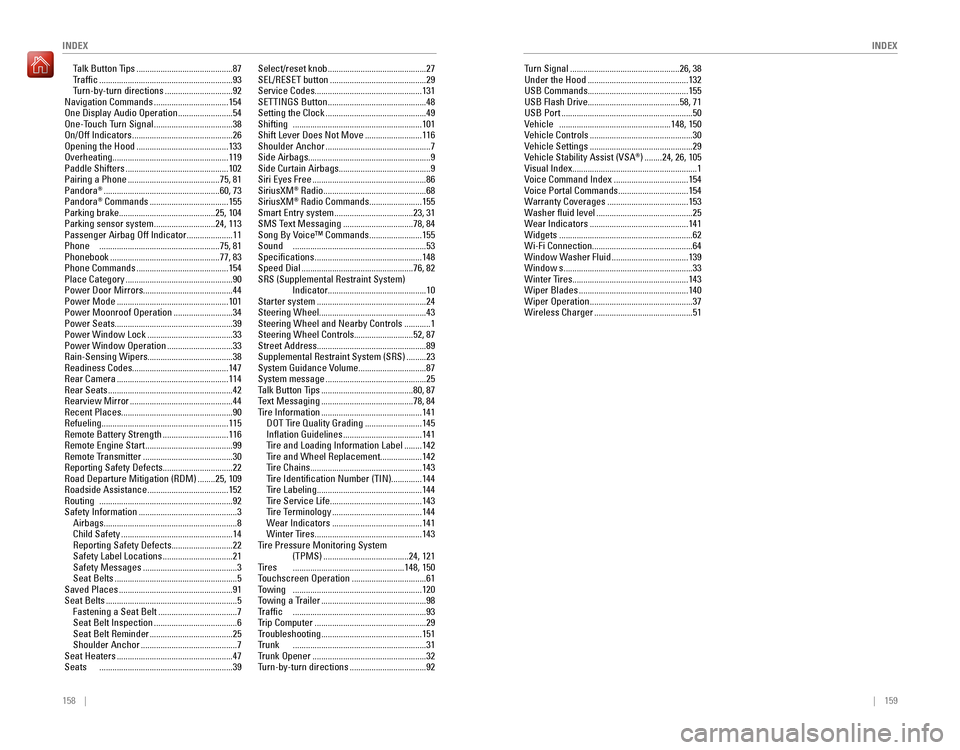
158 || 159
INDEX
INDEX
Talk Button Tips ............................................87Traffic .............................................................93Turn-by-turn directions ...............................92
Navigation Commands ..................................154one Display Audio operation .........................54one-Touch Turn Signal ....................................38On/Off Indicators ..............................................26opening the Hood ..........................................133overheating..................................................... 119
Paddle Shifters ...............................................102
Pairing a Phone ..........................................75, 81
Pandora® .....................................................60, 73
Pandora® Commands ....................................155Parking brake............................................ 25, 104
Parking sensor system ............................24, 113Passenger Airbag Off Indicator .....................11Phone .......................................................75, 81
Phonebook ..................................................77, 83
Phone Commands ..........................................154
Place Category .................................................90
Power Door Mirrors ......................................... 44
Power Mode
...................................................101Power Moonroof operation ...........................34
Power Seats ...................................................... 39
Power Window Lock .......................................33Power Window Operation ..............................33Rain-Sensing Wipers.......................................38readiness Codes............................................ 147rear Camera ...................................................114rear Seats .........................................................42rearview Mirror ...............................................44recent Places................................................... 90refueling.......................................................... 115remote Battery Strength ..............................116remote engine Start ........................................99remote Transmitter .........................................30reporting Safety Defects................................22road Departure Mitigation (rDM) ........25, 109roadside Assistance .....................................152routing .............................................................92Safety Information .............................................3
Airbags .............................................................8
Child Safety ...................................................14reporting Safety Defects ............................22Safety Label Locations ................................21
Safety Messages ...........................................3
Seat Belts ........................................................5
Saved Places ....................................................91
Seat Belts ............................................................5
Fastening a Seat Belt ....................................7Seat Belt Inspection ......................................6Seat Belt reminder ......................................25
Shoulder Anchor ............................................7
Seat Heaters .....................................................47Seats .............................................................39
Select/reset knob .............................................27SEL/RESET button ............................................29
Service Codes ................................................. 131
SETTINGS Button .............................................48
Setting the Clock ..............................................49Shifting ...........................................................101
Shift Lever Does Not Move ..........................116
Shoulder Anchor ................................................7Side Airbags........................................................ 9Side Curtain Airbags..........................................9Siri eyes Free ....................................................86
SiriusXM® radio ...............................................68
SiriusXM® radio Commands ........................155Smart entry system ....................................23, 31
SMS Text Messaging ................................78, 84Song By voice™ Commands ........................155Sound .............................................................53
Specifications .................................................148
Speed Dial ...................................................76, 82SrS (Supplemental restraint System)
Indicator ............................................. 10
Starter system
..................................................24Steering Wheel................................................. 43Steering Wheel and Nearby Controls ............1Steering Wheel Controls...........................52, 87
Street Address .................................................. 89
Supplemental restraint System (SrS) .........23System Guidance volume ...............................87
System message ..............................................25
Talk Button Tips ..........................................80, 87
Text Messaging ..........................................78, 84Tire Information ..............................................141DoT Tire Quality Grading ..........................145Inflation Guidelines ....................................141Tire and Loading Information Label ........142Tire and Wheel Replacement ...................142
Tire Chains ...................................................143Tire Identification Number (TIN) ..............144Tire Labeling ................................................144
Tire Service Life ..........................................143
Tire Terminology .........................................144Wear Indicators .........................................141Winter Tires .................................................143
Tire Pressure Monitoring System (TPMS)
.......................................24, 121Tires ...................................................148, 150Touchscreen operation ..................................61Towing ...........................................................120
Towing a Trailer ................................................98Traffic .............................................................93
Trip Computer ...................................................29
Troubleshooting ..............................................151Trunk .............................................................31Trunk opener ....................................................32Turn-by-turn directions ...................................92 Turn Signal
..................................................26, 38
Under the Hood ..............................................132
USB Commands .............................................. 155
USB Flash Drive .......................................... 58, 71
USB Port
............................................................50vehicle ...................................................148, 150vehicle Controls ...............................................30vehicle Settings ...............................................29Vehicle Stability Assist (VSA®) ........24, 26, 105Visual Index......................................................... 1Voice Command Index ..................................154voice Portal Commands ................................154Warranty Coverages .....................................153Washer fluid level ............................................25Wear Indicators .............................................141Widgets .............................................................62Wi-Fi Connection..............................................64Window Washer Fluid ...................................139Window s ...........................................................33Winter Tires .....................................................143Wiper Blades ..................................................140Wiper Operation ...............................................37Wireless Charger .............................................51