climate control HONDA ACCORD 2016 9.G Quick Guide
[x] Cancel search | Manufacturer: HONDA, Model Year: 2016, Model line: ACCORD, Model: HONDA ACCORD 2016 9.GPages: 83, PDF Size: 7.35 MB
Page 3 of 83
INTRODUCTIONTABLE OF CONTENTS
This Owner’s Guide is intended to help you quickly get acquainted with your
2016 Honda Accord Sedan
. It provides basic information and instructions on
technology and convenience features, as well as emergency procedures and\
how to
get assistance.
This guide is for vehicles sold in the United States and Canada. It covers all Accord
Sedan models, so you may find descriptions of features and equipment that are not
in your vehicle. Images throughout this guide are from U.S. vehicles and represent
features and equipment that are available on some, but not all, models.
This guide is not intended to be a substitute for the Owner’s Manual. The Owner
Information CD enclosed in your glove box kit includes the Owner’s Manual,
Navigation Manual, and vehicle and tire warranties in electronic format.\
This
information can be viewed on a computer (PC or Mac platform) and saved or printed
for your reference. You can also visit owners.honda.com (U.S.) or myhonda.ca
(Canada) to view the complete and most current information.
If you are the first registered owner of your vehicle, you may request a complimentary
printed copy of the Owner’s Manual, Navigation Manual, or Vehicle Warranty within
the first six months of vehicle purchase. To request a copy, visit owners.honda.com
(U.S.) and create or log in to your account. In Canada, please request a copy from
your Honda dealer.
American Honda Motor Company strives to be proactive in protecting our
environment and natural resources. By using electronic delivery for a considerable
portion of the information typically found in a vehicle owner’s manual, we are further
reducing our impact on the environment.
Honda Automobile Customer Service
Your authorized Honda dealer should be able to answer any questions you have
about your vehicle. However, if you are dissatisfied with the information you receive,
you can call Honda Automobile Customer Service (see page 152).
Call (800) 999-1009 (U.S.) or (888) 946-6329 (Canada)
Honda Roadside Assistance
24-hour emergency road service is available to you in the United States and Canada
throughout your 3-year/36,000-mile warranty term. Services include jump starting,
flat tire and lockout assistance, towing, and more (limitations apply\
).
Call (866) 864-5211 (U.S.) or (800) 465-7587 (Canada)
*if equipped
VISUAL INDEX .......................................1
Steering Wheel and Nearby Controls ...1
Dashboard and Other Controls
...........2
SAFETY INFORMATION
........................3
Important Safety Information
..............3
Seat Belts
...............................................5
Airbags
....................................................8
Child Safety
..........................................14
Safety Label Locations
.......................21
Reporting Safety Defects
...................22
INSTRUMENT PANEL
.........................23
Malfunction Indicators
......................23
Condition Indicators
...........................25
On/Off Indicators
.................................26
Information Display*
..........................27
Multi-Information Display (MID)*
....28
VEHICLE CONTROLS
...........................30
Using the Key or Remote
Transmitter*
.........................................30
Smart Entry System*
...........................31
Door Operation
....................................32
Power Window Operation
................33
Power Moonroof Operation*
...........34
Interior and Exterior Lights
...............35
Auto High-Beam System*
..................36
Wiper Operation
..................................37
One-Touch Turn Signal
.......................38
Adjusting the Seats
............................39
Adjusting the Steering Wheel
..........43
Driving Position Memory System*
...43
Adjusting the Mirrors
.........................44
HomeLink
® Garage Opener* .............45
Climate Control System
....................46
Seat Heaters*
......................................47
Customized Features
..........................48 Setting the Clock
.................................49
AUDIO AND CONNECTIVITY
.............50
Basic Audio Operation
.......................50
Models with one display
One Display Audio Operation ...........54
FM/AM Radio
.......................................55
Compact Disc (CD)
..............................56
iPod
®...................................................... 57
USB Flash Drive
..................................58
Bluetooth
® Audio ................................59
Pandora
® ..............................................60
Models with touchscreen
Touchscreen Operation .....................61
HondaLink
® ..........................................63
Wi-Fi Connection
................................64
Aha™ Radio
.........................................64
Apple CarPlay
......................................65
Android Auto
........................................66
FM/AM Radio
......................................67
SiriusXM
® Radio* ...............................68
Compact Disc (CD)
.............................69
iPod
®...................................................... 70
USB Flash Drive
..................................71
Bluetooth
® Audio ................................72
Pandora
® ..............................................73
BLUETOOTH
® HANDSFREELINK® ....74
Models with one display
Basic HFL Operation ...........................74
Pairing a Phone
...................................75
Making a Call
......................................76
SMS Text Messaging
.........................78
Models with touchscreen
Basic HFL Operation ...........................79
Pairing a Phone
...................................81
Making a Call
......................................82
Page 5 of 83
2 || 3
SAFETYVISUAL INDEX
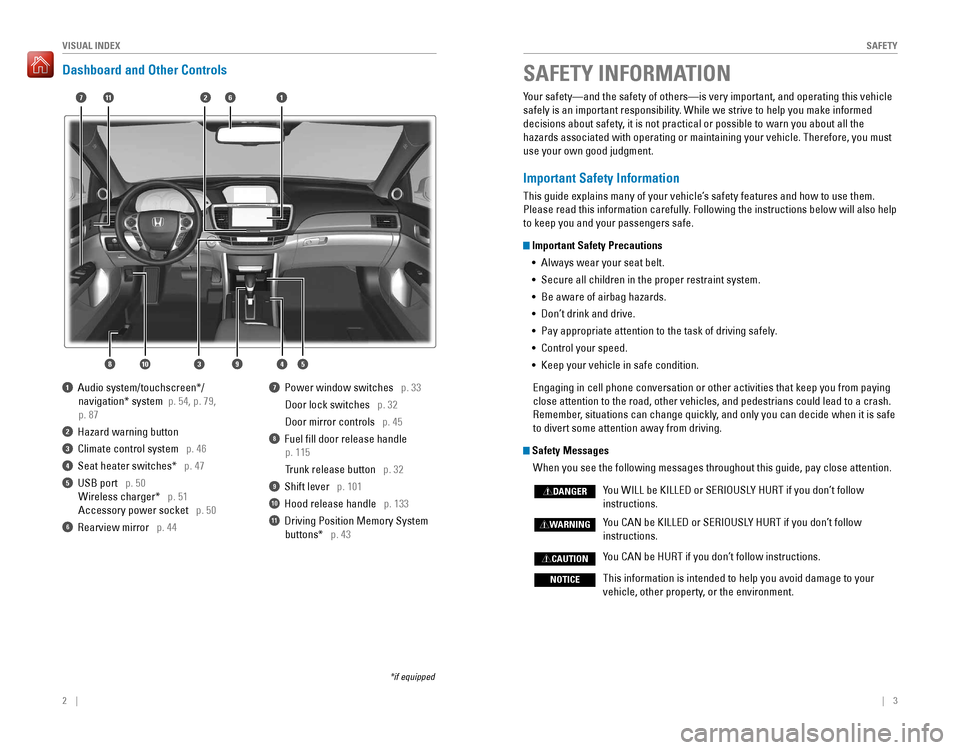
Dashboard and Other Controls
1 Audio system/touchscreen*/
navigation* system p. 54, p. 79,
p. 87
2 Hazard warning button
3 Climate control system p. 46
4 Seat heater switches* p. 47
5 USB port p. 50
Wireless charger* p. 51
Accessory power socket p. 50
6 rearview mirror p. 44
7 Power window switches p. 33
Door lock switches p. 32
Door mirror controls p. 45
8 Fuel fill door release handle
p. 115
Trunk release button p. 32
9 Shift lever p. 101
10 Hood release handle p. 133
11 Driving Position Memory System
buttons* p. 43
*if equipped
SAFETY INFORMATION
2
4
71
8
6
3
Your safety—and the safety of others—is very important, and operati\
ng this vehicle
safely is an important responsibility. While we strive to help you make informed
decisions about safety, it is not practical or possible to warn you about all the
hazards associated with operating or maintaining your vehicle. Therefore, you must
use your own good judgment.
Important Safety Information
This guide explains many of your vehicle’s safety features and how to use them.
Please read this information carefully. Following the instructions below will also help
to keep you and your passengers safe.
Important Safety Precautions
•
Always wear your seat belt.
• Secure all children in the proper restraint system.
•
Be aware of airbag hazards.
• Don’t drink and drive.
• Pay appropriate attention to the task of driving safely.
• Control your speed.
• Keep your vehicle in safe condition.
engaging in cell phone conversation or other activities that keep you fro\
m paying
close attention to the road, other vehicles, and pedestrians could lead \
to a crash.
Remember, situations can change quickly, and only you can decide when it is safe
to divert some attention away from driving.
Safety Messages
When you see the following messages throughout this guide, pay close attention.
You WILL be KILLED or SERIOUSLY HURT if you don’t follow
instructions.
You CAN be KILLED or SERIOUSLY HURT if you don’t follow
instructions.
You CAN be HURT if you don’t follow instructions.
This information is intended to help you avoid damage to your
vehicle, other property, or the environment.
DANGER
WARNING
CAUTION
NOTICE
5910
11
Page 6 of 83
4 || 5
SAFETYSAFETY
Carbon Monoxide Gas
The engine exhaust from this vehicle contains carbon monoxide, a colorless,
odorless, and highly toxic gas. As long as you properly maintain your ve\
hicle and
follow the instructions set forth below, you will not accumulate dangerous levels
of carbon monoxide gas in the vehicle interior.
Have the exhaust system inspected for leaks whenever:
• The exhaust system is making an unusual noise.
•
The exhaust system may have been damaged.
• The vehicle is raised for an oil change.
When you operate a vehicle with the trunk open, airflow can pull exhaust gas
into the interior and create a hazardous condition. If you must drive with the trunk
open, open all the windows and set the climate control system as shown below.
1. Select the fresh air mode.
2. Select the mode.
3. Set the fan speed to high.
4. Set the temperature control to a comfortable setting.
Adjust the climate control system in the same manner if you sit in your \
parked
vehicle with the engine running.
An enclosed area such as a garage can quickly fill up with carbon monoxide gas.
Do not run the engine with the garage door closed. even when the garage door is
open, drive out of the garage immediately after starting the engine.
Seat Belts
A seat belt is your best protection in all types of collisions. Airbags are designed to
supplement seat belts, not replace them. So even though your vehicle is equipped
with airbags, make sure you and your passengers always wear your seat belts and
wear them properly.
Lap/Shoulder Seat Belts
All five seating positions are equipped with lap/shoulder seat belts with
emergency locking retractors. In normal driving, the retractor lets you move
freely while keeping some tension on the belt. During a collision or sudden stop,
the retractor locks to restrain your body. The rear seat belts also have a lockable
retractor for use with child seats.
The front seats are equipped with automatic seat belt tensioners to enhance
safety. The tensioners automatically tighten the front seat belts during a moderate
to severe frontal collision, sometimes even if the collision is not seve\
re enough to
inflate the front airbags.
Proper Use of Seat Belts
Follow these guidelines for proper use:
•
All occupants should sit upright, well back in the seat, and remain in that
position for the duration of the trip. Slouching and leaning reduce the \
effectiveness of the belt and can increase the chance of serious injury in a
crash.
•
Never place the shoulder part of a lap/shoulder seat belt under your arm or
behind your back. This could cause very serious injuries in a crash.
• Two people should never use the same seat belt. If they do, they could be very
seriously injured in a crash.
•
Do not put any accessories on the seat belts. Devices intended to improve
comfort or reposition the shoulder part of a seat belt can reduce the protective
capability and increase the chance of serious injury in a crash.
• No one should sit in a seat with an inoperative seat belt or one that does not
appear to be working correctly. Using a seat belt that is not working properly
may not protect the occupant in a crash. Have a dealer check the belt as soon
as possible.
Carbon monoxide gas is toxic. Breathing it can cause unconsciousness and
even kill you.
Avoid any enclosed areas or activities that expose you to carbon monoxide.
WARNING
Not wearing a seat belt properly increases the chance of a serious injury or
death in a crash, even though your vehicle has airbags.
Be sure you and your passengers always wear seat belts and wear them
properly.
WARNING
Page 27 of 83

46 || 47
VEHICLE CONTROLSVEHICLE CONTROLS
Climate Control System
The automatic climate control system can maintain your preferred interio\
r
temperature by selecting the proper mix of heated or cooled air and fan speed. Use
the buttons on the dashboard to control the system.
AUTO button: Press, then
use the temperature
control buttons to set your preferred temperature.
Driver’s side
temperature
control
buttons
A/C
button
Fan
control
buttons Recirculation button:
Recirculation mode (indicator on): recirculates air from the vehicle’s interior. Fresh air mode (indicator off):
Maintains outside
ventilation.
Rear
defogger/
heated door
mirrors
button*
Windshield
defroster
button
ON/OFF
button
Mode button:
Change airflow
location.
Passenger’s
side
temperature
control
buttons
SYNC button:
Press to set the
passenger’s side
temperature to
the same as the
driver’s side.
*if equipped
Seat Heaters*
Quickly warm the seats when the vehicle is on.
Press the seat heater switch to the LO or HI position.
An indicator appears for the selected setting. return
the switch to the middle position to turn off. The
switch for the front seat heaters is located in the front
console.
The switch for the rear seat heaters is located on the
rear door. The rear middle seat does not have heating.
Heat-induced burns are possible when using seat heaters.
Persons with a diminished ability to sense temperature (e.g., persons with
diabetes, lower-limb nerve damage, or paralysis) or with sensitive skin should
not use the seat heaters.
WARNING
Page 53 of 83
98 || 99
DRIVING
DRIVING
Towing a Trailer
Your vehicle can tow a trailer if you carefully observe the load limits, use the proper
equipment, and follow the towing guidelines. Check the load limits before driving
(see page 96).
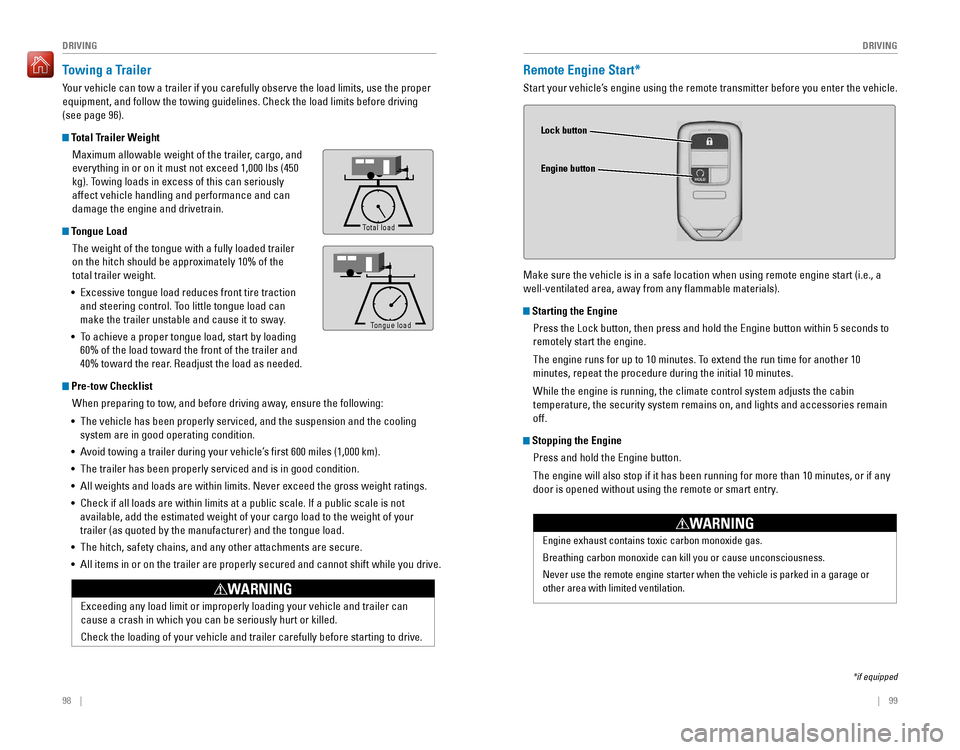
Total Trailer Weight
Maximum allowable weight of the trailer, cargo, and
everything in or on it must not exceed 1,000 lbs (450
kg). Towing loads in excess of this can seriously
affect vehicle handling and performance and can
damage the engine and drivetrain.
Tongue Load
The weight of the tongue with a fully loaded trailer
on the hitch should be approximately 10% of the
total trailer weight.
•
excessive tongue load reduces front tire traction
and steering control. Too little tongue load can
make the trailer unstable and cause it to sway.
• To achieve a proper tongue load, start by loading
60% of the load toward the front of the trailer and
40% toward the rear. Readjust the load as needed.
Pre-tow Checklist
When preparing to tow, and before driving away, ensure the following:
• The vehicle has been properly serviced, and the suspension and the cooling
system are in good operating condition.
• Avoid towing a trailer during your vehicle’s first 600 miles (1,000 km).
•
The trailer has been properly serviced and is in good condition.
• All weights and loads are within limits. Never exceed the gross weight r\
atings.
•
Check if all loads are within limits at a public scale. If a public scale is not
available, add the estimated weight of your cargo load to the weight of your
trailer (as quoted by the manufacturer) and the tongue load.
• The hitch, safety chains, and any other attachments are secure.
• All items in or on the trailer are properly secured and cannot shift whi\
le you drive.
exceeding any load limit or improperly loading your vehicle and trailer c\
an
cause a crash in which you can be seriously hurt or killed.
Check the loading of your vehicle and trailer carefully before starting to drive.
WARNING
To ngue Load
Total load
Tongue LoadTongue load
Remote Engine Start*
Start your vehicle’s engine using the remote transmitter before you enter the vehicle.
Make sure the vehicle is in a safe location when using remote engine start (i.e., a
well-ventilated area, away from any flammable materials).
Starting the Engine
Press the Lock button, then press and hold the Engine button within 5 seconds to
remotely start the engine.
The engine runs for up to 10 minutes. To extend the run time for another 10
minutes, repeat the procedure during the initial 10 minutes.
While the engine is running, the climate control system adjusts the cabin
temperature, the security system remains on, and lights and accessories remain
off.
Stopping the Engine
Press and hold the Engine button.
The engine will also stop if it has been running for more than 10 minutes, or if any
door is opened without using the remote or smart entry.
Engine exhaust contains toxic carbon monoxide gas.
Breathing carbon monoxide can kill you or cause unconsciousness.
Never use the remote engine starter when the vehicle is parked in a gara\
ge or
other area with limited ventilation.
WARNING
Lock button
Engine button
*if equipped
Page 54 of 83
100 || 101
DRIVING
DRIVING
Starting to Drive
Turn on the vehicle and start the engine to begin driving.
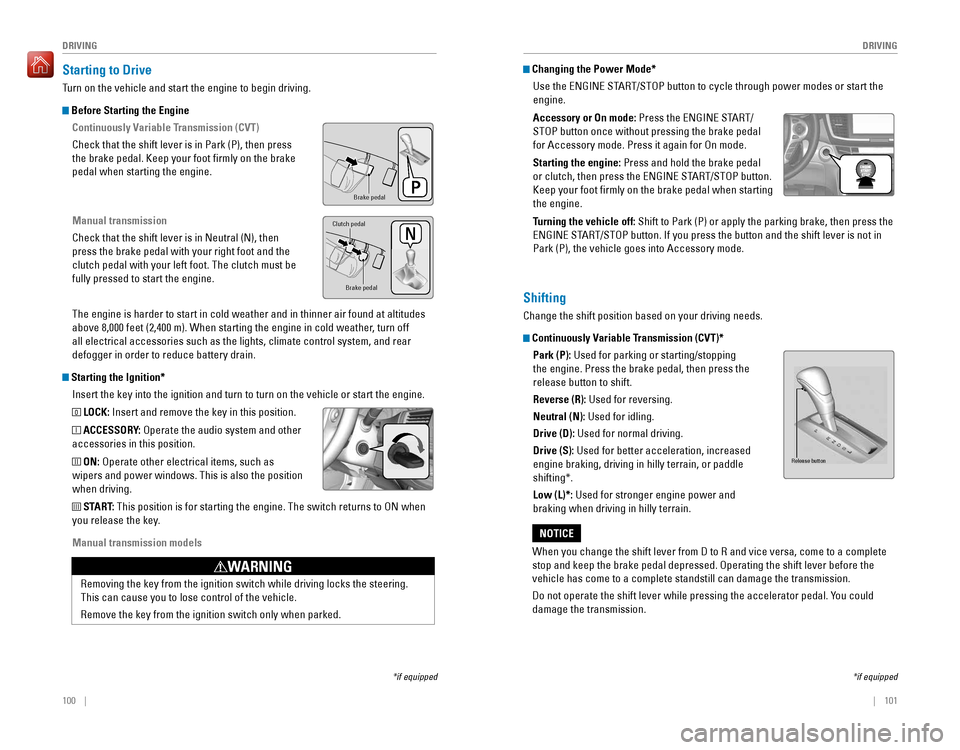
Before Starting the Engine
Continuously Variable Transmission (CVT)
Check that the shift lever is in Park (P), then press
the brake pedal. Keep your foot firmly on the brake
pedal when starting the engine.
Manual transmission
Check that the shift lever is in Neutral (N), then
press the brake pedal with your right foot and the
clutch pedal with your left foot. The clutch must be
fully pressed to start the engine.
The engine is harder to start in cold weather and in thinner air found a\
t altitudes
above 8,000 feet (2,400 m). When starting the engine in cold weather, turn off
all electrical accessories such as the lights, climate control system, a\
nd rear
defogger in order to reduce battery drain.
Starting the Ignition*
Insert the key into the ignition and turn to turn on the vehicle or start the engine.
0 LOCK: Insert and remove the key in this position.
I ACCESSORY: operate the audio system and other
accessories in this position.
II ON: operate other electrical items, such as
wipers and power windows. This is also the position
when driving.
III START: This position is for starting the engine. The switch returns to oN when
you release the key.
Manual transmission models
*if equipped
Brake peda l
Brake pedal
Clutch pedal
removing the key from the ignition switch while driving locks the steerin\
g.
This can cause you to lose control of the vehicle.
remove the key from the ignition switch only when parked.
WARNING
Changing the Power Mode*
Use the
ENGINE START/STOP button to cycle through power modes or start the
engine.
Accessory or On mode:
Press the ENGINE START/
STOP button once without pressing the brake pedal
for Accessory mode. Press it again for on mode.
Starting the engine: Press and hold the brake pedal
or clutch, then press the ENGINE START/STOP button.
Keep your foot firmly on the brake pedal when starting
the engine.
Turning the vehicle off:
Shift to Park (P) or apply the parking brake, then press the
ENGINE START/STOP button. If you press the button and the shift lever is not in
Park (P), the vehicle goes into Accessory mode.
*if equipped
Shifting
Change the shift position based on your driving needs.
Continuously Variable Transmission (CVT)*Park (P):
Used for parking or starting/stopping
the engine. Press the brake pedal, then press the
release button to shift.
Reverse (R): Used for reversing.
Neutral (N): Used for idling.
Drive (D): Used for normal driving.
Drive (S):
Used for better acceleration, increased
engine braking, driving in hilly terrain, or paddle
shifting*.
Low (L)*: Used for stronger engine power and
braking when driving in hilly terrain.
When you change the shift lever from D to R and vice versa, come to a complete
stop and keep the brake pedal depressed. Operating the shift lever before the
vehicle has come to a complete standstill can damage the transmission.
Do not operate the shift lever while pressing the accelerator pedal. You could
damage the transmission.
NOTICE
Release button
Page 56 of 83
104 || 105
DRIVING
DRIVING
Braking
Slow down or stop your vehicle, and keep it from moving when parked.
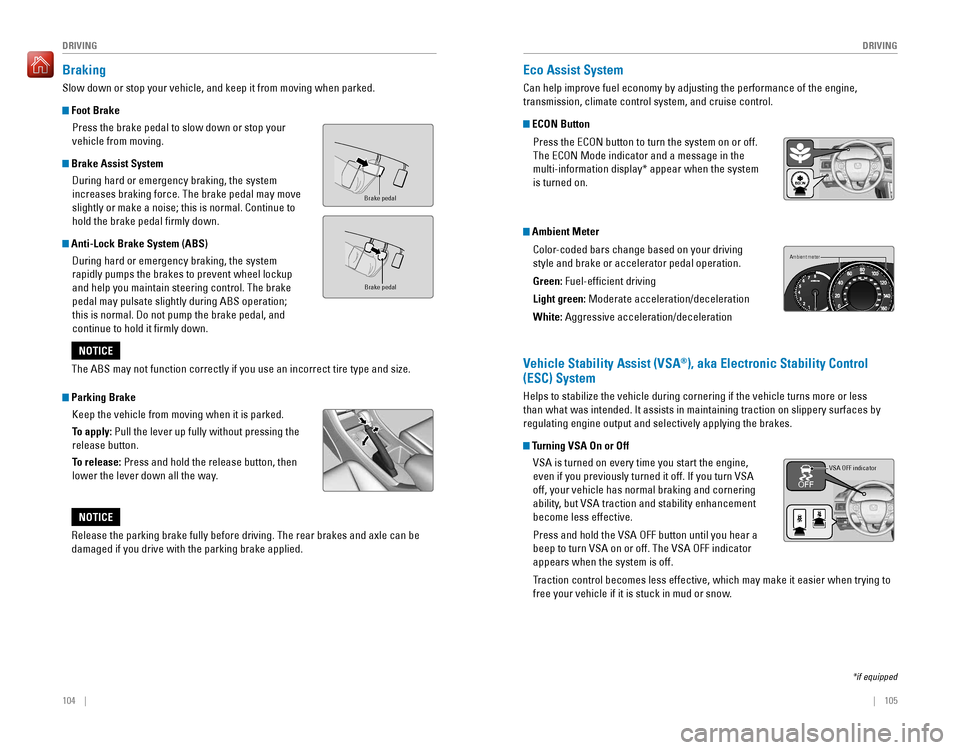
Foot Brake
Press the brake pedal to slow down or stop your
vehicle from moving.
Brake Assist System
During hard or emergency braking, the system
increases braking force. The brake pedal may move
slightly or make a noise; this is normal. Continue to
hold the brake pedal firmly down.
Anti-Lock Brake System (ABS)
During hard or emergency braking, the system
rapidly pumps the brakes to prevent wheel lockup
and help you maintain steering control. The brake
pedal may pulsate slightly during ABS operation;
this is normal. Do not pump the brake pedal, and
continue to hold it firmly down.
Parking Brake
Keep the vehicle from moving when it is parked.
To apply: Pull the lever up fully without pressing the
release button.
To release: Press and hold the release button, then
lower the lever down all the way.
Brake peda l
Brake pedal
The ABS may not function correctly if you use an incorrect tire type and size.
NOTICE
Release the parking brake fully before driving. The rear brakes and axle can be
damaged if you drive with the parking brake applied.
NOTICE
Eco Assist System
Can help improve fuel economy by adjusting the performance of the engine,
transmission, climate control system, and cruise control.
ECON Button
Press the ECON button to turn the system on or off.
The eCoN Mode indicator and a message in the
multi-information display* appear when the system
is turned on.
Ambient Meter
Color-coded bars change based on your driving
style and brake or accelerator pedal operation.
Green: Fuel-efficient driving
Light green:
Moderate acceleration/deceleration
White: Aggressive acceleration/deceleration
Ambient meter
Vehicle Stability Assist (VSA®), aka Electronic Stability Control
(ESC) System
Helps to stabilize the vehicle during cornering if the vehicle turns more or less
than what was intended. It assists in maintaining traction on slippery surfaces by
regulating engine output and selectively applying the brakes.
Turning VSA On or Off
vSA is turned on every time you start the engine,
even if you previously turned it off. If you turn VSA
off, your vehicle has normal braking and cornering
ability, but VSA traction and stability enhancement
become less effective.
Press and hold the VSA OFF button until you hear a
beep to turn VSA on or off. The VSA OFF indicator
appears when the system is off.
Traction control becomes less effective, which may make it easier when trying to
free your vehicle if it is stuck in mud or snow.
VSA OFF indicator
*if equipped
Page 76 of 83
144 || 145
MAINTENANCEMAINTENANCE
Tire Labeling
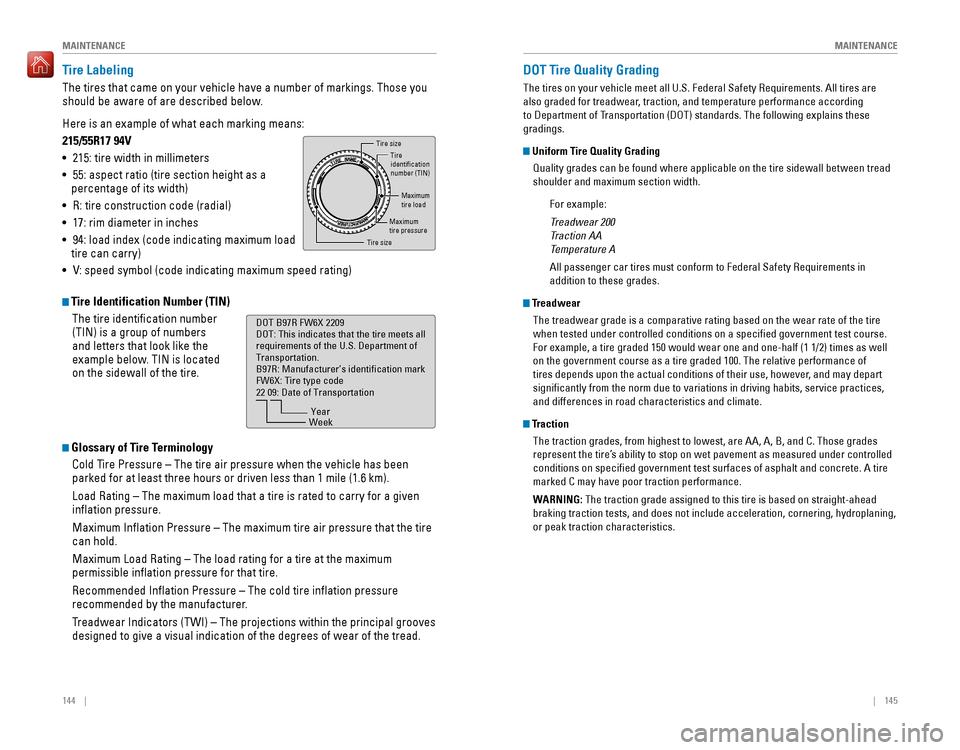
The tires that came on your vehicle have a number of markings. Those you
should be aware of are described below.
Here is an example of what each marking means:
215/55R17 94V
• 215: tire width in millimeters
• 55: aspect ratio (tire section height as a
percentage of its width)
•
r: tire construction code (radial)
• 17: rim diameter in inches
• 94: load index (code indicating maximum load
tire can carry)
•
V: speed symbol (code indicating maximum speed rating)
Tire Identification Number (TIN)
The tire identification number
(TIN) is a group of numbers
and letters that look like the
example below. TIN is located
on the sidewall of the tire.
Glossary of Tire Terminology
Cold Tire Pressure – The tire air pressure when the vehicle has been
parked for at least three hours or driven less than 1 mile (1.6 km).
Load rating – The maximum load that a tire is rated to carry for a given
inflation pressure.
Maximum Inflation Pressure – The maximum tire air pressure that the tire
can hold.
Maximum Load rating – The load rating for a tire at the maximum
permissible inflation pressure for that tire.
Recommended Inflation Pressure – The cold tire inflation pressure
recommended by the manufacturer.
Treadwear Indicators (TWI) – The projections within the principal grooves
designed to give a visual indication of the degrees of wear of the tread\
.
Tire size
Tire
identication
number (TIN)
Maximum
tire load
Maximu m
tire pressure
Tire siz e
DOT B97R FW6X 2209
DOT: This indicates that the tire meets all
requirements of the U.S. Department of
Transportation.
B97R: Manufacturer’s identication mark
FW6X: Tire type code
22 09: Date of Transportation
Year
Week
DOT Tire Quality Grading
The tires on your vehicle meet all U.S. Federal Safety Requirements. All tires are
also graded for treadwear, traction, and temperature performance according
to Department of Transportation (DoT) standards. The following explains these
gradings.
Uniform Tire Quality Grading
Quality grades can be found where applicable on the tire sidewall between tread
shoulder and maximum section width.
For example:
Treadwear 200
Traction AA
Temperature A
All passenger car tires must conform to Federal Safety Requirements in
addition to these grades.
Treadwear
The treadwear grade is a comparative rating based on the wear rate of the tire
when tested under controlled conditions on a specified government test\
course.
For example, a tire graded 150 would wear one and one-half (1 1/2) times as well
on the government course as a tire graded 100. The relative performance \
of
tires depends upon the actual conditions of their use, however, and may depart
significantly from the norm due to variations in driving habits, service practices,
and differences in road characteristics and climate.
TractionThe traction grades, from highest to lowest, are AA, A, B, and C. Those \
grades
represent the tire’s ability to stop on wet pavement as measured under controlled
conditions on specified government test surfaces of asphalt and concre\
te. A tire
marked C may have poor traction performance.
WARNING:
The traction grade assigned to this tire is based on straight-ahead
braking traction tests, and does not include acceleration, cornering, hydroplaning,
or peak traction characteristics.
Page 81 of 83
154 || 155
VOICE COMMAND INDEX
VOICE COMMAND INDEX
Voice Portal Commands
When you press the Talk button, the Voice Portal screen appears. Say one of the
options, and follow the system prompts.
Navigation Commands*
The system accepts these commands on most screens. You only need to press the
Talk button once for navigation commands.
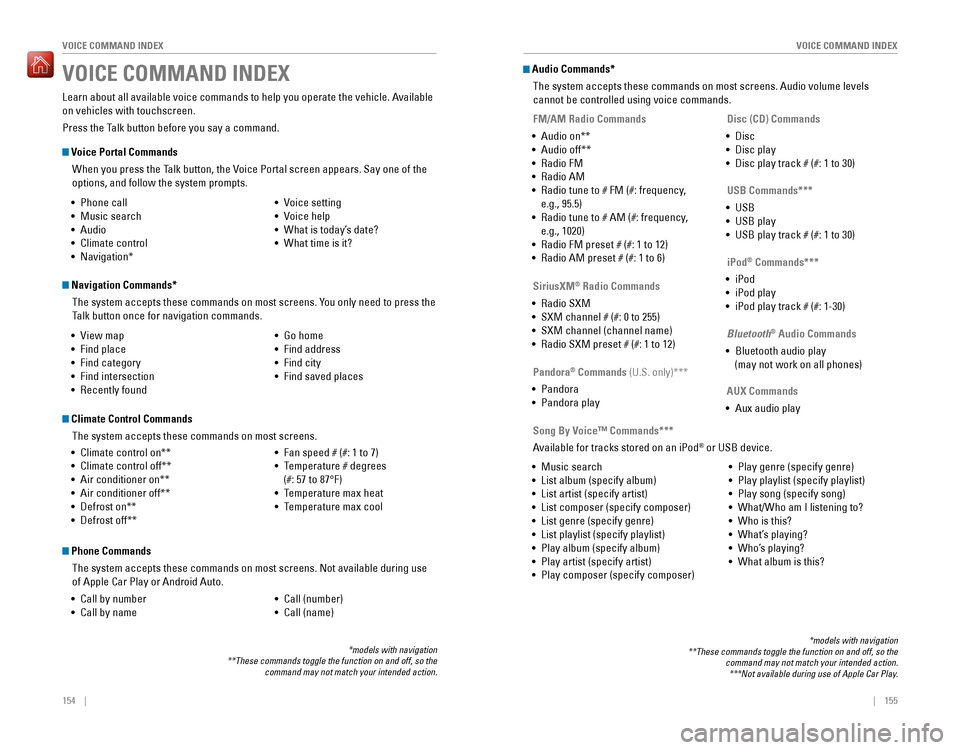
Learn about all available voice commands to help you operate the vehicle. Available
on vehicles with touchscreen.
Press the Talk button before you say a command.
VOICE COMMAND INDEX
• Phone call
• Music search
• Audio
• Climate control
• Navigation* • voice setting
• voice help
• What is today’s date?
• What time is it?
• view map
•
Find place
• Find category
• Find intersection
•
recently found
• Go home
• Find address
• Find city
• Find saved places
*models with navigation**These commands toggle the function on and off, so the command may not match your intended action.
Climate Control Commands
The system accepts these commands on most screens.
•
Climate control on**
• Climate control off**
• Air conditioner on**
• Air conditioner off**
• Defrost on**
• Defrost off**
• Fan speed # (#: 1 to 7)
• Temperature # degrees
(#: 57 to 87°F)
• Temperature max heat
• Temperature max cool
Phone Commands
The system accepts these commands on most screens. Not available during use
of Apple Car Play or Android Auto.
•
Call by number
• Call by name
• Call (number)
• Call (name)
Audio Commands*
The system accepts these commands on most screens. Audio volume levels
cannot be controlled using voice commands.
FM/AM Radio Commands
•
Audio on**
• Audio off**
• radio FM
• radio AM
• Radio tune to # FM (#: frequency,
e.g., 95.5)
•
Radio tune to # AM (#: frequency,
e.g., 1020)
•
radio FM preset # (#: 1 to 12)
• radio AM preset # (#: 1 to 6)
SiriusXM® Radio Commands
•
radio SXM
• SXM channel # (#: 0 to 255)
• SXM channel (channel name)
•
radio SXM preset # (#: 1 to 12)
Disc (CD) Commands
• Disc
• Disc play
• Disc play track # (#: 1 to 30)
USB Commands***
• USB
• USB play
• USB play track # (#: 1 to 30)
Pandora
® Commands (U.S. only)***
• Pandora
• Pandora play iPod
® Commands***
• iPod
• iPod play
• iPod play track # (#: 1-30)
Bluetooth
® Audio Commands
• Bluetooth audio play
(may not work on all phones)
AUX Commands
• Aux audio play
• Music search
•
List album (specify album)
• List artist (specify artist)
• List composer (specify composer)
• List genre (specify genre)
• List playlist (specify playlist)
•
Play album (specify album)
• Play artist (specify artist)
• Play composer (specify composer) •
Play genre (specify genre)
• Play playlist (specify playlist)
• Play song (specify song)
•
What/Who am I listening to?
• Who is this?
• What’s playing?
• Who’s playing?
• What album is this?
Song By Voice™ Commands***
Available for tracks stored on an iPod® or USB device.
*models with navigation**These commands toggle the function on and off, so the command may not match your intended action.***Not available during use of Apple Car Play.
Page 82 of 83
156 || 157
INDEX
INDEX
INDEX
ABS .....................................................24, 104ACC .......................................................24, 26
Accessory Power Socket ...............................50
Adaptive Cruise Control (ACC) ...............24, 107Address .............................................................89Advanced Airbags .............................................8Aha™ radio ......................................................64Airbags ...............................................................8Airbag Care ...................................................13Airbag System Components .......................12Airbag System Indicators ...........................10Ambient Meter................................................ 105
Android Auto .....................................................66
Anti-Lock Brake System (ABS) ..............24, 104
Apple CarPlay ...................................................65Apps .............................................................62
Audio Commands ...........................................155Audio operation ...............................................50Aha™ radio ..................................................64
Android Auto .................................................66
Apple CarPlay .................................................5Auxiliary Input Jack .....................................50
Bluetooth® Audio ...................................59, 72
Compact Disc (CD) .................................56, 69FM/AM Radio ..........................................55, 67
HondaLink® ...................................................63
iPod® .......................................................57, 70one Display Audio operation .....................54
Pandora® .................................................60, 73
SiriusXM® radio ...........................................68Sound .............................................................53Steering Wheel Controls .............................52Touchscreen operation ..............................61
USB Flash Drive ......................................58, 71
USB Port ........................................................50Wi-Fi Connection ..........................................64Wireless Charger .........................................51
Auto High-Beam System .....................24, 26, 36
Automatic (AUTO) Rain-Sensing Wipers .....38Automatic Dimming rearview Mirror ...........44
AUX Commands .............................................. 155
Auxiliary Input Jack .........................................50Battery ...........................................................139
Bluetooth® Audio .......................................59, 72
Bluetooth® Audio Commands ......................155
Bluetooth® HandsFreeLink® (HFL) .................74
Call History ..............................................77, 83Dialing a Number ...................................76, 82e-Mail .............................................................84
HFL Controls ............................................74, 79
HondaLink® Assist .......................................85
Making a Call ..........................................76, 82
Pairing a Phone ......................................75, 81 Phonebook
..............................................77, 83Siri eyes Free ................................................86
SMS Text Messaging ............................78, 84
Speed Dial ...............................................76, 82
Talk Button Tips ............................................80
Brake Assist System ...................................... 104
Brake Fluid
......................................................138
Brake system ..............................................23, 24Braking ...........................................................104
Brightness Control ...........................................35
Call History ..................................................77, 83Carbon Monoxide Gas....................................... 4
Changing a Flat Tire .......................................123
Changing Settings ............................................48
Charging system ............................................... 23
Childproof Door Locks
.....................................32
Child Safety .......................................................14
Child Seat ..........................................................16
Adding Security with a Tether ...................19LATCH-Compatible Child Seat ....................17
Climate Control Commands ..........................154
Climate Control System ...................................46Clock .............................................................49
Clutch Fluid ...................................................... 138
Collision Mitigation Braking System™ (CMBS™)
.............................24, 26, 112
Compact Disc (CD) .....................................56, 69
Compact Disc (CD) Commands ....................155Condition Indicators ........................................25
Contact Us .......................................................152Continuously Variable Transmission (CVT)... 101
Cruise Control ...........................................26, 106Customer Information.................................... 151Customized Features .......................................48Dashboard and Other Controls ........................2
Destination ........................................................89Dialing a Number .......................................76, 82
Door Mirrors .....................................................44
Door open ..........................................................25Door operation ...........................................31, 32DoT Tire Quality Grading ..............................145Driving .............................................................94
Adaptive Cruise Control (ACC) .................107
Braking .........................................................104
Collision Mitigation Braking System™ (CMBS™)
.........................................112Continuously Variable Transmission (CvT) .................................................101
Cruise Control .............................................106eco Assist System ......................................105ENGINE START/STOP button ...................101
Ignition .........................................................100
Lane Keeping Assist System (LKAS) .......110 LaneWatch™
..............................................111
Manual Transmission ................................103
Maximum Load Limit ....................................96Multi-view rear Camera ..........................114
Paddle Shifters ...........................................102
Parking Sensor System .............................113
Power Mode ...............................................101refueling ......................................................115remote engine Start ....................................99road Departure Mitigation (rDM) ..........109
Shifting .........................................................101
Towing a Trailer ............................................98Vehicle Stability Assist (VSA®) ................105
Driving Position Memory System ..................43eco Assist System.......................................... 105eCoN Button ...................................................105eCoN mode .......................................................26electric Power Steering (ePS) .......................24Electronic Stability Control (ESC) ................105e-Mail .............................................................84emergency engine Stop ................................120emergency Towing ........................................120engine and Fuel ......................................148, 150engine Coolant................................................ 137engine oil......................................................... 134ENGINE START/STOP button .......................101exterior lights ..............................................26, 35
Fastening a Seat Belt ........................................7Flat Tire ...........................................................123
Floor Mats .........................................................40Fluids ...................................................149, 150FM/AM Radio ..............................................55, 67FM/AM Radio Commands .............................155
Fog lights ...........................................................26
Foot Brake .......................................................104Frequently Asked Questions ........................151Front Airbags (SRS) ...........................................8Front Door Inner Handle .................................32Fuel Information .............................................115
Fuse Locations ................................................ 126
Garage opener .................................................45Hazards .............................................................26Headlight-Wiper Integration ..........................37Head restraints ................................................41High beams .......................................................26
High temperature .............................................24
Home Address ..................................................89
HomeLink® Garage opener ............................45
HondaLink® .......................................................63
HondaLink® Assist ...........................................85Honda roadside Assistance ........................152Hood ...........................................................132Ignition ...........................................................100
Immobilizer ........................................................26Information Display.......................................... 27
Instrument Panel ..............................................23Interior Lights.................................................... 35Intermittent Wipers..........................................37
iPod® .......................................................57, 70
iPod® Commands ...........................................155
Jump Starting .................................................117Key .............................................................30
Lane Keeping Assist System (LKAS) ....25, 110
LaneWatch™ ..................................................111Lap/Shoulder Seat Belts ...................................5LATCH-Compatible Child Seat ........................17Light Bulbs............................................... 148, 150
Light control ......................................................24Lights .......................................................26, 35LKAS .......................................................25, 26Lock Tab .............................................................32Low fuel .............................................................25
Low oil pressure ...............................................23
Low temperature ..............................................24
Low tire pressure .............................................25
Maintenance ................................................... 129
Battery
.........................................................139
Brake Fluid ..................................................138
Clutch Fluid ..................................................138engine Coolant ............................................137engine oil .....................................................134
Maintenance Minder™ .............................130
Service Codes .............................................131
Under the Hood ..........................................132Window Washer Fluid ...............................139
Making a Call ..............................................76, 82
Malfunction indicator lamp ............................24Malfunction Indicators.................................... 23
Manual Seats .................................................... 40
Manual Transmission
....................................103
Map Legend ......................................................92
Master Door Lock Switch ...............................32
Maximum Load Limit ........................................ 96
Mirrors .............................................................44
Moonroof ...........................................................34Multi-Information Display (MID).................... 28Multi-view rear Camera ..............................114
Music search ..................................................155
Navigation .........................................................87
Display and Controls ....................................88entering a Destination .................................89
Home Address ..............................................89
Map Legend ..................................................92
Place Category .............................................90recent Places ...............................................90routing ...........................................................92
Saved Places ................................................91Steering Wheel Controls .............................87
Street Address ..............................................89System Guidance volume ...........................87