ECO mode HONDA ACCORD 2017 9.G Owners Manual
[x] Cancel search | Manufacturer: HONDA, Model Year: 2017, Model line: ACCORD, Model: HONDA ACCORD 2017 9.GPages: 613
Page 289 of 613
288
uuAudio Error Messages uPandora®
Features
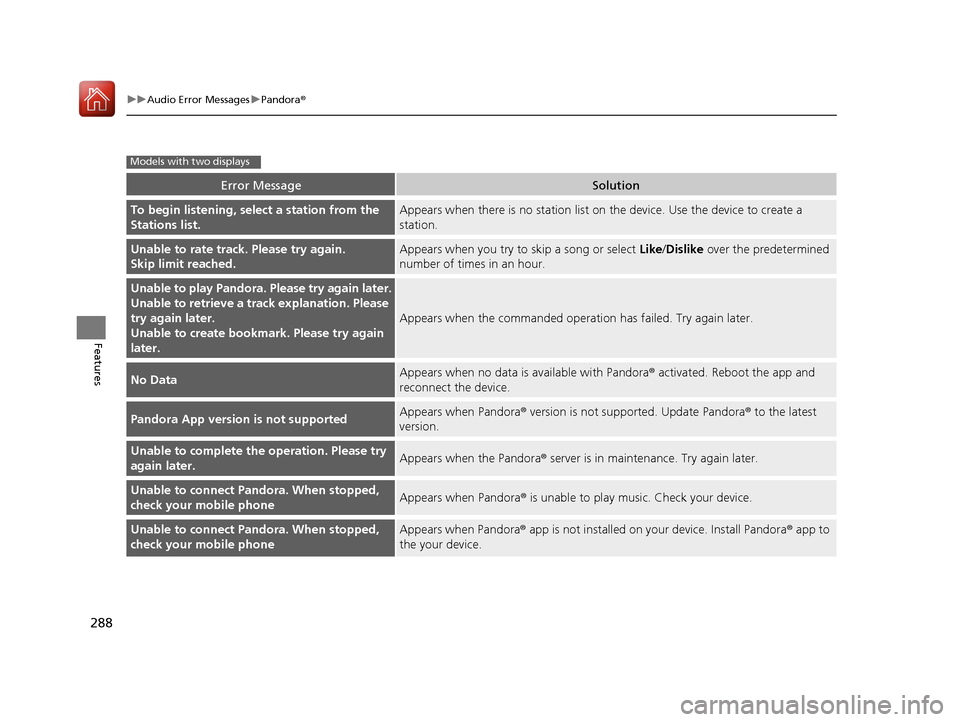
Error MessageSolution
To begin listening, select a station from the
Stations list.Appears when there is no station list on the device. Use the device to create a
station.
Unable to rate track. Please try again.
Skip limit reached.Appears when you try to skip a song or select Like/Dislike over the predetermined
number of times in an hour.
Unable to play Pandora. Please try again later.
Unable to retrieve a trac k explanation. Please
try again later.
Unable to create bookmark. Please try again
later.
Appears when the commanded operation has failed. Try again later.
No DataAppears when no data is available with Pandora® activated. Reboot the app and
reconnect the device.
Pandora App version is not supportedAppears when Pandora ® version is not supported. Update Pandora ® to the latest
version.
Unable to complete the operation. Please try
again later.Appears when the Pandora ® server is in maintenance. Try again later.
Unable to connect Pandora. When stopped,
check your mobile phoneAppears when Pandora® is unable to play music. Check your device.
Unable to connect Pandora. When stopped,
check your mobile phoneAppears when Pandora® app is not installed on your device. Install Pandora ® app to
the your device.
Models with two displays
17 ACCORD 4D GAS-31T2A6400.book 288 ページ 2016年6月7日 火曜日 午後5時6分
Page 294 of 613
293
uuGeneral Information on the Audio System uCompatible iPod, iPhone, and USB Flash Drives
Features
Compatible iPod, iPhone , and USB Flash Drives
*1:Models with one display
*2:Models with two displays
•A USB flash drive of 256 MB or higher is recommended.
• Some digital audio players may not be compatible.
• Some USB flash drives (e.g., a device with security lockout) may not work.
• Some software files may not allow for audio play or text data display.
• Some versions of MP3, WMA, or AAC formats may be unsupported.
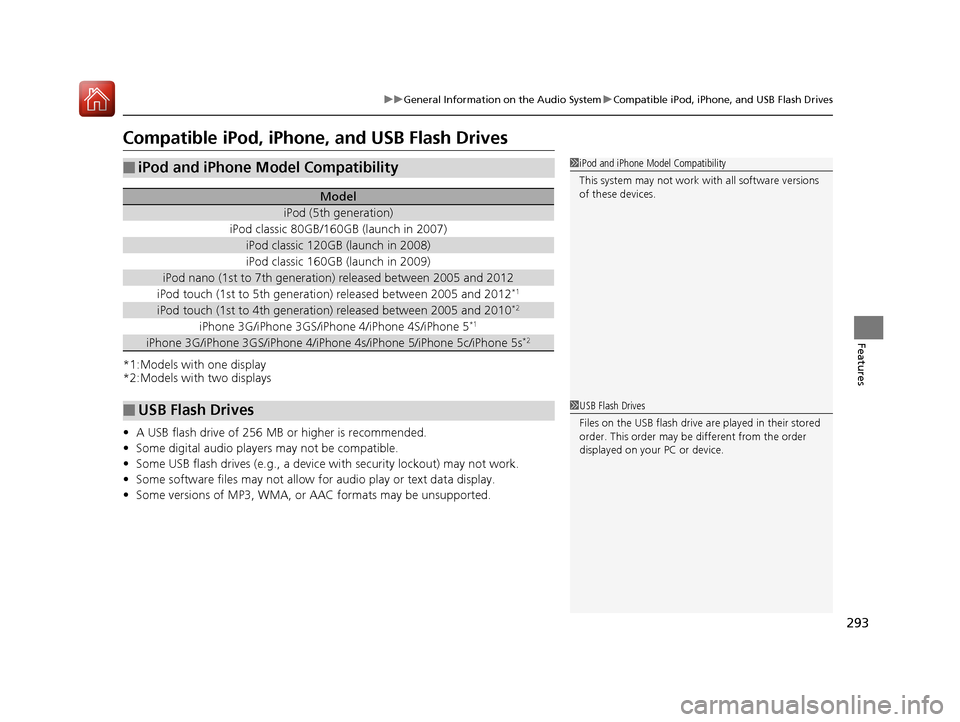
■iPod and iPhone Model Compatibility
Model
iPod (5th generation)
iPod classic 80GB/160GB (launch in 2007)
iPod classic 120GB (launch in 2008)
iPod classic 160GB (launch in 2009)
iPod nano (1st to 7th generation) released between 2005 and 2012
iPod touch (1st to 5th generation) released between 2005 and 2012*1
iPod touch (1st to 4th generation) released between 2005 and 2010*2
iPhone 3G/iPhone 3GS/iPhone 4/iPhone 4S/iPhone 5*1
iPhone 3G/iPhone 3GS/iPhone 4/iPho ne 4s/iPhone 5/iPhone 5c/iPhone 5s*2
■USB Flash Drives
1iPod and iPhone Model Compatibility
This system may not work with all software versions
of these devices.
1USB Flash Drives
Files on the USB flash drive are played in their stored
order. This order may be different from the order
displayed on your PC or device.
17 ACCORD 4D GAS-31T2A6400.book 293 ページ 2016年6月7日 火曜日 午後5時6分
Page 307 of 613
306
uuCustomized Features u
Features
*1:Default SettingSetup
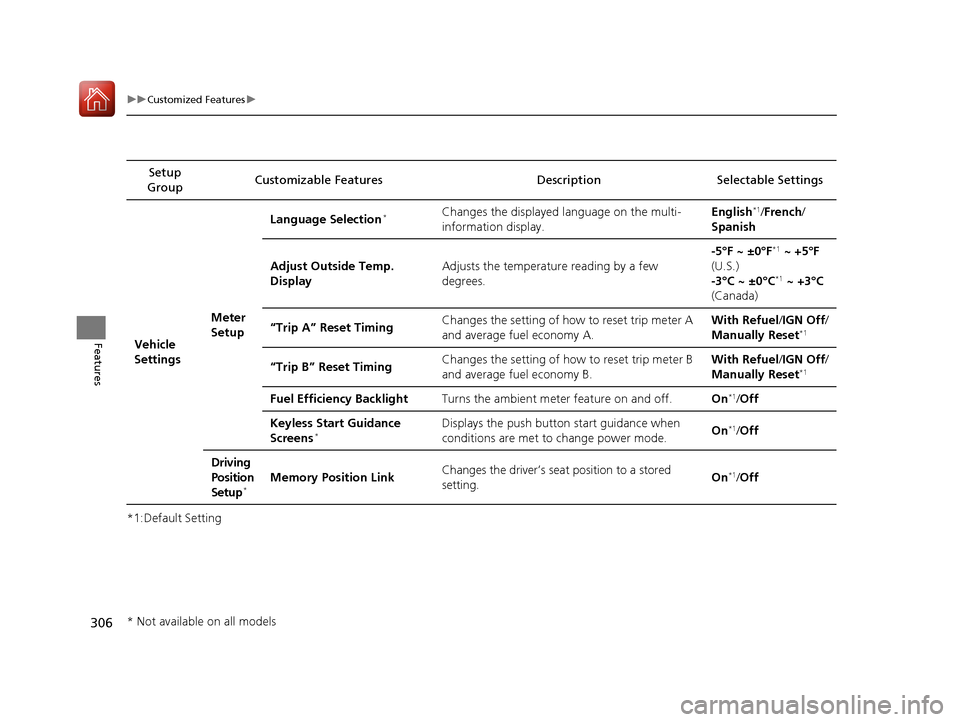
Group Customizable Features Descri
ption Selectable Settings
Vehicle
SettingsMeter
SetupLanguage Selection
*Changes the displayed language on the multi-
information display.
English*1/
French /
Spanish
Adjust Outside Temp.
Display Adjusts the temperature reading by a few
degrees. -5°F ~ ±0°F
*1
~ +5°F
(U.S.)
-3°C ~ ±0°C
*1 ~ +3°C
(Canada)
“Trip A” Reset Timing Changes the setting of how to reset trip meter A
and average fuel economy A. With Refuel
/IGN Off /
Manually Reset
*1
“Trip B” Reset Timing Changes the setting of how to reset trip meter B
and average fuel economy B. With Refuel
/IGN Off /
Manually Reset*1
Fuel Efficiency Backlight Turns the ambient meter feature on and off. On*1/Off
Keyless Start Guidance
Screens
*Displays the push button start guidance when
conditions are met to change power mode. On*1/
Off
Driving
Position
Setup
*Memory Position Link Changes the driver’s seat position to a stored
setting. On*1/
Off
* Not available on all models
17 ACCORD 4D GAS-31T2A6400.book 306 ページ 2016年6月7日 火曜日 午後5時6分
Page 308 of 613
307
uuCustomized Features u
Continued
Features
*1:Default SettingSetup
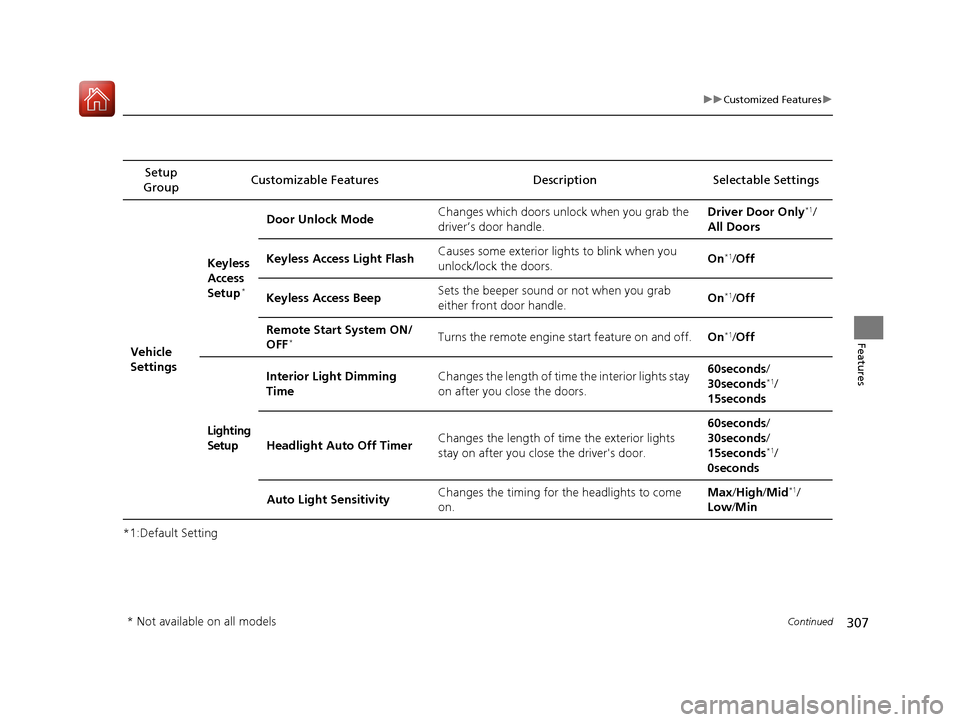
Group Customizable Features Description Selectable Settings
Vehicle
Settings Keyless
Access
Setup
*
Door Unlock Mode
Changes which doors unlock when you grab the
driver’s door handle. Driver Door Only*1/
All Doors
Keyless Access Light Flash Causes some exterior lights to blink when you
unlock/lock the doors.
On
*1/
Off
Keyless Access Beep Sets the beeper sound or not when you grab
either front door handle. On
*1/
Off
Remote Start System ON/
OFF
*Turns the remote engine start feature on and off. On*1/Off
Lighting
Setup Interior Light Dimming
Time
Changes the length of time the interior lights stay
on after you close the doors. 60seconds
/
30seconds
*1/
15seconds
Headlight Auto Off Timer Changes the length of time the exterior lights
stay on after you close the driver's door. 60seconds
/
30seconds /
15seconds
*1/
0seconds
Auto Light Sensitivity Changes the timing for the headlights to come
on. Max
/High /Mid
*1/
Low /Min
* Not available on all models
17 ACCORD 4D GAS-31T2A6400.book 307 ページ 2016年6月7日 火曜日 午後5時6分
Page 309 of 613
308
uuCustomized Features u
Features
*1:Default Setting
*2:Automatic transmission/CVT modelsSetup
Group Customizable Features Descri
ption Selectable Settings
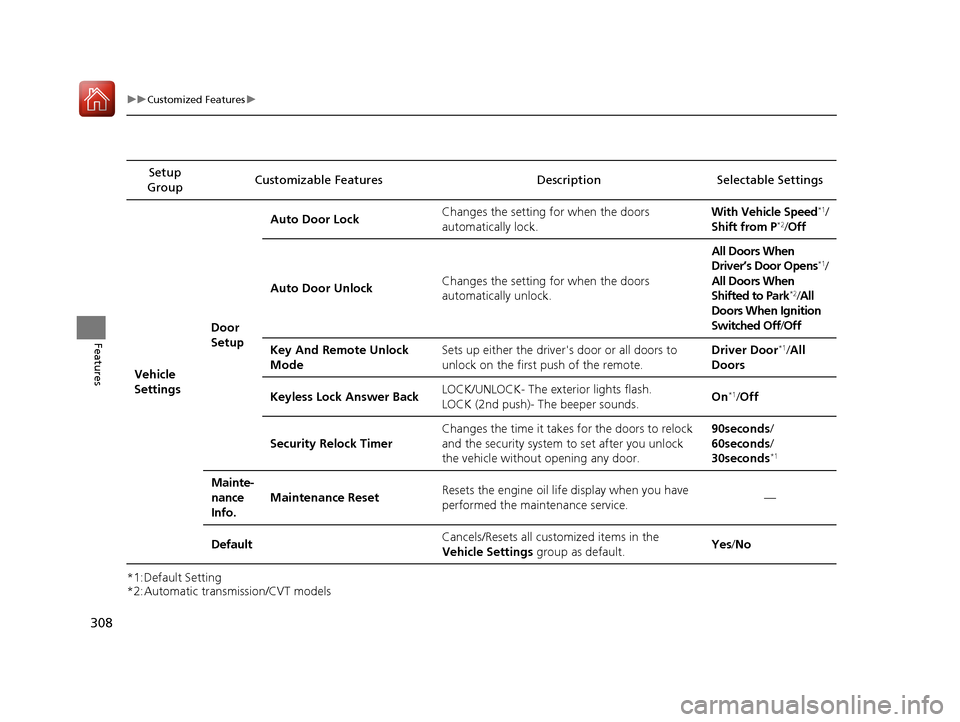
Vehicle
Settings Door
SetupAuto Door Lock
Changes the setting for when the doors
automatically lock. With Vehicle Speed
*1/
Shift from P*2/ Off
Auto Door Unlock Changes the setting for when the doors
automatically unlock. All Doors When
Driver’s Door Opens
*1/
All Doors When
Shifted to Park
*2/ All
Doors When Ignition
Switched Off /Off
Key And Remote Unlock
Mode Sets up either the driver
's door or all doors to
unlock on the first push of the remote. Driver Door
*1/
All
Doors
Keyless Lock Answer Back LOCK/UNLOCK- The exterior lights flash.
LOCK (2nd push)- The beeper sounds.
On
*1/
Off
Security Relock Timer Changes the time it takes for the doors to relock
and the security system to set after you unlock
the vehicle without opening any door. 90seconds/
60seconds/
30seconds
*1
Mainte-
nance
Info.
Maintenance Reset
Resets the engine oil life display when you have
performed the maintenance service. —
Default Cancels/Resets all cust
omized items in the
Vehicle Settings group as default. Yes
/No
17 ACCORD 4D GAS-31T2A6400.book 308 ページ 2016年6月7日 火曜日 午後5時6分
Page 317 of 613
316
uuCustomized Features u
Features
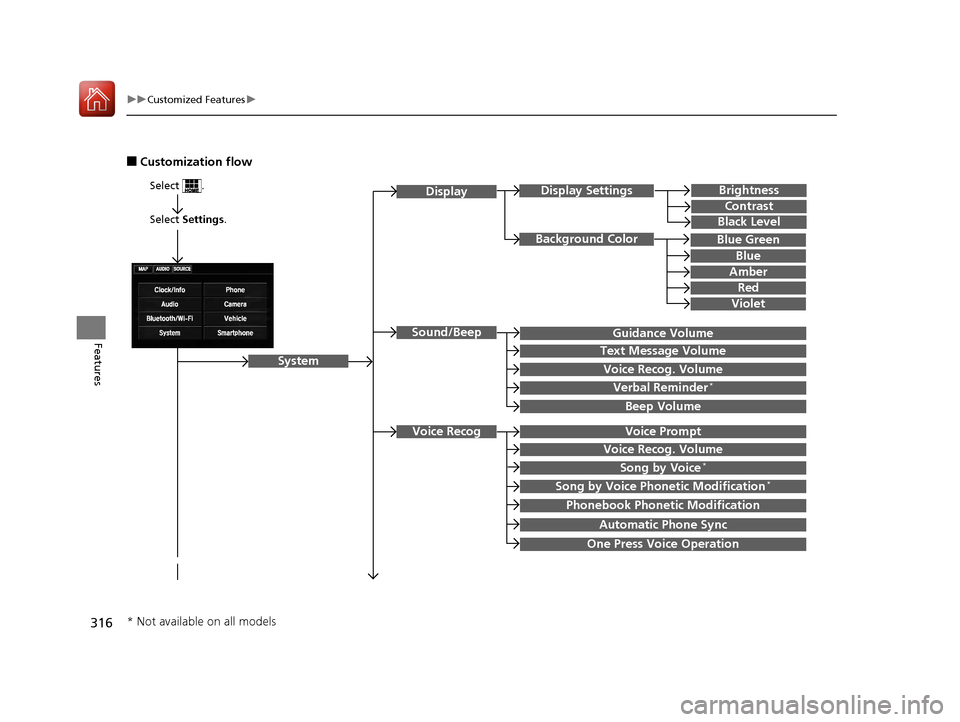
■Customization flow
Select Settings.
Brightness
Contrast
Black Level
Sound/Beep
System
DisplayDisplay Settings
Background Color
Guidance Volume
Text Message Volume
Select .
Voice RecogVoice Prompt
Blue
Amber
Red
Violet
Voice Recog. Volume
Beep Volume
Voice Recog. Volume
Song by Voice*
Song by Voice Phonetic Modification*
Phonebook Phonetic Modification
Automatic Phone Sync
One Press Voice Operation
Verbal Reminder*
Blue Green
* Not available on all models
17 ACCORD 4D GAS-31T2A6400.book 316 ページ 2016年6月7日 火曜日 午後5時6分
Page 325 of 613
324
uuCustomized Features u
Features
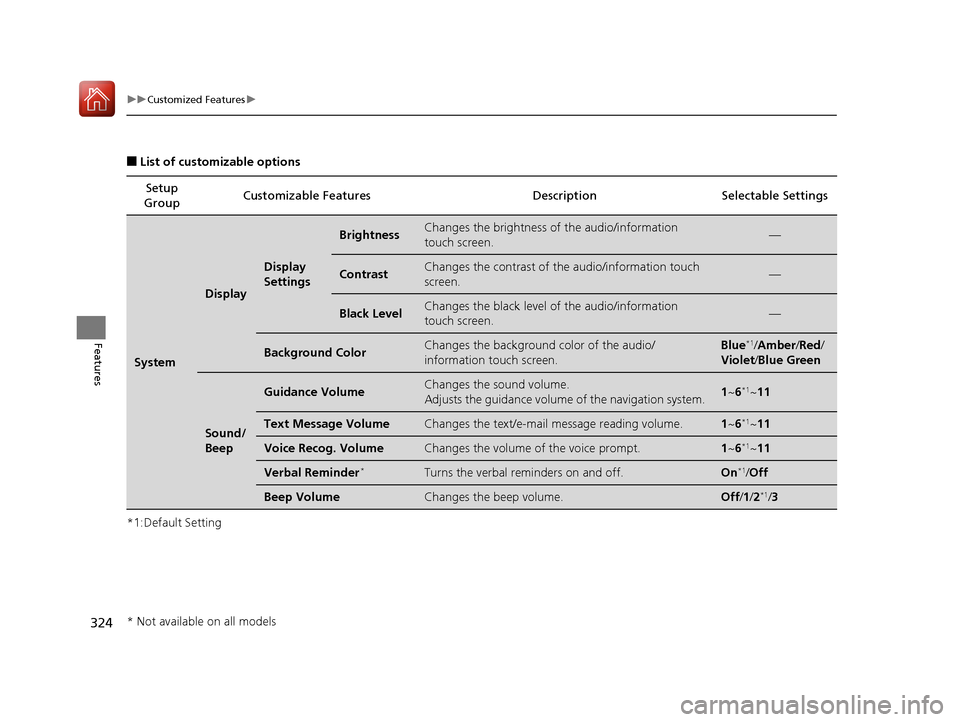
■List of customizable options
*1:Default Setting Setup
Group Customizable Features Description Selectable Settings
System
Display
Display
Settings
BrightnessChanges the brightness of the audio/information
touch screen.—
ContrastChanges the contrast of the audio/information touch
screen.—
Black LevelChanges the black level of the audio/information
touch screen.—
Background ColorChanges the background color of the audio/
information touch screen.Blue*1/
Amber /Red /
Violet /Blue Green
Sound/
Beep
Guidance VolumeChanges the sound volume.
Adjusts the guidance volume of the navigation system.1 ~6*1~11
Text Message VolumeChanges the text/e-mail message reading volume.1~6*1~11
Voice Recog. VolumeChanges the volume of the voice prompt.1~6*1~11
Verbal Reminder*Turns the verbal reminders on and off.On*1/Off
Beep VolumeChanges the beep volume.Off /1 /2*1/ 3
* Not available on all models
17 ACCORD 4D GAS-31T2A6400.book 324 ページ 2016年6月7日 火曜日 午後5時6分
Page 326 of 613
325
uuCustomized Features u
Continued
Features
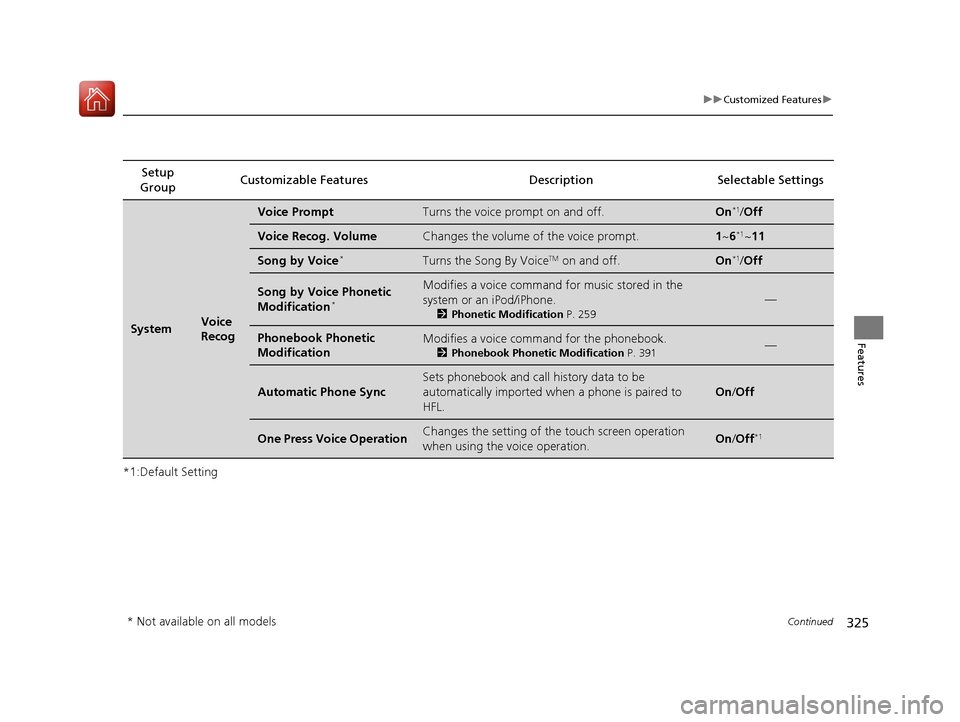
*1:Default SettingSetup
Group Customizable Featur
es Description Sel ectable Settings
SystemVoice
Recog
Voice PromptTurns the voice prompt on and off.On*1/Off
Voice Recog. VolumeChanges the volume of the voice prompt.1 ~6*1~11
Song by Voice*Turns the Song By VoiceTM on and off.On*1/Off
Song by Voice Phonetic
Modification*
Modifies a voice command for music stored in the
system or an iPod/iPhone.
2 Phonetic Modification P. 259
—
Phonebook Phonetic
ModificationModifies a voice command for the phonebook.
2Phonebook Phonetic Modification P. 391—
Automatic Phone Sync
Sets phonebook and call history data to be
automatically imported when a phone is paired to
HFL.
On /Off
One Press Voice OperationChanges the setting of the touch screen operation
when using the voice operation.On/Off*1
* Not available on all models
17 ACCORD 4D GAS-31T2A6400.book 325 ページ 2016年6月7日 火曜日 午後5時6分
Page 330 of 613
329
uuCustomized Features u
Continued
Features
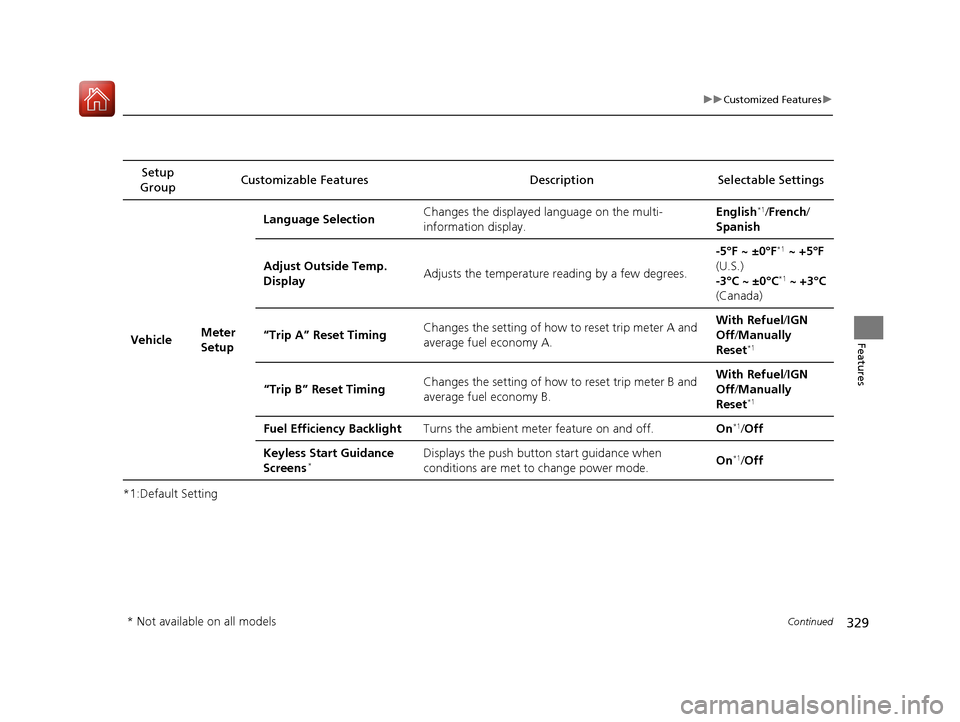
*1:Default SettingSetup
Group Customizable Features Descri
ption Selectable Settings
Vehicle Meter
SetupLanguage Selection
Changes the displayed language on the multi-
information display. English
*1/
French /
Spanish
Adjust Outside Temp.
Display Adjusts the temperature reading by a few degrees. -5°F ~ ±0°F
*1
~ +5°F
(U.S.)
-3°C ~ ±0°C
*1 ~ +3°C
(Canada)
“Trip A” Reset Timing Changes the setting of how to reset trip meter A and
average fuel economy A. With Refuel
/IGN
Off /Manually
Reset
*1
“Trip B” Reset Timing Changes the setting of how to reset trip meter B and
average fuel economy B. With Refuel
/IGN
Off /Manually
Reset*1
Fuel Efficiency Backlight Turns the ambient meter feature on and off. On*1/Off
Keyless Start Guidance
Screens
*Displays the push button start guidance when
conditions are met to change power mode. On*1/
Off
* Not available on all models
17 ACCORD 4D GAS-31T2A6400.book 329 ページ 2016年6月7日 火曜日 午後5時6分
Page 337 of 613
336
uuCustomized Features u
Features
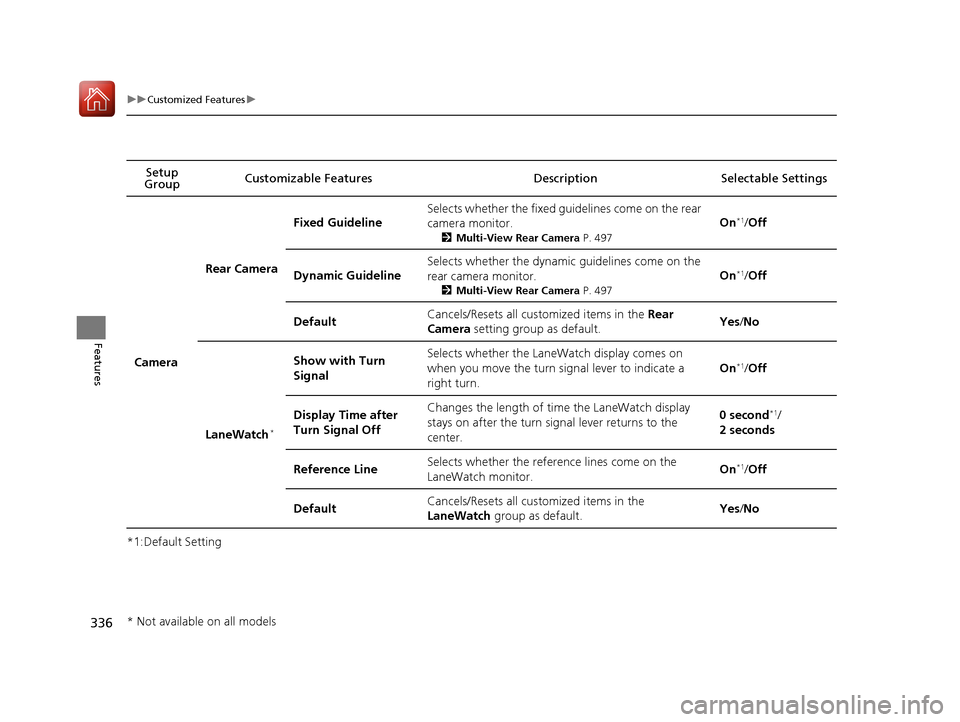
*1:Default SettingSetup
Group Customizable Features Description Selectable Settings
Camera
Rear Camera
Fixed Guideline
Selects whether the fixed guidelines come on the rear
camera monitor.
2
Multi-View Rear Camera P. 497
On*1/Off
Dynamic Guideline
Selects whether the dynamic guidelines come on the
rear camera monitor.
2 Multi-View Rear Camera P. 497
On*1/Off
DefaultCancels/Resets all cust omized items in the Rear
Camera setting group as default.Yes/No
LaneWatch*
Show with Turn
SignalSelects whether the LaneWatch display comes on
when you move the turn signal lever to indicate a
right turn.
On*1/ Off
Display Time after
Turn Signal OffChanges the length of time the LaneWatch display
stays on after the turn signal lever returns to the
center.0 second*1/
2 seconds
Reference LineSelects whether the reference lines come on the
LaneWatch monitor.On*1/ Off
DefaultCancels/Resets all cust omized items in the
LaneWatch group as default.Yes/No
* Not available on all models
17 ACCORD 4D GAS-31T2A6400.book 336 ページ 2016年6月7日 火曜日 午後5時6分