radio HONDA ACCORD 2017 9.G User Guide
[x] Cancel search | Manufacturer: HONDA, Model Year: 2017, Model line: ACCORD, Model: HONDA ACCORD 2017 9.GPages: 613
Page 200 of 613
199
uuAudio System Basic Operation uPlaying AM/FM Radio
Continued
Features
Playing AM/FM Radio
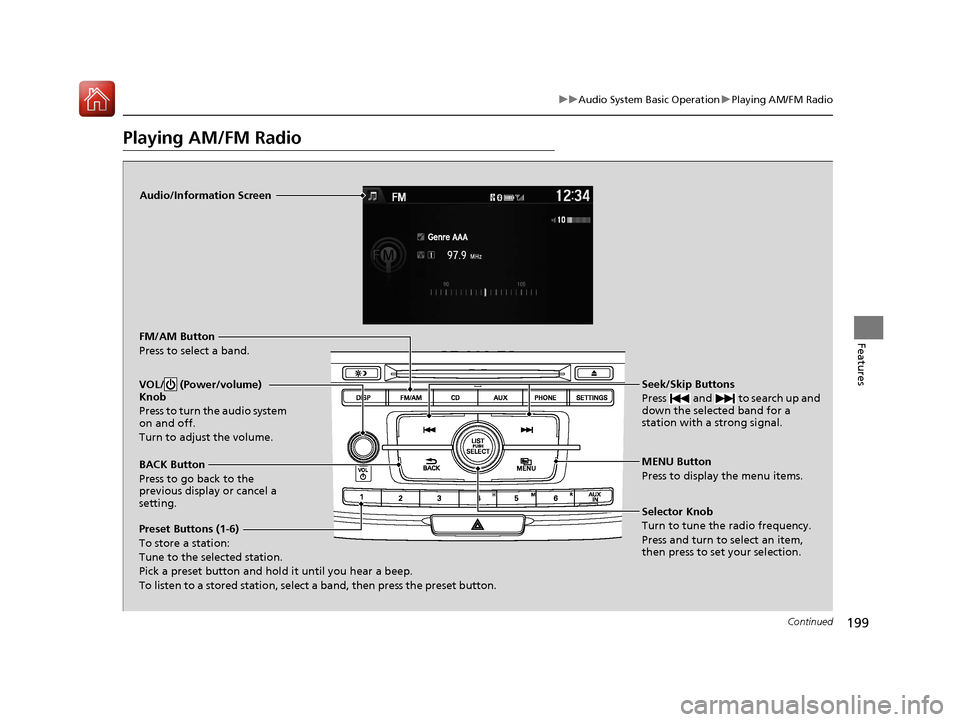
Audio/Information Screen
FM/AM Button
Press to select a band.
Preset Buttons (1-6)
To store a station:
Tune to the selected station.
Pick a preset button and hold it until you hear a beep.
To listen to a stored station, select a band, then press the preset button. Seek/Skip Buttons
Press and to search up and
down the selected band for a
station with a strong signal.
MENU Button
Press to display the menu items.
Selector Knob
Turn to tune the radio frequency.
Press and turn to select an item,
then press to set your selection.
VOL/ (Power/volume)
Knob
Press to turn the audio system
on and off.
Turn to adjust the volume.
BACK Button
Press to go back to the
previous display or cancel a
setting.
17 ACCORD 4D GAS-31T2A6400.book 199 ページ 2016年6月7日 火曜日 午後5時6分
Page 201 of 613
uuAudio System Basic Operation uPlaying AM/FM Radio
200
Features
Provides text data information related to your selected RDS-capable FM station.
■To find an RDS station from Station List
1. Press while listening to an FM station.
2. Rotate to select the station, then press .
■Manual update
Updates your available station list at any time.
1. Press while listening to an FM station.
2. Rotate to select Refresh, then press .
■Radio text
Displays the radio text informat ion of the selected RDS station.
1. Press the MENU button.
2. Rotate to select Radio Text, then press .
■Scan
Samples each of the strongest stations on the selected band for 10 seconds.
1. Press the MENU button.
2. Rotate to select Scan, then press .
To turn off scan, press to select Stop, or press the BACK button.
■Radio Data System (RDS)1Playing AM/FM Radio
The ST indicator appears on the display indicating
stereo FM broadcasts.
Stereo reproduction in AM is not available.
Switching the Audio Mode
Press the SOURCE button on the steering wheel.
2 Audio Remote Controls P. 190
You can also switch the mode by pressing the MENU
button and selecting Change Source on the MENU
screen.
You can store 6 AM stations and 12 FM stations into
the preset memory.
1 Radio Data System (RDS)
When you select an RDS-capable FM station, the RDS
automatically turns on, and the frequency display
changes to the station name. However, when the
signals of that station become weak, the display
changes from the statio n name to the frequency.
17 ACCORD 4D GAS-31T2A6400.book 200 ページ 2016年6月7日 火曜日 午後5時6分
Page 208 of 613
Continued207
uuAudio System Basic Operation uPlaying Internet Radio
Features
Playing Internet Radio
Connect a compatible phone through Bluetooth®.
You can also connect the phone using your dock connector to the USB port.
Press the AUX button to select Pandora mode.
U.S. models
Compatible phones only
1Playing Internet Radio
Pandora®, the Pandora logo, and the Pandora trade
dress are trademarks or registered trademarks of
Pandora Media, Inc., used with permission. Pandora
®,
the Pandora logo, and the Pandora trade dress are
trademarks or registered trademarks of Pandora Media,
Inc. Used with permission. Pandora
® is only available in
certain countries. Please visit
http://www.pandora.com/legal for more information.
To find out if your phone is compatible with this
feature, visit www.handsfreelink.honda.com , or call
1-888-528-7876.
To use this service in your vehicle, the Pandora ® app
must first be installed on your phone. Visit
www.pandora.com. for more information.
Pandora ® is free personalized radio that offers
effortless and endless music and comedy. Just start
with the name of one of y our favorite artists, songs,
genres, composers, or come dians and it will do the
rest.
If you cannot operate Pandora ® through the audio
system, it may be streaming through Bluetooth®
Audio. Make sure Pandora ® mode on your audio
system is selected.
Changing Stations
To change stations, activate the Pandora ® menu,
select Station List , and then select a new station.
iPhone
17 ACCORD 4D GAS-31T2A6400.book 207 ページ 2016年6月7日 火曜日 午後5時6分
Page 209 of 613
208
uuAudio System Basic Operation uPlaying Internet Radio
Features
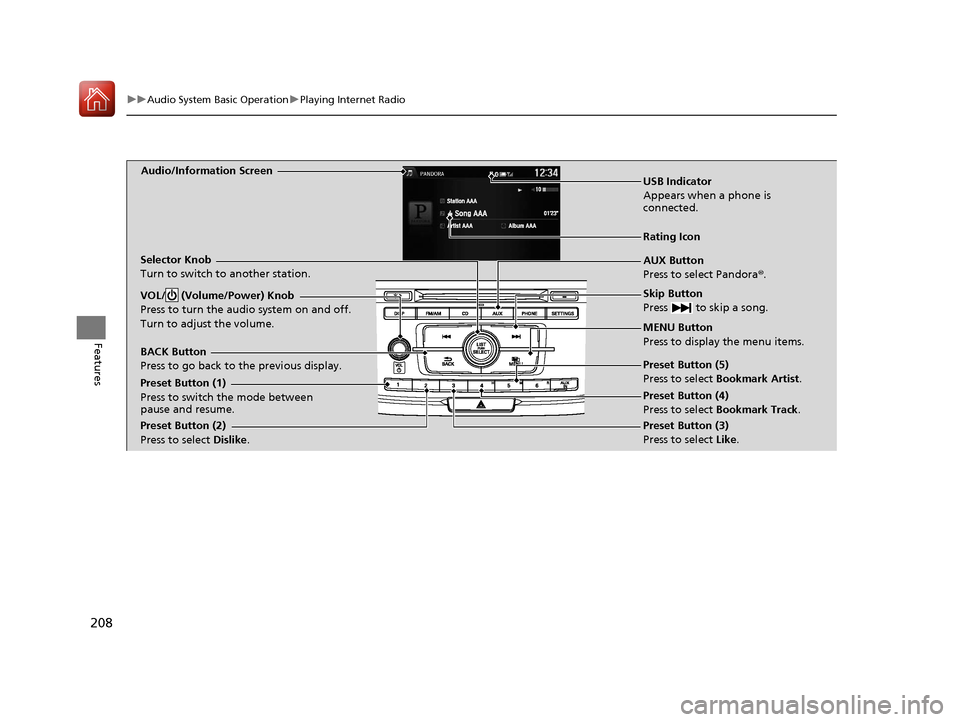
Audio/Information Screen
AUX Button
Press to select Pandora®.
Skip Button
Press to skip a song.
MENU Button
Press to display the menu items.
Selector Knob
Turn to switch to another station.
VOL/ (Volume/Power) Knob
Press to turn the audio system on and off.
Turn to adjust the volume.
BACK Button
Press to go back to
the previous display.
USB Indicator
Appears when a phone is
connected.
Rating Icon
Preset Button (1)
Press to switch the mode between
pause and resume.
Preset Button (2)
Press to select Dislike. Preset Button (3)
Press to select Like. Preset Button (4)
Press to select Bookmark Track
.
Preset Button (5)
Press to select Bookmark Artist
.
17 ACCORD 4D GAS-31T2A6400.book 208 ページ 2016年6月7日 火曜日 午後5時6分
Page 210 of 613
209
uuAudio System Basic Operation uPlaying Internet Radio
Features
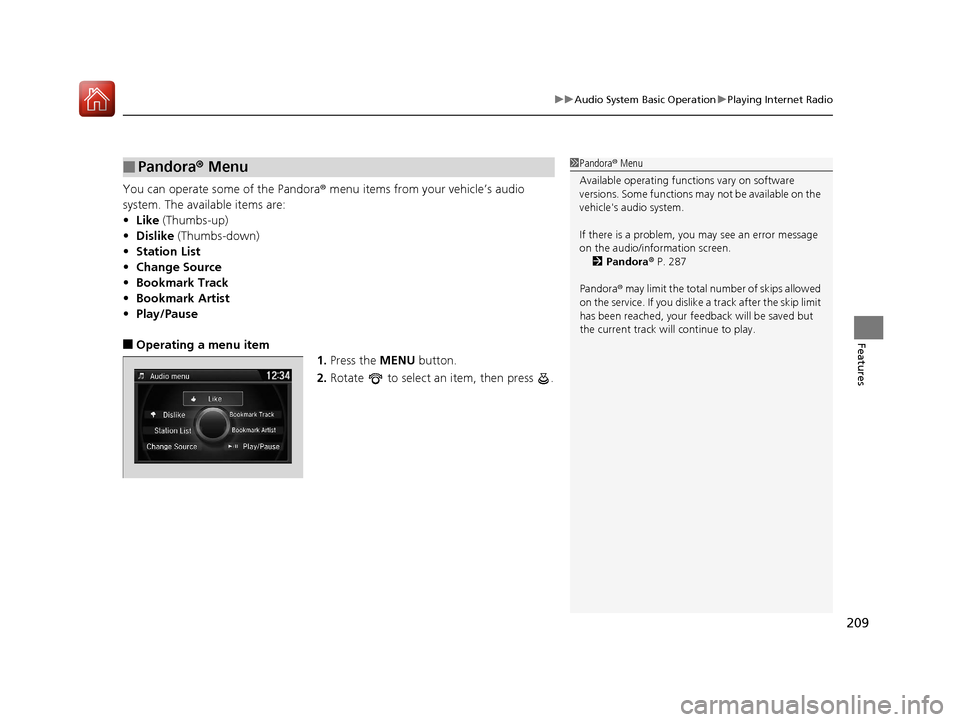
You can operate some of the Pandora ® menu items from your vehicle’s audio
system. The available items are:
• Like (Thumbs-up)
• Dislike (Thumbs-down)
• Station List
• Change Source
• Bookmark Track
• Bookmark Artist
• Play/Pause
■Operating a menu item
1.Press the MENU button.
2. Rotate to select an item, then press .
■Pandora ® Menu1 Pandora ® Menu
Available operating functi ons vary on software
versions. Some functions ma y not be available on the
vehicle's audio system.
If there is a problem, you may see an error message
on the audio/information screen. 2 Pandora ® P. 287
Pandora ® may limit the total number of skips allowed
on the service. If you dislike a track after the skip limit
has been reached, your fe edback will be saved but
the current track will continue to play.
17 ACCORD 4D GAS-31T2A6400.book 209 ページ 2016年6月7日 火曜日 午後5時6分
Page 216 of 613
215
Features
Audio System Basic Operation
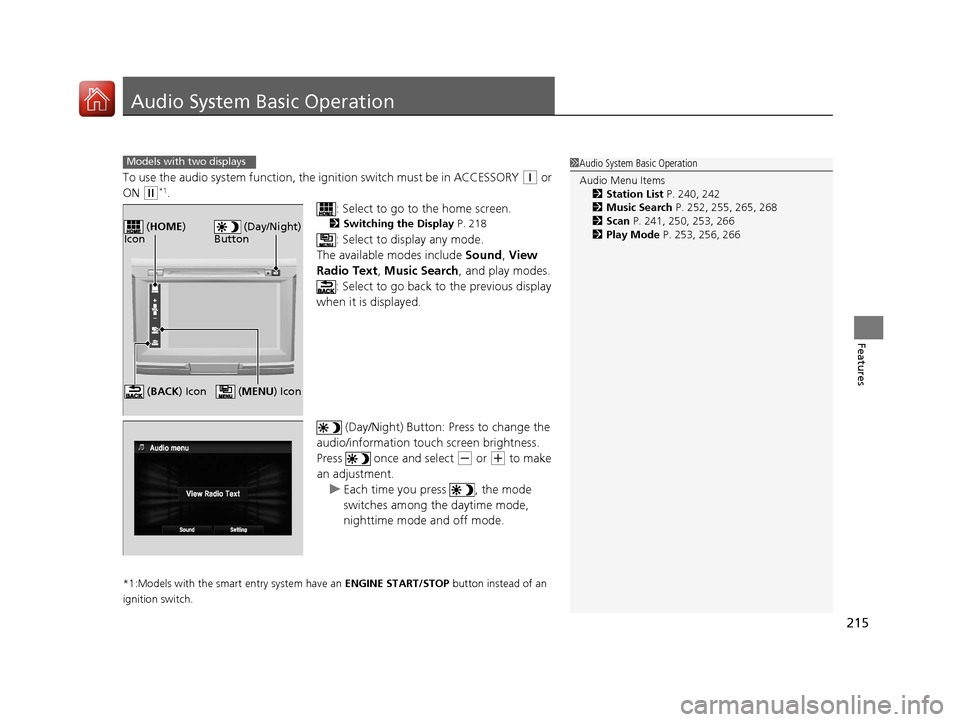
To use the audio system function, the ignition swit ch must be in ACCESSORY (q or
ON
(w*1.
: Select to go to the home screen.
2Switching the Display P. 218
: Select to display any mode.
The available modes include Sound, View
Radio Text , Music Search , and play modes.
: Select to go back to the previous display
when it is displayed.
(Day/Night) Button: Press to change the
audio/information touch screen brightness.
Press once and select
(- or (+ to make
an adjustment.
u Each time you press , the mode
switches among the daytime mode,
nighttime mode and off mode.
*1:Models with the smart entry system have an ENGINE START/STOP button instead of an
ignition switch.
Models with two displays1 Audio System Basic Operation
Audio Menu Items
2 Station List P. 240, 242
2 Music Search P. 252, 255, 265, 268
2 Scan P. 241, 250, 253, 266
2 Play Mode P. 253, 256, 266
(Day/Night)
Button ( HOME )
Icon
( MENU) Icon (BACK ) Icon
17 ACCORD 4D GAS-31T2A6400.book 215 ページ 2016年6月7日 火曜日 午後5時6分
Page 237 of 613
236
uuAudio System Basic Operation uVoice Control Operation
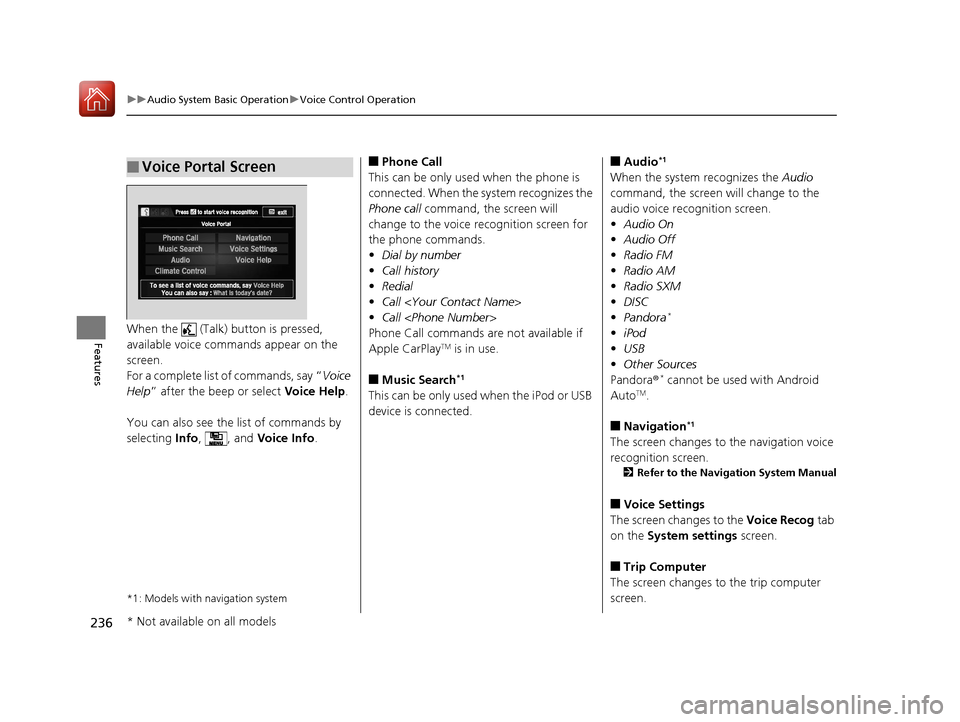
FeaturesWhen the (Talk) button is pressed,
available voice commands appear on the
screen.
For a complete list of commands, say “ Voice
Help ” after the beep or select Voice Help.
You can also see the list of commands by
selecting Info, , and Voice Info.
*1: Models with navigation system
■Voice Portal Screen■Phone Call
This can be only used when the phone is
connected. When the sy stem recognizes the
Phone call command, the screen will
change to the voice recognition screen for
the phone commands.
• Dial by number
• Call history
• Redial
• Call
• Call
Phone Call commands are not available if
Apple CarPlay
TM is in use.
■Music Search*1
This can be only used when the iPod or USB
device is connected.
■Audio*1
When the system recognizes the Audio
command, the screen will change to the
audio voice recognition screen.
• Audio On
• Audio Off
• Radio FM
• Radio AM
• Radio SXM
• DISC
• Pandora
*
•iPod
• USB
• Other Sources
Pandora ®
* cannot be used with Android
AutoTM.
■Navigation*1
The screen changes to the navigation voice
recognition screen.
2 Refer to the Navigation System Manual
■Voice Settings
The screen changes to the Voice Recog tab
on the System settings screen.
■Trip Computer
The screen changes to the trip computer
screen.
* Not available on all models
17 ACCORD 4D GAS-31T2A6400.book 236 ページ 2016年6月7日 火曜日 午後5時6分
Page 238 of 613
237
uuAudio System Basic Operation uVoice Control Operation
Continued
Features
■Voice Help
You can see a list of the available
commands on the screen.
• Useful Commands
• Phone Commands
• Audio Commands
• On Screen Commands
• Music Search Commands
• General Commands
• Climate Control Commands
• All Commands
• Voice Settings
• Getting Started
The system accepts these commands on the
voice portal top screen.
• Call
• Call
• What time is it?
• What is today’s date?
*1: Models with navigation system
■Useful Commands
The system accepts these commands on the
dedicated screen for the voice recognition
of the phone.
• Call by Number
• Call by Name
• Call
• Call
The system accepts these commands on the
dedicated screen for the voice recognition
of the audio.
■Radio FM Commands
• Radio tune to <87.7-107.9> FM
• Radio tune to <87.7 -107.9> HD <1-8>
FM
• Radio FM preset <1-12>
■Radio AM Commands
• Radio tune to <530-1710> AM
• Radio AM preset <1-6>
■Radio SXM Commands
• SXM channel <1-999>
• SXM channel
• Radio SXM preset <1-12>
■Phone Commands
■Audio Commands*1
■DISC Commands
• DISC play
• DISC play track <1-30>
■Pandora Commands*
•Pandora play
■iPod Commands
• iPod play
• iPod play track <1-30>
• Music Search
• What album is this?
• What am I listening to?
■USB Commands
• USB play
• USB play track <1-30>
• Music Search
• What album is this?
• What am I listening to?
■Bluetooth ® audio Commands
• Bluetooth ® audio play
NOTE:
Bluetooth ® Audio commands may not work
on some phones or Bluetooth® Audio
devices.
* Not available on all models
17 ACCORD 4D GAS-31T2A6400.book 237 ページ 2016年6月7日 火曜日 午後5時6分
Page 240 of 613
239
uuAudio System Basic Operation uPlaying AM/FM Radio
Continued
Features
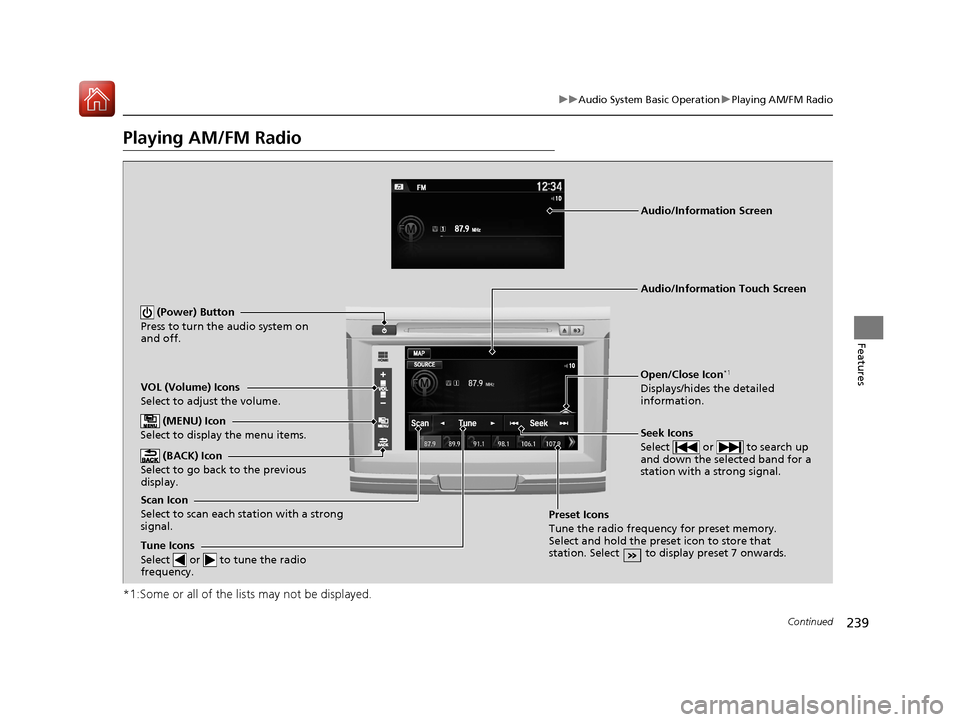
Playing AM/FM Radio
*1:Some or all of the lists may not be displayed.
VOL (Volume) Icons
Select to adjust the volume.
(BACK) Icon
Select to go back to the previous
display.
Seek Icons
Select or to search up
and down the selected band for a
station with a strong signal.
(Power) Button
Press to turn the audio system on
and off.
Open/Close Icon*1
Displays/hides the detailed
information.
(MENU) Icon
Select to display the menu items.
Tune Icons
Select or to tune the radio
frequency.
Audio/Information Touch Screen
Scan Icon
Select to scan each station with a strong
signal. Preset Icons
Tune the radio frequency for preset memory.
Select and hold the preset icon to store that
station. Select to display preset 7 onwards.
Audio/Information Screen
17 ACCORD 4D GAS-31T2A6400.book 239 ページ 2016年6月7日 火曜日 午後5時6分
Page 241 of 613
uuAudio System Basic Operation uPlaying AM/FM Radio
240
Features
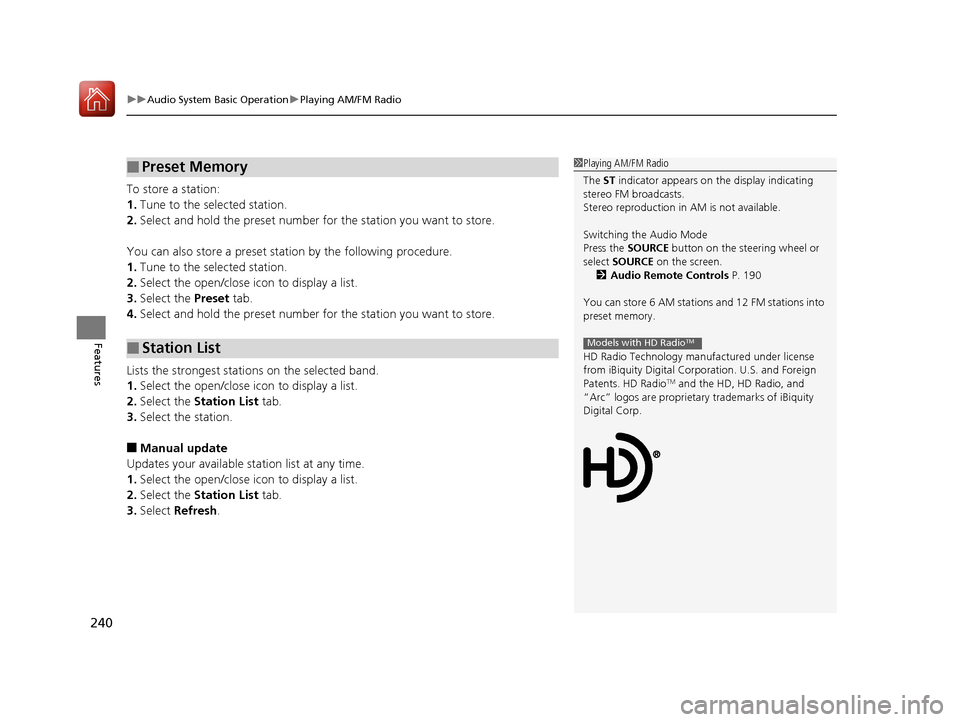
To store a station:
1. Tune to the selected station.
2. Select and hold the preset number for the station you want to store.
You can also store a preset station by the following procedure.
1. Tune to the selected station.
2. Select the open/close ic on to display a list.
3. Select the Preset tab.
4. Select and hold the preset number for the station you want to store.
Lists the strongest stations on the selected band.
1. Select the open/close ic on to display a list.
2. Select the Station List tab.
3. Select the station.
■Manual update
Updates your available station list at any time.
1. Select the open/close ic on to display a list.
2. Select the Station List tab.
3. Select Refresh .
■Preset Memory
■Station List
1Playing AM/FM Radio
The ST indicator appears on the display indicating
stereo FM broadcasts.
Stereo reproduction in AM is not available.
Switching the Audio Mode
Press the SOURCE button on the steering wheel or
select SOURCE on the screen.
2 Audio Remote Controls P. 190
You can store 6 AM stations and 12 FM stations into
preset memory.
HD Radio Technology manufactured under license
from iBiquity Digital Cor poration. U.S. and Foreign
Patents. HD Radio
TM and the HD, HD Radio, and
“Arc” logos are proprietary trademarks of iBiquity
Digital Corp.
Models with HD RadioTM
17 ACCORD 4D GAS-31T2A6400.book 240 ページ 2016年6月7日 火曜日 午後5時6分