phone HONDA ACCORD 2017 9.G Owner's Manual
[x] Cancel search | Manufacturer: HONDA, Model Year: 2017, Model line: ACCORD, Model: HONDA ACCORD 2017 9.GPages: 613
Page 259 of 613
uuAudio System Basic Operation uSong By VoiceTM (SBV)
258
Features
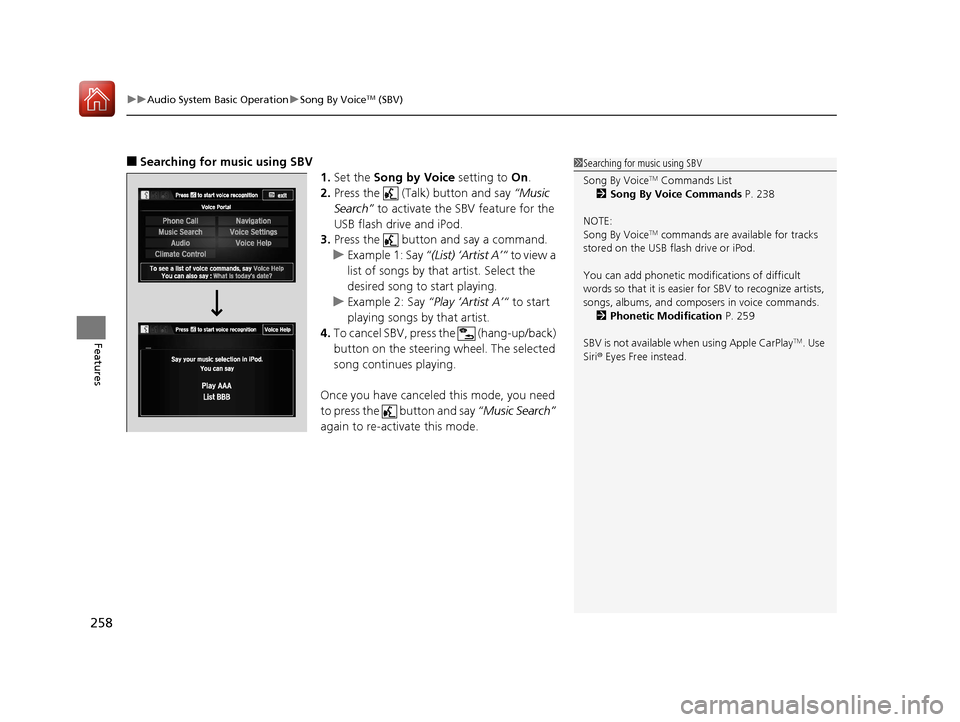
■Searching for music using SBV
1.Set the Song by Voice setting to On.
2. Press the (Talk) button and say “Music
Search” to activate the SBV feature for the
USB flash drive and iPod.
3. Press the button and say a command.
u Example 1: Say “(List) ‘Artist A’“ to view a
list of songs by that artist. Select the
desired song to start playing.
u Example 2: Say “Play ‘Artist A’“ to start
playing songs by that artist.
4. To cancel SBV, press the (hang-up/back)
button on the steering wheel. The selected
song continues playing.
Once you have canceled this mode, you need
to press the button and say “Music Search”
again to re-activate this mode.1 Searching for music using SBV
Song By Voice
TM Commands List
2 Song By Voice Commands P. 238
NOTE:
Song By Voice
TM commands are available for tracks
stored on the USB flash drive or iPod.
You can add phonetic modi fications of difficult
words so that it is easier for SBV to recognize artists,
songs, albums, and composers in voice commands. 2 Phonetic Modification P. 259
SBV is not available wh en using Apple CarPlay
TM. Use
Siri ® Eyes Free instead.
17 ACCORD 4D GAS-31T2A6400.book 258 ページ 2016年6月7日 火曜日 午後5時6分
Page 260 of 613
Continued259
uuAudio System Basic Operation uSong By VoiceTM (SBV)
Features
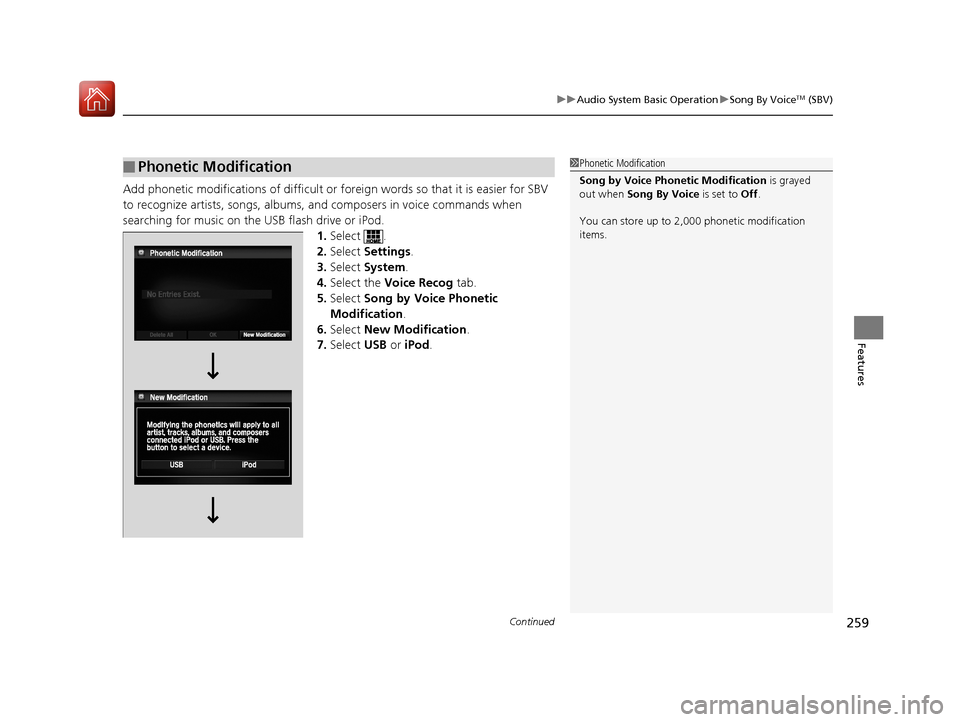
Add phonetic modifications of difficult or fo reign words so that it is easier for SBV
to recognize artists, songs, albums, and composers in voice commands when
searching for music on the USB flash drive or iPod. 1.Select .
2. Select Settings .
3. Select System.
4. Select the Voice Recog tab.
5. Select Song by Voice Phonetic
Modification .
6. Select New Modification.
7. Select USB or iPod .
■Phonetic Modification1Phonetic Modification
Song by Voice Phonetic Modification is grayed
out when Song By Voice is set to Off .
You can store up to 2, 000 phonetic modification
items.
17 ACCORD 4D GAS-31T2A6400.book 259 ページ 2016年6月7日 火曜日 午後5時6分
Page 261 of 613
260
uuAudio System Basic Operation uSong By VoiceTM (SBV)
Features
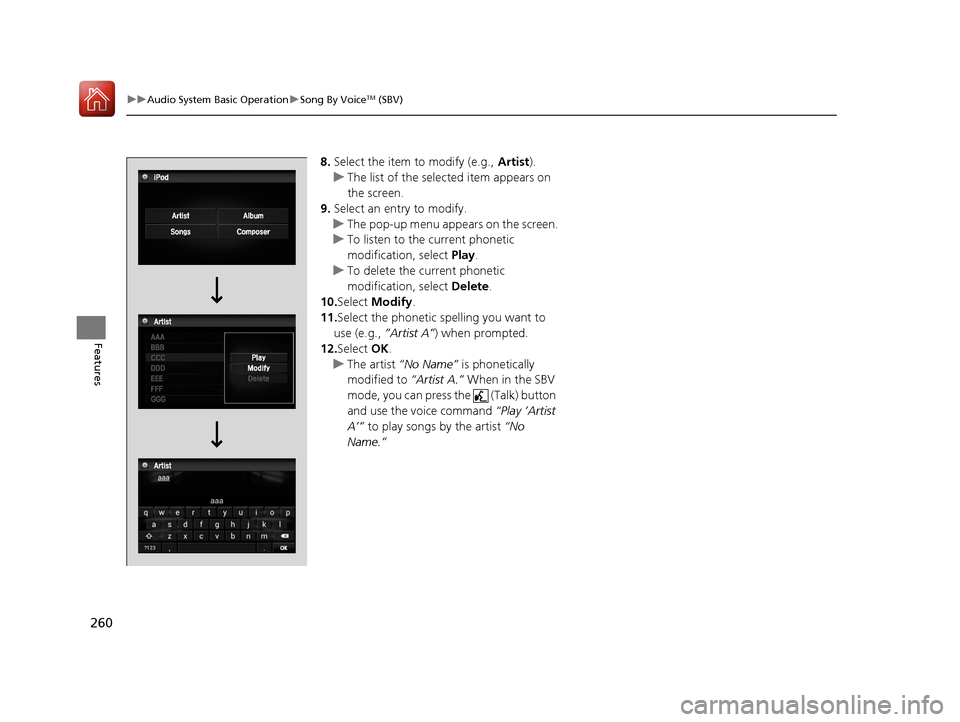
8. Select the item to modify (e.g., Artist).
u The list of the selected item appears on
the screen.
9. Select an entry to modify.
u The pop-up menu appears on the screen.
u To listen to the current phonetic
modification, select Play.
u To delete the current phonetic
modification, select Delete.
10. Select Modify .
11. Select the phonetic spelling you want to
use (e.g., ”Artist A”) when prompted.
12. Select OK.
u The artist “No Name” is phonetically
modified to “Artist A.” When in the SBV
mode, you can press the (Talk) button
and use the voice command “Play ‘Artist
A’” to play songs by the artist “No
Name.”
17 ACCORD 4D GAS-31T2A6400.book 260 ページ 2016年6月7日 火曜日 午後5時6分
Page 262 of 613
261
uuAudio System Basic Operation uPlaying Pandora ®*
Continued
Features
Playing Pandora ®*
Your audio system allows you to listen to music from the Pandora ® app on a
compatible smartphone.
This function is available when the phone is paired an d connected to the vehicle’s
Bluetooth ® HandsFreeLink ® (HFL) system, or with an iPhone, you can connect using
your USB cable to the USB port.
2 Phone Setup P. 382
2 USB Port(s*) P. 187
U.S. models
1 Playing Pandora ®*
Pandora®, the Pandora logo, and the Pandora trade
dress are trademarks or registered trademarks of
Pandora Media, Inc., used with permission. Pandora
is only available in certain countries.
Visit the Pandora website for more information.
To find out if your phone is compatible with this
feature, visit www.handsfreelink.honda.com , or call
1-888-528-7876.
To use this service in your vehicle, the Pandora ® app
must first be installed on your phone. Visit
www.pandora.com. for more information.
Pandora ® is free, personalized radio that plays music
and comedy you’ll love. Just start with the name of
one of your favorite arti sts, songs, comedians or
composers and Pandora ® will create a custom station
that plays similar tracks. Pandora® also features
hundreds of genre stations ranging from Dubstep to
Smooth Jazz to Power Workout.
If you cannot operate Pandora ® through the audio
system, it may be streaming through Bluetooth®
Audio. Make sure Pandora ® mode on your audio
system is selected.
If your phone is connected to Android Auto
TM,
Pandora ® is only available through the Android
Auto
TM interface.
Visit the Android AutoTM website to check
compatibility.
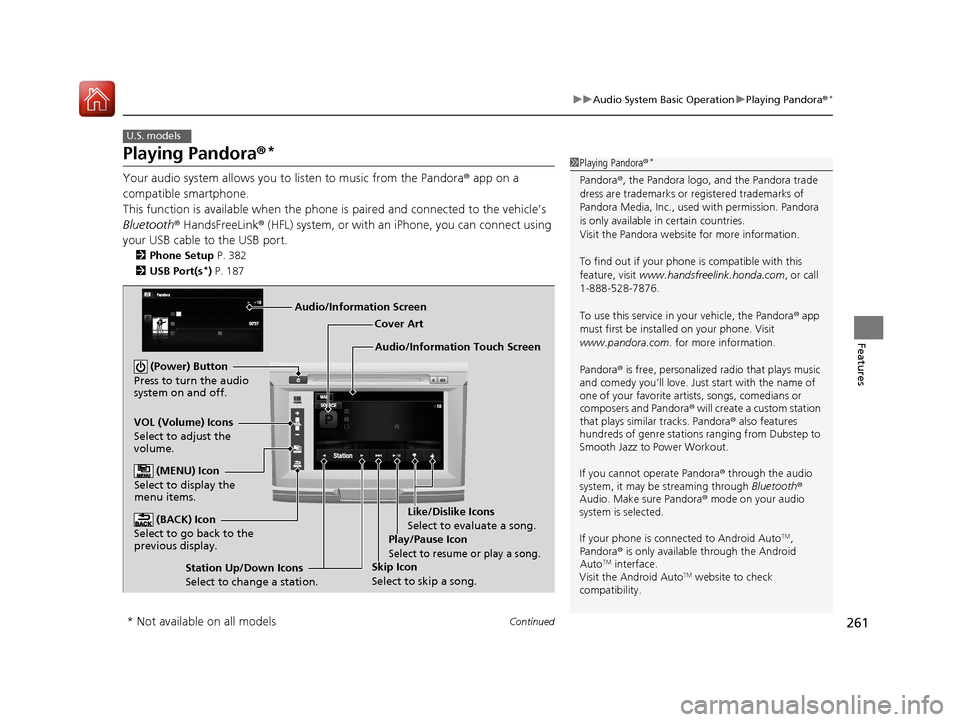
Audio/Information Touch Screen Cover Art
VOL (Volume) Icons
Select to adjust the
volume. (BACK) Icon
Select to go back to the
previous display.
(Power) Button
Press to turn the audio
system on and off.
(MENU) Icon
Select to display the
menu items.
Play/Pause Icon
Select to resume or play a song.
Station Up/Down Icons
Select to change a station. Skip Icon
Select to skip a song.Like/Dislike Icons
Select to evaluate a song.
Audio/Information Screen
* Not available on all models
17 ACCORD 4D GAS-31T2A6400.book 261 ページ 2016年6月7日 火曜日 午後5時6分
Page 264 of 613
263
uuAudio System Basic Operation uPlaying AhaTM
Features
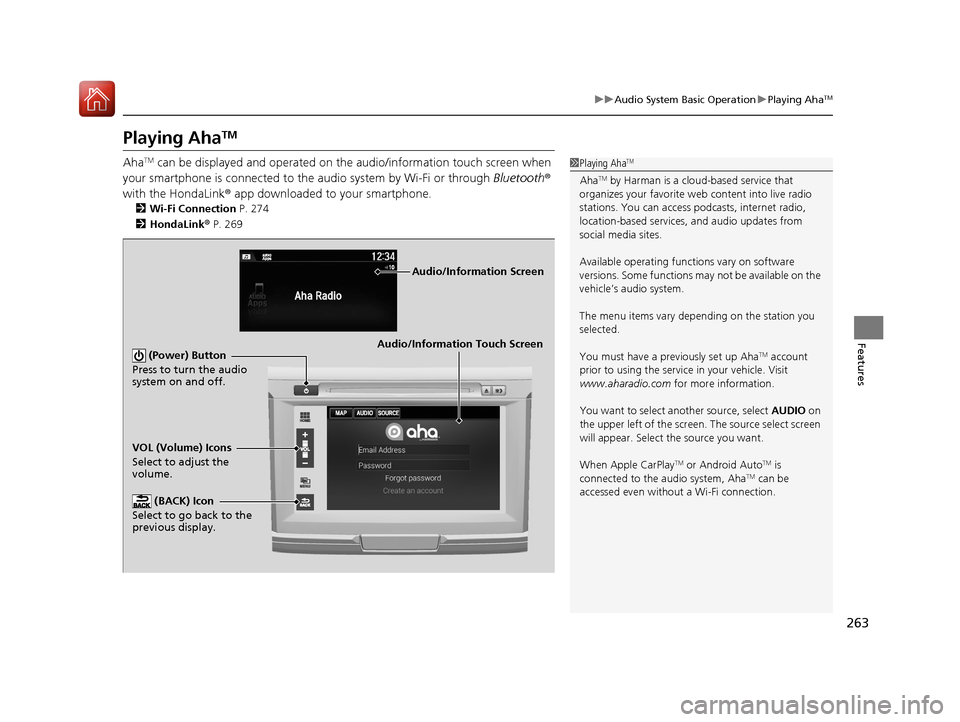
Playing AhaTM
AhaTM can be displayed and operated on the audio/information touch screen when
your smartphone is connected to the audio system by Wi-Fi or through Bluetooth®
with the HondaLink ® app downloaded to your smartphone.
2 Wi-Fi Connection P. 274
2 HondaLink ® P. 269
1 Playing AhaTM
AhaTM by Harman is a clou d-based service that
organizes your favorite we b content into live radio
stations. You can access podcasts, internet radio,
location-based services , and audio updates from
social media sites.
Available operating functi ons vary on software
versions. Some functions ma y not be available on the
vehicle’s audio system.
The menu items vary depending on the station you
selected.
You must have a previously set up Aha
TM account
prior to using the service in your vehicle. Visit
www.aharadio.com for more information.
You want to select a nother source, select AUDIO on
the upper left of the screen. The source select screen
will appear. Select the source you want.
When Apple CarPlay
TM or Android AutoTM is
connected to the audio system, AhaTM can be
accessed even without a Wi-Fi connection.
Audio/Information Touch Screen
VOL (Volume) Icons
Select to adjust the
volume. (BACK) Icon
Select to go back to the
previous display. (Power) Button
Press to turn the audio
system on and off.
Audio/Information Screen
17 ACCORD 4D GAS-31T2A6400.book 263 ページ 2016年6月7日 火曜日 午後5時6分
Page 268 of 613
267
uuAudio System Basic Operation uPlaying Bluetooth ® Audio
Continued
Features
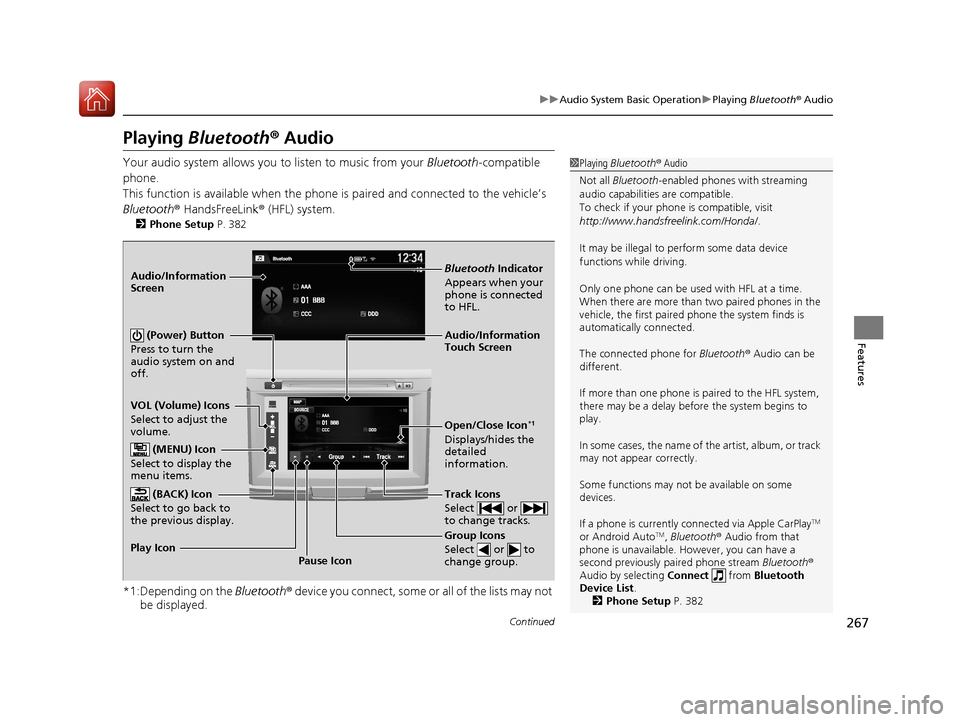
Playing Bluetooth ® Audio
Your audio system allows you to listen to music from your Bluetooth-compatible
phone.
This function is available when the phone is paired an d connected to the vehicle’s
Bluetooth ® HandsFreeLink ® (HFL) system.
2Phone Setup P. 382
*1:Depending on the Bluetooth ® device you connect, some or all of the lists may not
be displayed.
1 Playing Bluetooth ® Audio
Not all Bluetooth -enabled phones with streaming
audio capabilities are compatible.
To check if your phone is compatible, visit
http://www.handsfr eelink.com/Honda/.
It may be illegal to pe rform some data device
functions while driving.
Only one phone can be used with HFL at a time.
When there are more than two paired phones in the
vehicle, the first paired phone the system finds is
automatically connected.
The connected phone for Bluetooth® Audio can be
different.
If more than one phone is paired to the HFL system,
there may be a delay before the system begins to
play.
In some cases, the name of the artist, album, or track
may not appear correctly.
Some functions may not be available on some
devices.
If a phone is currently c onnected via Apple CarPlay
TM
or Android AutoTM, Bluetooth ® Audio from that
phone is unavailable. Ho wever, you can have a
second previously pa ired phone stream Bluetooth®
Audio by selecting Connect from Bluetooth
Device List .
2 Phone Setup P. 382
Audio/Information
Touch Screen
VOL (Volume) Icons
Select to adjust the
volume.
Group Icons
Select or to
change group.
Pause Icon
Play Icon
Bluetooth
Indicator
Appears when your
phone is connected
to HFL.
Track Icons
Select or
to change tracks.
Open/Close Icon*1
Displays/hides the
detailed
information.
Audio/Information
Screen
(Power) Button
Press to turn the
audio system on and
off.
(MENU) Icon
Select to display the
menu items.
(BACK) Icon
Select to go back to
the previous display.
17 ACCORD 4D GAS-31T2A6400.book 267 ページ 2016年6月7日 火曜日 午後5時6分
Page 269 of 613
uuAudio System Basic Operation uPlaying Bluetooth ® Audio
268
Features
1. Make sure that your phone is paired and
connected to the system.
2 Phone Setup P. 382
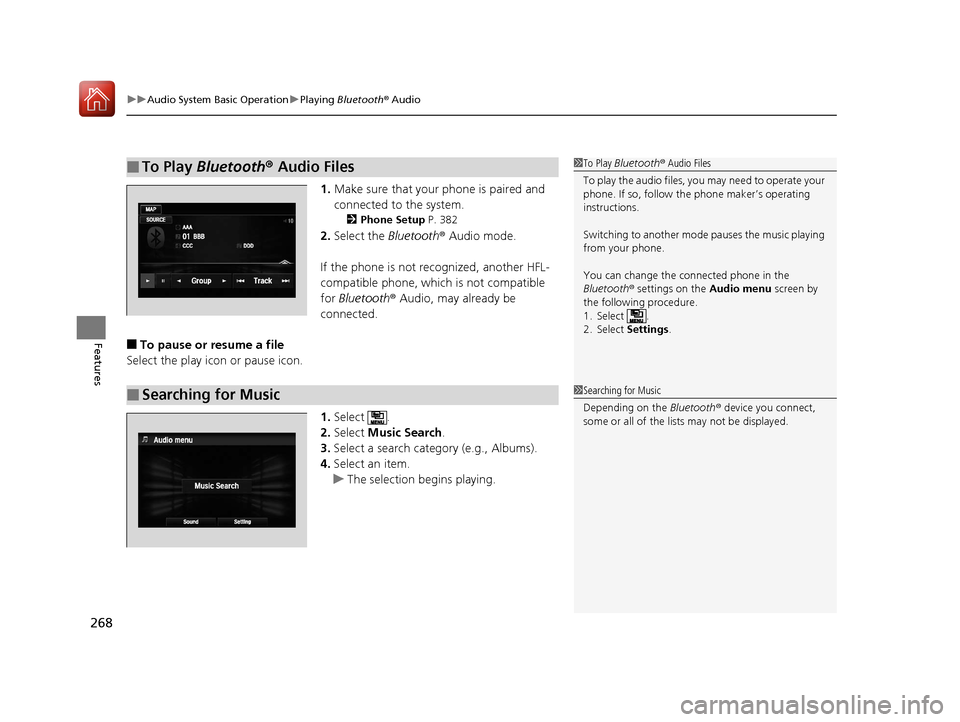
2.Select the Bluetooth® Audio mode.
If the phone is not recognized, another HFL-
compatible phone, which is not compatible
for Bluetooth ® Audio, may already be
connected.
■To pause or resume a file
Select the play icon or pause icon.
1.Select .
2. Select Music Search.
3. Select a search cate gory (e.g., Albums).
4. Select an item.
u The selection begins playing.
■To Play Bluetooth® Audio Files1To Play Bluetooth ® Audio Files
To play the audio files, y ou may need to operate your
phone. If so, follow the phone maker’s operating
instructions.
Switching to another mode pauses the music playing
from your phone.
You can change the connected phone in the
Bluetooth ® settings on the Audio menu screen by
the following procedure.
1. Select .
2. Select Settings .
■Searching for Music1Searching for Music
Depending on the Bluetooth® device you connect,
some or all of the list s may not be displayed.
17 ACCORD 4D GAS-31T2A6400.book 268 ページ 2016年6月7日 火曜日 午後5時6分
Page 270 of 613
269
uuAudio System Basic Operation uHondaLink ®
Continued
Features
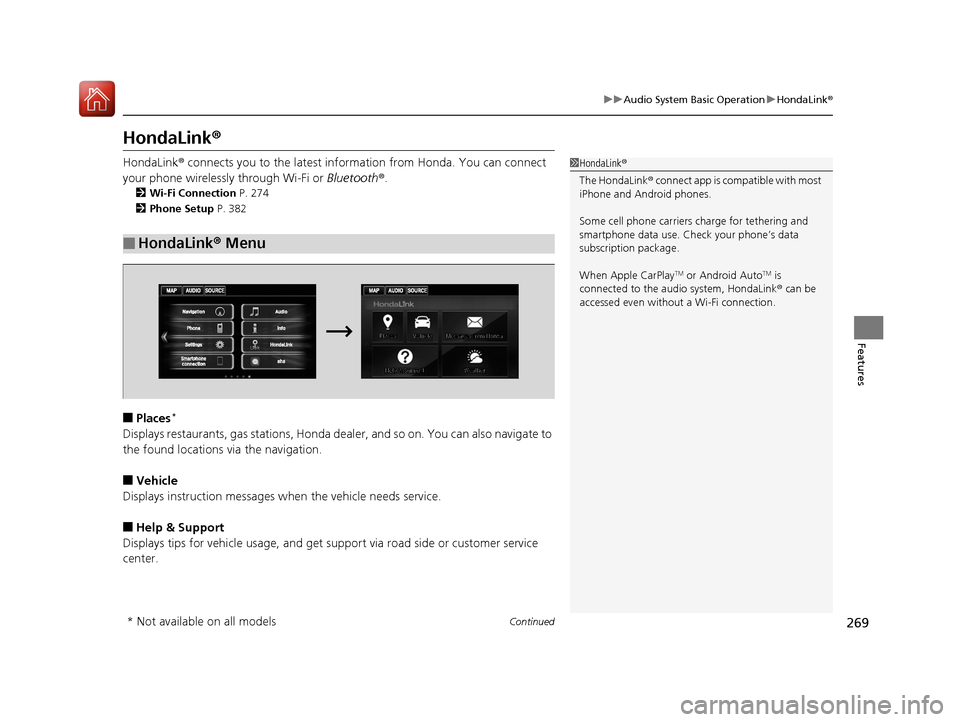
HondaLink ®
HondaLink® connects you to the latest info rmation from Honda. You can connect
your phone wirelessly through Wi-Fi or Bluetooth®.
2Wi-Fi Connection P. 274
2 Phone Setup P. 382
■Places*
Displays restaurants, gas stations, Honda de aler, and so on. You can also navigate to
the found locations via the navigation.
■Vehicle
Displays instruction messages when the vehicle needs service.
■Help & Support
Displays tips for vehicle us age, and get support via road side or customer service
center.
■HondaLink ® Menu
1 HondaLink ®
The HondaLink ® connect app is compatible with most
iPhone and Android phones.
Some cell phone carriers charge for tethering and
smartphone data use. Check your phone’s data
subscription package.
When Apple CarPlay
TM or Android AutoTM is
connected to the audio system, HondaLink ® can be
accessed even without a Wi-Fi connection.
* Not available on all models
17 ACCORD 4D GAS-31T2A6400.book 269 ページ 2016年6月7日 火曜日 午後5時6分
Page 275 of 613
274
uuAudio System Basic Operation uWi-Fi Connection
Features
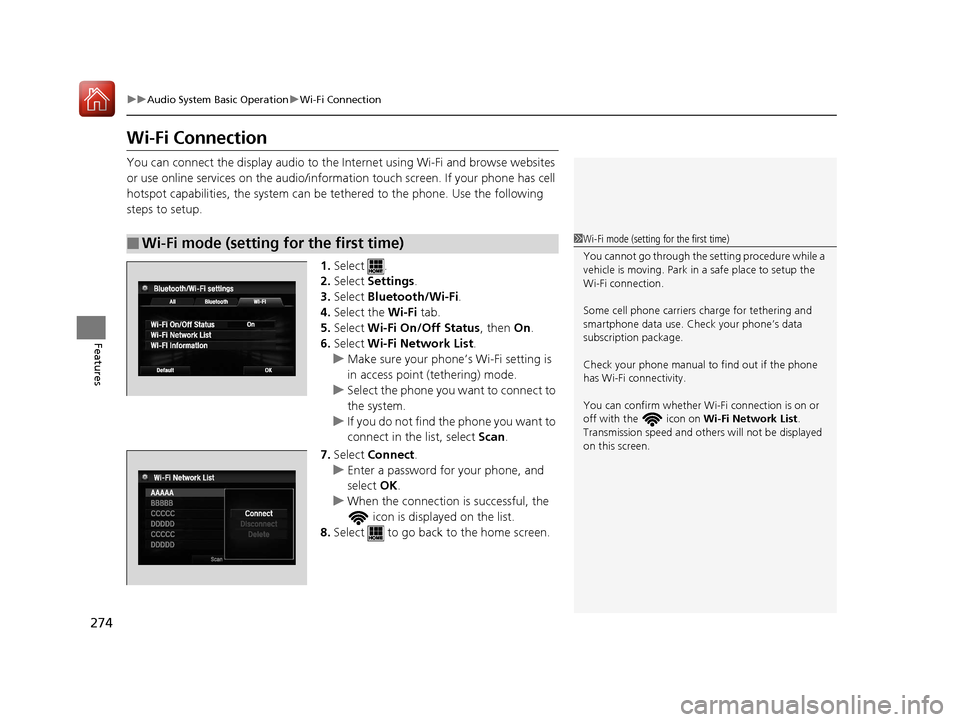
Wi-Fi Connection
You can connect the display audio to the Internet using Wi-Fi and browse websites
or use online services on the audio/informat ion touch screen. If your phone has cell
hotspot capabilities, the system can be te thered to the phone. Use the following
steps to setup.
1.Select .
2. Select Settings .
3. Select Bluetooth/Wi-Fi .
4. Select the Wi-Fi tab.
5. Select Wi-Fi On/Off Status , then On.
6. Select Wi-Fi Network List .
u Make sure your phone’s Wi-Fi setting is
in access point (tethering) mode.
u Select the phone you want to connect to
the system.
u If you do not find the phone you want to
connect in the list, select Scan.
7. Select Connect .
u Enter a password for your phone, and
select OK.
u When the connection is successful, the
icon is displayed on the list.
8. Select to go back to the home screen.
■Wi-Fi mode (setting for the first time)1Wi-Fi mode (setting for the first time)
You cannot go through the setting procedure while a
vehicle is moving. Park in a safe place to setup the
Wi-Fi connection.
Some cell phone carriers charge for tethering and
smartphone data use. Check your phone’s data
subscription package.
Check your phone manual to find out if the phone
has Wi-Fi connectivity.
You can confirm whether Wi -Fi connection is on or
off with the icon on Wi-Fi Network List.
Transmission speed and others will not be displayed
on this screen.
17 ACCORD 4D GAS-31T2A6400.book 274 ページ 2016年6月7日 火曜日 午後5時6分
Page 276 of 613
275
uuAudio System Basic Operation uWi-Fi Connection
Features
Make sure your phone's Wi-Fi setting is in access point (tethering) mode.
■Wi-Fi mode (after the initial setting has been made)1Wi-Fi mode (after the initial setting has been made)
You may need to go through an initial setup for Wi-
Fi connection again af ter you boot your phone.
iPhone users
17 ACCORD 4D GAS-31T2A6400.book 275 ページ 2016年6月7日 火曜日 午後5時6分