Radio HONDA ACCORD 2017 9.G Owner's Guide
[x] Cancel search | Manufacturer: HONDA, Model Year: 2017, Model line: ACCORD, Model: HONDA ACCORD 2017 9.GPages: 613
Page 262 of 613
261
uuAudio System Basic Operation uPlaying Pandora ®*
Continued
Features
Playing Pandora ®*
Your audio system allows you to listen to music from the Pandora ® app on a
compatible smartphone.
This function is available when the phone is paired an d connected to the vehicle’s
Bluetooth ® HandsFreeLink ® (HFL) system, or with an iPhone, you can connect using
your USB cable to the USB port.
2 Phone Setup P. 382
2 USB Port(s*) P. 187
U.S. models
1 Playing Pandora ®*
Pandora®, the Pandora logo, and the Pandora trade
dress are trademarks or registered trademarks of
Pandora Media, Inc., used with permission. Pandora
is only available in certain countries.
Visit the Pandora website for more information.
To find out if your phone is compatible with this
feature, visit www.handsfreelink.honda.com , or call
1-888-528-7876.
To use this service in your vehicle, the Pandora ® app
must first be installed on your phone. Visit
www.pandora.com. for more information.
Pandora ® is free, personalized radio that plays music
and comedy you’ll love. Just start with the name of
one of your favorite arti sts, songs, comedians or
composers and Pandora ® will create a custom station
that plays similar tracks. Pandora® also features
hundreds of genre stations ranging from Dubstep to
Smooth Jazz to Power Workout.
If you cannot operate Pandora ® through the audio
system, it may be streaming through Bluetooth®
Audio. Make sure Pandora ® mode on your audio
system is selected.
If your phone is connected to Android Auto
TM,
Pandora ® is only available through the Android
Auto
TM interface.
Visit the Android AutoTM website to check
compatibility.
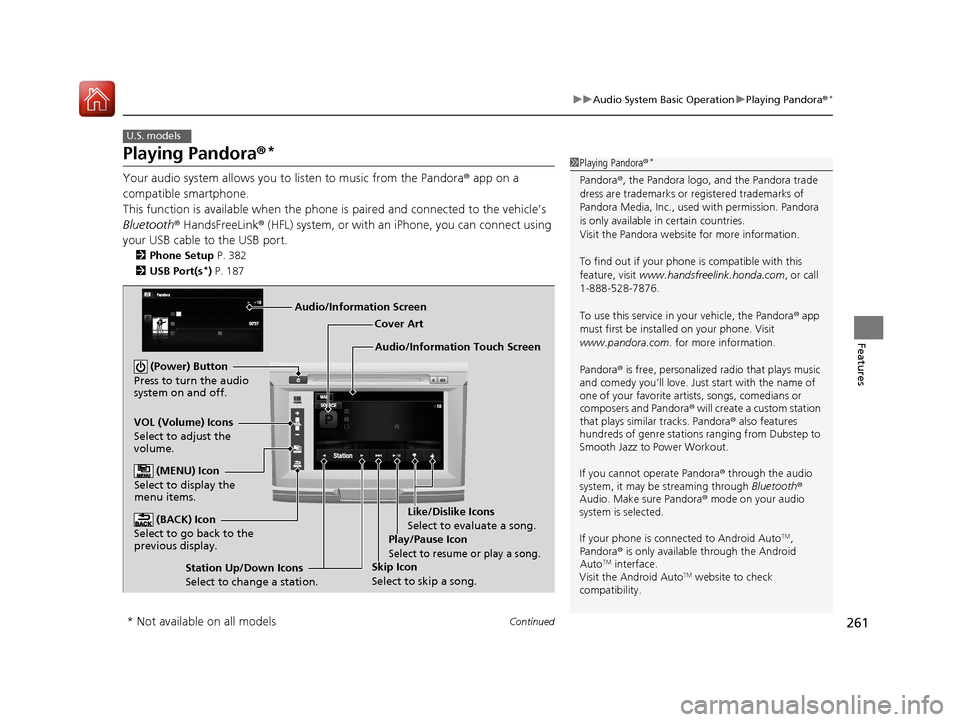
Audio/Information Touch Screen Cover Art
VOL (Volume) Icons
Select to adjust the
volume. (BACK) Icon
Select to go back to the
previous display.
(Power) Button
Press to turn the audio
system on and off.
(MENU) Icon
Select to display the
menu items.
Play/Pause Icon
Select to resume or play a song.
Station Up/Down Icons
Select to change a station. Skip Icon
Select to skip a song.Like/Dislike Icons
Select to evaluate a song.
Audio/Information Screen
* Not available on all models
17 ACCORD 4D GAS-31T2A6400.book 261 ページ 2016年6月7日 火曜日 午後5時6分
Page 264 of 613
263
uuAudio System Basic Operation uPlaying AhaTM
Features
Playing AhaTM
AhaTM can be displayed and operated on the audio/information touch screen when
your smartphone is connected to the audio system by Wi-Fi or through Bluetooth®
with the HondaLink ® app downloaded to your smartphone.
2 Wi-Fi Connection P. 274
2 HondaLink ® P. 269
1 Playing AhaTM
AhaTM by Harman is a clou d-based service that
organizes your favorite we b content into live radio
stations. You can access podcasts, internet radio,
location-based services , and audio updates from
social media sites.
Available operating functi ons vary on software
versions. Some functions ma y not be available on the
vehicle’s audio system.
The menu items vary depending on the station you
selected.
You must have a previously set up Aha
TM account
prior to using the service in your vehicle. Visit
www.aharadio.com for more information.
You want to select a nother source, select AUDIO on
the upper left of the screen. The source select screen
will appear. Select the source you want.
When Apple CarPlay
TM or Android AutoTM is
connected to the audio system, AhaTM can be
accessed even without a Wi-Fi connection.
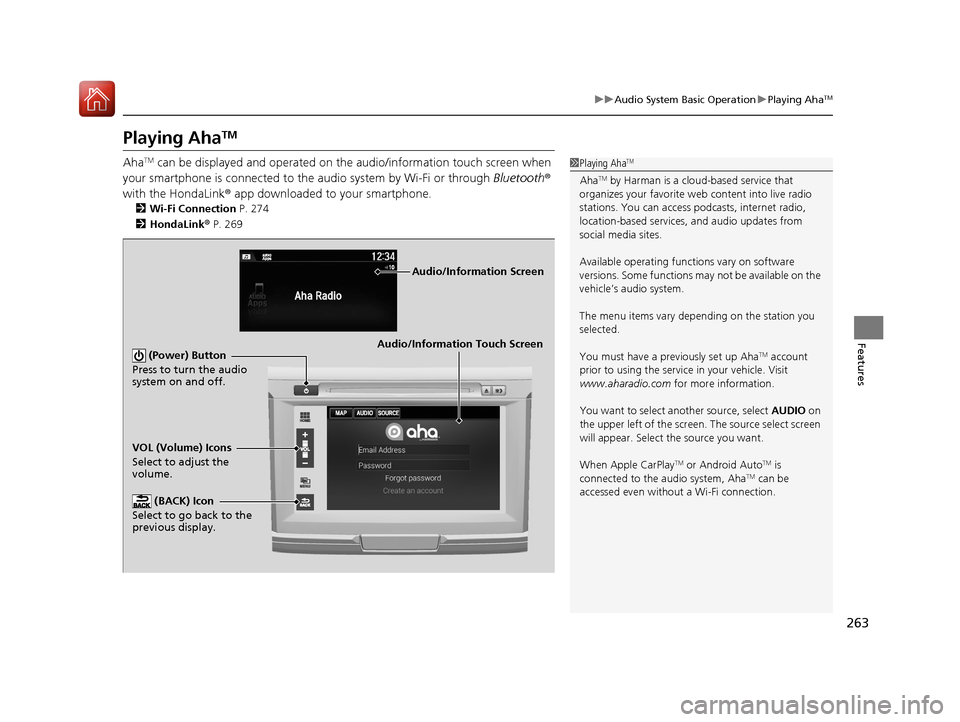
Audio/Information Touch Screen
VOL (Volume) Icons
Select to adjust the
volume. (BACK) Icon
Select to go back to the
previous display. (Power) Button
Press to turn the audio
system on and off.
Audio/Information Screen
17 ACCORD 4D GAS-31T2A6400.book 263 ページ 2016年6月7日 火曜日 午後5時6分
Page 291 of 613
290
Features
General Information on the Audio System
SiriusXM® Radio Service*
1. You need your radio ID ready before regist ering for subscription. To see the ID in
the screen, select Channel 0.
2. Have your radio ID ready, and either call or visit the SiriusXM® website to
subscribe.
Switch to the SiriusXM ® mode by using the SOURCE button on the steering wheel,
or through the audio/information touch screen, and stay in this mode for about 30
minutes until the service is activated. Make sure your vehicle is in an open area with
good reception.
Channel Not Subscribed:
You are not subscribed to the channel selected.
Subscription Updated:
SiriusXM ® radio is receiving information update from the network.
Channel Not Available:
No such channel exists, or the artist or title information is unavailable.
No Signal:
The signal is too weak in the current location.
Antenna Disconnected:
The SiriusXM ® antenna is disconnected. Contact a dealer.
■Subscribing to SiriusXM ® Radio
■Receiving SiriusXM® Radio
■SiriusXM® Radio Display Messages
1 Subscribing to SiriusXM ® Radio
Contact Information for SiriusXM ® Radio:
•US: SiriusXM ® Radio at www.siriusxm.com or 1-
800-852-9696
•Canada: SiriusXM ® Canada at
www.siriusxmradio.ca , or 1-877-209-0079
1Receiving SiriusXM ® Radio
The SiriusXM ® satellites are in orbit over the equator;
therefore, objects south of the vehicle may cause
satellite reception interruptions. Sa tellite signals are
more likely to be blocked by tall buildings and
mountains the farther north you travel from the
equator.
You may experience rece ption problems under the
following circumstances:
•In a location with an obstruction to the south of
your vehicle.
•In tunnels•On the lower level of a multi-tiered road
•Large items carried on the roof rack
* Not available on all models
17 ACCORD 4D GAS-31T2A6400.book 290 ページ 2016年6月7日 火曜日 午後5時6分
Page 321 of 613
320
uuCustomized Features u
Features
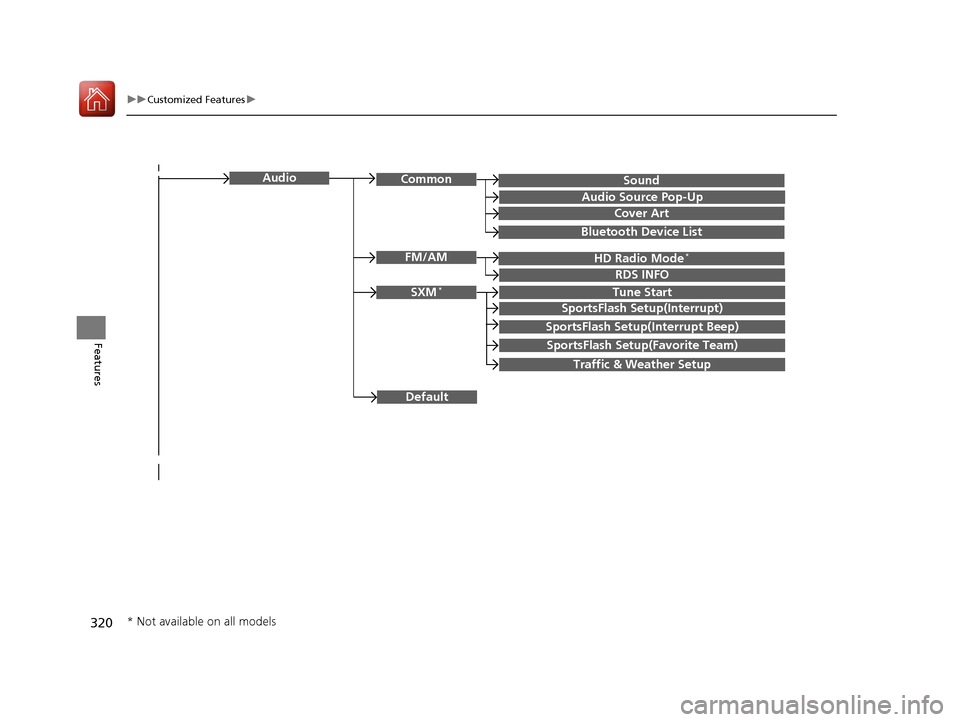
SoundAudioCommon
Audio Source Pop-Up
Cover Art
HD Radio Mode*FM/AM
RDS INFO
SXM*Tune Start
SportsFlash Setup(Interrupt)
SportsFlash Setup(Interrupt Beep)
SportsFlash Setup(Favorite Team)
Traffic & Weather Setup
Bluetooth Device List
Default
* Not available on all models
17 ACCORD 4D GAS-31T2A6400.book 320 ページ 2016年6月7日 火曜日 午後5時6分
Page 333 of 613
332
uuCustomized Features u
Features
*1:Default SettingSetup
Group Customizable Features Description Selectable Settings
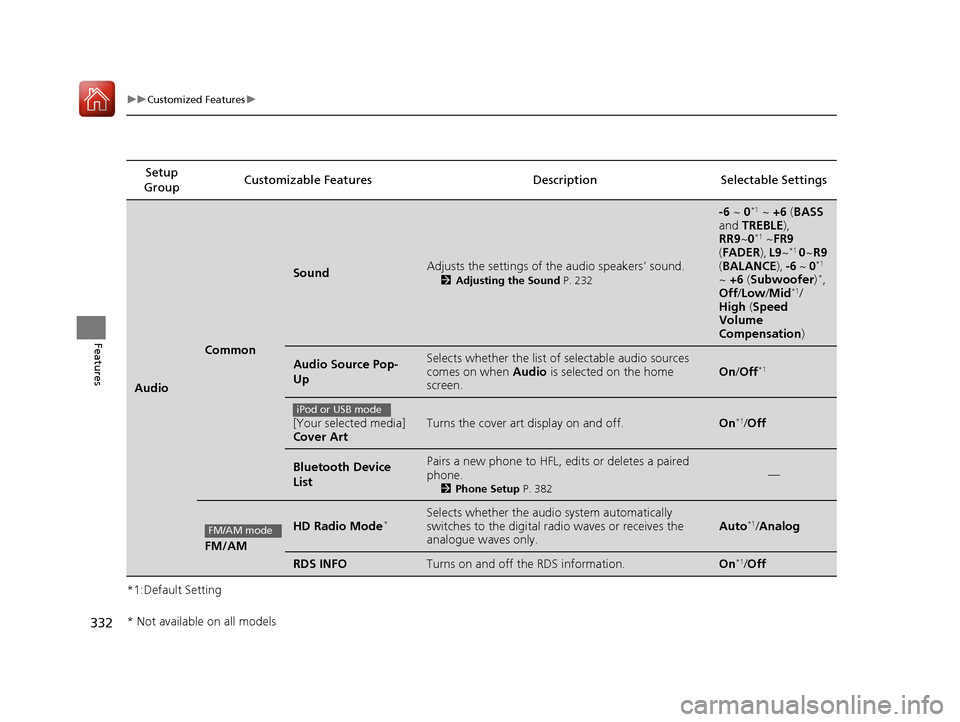
Audio
Common
SoundAdjusts the settings of the audio speakers’ sound.
2
Adjusting the Sound P. 232
-6 ~ 0*1 ~ +6 (BASS
and TREBLE ),
RR9 ~0
*1 ~FR9
( FADER ), L9 ~*1 0 ~R9
( BALANCE ), -6 ~ 0*1
~ +6 (Subwoofer )*,
Off /Low/ Mid*1/
High (Speed
Volume
Compensation )
Audio Source Pop-
UpSelects whether the list of selectable audio sources
comes on when Audio is selected on the home
screen.On /Off*1
[Your selected media]
Cover ArtTurns the cover art display on and off.On*1/Off
Bluetooth Device
ListPairs a new phone to HFL, edits or deletes a paired
phone.
2 Phone Setup P. 382
—
FM/AM
HD Radio Mode*Selects whether the audio system automatically
switches to the digital ra dio waves or receives the
analogue waves only.Auto*1/ Analog
RDS INFOTurns on and off the RDS information.On*1/Off
iPod or USB mode
FM/AM mode
* Not available on all models
17 ACCORD 4D GAS-31T2A6400.book 332 ページ 2016年6月7日 火曜日 午後5時6分
Page 425 of 613
uuWhen Driving uStarting the Engine
424
Driving
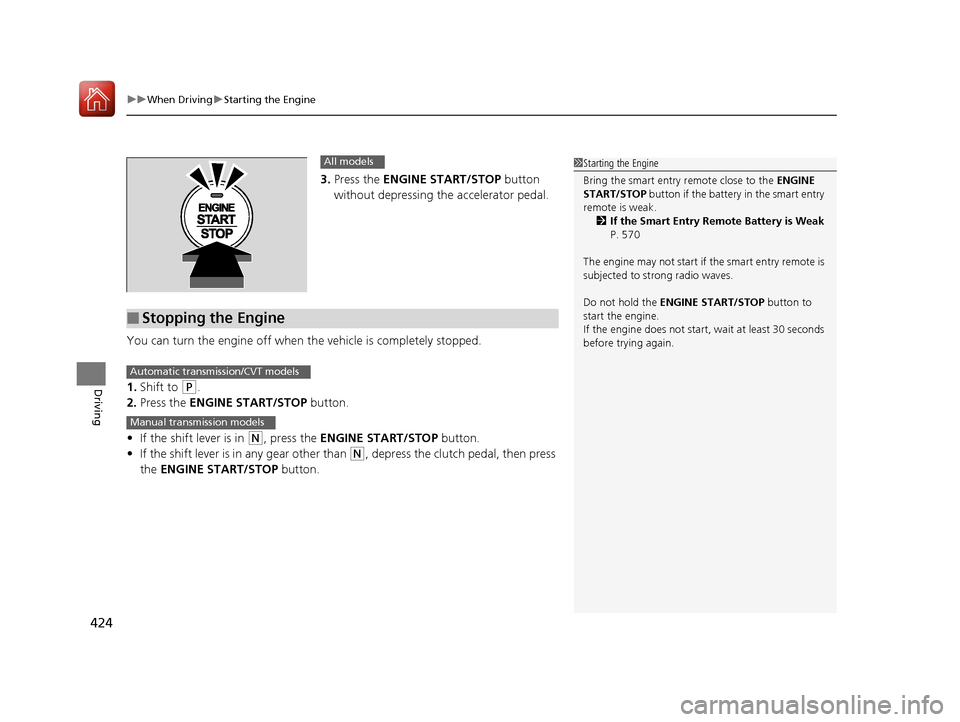
3. Press the ENGINE START/STOP button
without depressing the accelerator pedal.
You can turn the engine off when the vehicle is completely stopped.
1. Shift to
(P.
2. Press the ENGINE START/STOP button.
• If the shift lever is in
(N, press the ENGINE START/STOP button.
• If the shift lever is in any gear other than
(N, depress the clutch pedal, then press
the ENGINE START/STOP button.
1Starting the Engine
Bring the smart entry remote close to the ENGINE
START/STOP button if the battery in the smart entry
remote is weak.
2 If the Smart Entry Remote Battery is Weak
P. 570
The engine may not start if the smart entry remote is
subjected to strong radio waves.
Do not hold the ENGINE START/STOP button to
start the engine.
If the engine does not start, wait at least 30 seconds
before trying again.All models
■Stopping the Engine
Automatic transmission/CVT models
Manual transmission models
17 ACCORD 4D GAS-31T2A6400.book 424 ページ 2016年6月7日 火曜日 午後5時6分
Page 588 of 613
587
Information
This chapter includes your vehicle's specifications, locations of identification numbers, and other
information required by regulation.
Specifications.................................... 588
Identification Numbers Vehicle Identification Number (VIN), Engine Number, and Transmission
Number ......................................... 592
Devices that Emit Radio Waves ....... 593
Reporting Safety Defects ................. 594Emissions Testing
Testing of Readiness Codes.............. 595
Warranty Coverages ........................ 597
Authorized Manuals ......................... 599
17 ACCORD 4D GAS-31T2A6400.book 587 ページ 2016年6月7日 火曜日 午後5時6分
Page 594 of 613
593
Information
Devices that Emit Radio Waves
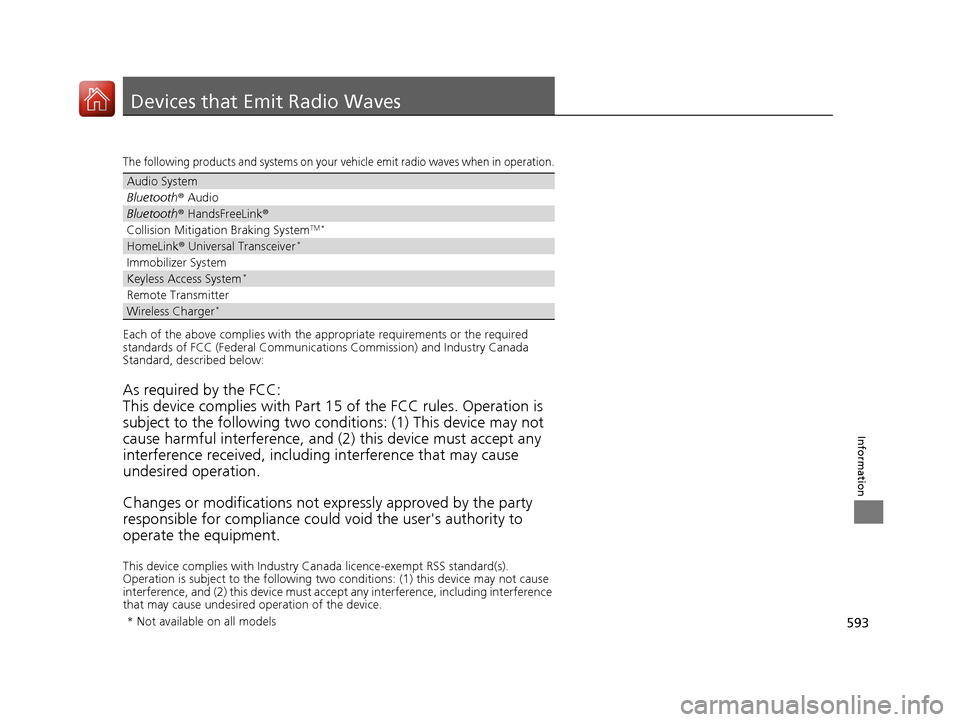
The following products and systems on your vehicle emit radio waves when in operation.
Each of the above complies with the appropriate requirements or the required
standards of FCC (Federal Communications Commission) and Industry Canada
Standard, described below:
As required by the FCC:
This device complies with Part 15 of the FCC rules. Operation is
subject to the following two cond itions: (1) This device may not
cause harmful interferenc e, and (2) this device must accept any
interference received, including interference that may cause
undesired operation.
Changes or modifications not ex pressly approved by the party
responsible for compliance could void the user's authority to
operate the equipment.
This device complies with Industry Canada licence-exempt RSS standard(s).
Operation is subject to the following two conditions: (1) this device may not cause
interference, and (2) this device must accept any interference, including interference
that may cause undesired operation of the device.
Audio System
Bluetooth ® Audio
Bluetooth® HandsFreeLink ®
Collision Mitigati on Braking SystemTM *
HomeLink® Universal Transceiver*
Immobilizer System
Keyless Access System*
Remote Transmitter
Wireless Charger*
* Not available on all models
17 ACCORD 4D GAS-31T2A6400.book 593 ページ 2016年6月7日 火曜日 午後5時6分
Page 602 of 613
Index
601
Index
Index
Numbers
7-Speed Manual Shift Mode................... 434
Operation ............................................... 435
A
ABS (Anti-lock Brake System) .................. 482
Accessories and Modifications ................ 559
Accessory Power Sockets ......................... 173
Adaptive Cruise Control (ACC) .......... 82, 447
Additives Coolant .................................................. 525
Engine Oil ............................................... 519
Washer ................................................... 530
Additives, Engine Oil ............................... 519
Adjusting
Armrest .................................................. 167
Clock ...................................................... 114
Front Seats.............................................. 160
Head Restraints ....................................... 163
Mirrors.................................................... 158
Rear Seats ............................................... 166
Steering Wheel ....................................... 157
Temperature ..................................... 98, 102
Aha
TM........................................................ 263
Air Conditioning System (Climate Control System) .................................................... 180
Changing the Mode................................ 180
Defrosting the Windshield and Windows .............................................. 181
Dust and Pollen Filter .............................. 553 Recirculation/Fresh Air Mode ................... 180
Sensors .................................................... 183
Synchronized Mode ................................. 182
Using Automatic Climate Control ............ 180
Air Pressure ............................... 542, 589, 591
Airbags ........................................................ 39
Advanced Airbags ..................................... 45
After a Collision ......................................... 42
Airbag Care ............................................... 51
Event Data Recorder .................................... 0
Front Airbags (SRS) .................................... 42
Indicator .............................................. 49, 72
Passenger Front Airbag Off Indicator ......... 50
Sensors ...................................................... 39
Side Airbags .............................................. 46
Side Curtain Airbags .................................. 48
AM/FM Radio .................................... 199, 239
Android Auto
TM........................................ 280
Anti-lock Brake System (ABS) .................. 482
Indicator .................................................... 72
Apple CarPlay
TM........................................ 276
Armrest ..................................................... 167
Audio Remote Controls ............................ 190
Audio System ............................................ 186
Adjusting the Sound ........................ 197, 232
Audio/Information Screen ................ 193, 216
Audio/Information Touch Screen ............. 218
Auxiliary Input Jack .................................. 188
Changing the Home Screen Icon Layout .. 221
Closing Apps ........................................... 231
Display Setup ................................... 198, 233 Error Messages ........................................ 285
General Information ................................ 290
Home Screen........................................... 224
Internet Radio ......................... 207, 261, 263
iPod ........................................ 204, 254, 293
Limitations for Manual
Operation .............................. 234, 343, 376
MP3/WMA/AAC .............. 201, 210, 251, 264
Playing a CD.................................... 201, 251
Recommended CDs ................................. 291
Recommended Devices............................ 293
Remote Controls ..................................... 190
Security Code .......................................... 189
Selecting an Audio Source ....................... 234
Status Area ............................................. 230
Theft Protection ...................................... 189
USB Flash Drives ...................... 210, 264, 293
USB Port.................................................. 187
Wallpaper Setup.............................. 195, 222
Audio/Information Screen ............... 193, 216
Audio/Information Touch Screen ............ 218
Authorized Manuals ................................ 599
Auto Door Locking/Unlocking ................. 127
Customize ............................... 109, 308, 331
Auto High-Beam (High Beam Support
System) .................................................... 147
Indicator.................................................... 80
Automatic Intermittent Wipers ............... 152
Automatic Lighting .................................. 145
17 ACCORD 4D GAS-31T2A6400.book 601 ページ 2016年6月7日 火曜日 午後5時6分
Page 604 of 613
603
Index
Collision Mitigation Braking SystemTM
(CMBSTM) ................................................. 484
Compact Spare Tire .................. 563, 589, 591
Compass .................................................... 408
Console Compartment ............................. 170
Continuously Variable Transmission (CVT) Creeping................................................. 429
Fluid ....................................................... 527
Kickdown ............................................... 429
Operating the Shift Lever .......... 19, 431, 433
Shift Lever Does Not Move ...................... 575
Shifting ........................................... 430, 432
Controls .................................................... 113
Coolant (Engine) ...................................... 525
Adding to the Engine Coolant Reserve Tank ..................................................... 525
Adding to the Radiator ........................... 526
Overheating ............................................ 576
Creeping
(Automatic Transmission/CVT) .............. 429
Cruise Control .......................................... 442
Indicator ................................................... 78
Cup Holders .............................................. 172
Customer Service Information ................ 600
Customized Features ............... 103, 297, 315
D
Daytime Running Lights .......................... 150
Dead Battery ............................................ 572
Defaulting All the Settings .............. 314, 338Defrosting the Windshield and
Windows ................................................. 181
Devices that Emit Radio Waves ............... 593
Dimming Headlights ............................................... 144
Rearview Mirror ....................................... 158
Dipstick (Engine Oil) ................................. 520
Directional Signals (Turn Signal) ............. 144
Display Button .................................. 193, 216
Door Mirrors ............................................. 159
Doors ......................................................... 116
Auto Door Locking .................................. 127
Auto Door Unlocking ............................... 127
Door and Trunk Open Indicator ........... 31, 74
Keys ........................................................ 116
Locking/Unlocking the Doors from the Inside..................................................... 124
Locking/Unlocking the Doors from the Outside.................................................. 119
Lockout Prevention System ...................... 123
DOT Tire Quality Grading ........................ 544
Driving ....................................................... 411
Adaptive Cruise Control (ACC) ................ 447
Automatic Transmission/CVT ................... 429
Braking .................................................... 480
Cruise Control ......................................... 442
Shifting Gear ................................... 436, 438
Shifting Position .............................. 430, 432
Starting the Engine .......................... 421, 423
Driving Position Memory System ............. 155
Dust and Pollen Filter ............................... 553
E
Eco Assist® System ........................................ 9
ECON Button ............................................ 441
Elapsed Time ............................................. 101
Electric Power Steering (EPS) System
Indicator............................................ 74, 580
Electronic Stability Control (ESC) ............. 472
Emergency ................................................ 586
Emergency Engine Stop ........................... 571
Emergency Trunk Opener ........................ 131
Emissions Testing (Readiness Codes) ....... 595
Engine ....................................................... 592
Coolant ................................................... 525
Jump Starting .......................................... 572
Oil ........................................................... 519
Remote Engine Start................................ 425
Starting ........................................... 421, 423
Switch Buzzer.......................................... 139
Engine Coolant ......................................... 525
Adding to the Engine Coolant Reserve Tank ...................................................... 525
Adding to the Radiator ............................ 526
Overheating ............................................ 576
Temperature Gauge .................................. 95
Engine Oil ................................................. 519
Adding .................................................... 522
Checking................................................. 520
Displaying Oil Life ............................ 507, 511
Low Oil Pressure Indicator ................. 69, 578
Recommended Engine Oil ....................... 519
ENGINE START/STOP Button .................... 140
17 ACCORD 4D GAS-31T2A6400.book 603 ページ 2016年6月7日 火曜日 午後5時6分