main HONDA ACCORD 2017 9.G Service Manual
[x] Cancel search | Manufacturer: HONDA, Model Year: 2017, Model line: ACCORD, Model: HONDA ACCORD 2017 9.GPages: 613
Page 204 of 613
203
uuAudio System Basic Operation uPlaying a CD
Features
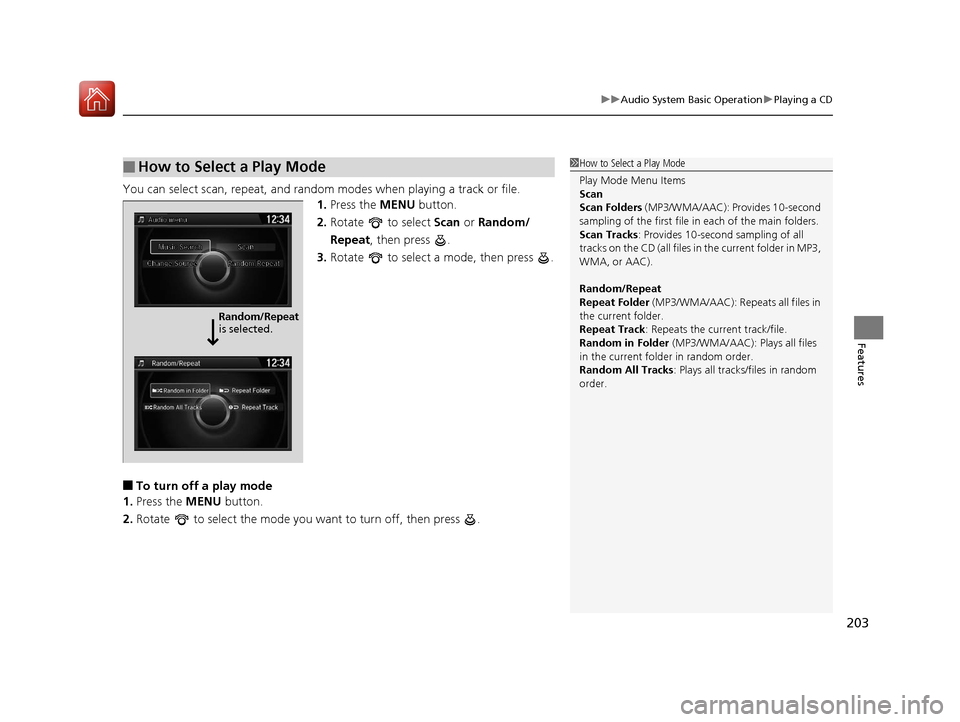
You can select scan, repeat, and random modes when playing a track or file.
1.Press the MENU button.
2. Rotate to select Scan or Random/
Repeat , then press .
3. Rotate to select a mode, then press .
■To turn off a play mode
1. Press the MENU button.
2. Rotate to select the mode you want to turn off, then press .
■How to Select a Play Mode1How to Select a Play Mode
Play Mode Menu Items
Scan
Scan Folders (MP3/WMA/AAC): Provides 10-second
sampling of the first file in each of the main folders.
Scan Tracks: Provides 10-second sampling of all
tracks on the CD (all files in the current folder in MP3,
WMA, or AAC).
Random/Repeat
Repeat Folder (MP3/WMA/AAC): Repeats all files in
the current folder.
Repeat Track: Repeats the current track/file.
Random in Folder (MP3/WMA/AAC): Plays all files
in the current folder in random order.
Random All Tracks : Plays all tracks/files in random
order.
Random/Repeat
is selected.
17 ACCORD 4D GAS-31T2A6400.book 203 ページ 2016年6月7日 火曜日 午後5時6分
Page 213 of 613
uuAudio System Basic Operation uPlaying a USB Flash Drive
212
Features
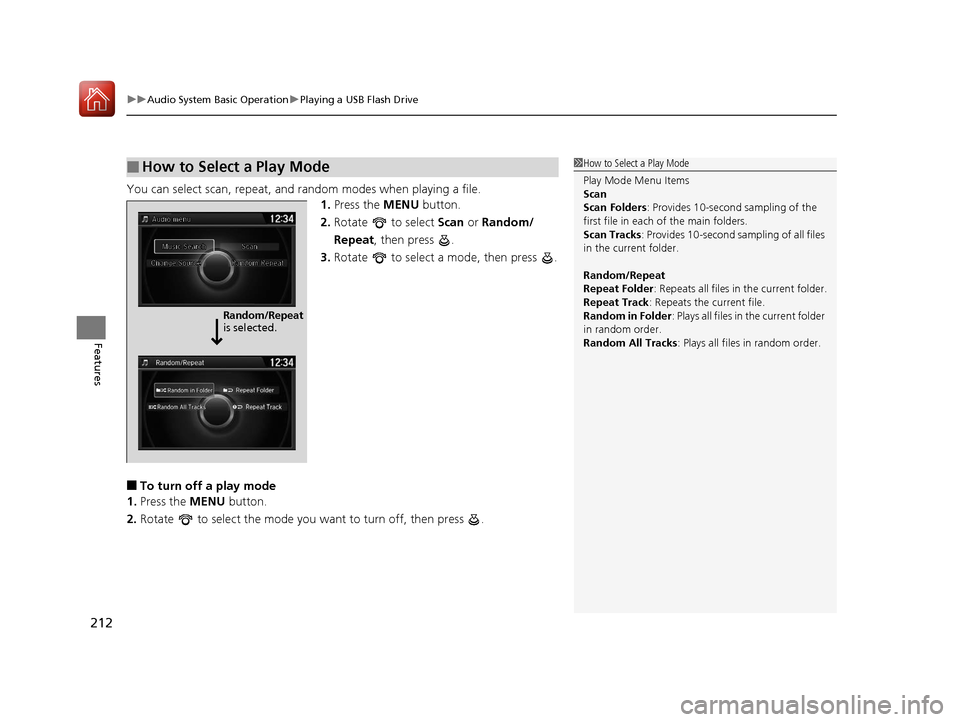
You can select scan, repeat, and random modes when playing a file.
1.Press the MENU button.
2. Rotate to select Scan or Random/
Repeat, then press .
3. Rotate to select a mode, then press .
■To turn off a play mode
1. Press the MENU button.
2. Rotate to select the mode you want to turn off, then press .
■How to Select a Play Mode1How to Select a Play Mode
Play Mode Menu Items
Scan
Scan Folders : Provides 10-second sampling of the
first file in each of the main folders.
Scan Tracks : Provides 10-second sa mpling of all files
in the current folder.
Random/Repeat
Repeat Folder : Repeats all files in the current folder.
Repeat Track: Repeats the current file.
Random in Folder : Plays all files in the current folder
in random order.
Random All Tracks : Plays all files in random order.
Random/Repeat
is selected.
17 ACCORD 4D GAS-31T2A6400.book 212 ページ 2016年6月7日 火曜日 午後5時6分
Page 254 of 613
253
uuAudio System Basic Operation uPlaying a CD
Features
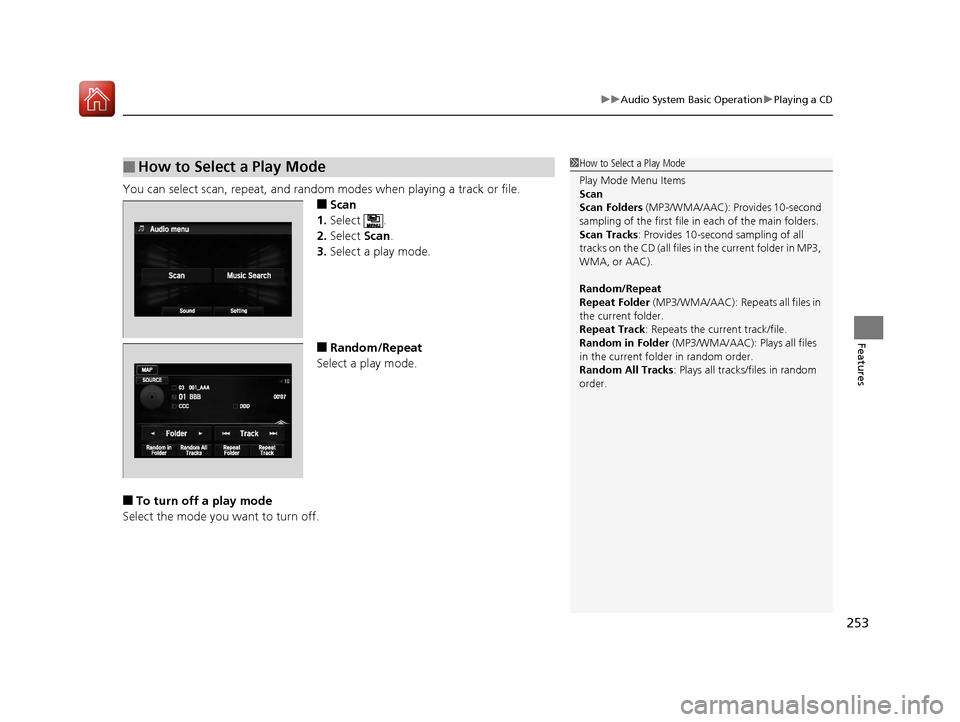
You can select scan, repeat, and random modes when playing a track or file.
■Scan
1. Select .
2. Select Scan.
3. Select a play mode.
■Random/Repeat
Select a play mode.
■To turn off a play mode
Select the mode you want to turn off.
■How to Select a Play Mode1 How to Select a Play Mode
Play Mode Menu Items
Scan
Scan Folders (MP3/WMA/AAC): Provides 10-second
sampling of the first file in each of the main folders.
Scan Tracks: Provides 10-second sampling of all
tracks on the CD (all files in the current folder in MP3,
WMA, or AAC).
Random/Repeat
Repeat Folder (MP3/WMA/AAC): Repeats all files in
the current folder.
Repeat Track: Repeats the current track/file.
Random in Folder (MP3/WMA/AAC): Plays all files
in the current folder in random order.
Random All Tracks : Plays all tracks/files in random
order.
17 ACCORD 4D GAS-31T2A6400.book 253 ページ 2016年6月7日 火曜日 午後5時6分
Page 263 of 613
uuAudio System Basic Operation uPlaying Pandora ®*
262
Features
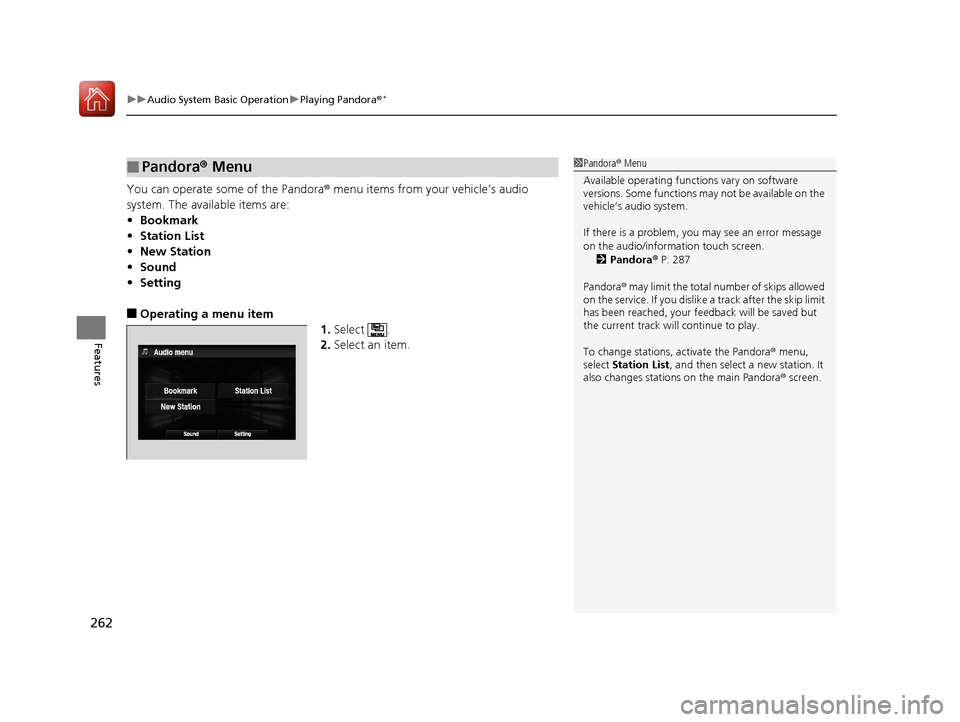
You can operate some of the Pandora® menu items from your vehicle’s audio
system. The available items are:
• Bookmark
• Station List
• New Station
• Sound
• Setting
■Operating a menu item
1.Select .
2. Select an item.
■Pandora® Menu1Pandora ® Menu
Available operating functi ons vary on software
versions. Some functions ma y not be available on the
vehicle’s audio system.
If there is a problem, you may see an error message
on the audio/information touch screen.
2 Pandora ® P. 287
Pandora ® may limit the total number of skips allowed
on the service. If you dislike a track after the skip limit
has been reached, your fe edback will be saved but
the current track will continue to play.
To change stations, activate the Pandora ® menu,
select Station List , and then select a new station. It
also changes stations on the main Pandora ® screen.
17 ACCORD 4D GAS-31T2A6400.book 262 ページ 2016年6月7日 火曜日 午後5時6分
Page 267 of 613
uuAudio System Basic Operation uPlaying a USB Flash Drive
266
Features
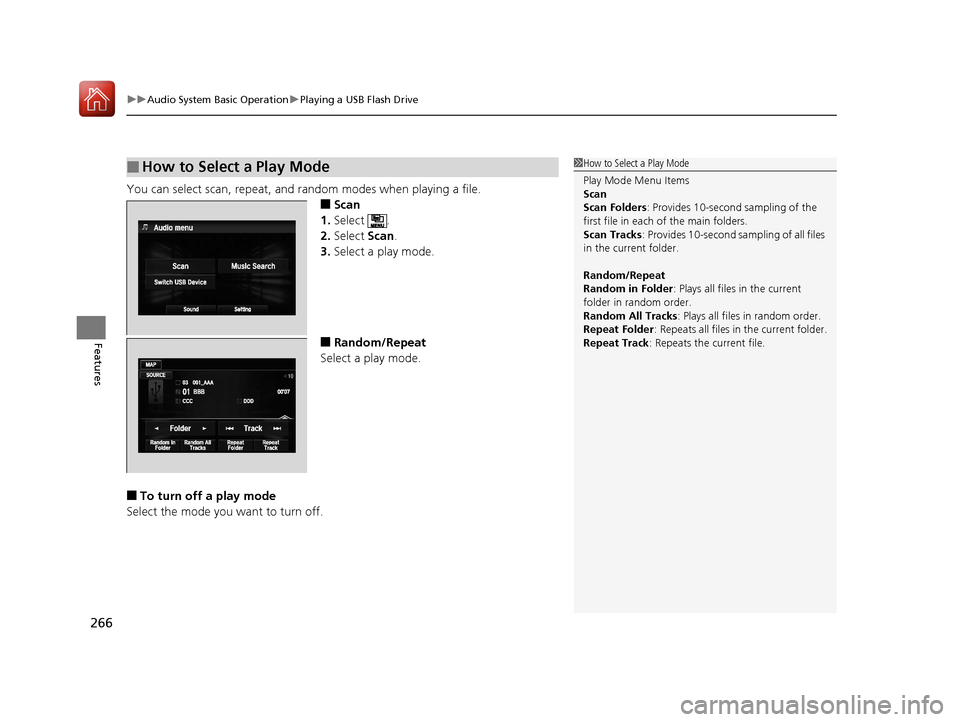
You can select scan, repeat, and random modes when playing a file.
■Scan
1. Select .
2. Select Scan.
3. Select a play mode.
■Random/Repeat
Select a play mode.
■To turn off a play mode
Select the mode you want to turn off.
■How to Select a Play Mode1 How to Select a Play Mode
Play Mode Menu Items
Scan
Scan Folders : Provides 10-second sampling of the
first file in each of the main folders.
Scan Tracks: Provides 10-second sa mpling of all files
in the current folder.
Random/Repeat
Random in Folder : Plays all files in the current
folder in random order.
Random All Tracks : Plays all files in random order.
Repeat Folder : Repeats all files in the current folder.
Repeat Track: Repeats the current file.
17 ACCORD 4D GAS-31T2A6400.book 266 ページ 2016年6月7日 火曜日 午後5時6分
Page 285 of 613
284
uuAudio System Basic Operation uSiri ® Eyes Free
Features
Siri ® Eyes Free
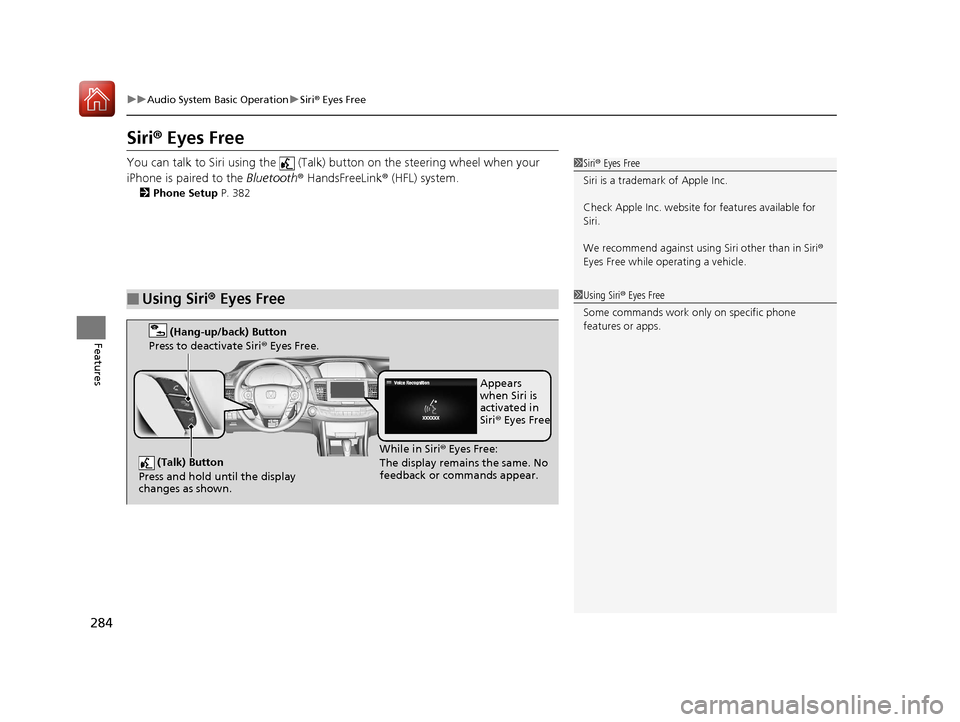
You can talk to Siri using the (Talk) button on the steering wheel when your
iPhone is paired to the Bluetooth® HandsFreeLink ® (HFL) system.
2Phone Setup P. 382
■Using Siri® Eyes Free
1Siri ® Eyes Free
Siri is a trademark of Apple Inc.
Check Apple Inc. website for features available for
Siri.
We recommend against using Siri other than in Siri ®
Eyes Free while operating a vehicle.
1 Using Siri ® Eyes Free
Some commands work only on specific phone
features or apps.
(Talk) Button
Press and hold until the display
changes as shown.
(Hang-up/back) Button
Press to deactivate Siri ® Eyes Free.
While in Siri ® Eyes Free:
The display remains the same. No
feedback or commands appear. Appears
when Siri is
activated in
Siri
® Eyes Free
17 ACCORD 4D GAS-31T2A6400.book 284 ページ 2016年6月7日 火曜日 午後5時6分
Page 288 of 613
287
uuAudio Error Messages uPandora ®
Continued
Features
Pandora ®
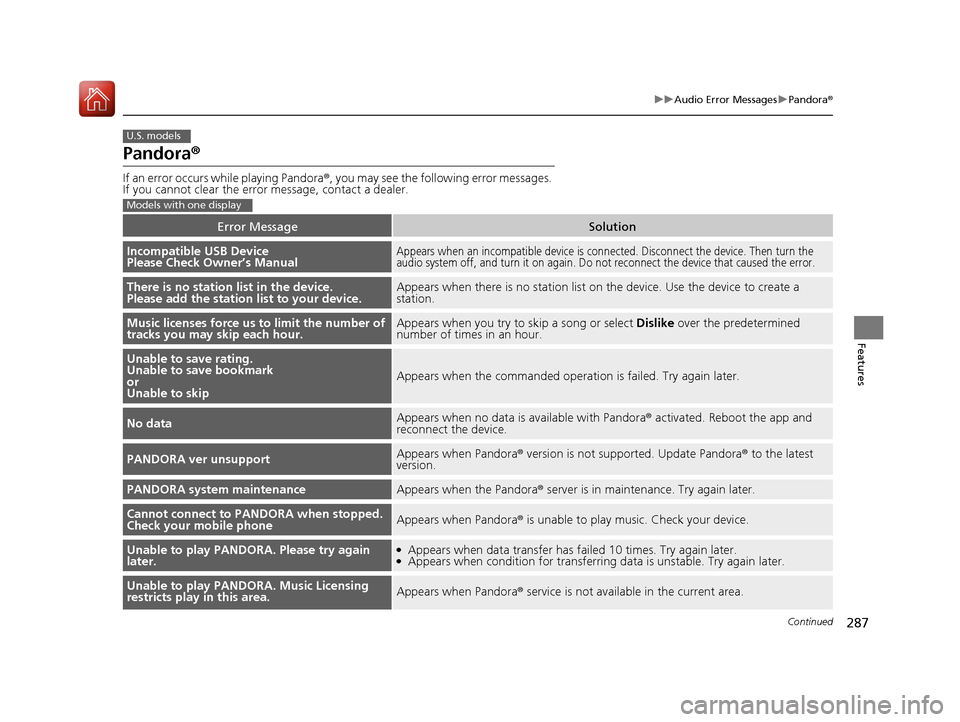
If an error occurs while playing Pandora ®, you may see the following error messages.
If you cannot clear the error message, contact a dealer.
Error MessageSolution
Incompatible USB Device
Please Check Owner’s ManualAppears when an incompatible device is c onnected. Disconnect the device. Then turn the
audio system off, and turn it on again. Do not reconnect the device that caused the error.
There is no station list in the device.
Please add the station list to your device.Appears when there is no station list on the device. Use the device to create a
station.
Music licenses force us to limit the number of
tracks you may skip each hour.Appears when you try to skip a song or select Dislike over the predetermined
number of times in an hour.
Unable to save rating.
Unable to save bookmark
or
Unable to skip
Appears when the comm anded operation is failed. Try again later.
No dataAppears when no data is available with Pandora® activated. Reboot the app and
reconnect the device.
PANDORA ver unsupportAppears when Pandora ® version is not supported. Update Pandora ® to the latest
version.
PANDORA system maintenanceAppears when the Pandora ® server is in maintenance. Try again later.
Cannot connect to PANDORA when stopped.
Check your mobile phoneAppears when Pandora ® is unable to play music. Check your device.
Unable to play PANDORA. Please try again
later.●Appears when data transfer has failed 10 times. Try again later.●Appears when condition for transferring data is unstable. Try again later.
Unable to play PANDORA. Music Licensing
restricts play in this area.Appears when Pandora ® service is not available in the current area.
U.S. models
Models with one display
17 ACCORD 4D GAS-31T2A6400.book 287 ページ 2016年6月7日 火曜日 午後5時6分
Page 289 of 613
288
uuAudio Error Messages uPandora®
Features
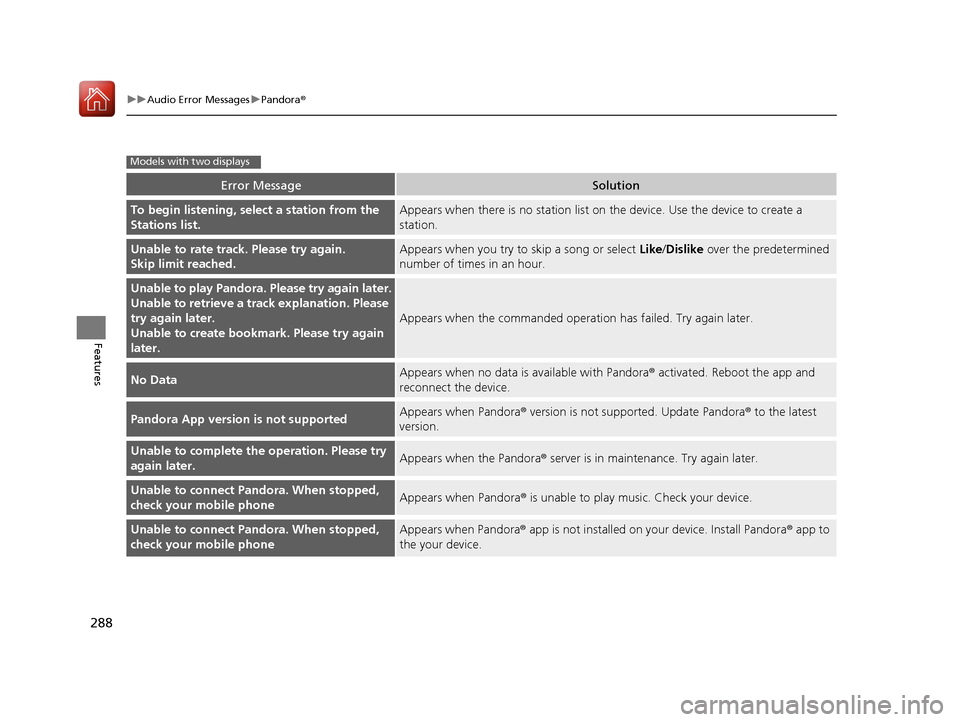
Error MessageSolution
To begin listening, select a station from the
Stations list.Appears when there is no station list on the device. Use the device to create a
station.
Unable to rate track. Please try again.
Skip limit reached.Appears when you try to skip a song or select Like/Dislike over the predetermined
number of times in an hour.
Unable to play Pandora. Please try again later.
Unable to retrieve a trac k explanation. Please
try again later.
Unable to create bookmark. Please try again
later.
Appears when the commanded operation has failed. Try again later.
No DataAppears when no data is available with Pandora® activated. Reboot the app and
reconnect the device.
Pandora App version is not supportedAppears when Pandora ® version is not supported. Update Pandora ® to the latest
version.
Unable to complete the operation. Please try
again later.Appears when the Pandora ® server is in maintenance. Try again later.
Unable to connect Pandora. When stopped,
check your mobile phoneAppears when Pandora® is unable to play music. Check your device.
Unable to connect Pandora. When stopped,
check your mobile phoneAppears when Pandora® app is not installed on your device. Install Pandora ® app to
the your device.
Models with two displays
17 ACCORD 4D GAS-31T2A6400.book 288 ページ 2016年6月7日 火曜日 午後5時6分
Page 296 of 613
295
uuGeneral Information on the Audio System uLegal Information on Apple CarPlayTM/Android AutoTM
Features
YOU EXPRESSLY ACKNOWLEDGE AND AG REE THAT USE OF APPLE CARPLAYTM OR ANDROID AUTOTM (“THE APPLICATIONS”) IS AT YOUR
SOLE RISK AND THAT THE ENTIRE RISK AS TO SATISFACTORY Q UALITY, PERFORMANCE, ACCURACY AND EFFORT IS WITH YOU TO THE
MAXIMUM EXTENT PERMITTED BY APPLICABLE LAW, AND THAT TH E APPLICATIONS AND INFORMATION ON THE APPLICATIONS IS
PROVIDED “AS IS” AND “AS AVAILABLE,” WITH ALL FAUL TS AND WITHOUT WARRANTY OF ANY KIND, AND HONDA HEREBY
DISCLAIMS ALL WARRANTIES AND CONDITIONS WITH RESPECT TO THE APPLICATIONS AND INFORMATION ON THE APPLICATIONS,
EITHER EXPRESS, IMPLIED OR STATUTORY, INCLUDING, BUT NOT LIMITED TO, THE IMPLIED WARRANTIES AND/OR CONDITIONS OF
MERCHANTABILITY, SATISFACTORY QUALITY, FITNESS FOR A PA RTICULAR PURPOSE, ACCURACY, QUIET ENJOYMENT, AND NON-
INFRINGEMENT OF THIRD PARTY RIGHTS. NO ORAL OR WRITTEN INFORMATION OR ADVICE GIVEN BY HONDA OR AN AUTHORIZED
REPRESENTATIVE SHALL CREATE A WARRANTY. AS EXAMPLES, AND WITHOUT LIMITATION, HONDA DISCLAIMS ANY WARRANTY
REGARDING THE ACCURACY OF DATA PROVIDED BY THE APPLI CATIONS, SUCH AS THE ACCURACY OF DIRECTIONS, ESTIMATED
TRAVEL TIME, SPEED LIMITS, ROAD CONDITIONS, NEWS, WEATHER, TRAF FIC, OR OTHER CONTENT PROVIDED BY APPLE, GOOGLE, THEIR
AFFILIATES, OR THIRD PARTY PROVIDERS; HONDA DOES NOT GUARANTEE AGAINST LO SS OF APPLICATION DATA, WHICH MAY BE LOST
AT ANY TIME; HONDA DOES NOT GUARANTEE THAT THE APPLICATIO NS OR ANY SERVICES PROVIDED THROUGH THEM WILL BE
PROVIDED AT ALL TIMES OR THAT ANY OR ALL SERVICES WILL BE AVAILABLE AT ANY PA RTICULAR TIME OR LOCATION. FOR EXAMPLE,
SERVICES MAY BE SUSPENDED OR INTERRUPTED WITHOUT NOTICE FOR REPAIR, MAINTENANCE, SECURITY FIXES, UPDATES, ETC.,
SERVICES MAY BE UNAVAILABLE IN YOUR AREA OR LOCATION, ETC. IN ADDITION, YOU UNDERSTAND THAT CHANGES IN THIRD PARTY
TECHNOLOGY OR GOVERNMENT REGULATION MAY RENDER THE SERVICES AND/OR APPLICATIONS OBSOLETE AND/OR UNUSABLE.
TO THE EXTENT NOT PROHIBITED BY LAW, IN NO EVENT SHALL HONDA OR ITS AFFILIATES BE LIABLE FOR PERSONAL INJURY, OR ANY
INCIDENTAL, SPECIAL, INDIRECT OR CO NSEQUENTIAL DAMAGES WHATSOEVER, INCLUDING, WITHOUT LIMITATION, DAMAGES FOR
LOSS OF PROFITS, CORRUPTION OR LOSS OF DATA, FAILURE TO TRANSMIT OR RECEIVE ANY DATA, BUSINESS INTERRUPTION OR ANY
OTHER COMMERCIAL DAMAGES OR LOSSES, ARISIN G OUT OF OR RELATED TO THE APPLICATIONS OR YOUR USE OF OR INABILITY TO
USE THE APPLICATIONS OR INFORMATION ON THE APPLICATIONS, HOWEVER CAUSED, REGARDLESS OF THE THEORY OF LIABILITY
(CONTRACT, TORT OR OTHERWISE) AND EVEN IF HONDA WERE ADVISED OF THE POSSIBILITY OF SUCH DAMAGES. SOME STATES AND
JURISDICTIONS DISALLOW THE EXCLUSION OR LIMITATION OF LI ABILITY FOR DAMAGES, SO THESE LIMITATIONS AND EXCLUSIONS MAY
NOT APPLY TO YOU. IN NO EVENT SHALL HONDA’S TOTAL LIABILITY TO YOU FOR ALL DAMAGES (OTHER THAN AS MAY BE REQUIRED
BY APPLICABLE LAW IN CASES INVOLVING PERSONAL INJURY) EXCE ED THE AMOUNT OF FIVE DOLLARS ($5.00). THE FOREGOING
LIMITATIONS WILL APPLY EVEN IF THE ABOVE STATED REMEDY FAILS OF ITS ESSENTIAL PURPOSE.
■DISCLAIMER OF WARRANTIES; LIMITATION ON LIABILITY
17 ACCORD 4D GAS-31T2A6400.book 295 ページ 2016年6月7日 火曜日 午後5時6分
Page 301 of 613
300
uuCustomized Features u
Features
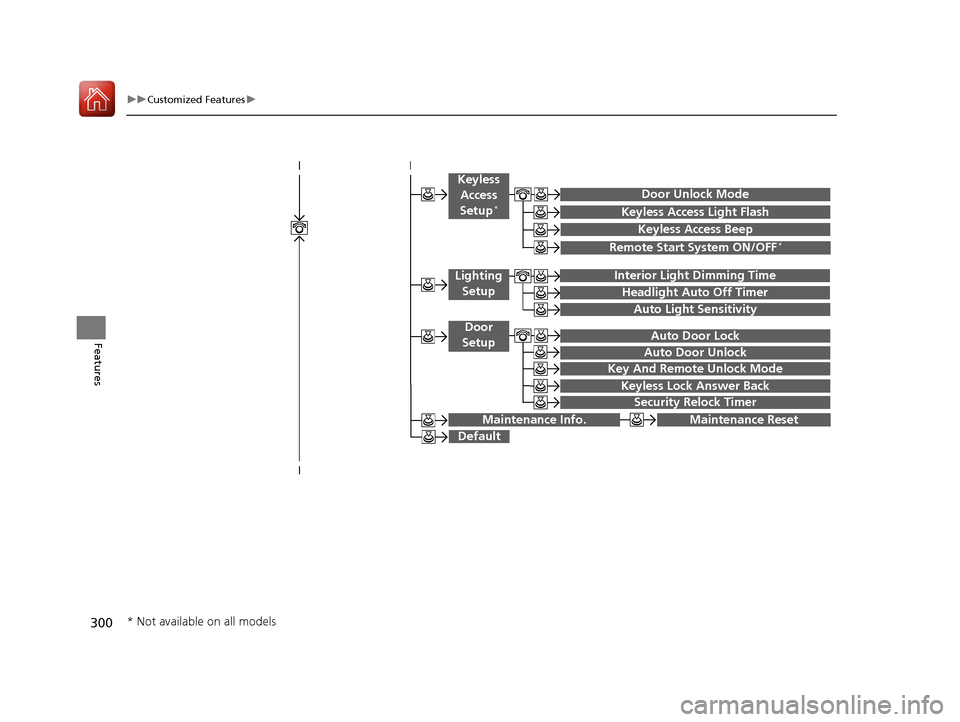
Keyless Access Light Flash
Auto Light Sensitivity
Auto Door Lock
Auto Door Unlock
Door Unlock Mode
Interior Light Dimming Time
Headlight Auto Off Timer
Key And Remote Unlock Mode
Keyless Lock Answer Back
Security Relock Timer
Maintenance Reset
Default
Keyless
Access
Setup
*
Lighting Setup
Door
Setup
Maintenance Info.
Keyless Access Beep
Remote Start System ON/OFF*
* Not available on all models
17 ACCORD 4D GAS-31T2A6400.book 300 ページ 2016年6月7日 火曜日 午後5時6分