display HONDA ACCORD 2017 9.G Workshop Manual
[x] Cancel search | Manufacturer: HONDA, Model Year: 2017, Model line: ACCORD, Model: HONDA ACCORD 2017 9.GPages: 613
Page 140 of 613
139
Controls
Operating the Switches Around the Steering Wheel
Ignition Switch*
1Ignition Switch*
You cannot take the key out unless the shift lever is
in
( P.
If you open the driver’s door when the key is in LOCK
(0 or ACCESSORY (q, a warning buzzer will sound
to remind you to take the key out.
When this happens, the following messages appear
on the multi-information display:
•In LOCK ( 0: Remove Key From Ignition
•In ACCESSORY (q: Turn Ignition Switch To Lock
(0) Position
If the key won’t turn from LOCK
( 0 to ACCESSORY
(q, turn the key while moving the steering wheel left
and right. The steering wh eel will unlock, allowing
the key to turn.
3WARNING
Removing the key from the ignition switch
while driving locks the steering. This can
cause you to lose control of the vehicle.
Remove the key from the ignition switch
only when parked.
Manual transmission models
Continuously variable transmission (CVT) models
All models
Models with multi-information display
All models
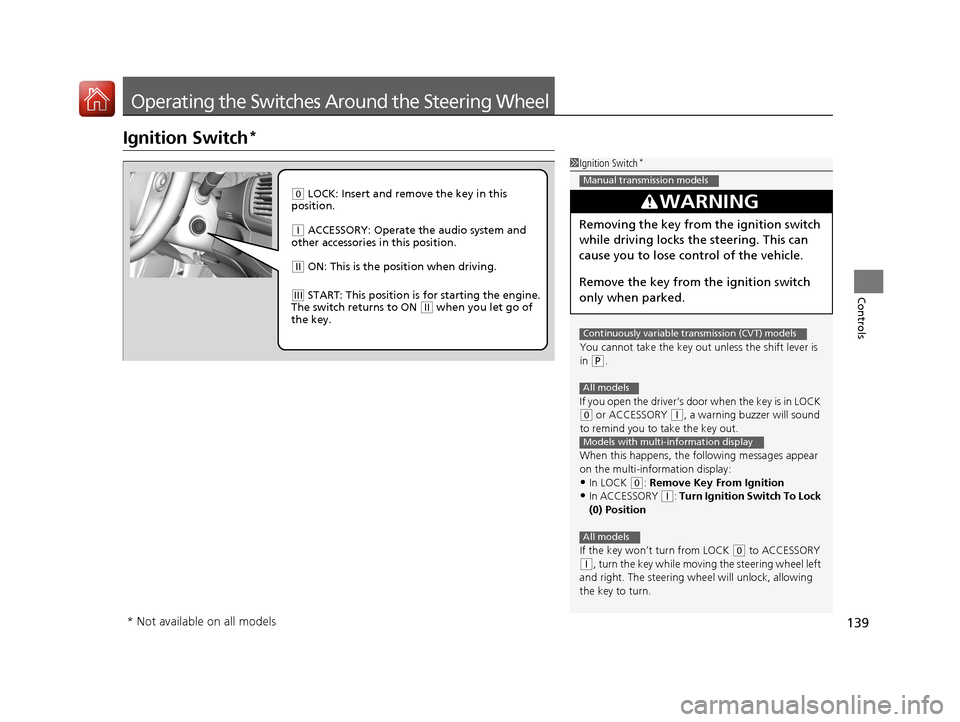
( 0 LOCK: Insert and remove the key in this
position.
( q ACCESSORY: Operate the audio system and
other accessories in this position.
( w ON: This is the position when driving.
(e START: This position is for starting the engine.
The switch returns to ON ( w when you let go of
the key.
* Not available on all models
17 ACCORD 4D GAS-31T2A6400.book 139 ページ 2016年6月7日 火曜日 午後5時6分
Page 141 of 613
140
uuOperating the Switches Around the Steering Wheel uENGINE START/STOP Button*
Controls
ENGINE START/STOP Button*
*1 : Except U.S. automatic transmission/CVT models
■Changing the Power Mode1ENGINE START/STOP Button*
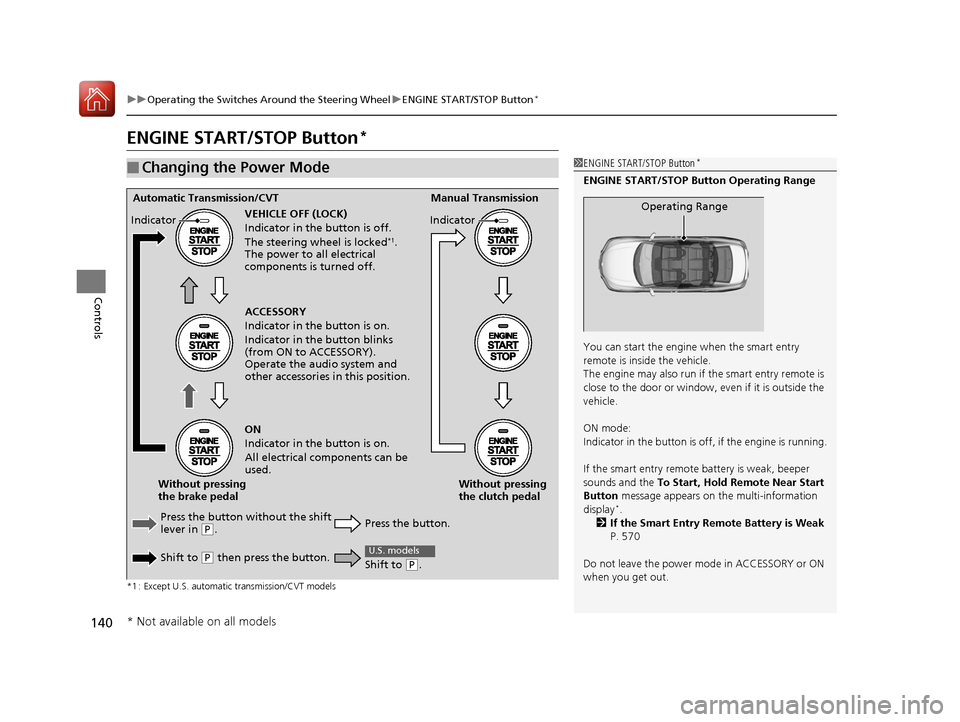
ENGINE START/STOP Button Operating Range
You can start the engine when the smart entry
remote is inside the vehicle.
The engine may also run if the smart entry remote is
close to the door or window, ev en if it is outside the
vehicle.
ON mode:
Indicator in the button is of f, if the engine is running.
If the smart entry remote battery is weak, beeper
sounds and the To Start, Hold Remote Near Start
Button message appears on the multi-information
display
*.
2 If the Smart Entry Remote Battery is Weak
P. 570
Do not leave the power mode in ACCESSORY or ON
when you get out.
Operating RangeAutomatic Transmission/CVT Manual Transmission
VEHICLE OFF (LOCK)
Indicator in th e button is off.
The steering wheel is locked
*1.
The power to all electrical
components is turned off.
Press the button without the shift
lever in
( P.
Shift to
( P then press the button. Press the button.Without pressing
the clutch pedal
Without pressing
the brake pedal ACCESSORY
Indicator in the button is on.
Indicator in th
e button blinks
(from ON to ACCESSORY).
Operate the audio system and
other accessories in this position.
ON
Indicator in the button is on.
All electrical components can be
used.
Indicator
Indicator
Shift to (
P.
U.S. models
* Not available on all models
17 ACCORD 4D GAS-31T2A6400.book 140 ページ 2016年6月7日 火曜日 午後5時6分
Page 143 of 613
uuOperating the Switches Around the Steering Wheel uENGINE START/STOP Button*
142
Controls
Warning buzzers may sound from inside and/
or outside the vehicle to remind you that the
smart entry remote is out of the vehicle. If the
buzzer continues even after the remote is put
back inside, place it to be within its
operational range.
■When the power mode is in ON
If the smart entry remote is taken out of the
vehicle, and the driver’s door is closed, a
warning buzzer sounds from both inside and
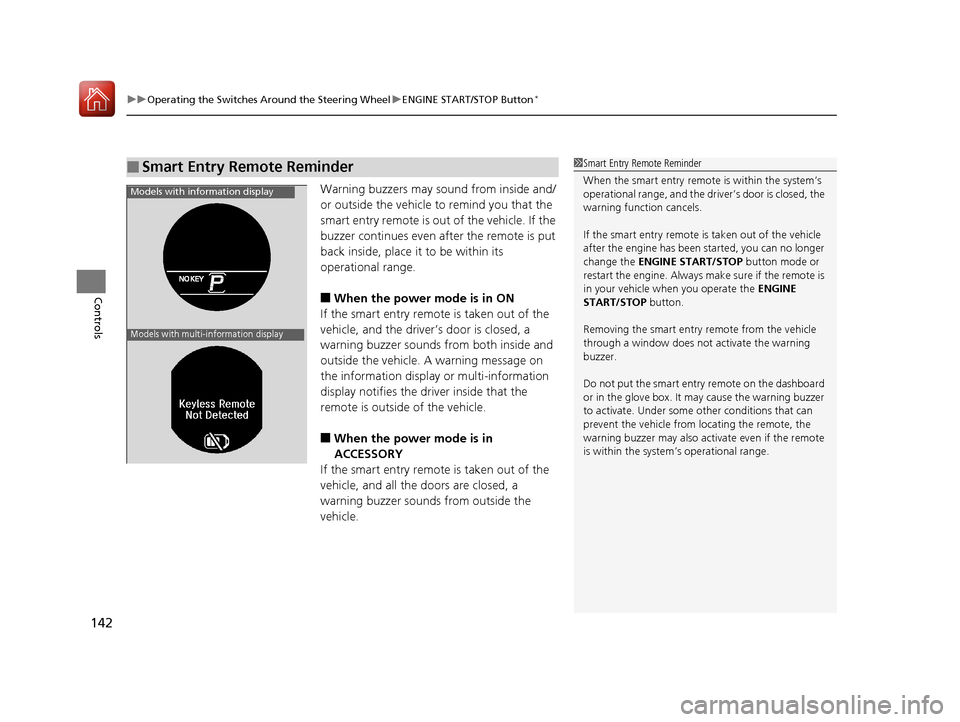
outside the vehicle. A warning message on
the information display or multi-information
display notifies the driver inside that the
remote is outside of the vehicle.
■When the power mode is in
ACCESSORY
If the smart entry remote is taken out of the
vehicle, and all the doors are closed, a
warning buzzer sounds from outside the
vehicle.
■Smart Entry Remote Reminder1 Smart Entry Remote Reminder
When the smart entry remote is within the system’s
operational range, and the driv er’s door is closed, the
warning function cancels.
If the smart entry remote is taken out of the vehicle
after the engine has been started, you can no longer
change the ENGINE START/STOP button mode or
restart the engine. Always make sure if the remote is
in your vehicle when you operate the ENGINE
START/STOP button.
Removing the smart entry remote from the vehicle
through a window does not activate the warning
buzzer.
Do not put the smart entr y remote on the dashboard
or in the glove box. It may cause the warning buzzer
to activate. Under some other conditions that can
prevent the vehicle from locating the remote, the
warning buzzer may also activate even if the remote
is within the system’s operational range.
Models with information display
Models with multi-information display
17 ACCORD 4D GAS-31T2A6400.book 142 ページ 2016年6月7日 火曜日 午後5時6分
Page 149 of 613
uuOperating the Switches Around the Steering Wheel uAuto High-Beam (High Beam Support System)*
148
Controls
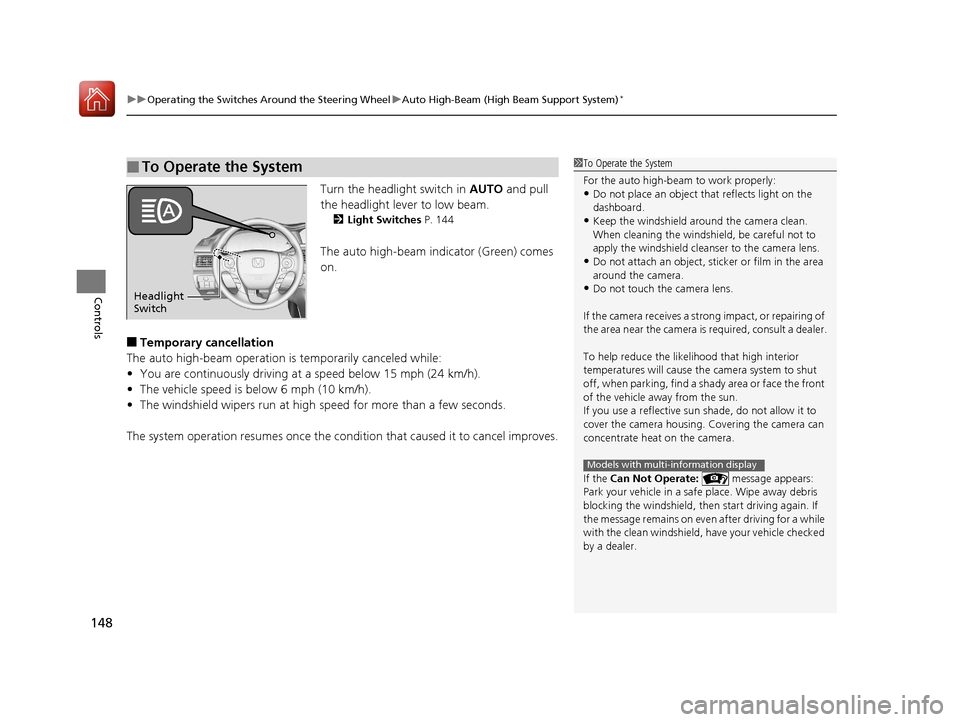
Turn the headlight switch in AUTO and pull
the headlight lever to low beam.
2 Light Switches P. 144
The auto high-beam indicator (Green) comes
on.
■Temporary cancellation
The auto high-beam operation is temporarily canceled while:
• You are continuously driving at a speed below 15 mph (24 km/h).
• The vehicle speed is below 6 mph (10 km/h).
• The windshield wipers run at high speed for more than a few seconds.
The system operation resumes once the condit ion that caused it to cancel improves.
■To Operate the System1To Operate the System
For the auto high-beam to work properly:
•Do not place an object that reflects light on the
dashboard.
•Keep the windshield around the camera clean.
When cleaning the windshield, be careful not to
apply the windshield cleanser to the camera lens.
•Do not attach an object, sticker or film in the area
around the camera.
•Do not touch the camera lens.
If the camera receives a st rong impact, or repairing of
the area near the camera is required, consult a dealer.
To help reduce the likel ihood that high interior
temperatures will cause the camera system to shut
off, when parking, find a sh ady area or face the front
of the vehicle away from the sun.
If you use a reflective sun shade, do not allow it to
cover the camera housing. Covering the camera can
concentrate heat on the camera.
If the Can Not Operate: message appears:
Park your vehicle in a safe place. Wipe away debris
blocking the windshield, then start driving again. If
the message remains on even after driving for a while
with the clean windshield, have your vehicle checked
by a dealer.
Models with multi-information display
Headlight
Switch
17 ACCORD 4D GAS-31T2A6400.book 148 ページ 2016年6月7日 火曜日 午後5時6分
Page 154 of 613
153
uuOperating the Switches Around the Steering Wheel uBrightness Control
Controls
Brightness Control
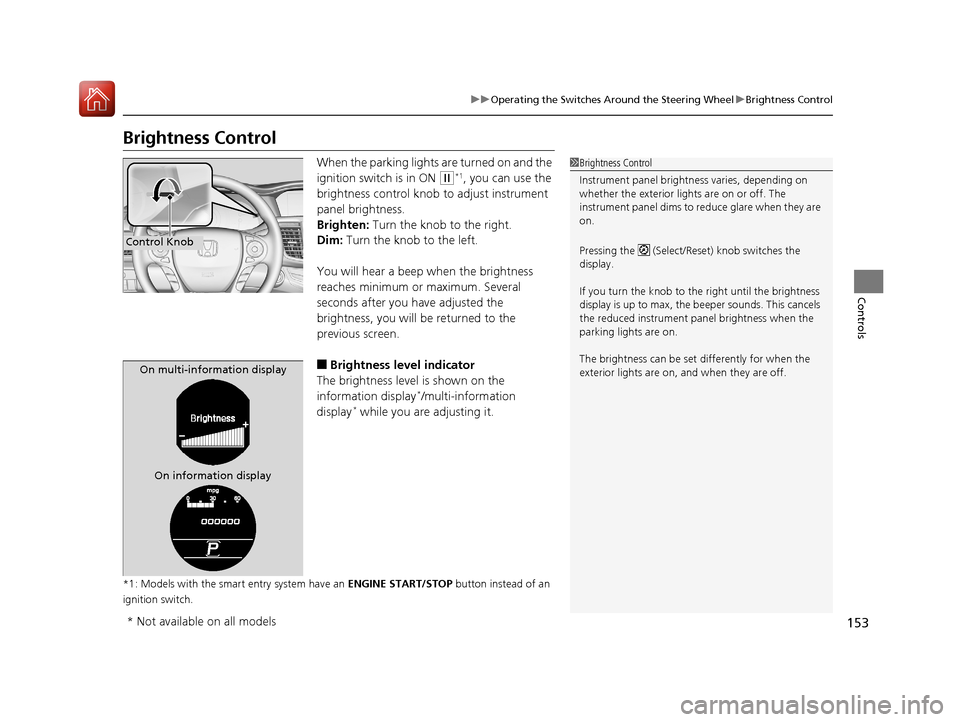
When the parking lights are turned on and the
ignition switch is in ON
(w*1, you can use the
brightness control knob to adjust instrument
panel brightness.
Brighten: Turn the knob to the right.
Dim: Turn the knob to the left.
You will hear a beep when the brightness
reaches minimum or maximum. Several
seconds after you have adjusted the
brightness, you will be returned to the
previous screen.
■Brightness level indicator
The brightness level is shown on the
information display
*/multi-information
display* while you are adjusting it.
*1: Models with the smart entry system have an ENGINE START/STOP button instead of an
ignition switch.
1 Brightness Control
Instrument panel brightne ss varies, depending on
whether the exterior lights are on or off. The
instrument panel dims to reduce glare when they are
on.
Pressing the (Select/Reset) knob switches the
display.
If you turn the knob to the right until the brightness
display is up to max, the beeper sounds. This cancels
the reduced instrument panel brightness when the
parking lights are on.
The brightness can be set differently for when the
exterior lights are on, and when they are off.
Control Knob
On multi-information display
On information display
* Not available on all models
17 ACCORD 4D GAS-31T2A6400.book 153 ページ 2016年6月7日 火曜日 午後5時6分
Page 156 of 613
155
uuOperating the Switches Around the Steering Wheel uDriving Position Memory System*
Continued
Controls
Driving Position Memory System*
You can store two driver’s seat positions with the driving position memory system.
When you unlock and open the driver’s door with a remote, the seat adjusts
automatically to one of the two preset positions.
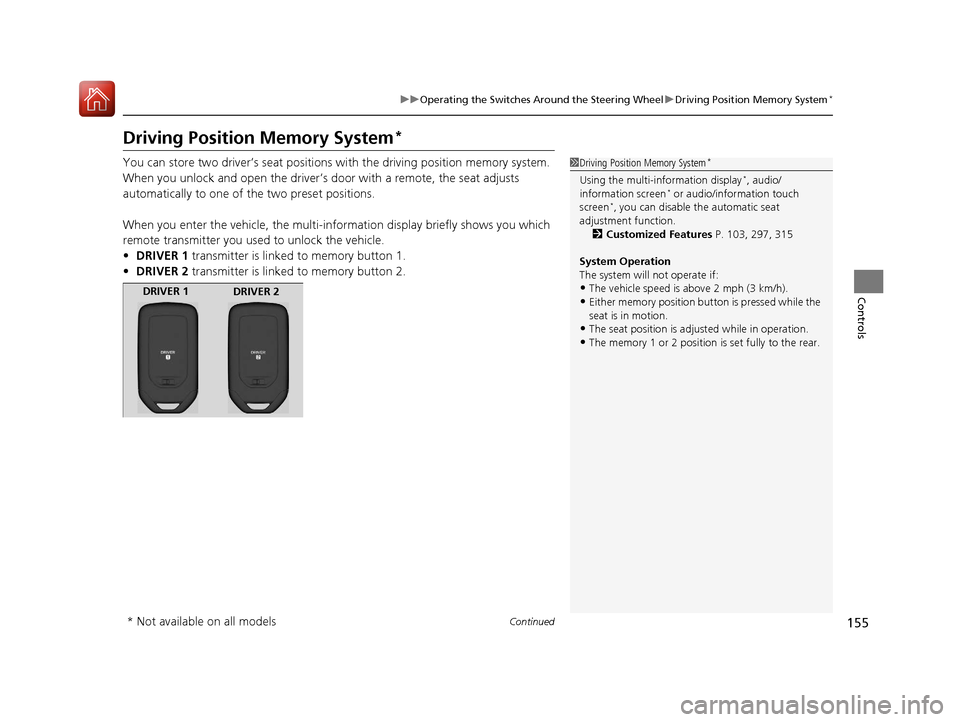
When you enter the vehicle, the multi-in formation display briefly shows you which
remote transmitter you used to unlock the vehicle.
• DRIVER 1 transmitter is linked to memory button 1.
• DRIVER 2 transmitter is linked to memory button 2.1Driving Position Memory System*
Using the multi-information display*, audio/
information screen* or audio/information touch
screen*, you can disable the automatic seat
adjustment function.
2 Customized Features P. 103, 297, 315
System Operation
The system will not operate if:
•The vehicle speed is above 2 mph (3 km/h).•Either memory position button is pressed while the
seat is in motion.
•The seat position is adju sted while in operation.•The memory 1 or 2 position is set fully to the rear.
DRIVER 1
DRIVER 2
* Not available on all models
17 ACCORD 4D GAS-31T2A6400.book 155 ページ 2016年6月7日 火曜日 午後5時6分
Page 181 of 613
180
Controls
Climate Control System
Using Automatic Climate Control
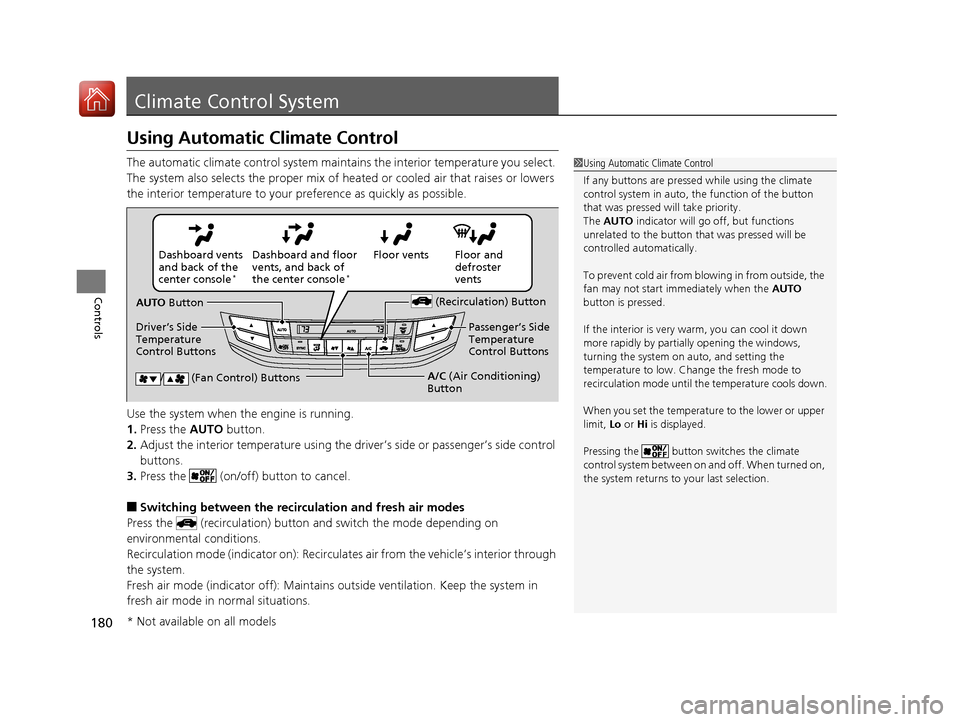
The automatic climate control system maintains the interior temperature you select.
The system also selects the proper mix of heated or cooled air that raises or lowers
the interior temperature to your pr eference as quickly as possible.
Use the system when the engine is running.
1. Press the AUTO button.
2. Adjust the interior temperature using the dr iver’s side or passenger’s side control
buttons.
3. Press the (on/off) button to cancel.
■Switching between the recirculation and fresh air modes
Press the (recirculation) button and switch the mode depending on
environmental conditions.
Recirculation mode (indicator on): Recirculat es air from the vehicle’s interior through
the system.
Fresh air mode (indicator off): Maintains ou tside ventilation. Keep the system in
fresh air mode in normal situations.
1 Using Automatic Climate Control
If any buttons are presse d while using the climate
control system in auto, the function of the button
that was pressed will take priority.
The AUTO indicator will go off, but functions
unrelated to the button th at was pressed will be
controlled automatically.
To prevent cold air from bl owing in from outside, the
fan may not start i mmediately when the AUTO
button is pressed.
If the interior is very warm, you can cool it down
more rapidly by partial ly opening the windows,
turning the system on auto, and setting the
temperature to low. Change the fresh mode to
recirculation mode until the temperature cools down.
When you set the temperat ure to the lower or upper
limit, Lo or Hi is displayed.
Pressing the button switches the climate
control system between on and off. When turned on,
the system returns to your last selection.
Floor and
defroster
vents
Floor vents
Dashboard and floor
vents, and back of
the center console
*
Dashboard vents
and back of the
center console
*
AUTO Button
Driver’s Side
Temperature
Control Buttons (Recirculation) Button
/ (Fan Control) ButtonsA/C
(Air Conditioning)
Button Passenger’s Side
Temperature
Control Buttons
* Not available on all models
17 ACCORD 4D GAS-31T2A6400.book 180 ページ 2016年6月7日 火曜日 午後5時6分
Page 186 of 613
185
Features
This chapter describes how to operate technology features.
Audio SystemAbout Your Audio System ................ 186
USB Port(s
*) ..................................... 187
Auxiliary Input Jack*........................ 188
Audio System Theft Protection*....... 189
Audio Remote Controls .................... 190
Audio System Basic Operation ........ 192
Audio/Information Screen ................ 193
Display Setup ................................... 198
Playing AM/FM Radio ....................... 199
Playing a CD .................................... 201
Playing an iPod ................................ 204
Playing Internet Radio ...................... 207
Playing a USB Flash Drive ................. 210
Playing Bluetooth ® Audio ................. 213
Models with one display
Audio System Basic Operation ........ 215
Audio/Information Screen ................ 216
Audio/Information Touch Screen ...... 218
Adjusting the Sound ........................ 232
Display Setup ................................... 233
Voice Control Operation .................. 235
Playing AM/FM Radio ....................... 239
Playing SiriusXM ® Radio
*................. 243
Playing a CD .................................... 251
Playing an iPod ................................ 254
Song By Voice
TM (SBV) ...................... 257
Playing Pandora ®*............................ 261
Playing AhaTM................................... 263
Playing a USB Flash Drive ................. 264
Playing Bluetooth ® Audio................. 267
Models with two displaysHondaLink ®..................................... 269
Wi-Fi Connection ............................. 274
Apple CarPlay
TM............................... 276
Android AutoTM............................... 280
Siri ® Eyes Free .................................. 284
Audio Error Messages ...................... 285
General Information on the Audio System ............................................. 290
Customized Features ................ 297, 315
HomeLink ® Universal Transceiver
*... 339
Bluetooth ® HandsFreeLink® ..... 342, 373
Compass
*.......................................... 408
* Not available on all models
17 ACCORD 4D GAS-31T2A6400.book 185 ページ 2016年6月7日 火曜日 午後5時6分
Page 187 of 613
186
Features
Audio System
About Your Audio System
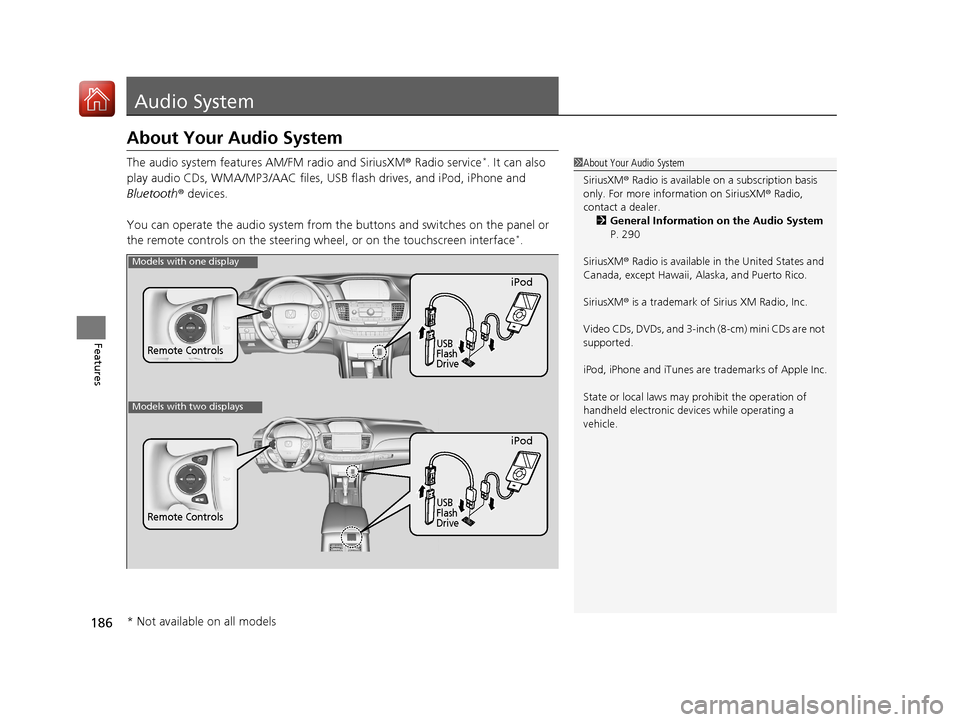
The audio system features AM/FM radio and SiriusXM ® Radio service*. It can also
play audio CDs, WMA/MP3/AAC files, USB flash drives, and iPod, iPhone and
Bluetooth ® devices.
You can operate the audio system from the buttons and switches on the panel or
the remote controls on the steering wheel, or on the touchscreen interface
*.
1 About Your Audio System
SiriusXM ® Radio is available on a subscription basis
only. For more information on SiriusXM ® Radio,
contact a dealer.
2 General Information on the Audio System
P. 290
SiriusXM ® Radio is available in the United States and
Canada, except Ha waii, Alaska, and Puerto Rico.
SiriusXM ® is a trademark of Sirius XM Radio, Inc.
Video CDs, DVDs, and 3-inch (8-cm) mini CDs are not
supported.
iPod, iPhone and iTunes are trademarks of Apple Inc.
State or local laws may pr ohibit the operation of
handheld electronic devi ces while operating a
vehicle.
Remote Controls
iPod
USB
Flash
Drive
Models with one display
Remote Controls
iPod
USB
Flash
Drive
Models with two displays
* Not available on all models
17 ACCORD 4D GAS-31T2A6400.book 186 ページ 2016年6月7日 火曜日 午後5時6分
Page 188 of 613
187
uuAudio System uUSB Port(s*)
Features
USB Port(s*)
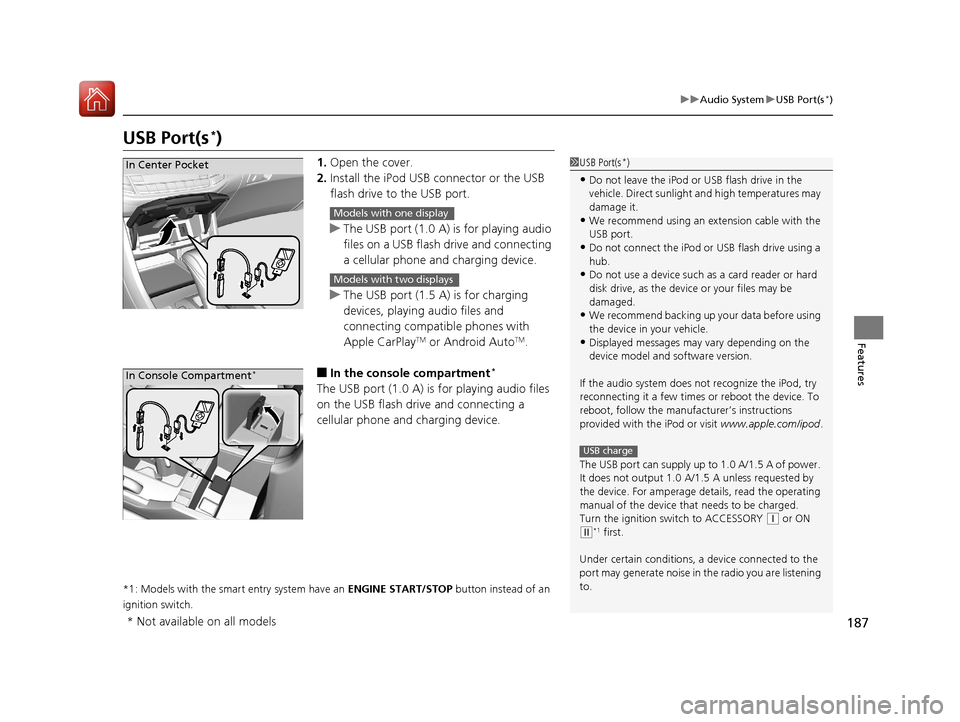
1. Open the cover.
2. Install the iPod USB connector or the USB
flash drive to the USB port.
u The USB port (1.0 A) is for playing audio
files on a USB flash drive and connecting
a cellular phone and charging device.
u The USB port (1.5 A) is for charging
devices, playing audio files and
connecting compatib le phones with
Apple CarPlay
TM or Android AutoTM.
■In the consol e compartment*
The USB port (1.0 A) is for playing audio files
on the USB flash drive and connecting a
cellular phone and charging device.
*1: Models with the smart entry system have an ENGINE START/STOP button instead of an
ignition switch.
1 USB Port(s*)
•Do not leave the iPod or USB flash drive in the
vehicle. Direct sunlight and high temperatures may
damage it.
•We recommend using an extension cable with the
USB port.
•Do not connect the iPod or USB flash drive using a
hub.
•Do not use a device such as a card reader or hard
disk drive, as the device or your files may be
damaged.
•We recommend backing up yo ur data before using
the device in your vehicle.
•Displayed messages may vary depending on the
device model and software version.
If the audio system does not recognize the iPod, try
reconnecting it a few times or reboot the device. To
reboot, follow the manufac turer’s instructions
provided with the iPod or visit www.apple.com/ipod.
The USB port can supply up to 1.0 A/1.5 A of power.
It does not output 1.0 A/1. 5 A unless requested by
the device. For amperage de tails, read the operating
manual of the device that needs to be charged.
Turn the ignition switch to ACCESSORY
( q or ON
(w*1 first.
Under certain condi tions, a device connected to the
port may generate noise in the radio you are listening
to.
USB charge
In Center Pocket
Models with one display
Models with two displays
In Console Compartment*
* Not available on all models
17 ACCORD 4D GAS-31T2A6400.book 187 ページ 2016年6月7日 火曜日 午後5時6分