seat HONDA ACCORD 2017 9.G Quick Guide
[x] Cancel search | Manufacturer: HONDA, Model Year: 2017, Model line: ACCORD, Model: HONDA ACCORD 2017 9.GPages: 83, PDF Size: 6.77 MB
Page 13 of 83

18 || 19
S
AFETYSAFETY
Adding Security with a Tether
A tether anchorage point is provided behind each rear seating position. \
A child
seat that is installed with a seat belt and comes with a tether can use \
the tether
for additional security.
1.
Locate the appropriate tether anchorage point
and lift the cover.
2.
raise the head restraint to its highest position,
then route the tether strap through the head
restraint legs. Make sure the strap is not twisted.
3.
Secure the tether strap hook onto the anchor.
4.
Tighten the tether strap according to the seat
manufacturer’
s instructions.
Tether anchorage points
Cover
Anchor
Outer positi on
Tether strap hook
Anchor
Center positionTether strap
hook
Anchor
Installing a Child Seat with a Lap/Shoulder Seat Belt
1.
Place the child seat on the vehicle seat.
2.
route the seat belt through the child seat
according to the seat manufacturer’
s
instructions, and insert the latch plate into the
buckle. Insert the latch plate fully until it clicks.
3.
Slowly pull the shoulder part of the belt all the
way out until it stops. This activates the lockable
retractor.
4.
Let the seat belt retract a few inches, then try to
pull it out to make sure the retractor is locked.
If you are able to pull the shoulder belt out, the
lockable retractor is not activated. Pull the seat
belt all the way out, and repeat steps 3 – 4.
5.
Grab the shoulder part of the seat belt near the
buckle, and pull up to remove any slack from
the lap part of the belt. When doing this, place
your weight on the child seat and push it into the
vehicle seat.
6.
Make sure the child seat is firmly secured by
rocking it forward and back and side to side; little
movement should be felt.
7.
Make sure any unused seat belt that a child
can reach is buckled, the lockable retractor
is activated, and the belt is fully retracted and
locked.
To deactivate a lockable retractor
, release the buckle and allow the seat belt to
wind up all the way.
Page 14 of 83

20 || 21
S
AFETYSAFETY
Safety Label Locations
Safety labels are in the locations shown. They warn you of potential haz\
ards that
can cause serious injury or death.
read these labels carefully
.
Sun visor
U.S. models Canadian models
Radiator cap
U.S. models only
Dashboard
Protecting Larger Children
When a child is too big for a child seat, secure the child in a rear sea\
t using the
lap/shoulder seat belt.
Have the child sit upright and all the way back, then ensure the followi\
ng:
•
The child’s knees bend comfortably over the edge
of the seat.
•
The shoulder belt crosses between the child’s
neck and arm.
•
The lap part of the seat belt is as low as possible,
touching the child’s thighs.
•
The child can stay seated for the whole trip.
If a lap/shoulder belt cannot be used properly, position the child in a booster seat
in a rear seating position. For the child’
s safety, check that the child meets the
booster seat manufacturer’s recommendations.
Some U.S. states and Canadian provinces/territories require children to \
use a
booster seat until they reach a given age or weight (e.g., 6 years or 6\
0 lbs). Be sure
to check current laws in the state or province/territory where you inten\
d to drive.
Allowing a child age 12 or under to sit in the front can result in injur\
y or death
if the passenger’s front airbag inflates.
If a larger child must ride in front, move the vehicle seat as far to th\
e rear as
possible, then have the child sit up properly and wear the seat belt pro\
perly,
using a booster seat if needed.
WARNING
Page 15 of 83

22 || 23
I
NSTRUMENT PANELSAFETY
INSTRUMENT PANEL
Learn about the indicators, gauges, and displays related to driving the \
vehicle.
Indicators briefly appear with each engine start and then go out.
red and amber
indicators are most critical. Blue and green indicators are used for gen\
er
al
information.
Malfunction Indicators
These are the most critical indicators. If they come on and stay lit whi\
le driving or at
any other time, there may be a problem. See your dealer if necessary.
Brake system
• Brake fluid is low.
• The brake system has a problem.
Press the brake pedal lightly to check pedal pressure. If normal, check \
the brake fluid level when you stop. If abnormal, take immediate actio\
n. If
necessary, downshift the transmission to slow the vehicle using engine
braking. Have your vehicle repaired immediately.
Low oil pressure
engine oil pressure is low
. Stop in a safe place.
open the hood. Check the oil
level, and add oil if necessary (see page 134). If the indicator does \
not tur
n
off, have your vehicle repaired immediately.
Charging system
The battery is not charging. Turn off all electrical items, but do not turn off
the vehicle to prevent further battery discharge. Have your vehicle repa\
ired
immediately.
Supplemental Restraint System (SRS)
There is a problem with one of the airbag systems or seat belt tensioner\
s.
Smart Entry system*
There is a problem with the smart entry system.
U.S.
Canada
*if equipped
Reporting Safety Defects
In the U.S.
If you believe that your vehicle has a defect which could cause a crash \
or could
cause injury or death, you should immediately inform the National Highway Traffic
Safety Administration (NHTSA) in addition to notifying American Honda \
Motor Co.,
Inc.
If NHTSA receives similar complaints, it may open an investigation, and \
if it finds
that a safety defect exists in a group of vehicles, it may order a recal\
l and remedy
campaign. However, NHTSA cannot become involved in individual problems
between you, your dealer, or American Honda Motor Co., Inc.
To contact NHTSA, you may call the
vehicle Safety Hotline toll-free at 1-888-327-
4236 (TTY: 1-800-424-9153); go to
http://www.safercar.gov; or write to: Administrator,
NHTSA, 1200 New Jersey Avenue, S
e., W
ashington, DC 20590. You can also obtain
other information about motor vehicle safety from http://www.safercar.gov.
In Canada
If you believe that your vehicle has a defect which could cause a crash \
or could
cause injury or death, you should immediately inform Honda Canada, Inc.,\
and you
may also inform Transport Canada.
If Transport Canada receives similar complaints, it may open an investigation, and if
it finds that a safety defect exists in a group of vehicles, it may le\
ad to a recall and
remedy campaign. However, Transport Canada cannot become involved in individual
problems between you, your dealer, or Honda Canada, Inc.
To contact Transport Canada’s Defect Investigations and
recalls Division, you may
call 1-800-333-0510. For more information on reporting safety defects or\
about motor
vehicle safety, go to http://www.tc.gc.ca/roadsafety.
Page 16 of 83
24 || 25
I
NSTRUMENT PANELINSTRUMENT PANEL
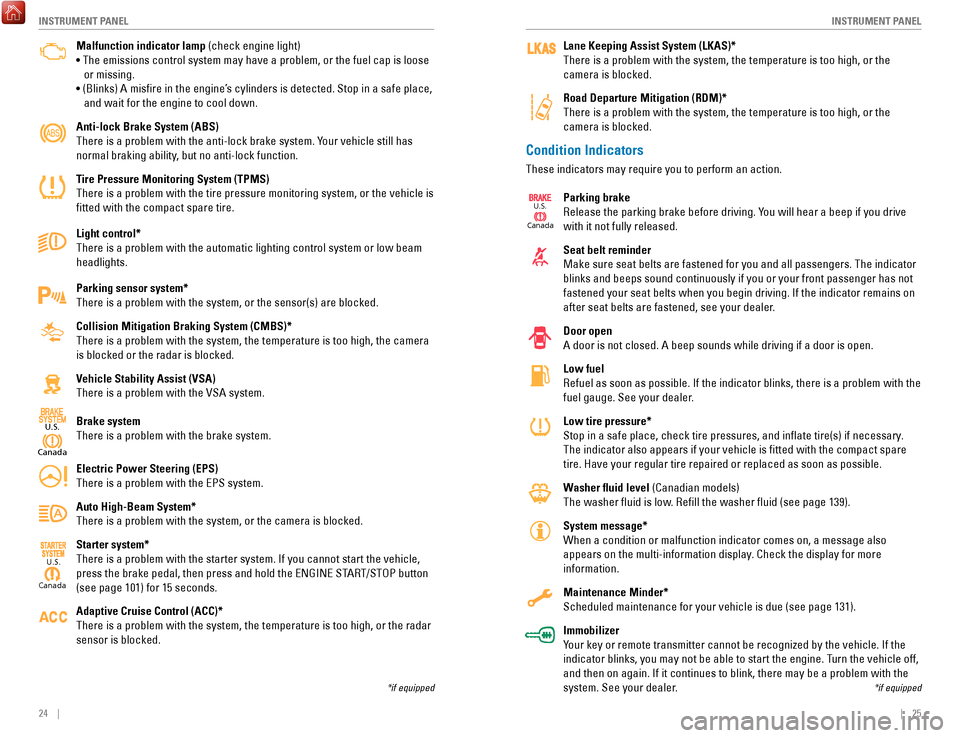
Condition Indicators
These indicators may require you to perform an action.
Parking brake
release the parking brake before driving. Y
ou will hear a beep if you drive
with it not fully released.
Seat belt reminder
Make sure seat belts are fastened for you and all passengers. The indicator
blinks and beeps sound continuously if you or your front passenger has not
fastened your seat belts when you begin driving. If the indicator remain\
s on
after seat belts are fastened, see your dealer.
Door open
A door is not closed. A beep sounds while driving if a door is open.
Low fuel
refuel as soon as possible. If the indicator blinks, there is a problem w\
ith t
he
fuel gauge. See your dealer.
Low tire pressure*
Stop in a safe place, check tire pressures, and inflate tire(s) if n\
ecessary.
The indicator also appears if your vehicle is fitted with the compact \
spare
tire. Have your regular tire repaired or replaced as soon as possible.
Washer fluid level (Canadian models)
The washer fluid is low.
refill the washer fluid (see page 139).
System message*
When a condition or malfunction indicator comes on, a message also
appears on the multi-information display
. Check the display for more
information.
Maintenance Minder*
Scheduled maintenance for your vehicle is due (see page 131).
Immobilizer
Your key or remote transmitter cannot be recognized by the vehicle. If th\
e
indicator blinks, you may not be able to start the engine. Turn the vehicle off,
and then on again. If it continues to blink, there may be a problem with\
the
system. See your dealer.
*if equipped
Lane Keeping Assist System (LKAS)*
There is a problem with the system, the temperature is too high, or the \
camera is blocked.
Road Departure Mitigation (RDM)*
There is a problem with the system, the temperature is too high, or the \
camera is blocked.
Canad a
U.S.
Malfunction indicator lamp (check engine light)
• The emissions control system may have a problem, or the fuel cap is\
loose
or missing.
• (Blinks) A
misfire in the engine’
s cylinders is detected. Stop in a safe place,
and wait for the engine to cool down.
Anti-lock Brake System (ABS)
There is a problem with the anti-lock brake system. Your vehicle still has
normal braking ability, but no anti-lock function.
Tire Pressure Monitoring System (TPMS)
There is a problem with the tire pressure monitoring system, or the vehi\
cle is
fitted with the compact spare tire.
Light control*
There is a problem with the automatic lighting control system or low bea\
m
headlights.
Parking sensor system*
There is a problem with the system, or the sensor(s) are blocked.
Collision Mitigation Braking System (CMBS)*
There is a problem with the system, the temperature is too high, the cam\
era
is blocked or the radar is blocked.
Vehicle Stability Assist (VSA)
There is a problem with the
vSA system.
Brake system
There is a problem with the brake system.
Electric Power Steering (EPS)
There is a problem with the
ePS system.
Auto High-Beam System*
There is a problem with the system, or the camera is blocked.
Starter system*
There is a problem with the starter system. If you cannot start the vehi\
cle,
press the brake pedal, then press and hold the
eNGINe ST
A
rT/SToP button
(see page 101) for 15 seconds.
Adaptive Cruise Control (ACC)*
There is a problem with the system, the temperature is too high, or the \
r
adar
sensor is blocked.
Canad a
U.S.
*if equipped
Canada
U.S.
Page 20 of 83

32 || 33
V
EHICLE CONTROLSVEHICLE CONTROLS
Power Window Operation
The power windows can be opened and closed when the vehicle is on by usi\
ng the
switches on the doors. The switches on the driver’s side can be used to open and
close all the windows.
Automatic Operation
To open: Push the switch down firmly.
To close: Pull the switch up firmly.
The window opens or closes completely. To stop the
window at any time, push or pull the switch again
briefly.
Manual OperationTo open: Push the switch down lightly.
To close: Pull the switch up lightly.
release the switch when the window reaches the desired position.
Power Window LockPush in the power window lock button so only the driver’s window can be
operated.
On
Off
Power window
lock button
Driver’s
window
switch
Front passenger’s
window switch
Closing a power window on someone’s hands or fingers can cause serious
injury.
Make sure your passengers are away from the windows before closing them.
WARNING
Door Operation
Use several methods to lock or unlock the doors.
Using the Lock Tab
To unlock: Pull the lock tab rearward. When you
unlock the door using the lock tab on the driver’s
door, only the driver’s door unlocks.
To lock: Push the lock tab forward. When you lock
the door using the lock tab on the driver’s door, all
the other doors lock at the same time.
Using the Front Door Inner HandleWhen you pull either front door inner handle, the
door unlocks and opens.
on vehicles with smart
entry
, pulling the driver’s door inner handle unlocks
all other doors.
Using the Master Door Lock Switch
To unlock: Press the unlock side of the switch to
unlock all doors.
To lock: Press the lock side of the switch to lock all
doors.
Childproof Door LocksThe childproof door locks prevent the rear doors
from being opened from the inside regardless of the
position of the lock tab.
Slide the lever in the rear door to the lock position,
and close the door.
open the door using the outer door handle.
Using the Trunk OpenerPull the trunk release near the bottom of the driver’s
seat to unlock and open the trunk.
To unlock
Lock ta bTo lock
Inner handle
To unloc k
Master door
lock switch
To lock
Unlock
Lock
Trunk
release
Page 23 of 83

38 || 39
V
EHICLE CONTROLSVEHICLE CONTROLS
Adjusting the Seats
Make seat adjustments before driving to ensure the best comfort and safe\
ty.
Adjusting the Front Seats
Adjust the driver’s seat as far back as possible while
allowing you to maintain full control of the vehicle.
You should be able to sit upright and well back in the
seat, adequately press the pedals without leaning
forward, and grip the steering wheel comfortably.
The passenger’s seat should be adjusted so that it
is as far back from the front airbag in the dashboard
as possible.
The National Highway Traffic Safety Administration and Transport Canada
recommend that drivers allow at least 10 inches (25 cm) between the ce\
nter of the
steering wheel and the chest.
Power Seats*
Move back and allow sufficient space.
*if equipped
Horizontal position
adjustment
Height adjustment
(driver’s seat only) Seat-back angle
adjustment
Lumbar support
adjustment
(driver’s seat only)
reclining the seat-back too far can result in serious injury or death in \
a crash.
Adjust the seat-back to an upright position, and sit well back in the se\
at.
WARNING
Sitting too close to a front airbag can result in serious injury or deat\
h if the
front airbags inflate.
Always sit as far back from the front airbags as possible while maintain\
ing
control of the vehicle.
WARNING
To prevent severe damage to the windshield wiper system, ensure the wiper lever
is in the
oFF position before entering a car wash or cleaning the windsh
ield.
NOTICE
Do not use the wipers when the windshield is dry. The windshield will get
scratched, or the rubber blades will get damaged.
In cold weather, the blades may freeze to the windshield, becoming stuck.
operating the wipers in this condition may damage the wipers. Use the def\
roster
to warm the windshield, or manually clear the windshield of ice and snow before
turning on the wipers.
NOTICE
Automatic Intermittent Wipers*
When you move the lever to the AUT
o position
while driving in rainy weather
, the wipers operate
based on the amount of detected rainfall.
Put the lever in the AUT
o position only when
driving in rainy weather
.
rotate the adjustment ring to adjust the rainfall
sensor sensitivity
.
return the lever to the oFF position when rain
stops.
Adjustment ring
AUTO
position
Low sensitivity: Wipers
operate when more
rainfall is detected.
High sensitivity: Wipers
operate when less
rainfall is detected.
*if equipped
One-Touch Turn Signal
Use this quick and convenient method to signal a lane change.
Lightly push the turn signal lever up or down for a
three-blink sequence.
For a continuous signal, push the lever up or down
until it locks into place.
Right turn
Left turn
Page 24 of 83

40 || 41
V
EHICLE CONTROLSVEHICLE CONTROLS
Adjusting the Head Restraints
Your vehicle is equipped with head restraints in all seating positions. H\
ead
restraints are most effective for protection against whiplash and other \
rear-impact
crash injuries.
The center of the back of the occupant’s head
should rest against the center of the restraint. The
tops of the occupant’s ears should be level with the
center height of the restraint.
To raise the head restraint: Pull it upward.
To lower the head restraint: Push it down while
pressing the release button.
To remove the head restraint: Pull the restraint up
as far as it will go. Then push the release button,
and pull the restraint up and out.
To reinstall a head restraint: Insert the legs back
in place, then adjust the head restraint to an
appropriate height while pressing the release
button. Pull up on the restraint to make sure it is
locked in position.
For a head restraint system to work properly:
•
Do not hang any items on the head restraints, or from the restraint legs\
.
•
Do not place any object between an occupant and the seat-back.
•
Install each restraint in its proper location.
Position head in the
center of the head
restraint.
Improperly positioning head restraints reduces their effectiveness and
increases the likelihood of serious injury in a crash.
Make sure head restraints are in place and positioned properly before dr\
iving.
WARNING
Failure to reinstall, or correctly reinstall, the head restraints can re\
sult in
severe injury during a crash.
Always replace the head restraints before driving.
WARNING
Manual Seats*
Floor Mats Position the front- and rear-seat floor mats properly,
and anchor them. If they are not properly positioned,
the floor mats can interfere with the front seat
functions.
Do not put additional floor mats on top of the
anchored mats.
*if equipped
Horizontal position
adjustment
Pull up on the bar to move the
seat, then release the bar.
Height adjustment(driver side only)
Pull up or push down the lever
to raise or lower the seat .
Seat-back angle
adjustment
Pull up the lever to
change the angle.
Sitting improperly or out of position can result in serious injury or de\
ath in a
crash.
Always sit upright, well back in the seat, with your feet on the floor\
.
WARNING
Lock
Unlock
Page 25 of 83

42 || 43
V
EHICLE CONTROLSVEHICLE CONTROLS
Adjusting the Steering Wheel
The steering wheel height and distance from your body can be adjusted so\
that you
can comfortably grip the steering wheel in an appropriate driving postur\
e.
1.
Pull up the steering wheel adjustment lever.
2.
Move the steering wheel up or down, and in
or out.
3.
Push down the steering wheel adjustment
lever to lock the steering wheel in position.
To adjus t
To lock
Lever
Adjusting the steering wheel position while driving may cause you to los\
e
control of the vehicle and be seriously injured in a crash.
Adjust the steering wheel only when the vehicle is stopped.
WARNING
Driving Position Memory System*
You can store two driver’s seat positions into memory when the vehicle is on using
the buttons on the driver’s door.
1.
Adjust the seat to your preferred position.
2.
Press SeT
.
3.
Press and hold memory button 1 or 2. You will hear
two beeps when the memory is set.
4.
Press one of the memory buttons to recall
previously stored positions.
Lumbar positions cannot be stored.
When you unlock and open the driver’s door with a remote transmitter
, the seat
adjusts automatically to one of the two preset positions.
Memory
button 1
Memory
button 2
SET button
*if equipped
Folding Down the Rear Seats
The rear seat-back(s*) can be folded down to make room for large items\
in the
trunk.
1.
remove the center shoulder belt from the guide.
2.
Pull the release lever in the trunk to release the
lock.
3.
Fold down the seat-back. remove the rear head
restraints if necessary (see page 41).
Push the seat-back up firmly until it locks into
place to return it to its original position.
Make sure all items in the trunk or items extending through the opening \
int
o
the rear seats are properly secured. Loose items can fly forward if yo\
u have to
brake hard.
*if equipped
Guide
Center
shoulder belt
Release
lever
Release
lever*
Page 27 of 83
46 || 47
V
EHICLE CONTROLSVEHICLE CONTROLS
*if equipped
Seat Heaters*
Quickly warm the seats when the vehicle is on.
Press the seat heater switch to the L
o or HI position.
An indicator appears for the selected setting.
return
the switch to the middle position to turn off. The
switch for the front seat heaters is located in the front
console.
The switch for the rear seat heaters is located on the
rear door
. The rear middle seat does not have heating.
Heat-induced burns are possible when using seat heaters.
Persons with a diminished ability to sense temperature (e.g., persons w\
ith
diabetes, lower-limb nerve damage, or paralysis) or with sensitive skin should
not use the seat heaters.
WARNING
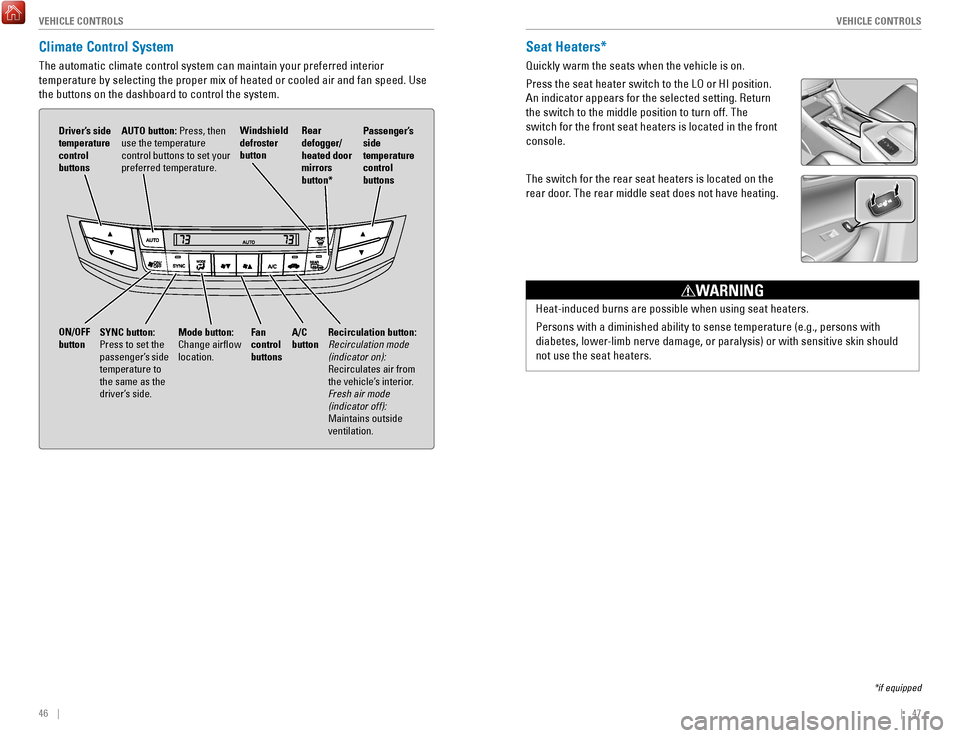
Climate Control System
The automatic climate control system can maintain your preferred interio\
r
temperature by selecting the proper mix of heated or cooled air and fan \
speed. Use
the buttons on the dashboard to control the system.
AUTO button: Press, then
use the temperature
control buttons to set your
preferred temperature.
Driver’s side
temperature
control
buttons
A/C
button
Fan
control
buttons Recirculation button:
Recirculation mode
(indicator on):
recirculates air from
the vehicle’
s interior.
Fresh air mode
(indicator off):
Maintains outside
ventilation.
Rear
defogger/
heated door
mirrors
button*
Windshield
defroster
button
ON/OFF
button
Mode button:
Change airflow
location.
Passenger’s
side
temperature
control
buttons
SYNC button:
Press to set the
passenger’s side
temperature to
the same as the
driver’s side.
Page 51 of 83
 of operation, avoid sudden acc\
eleration or
full throttle operation so as not to damage the engine or po")
94 || 95
DRIVING
DRIVING
In addition:
•
During the first 600 miles (1,000 km) of operation, avoid sudden acc\
eleration or
full throttle operation so as not to damage the engine or powertrain.
•
Avoid hard braking for the first 200 miles (300 km). Y
ou should also follow this
when the brake pads are replaced.
Improper accessories or modifications can affect your vehicle’s handling, and
stability, and performance, and cause a crash in which you can be seriously
hurt or killed.
Follow all instructions in the vehicle owner’s manual regarding accessories
and modifications.
WARNING
DRIVING
Learn about preparation for driving, as well as other features.
Before Driving
Check the following items before you begin driving.
Exterior Checks •
Make sure there are no obstructions on the windows, door mirrors, exteri\
or
lights, or other parts of the vehicle.
•
remove any frost, snow
, or ice.
•
Make sure the hood is securely closed.
•
Heat from the engine and exhaust can ignite flammable materials left u\
nder
the hood, causing a fire. If you’ve parked your vehicle for an exte\
nded period,
inspect and remove any debris that may have collected, such as dried gra\
ss and leaves that have fallen or have been carried in for use as a nest by\
a
small
animal. Also check under the hood for leftover flammable materials aft\
er you or
someone else has performed maintenance on your vehicle.
•
Make sure the tires are in good condition.
•
Make sure there are no people or objects behind or around the vehicle.
Interior Checks •
Store or secure all items on board properly.
•
Do not pile items higher in the cargo area than the seat-back height.
•
Do not place anything in the front seat footwells. Make sure to secure t\
he floor
mats.
•
If you have any animals on board, do not let them move freely around in \
the
vehicle.
•
Securely close and lock all doors and the trunk.
•
Adjust your seating position, mirrors, and steering wheel properly.
•
Make sure items placed on the floor behind the front seats cannot roll\
under the
seats.
•
everyone in the vehicle must fasten their seat belt.
•
Make sure that the indicators in the instrument panel come on when you s\
tart
the vehicle, and go off soon after.
If the doors are frozen shut, use warm water around the door edges to me\
lt any
ice. Do not try to force them open, as this can damage the rubber trim a\
r
ound the
doors. When done, wipe dry to avoid further freezing.
NOTICE