wheel HONDA ACCORD 2017 9.G Quick Guide
[x] Cancel search | Manufacturer: HONDA, Model Year: 2017, Model line: ACCORD, Model: HONDA ACCORD 2017 9.GPages: 83, PDF Size: 6.77 MB
Page 66 of 83
124 || 125
HANDLING THE UNEXPECTED
HANDLING THE UNEXPECTED
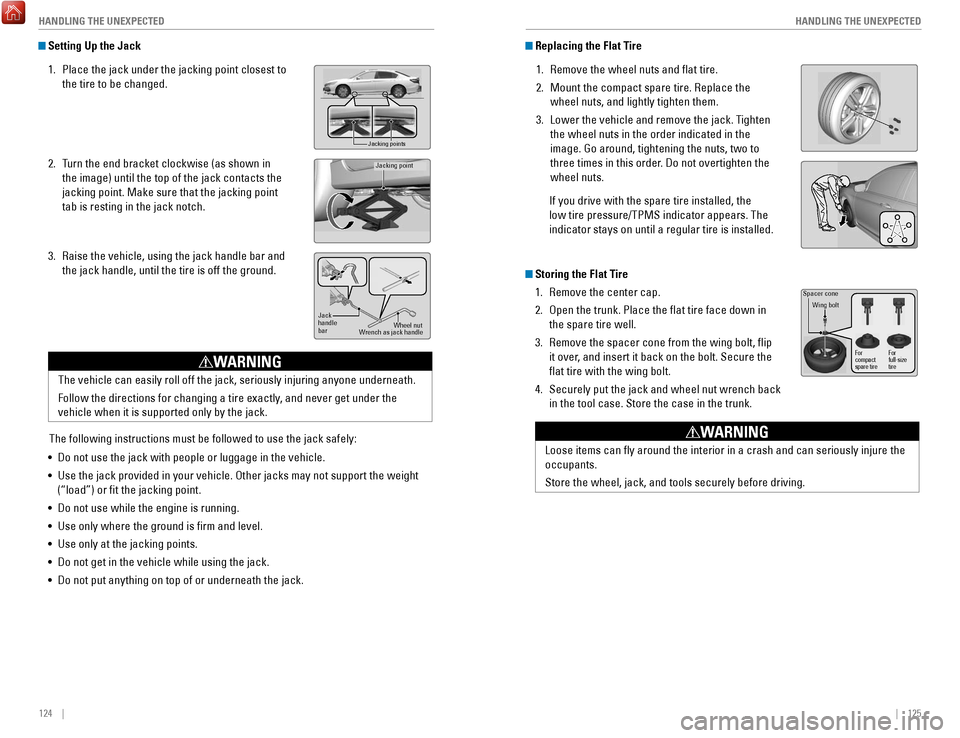
Replacing the Flat Tire
1.
remove the wheel nuts and flat tire.
2.
Mount the compact spare tire. replace the
wheel nuts, and lightly tighten them.
3.
Lower the vehicle and remove the jack. Tighten
the wheel nuts in the order indicated in the
image. Go around, tightening the nuts, two to
three times in this order
. Do not overtighten the
wheel nuts.
If you drive with the spare tire installed, the
low tire pressure/TPMS indicator appears. The
indicator stays on until a regular tire is installed.
Storing the Flat Tire 1.
remove the center cap.
2.
open the trunk. Place the flat tire face down in
the spare tire well.
3.
remove the spacer cone from the wing bolt, flip
it over
, and insert it back on the bolt. Secure the
flat tire with the wing bolt.
4.
Securely put the jack and wheel nut wrench back
in the tool case. Store the case in the trunk.
Spacer cone
Wing bolt
For
compact
spare tire For
full-size
tire
Loose items can fly around the interior in a crash and can seriously i\
njure the
occupants.
Store the wheel, jack, and tools securely before driving.
WARNING
Setting Up the Jack
1.
Place the jack under the jacking point closest to
the tire to be changed.
2.
Turn the end bracket clockwise (as shown in
the image) until the top of the jack contacts the
jacking point. Make sure that the jacking point
tab is resting in the jack notch.
3.
raise the vehicle, using the jack handle bar and
the jack handle, until the tire is off the ground.
Jacking points
Jacking point
Jack
handle
ba r Wheel nut
Wrench as jack handle
The vehicle can easily roll off the jack, seriously injuring anyone unde\
rneath.
Follow the directions for changing a tire exactly, and never get under the
vehicle when it is supported only by the jack.
WARNING
The following instructions must be followed to use the jack safely:
•
Do not use the jack with people or luggage in the vehicle.
•
Use the jack provided in your vehicle. other jacks may not support the weight
(“load”) or fit the jacking point.
•
Do not use while the engine is running.
•
Use only where the ground is firm and level.
•
Use only at the jacking points.
•
Do not get in the vehicle while using the jack.
•
Do not put anything on top of or underneath the jack.
Page 69 of 83
130 || 131
M
AINTENANCEMAINTENANCE
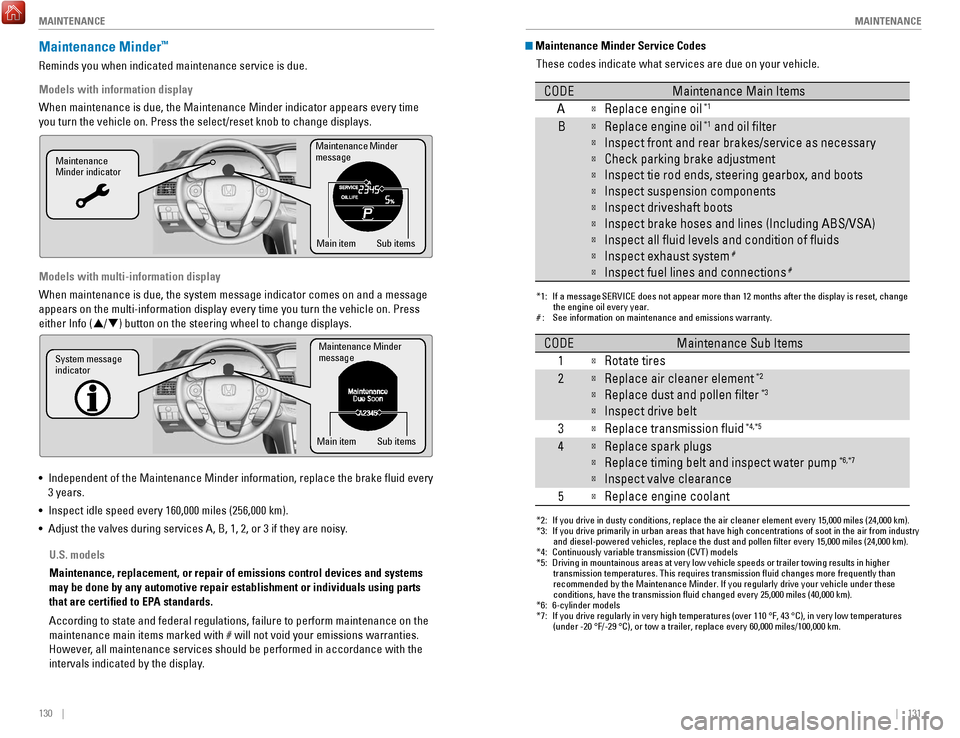
Maintenance Minder Service Codes
These codes indicate what services are due on your vehicle.
*1: If a message SERVICE does not appear more than 12 months after the display is reset, change the engine oil every year.
#: See information on maintenance and emissions warranty.
CODEMaintenance Main Items
A
Replace engine oi l*1
BReplace engine oil*1 and oil lter
Inspect front and rear brakes/service as necessary
Check parking brake adjustment
Inspect tie rod ends, steering gearbox, and boots
Inspect suspension components
Inspect driveshaft boots
Inspect brake hoses and lines (Including ABS/VSA)
Inspect all uid levels and condition of uid s
Inspect exhaust system#
Inspect fuel lines and connections#
*2: If you drive in dusty conditions, replace the air cleaner element every \
15,000 miles (24,000 km).
*3: If you drive primarily in urban areas that have high concentrations of s\
oot in the air from industryand diesel-powered vehicles, replace the dust and pollen lter every \
15,000 miles (24,000 km).
*4: Continuously variable transmission (CVT) models
*5: Driving in mountainous areas at very low vehicle speeds or trailer towing results in higher
transmission temperatures. This requires transmission uid changes mo\
re frequently than
recommended by the Maintenance Minder. If you regularly drive your vehic\
le under these
conditions, have the transmission uid changed every 25,000 miles (4\
0,000 km).
*6: 6-cylinder models
*7: If you drive regularly in very high temperatures (over 110 °F, 43 °C), in very low temperatures
(under -20 °F/-29 °C), or tow a trailer, replace every 60,000 mi\
les/100,000 km.
CODEMaintenance Sub Items
1
Rotate tires
2Replace air cleaner element*2
Replace dust and pollen lter*3
Inspect drive belt
3
Replace transmission ui d*4,*5
4Replace spark plugs
Replace timing belt and inspect water pum p*6,*7
Inspect valve clearance
5
Replace engine coolant
Maintenance Minder™
reminds you when indicated maintenance service is due.
Models with information display
When maintenance is due, the Maintenance Minder indicator appears every \
time
you turn the vehicle on. Press the select/reset knob to change displays.\
Models with multi-information display
When maintenance is due, the system message indicator comes on and a mes\
sage
appears on the multi-information display every time you turn the vehicle\
on. Press either Info (
p/q) button on the steering wheel to change displays.
•
Independent of the Maintenance Minder information, replace the brake fl\
uid every
3 years.
•
Inspect idle speed every 160,000 miles (256,000 km).
•
Adjust the valves during services A, B, 1, 2, or 3 if they are noisy.
Maintenance Minder
message
Maintenance
Minder indicator
Sub items
Main item
Maintenance Minder
messag e
System message
indicator
Sub items
Main item
U.S. models
Maintenance, replacement, or repair of emissions control devices and sys\
tems
may be done by any automotive repair establishment or individuals using \
parts
that are certified to EPA standards.
According to state and federal regulations, failure to perform maintenan\
ce on the
maintenance main items marked with # will not void your emissions warranties.
However, all maintenance services should be performed in accordance with the
intervals indicated by the display.
Page 72 of 83

136 || 137
M
AINTENANCEMAINTENANCE
Engine Coolant
Park the vehicle on level ground. Check the reserve tank and the coolant\
level in the
radiator. We recommend Honda Long Life Antifreeze/Coolant Type 2.
Checking the Reserve Tank
1.
Check the amount of coolant in the reserve tank.
2.
If the coolant level is below the MIN mark, add
the specified coolant until it reaches the MAX
mark.
3.
Inspect the cooling system for leaks.
Adding Coolant 1.
Make sure the engine and radiator are cool.
2.
Turn the radiator cap counterclockwise and
relieve any pressure in the coolant system. Do
not push the cap down when turning.
3.
Push down and turn the radiator cap
counterclockwise to remove it.
4.
The coolant level should be up to the base of the
filler neck. Add coolant if it is low.
5.
Put the radiator cap back on, and tighten it fully.
6.
Pour coolant into the reserve tank until it reaches
the MAX mark. Put the cap back on the reserve
tank.
Reserve
tank
MAXMIN
If temperatures consistently below −22°F (−30°C) are expec\
ted, the coolant
mixture should be changed to a higher concentration. Consult a dealer fo\
r details
for more information.
NOTICE
Radiator ca p
removing the radiator cap while the engine is hot can cause the coolant t\
o
spray out, seriously scalding you.
Always let the engine and radiator cool down before removing the radiato\
r
cap.
WARNING
Pour the fluid slowly and carefully so you do not spill any. Clean up any spills
immediately; they can damage components in the engine compartment.
NOTICE
Resetting the Engine Oil Life
If you change or replace the vehicle’s engine oil yourself, you must reset the
engine oil life.
Models with information display
1.
Press the select/reset knob until the engine oil
life appears in the display.
2.
Press and hold the knob for 10 seconds or more,
until the display begins to blink.
3.
Press and hold the knob for 5 seconds or more.
The engine oil life display returns to 100%.
Models with multi-information display
Use the Info (p
/q) and S
eL/reSeT buttons on the steering wheel buttons to
control the display
.
1.
Scroll to the vehicle Settings screen, and select
it.
2.
Scroll to the Maintenance reset screen, and
select it.
3.
Select reset. The maintenance codes disappear
,
and the engine oil life display returns to 100%.
Failure to reset the Maintenance Minder display after a maintenance serv\
ice
results in the system showing incorrect maintenance intervals, which can\
lead to
serious mechanical problems.
NOTICE
Page 74 of 83

140 || 141
M
AINTENANCEMAINTENANCE
Tire Information
To safely operate your vehicle, your tires must be of the proper type and\
size, in good
condition with adequate tread, and properly inflated.
Inflation Guidelines
•
Properly inflated tires provide the best combination of handling, trea\
d life, and
comfort.
refer to the driver’
s doorjamb label or the specifications (see page
148) for the specified pressure.
•
Underinflated tires wear unevenly, adversely affect handling and fuel economy
,
and are more likely to fail from overheating.
•
overinflated tires make your vehicle ride harshly
, are more prone to road
hazards, and wear unevenly.
•
every day before you drive, look at each of the tires. If one looks lower\
than t
he
others, check the pressure with a tire gauge.
•
Measure the air pressure when tires are cold. This means the vehicle has been
parked for at least 3 hours, or driven less than 1 mile (1.6 km). If n\
ecessar
y, add
or release air until the specified pressure is reached, and then calib\
rate the
system (see page 121). If checked when hot, tire pressure can be as mu\
ch as
4–6 psi (30–40 kPa, 0.3–0.5 kgf/cm
2) higher than checked when cold.
•
At least once a month or before long trips, use a gauge to measure the p\
ressure
in all tires, including the spare.
even tires in good condition can lose 1–2 ps
i
(10–20 kPa, 0.1–0.2 kgf/cm
2) per month.
Inspection Guidelines
every time you inflate the tires, check for the following:
•
Any damage to tires, including bumps, bulges, cuts, splits, or cracks in\
the side
or tread.
remove any foreign objects and inspect for air leaks. replace t
ires if
you see fabric or cord.
•
Uneven or excessive tread wear. Have a dealer check the wheel alignment.
•
Cracks or other damage around the valve stems.
Wear Indicators The groove where the wear indicator is located is
1/16 inch (1.6 mm) shallower than elsewhere on the
tire. If the tread has worn so low that the indicator is
exposed, replace the tire. Worn out tires have poor
traction on wet roads.
Example of a wear
indicator mark
Changing Wiper Blades
If the wiper blades leave streaks across the windshield, try cleaning th\
em first with a
paper towel or soft cloth and wiper fluid. If the wiper blade rubber h\
as deteriorated,
you should change the wiper blades.
1.
Lift the driver side wiper arm first, then the
passenger side.
2.
Press and hold the tab, then slide the holder from
the wiper arm.
3.
Slide the wiper blade out from its holder by pulling
the tabbed end out.
4.
remove the retainers from the rubber blade that
has been removed, and mount to a new rubber
blade. Correctly align the rubber protrusion and the
retainer grooves.
5.
Slide the new wiper blade onto the holder from the
bottom end. The tab on the holder should fit in the
indent of the wiper blade.
6.
Slide the wiper holder onto the wiper arm, then
push down the lock tab.
7.
Lower the passenger side wiper arm first, then the
driver side.
end cap at
the bottom
Holder
Holder Cap
Tab
Blade
TopRetainer
Blade
Tab
Indent
Avoid dropping the wiper arm, as it may damage the windshield.
NOTICE
Page 75 of 83

142 || 143
M
AINTENANCEMAINTENANCE
Tire Service Life
The life of your tires is dependent on many factors, including driving h\
abits, road
conditions, vehicle loading, inflation pressure, maintenance history, speed, and
environmental conditions (even when the tires are not in use).
In addition to regular inspections and inflation pressure maintenance,\
it is
recommended that you have annual inspections performed once the tires re\
ach
five years old. All tires, including the spare, should be removed from\
service after
10 years from the date of manufacture, regardless of their condition or \
state of
wear.
Winter TiresIf driving on snowy or frozen roads, mount all season tires marked “M\
+S”, snow
tires, or tire chains; reduce speed; and maintain sufficient distance \
between
vehicles when driving. For winter tires, select the size and load ranges\
that are the
same as the original tires, and mount them to all four wheels.
Tire ChainsInstall tire chains on the front tires only. Because your vehicle has limited tire
clearance, we strongly recommend using the following chains:
For 205/65R16 tires:
Cable-type: SCC
radial Chain SC1034
For 215/55R17 tires:
Cable-type: SCC
radial Chain SC1036
For 235/40R19 tires:
Cable-type: SCC
radial Chain SC1040
Mount chains as tightly as you can, and make sure that they do not touch\
the
brake lines or suspension.
T
raction devices that are the wrong size or improperly installed can dama\
ge your
vehicle’s brake lines, suspension, body, and wheels. Stop driving if they are hitting
any part of the vehicle.
NOTICE
Using the wrong chains, or not properly installing chains, can damage th\
e
brake lines and cause a crash in which you can be seriously injured or k\
illed.
Follow all instructions in this guide regarding the selection and use of\
tire
chains.
WARNING
Tire and Loading Information LabelThe label attached to the driver’s doorjamb provides necessary tire and
loading information. Using tires that are excessively worn or improperly inflated can cause\
a crash in which you can be seriously hurt or killed.
Follow all instructions in this owner’s manual regarding tire inflation
and maintenance
.
WARNING
Tire and Wheel Replacement
replace your tires with radials of the same size, load range, speed ratin\
g, and
maximum cold tire pressure rating (as shown on the tire’s sidewall). Using tires
of a different size or construction can cause certain vehicle systems to\
work
incorrectly. It is best to replace all four tires at the same time. If that isn’\
t possible,
replace the front or rear tires in pairs.
If you change or replace a wheel, make sure that the wheel’s specifications match
those of the original wheels.
only use TPMS-specified wheels approved f
or your
vehicle.
Original
tire sizes Number of
people your
vehicle can
carry Proper cold
tire pressure
Total weight
your vehicle
can carry
(do not exceed)
Installing improper tires on your vehicle can affect handling and stabil\
ity.
This can cause a crash in which you can be seriously hurt or killed.
Always use the size and type of tires recommended in the
owner’
s Manual.
WARNING
Page 77 of 83

146 || 147
M
AINTENANCEMAINTENANCE
Testing of Readiness Codes
Your vehicle has readiness codes as part of the onboard self-diagnostic s\
ystem.
Some states use these codes for testing to verify whether your vehicle’\
s emissions
components are working properly. The codes may not be read if you go through the
testing just after the battery has gone dead or been disconnected.
To check if they are set, turn the vehicle on without starting the engine\
. The
malfunction indicator lamp will come on for several seconds. If it goes \
off, the
readiness codes are set. If it blinks five times, the readiness codes \
are not set.
If you are required to have your vehicle tested before the readiness cod\
es are set,
prepare the vehicle for retesting by doing the following:
1.
Fill the gas tank to approximately 3/4 full.
2.
Park the vehicle and leave the engine off for 6 hours or more.
3.
Make sure the ambient temperature is between 40°F and 95°F (4°\
C and 35°C).
4.
Start the engine without touching the accelerator pedal, and let it idle\
for 20
seconds.
5.
Keep the vehicle in Park (P) or Neutral for manual transmission. Incre\
ase the
engine speed to 2,000 rpm, and hold it there for about 3 minutes.
6.
Let the engine idle with your foot off the accelerator for 20 seconds.
7.
Select a nearby, lightly traveled major highway where you can maintain a speed
of 50 to 60 mph (80 to 97 km/h) for at least 20 minutes. Drive on the \
highw
ay
with the vehicle in Drive (D) or 5th gear. Do not use cruise control. When traffic
allows, drive for 90 seconds without using the accelerator pedal. (
vehicle speed
may vary slightly; this is
oK.) If you cannot do this for a continuous 90 seconds
because of traffic conditions, drive for at least 30 seconds, then rep\
eat two more
times (for a total of 90 seconds).
8.
Drive in city or suburban traffic for at least 10 minutes. When traffi\
c conditions
allow
, let the vehicle coast for several seconds without using the accelerator
pedal or the brake pedal.
9.
Park the vehicle and leave the engine off for 30 minutes.
The readiness codes are erased when the battery is disconnected, and set\
again
only after several days of driving under a variety of conditions.
If a testing facility determines that the readiness codes are not set, y\
ou may be
requested to return at a later date to complete the test, or see your de\
aler
.
TemperatureThe temperature grades are A (the highest), B, and C, representing the\
tire’s
resistance to the generation of heat and its ability to dissipate heat w\
hen tested
under controlled conditions on a specified indoor laboratory test whee\
l. Sustained
high temperature can cause the material of the tire to degenerate and re\
duce
tire life, and excessive temperature can lead to sudden tire failure. Th\
e grade
C corresponds to a level of performance which all passenger car tires must
meet under the Federal Motor
vehicle Safety Standard No. 109. Grades B and
A represent higher levels of performance on the laboratory test wheel th\
an the
minimum required by law.
W
ARNING: The temperature grade for this tire is established for a tire that
is properly inflated and not overloaded.
excessive speed, underinflation, or
excessive loading, either separately or in combination, can cause heat b\
uildup
and possible tire failure.
Page 78 of 83
148 || 149
SPECIFICATIONS
SPECIFICATIONS
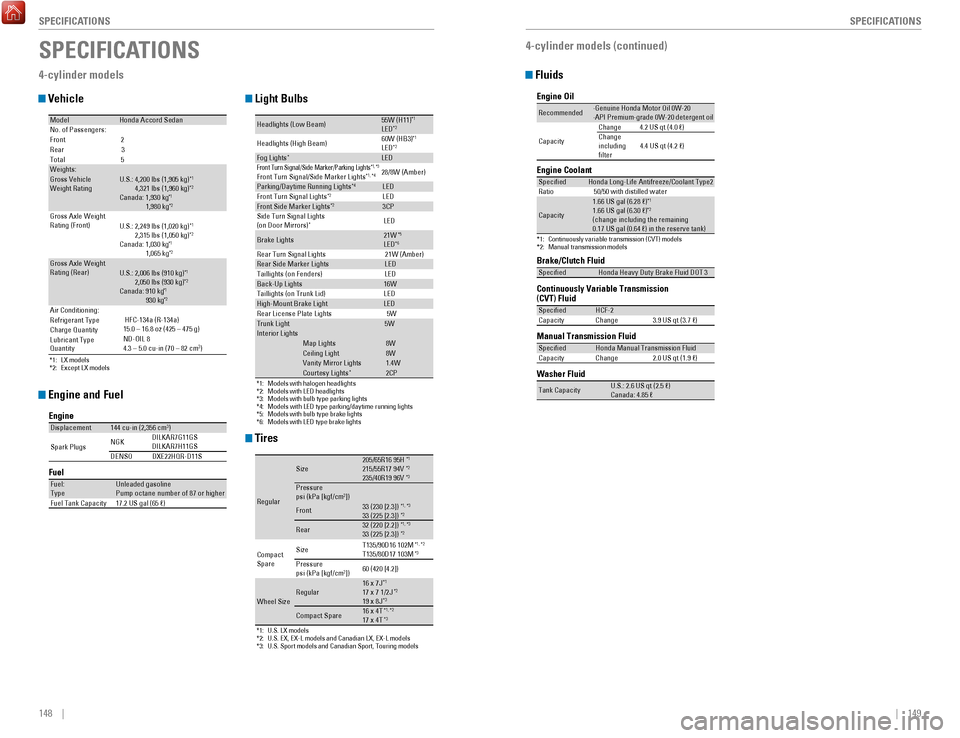
Fluids
4-cylinder models (continued)
Brake/Clutch Fluid
Continuously Variable Transmission (CVT) Fluid
Manual Transmission Fluid
Specie
dHonda Heavy Duty Brake Fluid DOT 3
SpeciedHCF-2
Capacity Change 3.9 US qt (3.7 )
SpeciedHonda Manual Transmission Flui d
Capacity Change 2.0 US qt (1.9 )
Engine Oil
Engine Coolan
t
*1:Continuously variable transmission (CVT) models*2:Manual transmission models
Recommended·Genuine Honda Motor Oil 0W-20
·API Premium-grade 0W-20 detergent oi l
Capacity Change
4.2 US qt (4.0 )
Change
including
lter 4.4 US qt (4.2 )
Specie
dHonda Long-Life Anti freeze/Coolant Type2
Ratio 50/50 with distilled wate r
Capacity
1.66 US gal (6.28 )*11.66 US gal (6.30 ) *2(change including the remaining
0.17 US gal (0.64 ) in the reserve tank)
Washer Flui d
Tank CapacityU.S.: 2.6 US qt (2.5 )
Canada: 4.85
SPECIFICATIONS
4-cylinder models
Vehicle
Engine and Fuel
Tires
Light Bulbs
*1: LX models
*2: Except LX models
ModelHonda Accord SedanNo. of Passengers:
Front 2
Rear 3
Tota l5
Weights:Gross Vehicle
Weight Rating U.S.: 4,200 lbs (1,905 kg )*1 4,321 lbs (1,960 kg)*2Canada: 1,930 kg*1 1,980 kg*2Gross Axle Weight
Rating (Front )U.S.: 2,249 lbs (1,020 kg )*1 2,315 lbs (1,050 kg)*2Canada: 1,030 kg*1 1,065 kg*2Gross Axle Weight
Rating (Rear)U.S.: 2,006 lbs (910 kg )*1 2,050 lbs (930 kg)*2Canada: 910 kg*1 930 kg*2Air Conditioning:
Refrigerant Type
Charge Quantity
Lubricant Type
Quantity HFC-134a (R-134a)
15.0 – 16.8 oz (425 – 475 g)
ND-OIL 8
4.3 – 5.0 cu-in (70 – 82 cm 3
)
Engine
FuelDisplacemen t144 cu-in (2,356 cm3)
Spark Plugs NG
K DILKAR7G11GS
DILKAR7H11GS
DENSO DXE22HQR-D11 S
Fuel:
TypeUnleaded gasoline
Pump octane number of 87 or higher
Fuel Tank Capacity 17.2 US gal (65 )
*1:U.S. LX models*2:U.S. EX, EX-L models and Canadian LX, EX-L models*3: U.S. Sport models and Canadian Sport, Touring models
Regular
Size205/65R16 95 H*1215/55R17 94V*2235/40R19 96V*3Pressure
psi (kPa [kgf/cm2])
Front33 (230 [2.3])*1, *333 (225 [2.3])*2
Rear32 (220 [2.2])*1, *333 (225 [2.3])*2
Compact
Spar e Size
T135/90D16 102M*1
, *2T135/80D17 103M*3Pressure
psi (kPa [kgf/cm2]) 60 (420 [4.2])
Wheel SizeRegular16 x 7J*117 x 7 1/2J*219 x 8J*3
Compact Spar
e16 x 4T*1, *217 x 4T*3
*1:Models with halogen headlights*2:Models with LED headlights*3:Models with bulb type parking lights*4:Models with LED type parking/daytime running lights*5:Models with bulb type brake lights*6: Models with LED type brake lights
Headlights (Low Beam)55W (H11 )*1LED*2
Headlights (High Beam )60W (HB3
)*1LED*2Fog Lights*LEDFront Turn Si gnal/Side Marker/Parki ng Ligh ts*1, *3Front Turn Signal/Side Marker Light s*1, *428/8W (Amber )
Parking/Daytime Running Lights*4LE D
Front Turn Signal Light s*2LEDFront Side Marker Lights*23CP
Side Turn Signal Lights
(on Door Mirrors )
*LED
Brake Lights21W*5LED*6Rear Turn Signal Lights 21W (Amber)Rear Side Marker LightsLED
Taillights (on Fenders) LED
Back-Up Lights16W
Taillights (on Trunk Lid) LED
High-Mount Brake LightLED
Rear License Plate Lights5WTrunk Light5WIn terior Light sMap Lights8WCeiling Ligh t8WVanity Mirror Light s1.4WCourtesy Lights*2CP
Page 79 of 83

150 || 151
CUSTOMER INFORMATION
SPECIFICATIONS
CUSTOMER INFORMATION
*if equipped
Learn about information specific to you as a Honda customer and how to\
get help.
Frequently Asked Questions/Troubleshooting
Below are some frequently asked questions and troubleshooting items that\
you may
have about the vehicle.
Q:
How do I set the vehicle clock?
A:
For vehicles without navigation, see page 49. For vehicles with navigati\
on, the
time is automatically set using GPS signals.
Q:
Why doesn’t the vehicle start when I press the ENGINE ST
ART/STOP button?*
A:
The brake pedal (and/or clutch pedal*) must be pressed to start the en\
gine.
Q:
What is the AUTO setting on my headlight lever?
A:
When in the AUTo position, the vehicle’
s exterior lights will automatically turn
on or off depending on the ambient lighting.
Q:
Why won’t the driver’
s door unlock when I grab the door handle, even though
the keyless access remote is within range?*
A:
If you pull the handle too quickly, the system may not have time to confirm the
door is unlocked. Wait to hear a beep to confirm the door is unlocked. If you are
wearing gloves, the system may be slow to respond.
Q:
After my battery was disconnected or went dead, the audio system is aski\
ng for
a code. Where do I find this?
A:
In most cases, you do not need to enter a code. Turn on the vehicle and the
audio system, and press and hold the power button until the system react\
ivates.
Q:
Why can’t I operate Pandora through the audio system?*
A:
Audio may be streaming through Bluetooth
Audio. Make sure Pandora mode
is selected and the phone cable is properly connected to the USB adapter\
cable (if using). Some phones may prompt you to “Allow” a connec\
tion.
Q:
Is my phone compatible with Bluetooth
features?
A:
v
isit handsfreelink.com
(U.S.) or www.handsfreelink.ca (Canada) to
check phone compatibility for Bluetooth
Audio, Bluetooth HandsFreeLink,
and SMS text messaging.
Q:
Every time I press the Talk button, the system gives me voice prompts. Can I turn
these off?*
A:
From the Home screen, select SeTTINGS. Select System, then select voice
Prompt. Select off.
6-cylinder models
Vehicle
Engine and Fuel
Tires
Light Bulbs
Fluids
ModelHonda Accord SedanNo. of Passengers:
Front
2
Rear 3
Tota l5
Weights:Gross Vehicle
Weight Rating U.S.: 4,542 lbs (2,060 kg)
Canada: 2,060 kg
Gross Axle Weight
Rating (Front)U.S.: 2,491 lbs (1,130 kg)
Canada: 1,130 kg
Gross Axle Weight
Rating (Rear)U.S.: 2,072 lbs (940 kg)
Canada: 940 kg
Air Conditioning:
Refrigerant Type
Charge Quantity
Lubricant Type
QuantityHFC-134a (R-134a)
15.0 – 16.8 oz (425 – 475 g) ND-OIL 8
4.3 – 5.0 cu-in (70 – 82 cm
3)
Engine
FuelDisplacemen t212 cu-in (3,471 cm3)
Spark Plugs NG
KI LZKR7B11
DENSO SXU22HCR11
Fuel:
TypeUnleaded gasoline
Pump octane number of 87 or higher
Fuel Tank Capacity 17.2 US gal (65 )
*1: EX-L V6 models*2: U.S. Touring models and Canadian V6 Touring models
Regular
Size215/55R17 94 V*1235/40R19 96V*2
Pressure
psi (kPa [kgf/cm2])33 (225 [2.3])*133 (230 [2.3])*2Front
Rear33 (225 [2.3])*132 (220 [2.2])*2
Compact
Spar e Size
T135/90D16 102M*1T135/80D17 103M*2Pressure
psi (kPa [kgf/cm2])
60 (420 [4.2])
Wheel SizeRegula
r17 x 7 1/2J*119 x 8J*2
Compact Spar e16 x 4T*117 x 4T*2
*1:Models with halogen headlights*2:Models with LED headlights*3:Models with bulb type parking lights*4:Models with LED type parking/daytime running lights*5:Models with bulb type brake lights*6: Models with LED type brake lights
Headlights (Low Beam)55W (H11)*1LED*2
Headlights (High Beam) 60W (HB3
)*1LED*2Fog LightsLEDFront Turn Si gnal/Side Marker/Parking Ligh ts*1, *3Front Turn Signal/Side Marker Lights*1, *428/8W (Amber )
Parking/Daytime Running Light s*4LED
Front Turn Signal Light s*2LEDFront Side Marker Lights*23CP
Side Turn Signal Lights
(on Door Mirrors) LE
D
Brake Lights21W*5LED*6Rear Turn Signal Lights 21W (Amber)Rear Side Marker LightsLED
Taillights (on Fenders) LED
Back-Up Lights16W
Taillights (on Trunk Lid) LED
High-Mount Brake Ligh tLED
Rear License Plate Lights 5W
Trunk Light5WInterior LightsMap Lights8WCeiling Ligh t8WVanity Mirror Light s1.4WCourtesy Lights2CP
Brake Fluid
Automatic Transmission Fluid
SpeciedHonda Heavy Duty Brake Fluid DOT 3
SpeciedHonda ATF DW-1
(automatic transmission uid )
Capacit yC hange3 .3 US qt (3.1 )
Engine Oil
Engine Coolan
t
Recommended·Genuine Honda Motor Oil 0W-2 0
·API Premium-grade 0W-20 detergent oi l
Capacity Chang
e4 .2 US qt (4.0 )
Change
including
lter 4.5 US qt (4.3 )
Specie
dHonda Long-Life Anti freeze/Coolant Type 2
Ratio 50/50 with distilled wate r
Capacity1.72 US gal (6.5 )
(change including the remaining
0.17 US gal (0.64 ) in the reserve tank )
Washer Fluid
Tank CapacityU.S.: 2.6 US qt (2.5 )
Canada: 4.85
Page 82 of 83
 ........................... 107
Braking .......")
156 || 157
INDEX
INDEX
Driving ........................................................................\
. 94
Adaptive Cruise Control (ACC) ........................... 107
Braking ................................................................... 104
Collision Mitigation Braking System ................. 112
Continuously variable Transmission (CvT) ...... 101
Cruise Control ....................................................... 106eco Assist System ................................................105eNGINe ST
A
rT/SToP button .............................. 101
Forward Collision W
arning (FCW)
.....109
, 110, 112
Ignition
................................................................... 100
Lane Keeping Assist System (LKAS) ................. 110
LaneW
atch
™ .......................................................... 111
Manual Transmission .......................................... 103
Maximum Load Limit .............................................. 96
Multi-view rear Camera ..................................... 114
Paddle Shifters ..................................................... 102
Parking Sensor System ....................................... 113
Power Mode .......................................................... 101refueling ................................................................ 115remote engine Start ..............................................99road Departure Mitigation (rDM)
..................... 109
Shifting
................................................................... 101
T
owing a Trailer
...................................................... 98vehicle Stability Assist (vSA®) ...........................105
Wiper Blades ........................................................ 140
Driving Position Memory System ........................... 43eco Assist System
................................................... 105
eCoN Button ............................................................ 105eCoN mode ................................................................ 26electric Power Steering (ePS) ................................24e-Mail ........................................................................\
.. 84emergency engine Stop .........................................120emergency T
owing
................................................. 120engine and Fuel ...............................................148
, 150
engine Coolant
......................................................... 137
engine oil
.................................................................. 134
eNGINe ST
A
rT/SToP button ................................ 101exterior Lights ...................................................... 26
, 35
Fastening a Seat Belt
................................................. 7
Flat T
ire
..................................................................... 123
Floor Mats .................................................................. 40
Fluids ................................................................. 149
, 150
FM/AM
radio ....................................................... 55
, 67
FM/AM
radio Commands ...................................... 155
Fog lights .................................................................... 26
Foot Brake ................................................................ 104
Frequently Asked Questions ................................. 151
Front Airbags (SrS) .................................................... 8
Front Door Inner Handle .......................................... 32
Fuel Information ...................................................... 115
Fuse Locations
......................................................... 126
Garage
opener .......................................................... 45
Hazards ....................................................................... 26
Headlight-Wiper Integration ................................... 37
Head restraints ......................................................... 41High beams
................................................................
26
High temperature ...................................................... 24
Home Address ........................................................... 89
HomeLink® Universal Transceiver.......................... 45
HondaLink™ ................................................................ 63
HondaLink™ Assist .................................................... 85
Honda roadside Assistance ................................. 152
Hood ........................................................................\
.. 132
Ignition ...................................................................... 100
Immobilizer ................................................................. 25
Information Display
................................................... 27
Instrument Panel
....................................................... 23
Interior Lights
............................................................. 35
Intermittent Wipers................................................... 37
iPod
® ..................................................................... 57, 70
iPod® Commands .................................................... 155
Jump Starting .......................................................... 117
Key ........................................................................\
....... 30
Lane Keeping Assist System (LKAS)
.............. 25, 110
LaneWatch
™ ............................................................. 111
Lap/Shoulder Seat Belts ............................................ 5
LATCH-Compatible Child Seat ................................. 17
Light Bulbs
........................................................ 148, 150
Light control
............................................................... 24
Lights ..................................................................... 26
, 35
LKAS
...................................................................... 25
, 26
Lock Tab
...................................................................... 32
Low fuel ...................................................................... 25
Low oil pressure ........................................................ 23
Low temperature ....................................................... 24
Low tire pressure ...................................................... 25
Maintenance
............................................................ 129
Battery
.................................................................... 139
Brake Fluid ............................................................. 138
Clutch Fluid ............................................................ 138engine Coolant ......................................................137engine oil ............................................................... 134
Maintenance Minder™ ......................................... 130
Service Codes ....................................................... 131
Under the Hood ..................................................... 132
Window W
asher Fluid
......................................... 139
Making a Call ....................................................... 76
, 82
Malfunction indicator lamp
..................................... 24
Malfunction Indicators
............................................. 23
Manual Seats............................................................. 40 Manual Transmission
............................................. 103
Map Legend ............................................................... 92
Master Door Lock Switch ........................................ 32
Maximum Load Limit................................................. 96
Mirrors
........................................................................\
44
Moonroof .................................................................... 34
Multi-Information Display (MID)
............................. 28
Multi-
view rear Camera ....................................... 114
Music search ........................................................... 155
INDEX
ABS........................................................................\
...... 24
ACC ........................................................................\
24
, 26
Accessory Power Socket
........................................ 50
Adaptive Cruise Control (ACC) ........................ 24
, 107
Address....................................................................... 89 Advanced Airbags
...................................................... 8
Aha™ radio ................................................................. 64
Airbags........................................................................\
.. 8 Airbag Care
............................................................. 13
Airbag System Components ................................. 12
Airbag System Indicators ..................................... 10
Ambient Meter
......................................................... 105
Android Auto
.............................................................. 66
Anti-Lock Brake System (ABS) ....................... 24
, 104
Apple CarPlay
™ .......................................................... 65
Apps ........................................................................\
.... 62
Audio Commands .................................................... 155
Audio operation ........................................................ 50
Aha™ radio .............................................................. 64
Android Auto ........................................................... 66
Apple CarPlay™ ....................................................... 65
Auxiliary Input Jack ............................................... 50
Bluetooth® Audio .............................................. 59, 72
Compact Disc (CD) ........................................... 56,
69
FM/AM
radio .................................................... 55
, 67
HondaLink
™ .............................................................. 63
iPod® ................................................................... 57, 70one Display Audio operation ...............................54
Pandora® ........................................................... 60, 73
SiriusXM® radio ..................................................... 68
Sound ....................................................................... 53
Steering Wheel Controls ....................................... 52
T
ouchscreen
operation ......................................... 61
USB Flash Drive ................................................ 58
, 71
USB Port
.................................................................. 50
Wi-Fi Connection .................................................... 64
Wireless Charger ................................................... 51
Auto High-Beam System
.............................. 24, 26, 36
Automatic Dimming
rearview Mirror .................... 44
Automatic Intermittent Wipers ............................... 38
AUX Commands
....................................................... 155
Auxiliary Input Jack
.................................................. 50
Battery ...................................................................... 139
Bluetooth® Audio ................................................ 59, 72
Bluetooth® Audio Commands ............................... 155Bluetooth
® Handsfreelink® (HFL) ............................
74
Call History ........................................................ 77
, 83
Dialing a Number
.............................................. 76
, 82
e-Mail ....................................................................... 84
HFL Controls ...................................................... 74
, 79
HondaLink
™ Assist .................................................. 85
Making a Call .................................................... 76
, 82
Pairing a Phone
................................................ 75
, 81
Phonebook
......................................................... 77
, 83
Siri
eyes Free .......................................................... 86
SMS T
ext Messaging
....................................... 78,
84
Speed Dial
......................................................... 76
, 82
Talk Button Tips
...................................................... 80
Brake Assist System
............................................... 104
Brake Fluid
............................................................... 138
Brake system ....................................................... 23
, 24
Braking...................................................................... 104 Brightness Control
.................................................... 35
Call History ........................................................... 77
, 83
Carbon Monoxide Gas................................................ 4
Changing a Flat Tire
................................................ 123
Changing Settings ..................................................... 48
Charging system
........................................................ 23
Childproof Door Locks
.............................................. 32
Child Safety ................................................................ 14
Child Seat ................................................................... 16
Adding Security with a T
ether
.............................. 19
LA
TCH-Compatible Child Seat
.............................. 17
Climate Control Commands ................................... 154
Climate Control System ............................................ 46
Clock........................................................................\
.... 49 Clutch Fluid............................................................... 138CMBS
™ ........................................................................\
26
Collision Mitigation Braking System™ ............ 24, 112
Compact Disc (CD) .............................................. 56
, 69
Compact Disc (CD) Commands
............................. 155
Condition Indicators ................................................. 25
Contact Us ................................................................ 152
Continuously variable Transmission (CvT) ......... 101
Cruise Control .......................................................... 106
CrUISe CoNTroL ..................................................... 26
CUSToMer Information
......................................... 151
Customized Features
................................................ 48
Dashboard and other Controls ................................. 2
Daytime running Lights (DrL)
................................. 24
Destination
................................................................. 89
Dialing a Number ................................................ 76
, 82
Door Mirrors
.............................................................. 44
Door open ................................................................... 25
Door operation .......................................................... 32
Doors ........................................................................\
... 31
DoT T
ire Quality Grading
....................................... 145
Page 83 of 83
158 || 159
INDEX
INDEX
Tire Information ....................................................... 141
DoT T ire Quality Grading ..................................... 145
Inflation Guidelines .............................................. 141
Tire and Loading Information Label ................... 142
T
ire and Wheel
replacement ............................. 142
T
ire Chains
............................................................. 143
T
ire Identification Number (TIN)
........................ 144
T
ire Labeling
.......................................................... 144
T
ire Service Life
.................................................... 143
T
ire Terminology
................................................... 144
W
ear Indicators
.................................................... 141
Winter T
ires
........................................................... 143
T
ire Pressure Monitoring System (TPMS)
.... 24
, 121
Tires
................................................................... 148
, 150
Touchscreen
operation ........................................... 61
T
owing
....................................................................... 120
T
owing a Trailer
......................................................... 98
TPMS
........................................................... 24, 121, 122
Traffic
........................................................................\
.. 93
T
rip Computer
............................................................ 29
T
roubleshooting
....................................................... 151
T
runk
........................................................................\
.... 31
T
runk
opener ............................................................. 32
T
urn-by-turn directions
............................................ 92
Turn signals .......................................................... 26
, 38
Under the Hood
....................................................... 132
USB Commands
....................................................... 155
USB Flash Drive................................................... 58, 71 USB Port
..................................................................... 50vehicle ..............................................................148
, 150
vehicle Controls ........................................................30vehicle Settings ........................................................29vehicle Stability Assist (vSA®) .......................24, 105visual Index
.................................................................. 1
voice Command Index ........................................... 154voice Portal Commands .........................................154voice recognition T
ips
............................................. 80vSA® ...................................................................... 24, 26
Warranty Coverages .............................................. 153
Washer fluid level ..................................................... 25
W
ear Indicators
...................................................... 141
Widgets
....................................................................... 62
Wi-Fi Connection....................................................... 64 Window....................................................................... 33Window Washer Fluid
............................................ 139
Winter Tires .............................................................. 143
Wiper Blades ........................................................... 140
Wiper operation ........................................................ 37
Wireless Charger ...................................................... 51
Navigation
..................................................................
87
Display and Controls .............................................. 88entering a Destination ...........................................89
Home Address ........................................................ 89
Map Legend ............................................................ 92
Place Category ....................................................... 90recent Places ......................................................... 90routing ..................................................................... 92
Saved Places .......................................................... 91
Steering Wheel Controls ....................................... 87
Street Address ........................................................ 89
System Guidance volume ..................................... 87
T
alk Button Tips
......................................................
87
T
raffic
.......................................................................
93
T
urn-by-turn directions
.........................................
92
Navigation Commands ........................................... 154one Display Audio operation ..................................54one-T
ouch Turn Signal
.............................................
38on/off Indicators ....................................................... 26opening the Hood ...................................................133overheating
.............................................................. 119
Paddle Shifters
........................................................ 102
Pairing a Phone ................................................... 75
, 81
Pandora
® .............................................................. 60, 73
Pandora® Commands ............................................. 155
Parking Brake .................................................... 25
, 104
Parking Sensor System
.................................... 24,
113
Passenger Airbag
off Indicator .............................. 11
Phone .................................................................... 75
, 81
Phonebook
........................................................... 77
, 83
Phone Commands
................................................... 154
Place Category .......................................................... 90
Power Door Mirrors
.................................................. 44
Power Mode
............................................................ 101
Power Moonroof operation .................................... 34
Power Seats
............................................................... 39
Power Window Lock
................................................ 33
Power Window operation ....................................... 33radio ........................................................................\
... 67readiness Codes
..................................................... 147
rear Camera ............................................................ 114rear Seats .................................................................. 42rearview Mirror ........................................................44recent Places
............................................................ 90
refueling
................................................................... 115
remote Battery Strength ....................................... 116remote engine Start ................................................. 99remote T
ransmitter
.................................................. 30reporting Safety Defects
......................................... 22
road Departure Mitigation (rDM) .................25
, 109
roadside Assistance ..............................................152routing ........................................................................\
92Safety Information
......................................................
3
Airbags ....................................................................... 8
Child Safety ............................................................. 14reporting Safety Defects ......................................22
Safety Label Locations .......................................... 21
Safety Messages ...................................................... 3
Seat Belts .................................................................. 5
Saved Places ............................................................. 91
Seat belt reminder .................................................... 25
Seat Belts ..................................................................... 5
Fastening a Seat Belt ............................................... 7
Seat Belt Inspection ................................................ 6
Shoulder Anchor ...................................................... 7
Seat Heaters .............................................................. 47
Seats ........................................................................\
... 39
SeL/reSeT button ............................................... 27,
29
Service Codes.......................................................... 131 S
eTTINGS Button ...................................................... 48
Setting the Clock ....................................................... 49
Shifting ...................................................................... 101
Shift Lever Does Not Move ................................... 116
Shoulder Anchor ......................................................... 7
Side Airbags
................................................................. 9
Side Curtain Airbags................................................... 9
Siri
eyes Free ............................................................. 86
SiriusXM® radio ........................................................ 68
SiriusXM® radio Commands ................................. 155
Smart entry System ............................................ 23
, 31
SMS Text Messaging
......................................... 78,
84
Song By
voice™ Commands .................................. 155
Sound ........................................................................\
.. 53
Specifications .......................................................... 148
Speed Dial ............................................................ 76
, 82
S
rS (Supplemental restraint) Indicator ............... 10
Starter system ........................................................... 24
Steering Wheel
.......................................................... 43
Steering Wheel and Nearby Controls
..................... 1
Steering Wheel Controls
.................................... 52, 87
Street Address........................................................... 89 Supplemental
restraint System (SrS) .................. 23
System Guidance volume ........................................ 87
System message ....................................................... 25
T
alk Button Tips
................................................... 80
, 87
Text Messaging
................................................... 78
, 84