mirror HONDA ACCORD 2022 User Guide
[x] Cancel search | Manufacturer: HONDA, Model Year: 2022, Model line: ACCORD, Model: HONDA ACCORD 2022Pages: 657, PDF Size: 11.42 MB
Page 206 of 657
204
uuOperating the Switches Around the Steering Wheel uRear Defogger/Heated Door Mirror* Button
Controls
Rear Defogger/Heated Door Mirror* Button
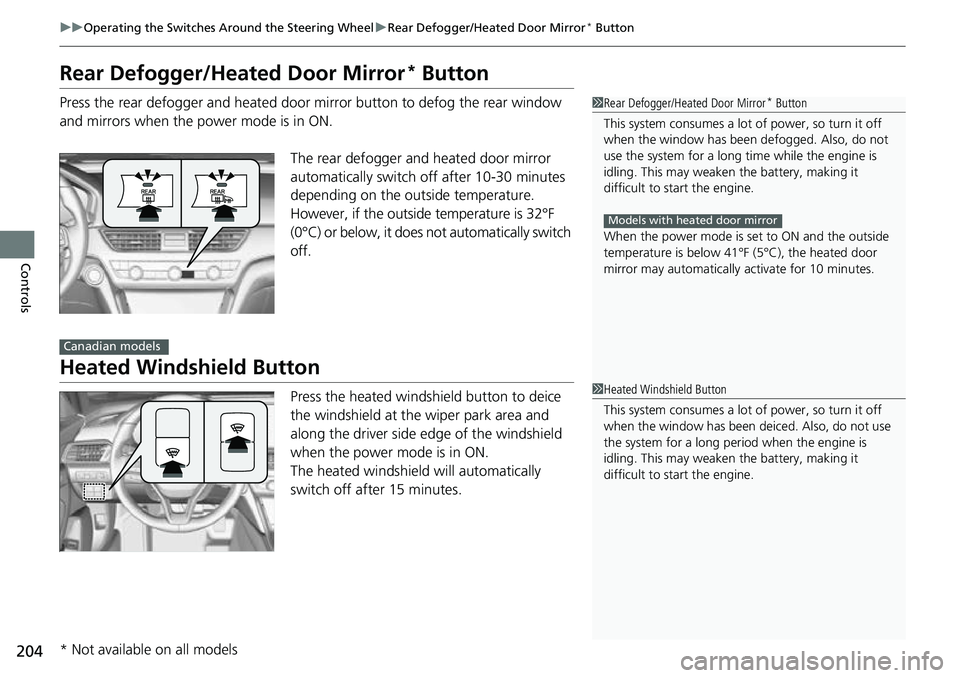
Press the rear defogger and heated door mirror button to defog the rear window
and mirrors when the power mode is in ON.
The rear defogger and heated door mirror
automatically switch off after 10-30 minutes
depending on the outside temperature.
However, if the outside temperature is 32°F
(0°C) or below, it does not automatically switch
off.
Heated Windshield Button
Press the heated windshield button to deice
the windshield at the wiper park area and
along the driver side edge of the windshield
when the power mode is in ON.
The heated windshield will automatically
switch off after 15 minutes.
1 Rear Defogger/Heated Door Mirror* Button
This system consumes a lot of power, so turn it off
when the window has been defogged. Also, do not
use the system for a long ti me while the engine is
idling. This may weaken the battery, making it
difficult to start the engine.
When the power mode is se t to ON and the outside
temperature is below 41°F (5°C), the heated door
mirror may automatically activate for 10 minutes.
Models with heated door mirror
Canadian models
1 Heated Windshield Button
This system consumes a lot of power, so turn it off
when the window has been deiced. Also, do not use
the system for a long peri od when the engine is
idling. This may weaken the battery, making it
difficult to start the engine.
* Not available on all models
Page 212 of 657
210
Controls
Mirrors
Interior Rearview Mirror
Adjust the angle of the rearview mirror when you are sitting in the correct driving
position.
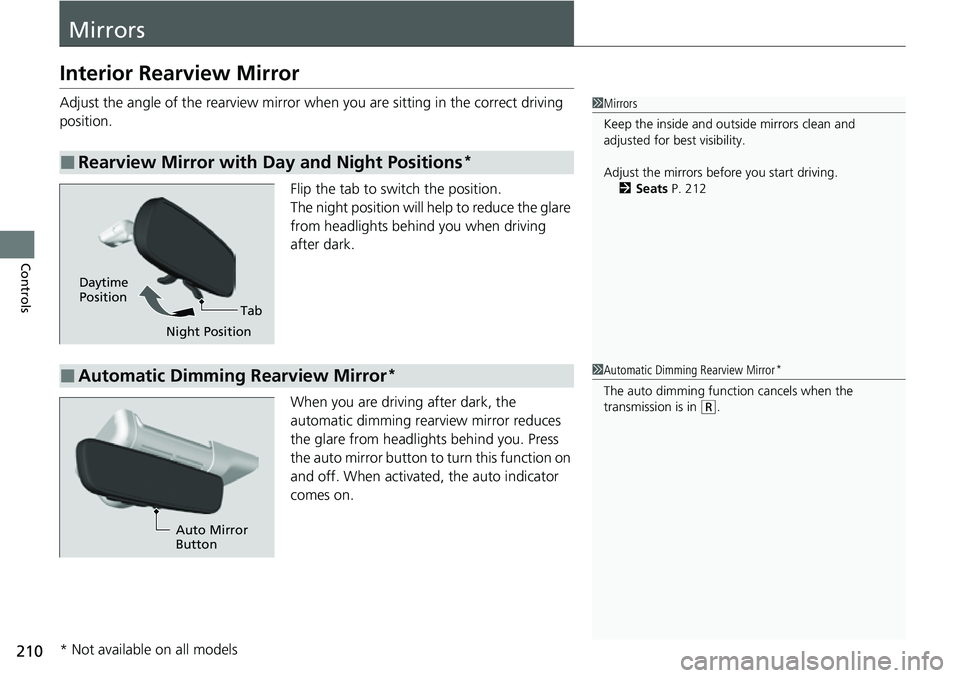
Flip the tab to switch the position.
The night position will help to reduce the glare
from headlights behind you when driving
after dark.
When you are driving after dark, the
automatic dimming rearview mirror reduces
the glare from headlights behind you. Press
the auto mirror button to turn this function on
and off. When activated, the auto indicator
comes on.
■Rearview Mirror with Day and Night Positions*
1Mirrors
Keep the inside and out side mirrors clean and
adjusted for best visibility.
Adjust the mirrors before you start driving. 2 Seats P. 212
Tab
Daytime
Position
Night Position
■Automatic Dimming Rearview Mirror*1Automatic Dimming Rearview Mirror*
The auto dimming function cancels when the
transmission is in (R.
Auto Mirror
Button
* Not available on all models
Page 213 of 657
211
uuMirrors uPower Door Mirrors
Controls
Power Door Mirrors
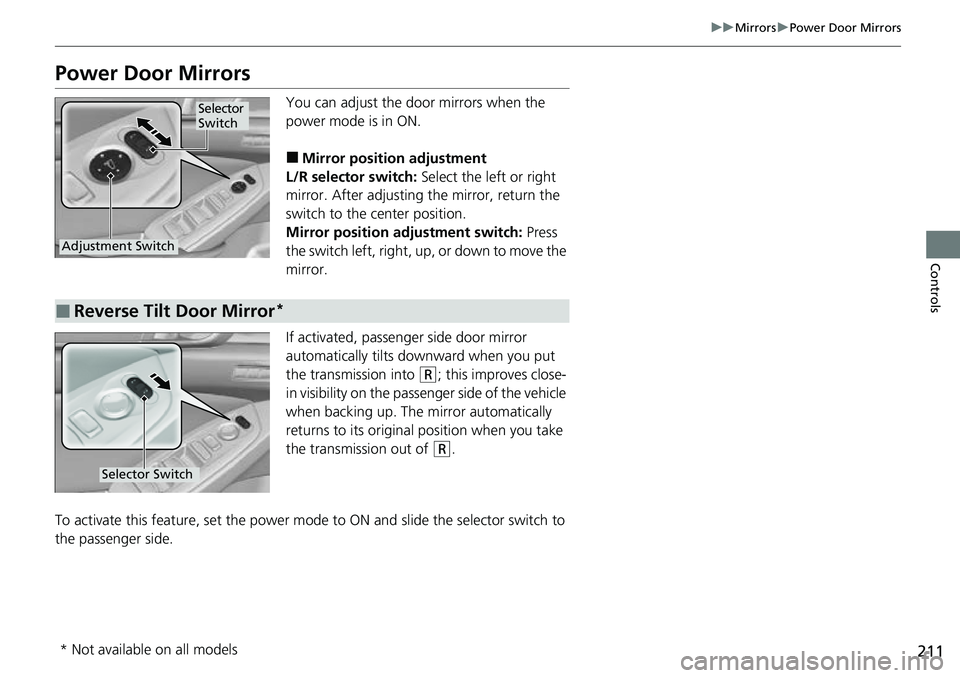
You can adjust the door mirrors when the
power mode is in ON.
■Mirror position adjustment
L/R selector switch: Select the left or right
mirror. After adjusting the mirror, return the
switch to the center position.
Mirror positi on adjustment switch: Press
the switch left, right, up, or down to move the
mirror.
If activated, passenger side door mirror
automatically tilts do wnward when you put
the transmission into
(R; this improves close-
in visibility on the passenger side of the vehicle
when backing up. The mirror automatically
returns to its original position when you take
the transmission out of
(R.
To activate this feature, set the power mode to ON and slide the selector switch to
the passenger side.
Selector
Switch
Adjustment Switch
■Reverse Tilt Door Mirror*
Selector Switch
* Not available on all models
Page 404 of 657
402
Driving
Before Driving
Driving Preparation
Check the following items before you start driving.
• Make sure there are no obstructions on the windows, door mirrors, exterior
lights, or other parts of the vehicle.
u Remove any frost, snow, or ice.
u Remove any snow on the roof, as this can slip down and obstruct your field of
vision while driving. If frozen solid , remove ice once it has softened.
u When removing ice from around the wheels, be sure not to damage the wheel
or wheel components.
• Make sure the hood is securely closed.
u If the hood opens while driving, your front view will be blocked.
• Make sure the tires are in good condition.
u Check air pressure, and check for damage and excessive wear.
2 Checking and Maintaining Tires P. 575
•Make sure there are no people or ob jects behind or around the vehicle.
u There are blind spots from the inside.
■Exterior Checks1Exterior Checks
NOTICE
When doors are frozen s hut, use warm water around
the door edges to melt any ice. Do not try to force
them open, as this can damage the rubber trim
around the doors. When done, wipe dry to avoid
further freezing.
Do not pour warm water into the key cylinder.
You will be unable to insert the key if the water
freezes in the hole.
Heat from the engine and exhaust can ignite
flammable material s left under the hood, causing a
fire. If you’ve parked y our vehicle for an extended
period, inspect and remove any debris that may have
collected, such as dried grass and leaves that have
fallen or have been carried in for use as a nest by a
small animal. Also, check under the hood for leftover
flammable materials after you or someone else has
performed maintenance on your vehicle.
Page 405 of 657
Continued403
uuBefore Driving uDriving Preparation
Driving
• Store or secure all items on board properly.
u Carrying too much cargo, or improperly storing it, can affect your vehicle’s
handling, stability, sto pping distance, and tires, and make it unsafe.
2Maximum Load Limit P. 405
•Do not pile items higher than the seat height.
u They can block your view and may be thrown forward in the event of sudden
braking.
• Do not place anything in the front seat footwells. Make sure to secure the floor
mat.
u An object or unsecured floor mat can in terfere with your brake and accelerator
pedal operation while driving.
• If you have any animals on board, do not let them move around in the vehicle.
u They may interfere with driving and a crash could occur.
• Securely close and lock all doors and the trunk.
2 Locking/Unlocking the Doors from the Inside P. 177
•Adjust your seating position properly.
u Adjust the head restraint, too.
2Seats P. 212
2 Adjusting the Front and Rear Outer* Head Restraint Positions P. 219
•Adjust the mirrors and steering wheel properly.
u Adjust them while sitting in the proper driving position.
2 Mirrors P. 210
2 Adjusting the Steering Wheel P. 209
■Interior Checks1Interior Checks
The headlight aim is set by the factory, and does not
need to be adjusted. Howeve r, if you regularly carry
heavy items in the tr unk or tow a trailer
*, have the
aiming readjusted at a de aler or by a qualified
technician.
* Not available on all models
Page 411 of 657
409
uuTowing a Trailer uTowing Preparation
Driving
Towing equipment varies by th e size of your trailer, how much load you are towing,
and where you are towing.
■Hitches
The hitch must be of an approved type and properly bolted to the underbody.
■Safety chains
Always use safety chains when you tow a trailer. Leave enough slack to allow the
trailer to turn corners easily, but do not allow the chains to drag on the ground.
■Trailer brakes
There are two common types of trailer bra kes: surge and electric. Surge brakes are
common for boat trailers, since the brakes will get wet. If you choose electric brakes,
be sure they are electronically actuated. Do not attempt to attach trailer brakes to
your vehicle’s hydraulic system, as it wi ll lower braking effectiveness and create a
potential hazard.
■Additional towing equipment
Many states and provinces/territories requ ire special outside mirrors when towing a
trailer. Even if mirrors are not required in your locale, you should install special
mirrors if visibility is restricted in any way.
■Trailer light
Trailer lights and equipment must comply with federal, state, province/territory, and
local regulations. Check with your local trailer sales or rental agency for the
requirements in the area where you plan to tow.
■Towing Equipment and Accessories1Towing Equipment and Accessories
Make sure that all equipmen t is properly installed and
maintained, and that it meets federal, state, province/
territory, and lo cal regulations.
Consult your trai ler maker for prope r installation and
setup of the equipment.
Improper installation and setup can affect the
handling, stability, and br aking performance of your
vehicle.
Consult your traile r sales or rental agency if any other
items are recommended or required for your towing
situation.
The lighting and wiring of tra ilers can vary by type
and brand. If a connector is required, it should only
be installed by a qua lified technician.
Page 418 of 657
uuWhen Driving uStarting the Engine
416
Driving
1Remote Engine Start*
The engine may stop whil e it is running if:•You do not start the vehicl e within 10 minutes of
starting the engine with the keyless remote.
•The engine is stopped by using the keyless remote.•The security system alarm is activated.•The door is unlocked with the built-in key.•The hood is open.•The engine coolant temper ature is extremely high.•The battery is low.•The engine oil pressure is low.•The malfunction indicator la mp comes on if there is
a problem with the emissions control systems.
•You press the ENGINE START/STOP button
without depressing the brake pedal.
•The transmission is in a position other than ( P.
•You press the shift lever release button.
While the engine is running, the vehicle will
automatically preconditi on inside the vehicle.
When it is warm outside:
•The climate control system is activated in auto mode.
When it is cold outside:
•The defroster is activated at a moderately warm
temperature.
•The rear defogger and door mirror heaters are
activated.
•The seat heaters* and heated steering wheel* are
activated. 2 Heated Steering Wheel
* P. 236
2 Front Seat Heaters* P. 237
2 Front Seat Heaters and Seat Ventilation*
P. 238
Automatic transmission models
Continuously variable transmission models
* Not available on all models
Page 453 of 657
Continued451
uuWhen Driving uBlind spot information System*
Driving
■When the system detects a vehicle
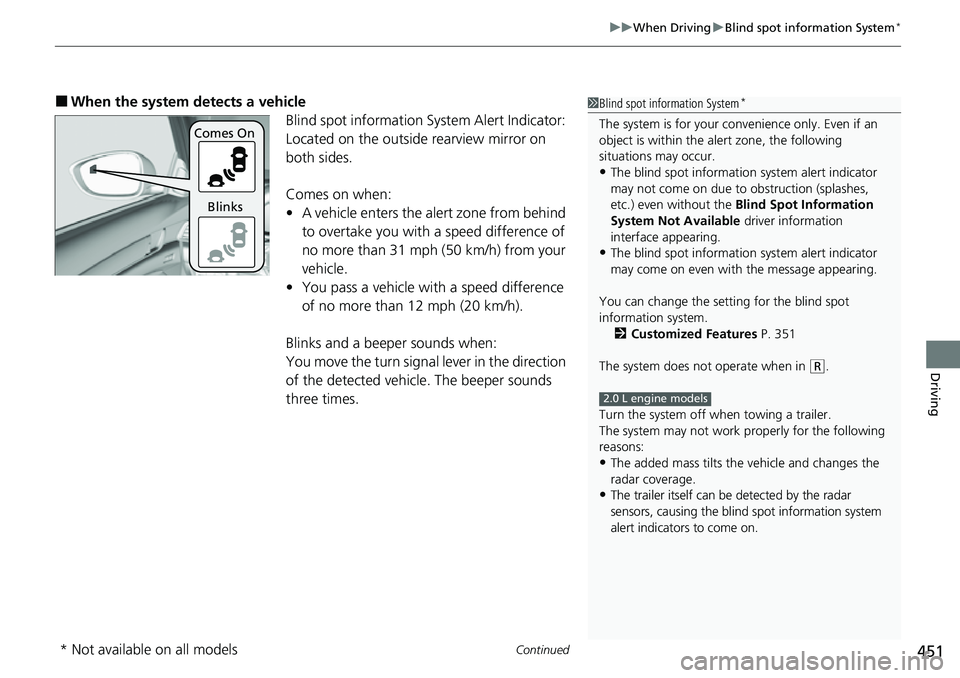
Blind spot information System Alert Indicator:
Located on the outside rearview mirror on
both sides.
Comes on when:
•A vehicle enters the alert zone from behind
to overtake you with a speed difference of
no more than 31 mph (50 km/h) from your
vehicle.
• You pass a vehicle with a speed difference
of no more than 12 mph (20 km/h).
Blinks and a beeper sounds when:
You move the turn signal lever in the direction
of the detected vehicle. The beeper sounds
three times.1 Blind spot information System*
The system is for your convenience only. Even if an
object is within the alert zone, the following
situations may occur.
•The blind spot informatio n system alert indicator
may not come on due to obstruction (splashes,
etc.) even without the Blind Spot Information
System Not Available driver information
interface appearing.
•The blind spot informatio n system alert indicator
may come on even with the message appearing.
You can change the setting for the blind spot
information system. 2 Customized Features P. 351
The system does not operate when in
( R.
Turn the system off when towing a trailer.
The system may not work properly for the following
reasons:
•The added mass tilts the vehicle and changes the
radar coverage.
•The trailer itself can be detected by the radar
sensors, causing the blind spot information system
alert indicators to come on.
2.0 L engine models
Comes On
Blinks
* Not available on all models
Page 455 of 657
453Continued
Driving
Honda Sensing®
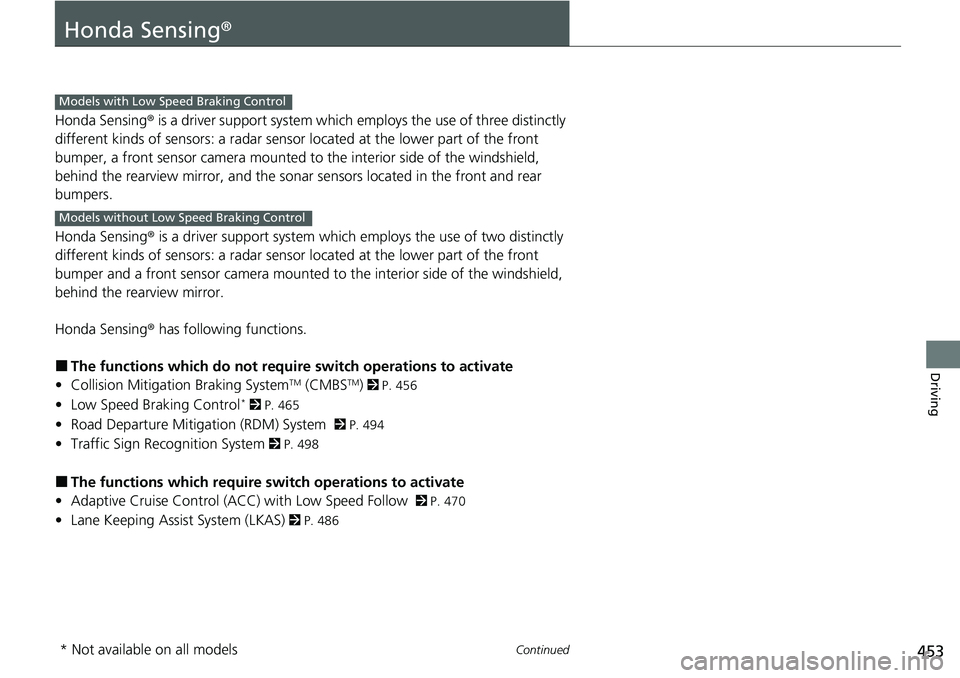
Honda Sensing® is a driver support system which employs the use of three distinctly
different kinds of sensors: a radar sensor located at the lower part of the front
bumper, a front sensor camera mounted to the interior side of the windshield,
behind the rearview mirror, and the sonar sensors located in the front and rear
bumpers.
Honda Sensing ® is a driver support system which employs the use of two distinctly
different kinds of sensors: a radar sensor located at the lower part of the front
bumper and a front sensor camera mounted to the interior side of the windshield,
behind the rearview mirror.
Honda Sensing ® has following functions.
■The functions which do not requir e switch operations to activate
• Collision Mitigation Braking SystemTM (CMBSTM) 2 P. 456
• Low Speed Braking Control* 2 P. 465
• Road Departure Mitigation (RDM) System 2 P. 494
• Traffic Sign Recognition System 2 P. 498
■The functions wh ich require switch operations to activate
• Adaptive Cruise Control (ACC) with Low Speed Follow
2 P. 470
• Lane Keeping Assist System (LKAS) 2 P. 486
Models with Low Speed Braking Control
Models without Low Speed Braking Control
* Not available on all models
Page 458 of 657
456
uuHonda Sensing ®u Collision Mitigation Braking SystemTM (CMBSTM)
Driving
Collision Mitigati on Braking SystemTM (CMBSTM)
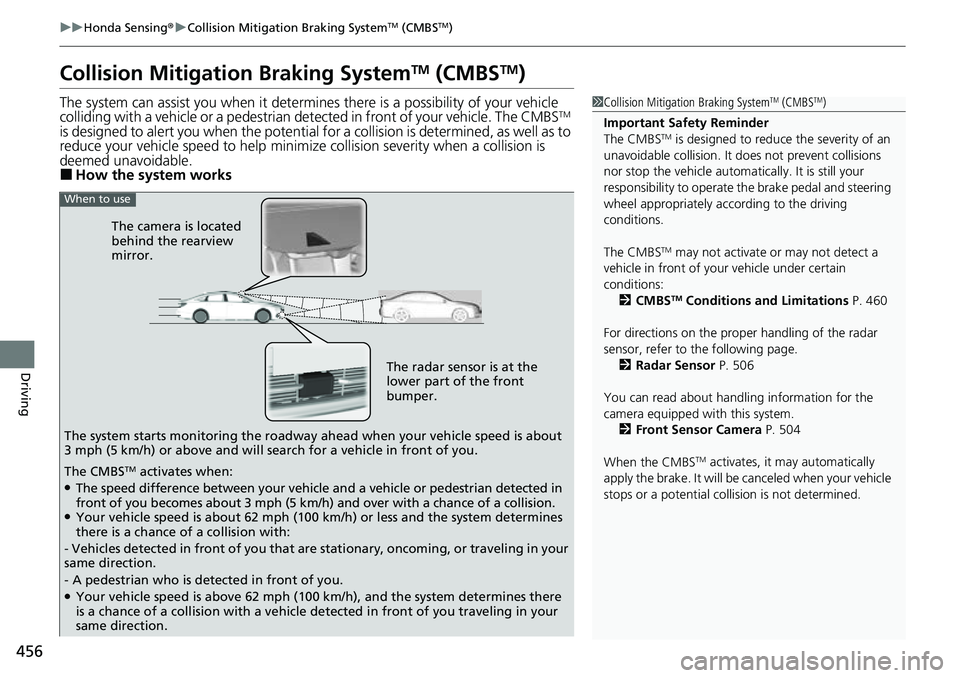
The system can assist you when it determine s there is a possibility of your vehicle
colliding with a vehicle or a pedestrian de tected in front of your vehicle. The CMBSTM
is designed to alert you when the potential for a collision is determined, as well as to
reduce your vehicle speed to help minimize collision severity when a collision is
deemed unavoidable.
■How the system works
1 Collision Mitigation Braking SystemTM (CMBSTM)
Important Safety Reminder
The CMBS
TM is designed to reduce the severity of an
unavoidable collision. It does not prevent collisions
nor stop the vehicle automati cally. It is still your
responsibility to operate th e brake pedal and steering
wheel appropriately acco rding to the driving
conditions.
The CMBS
TM may not activate or may not detect a
vehicle in front of y our vehicle under certain
conditions: 2 CMBS
TM Conditions and Limitations P. 460
For directions on the prop er handling of the radar
sensor, refer to the following page. 2 Radar Sensor P. 506
You can read about handling information for the
camera equipped with this system. 2 Front Sensor Camera P. 504
When the CMBS
TM activates, it may automatically
apply the brake. It will be canceled when your vehicle
stops or a potential collision is not determined.
The radar sensor is at the
lower part of the front
bumper.
The camera is located
behind the rearview
mirror.
The system starts monitoring the roadway ah ead when your vehicle speed is about
3 mph (5 km/h) or above and will search for a vehicle in front of you.
When to use
The CMBSTM activates when:●The speed difference between your vehicle and a vehicle or pedestrian detected in
front of you becomes about 3 mph (5 km/h) and over with a chance of a collision.
●Your vehicle speed is about 62 mph (100 km/h) or less and the system determines
there is a chance of a collision with:
- Vehicles detected in front of you that ar e stationary, oncoming, or traveling in your
same direction.
- A pedestrian who is detected in front of you.
●Your vehicle speed is above 62 mph (100 km/h), and the system determines there
is a chance of a collision with a vehicle detected in front of you traveling in your
same direction.