trunk HONDA ACCORD 2022 Owner's Manual
[x] Cancel search | Manufacturer: HONDA, Model Year: 2022, Model line: ACCORD, Model: HONDA ACCORD 2022Pages: 657, PDF Size: 11.42 MB
Page 227 of 657
225
uuInterior Convenience Items uStorage Items
Continued
Controls
Storage Items
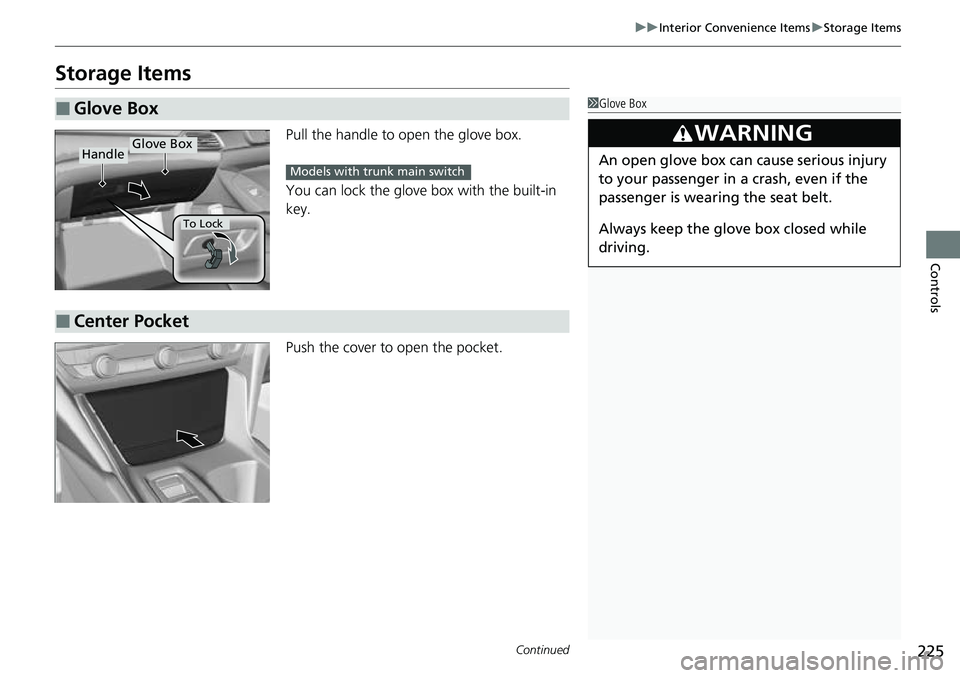
Pull the handle to open the glove box.
You can lock the glove box with the built-in
key.
Push the cover to open the pocket.
■Glove Box1Glove Box
3WARNING
An open glove box can cause serious injury
to your passenger in a crash, even if the
passenger is wearing the seat belt.
Always keep the glove box closed while
driving.
Glove BoxHandle
To Lock
Models with trunk main switch
■Center Pocket
Page 231 of 657
Continued229
uuInterior Convenience Items uStorage Items
Controls
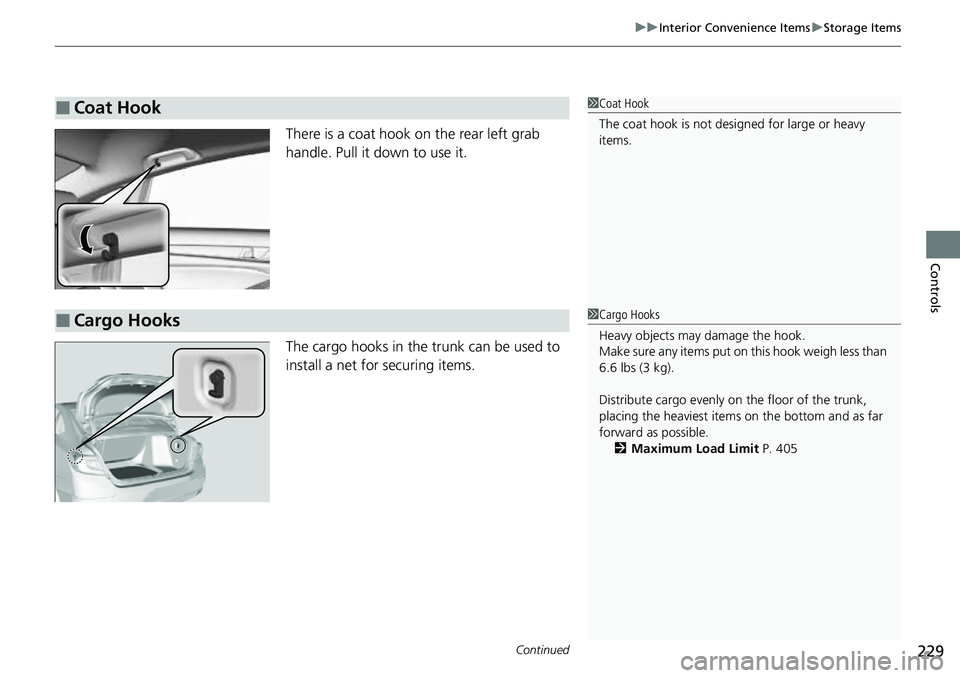
There is a coat hook on the rear left grab
handle. Pull it down to use it.
The cargo hooks in the trunk can be used to
install a net for securing items.
■Coat Hook1Coat Hook
The coat hook is not desi gned for large or heavy
items.
■Cargo Hooks1 Cargo Hooks
Heavy objects may damage the hook.
Make sure any items put on this hook weigh less than
6.6 lbs (3 kg).
Distribute cargo evenly on the floor of the trunk,
placing the heaviest item s on the bottom and as far
forward as possible. 2 Maximum Load Limit P. 405
Page 237 of 657
Continued235
uuInterior Convenience Items uOther Interior Convenience Items
Controls
1Wireless Charger*
Charging may be briefl y interrupted when:•All the doors and the trunk are closed
- to avoid interference with the proper functioning
of the keyless access system.
•The position of the device is altered.
Do not charge more than one device at a time on a
charging area.
If the device becomes too hot and its battery
protection function activa tes, it may charge
extremely slowly or no longer charge.
The temperature at which the battery protection
function activates de pends on the device.
* Not available on all models
Page 405 of 657
Continued403
uuBefore Driving uDriving Preparation
Driving
• Store or secure all items on board properly.
u Carrying too much cargo, or improperly storing it, can affect your vehicle’s
handling, stability, sto pping distance, and tires, and make it unsafe.
2Maximum Load Limit P. 405
•Do not pile items higher than the seat height.
u They can block your view and may be thrown forward in the event of sudden
braking.
• Do not place anything in the front seat footwells. Make sure to secure the floor
mat.
u An object or unsecured floor mat can in terfere with your brake and accelerator
pedal operation while driving.
• If you have any animals on board, do not let them move around in the vehicle.
u They may interfere with driving and a crash could occur.
• Securely close and lock all doors and the trunk.
2 Locking/Unlocking the Doors from the Inside P. 177
•Adjust your seating position properly.
u Adjust the head restraint, too.
2Seats P. 212
2 Adjusting the Front and Rear Outer* Head Restraint Positions P. 219
•Adjust the mirrors and steering wheel properly.
u Adjust them while sitting in the proper driving position.
2 Mirrors P. 210
2 Adjusting the Steering Wheel P. 209
■Interior Checks1Interior Checks
The headlight aim is set by the factory, and does not
need to be adjusted. Howeve r, if you regularly carry
heavy items in the tr unk or tow a trailer
*, have the
aiming readjusted at a de aler or by a qualified
technician.
* Not available on all models
Page 417 of 657
Continued415
uuWhen Driving uStarting the Engine
Driving
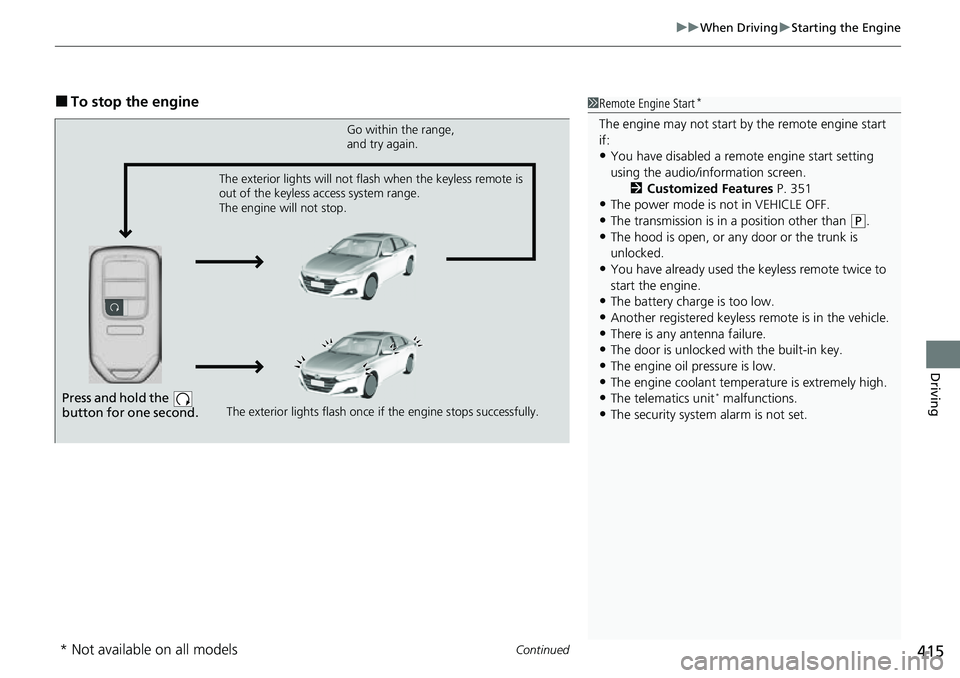
■To stop the engine1Remote Engine Start*
The engine may not start by the remote engine start
if:
•You have disabled a remo te engine start setting
using the audio/information screen. 2Customized Features P. 351
•The power mode is not in VEHICLE OFF.
•The transmission is in a position other than (P.•The hood is open, or any door or the trunk is
unlocked.
•You have already used the keyless remote twice to
start the engine.
•The battery charge is too low.
•Another registered keyless remote is in the vehicle.•There is any antenna failure.
•The door is unlocked with the built-in key.
•The engine oil pressure is low.•The engine coolant temper ature is extremely high.
•The telematics unit* malfunctions.
•The security system alarm is not set.
Press and hold the
button for one second.
Go within the range,
and try again.
The exterior lights flash once if the engine stops successfully.
The exterior lights will not flash when the keyless remote is
out of the keyless access system range.
The engine will not stop.
* Not available on all models
Page 471 of 657
469
uuHonda Sensing ®u Low Speed Braking Control*
Driving
■Examples of situations where the sonar sensors cannot detect obstacles
• The sonar sensors are dirty (covered by snow, water, mud, etc.).
• The vehicle is too hot or cold.
• The steering wheel is turned sharply when approaching the obstacle at an angle.
■Examples of other cases where the system may not work correctly
• The vehicle is tilted due to heavy load in the trunk or rear seats.
• Bad weather conditions such as heav y rain, fog, snow, sandstorms, etc.
• The ambient temperature/humidity is too high or low.
• When going down a very steep slope.
• When close to other vehicles with sonar sensors or other objects that emit
ultrasonic waves.
■Situations where the system may acti vate even without risk of a collision
• When passing through short or narrow gates.
• When driving on uneven surfaces, grassy areas, or places with steps.
• When a sloped pillar or wall is protruding from a high position.
• When there are obstacles next to the road.
• When driving toward flags, curtains, tre e branches, railroad crossing bars, etc.
• When driving on flooded roads.
Page 597 of 657
595
Handling the Unexpected
This chapter explains how to handle unexpected troubles.
ToolsTypes of Tools .................................. 596
If a Tire Goes Flat
Changing a Flat Tire ......................... 597
Engine Does Not Start Checking the Engine ........................ 603
If the Keyless Remote Battery is Weak ....604Emergency Engine Stop ................... 605
If the Battery Is Dead ....................... 606
Shift Lever Does Not Move .............. 609
Overheating How to Handle Overheating ............. 611 Indicator, Coming On/Blinking
If the Low Oil Pressure Warning Appears ... 613If the Charging System Indicator Comes
On ................................................. 613
If the Malfunction Indicator Lamp Comes On or Blinks ................................... 614
If the Brake System Indicator (Red) Comes
On or Blinks ................................... 615
If the Brake System Indicator (Red) Comes On
or Blinks at the Same Time When the Brake
System Indicator (Amber) Comes On.... 616
If the Electric Power Steering (EPS) System Indicator Comes On ....................... 617 If the Low Tire Pressure/TPMS Indicator
Comes On or Blinks ....................... 618
If the Transmission System Indicator Blinks along with the Warning Message... 619
Fuses Fuse Locations ................................. 620
Inspecting and Changing Fuses ........ 625
Emergency Towing ........................... 626
If You Cannot Unlock the Fuel Fill Door....627
If You Cannot Open the Trunk ........... 628
Refueling ........................................... 630
Page 598 of 657
596
Handling the Unexpected
Tools
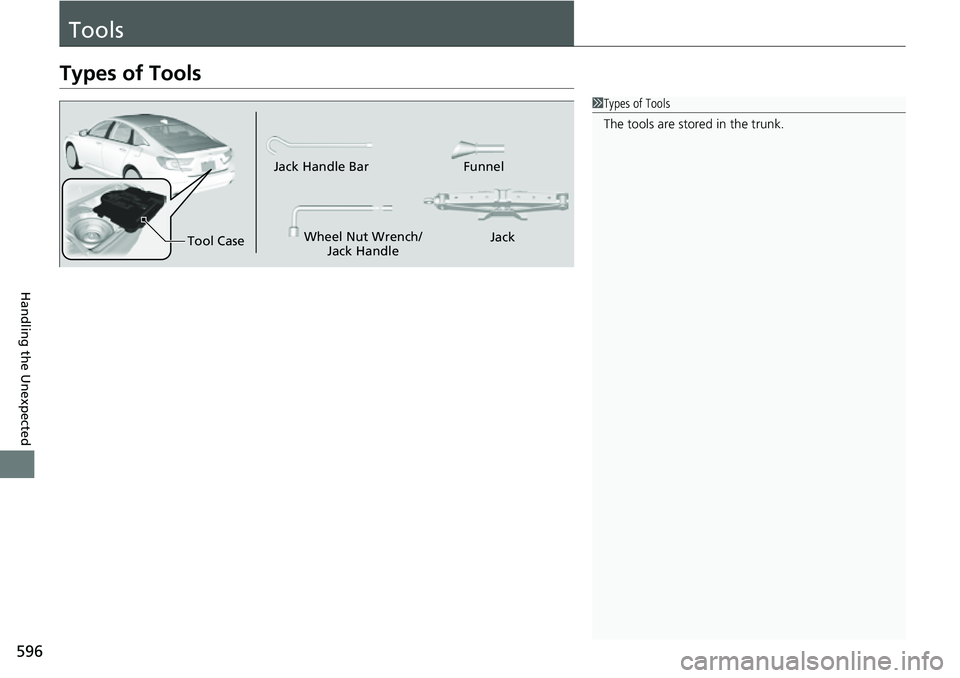
Types of Tools
1Types of Tools
The tools are stored in the trunk.
Wheel Nut Wrench/
Jack Handle Funnel
Jack Handle Bar
Tool Case Jack
Page 600 of 657
598
uuIf a Tire Goes Flat uChanging a Flat Tire
Handling the Unexpected
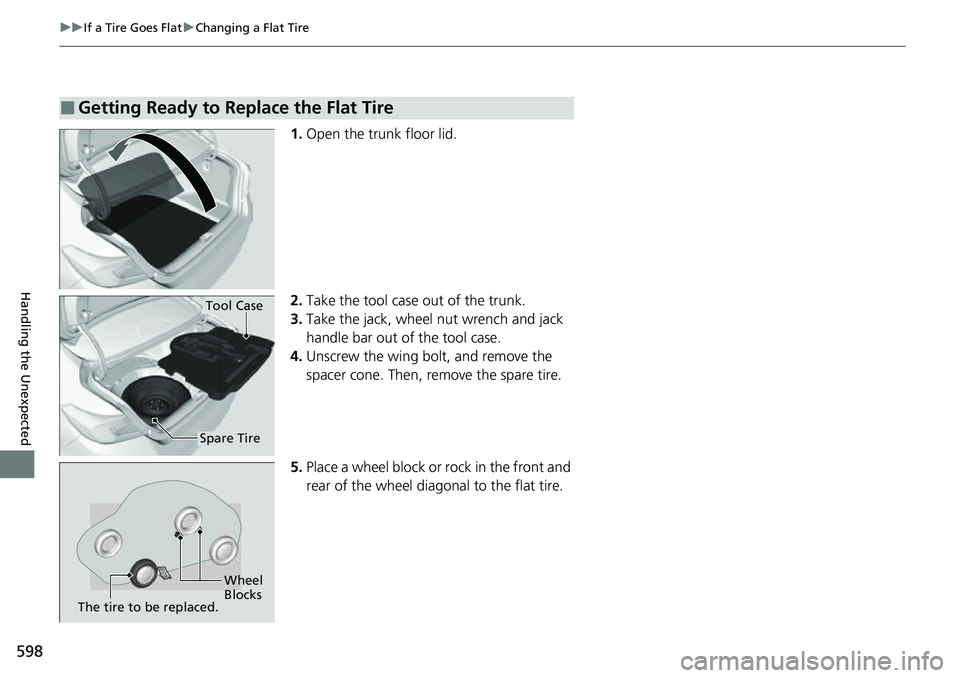
1. Open the trunk floor lid.
2. Take the tool case out of the trunk.
3. Take the jack, wheel nut wrench and jack
handle bar out of the tool case.
4. Unscrew the wing bolt, and remove the
spacer cone. Then, remove the spare tire.
5. Place a wheel block or rock in the front and
rear of the wheel diagonal to the flat tire.
■Getting Ready to Replace the Flat Tire
Tool Case
Spare Tire
Wheel
Blocks
The tire to be replaced.
Page 604 of 657
uuIf a Tire Goes Flat uChanging a Flat Tire
602
Handling the Unexpected
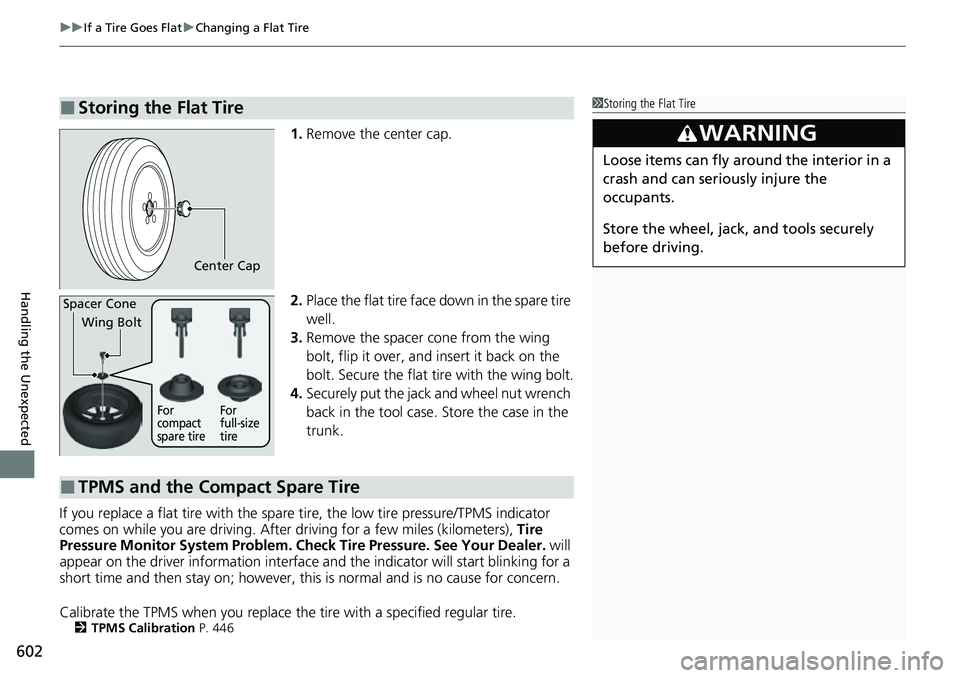
1. Remove the center cap.
2. Place the flat tire face down in the spare tire
well.
3. Remove the spacer cone from the wing
bolt, flip it over, and insert it back on the
bolt. Secure the flat tire with the wing bolt.
4. Securely put the jack and wheel nut wrench
back in the tool case. Store the case in the
trunk.
If you replace a flat tire with the spare tire, the low tire pressure/TPMS indicator
comes on while you are driving. Afte r driving for a few miles (kilometers), Tire
Pressure Monitor System Problem. Ch eck Tire Pressure. See Your Dealer. will
appear on the driver information interface and the indicator will start blinking for a
short time and then stay on; however, this is normal and is no cause for concern.
Calibrate the TPMS when you replace the tire with a specified regular tire.
2TPMS Calibration P. 446
■Storing the Flat Tire1Storing the Flat Tire
3WARNING
Loose items can fly around the interior in a
crash and can seriously injure the
occupants.
Store the wheel, jack, and tools securely
before driving.
Center Cap
Spacer Cone
Wing Bolt
For
compact
spare tire For
full-size
tire
■TPMS and the Compact Spare Tire