warning HONDA ACCORD 2022 Owner's Manual
[x] Cancel search | Manufacturer: HONDA, Model Year: 2022, Model line: ACCORD, Model: HONDA ACCORD 2022Pages: 657, PDF Size: 11.42 MB
Page 101 of 657
99
uuIndicators u
Continued
Instrument Panel
IndicatorNameOn/BlinkingExplanationMessage
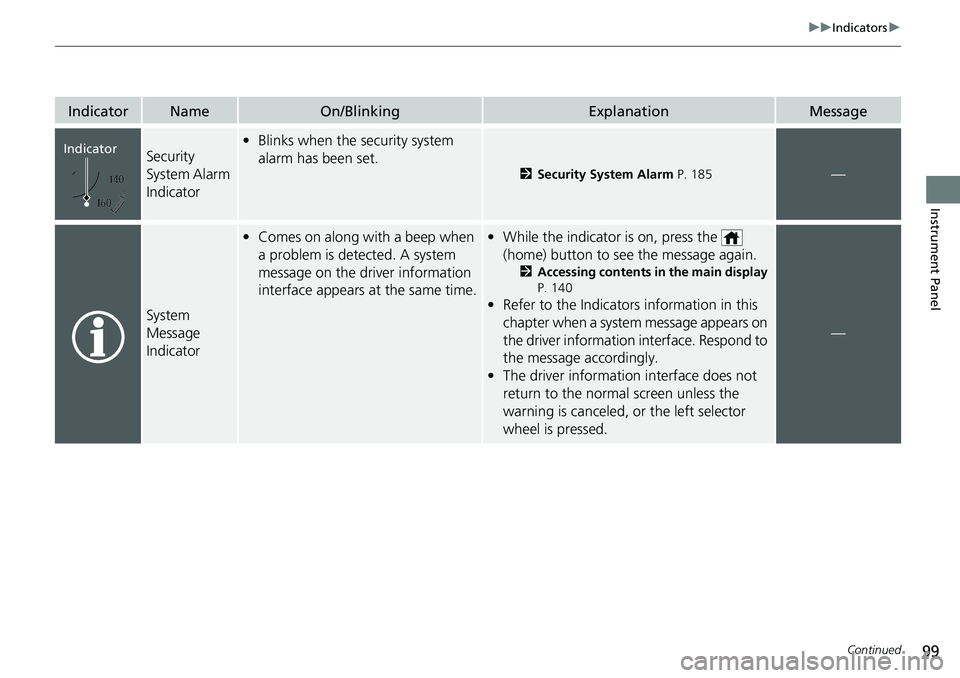
Security
System Alarm
Indicator•Blinks when the security system
alarm has been set.
2 Security System Alarm P. 185—
System
Message
Indicator
•Comes on along with a beep when
a problem is detected. A system
message on the driver information
interface appears at the same time.• While the indicator is on, press the
(home) button to see the message again.
2 Accessing contents in the main display
P. 140
• Refer to the Indicators information in this
chapter when a system message appears on
the driver information interface. Respond to
the message accordingly.
• The driver information interface does not
return to the normal screen unless the
warning is canceled, or the left selector
wheel is pressed.
—
Indicator
Page 111 of 657
109
uuIndicators uDriver Information Interface Wa rning and Information Messages
Continued
Instrument Panel
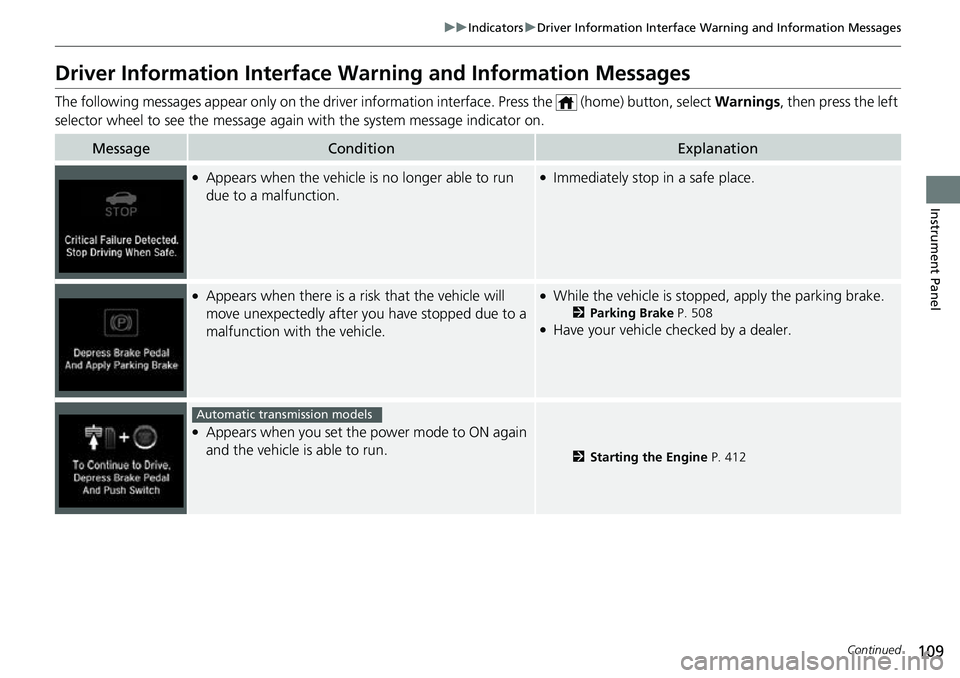
Driver Information Interface Warning and Information Messages
The following messages appear only on the driver info rmation interface. Press the (home) button, select Warnings, then press the left
selector wheel to see the message agai n with the system message indicator on.
MessageConditionExplanation
●Appears when the vehicle is no longer able to run
due to a malfunction.●Immediately stop in a safe place.
●Appears when there is a ri sk that the vehicle will
move unexpectedly after you have stopped due to a
malfunction with the vehicle.●While the vehicle is stopped, apply the parking brake.
2 Parking Brake P. 508●Have your vehicle checked by a dealer.
●Appears when you set the power mode to ON again
and the vehicle is able to run.
2Starting the Engine P. 412
Automatic transmission models
Page 112 of 657
110
uuIndicators uDriver Information Interface Wa rning and Information Messages
Instrument Panel
MessageConditionExplanation
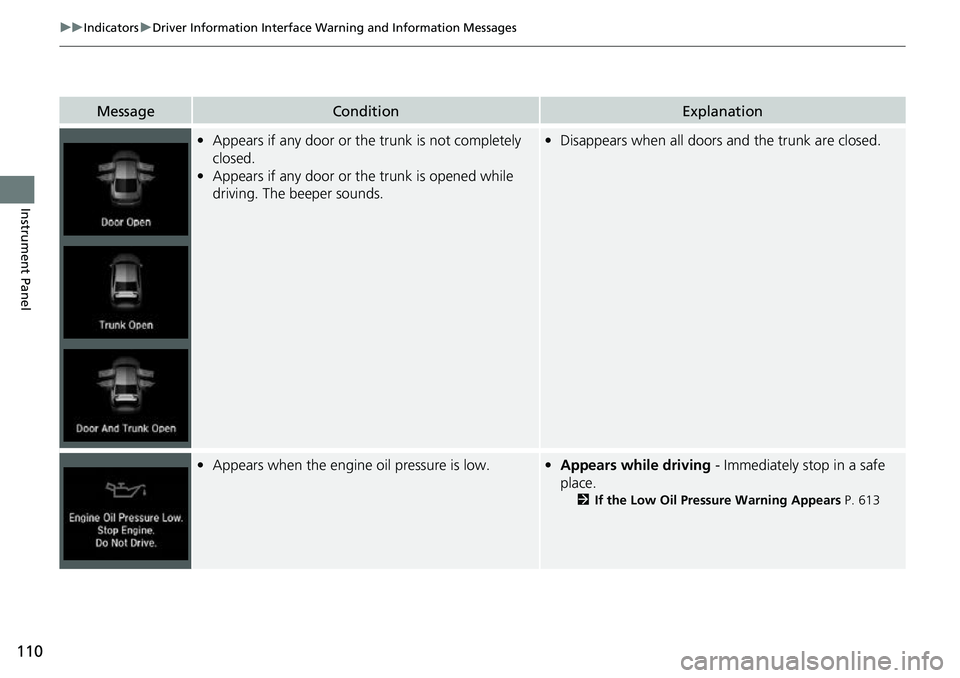
•Appears if any door or the trunk is not completely
closed.
• Appears if any door or the trunk is opened while
driving. The beeper sounds.•Disappears when all doors and the trunk are closed.
•Appears when the engine oil pressure is low.•Appears while driving - Immediately stop in a safe
place.
2 If the Low Oil Pressure Warning Appears P. 613
Page 138 of 657
136
uuIndicators uDriver Information Interface Wa rning and Information Messages
Instrument Panel
MessageConditionExplanation
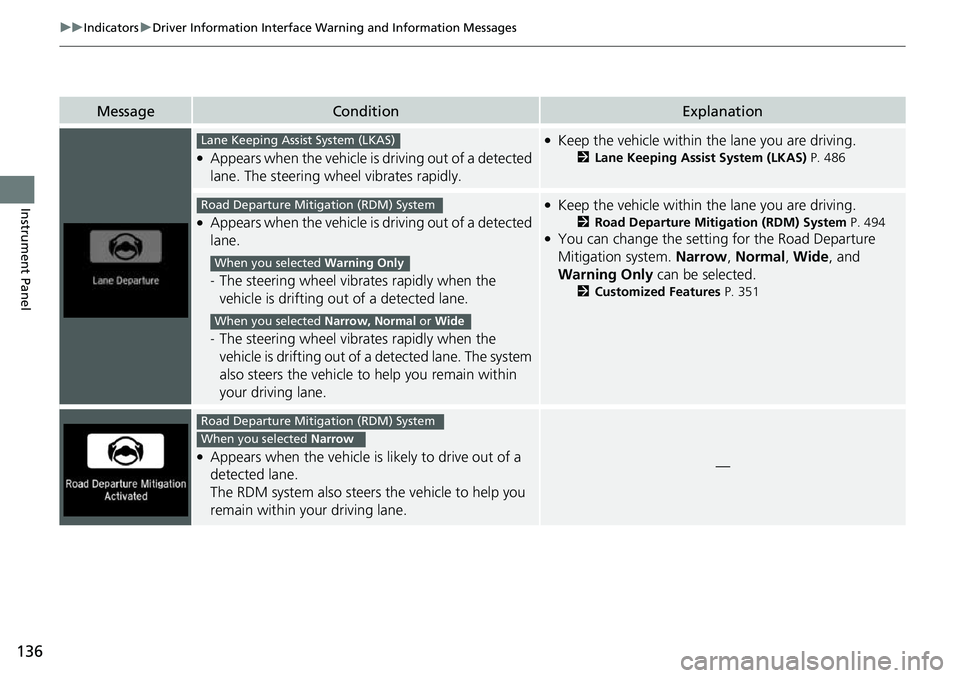
●Appears when the vehicle is driving out of a detected
lane. The steering wheel vibrates rapidly.
●Keep the vehicle within the lane you are driving.
2Lane Keeping Assist System (LKAS) P. 486
●Appears when the vehicle is driving out of a detected
lane.
-The steering wheel vibrates rapidly when the
vehicle is drifting out of a detected lane.
- The steering wheel vibrates rapidly when the
vehicle is drifting out of a detected lane. The system
also steers the vehicle to help you remain within
your driving lane.
●Keep the vehicle within the lane you are driving.
2 Road Departure Mitigation (RDM) System P. 494●You can change the setting for the Road Departure
Mitigation system. Narrow, Normal , Wide , and
Warning Only can be selected.
2Customized Features P. 351
●Appears when the vehicle is likely to drive out of a
detected lane.
The RDM system also steers the vehicle to help you
remain within your driving lane.—
Lane Keeping Assist System (LKAS)
Road Departure Mitigation (RDM) System
When you selected Warning Only
When you selected Narrow, Normal or Wide
Road Departure Mitigation (RDM) System
When you selected Narrow
Page 142 of 657
140
uuGauges and Displays uDriver Information Interface
Instrument Panel
Driver Information Interface
The driver information interface shows in formation such as the estimated travelable
distance and fuel economy of the vehicle. It also displays messages such as warnings
and other helpful information.
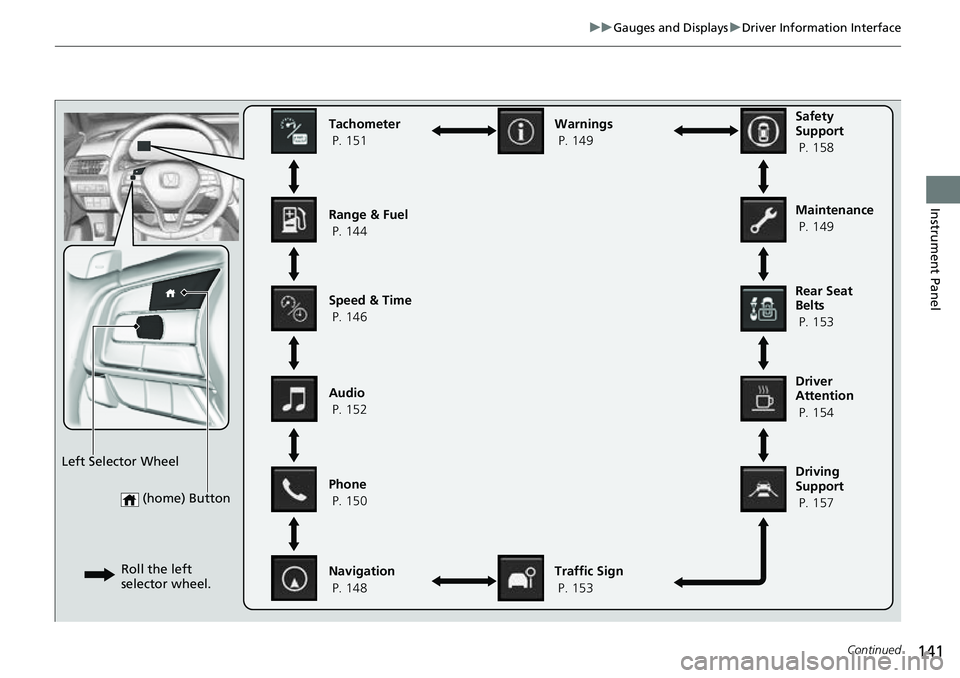
■Accessing contents in the main display
Press the (home) button, then roll the le ft selector wheel to scroll to the content
you want to see. Press the left select or wheel to see detailed information.
■Switching the Display1Switching the Display
To go back to the previous screen, press the
(back) button.
You can edit, add, or delete the meter contents using
the audio/information screen. 2 Customizing the Meter P. 265
Page 143 of 657
141
uuGauges and Displays uDriver Information Interface
Continued
Instrument Panel
(home) Button
Tachometer
P. 151
Range & Fuel
P. 144
Speed & Time
P. 146
Navigation
P. 148 Traffic Sign
P. 153
Phone
P. 150 Audio
P. 152 Safety
Support
P. 158
Maintenance
P. 149
Warnings
P. 149
Left Selector Wheel Roll the left
selector wheel.
Driving
Support
P. 157 Driver
Attention
P. 154 Rear Seat
Belts
P. 153
Page 151 of 657
Continued149
uuGauges and Displays uDriver Information Interface
Instrument Panel
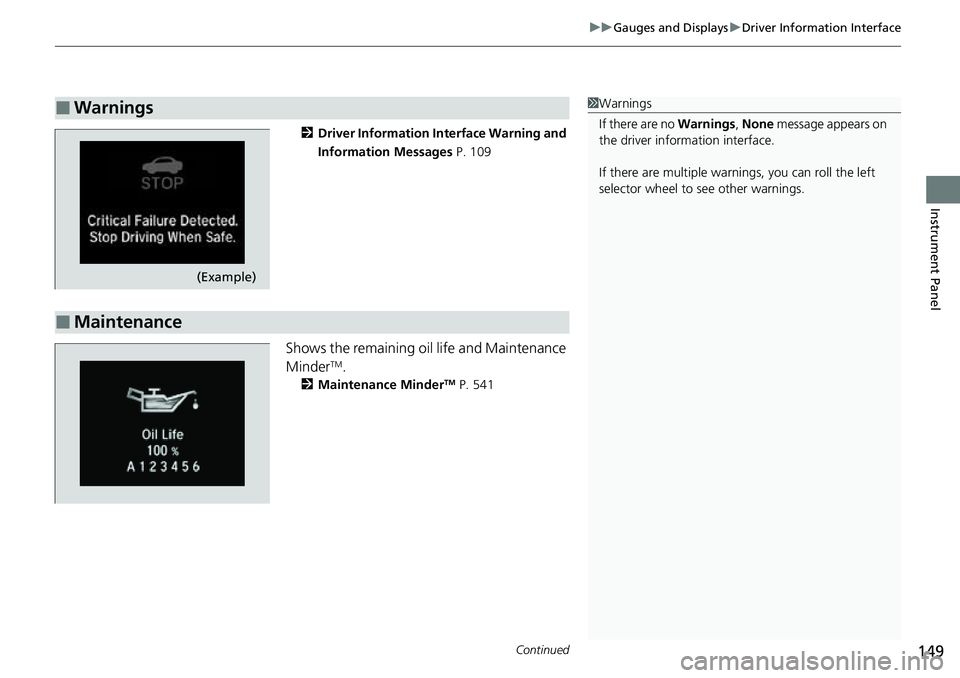
2 Driver Information Interface Warning and
Information Messages P. 109
Shows the remaining oil life and Maintenance
MinderTM.
2Maintenance MinderTM P. 541
■Warnings1Warnings
If there are no Warnings, None message appears on
the driver information interface.
If there are multiple warnings, you can roll the left
selector wheel to see other warnings.
(Example)
■Maintenance
Page 162 of 657
160
uuGauges and Displays uHead-Up Display*
Instrument Panel
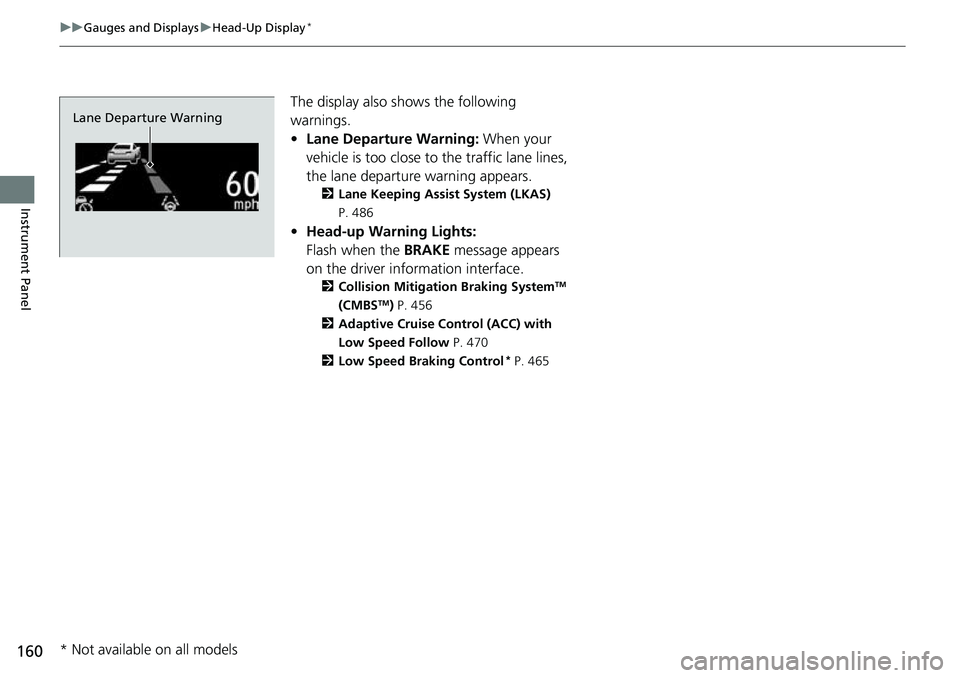
The display also s hows the following
warnings.
• Lane Departure Warning: When your
vehicle is too close to the traffic lane lines,
the lane departure warning appears.
2 Lane Keeping Assist System (LKAS)
P. 486
• Head-up Warning Lights:
Flash when the BRAKE message appears
on the driver information interface.
2 Collision Mitigation Braking SystemTM
(CMBSTM) P. 456
2 Adaptive Cruise Control (ACC) with
Low Speed Follow P. 470
2 Low Speed Braking Control
* P. 465
Lane Departure Warning
* Not available on all models
Page 175 of 657
Continued173
uuLocking and Unlocking the Doors uLocking/Unlocking the Doors from the Outside
Controls
To temporarily deactivate the function:
1. Set the power mode to OFF.
2. Open the driv er’s door.
3. Using the master door lock switch, operate
the lock as follows:
Lock Unlock Lock Unlock.
u The beeper sounds an d the function is
deactivated.
To restore the function:
• Set the power mode to ON.
• Lock the vehicl e without using the auto lock
function.
• With the keyless remote on you, move out
of the auto lock function operation range.
• Open any door.1Locking the doors (Walk away auto lock ®)
The auto lock function does not operate when any of
the following conditions are met.
•The keyless remote is inside the vehicle.
•A door or the hood is not closed.•The power mode is set to any mode other than
OFF.
•The keyless remote is not located within a radius of
about 5 feet (1.5 m) from the vehicle when you get
out of the vehicle and close the doors.
Auto lock function operation stop beeper
After the auto lock function has been activated, the
auto lock operation stop beeper sounds for
approximately two seconds in the following cases.
•The keyless remote is put inside the vehicle through
a window.
•You are located too close to the vehicle.
•The keyless remote is put inside the trunk.
If the warning beeper sounds, check that you are
carrying the keyless remote. Then, open/close a door
and confirm the auto lock activation beeper sounds
once.
Page 189 of 657
187Continued
Controls
Windows
Opening/Closing the Power Windows
The power windows can be opened and closed when the power mode is in ON,
using the switches on the doors.
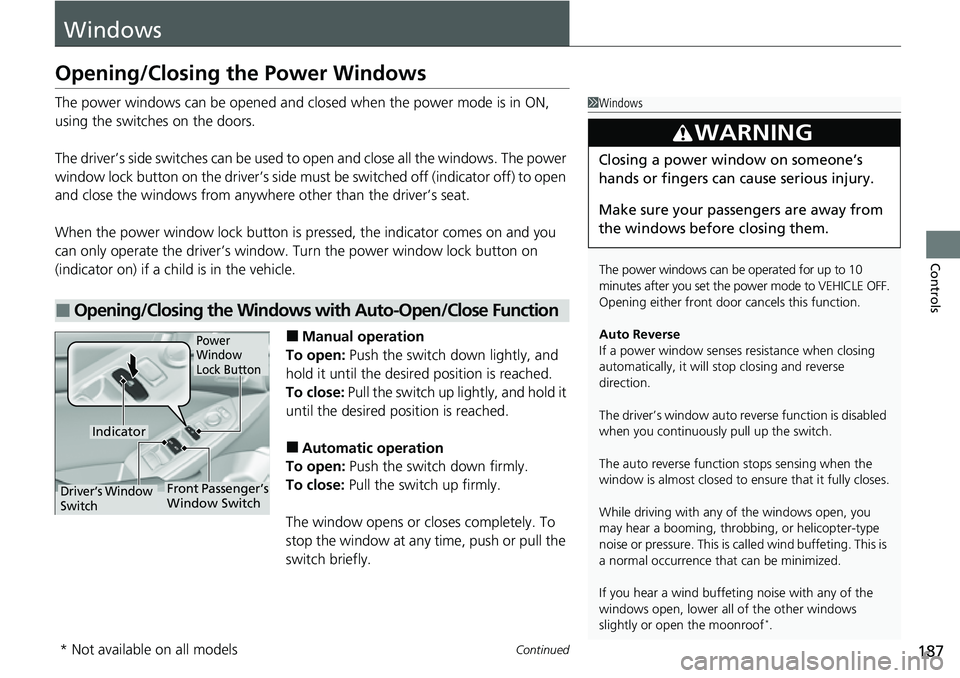
The driver’s side switches can be used to open and close all the windows. The power
window lock button on the driver’s side must be switched off (indicator off) to open
and close the windows from anywhere other than the driver’s seat.
When the power window lock button is pressed, the indicator comes on and you
can only operate the driver’s window. Turn the power window lock button on
(indicator on) if a child is in the vehicle.
■Manual operation
To open: Push the switch down lightly, and
hold it until the desired position is reached.
To close: Pull the switch up lightly, and hold it
until the desired position is reached.
■Automatic operation
To open: Push the switch down firmly.
To close: Pull the switch up firmly.
The window opens or closes completely. To
stop the window at any time, push or pull the
switch briefly.
■Opening/Closing the Windows with Auto-Open/Close Function
1 Windows
The power windows can be operated for up to 10
minutes after you set the po wer mode to VEHICLE OFF.
Opening either front door cancels this function.
Auto Reverse
If a power window senses resistance when closing
automatically, it will stop closing and reverse
direction.
The driver’s window auto re verse function is disabled
when you continuously pull up the switch.
The auto reverse function stops sensing when the
window is almost closed to en sure that it fully closes.
While driving with any of the windows open, you
may hear a booming, throbbi ng, or helicopter-type
noise or pressure. This is ca lled wind buffeting. This is
a normal occurrence th at can be minimized.
If you hear a wind buffeti ng noise with any of the
windows open, lower all of the other windows
slightly or open the moonroof
*.
3WARNING
Closing a power window on someone’s
hands or fingers can cause serious injury.
Make sure your passengers are away from
the windows before closing them.
Power
Window
Lock Button
Indicator
Driver’s Window
SwitchFront Passenger’s
Window Switch
* Not available on all models