belt HONDA ACCORD 2022 Service Manual
[x] Cancel search | Manufacturer: HONDA, Model Year: 2022, Model line: ACCORD, Model: HONDA ACCORD 2022Pages: 657, PDF Size: 11.42 MB
Page 84 of 657
82
Instrument Panel
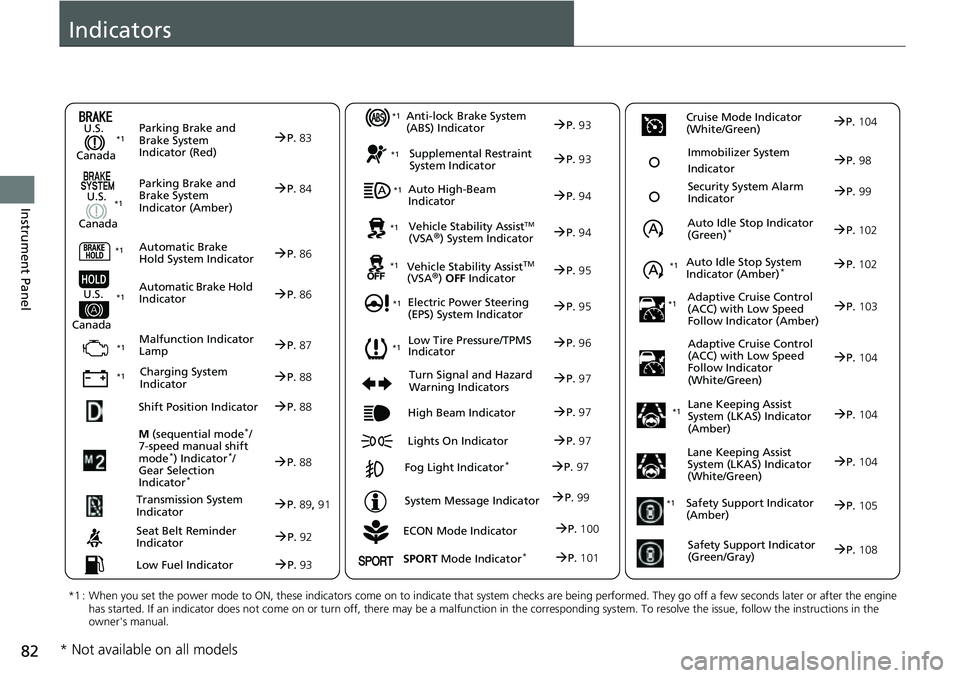
Indicators
ECON Mode Indicator
M
(sequential mode
*/
7-speed manual shift
mode
*) Indicator*/
Gear Selection
Indicator
*
P. 88
Parking Brake and
Brake System
Indicator (Red)
Parking Brake and
Brake System
Indicator (Amber)
U.S.
Canada
U.S.
Canada Automatic Brake
Hold System Indicator
Automatic Brake Hold
IndicatorU.S.
Canada
*1 : When you set the power mode to ON, these indicators come on to indicate that system checks are being performed. They go off a few seconds later or after the engine
has started. If an indicator does not come on or turn off, ther e may be a malfunction in the corresponding system. To resolve the issue, follow the instructions in the
owner's manual.
P. 83*1
Malfunction Indicator
Lamp
Charging System
Indicator
Anti-lock Brake System
(ABS) Indicator
Seat Belt Reminder
Indicator
Low Fuel Indicator
Vehicle Stability AssistTM (VSA®) System Indicator
Vehicle Stability Assist
TM (VSA®) OFF Indicator
Supplemental Restraint
System Indicator
Auto High-Beam
Indicator
Low Tire Pressure/TPMS
Indicator
Electric Power Steering
(EPS) System Indicator
Turn Signal and Hazard
Warning Indicators
Lights On Indicator High Beam Indicator
Fog Light Indicator*
System Message Indicator Auto Idle Stop Indicator
(Green)
*
Lane Keeping Assist
System (LKAS) Indicator
(Amber)
Safety Support Indicator
(Amber)
Safety Support Indicator
(Green/Gray)
P. 84
P.86
P.86
P.87
P.88
*1
*1 *1 *1
P.
96*1
*1
Shift Position IndicatorP. 88
Transmission System
Indic a
torP.89, 91
P.92
P.93
P.93
P.93
P.94
P.94
*1
*1
*1
*1
P. 95
*1P.95
P.97
P.102
*1
P.97
P.97
P.97 Security System Alarm
Indica
to
r P.99
P.99
P. 104
P.105
P.108
*1Auto Idle Stop System
Indicator (Amber)*P.102
*1
Lane Keeping Assist
System (LKAS) Indicator
(White/Green)P.104
*1
Immobilizer System
IndicatorP.98
SPORT Mode Indicator*P.101
P.100
Cruise Mode Indicator
(White/Green)P. 104
Adaptive Cruise Control
(A C
C) with Low Speed
Follow Indicator (Amber)P. 103*1
Adaptive Cruise Control
(ACC) with Low Speed
Follow Indicator
(White/Green)P.104
* Not available on all models
Page 94 of 657
92
uuIndicators u
Instrument Panel
IndicatorNameOn/BlinkingExplanationMessage
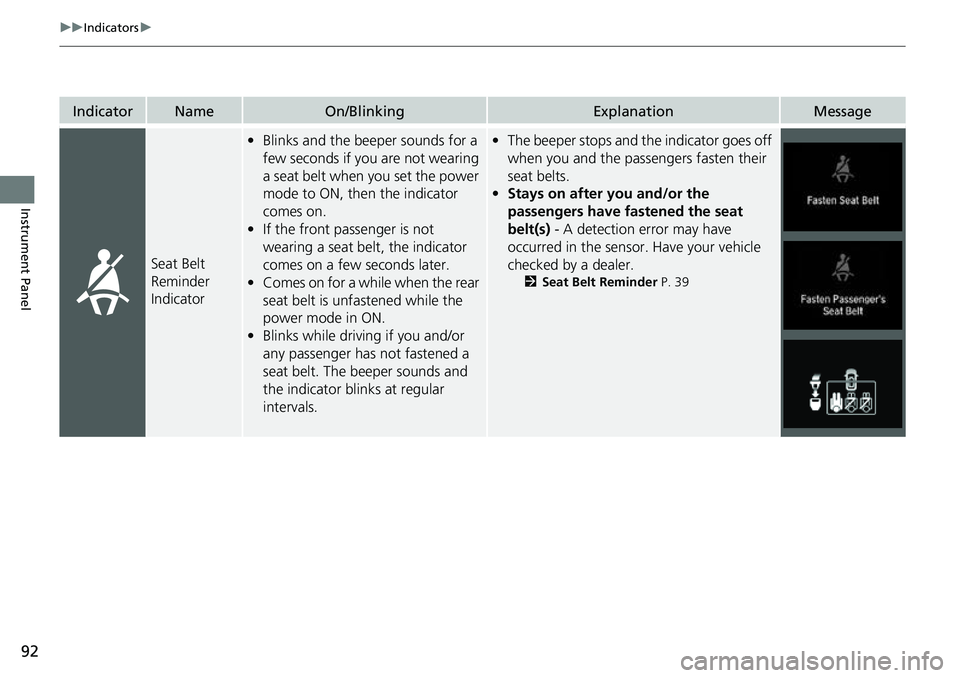
Seat Belt
Reminder
Indicator
•Blinks and the beeper sounds for a
few seconds if you are not wearing
a seat belt when you set the power
mode to ON, then the indicator
comes on.
• If the front passenger is not
wearing a seat belt, the indicator
comes on a few seconds later.
• Comes on for a while when the rear
seat belt is unfastened while the
power mode in ON.
• Blinks while driving if you and/or
any passenger has not fastened a
seat belt. The beeper sounds and
the indicator blinks at regular
intervals.•The beeper stops and the indicator goes off
when you and the passengers fasten their
seat belts.
• Stays on after you and/or the
passengers have fastened the seat
belt(s) - A detection error may have
occurred in the sensor. Have your vehicle
checked by a dealer.
2 Seat Belt Reminder P. 39
Page 95 of 657
93
uuIndicators u
Continued
Instrument Panel
IndicatorNameOn/BlinkingExplanationMessage
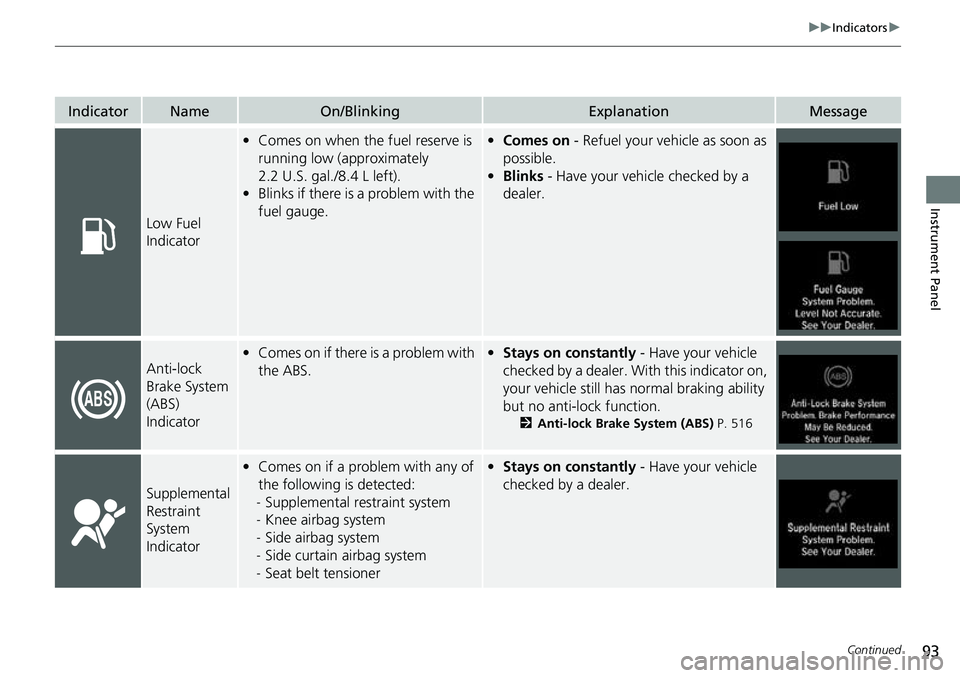
Low Fuel
Indicator
•Comes on when the fuel reserve is
running low (approximately
2.2 U.S. gal./8.4 L left).
• Blinks if there is a problem with the
fuel gauge.• Comes on - Refuel your vehicle as soon as
possible.
• Blinks - Have your vehicle checked by a
dealer.
Anti-lock
Brake System
(ABS)
Indicator•Comes on if there is a problem with
the ABS.• Stays on constantly - Have your vehicle
checked by a dealer. Wi th this indicator on,
your vehicle still has normal braking ability
but no anti-lock function.
2 Anti-lock Brake System (ABS) P. 516
Supplemental
Restraint
System
Indicator
•Comes on if a problem with any of
the following is detected:
- Supplemental restraint system
- Knee airbag system
- Side airbag system
- Side curtain airbag system
- Seat belt tensioner• Stays on constantly - Have your vehicle
checked by a dealer.
Page 114 of 657
112
uuIndicators uDriver Information Interface Wa rning and Information Messages
Instrument Panel
MessageConditionExplanation
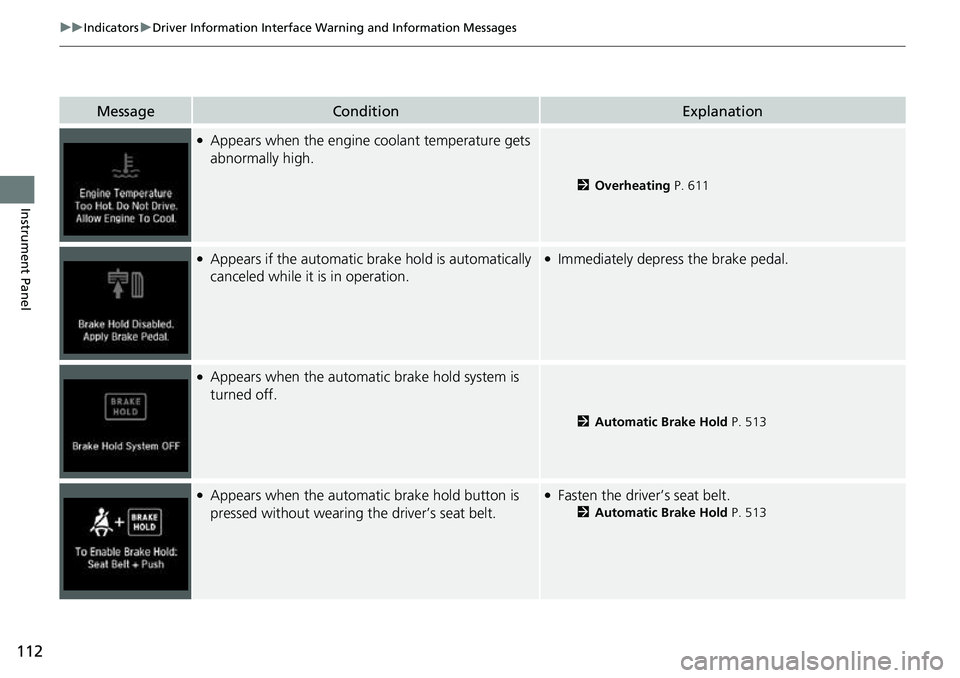
●Appears when the engine coolant temperature gets
abnormally high.
2 Overheating P. 611
●Appears if the automatic brake hold is automatically
canceled while it is in operation.●Immediately depress the brake pedal.
●Appears when the automa tic brake hold system is
turned off.
2 Automatic Brake Hold P. 513
●Appears when the automa tic brake hold button is
pressed without wearing the driver’s seat belt.●Fasten the driver’s seat belt.
2 Automatic Brake Hold P. 513
Page 121 of 657
119
uuIndicators uDriver Information Interface Wa rning and Information Messages
Continued
Instrument Panel
MessageConditionExplanation
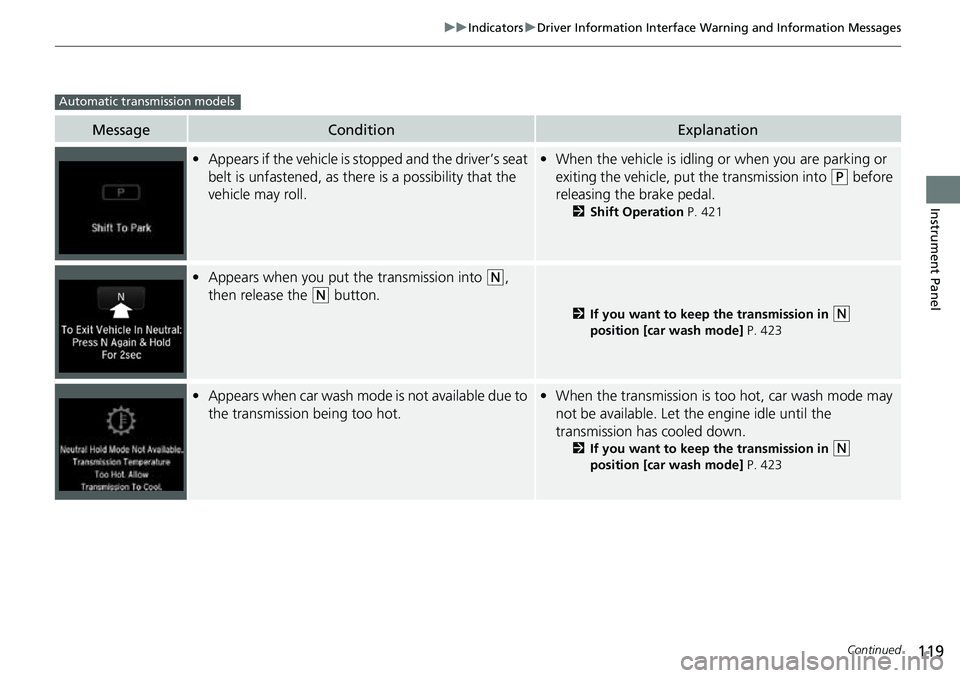
•Appears if the vehicle is st opped and the driver’s seat
belt is unfastened, as there is a possibility that the
vehicle may roll.• When the vehicle is idling or when you are parking or
exiting the vehicle, put the transmission into
(P before
releasing the brake pedal.
2 Shift Operation P. 421
•Appears when you put the transmission into (N,
then release the
(N button.
2 If you want to keep the transmission in (N
position [car wash mode] P. 423
•Appears when car wash mode is not available due to
the transmission being too hot.•When the transmission is too hot, car wash mode may
not be available. Let the engine idle until the
transmission has cooled down.
2 If you want to keep the transmission in (N
position [car wash mode] P. 423
Automatic transmission models
Page 122 of 657
120
uuIndicators uDriver Information Interface Wa rning and Information Messages
Instrument Panel
MessageConditionExplanation
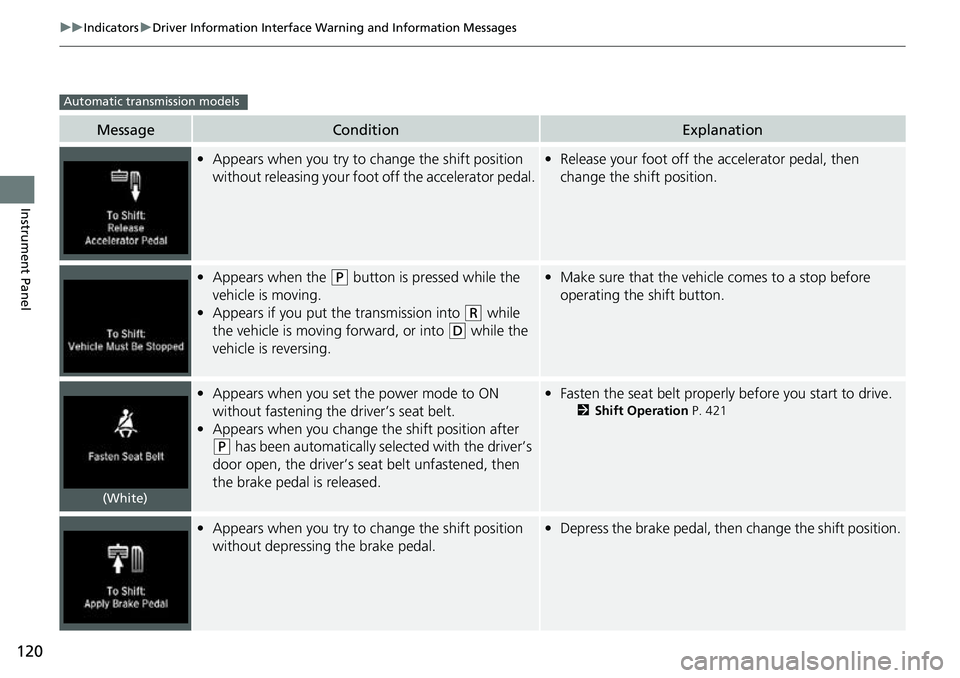
•Appears when you try to ch ange the shift position
without releasing your foot off the accelerator pedal.• Release your foot off the accelerator pedal, then
change the shift position.
• Appears when the (P button is pressed while the
vehicle is moving.
• Appears if you put the transmission into
(R while
the vehicle is moving forward, or into
(D while the
vehicle is reversing.
• Make sure that the vehicl e comes to a stop before
operating the shift button.
• Appears when you set the power mode to ON
without fastening the driver’s seat belt.
• Appears when you change the shift position after
(P has been automatically selected with the driver’s
door open, the driver’s se at belt unfastened, then
the brake pedal is released.
• Fasten the seat belt properly before you start to drive.
2 Shift Operation P. 421
•Appears when you try to ch ange the shift position
without depressing the brake pedal.• Depress the brake pedal, then change the shift position.
Automatic transmission models
(White)
Page 132 of 657
130
uuIndicators uDriver Information Interface Wa rning and Information Messages
Instrument Panel
MessageConditionExplanation
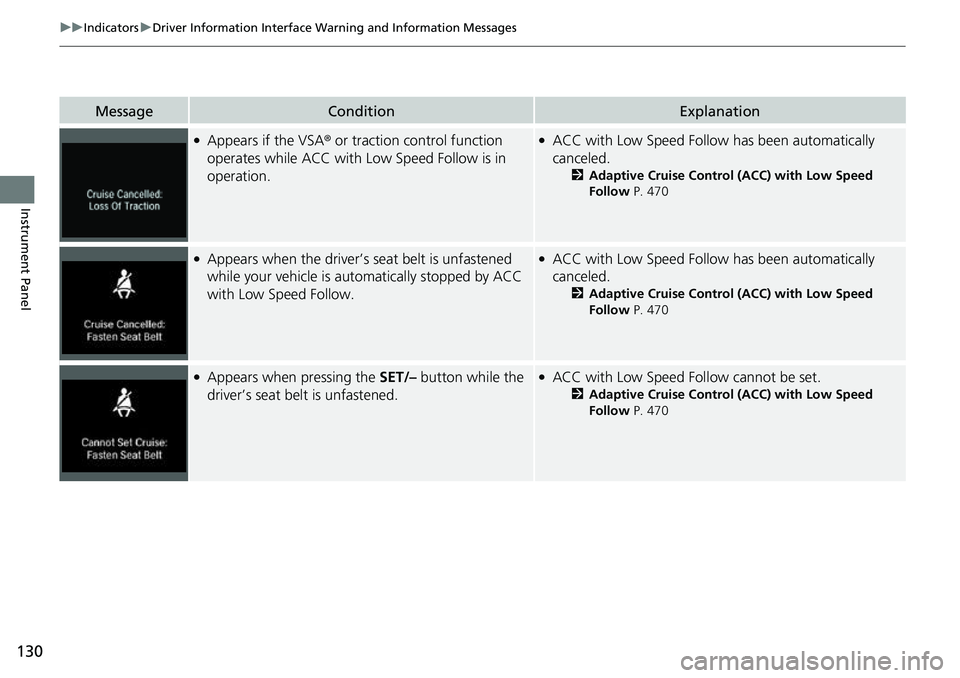
●Appears if the VSA® or traction control function
operates while ACC with Low Speed Follow is in
operation.●ACC with Low Speed Follow has been automatically
canceled.
2 Adaptive Cruise Control (ACC) with Low Speed
Follow P. 470
●Appears when the driver’s seat belt is unfastened
while your vehicle is au tomatically stopped by ACC
with Low Speed Follow.●ACC with Low Speed Follow has been automatically
canceled.
2 Adaptive Cruise Control (ACC) with Low Speed
Follow P. 470
●Appears when pressing the SET/– button while the
driver’s seat belt is unfastened.●ACC with Low Speed Foll ow cannot be set.
2Adaptive Cruise Control (ACC) with Low Speed
Follow P. 470
Page 143 of 657
141
uuGauges and Displays uDriver Information Interface
Continued
Instrument Panel
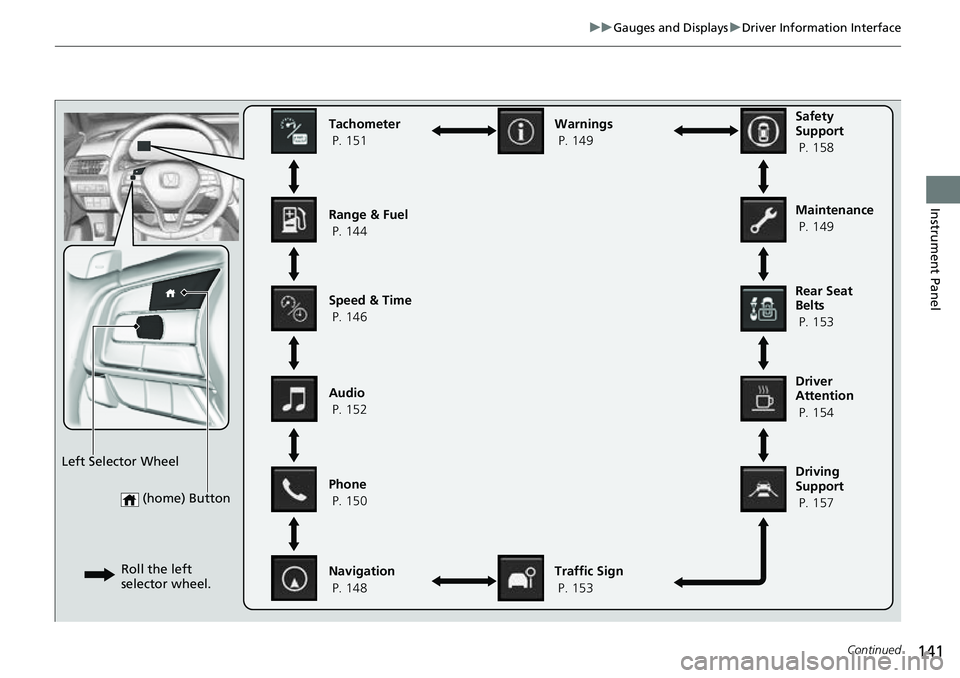
(home) Button
Tachometer
P. 151
Range & Fuel
P. 144
Speed & Time
P. 146
Navigation
P. 148 Traffic Sign
P. 153
Phone
P. 150 Audio
P. 152 Safety
Support
P. 158
Maintenance
P. 149
Warnings
P. 149
Left Selector Wheel Roll the left
selector wheel.
Driving
Support
P. 157 Driver
Attention
P. 154 Rear Seat
Belts
P. 153
Page 155 of 657
153
uuGauges and Displays uDriver Information Interface
Continued
Instrument Panel
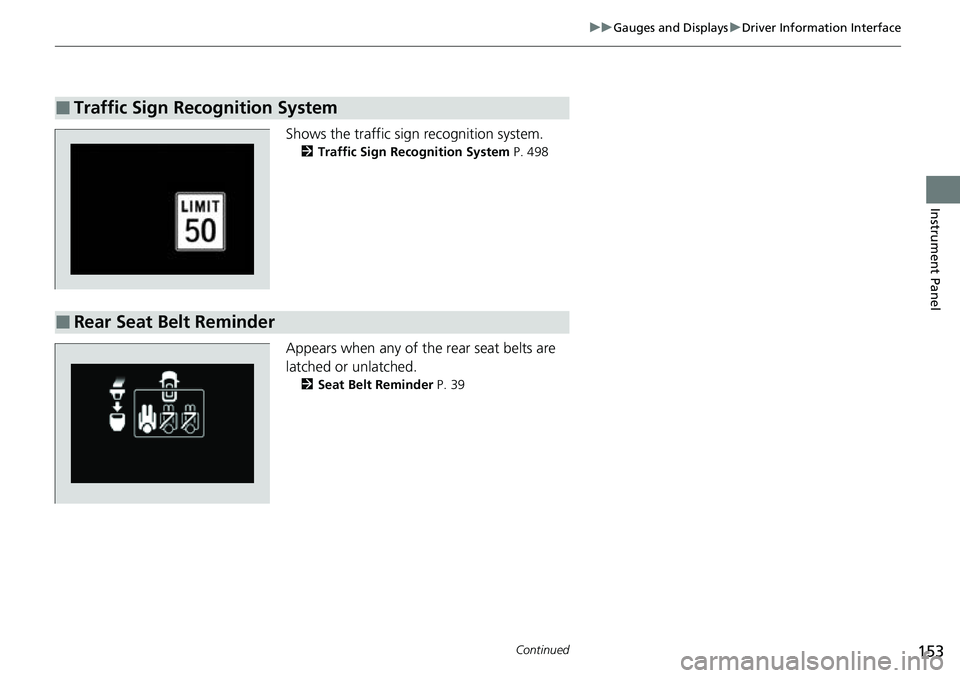
Shows the traffic sign recognition system.
2 Traffic Sign Recognition System P. 498
Appears when any of the rear seat belts are
latched or unlatched.
2Seat Belt Reminder P. 39
■Traffic Sign Recognition System
■Rear Seat Belt Reminder
Page 158 of 657
uuGauges and Displays uDriver Information Interface
156
Instrument Panel
■The Driver Attention Monitor resets when:
• The engine is turned off.
• The driver unfastens the seat belt and op ens the door while the vehicle is stopped.
■For the Driver Attention Monitor to function:
• The vehicle must be traveling above 25 mph (40 km/h).
• The electric power steering (EPS) system indicator must be off.
■Depending on driving conditions or other factors, the Driver Attention
Monitor may not function in the following circumstances:
• The steering assist function of the Lane Keeping Assist System (LKAS) is active.
2Lane Keeping Assist System (LKAS) P. 486
•The condition of the road is poor, e.g. the surface is unpaved or bumpy.
• It is windy.
• The driver is frequently op erating the vehicle in an assertive manner such as
changing lanes or accelerating.
■Customizing
You can change the Driver Attention Monitor settings. Select Tactile And Audible
Alert , Tactile Alert , or OFF.
2Customized Features P. 351
1For the Driver Attention Monitor to function:
The bars on the driver information interface remain
grayed out unless the Driv er Attention Monitor is
functioning.