power steering HONDA ACCORD 2022 Owners Manual
[x] Cancel search | Manufacturer: HONDA, Model Year: 2022, Model line: ACCORD, Model: HONDA ACCORD 2022Pages: 657, PDF Size: 11.42 MB
Page 32 of 657
30
Quick Reference Guide
What to Do If
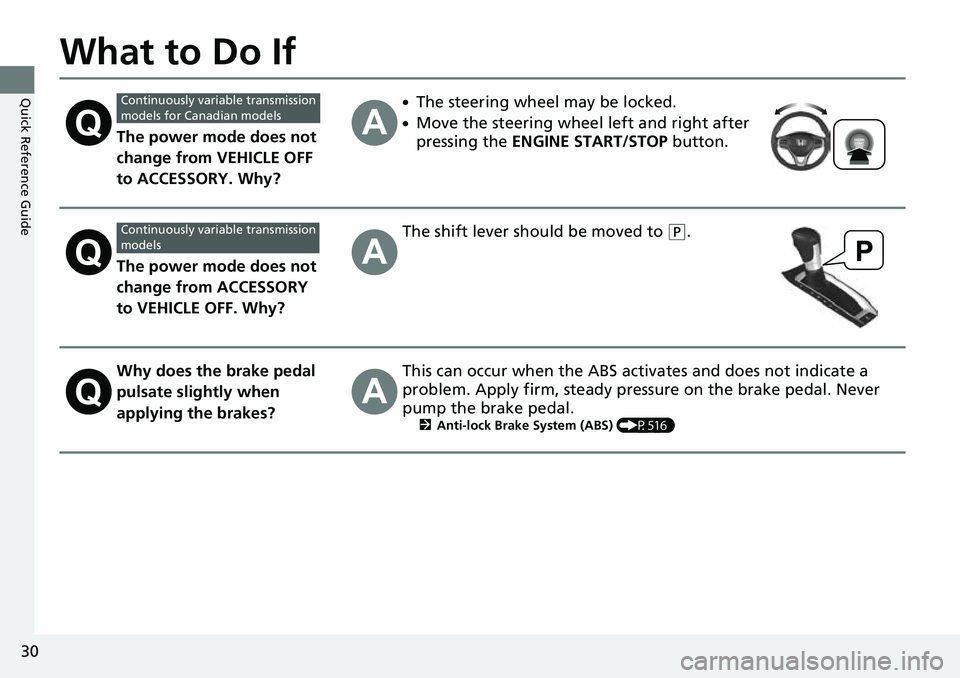
The power mode does not
change from VEHICLE OFF
to ACCESSORY. Why?
●The steering wheel may be locked.
●Move the steering wheel left and right after
pressing the ENGINE START/STOP button.
The power mode does not
change from ACCESSORY
to VEHICLE OFF. Why?
The shift lever should be moved to (P.
Why does the brake pedal
pulsate slightly when
applying the brakes?This can occur when the ABS activates and does not indicate a
problem. Apply firm, steady pressure on the brake pedal. Never
pump the brake pedal.
2Anti-lock Brake System (ABS) (P516)
Continuously variable transmission
models for Canadian models
Continuously variable transmission
models
Page 49 of 657

47
uuAirbags uAirbag System Components
Continued
Safe Driving
The front, front knee, side, and side curtain
airbags are deployed according to the
direction and severity of impact. Both side
curtain airbags are deployed in a rollover.
The airbag system includes:
aTwo SRS (Supplemental Restraint System)
front airbags. The driver’s airbag is stored
in the center of the steering wheel; the
front passenger’s airbag is stored in the
dashboard. Both are marked SRS
AIRBAG.
bTwo knee airbags. The driver’s knee
airbag is stored under the steering
column; the front passenger’s knee
airbag is stored under the glove box.
Both are marked SRS AIRBAG.
cTwo side airbags, one for the driver and
one for the front passenger. The airbags
are stored in the outer edges of the seat-
backs. Both are marked SIDE AIRBAG.
dTwo side curtain ai rbags, one for each
side of the vehicle. The airbags are stored
in the ceiling, above the side windows.
The front and rear pillars are marked
SIDE CURTAIN AIRBAG .
eAn electronic control unit that, when the
power mode is in ON, continually
monitors information about the various
impact sensors, seat and buckle sensors,
rollover sensor, airbag activators, seat
belt tensioners, and other vehicle
information. During a crash event the
unit can record such information.
fAutomatic front seat belt tensioners. In
addition, the driver’s and front
passenger’s seat belt buckles incorporate
sensors that detect whether or not the
belts are fastened.
gDriver’s seat position sensor. This sensor
detects the driver’s s eat slide position to
help determine the optimal deployment
of the driver’s airbag.
hWeight sensors in the front passenger’s
seat. The sensors are used for occupant
classification to activate or deactivate the
front passenger’s airbag.
iImpact sensors that can detect a
moderate-to-severe front or side impact.
jAn indicator on the dashboard that alerts
you that the front passenger’s front
airbag has been turned off.
kAn indicator on the instrument panel that
alerts you to a possib le problem with your
airbag system or seat belt tensioners.
lA rollover sensor that can detect if your
vehicle is about to ro ll over and signal the
control unit to deploy both side curtain
airbags.
Page 51 of 657
49
uuAirbags uTypes of Airbags
Continued
Safe Driving
Types of Airbags
Your vehicle is equipped with four types of airbags:
• Front airbags: Airbags in front of the driver’s and front passenger’s seats.
• Front knee airbags: Airbags under the steering co lumn and under the glove
box.
• Side airbags: Airbags in the driver’s and front passenger’s seat-backs.
• Side curtain airbags: Airbags above the side windows.
Each is discussed in the following pages.
Front Airbags (SRS)
The front SRS airbags inflate in a moderate-to-severe frontal collision to help protect
the head and chest of the driver and/or front passenger.
SRS (Supplemental Restraint System) indica tes that the airbags are designed to
supplement seat belts, not replace them . Seat belts are the occupant’s primary
restraint system.
The front airbags are housed in the center of the steering wheel for the driver, and
in the dashboard for the front pass enger. Both airbags are marked SRS AIRBAG.
■Housing Locations
1Types of Airbags
The airbags can inflate whenever the power mode is
in ON.
After an airbag inflates in a crash, you may see a
small amount of smoke. This is from the combustion
process of the infl ator material and is not harmful.
People with respiratory pr oblems may experience
some temporary discomfort. If this occurs, get out of
the vehicle as soon as it is safe to do so.
1 Front Airbags (SRS)
During a frontal crash severe enough to cause one or
both front airbags to deploy, the airbags can inflate
at different rates, dependi ng on the severity of the
crash, whether or not the se at belts are latched, and/
or other factors. Frontal airbags are designed to
supplement the seat belts to help reduce the
likelihood of head and chest injuries in frontal
crashes.
Page 84 of 657
82
Instrument Panel
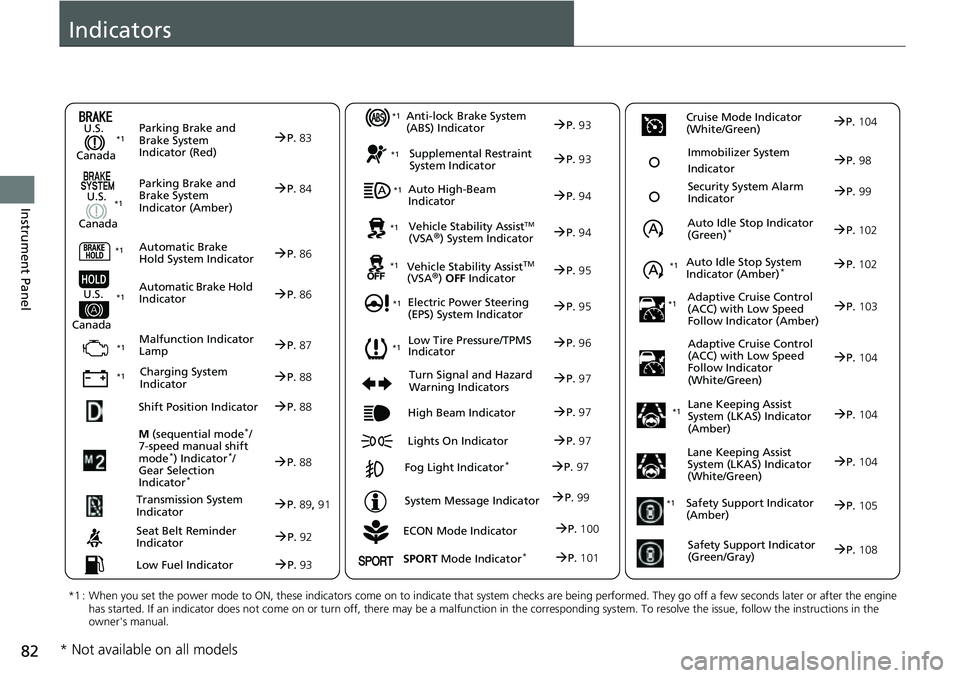
Indicators
ECON Mode Indicator
M
(sequential mode
*/
7-speed manual shift
mode
*) Indicator*/
Gear Selection
Indicator
*
P. 88
Parking Brake and
Brake System
Indicator (Red)
Parking Brake and
Brake System
Indicator (Amber)
U.S.
Canada
U.S.
Canada Automatic Brake
Hold System Indicator
Automatic Brake Hold
IndicatorU.S.
Canada
*1 : When you set the power mode to ON, these indicators come on to indicate that system checks are being performed. They go off a few seconds later or after the engine
has started. If an indicator does not come on or turn off, ther e may be a malfunction in the corresponding system. To resolve the issue, follow the instructions in the
owner's manual.
P. 83*1
Malfunction Indicator
Lamp
Charging System
Indicator
Anti-lock Brake System
(ABS) Indicator
Seat Belt Reminder
Indicator
Low Fuel Indicator
Vehicle Stability AssistTM (VSA®) System Indicator
Vehicle Stability Assist
TM (VSA®) OFF Indicator
Supplemental Restraint
System Indicator
Auto High-Beam
Indicator
Low Tire Pressure/TPMS
Indicator
Electric Power Steering
(EPS) System Indicator
Turn Signal and Hazard
Warning Indicators
Lights On Indicator High Beam Indicator
Fog Light Indicator*
System Message Indicator Auto Idle Stop Indicator
(Green)
*
Lane Keeping Assist
System (LKAS) Indicator
(Amber)
Safety Support Indicator
(Amber)
Safety Support Indicator
(Green/Gray)
P. 84
P.86
P.86
P.87
P.88
*1
*1 *1 *1
P.
96*1
*1
Shift Position IndicatorP. 88
Transmission System
Indic a
torP.89, 91
P.92
P.93
P.93
P.93
P.94
P.94
*1
*1
*1
*1
P. 95
*1P.95
P.97
P.102
*1
P.97
P.97
P.97 Security System Alarm
Indica
to
r P.99
P.99
P. 104
P.105
P.108
*1Auto Idle Stop System
Indicator (Amber)*P.102
*1
Lane Keeping Assist
System (LKAS) Indicator
(White/Green)P.104
*1
Immobilizer System
IndicatorP.98
SPORT Mode Indicator*P.101
P.100
Cruise Mode Indicator
(White/Green)P. 104
Adaptive Cruise Control
(A C
C) with Low Speed
Follow Indicator (Amber)P. 103*1
Adaptive Cruise Control
(ACC) with Low Speed
Follow Indicator
(White/Green)P.104
* Not available on all models
Page 97 of 657
95
uuIndicators u
Continued
Instrument Panel
IndicatorNameOn/BlinkingExplanationMessage
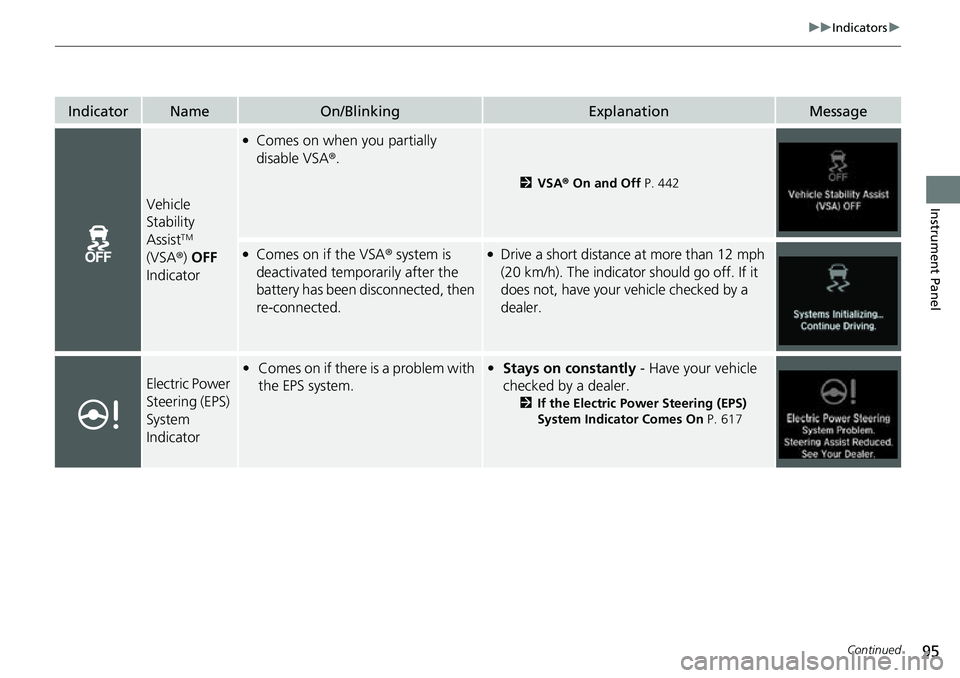
Vehicle
Stability
Assist
TM
(VSA ®) OFF
Indicator
●Comes on when you partially
disable VSA ®.
2VSA ® On and Off P. 442
●Comes on if the VSA ® system is
deactivated temporarily after the
battery has been disconnected, then
re-connected.●Drive a short distance at more than 12 mph
(20 km/h). The indicator should go off. If it
does not, have your vehicle checked by a
dealer.
Electric Power
Steering (EPS)
System
Indicator• Comes on if there is a problem with
the EPS system.• Stays on constantly - Have your vehicle
checked by a dealer.
2 If the Electric Power Steering (EPS)
System Indicator Comes On P. 617
Page 116 of 657
114
uuIndicators uDriver Information Interface Wa rning and Information Messages
Instrument Panel
MessageConditionExplanation
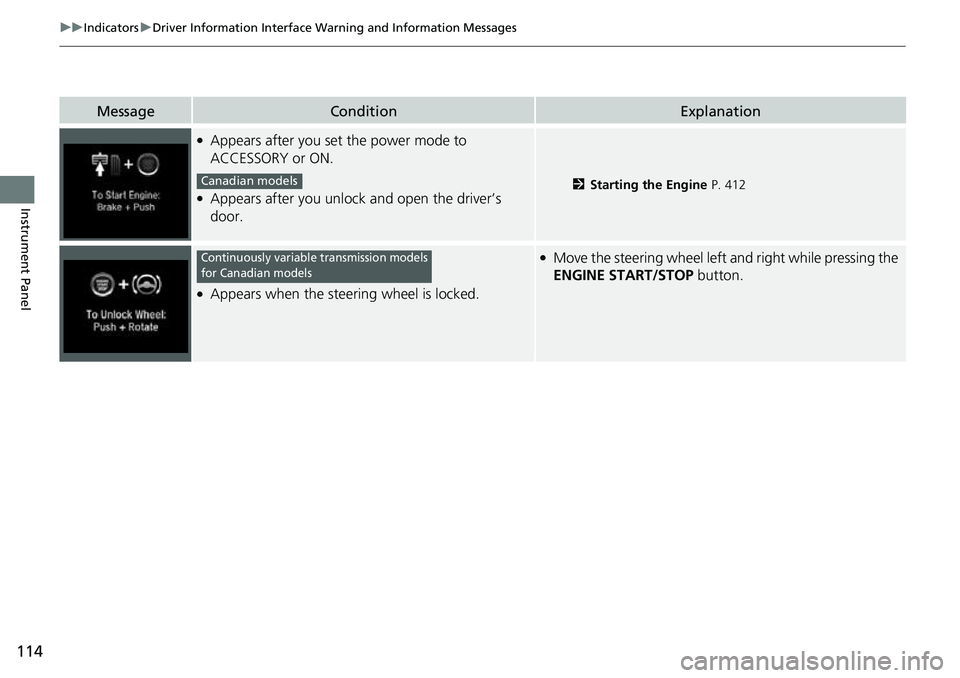
●Appears after you set the power mode to
ACCESSORY or ON.
●Appears after you unlock and open the driver’s
door.2Starting the Engine P. 412
●Appears when the steering wheel is locked.
●Move the steering wheel left and right while pressing the
ENGINE START/STOP button.
Canadian models
Continuously variable transmission models
for Canadian models
Page 158 of 657
uuGauges and Displays uDriver Information Interface
156
Instrument Panel
■The Driver Attention Monitor resets when:
• The engine is turned off.
• The driver unfastens the seat belt and op ens the door while the vehicle is stopped.
■For the Driver Attention Monitor to function:
• The vehicle must be traveling above 25 mph (40 km/h).
• The electric power steering (EPS) system indicator must be off.
■Depending on driving conditions or other factors, the Driver Attention
Monitor may not function in the following circumstances:
• The steering assist function of the Lane Keeping Assist System (LKAS) is active.
2Lane Keeping Assist System (LKAS) P. 486
•The condition of the road is poor, e.g. the surface is unpaved or bumpy.
• It is windy.
• The driver is frequently op erating the vehicle in an assertive manner such as
changing lanes or accelerating.
■Customizing
You can change the Driver Attention Monitor settings. Select Tactile And Audible
Alert , Tactile Alert , or OFF.
2Customized Features P. 351
1For the Driver Attention Monitor to function:
The bars on the driver information interface remain
grayed out unless the Driv er Attention Monitor is
functioning.
Page 161 of 657
159
uuGauges and Displays uHead-Up Display*
Continued
Instrument Panel
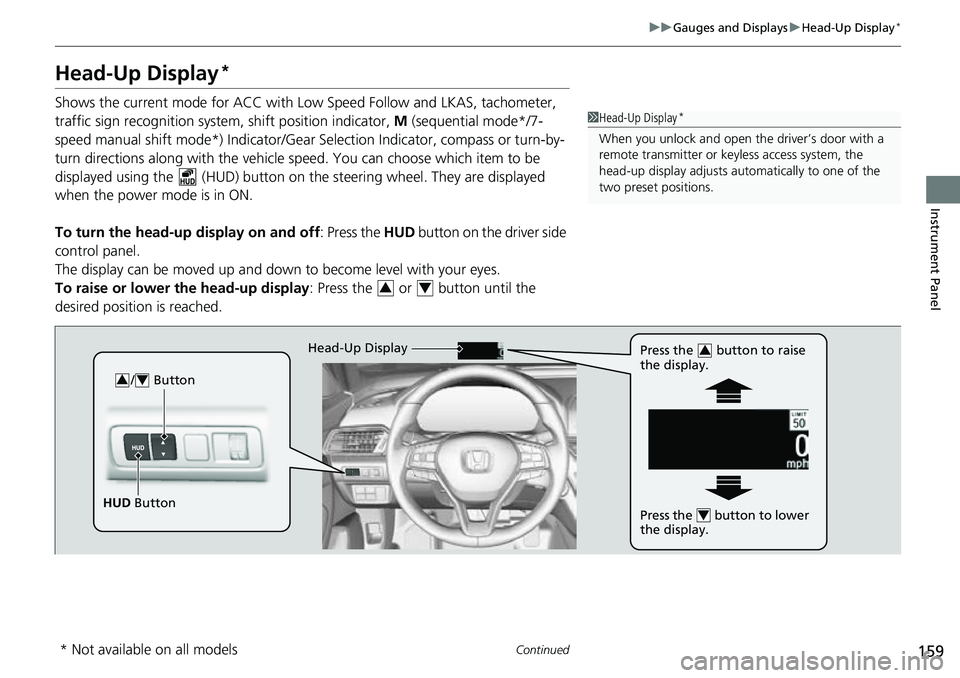
Head-Up Display*
Shows the current mode for ACC with Lo w Speed Follow and LKAS, tachometer,
traffic sign recognition system, shift position indicator, M (sequential mode*/7-
speed manual shift mode*) Indicator/Gear Selection Indicator, compass or turn-by-
turn directions along with the vehicle speed. You can choose which item to be
displayed using the (HUD) button on th e steering wheel. They are displayed
when the power mode is in ON.
To turn the head-up display on and off: Press the HUD button on the driver side
control panel.
The display can be moved up and down to become level with your eyes.
To raise or lower the head-up display : Press the or button until the
desired position is reached.1 Head-Up Display*
When you unlock and open the driver’s door with a
remote transmitter or keyless access system, the
head-up display adjusts auto matically to one of the
two preset positions.
34
/ Button34
HUD Button Head-Up Display
Press the button to raise
the display.
3
Press the button to lower
the display.4
* Not available on all models
Page 167 of 657
165
Controls
This chapter explains how to operate the various controls necessary for driving.
Clock.................................................. 166
Locking and Unlocking the Doors
Key .................................................. 167
Low Keyless Remote Signal Strength ... 169
Locking/Unlocking the Doors from the Outside .......................................... 170
Locking/Unlocking the Doors from the
Inside ............................................. 177
Childproof Door Locks ..................... 179
Auto Door Locking/Unlocking .......... 180
Opening and Closing the Trunk ....... 181
Security System
Immobilizer System .......................... 184
Security System Alarm ...................... 185
Windows ........................................... 187 Moonroof*........................................ 190
Operating the Switches Around the
Steering Wheel ENGINE START/STOP Button............. 191
Turn Signals ..................................... 194
Light Switches.................................. 195
Fog Lights
*...................................... 197
Daytime Running Lights ................... 198
Auto High-Beam .............................. 199
Wipers and Washers ........................ 202
Rear Defogger/Heat ed Door Mirror
*
Button ........................................... 204 Heated Windshield Button ............... 204
Brightness Control ........................... 205
Driving Position Memory System
*.... 207
Adjusting the Steering Wheel .......... 209
Mirrors Interior Rearview Mirror ................... 210
Power Door Mirrors ......................... 211
Seats .................................................. 212
Interior Convenience Items .............. 223
Climate Control System Using Automatic Climate Control .... 240
Automatic Climate Control Sensors ... 243
Canadian models
* Not available on all models
Page 193 of 657
191Continued
Controls
Operating the Switches Around the Steering Wheel
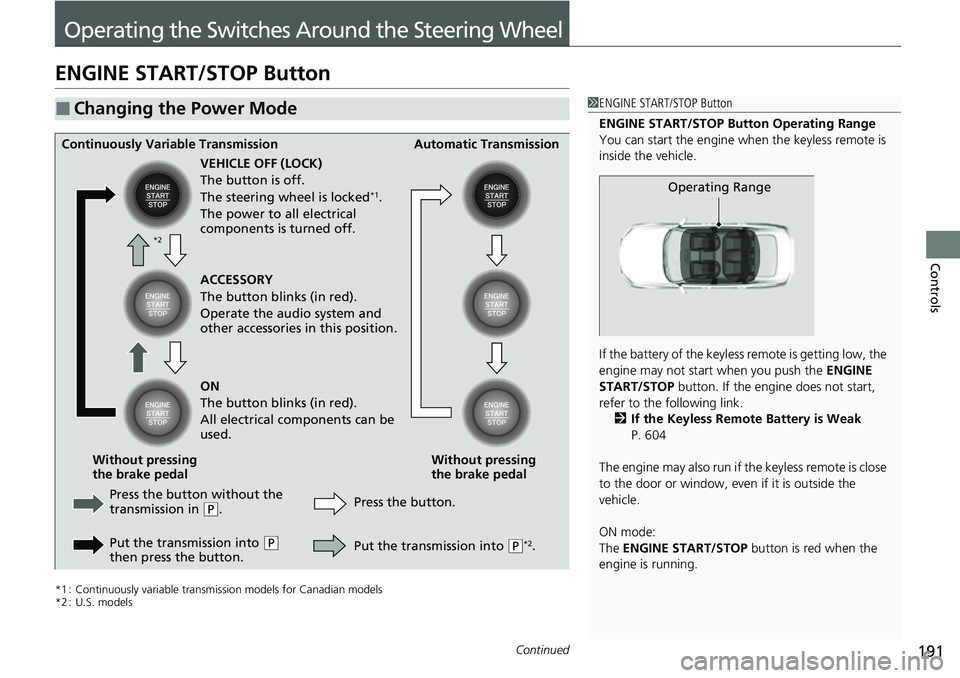
ENGINE START/STOP Button
*1 : Continuously variable transmission models for Canadian models
*2 : U.S. models
■Changing the Power Mode1ENGINE START/STOP Button
ENGINE START/STOP Button Operating Range
You can start the engine when the keyless remote is
inside the vehicle.
If the battery of the keyless remote is getting low, the
engine may not start when you push the ENGINE
START/STOP button. If the engi ne does not start,
refer to the following link. 2 If the Keyless Remote Battery is Weak
P. 604
The engine may also run if the keyless remote is close
to the door or window, even if it is outside the
vehicle.
ON mode:
The ENGINE START/STOP button is red when the
engine is running.
Operating Range
Continuously Variable Transmission Automatic Transmission
VEHICLE OFF (LOCK)
The button is off.
The steering wheel is locked
*1.
The power to all electrical
components is turned off.
Press the button without the
transmission in
( P.
Put the transmission into
( P
then press the button. Press the button.
Without pressing
the brake pedal
Without pressing
the brake pedal ACCESSORY
The button blinks (in red).
Operate the audio system and
other accessories in this position.
ON
The button blinks (in red).
All electrical components can be
used.
Put the transmission into (P*2.
*2