lock HONDA ACCORD 2023 Repair Manual
[x] Cancel search | Manufacturer: HONDA, Model Year: 2023, Model line: ACCORD, Model: HONDA ACCORD 2023Pages: 533, PDF Size: 20.09 MB
Page 190 of 533
uuSeats uHead Restraints
188
Controls
Head restraints can be removed for cleaning or repair.
To remove a head restraint:
Pull the restraint up as far as it will go. Then, push the release button and pull the
restraint up and out.
To reinstall a head restraint:
Insert the legs back in place, then adjust the head restraint to an appropriate height
while pressing the release button. Pull up on the restraint to make sure it is locked
in position.
■Removing and Reinstalling the Front Head Restraints1 Removing and Reinstalling the Front Head Restraints
3WARNING
Failure to reinstall or correctly reinstall, the
head restraints can result in severe injury
during a crash.
Always replace the he ad restraints before
driving.
23 ACCORD 4D US PET MAP-3130A6000_01.book 188 ページ 2022年10月19日 水曜日 午前11時49分
Page 192 of 533
190
Controls
Interior Convenience Items
Interior Lights
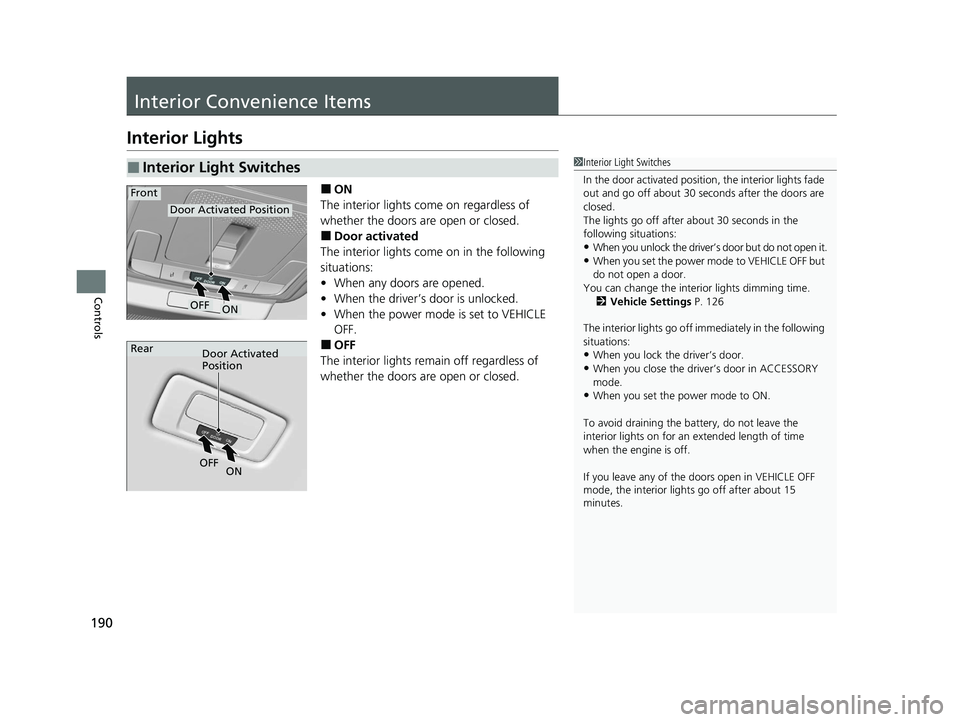
■ON
The interior lights come on regardless of
whether the doors are open or closed.
■Door activated
The interior lights come on in the following
situations:
• When any doors are opened.
• When the driver’s door is unlocked.
• When the power mode is set to VEHICLE
OFF.
■OFF
The interior lights remain off regardless of
whether the doors are open or closed.
■Interior Light Switches1 Interior Light Switches
In the door activated position, the interior lights fade
out and go off about 30 seconds after the doors are
closed.
The lights go off after about 30 seconds in the
following situations:
•When you unlock the driver’s door but do not open it.
•When you set the power mode to VEHICLE OFF but
do not open a door.
You can change the interi or lights dimming time.
2 Vehicle Settings P. 126
The interior lights go off im mediately in the following
situations:
•When you lock the driver’s door.
•When you close the driver’s door in ACCESSORY
mode.
•When you set the power mode to ON.
To avoid draining the ba ttery, do not leave the
interior lights on for an extended length of time
when the engine is off.
If you leave any of the doors open in VEHICLE OFF
mode, the interior light s go off after about 15
minutes.
Door Activated Position
ON
Front
OFF
Door Activated
Position
Rear
ON
OF
F
23 ACCORD 4D US PET MAP-3130A6000_01.book 190 ページ 2022年10月19日 水曜日 午前11時49分
Page 194 of 533
192
uuInterior Convenience Items uStorage Items
Controls
Storage Items
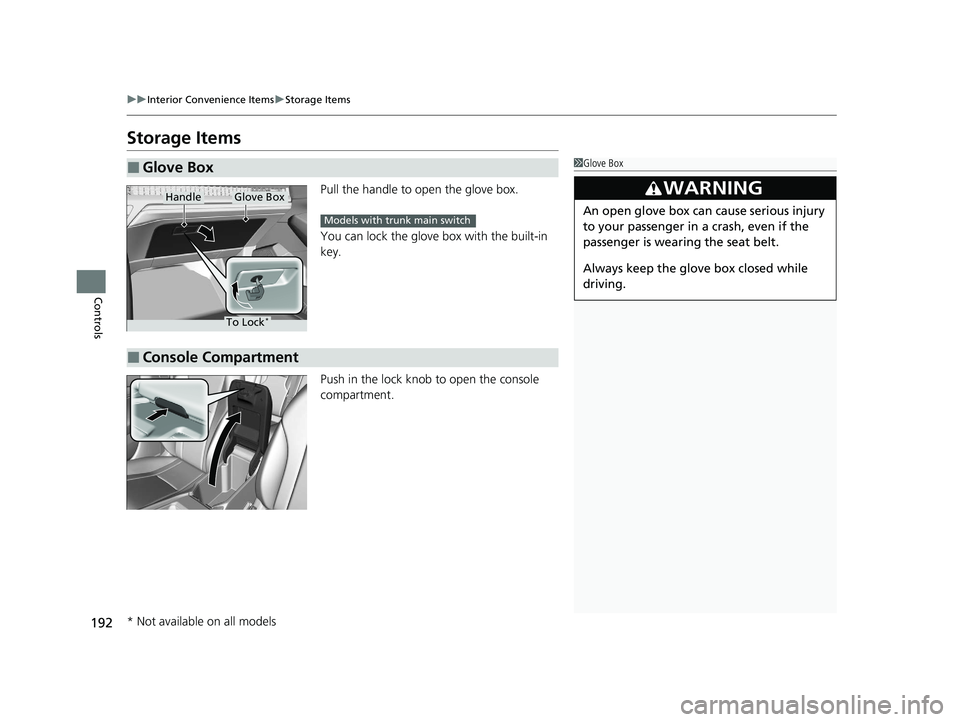
Pull the handle to open the glove box.
You can lock the glove box with the built-in
key.
Push in the lock knob to open the console
compartment.
■Glove Box1Glove Box
3WARNING
An open glove box can cause serious injury
to your passenger in a crash, even if the
passenger is wearing the seat belt.
Always keep the glove box closed while
driving.
Glove BoxHandle
To Lock*
Models with trunk main switch
■Console Compartment
* Not available on all models
23 ACCORD 4D US PET MAP-3130A6000_01.book 192 ページ 2022年10月19日 水曜日 午前11時49分
Page 213 of 533
211
Features
Audio System Basic Operation
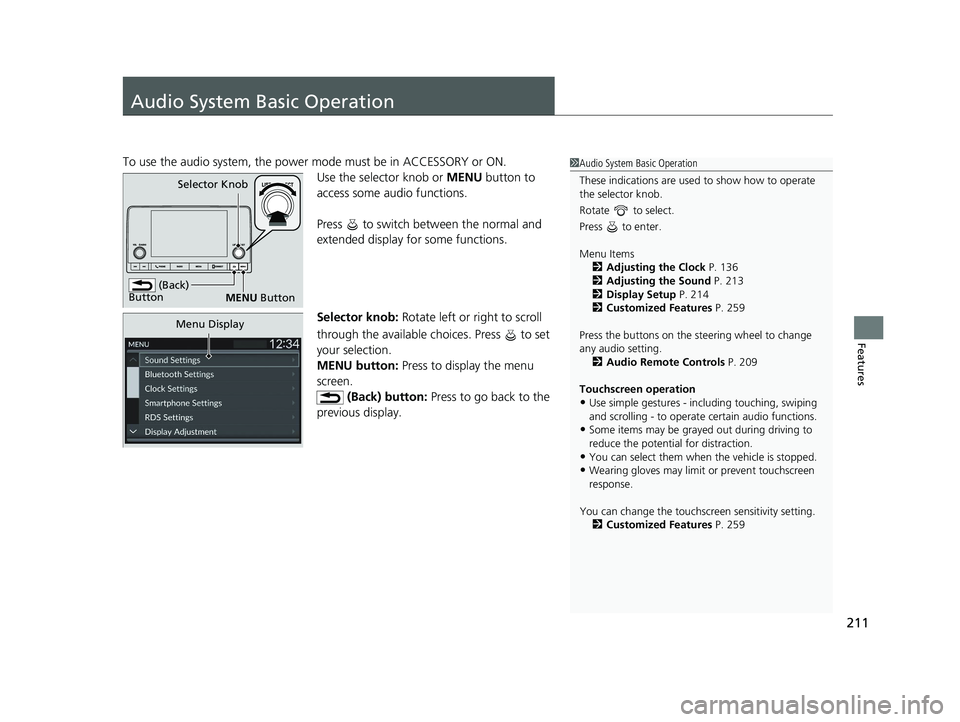
To use the audio system, the power mode must be in ACCESSORY or ON.Use the selector knob or MENU button to
access some au dio functions.
Press to switch between the normal and
extended display fo r some functions.
Selector knob: Rotate left or right to scroll
through the available choices. Press to set
your selection.
MENU button: Press to display the menu
screen.
(Back) button: Press to go back to the
previous display.1 Audio System Basic Operation
These indications are used to show how to operate
the selector knob.
Rotate to select.
Press to enter.
Menu Items 2 Adjusting the Clock P. 136
2 Adjusting the Sound P. 213
2 Display Setup P. 214
2 Customized Features P. 259
Press the buttons on the steering wheel to change
any audio setting. 2 Audio Remote Controls P. 209
Touchscreen operation
•Use simple gestures - in cluding touching, swiping
and scrolling - to operate certain audio functions.
•Some items may be grayed out during driving to
reduce the potential for distraction.
•You can select them when the vehicle is stopped.•Wearing gloves may limit or prevent touchscreen
response.
You can change the touchs creen sensitivity setting.
2 Customized Features P. 259
(Back)
Button
Selector Knob
MENU Button
Menu Display
23 ACCORD 4D US PET MAP-3130A6000_01.book 211 ページ 2022年10月19日 水曜日 午前11時49分
Page 241 of 533
239
Features
General Information on the Audio System
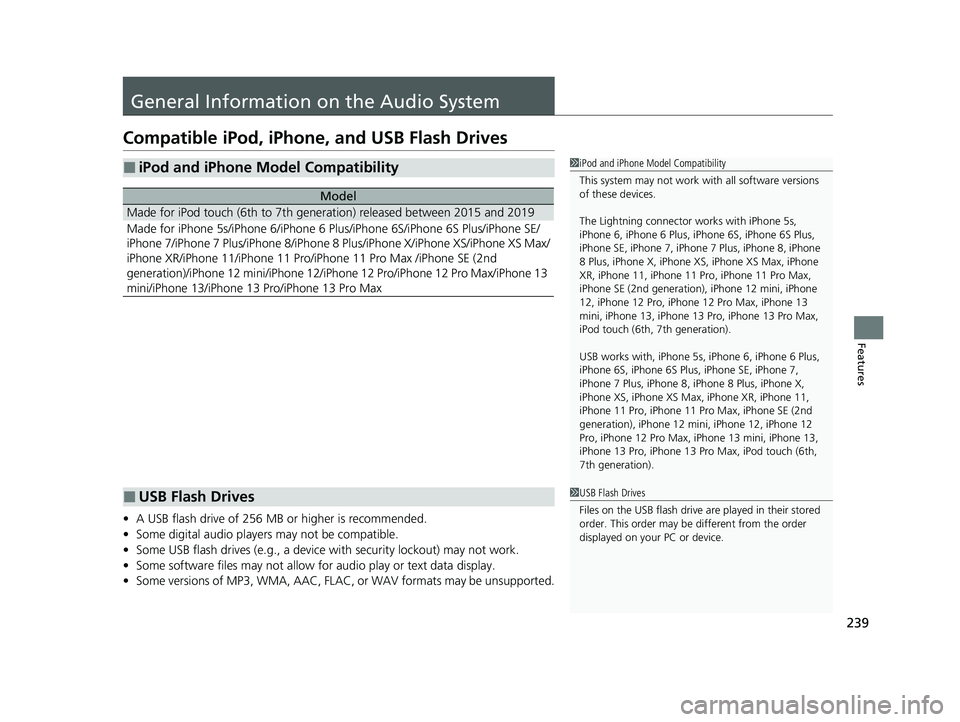
Compatible iPod, iPhone , and USB Flash Drives
•A USB flash drive of 256 MB or higher is recommended.
• Some digital audio players may not be compatible.
• Some USB flash drives (e.g., a device with security lockout) may not work.
• Some software files may not allow for audio play or text data display.
• Some versions of MP3, WMA, AAC, FLAC, or WAV formats may be unsupported.
■iPod and iPhone Model Compatibility
Model
Made for iPod touch (6th to 7th generation) released between 2015 and 2019
Made for iPhone 5s/iPhone 6/iPhone 6 Plus/iPhone 6S/iPhone 6S Plus/iPhone SE/
iPhone 7/iPhone 7 Plus/iPhone 8/iPhone 8 Plus/iPhone X/iPhone XS/iPhone XS Max/
iPhone XR/iPhone 11/iPhone 11 Pro/iPhone 11 Pro Max /iPhone SE (2nd
generation)/iPhone 12 mini/iPhone 12/iP hone 12 Pro/iPhone 12 Pro Max/iPhone 13
mini/iPhone 13/iPhone 13 Pro/iPhone 13 Pro Max
1 iPod and iPhone Model Compatibility
This system may not work with all software versions
of these devices.
The Lightning connector wo rks with iPhone 5s,
iPhone 6, iPhone 6 Plus, iPhone 6S, iPhone 6S Plus,
iPhone SE, iPhone 7, iPhone 7 Plus, iPhone 8, iPhone
8 Plus, iPhone X, iPhone XS, iPhone XS Max, iPhone
XR, iPhone 11, iPhone 11 Pro, iPhone 11 Pro Max,
iPhone SE (2nd generation), iPhone 12 mini, iPhone
12, iPhone 12 Pro, iPhone 12 Pro Max, iPhone 13
mini, iPhone 13, iPhone 13 Pro, iPhone 13 Pro Max,
iPod touch (6th, 7th generation).
USB works with, iPhone 5s, iPhone 6, iPhone 6 Plus,
iPhone 6S, iPhone 6S Plus, iPhone SE, iPhone 7,
iPhone 7 Plus, iPhone 8, iPhone 8 Plus, iPhone X,
iPhone XS, iPhone XS Ma x, iPhone XR, iPhone 11,
iPhone 11 Pro, iPhone 11 Pr o Max, iPhone SE (2nd
generation), iPhone 12 mi ni, iPhone 12, iPhone 12
Pro, iPhone 12 Pro Max, iPhone 13 mini, iPhone 13,
iPhone 13 Pro, iPhone 13 Pro Max, iPod touch (6th,
7th generation).
■USB Flash Drives1 USB Flash Drives
Files on the USB flash drive are played in their stored
order. This order may be different from the order
displayed on your PC or device.
23 ACCORD 4D US PET MAP-3130A6000_01.book 239 ページ 2022年10月19日 水曜日 午前11時49分
Page 262 of 533
260
uuCustomized Features u
Features
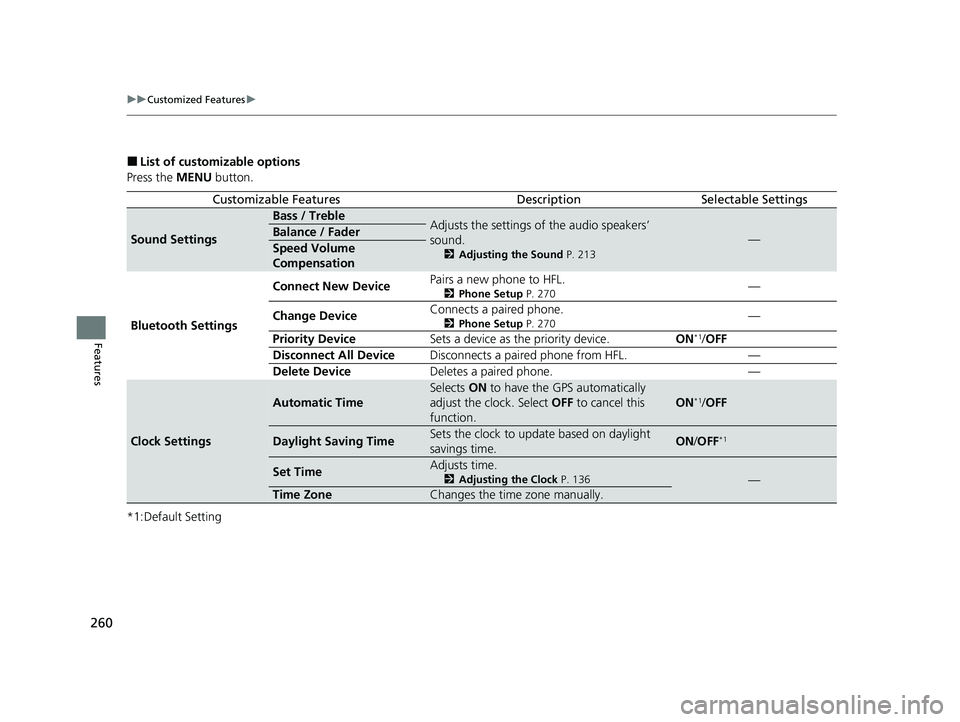
■List of customizable options
Press the MENU button.
*1:Default Setting
Customizable FeaturesDescriptionSelectable Settings
Sound Settings
Bass / TrebleAdjusts the settings of the audio speakers’
sound.
2 Adjusting the Sound P. 213
—Balance / Fader
Speed Volume
Compensation
Bluetooth Settings Connect New Device
Pairs a new phone to HFL.
2
Phone Setup P. 270—
Change Device Connects a paired phone.
2
Phone Setup P. 270—
Priority Device Sets a device as the priority device. ON
*1/OFF
Disconnect All Device Disconnects a paired phone from HFL. —
Delete Device Deletes a paired phone. —
Clock Settings
Automatic Time
Selects ON to have the GPS automatically
adjust the clock. Select OFF to cancel this
function.
ON*1/ OFF
Daylight Saving TimeSets the clock to update based on daylight
savings time.ON /OFF*1
Set TimeAdjusts time.
2 Adjusting the Clock P. 136—
Time ZoneChanges the time zone manually.
23 ACCORD 4D US PET MAP-3130A6000_01.book 260 ページ 2022年10月19日 水曜日 午前11時49分
Page 291 of 533
289
Driving
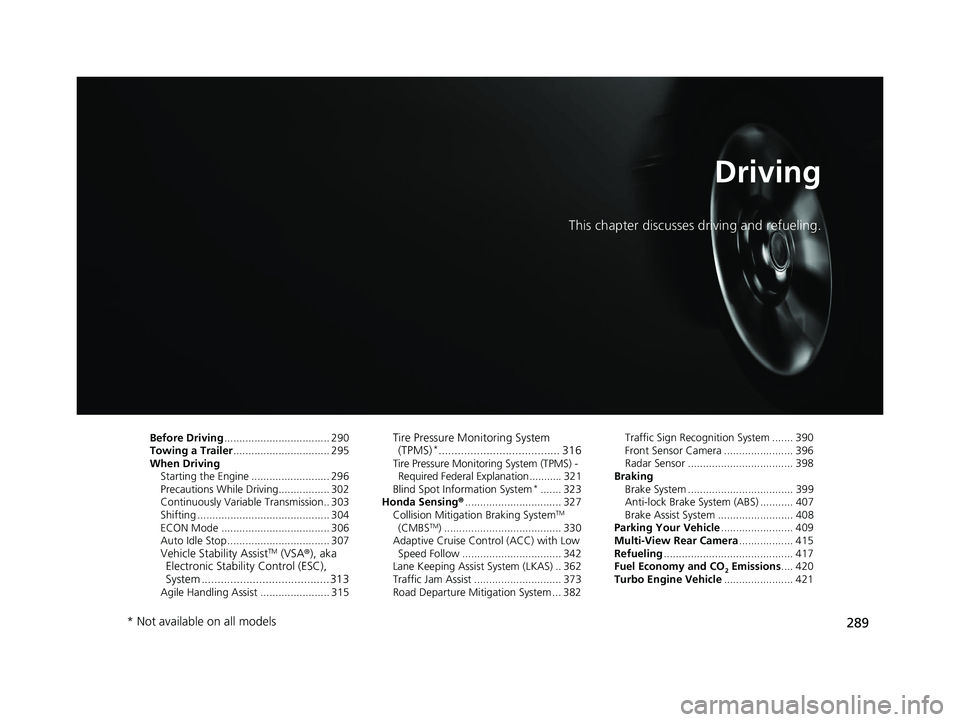
This chapter discusses driving and refueling.
Before Driving................................... 290
Towing a Trailer ................................ 295
When Driving
Starting the Engine .......................... 296
Precautions While Driving................. 302
Continuously Variable Transmission.. 303
Shifting ............................................ 304
ECON Mode .................................... 306
Auto Idle Stop .................................. 307
Vehicle Stability AssistTM (VSA® ), aka
Electronic Stability Control (ESC),
System ........................................ 313
Agile Handling Assist ....................... 315
Tire Pressure Monitoring System (TPMS)*...................................... 316Tire Pressure Monitoring System (TPMS) -
Required Federal Explanation ........... 321
Blind Spot Information System
*....... 323
Honda Sensing ®................................ 327
Collision Mitigati on Braking System
TM
(CMBSTM) ....................................... 330
Adaptive Cruise Control (ACC) with Low
Speed Follow ................................. 342
Lane Keeping Assist System (LKAS) .. 362
Traffic Jam Assist ............................. 373
Road Departure Mitigation System ... 382 Traffic Sign Recognition System ....... 390
Front Sensor Camera ....................... 396
Radar Sensor ................................... 398
Braking Brake System ................................... 399
Anti-lock Brake System (ABS) ........... 407
Brake Assist System ......................... 408
Parking Your Vehicle ........................ 409
Multi-View Rear Camera .................. 415
Refueling ........................................... 417
Fuel Economy and CO
2 Emissions .... 420
Turbo Engine Vehicle ....................... 421
* Not available on all models
23 ACCORD 4D US PET MAP-3130A6000_01.book 289 ページ 2022年10月19日 水曜日 午前11時49分
Page 292 of 533
290
Driving
Before Driving
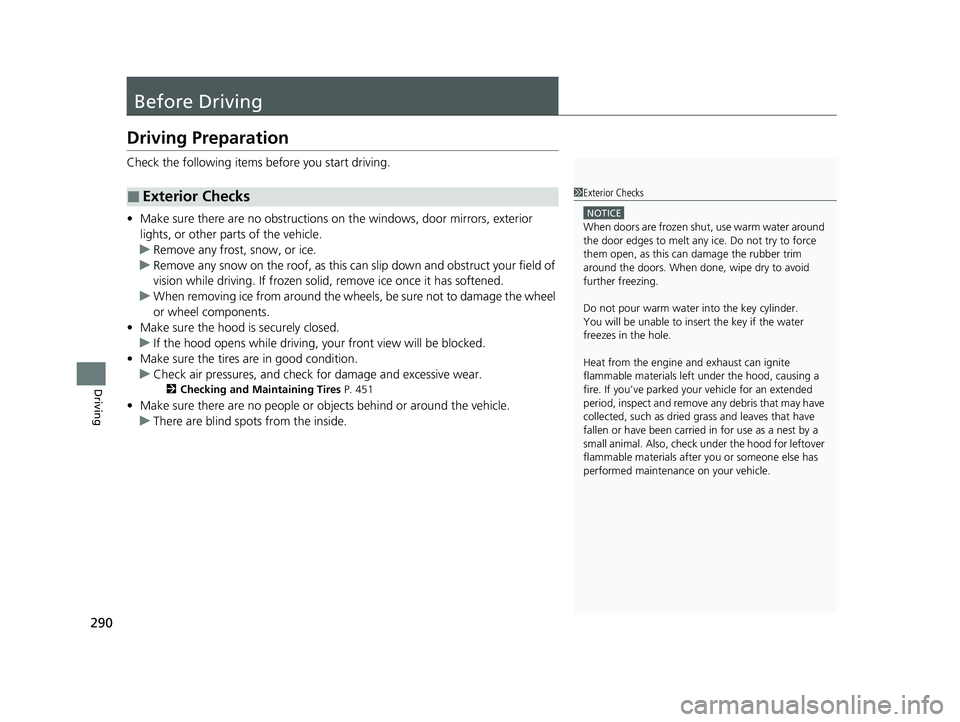
Driving Preparation
Check the following items before you start driving.
• Make sure there are no obstructions on the windows, door mirrors, exterior
lights, or other parts of the vehicle.
u Remove any frost, snow, or ice.
u Remove any snow on the roof, as this can slip down and obstruct your field of
vision while driving. If frozen solid , remove ice once it has softened.
u When removing ice from around the wheels, be sure not to damage the wheel
or wheel components.
• Make sure the hood is securely closed.
u If the hood opens while driving, your front view will be blocked.
• Make sure the tires are in good condition.
u Check air pressures, and check for damage and excessive wear.
2Checking and Maintaining Tires P. 451
•Make sure there are no people or ob jects behind or around the vehicle.
u There are blind spots from the inside.
■Exterior Checks1Exterior Checks
NOTICE
When doors are frozen s hut, use warm water around
the door edges to melt any ice. Do not try to force
them open, as this can damage the rubber trim
around the doors. When done, wipe dry to avoid
further freezing.
Do not pour warm water into the key cylinder.
You will be unable to insert the key if the water
freezes in the hole.
Heat from the engine and exhaust can ignite
flammable material s left under the hood, causing a
fire. If you’ve parked y our vehicle for an extended
period, inspect and remove any debris that may have
collected, such as dried grass and leaves that have
fallen or have been carried in for use as a nest by a
small animal. Also, check under the hood for leftover
flammable materials after you or someone else has
performed maintenance on your vehicle.
23 ACCORD 4D US PET MAP-3130A6000_01.book 290 ページ 2022年10月19日 水曜日 午前11時49分
Page 293 of 533
Continued291
uuBefore Driving uDriving Preparation
Driving
• Store or secure all items on board properly.
u Carrying too much cargo, or improperly storing it, can affect your vehicle’s
handling, stability, sto pping distance, and tires, and make it unsafe.
2Maximum Load Limit P. 293
•Do not pile items higher than the seat height.
u They can block your view and may be thrown forward in the event of sudden
braking.
• Do not place anything in the front seat footwells. Make sure to secure the floor
mat.
u An object or unsecured floor mat can in terfere with your brake and accelerator
pedal operation while driving.
• If you have any animals on board, do not let them move around in the vehicle.
u They may interfere with driving and a crash could occur.
• Securely close and lock all doors and the trunk.
2 Locking/Unlocking the Doors from the Inside P. 149
•Adjust your seating position properly.
u Adjust the head restraint, too.
2Seats P. 181
2 Adjusting the Front Head Restraint Positions P. 187
•Adjust the mirrors and steering wheel properly.
u Adjust them while sitting in the proper driving position.
2 Mirrors P. 179
2 Adjusting the Steering Wheel P. 178
■Interior Checks1Interior Checks
The headlight aim is set by the factory, and does not
need to be adjusted. Howeve r, if you regularly carry
heavy items in the trunk, have the aiming readjusted
at a dealer or by a qualified technician.
23 ACCORD 4D US PET MAP-3130A6000_01.book 291 ページ 2022年10月19日 水曜日 午前11時49分
Page 298 of 533
296
Driving
When Driving
Starting the Engine
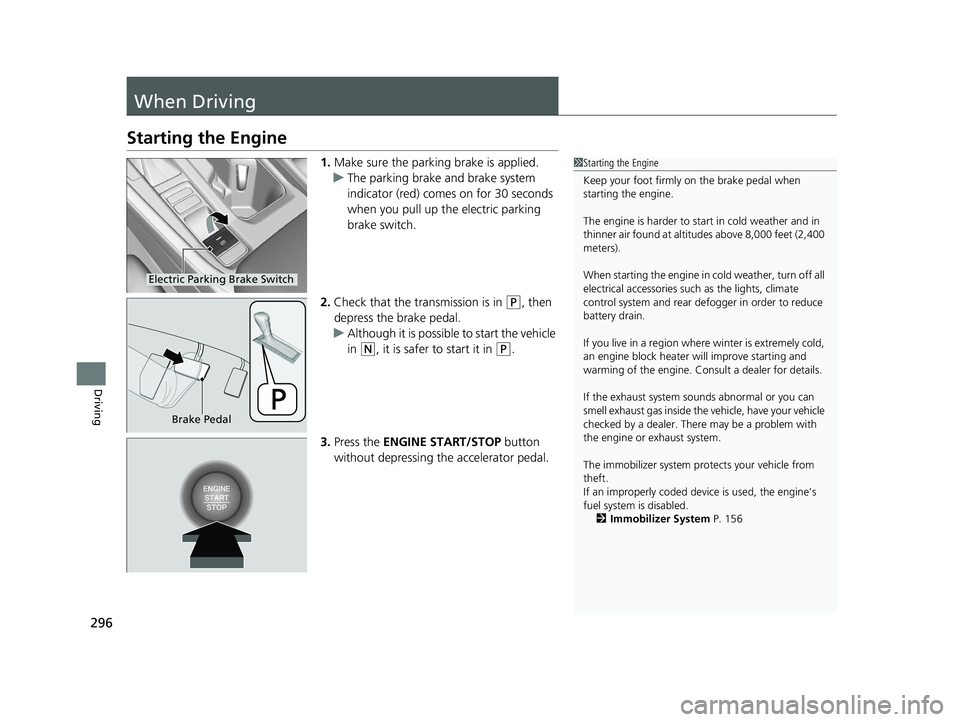
1.Make sure the parking brake is applied.
u The parking brake and brake system
indicator (red) comes on for 30 seconds
when you pull up the electric parking
brake switch.
2. Check that the tr ansmission is in
(P, then
depress the brake pedal.
u Although it is possible to start the vehicle
in
(N, it is safer to start it in (P.
3. Press the ENGINE START/STOP button
without depressing the accelerator pedal.
1Starting the Engine
Keep your foot firmly on the brake pedal when
starting the engine.
The engine is harder to st art in cold weather and in
thinner air found at altit udes above 8,000 feet (2,400
meters).
When starting the engine in cold weather, turn off all
electrical accessories such as the lights, climate
control system and rear de fogger in order to reduce
battery drain.
If you live in a region where winter is extremely cold,
an engine block heater will improve starting and
warming of the engine. Consult a dealer for details.
If the exhaust system sounds abnormal or you can
smell exhaust gas inside the vehicle, have your vehicle
checked by a dealer. There may be a problem with
the engine or exhaust system.
The immobilizer system pr otects your vehicle from
theft.
If an improperly c oded device is used, the engine’s
fuel system is disabled. 2 Immobilizer System P. 156
Electric Parking Brake Switch
Brake Pedal
23 ACCORD 4D US PET MAP-3130A6000_01.book 296 ページ 2022年10月19日 水曜日 午前11時49分