door lock HONDA ACCORD COUPE 2014 9.G User Guide
[x] Cancel search | Manufacturer: HONDA, Model Year: 2014, Model line: ACCORD COUPE, Model: HONDA ACCORD COUPE 2014 9.GPages: 593, PDF Size: 22.22 MB
Page 84 of 593
83
uuIndicators uInformation Display Warning and Information Messages*
Instrument Panel
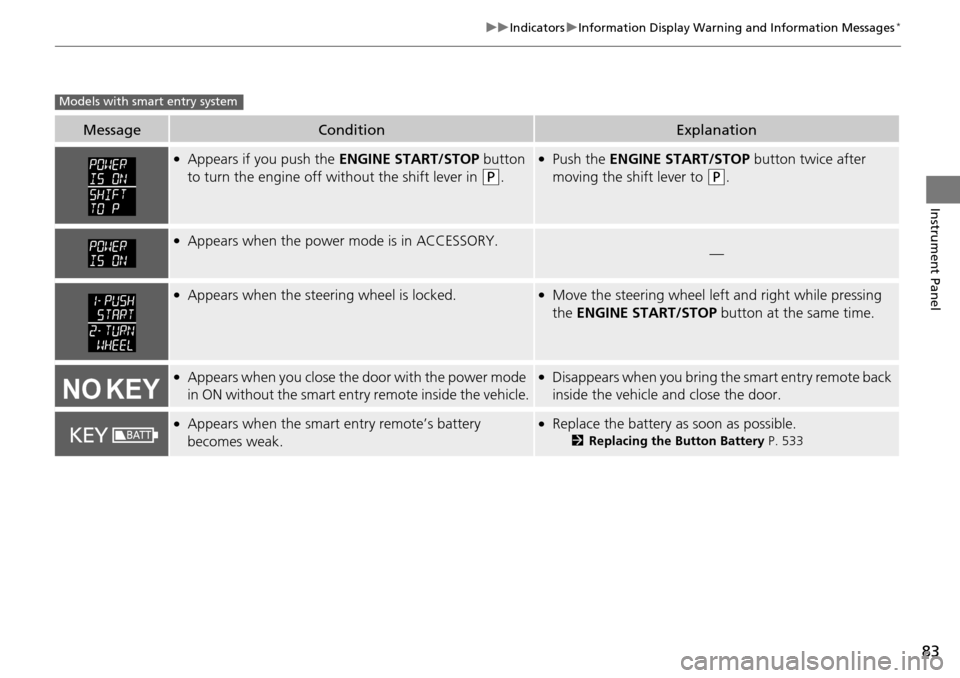
MessageConditionExplanation
●Appears if you push the ENGINE START/STOP button
to turn the engine off wi thout the shift lever in
(P.
●Push the ENGINE START/STOP button twice after
moving the shift lever to
(P.
●Appears when the power mode is in ACCESSORY.—
●Appears when the steering wheel is locked.●Move the steering wheel left and right while pressing
the ENGINE START/STOP button at the same time.
●Appears when you close the door with the power mode
in ON without the smart entry remote inside the vehicle.●Disappears when you bring the smart entry remote back
inside the vehicle and close the door.
●Appears when the smart entry remote’s battery
becomes weak.●Replace the battery as soon as possible.
2Replacing the Button Battery P. 533
Models with smart entry system
Page 86 of 593
85
uuIndicators uMulti-Information Display Warn ing and Information Messages*
Continued
Instrument Panel
MessageConditionExplanation
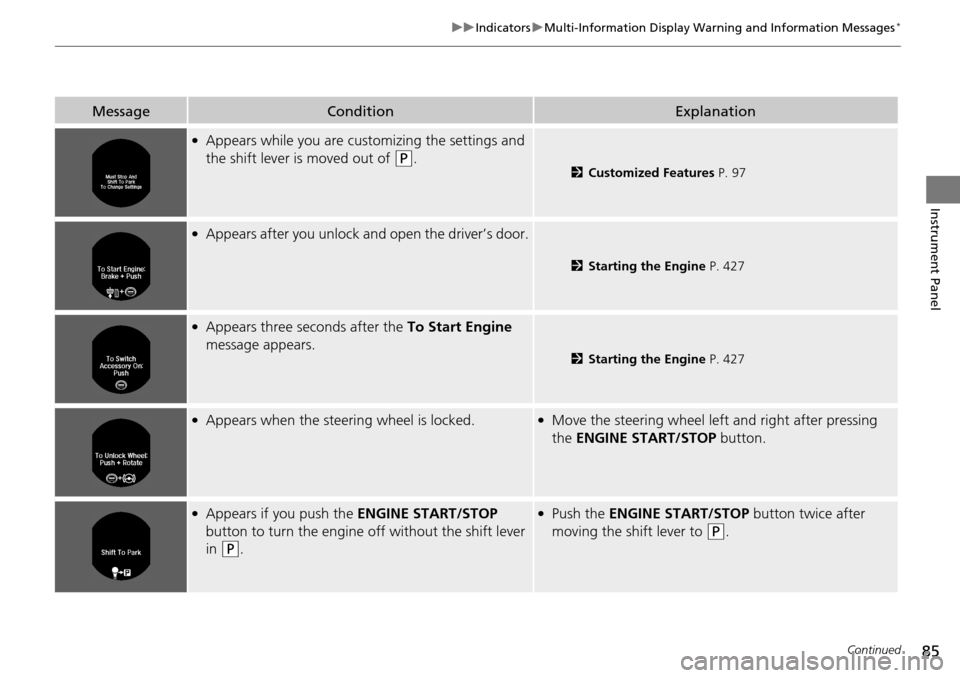
●Appears while you are customizing the settings and
the shift lever is moved out of
(P.2Customized Features P. 97
●Appears after you unlock and open the driver’s door.
2Starting the Engine P. 427
●Appears three seconds after the To Start Engine
message appears.
2 Starting the Engine P. 427
●Appears when the steering wheel is locked.●Move the steering wheel left and right after pressing
the ENGINE START/STOP button.
●Appears if you push the ENGINE START/STOP
button to turn the engine off without the shift lever
in
(P.
●Push the ENGINE START/STOP button twice after
moving the shift lever to
(P.
Page 87 of 593
86
uuIndicators uMulti-Information Display Warn ing and Information Messages*
Instrument Panel
MessageConditionExplanation
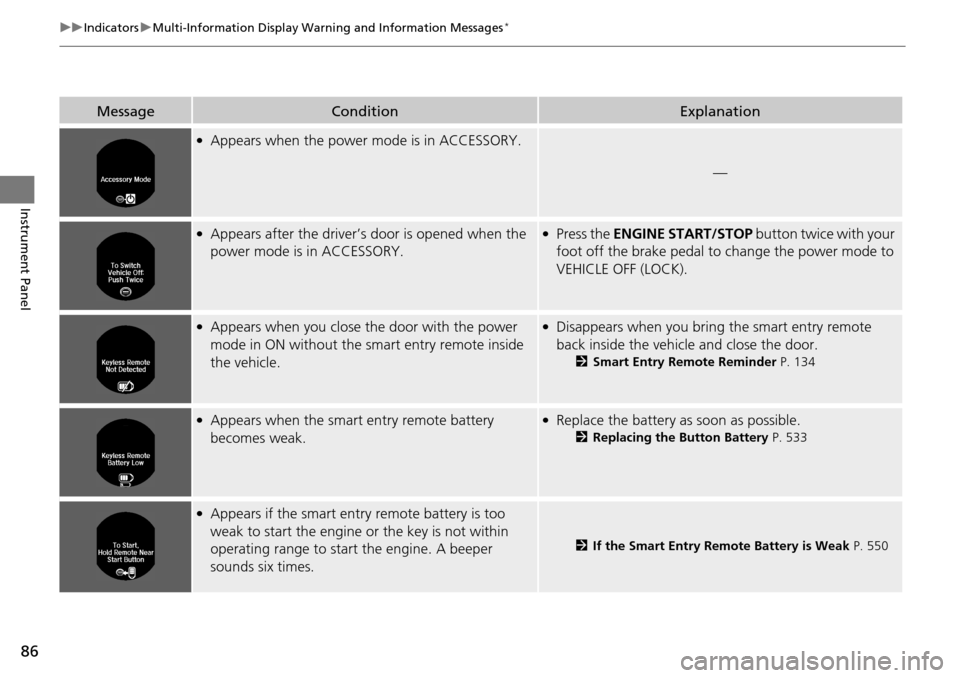
●Appears when the power mode is in ACCESSORY.
—
●Appears after the driver’s door is opened when the
power mode is in ACCESSORY.●Press the ENGINE START/STOP button twice with your
foot off the brake pedal to change the power mode to
VEHICLE OFF (LOCK).
●Appears when you close the door with the power
mode in ON without the smart entry remote inside
the vehicle.●Disappears when you bring the smart entry remote
back inside the vehicle and close the door.
2 Smart Entry Remote Reminder P. 134
●Appears when the smart entry remote battery
becomes weak.●Replace the battery as soon as possible.
2Replacing the Button Battery P. 533
●Appears if the smart entry remote battery is too
weak to start the engine or the key is not within
operating range to start the engine. A beeper
sounds six times.
2If the Smart Entry Remote Battery is Weak P. 550
Page 98 of 593
Continued97
uuGauges and Displays uMulti-Information Display*
Instrument Panel
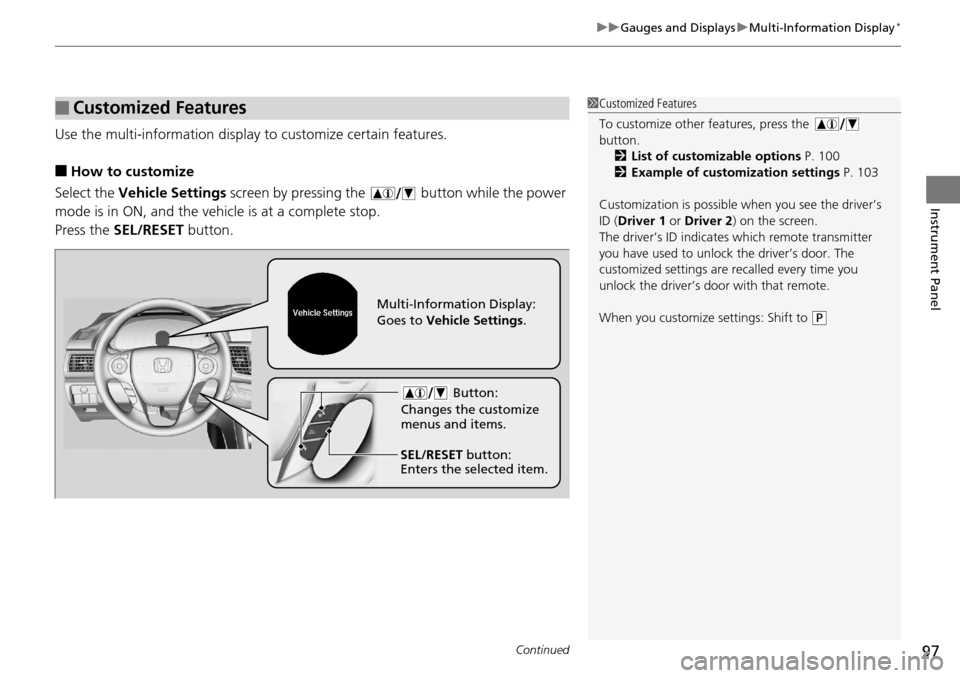
Use the multi-information display to customize certain features.
■How to customize
Select the Vehicle Settings screen by pressing the button while the power
mode is in ON, and the vehi cle is at a complete stop.
Press the SEL/RESET button.
■Customized Features1Customized Features
To customize other features, press the
button.
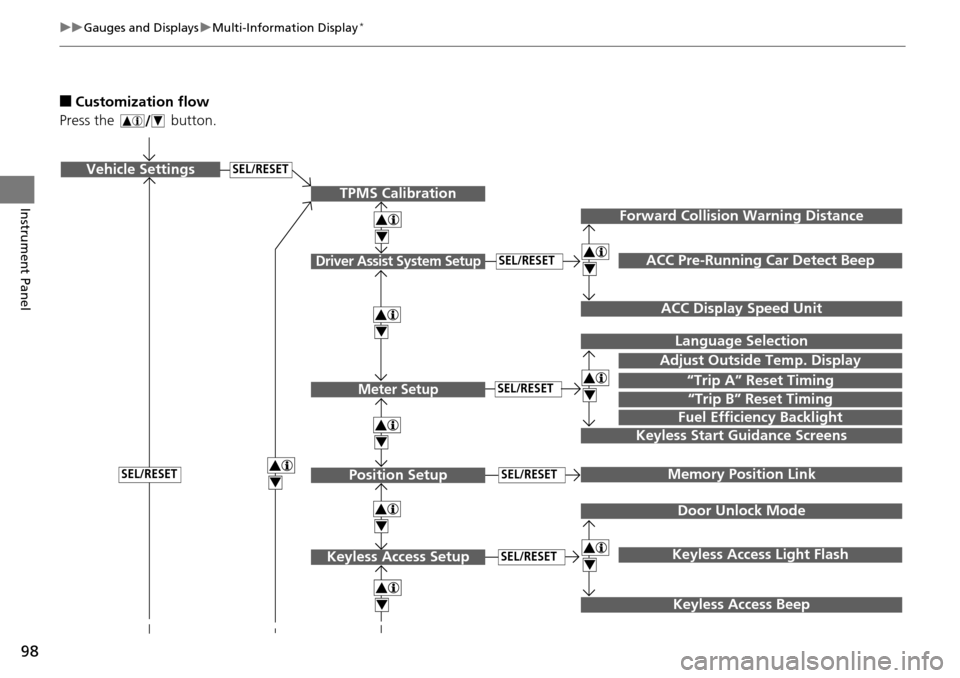
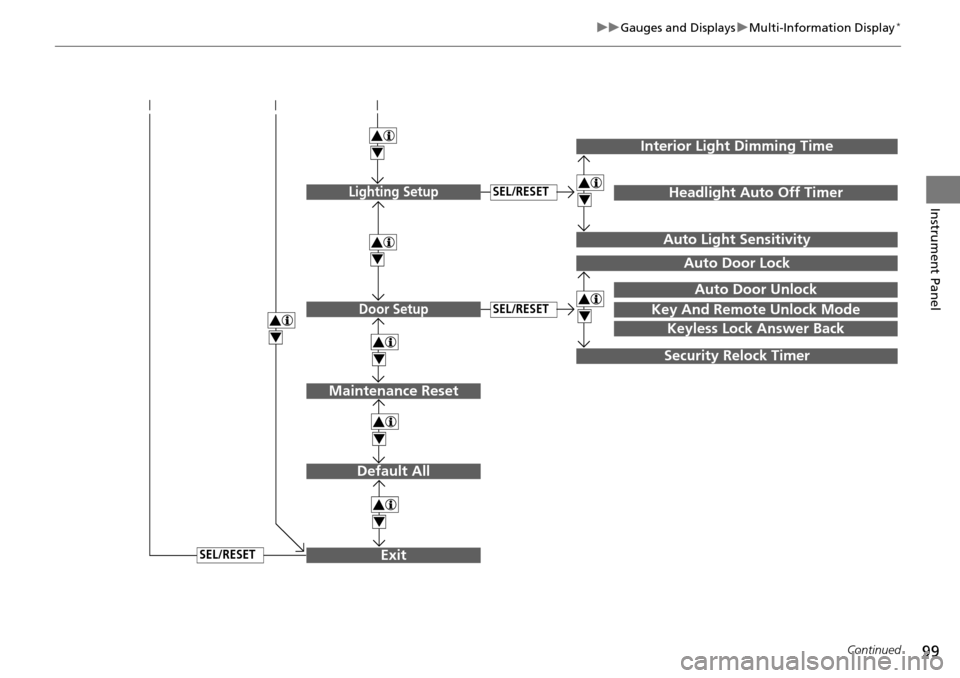
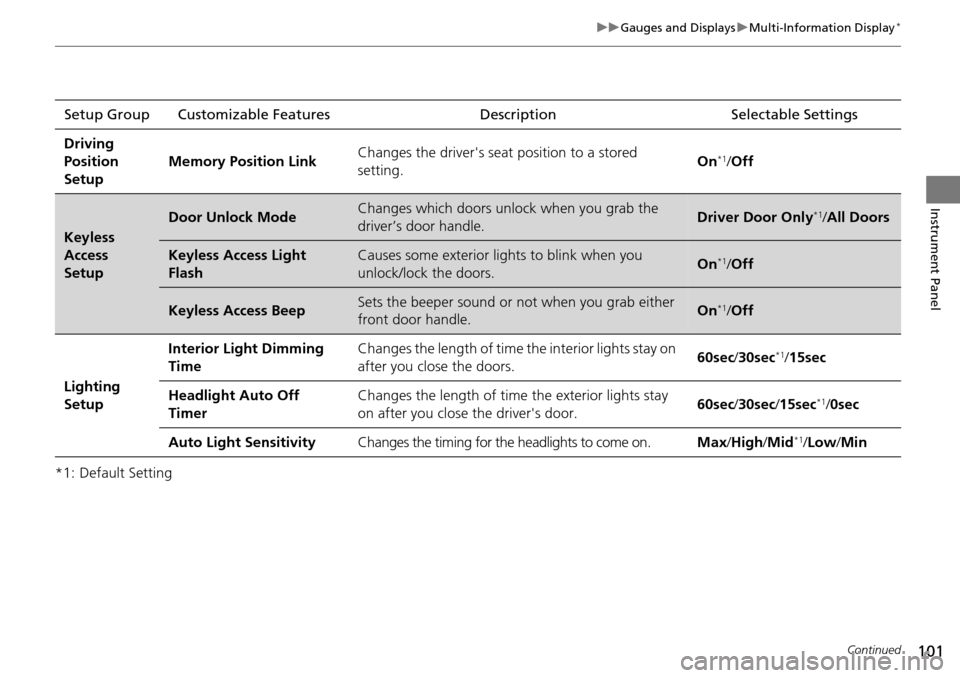
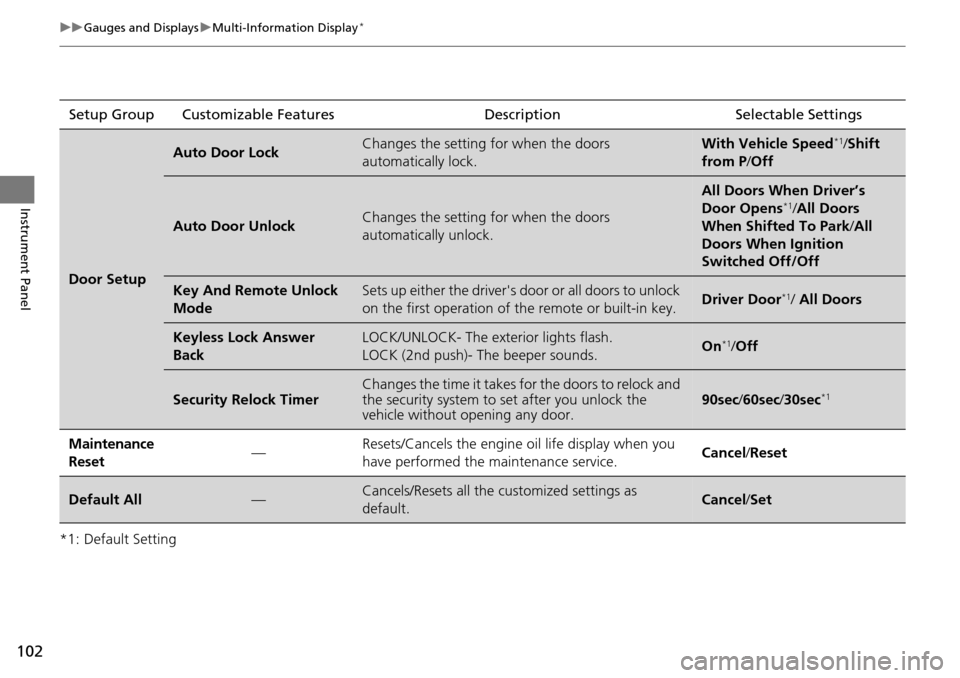
2 List of customizable options P. 100
2 Example of customization settings P. 103
Customization is possible when you see the driver’s
ID ( Driver 1 or Driver 2) on the screen.
The driver’s ID indicates which remote transmitter
you have used to unlock the driver’s door. The
customized settings are recalled every time you
unlock the driver’s door with that remote.
When you customize settings: Shift to
( P
Button:
Changes the customize
menus and items.
Multi-Information Display:
Goes to Vehicle Settings .
SEL/RESET button:
Enters the selected item.
Page 99 of 593
98
uuGauges and Displays uMulti-Information Display*
Instrument Panel
■Customization flow
Press the button.
SEL/RESETVehicle Settings
“Trip A” Reset Timing
Language Selection
Adjust Outside Temp. Display
Memory Position Link
Door Unlock Mode
Keyless Access Light Flash
4
4
4
4
TPMS Calibration
Driver Assist System Setup
Meter Setup
Position Setup
Keyless Access Setup
SEL/RESET
SEL/RESET
SEL/RESET
SEL/RESET
“Trip B” Reset Timing
Fuel Efficiency Backlight
4
ACC Pre-Running Car Detect Beep
ACC Display Speed Unit
4Keyless Start Guidance Screens
SEL/RESET
Keyless Access Beep
Forward Collision Warning Distance
4
4
4
Page 100 of 593
99
uuGauges and Displays uMulti-Information Display*
Continued
Instrument Panel
Exit
4
4
4
Door Setup
Maintenance Reset
Default All
SEL/RESET
4
SEL/RESET
4
Lighting SetupSEL/RESET
4
Key And Remote Unlock Mode
Auto Door Lock
Auto Door Unlock
Keyless Lock Answer Back
Security Relock Timer
Interior Light Dimming Time
Headlight Auto Off Timer
Auto Light Sensitivity
4
4
Page 102 of 593
101
uuGauges and Displays uMulti-Information Display*
Continued
Instrument Panel
*1: Default SettingSetup Group Customizable Features
Description Selectable Settings
Driving
Position
Setup Memory Position Link
Changes the driver's seat
position to a stored
setting. On
*1/
Off
Keyless
Access
Setup
Door Unlock ModeChanges which doors unlock when you grab the
driver’s door handle.Driver Door Only*1/All Doors
Keyless Access Light
FlashCauses some exterior lights to blink when you
unlock/lock the doors.On*1/ Off
Keyless Access BeepSets the beeper sound or not when you grab either
front door handle.On*1/Off
Lighting
Setup Interior Light Dimming
Time
Changes the length of time the interior lights stay on
after you close the doors.
60sec
/30sec
*1/15sec
Headlight Auto Off
Timer Changes the length of time
the exterior lights stay
on after you close the driver's door. 60sec
/30sec /15sec
*1/ 0sec
Auto Light Sensitivity Changes the timing for the headlights to come on. Max/High /Mid
*1/Low /Min
Page 103 of 593
102
uuGauges and Displays uMulti-Information Display*
Instrument Panel
*1: Default SettingSetup Group Customizable Features Description Selectable Settings
Door Setup
Auto Door LockChanges the setting for when the doors
automatically lock.With Vehicle Speed*1/
Shift
from P /Off
Auto Door UnlockChanges the setting for when the doors
automatically unlock.
All Doors When Driver’s
Door Opens*1/All Doors
When Shifted To Park /All
Doors When Ignition
Switched Off/Off
Key And Remote Unlock
ModeSets up either the driver's door or all doors to unlock
on the first operation of the remote or built-in key.Driver Door*1/ All Doors
Keyless Lock Answer
BackLOCK/UNLOCK- The exterior lights flash.
LOCK (2nd push)- The beeper sounds.On*1/ Off
Security Relock TimerChanges the time it takes for the doors to relock and
the security system to set after you unlock the
vehicle without opening any door.90sec /60sec /30sec*1
Maintenance
Reset—Resets/Cancels the engine oil life display when you
have performed the maintenance service. Cancel /Reset
Default All—Cancels/Resets all the customized settings as
default.Cancel /Set
Page 106 of 593
105
Controls
This chapter explains how to operate the various controls necessary for driving.
Clock.................................................. 106
Locking and Unlocking the Doors
Key Types and Functions .................. 108
Low Smart Entry Remote Signal Strength*.................................... 110Locking/Unlocking the Doors from the
Inside ............................................. 116
Childproof Door Locks ..................... 118
Auto Door Locking/Unlocking .......... 119
Opening and Closing the Trunk ....... 120
Security System Immobilizer System .......................... 124
Security System Alarm ...................... 124
Opening and Closing the Windows ..... 127
Opening and Closing the Moonroof*.. 130
Operating the Switches Around the Steering Wheel
Ignition Switch
*............................... 131
ENGINE START/STOP Button*........... 132
Ignition Switch and Power Mode
Comparison ................................... 135
Turn Signals ..................................... 136
Light Switches.................................. 136
Fog Lights
*...................................... 138
Daytime Running Lights ................... 139
Wipers and Washers ........................ 140
Brightness Control ........................... 141
Rear Defogger/Heat ed Door Mirror
*
Button ........................................... 142 Driving Position Memory System
*.... 143
Adjusting the Steering Wheel .......... 145
Adjusting the Mirrors Interior Rearview Mirror ................... 146
Power Door Mirrors ......................... 147
Adjusting the Seats .......................... 148
Interior Lights/Interior Convenience Items ................................................ 156
Heating and Cooling
*
Using Vents, Heating and A/C.......... 166
Climate Control System*
Using Automatic Climate Control .... 169
Synchronized Mode ......................... 171
Automatic Climate Control Sensors ... 172
* Not available on all models
Page 109 of 593
108
Controls
Locking and Unlocking the Doors
Key Types and Functions
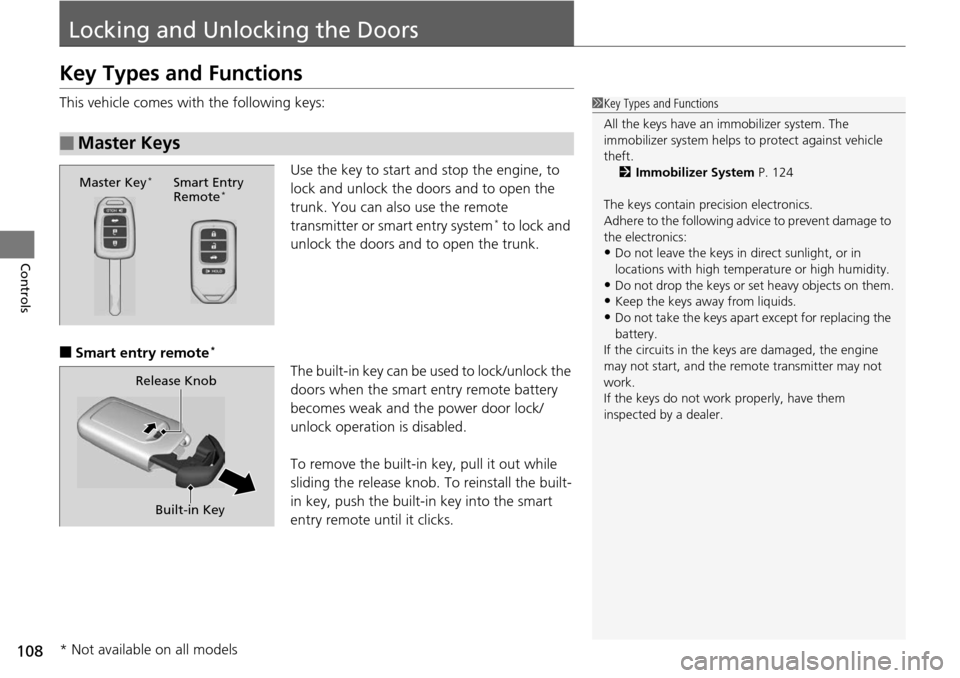
This vehicle comes with the following keys:Use the key to start and stop the engine, to
lock and unlock the doors and to open the
trunk. You can also use the remote
transmitter or smart entry system
* to lock and
unlock the doors and to open the trunk.
■Smart entry remote*
The built-in key can be us ed to lock/unlock the
doors when the smart entry remote battery
becomes weak and th e power door lock/
unlock operation is disabled.
To remove the built-in key, pull it out while
sliding the release knob. To reinstall the built-
in key, push the built-in key into the smart
entry remote until it clicks.
■Master Keys
1 Key Types and Functions
All the keys have an immobilizer system. The
immobilizer system helps to protect against vehicle
theft. 2 Immobilizer System P. 124
The keys contain precision electronics.
Adhere to the following advi ce to prevent damage to
the electronics:
•Do not leave the keys in direct sunlight, or in
locations with high temperature or high humidity.
•Do not drop the keys or set heavy objects on them.
•Keep the keys away from liquids.
•Do not take the keys apart except for replacing the
battery.
If the circuits in the keys are damaged, the engine
may not start, and the remote transmitter may not
work.
If the keys do not work properly, have them
inspected by a dealer.
Master Key*Smart Entry
Remote*
Built-in Key
Release Knob
* Not available on all models